The Future of Oilfield Progress Tracking: Virtual Tours in Action

Cloudpano
July 26, 2025
5 min read
Share this post

🛢️ The Future of Oilfield Progress Tracking: Virtual Tours in Action 🚀🎥

Tracking progress across sprawling oilfield sites has always been a logistical challenge. With multiple teams, remote locations, and strict compliance demands, staying informed in real time isn’t just convenient — it’s mission-critical.

Enter 360° virtual tours — the future of oilfield progress tracking. 🌐🔍

This guide explores how operators are using immersive walkthroughs to monitor field development, track project milestones, and share updates across teams — all without setting foot on-site.

⚙️ The Challenges of Traditional Progress Tracking

Before virtual tours, teams relied on:

  • 📸 Flat photos
  • 📝 Field notes
  • 📧 Email updates
  • 🛻 In-person inspections

While these methods worked in the past, they fall short in today’s fast-paced, high-risk environments. Operators often deal with:

  • Delayed updates
  • Inconsistent reporting
  • Communication breakdowns
  • Costly travel for site visibility
  • Missed safety or QA issues

🔗 Related: Cut Site Visits, Not Visibility: 360 Virtual Tours for Oilfields

🌀 What Are Virtual Tours for Oilfields?

A 360° virtual tour is an interactive, panoramic view of a physical space — captured by a 360 camera or drone and hosted online.

It allows users to:

  • 🚶 Walk through the site virtually
  • 🧠 View tagged equipment and infrastructure
  • 📄 Access real-time data overlays and updates
  • 📆 Revisit historical versions for comparison

🔗 Related: Real-Time Oilfield Development Tracking with 360° Virtual Tours

🔍 Why Use Virtual Tours for Progress Monitoring?

📸 1. Visual Milestone Documentation

Capture before-and-after visuals for every phase — from grading to equipment installation to commissioning.

🔗 Related: 360° Virtual Tours for Oilfield Project Updates: A Complete Guide

⏱️ 2. Time-Saving Field Inspections

Supervisors and engineers can view daily or weekly updates without leaving the office, saving hours per week in travel.

🔗 Related: Streamlining Oilfield Inspections Using 360 Virtual Tours

📊 3. Transparent Reporting

Virtual tours offer transparent, visual-first documentation to investors, partners, and compliance officers.

🔗 Related: Cloud-Based Oilfield Reporting with Virtual Tours

🧠 4. Better Team Collaboration

Field crews, office staff, and contractors can leave comments, mark issues, or log updates right inside the tour.

🔗 Related: Enhancing Safety with Remote Site Inspections in the Oil and Gas Sector

🧯 5. Real-Time Safety & Compliance Checks

Hotspots in the virtual tour can flag hazards, show PPE zones, and log maintenance records.

🔗 Related: Remote Oilfield Safety Training with 360 VR Technology

🛠️ How to Build a Virtual Progress Tracker

🖼️ Step 1: Capture the Site

Use a 360 camera or drone to document your site weekly or per milestone.

Top gear:

  • Insta360 One RS
  • Ricoh Theta Z1
  • DJI Mavic 3 Enterprise

🔗 Related: Best Cameras and Drones for Oilfield Virtual Tours in 2025

☁️ Step 2: Upload to a Virtual Tour Platform

Use a platform like CloudPano to:

  • Create site walkthroughs
  • Add timestamps and location tags
  • Embed updates and documents
  • Share links securely with your team

🔗 Related: Building a Centralized Oilfield Documentation System with 360 Tours

🔁 Step 3: Repeat and Compare

Schedule recurring captures to track progress over time.

Visual comparisons help teams:

  • Validate contractor progress
  • Document maintenance and fixes
  • Pass audits and meet regulations
  • Spot delays early

📈 Case Study: Progress Tracking in Action

A Midland-based operator used 360° virtual tours to track the construction of a compressor station.

✅ Results in 90 Days:

  • 🔄 Reduced site visits by 60%
  • 📉 Cut travel costs by $18,000
  • 🧯 Identified 3 critical issues remotely
  • 📆 Hit milestones 2 weeks early
  • 🔐 Passed compliance audit using visual tour archives

🔗 Related: Case Study: Virtual Tour Implementation for Oilfield Workflow Visibility

💡 Use Case: Multi-Site Visibility for Executives

Executives and stakeholders often oversee multiple locations. With virtual progress tracking:

  • View any site from a central dashboard
  • Zoom in on project details
  • Track timelines across assets
  • Get weekly visual updates in one click

🔗 Related: Virtual Site Updates: How 360° Virtual Tours Improve Oilfield Oversight

📚 Use Case: Maintenance Verification

Documenting repairs and servicing becomes easier when:

  • Crews tag the location in a 360 tour
  • Supervisors verify the fix remotely
  • Photos and documents are embedded in the scene

No more email chains or missed issues.

🔐 Use Case: Audit Trail and Compliance

360° virtual tours create a time-stamped, visual record of site conditions and work completed. This simplifies:

  • Environmental reviews
  • Safety inspections
  • Regulatory compliance
  • Third-party reporting

🔗 Related: Revolutionize Oilfield Reporting with 360-Degree Virtual Walkthroughs
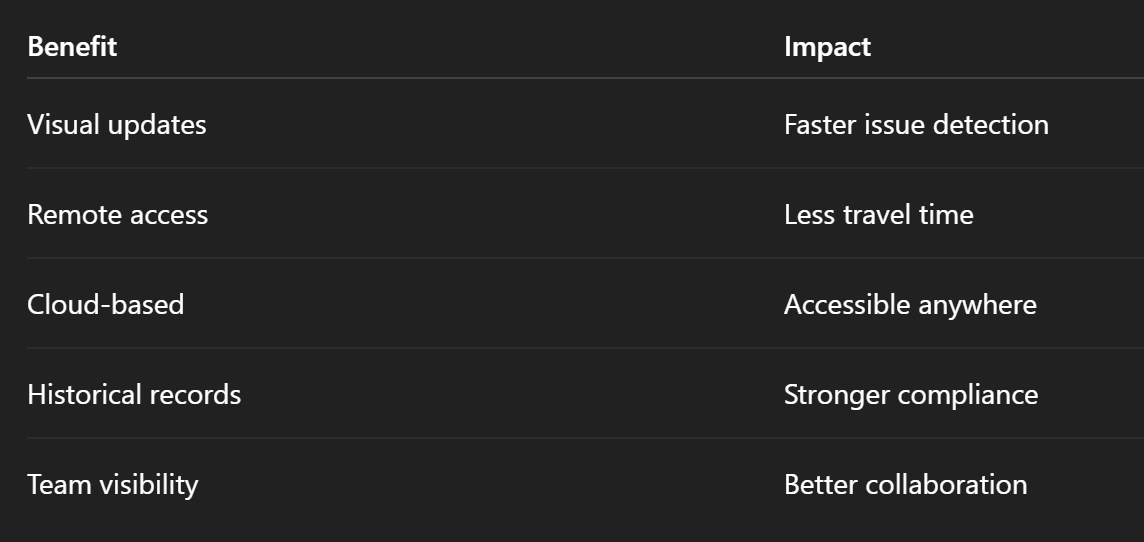
✅ Summary: Why Virtual Tours Are the Future of Oilfield Tracking

Virtual tours aren’t just about cool tech — they’re about better management, fewer delays, and smarter decisions.

🚀 Ready to Modernize Your Progress Tracking?

Here’s your quick-start checklist:

  1. Choose a 360 camera or drone
  2. Pick a cloud platform like CloudPano
  3. Capture weekly site updates
  4. Tag milestones, repairs, and notes
  5. Share progress across your team and stakeholders

You’ll get more clarity, save more time, and keep projects on schedule — all while building a smarter, visual-first oilfield operation. 💡🛢️

Share this post
Cloudpano

Choose The Right 360° Camera

Insta360 ONE RS 1-Inch 360 Edition

  • Compact, ready to go anywhere

  • Interchangeable lens that’s upgradeable

  • Dual 1-inch sensors for improved clarity and low light performance

  • Dynamic range and 6K 360° capture

  • 360° photo resolution at 21MP

Learn More

Insta360 X4

  • 8K 360° video recording for ultra-detailed visuals.

  • 4K single-lens mode for traditional wide-angle shots.

  • Invisible selfie stick effect for drone-like perspectives.

  • 2.5-inch touchscreen with Gorilla Glass protection.

  • Waterproof up to 33ft for underwater shooting.

Learn More

Ricoh Theta Z1

  • 360° photo resolution in 23MP

  • Slim design at 24 mm thick

  • Built-in image stabilization for smooth video capture.

  • Internal 19GB storage for photo and video storage.

  • Wireless connectivity for remote control and sharing.

Learn More

Ricoh Theta X

  • 60MP 360° still images for high-resolution photography.

  • 5.7K 360° video recording at 30fps.

  • 2.25-inch touchscreen for intuitive control.

  • USB Type-C port for fast charging and data transfer.

  • MicroSD card slot for expandable storage.

Learn More
Property Marketing
Allows potential buyers to explore properties in detail from anywhere, enhancing the real estate marketing process.
Automotive Spins
Create an interactive virtual showroom and engage affluent digital buyers with live 360º video calls, all through the CloudPano mobile app for a complete automotive sales solution.
Interactive Floor Plans
Create 2D and 3D floor plans with measurements in 4 minutes or less, all from your phone. Download the Floor Plan Scanner app and get your first scan free.

360 Virtual Tours With CloudPano.com. Get Started Today.

Try it free. No credit card required. Instant set-up.

Try it free
Latest posts

See our other posts

Interviews, tips, guides, industry best practices, and news.

How Auto Backgrounding Software Helps Dealerships Improve Inventory Listings

Takes an operational/technical angle — the hook is inconsistent vehicle photos across syndicated marketplaces (Cars.com, Autotrader, CarGurus) caused by staff turnover and inconsistent capture setups, not lack of effort. Frames AI backgrounding software as a "consistency at scale" fix rather than an artistic upgrade, uses a manual-setup-vs-software comparison table, and covers multi-location dealer groups and marketplace syndication specifically before closing with the reseller CTA.
Read post

Why Dealerships Need Better Vehicle Photos, Spins, and AI Videos

Summary: Makes the buyer-side business case for why dealership vehicle photos matter — shoppers scroll past weak, inconsistent listings before ever calling — then diagnoses why photo quality stays mediocre internally (no one owns the process) and positions CloudPano's automotive tools as the fix. Uses a trial-batch-first sales workflow, a static-vs-AI-enhanced comparison, five use cases (including multi-location dealer groups and RV/powersport dealers), and a reseller-program CTA.
Read post

How to Sell AI Automotive Photo Tools to Car Dealerships

Here's a short summary you could use for a content calendar, internal review, or social share: Summary: This article reframes the automotive dealership pitch from "I take photos" to "I can cut your days-on-lot" — showing resellers how to sell CloudPano's AI vehicle photo and 360-spin tools as a recurring-revenue software play instead of one-off photography gigs. It covers a step-by-step sales process, a services-vs-software-plus-services comparison table, five practical use cases (independent lots, consultants, photographers, salespeople, agencies), common pitching mistakes, and a reseller-link-driven CTA to the CloudPano Reseller Program.
Read post