360° Virtual Tours for Oilfield Project Updates: A Complete Guide

Cloudpano
July 25, 2025
5 min read
Share this post

🛢️ 360° Virtual Tours for Oilfield Project Updates: A Complete Guide 🛠️📸

Keeping stakeholders informed on oilfield projects is no small task. From remote sites to strict safety protocols, it’s difficult to provide accurate, timely, and visual updates — until now.

In 2025, the smartest oil and gas operators are using 360° virtual tours to deliver crystal-clear project updates that go far beyond spreadsheets and progress reports. These immersive, cloud-based tools transform how teams communicate, document, and manage oilfield development from anywhere in the world. 🌍

In this complete guide, we’ll break down how to use 360° virtual tours for project updates — step-by-step — and link you to other powerful tools and examples across the oil and gas sector. 👇

🧱 Why Traditional Project Updates Fall Short

Oilfield operations move fast, and traditional update methods can’t keep up. Common problems include:

  • Delayed email updates 📩
  • Static reports lacking visuals 🧾
  • Communication breakdowns between field teams and execs 🔇
  • Missed change orders and scope confusion 💸

Project managers are constantly putting out fires — often because the right people didn’t have visual context of what was happening on-site. 🔥

🌐 Enter: 360° Virtual Tours

360° virtual tours provide a fully immersive, visual snapshot of a project at any given time. Captured via 360° cameras or drones and hosted in the cloud, these tours allow viewers to "walk through" the job site virtually — from well pads to pipelines.

With built-in tools for annotations, timestamps, and versioning, virtual tours let you:

✅ Compare weekly or monthly progress
✅ Share real-time site updates with stakeholders
✅ Document milestones for reporting and compliance
✅ Train remote teams on evolving site conditions

🔗 Related: From Ground to Cloud: Tracking Oilfield Workflows with 360 Virtual Tours

🛠️ What You’ll Need to Create 360° Project Updates

To build your first oilfield virtual project update, here’s what you need:

1. 360° Camera or Drone

Use rugged cameras like Insta360 One RS, Ricoh Theta Z1, or DJI Mavic 3 Enterprise.

🔗 Related: Best Cameras and Drones for Oilfield Virtual Tours in 2025

2. Tour Creation Software (e.g. CloudPano)

Easily upload your 360° footage and build interactive tours with labels, callouts, and comparison scenes.

3. Scheduled Capture Plan

Capture your site at regular intervals — daily, weekly, or by milestone.

4. Cloud Sharing & Permissions

Host securely and share with clients, regulators, or internal teams via link.

🔗 Related: Cloud-Based Oilfield Reporting with Virtual Tours

🔁 Step-by-Step: How to Build and Share Virtual Project Updates

✅ Step 1: Plan Your Capture Points

Decide where and how often you’ll capture:

  • Entrance roads 🚧
  • Storage yards 🛢️
  • Active drill pads 🛠️
  • Compressor stations ⚙️

🔗 Related: Streamlining Oilfield Inspections Using 360 Virtual Tours

✅ Step 2: Capture and Upload to Tour Platform

Use your 360° camera or drone to film. Then upload the images into your tour platform (e.g., CloudPano) and create a visual walkthrough.

✅ Step 3: Add Context

Inside your tour, add:

  • Date tags 📅
  • Phase descriptions (e.g., “Foundation poured”) 🧱
  • Hotspots linking to documents or images 📂
  • Annotations for updates or safety flags 🚩

🔗 Related: Building a Centralized Oilfield Documentation System with 360 Tours

✅ Step 4: Share With Stakeholders

Generate a secure shareable link and send it to:

  • Investors 💼
  • Engineers 🧑‍🔧
  • Project owners 🏢
  • Safety inspectors 👷

Everyone sees the same immersive, real-time visuals — no interpretation needed.

✅ Step 5: Version Your Updates

Each time you update the site, create a new version of the tour. Use side-by-side comparison tools to show:

  • What changed
  • What’s delayed
  • What’s ahead of schedule

🔗 Related: Oilfield Progress Monitoring with 360 Virtual Tours

🏗️ Real-World Use Case

A pipeline contractor in New Mexico used weekly 360° drone flyovers combined with interior walk-throughs to:

  • Keep the operations director updated from 1,200 miles away
  • Reduce site visits by 60%
  • Resolve disputes with subcontractors using visual proof
  • Win an additional project phase by showcasing site professionalism

This tour-based system replaced weekly written reports and became the standard for internal communication.

📌 More examples here: Case Study: Virtual Tour Implementation for Oilfield Workflow Visibility

🔐 Bonus: Use for Compliance and Training Too

These same 360° project updates can serve dual purposes:

  • ✔️ Regulatory documentation: Show inspectors timestamped visual evidence
  • ✔️ Onboarding new workers: Let new hires walk the site before arrival
  • ✔️ Safety training: Highlight hazards, escape routes, and safe zones

🔗 Related:

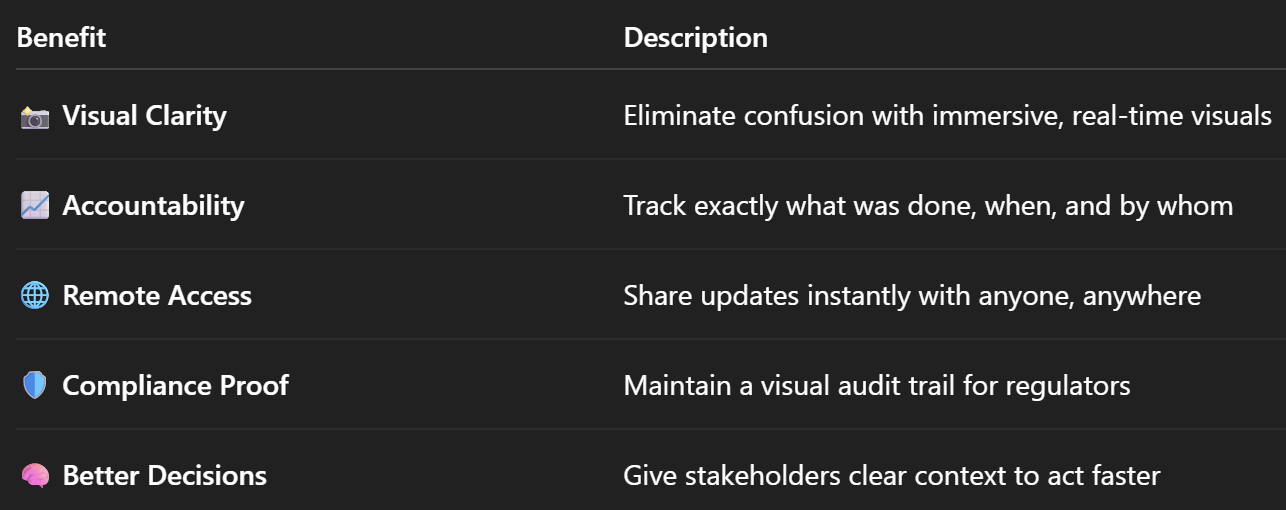
🎯 Benefits of Virtual Project Updates

Let’s recap the advantages of using 360° tours to deliver oilfield updates:
🔮 Final Thoughts: Project Updates That Actually Get Noticed

360° virtual tours don’t just make oilfield updates prettier — they make them smarter, faster, and more reliable. In a world where efficiency, compliance, and communication are everything, visual tools like this are no longer optional.

If you want your updates to be:

✅ Seen
✅ Understood
✅ Acted on

…it’s time to go virtual.

Share this post
Cloudpano

Choose The Right 360° Camera

Insta360 ONE RS 1-Inch 360 Edition

  • Compact, ready to go anywhere

  • Interchangeable lens that’s upgradeable

  • Dual 1-inch sensors for improved clarity and low light performance

  • Dynamic range and 6K 360° capture

  • 360° photo resolution at 21MP

Learn More

Insta360 X4

  • 8K 360° video recording for ultra-detailed visuals.

  • 4K single-lens mode for traditional wide-angle shots.

  • Invisible selfie stick effect for drone-like perspectives.

  • 2.5-inch touchscreen with Gorilla Glass protection.

  • Waterproof up to 33ft for underwater shooting.

Learn More

Ricoh Theta Z1

  • 360° photo resolution in 23MP

  • Slim design at 24 mm thick

  • Built-in image stabilization for smooth video capture.

  • Internal 19GB storage for photo and video storage.

  • Wireless connectivity for remote control and sharing.

Learn More

Ricoh Theta X

  • 60MP 360° still images for high-resolution photography.

  • 5.7K 360° video recording at 30fps.

  • 2.25-inch touchscreen for intuitive control.

  • USB Type-C port for fast charging and data transfer.

  • MicroSD card slot for expandable storage.

Learn More
Property Marketing
Allows potential buyers to explore properties in detail from anywhere, enhancing the real estate marketing process.
Automotive Spins
Create an interactive virtual showroom and engage affluent digital buyers with live 360º video calls, all through the CloudPano mobile app for a complete automotive sales solution.
Interactive Floor Plans
Create 2D and 3D floor plans with measurements in 4 minutes or less, all from your phone. Download the Floor Plan Scanner app and get your first scan free.

360 Virtual Tours With CloudPano.com. Get Started Today.

Try it free. No credit card required. Instant set-up.

Try it free
Latest posts

See our other posts

Interviews, tips, guides, industry best practices, and news.

Mastering Compliance: The Future of Automated Property Video

This article provides a definitive guide for real estate professionals on navigating strict MLS branding regulations through AI-driven automation. It addresses the risks of compliance violations, details the limitations of manual editing workflows, and introduces a scalable, "compliance-first" system for generating high-quality, MLS-approved property videos. The post serves as a strategic blueprint for agents aiming to maintain listing visibility, avoid regulatory penalties, and streamline their marketing operations.
Read post

Future-Proofing Your Business with MLS Safe AI Video for Listings

This high-authority guide focuses on long-term operational stability and the strategic advantages of leveraging artificial intelligence to bypass the industry-wide friction between high-impact marketing and regulatory compliance. Key Takeaways & Content Structure: The Reputation-Risk Factor: Explains the high cost of compliance errors, focusing on how a single technical oversight—such as a misplaced logo or branded watermark—can trigger a systemic board audit, leading to immediate listing suspension and lasting reputational damage with sellers. The Production Disconnect: Breaks down the "two-version" operational tax, where marketing teams suffer from repetitive rendering, file-management bloat, and the persistent danger of human error when manually managing branded vs. unbranded media assets. AI as a Compliance Engine: Defines how advanced AI media platforms move beyond mere aesthetics to function as regulatory safeguards. It illustrates the technical architecture where the AI engine isolates branding data from structural property data at the rendering level, effectively "forking" the output into two distinct, safe-to-use tracks. Operational Blueprint: Maps out a transparent, 6-step automation funnel that takes a listing from flat photograph ingestion to syndicate-ready, neutral-hosted media in minutes. Strategic Scalability: Demonstrates why centralizing production into a single SaaS platform is the only way for growing brokerages to maintain consistency, remove contractor-level liability, and recover significant administrative time. The PhotoAIVideo.com Edge: Concludes by positioning the platform as a purpose-built solution that combines high-definition parallax AI motion with an automated "compliance-first" export workflow, ensuring Realtors can generate professional, engaging video content that passes even the most stringent board audits on the first attempt.
Read post

Streamlining Your Workflow with a Specialized MLS Compliant Real Estate Media App

This article functions as a tactical operations guide for real estate marketers and brokerage leaders focused on reducing technical friction and human error in their media publishing pipeline. Key Takeaways & Content Structure: The "Stop-Work" Order: Addresses the high-stakes reality of MLS compliance flags, where automated rules block properties from IDX feeds due to accidental branding, causing immediate listing velocity loss. The Fragmented Workflow Problem: Identifies the "manual bottleneck"—the inefficiency of having field photographers deliver single assets that then require internal staff to manually strip, re-render, and verify separate branded and unbranded versions. Architecture of Dual-Path Rendering: Illustrates the technological shift toward programmatic asset management. It explains how a modern app processes a single source file into two isolated rendering tracks: a lead-gen-heavy marketing track and a strictly compliant, unbranded track for MLS syndication. Operational Workflow Mapping: Provides a clear, 6-step blueprint for moving from raw photography ingestion to compliant deployment, including automated motion application, metadata scrubbing, and neutral link hosting. Risk Mitigation for Brokerages: Highlights how centralized management dashboards eliminate the "wild west" of agent-led media creation, providing brokers with a single-pane-of-glass view to ensure compliance across all active listings. The PhotoAIVideo.com Advantage: Positions the platform as the ideal MLS compliant real estate media app that leverages AI to inject cinematic motion into flat listing photos, effectively automating the entire compliance-forking process and increasing overall production capacity by up to 94%.
Read post



