


.png)


Most comparisons in this category are written for an average business that doesn't really exist — somewhere between a solo agent and a large agency. Small businesses have specific, narrower needs, and evaluating virtual tour software for small business use means weighing setup simplicity and cost predictability more heavily than the deeper feature set a larger operation might value. This article makes a direct case for why CloudPano tends to fit that profile well, along with an honest look at when it doesn't.
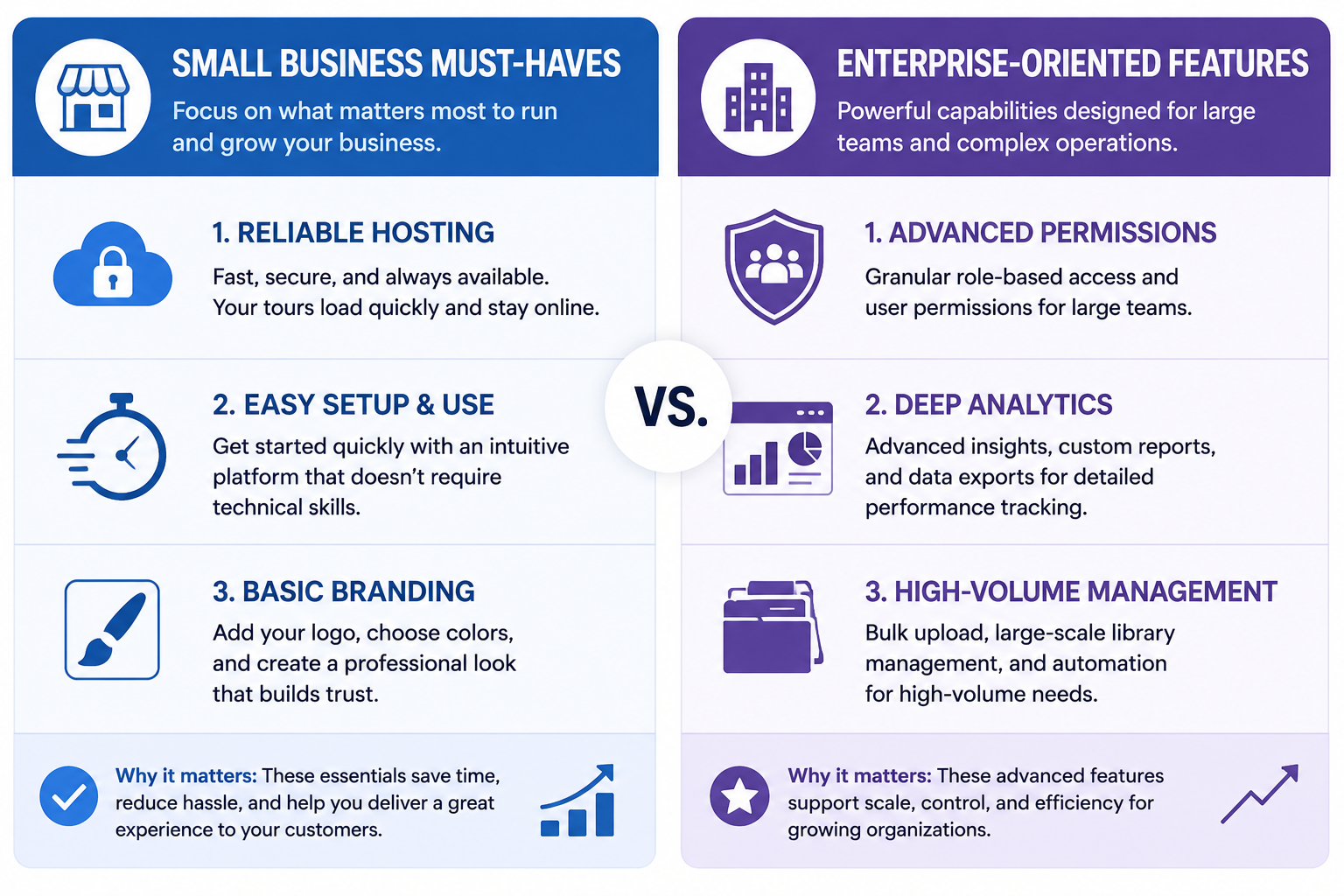
A small business doesn't need most of what a larger platform's feature set is built around — advanced team permissions, high-volume library management, deep analytics reporting. What it needs is straightforward: get a tour published without a steep learning curve, keep costs predictable without hidden tier-jump surprises, and have the tour look professional without requiring a design background. Evaluating against this narrower list, rather than a full enterprise feature comparison, changes which platform actually looks like the better fit.
For a solo owner or a small team without a dedicated person managing software, easy virtual tour setup isn't a nice-to-have — it's often the difference between a tool that actually gets used and one that sits half-configured. Matterport's interface, built partly around a hardware-integrated professional capture workflow, can carry more setup complexity than a small business without dedicated technical support really needs. CloudPano's more hardware-agnostic approach tends to translate into a simpler initial setup experience, since it isn't built around integrating with one specific proprietary capture ecosystem.
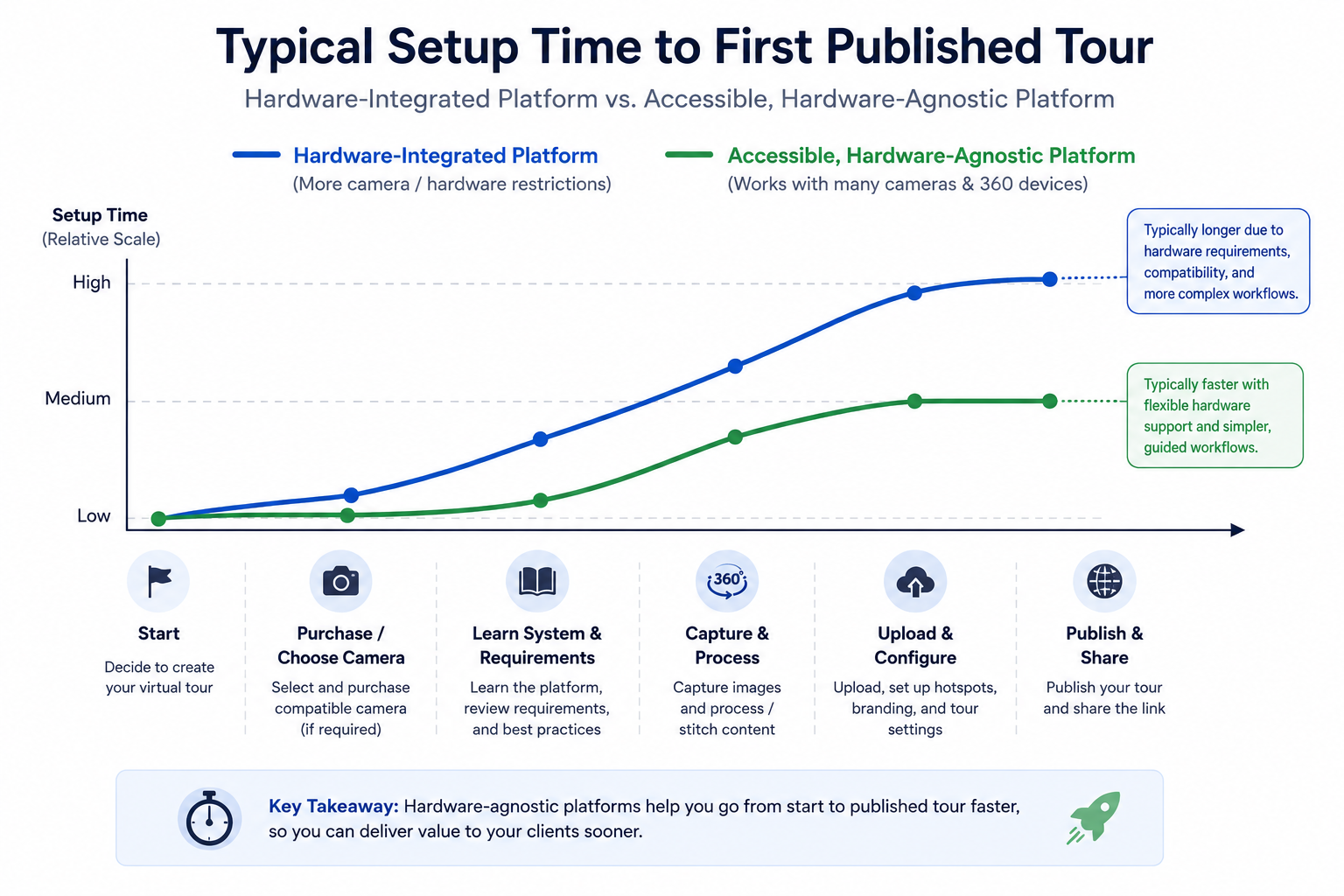
This matters practically: a platform that takes a day to get comfortable with, rather than a week, means you're actually publishing tours sooner rather than losing momentum during a drawn-out learning period.
It's worth being concrete about what easy virtual tour setup actually means, rather than treating it as a vague marketing phrase. Concretely, it means: uploading raw capture content and getting a usable preview without needing to consult documentation first, placing hotspots and navigation through an interface that doesn't require guessing what an icon does, and applying basic branding without needing design software or outside help. If a platform requires a support ticket or a tutorial video just to complete your first tour, that's a meaningful signal about ongoing usability, not just a one-time learning curve.
This is worth testing directly during any trial, rather than trusting a "quick and easy" claim on a marketing page — actually attempt your first tour, start to finish, and note where you get stuck, since that friction point is exactly what easy virtual tour setup should be minimizing.
The honest goal for a small business isn't the cheapest possible option — it's affordable 3D tours that still cover what you actually need. CloudPano's approach to pricing has generally aimed to bundle genuinely useful functionality into accessible tiers, rather than reserving basic usability for a premium plan, which matters more for a small business operating on a tighter budget than for a larger operation that can absorb a higher tier without much thought.
A small business virtual walkthrough only creates value if it actually gets built, maintained, and shared — a sophisticated platform that intimidates a small team into never quite finishing their first tour delivers zero value regardless of its feature depth. This is the practical argument for prioritizing ease of use as a primary criterion, not a secondary one, for a small business specifically: the best platform on paper is worthless if it doesn't get used.
It's worth acknowledging that the small-business framing in this article has a natural expiration point. If your business grows significantly — more team members, a much larger tour library, more complex client or permission needs — the priorities that made sense here may shift toward the deeper feature considerations this article deliberately set aside. That's a reasonable evolution, not a sign that the earlier choice was wrong. Revisiting this comparison periodically as your business changes, rather than assuming today's fit is permanent, keeps the decision honest over time.
In the interest of an honest case rather than a one-sided pitch, it's worth naming when CloudPano specifically may not be the best fit: a small business already comfortable with Matterport's specific workflow, with no particular frustration driving a change, may not have enough to gain from switching to justify the migration effort. A business planning to scale quickly into a much larger operation with complex team and permission needs might be better served planning ahead for a platform built more heavily around that scale from the start. And a business with only a handful of tours ever needed, with no ongoing production, might reasonably stick with a free tool rather than paying for either platform.
None of this contradicts the case made above — it just means "best for small business" is conditional on actually being a small business with the specific needs described, not a universal claim.
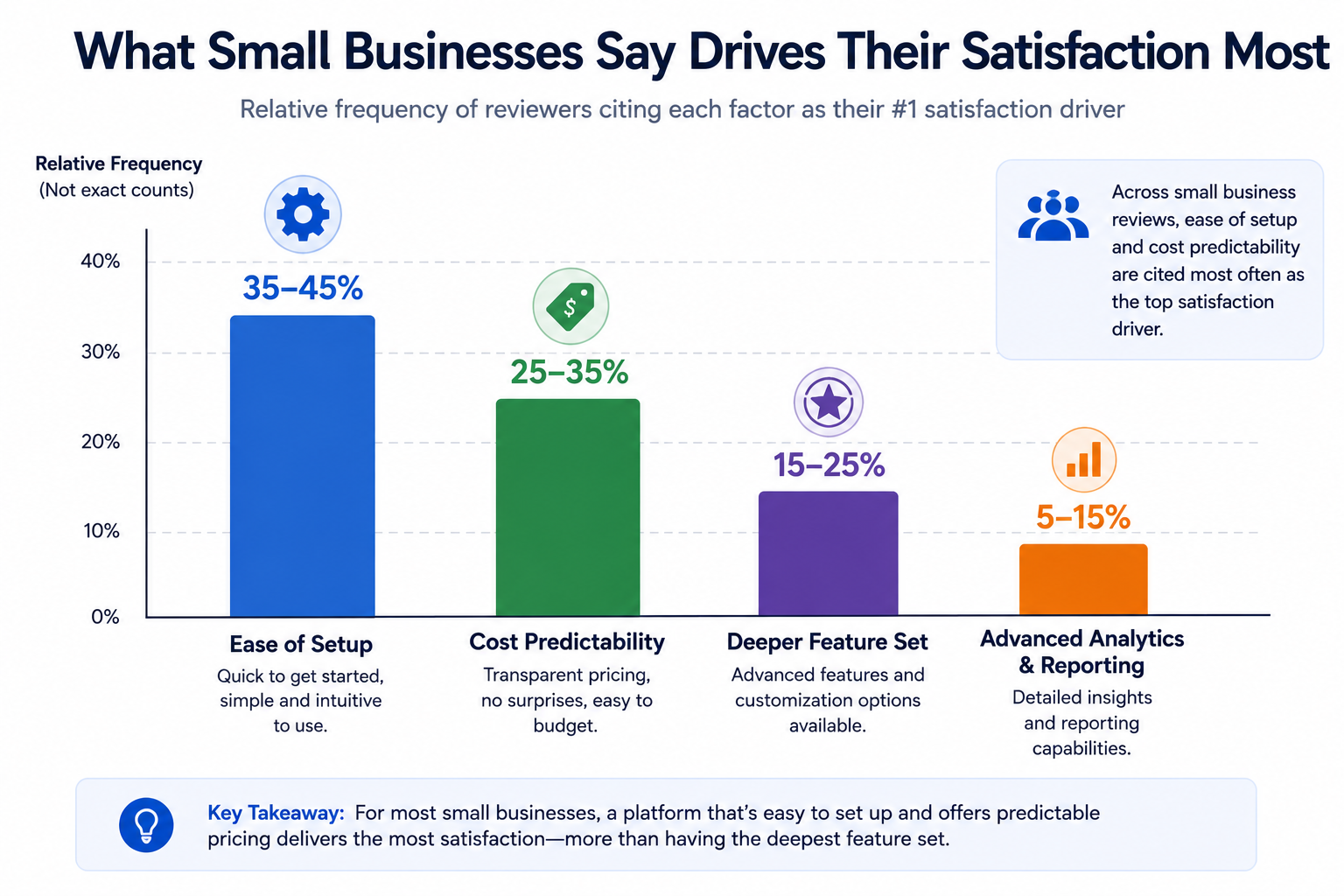
On G2's virtual tour software category page, reviewers self-identifying as small business users frequently cite ease of setup and predictable cost as their top satisfaction drivers, which tracks directly with the priorities argued for above rather than deeper enterprise features.
Community discussions on r/smallbusiness occasionally surface candid comparisons from other small business owners evaluating this same decision, which can be a more directly relevant source than reviews aggregated across much larger businesses with different priorities.
"Isn't this just a company telling me its own product is best?"
That's a fair instinct to bring to this article specifically, which is exactly why the section above naming genuine non-fits exists. The underlying argument — that small businesses should weight setup simplicity and cost predictability more heavily than deep feature sets — holds regardless of which specific platform you ultimately choose, even if you decide CloudPano isn't the right one for your situation.
"How do I know if I'm actually a 'small business' for the purposes of this comparison?"
If you're managing tours as one part of a broader role rather than a dedicated function, if you don't have a large, established tour library already, and if your team is small enough that complex permission structures aren't a priority yet, the small-business framing in this article likely applies to you.
Small businesses generally benefit more from setup simplicity and predictable, accessible cost than from a deeper feature set built for larger operations. CloudPano's more hardware-agnostic, accessible approach tends to fit this profile well — though as covered honestly above, it isn't the automatic right answer for every small business situation.
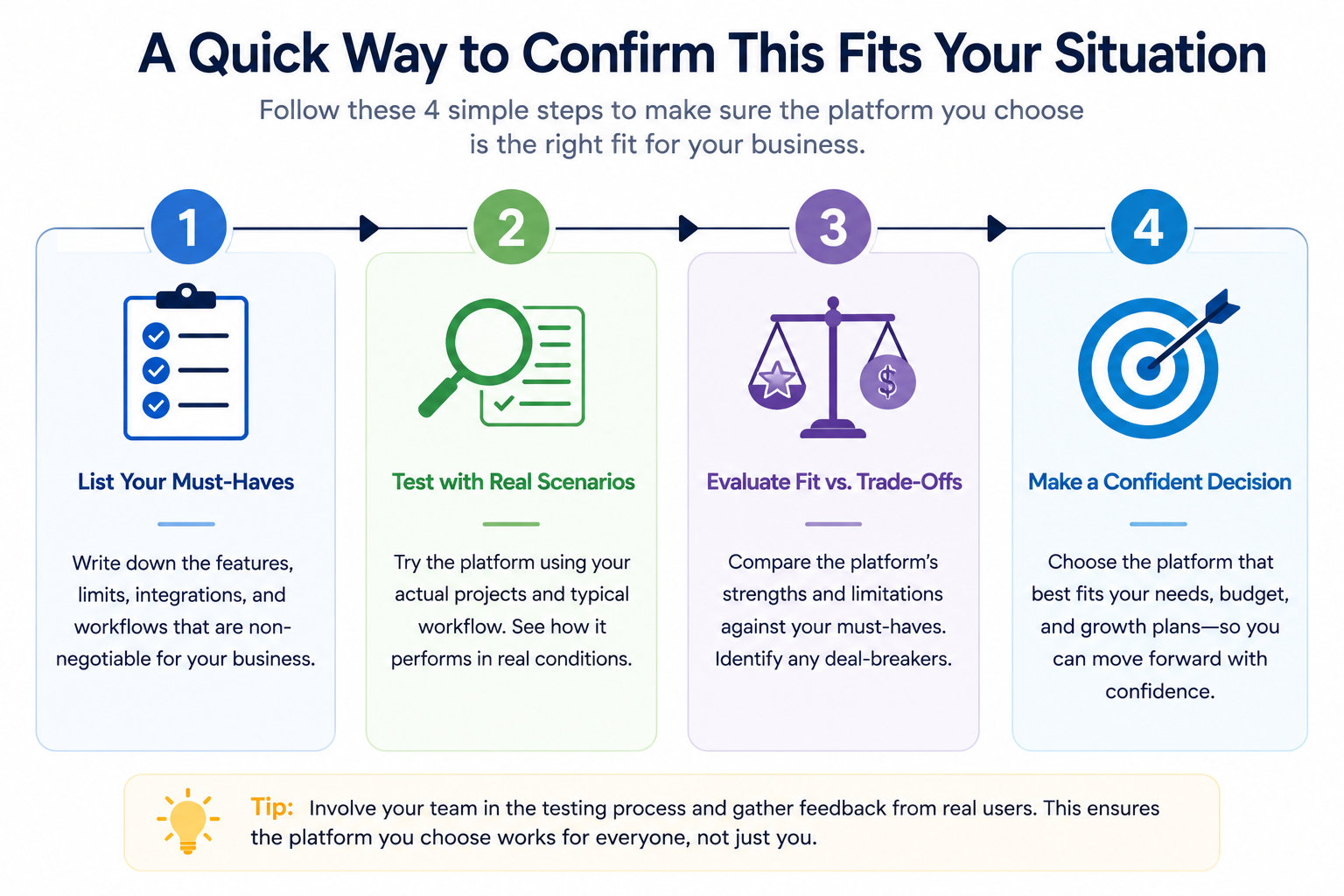
If setup simplicity and cost predictability are genuinely your priorities, it's worth running the quick confirmation above with your own content. And if you want the broader, more neutral framework for evaluating any affordable alternative rather than a direct CloudPano case, our guide on budget-friendly Matterport alternatives covers that ground without advocating for one specific platform. Whichever path you take, the underlying test is the same: does the platform get out of your way and let you actually publish a professional-looking tour, or does it demand more time and expertise than a small business reasonably has to spare.


Compact, ready to go anywhere
Interchangeable lens that’s upgradeable
Dual 1-inch sensors for improved clarity and low light performance
Dynamic range and 6K 360° capture
360° photo resolution at 21MP

8K 360° video recording for ultra-detailed visuals.
4K single-lens mode for traditional wide-angle shots.
Invisible selfie stick effect for drone-like perspectives.
2.5-inch touchscreen with Gorilla Glass protection.
Waterproof up to 33ft for underwater shooting.

360° photo resolution in 23MP
Slim design at 24 mm thick
Built-in image stabilization for smooth video capture.
Internal 19GB storage for photo and video storage.
Wireless connectivity for remote control and sharing.

60MP 360° still images for high-resolution photography.
5.7K 360° video recording at 30fps.
2.25-inch touchscreen for intuitive control.
USB Type-C port for fast charging and data transfer.
MicroSD card slot for expandable storage.
.png)

.png)

Try it free. No credit card required. Instant set-up.





.svg)


.svg)