
In today’s digital-first real estate world, standing out means going beyond static images. If you're a property manager or real estate marketer, combining AppFolio’s powerful listing engine with Matterport’s immersive 3D virtual tours is the perfect way to elevate your listings, generate more leads, and lease faster. 🚀
This post breaks down exactly why AppFolio + Matterport is the winning combo — and how to implement it effectively for your portfolio. 💼
AppFolio is a robust property management software trusted by thousands of professionals to market and manage rentals. But today’s renters demand more. 📲 They want remote access, immersive walkthroughs, and quick decision-making tools.
That’s where Matterport’s 3D virtual tours shine. These fully interactive digital replicas let prospects explore units as if they were there — from any device.
🧠 Need the how-to? 👉 How to Integrate Matterport Virtual Tours with AppFolio Listings
Let’s break down the perks:
✅ Higher Engagement – Users spend more time on listings with 3D tours.
✅ Faster Leasing – Save time by pre-qualifying prospects with virtual walkthroughs.
✅ Competitive Advantage – Stand out from nearby listings that only use photos.
✅ Remote Access – Perfect for long-distance renters or corporate relocations.
✅ Automation Potential – Set it and forget it using tools like Zapier or CloudPano.
Looking for more automation ideas? 👉 Automating Virtual Tour Uploads with Zapier + AppFolio
Here’s a quick how-to. (For a deep dive, see Your Easy AppFolio Virtual Tour Upload Guide (With Screenshots))
1️⃣ Publish Your Tour on Matterport
Make sure your tour is “public” and ready to share.
2️⃣ Copy the Share Link
It should look like this:https://my.matterport.com/show/?m=TourID
3️⃣ Log into AppFolio & Edit the Property Listing
Find the "Video Tour" or "Virtual Tour" section.
4️⃣ Paste the Tour Link
Save your listing. Done! ✅
For more tour-specific help 👉 How to Upload and Showcase Virtual Tours in AppFolio Effectively
Matterport is a game-changer, but pairing it with floor plans and video walkthroughs creates an even more complete experience. 🎥
📌 Related Guides:
After integrating Matterport into their AppFolio listings, users report:
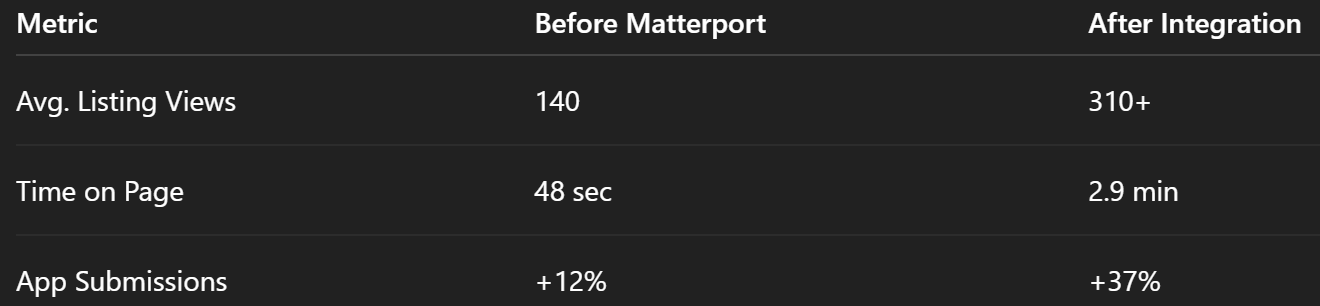
Combine this with strong CTAs and you'll be hard to beat. 💥
Managing 50+ listings? Skip the copy/paste and try automation tools like:
📚 Recommended reading:
👉 CloudPano Auto-Embed Tool for AppFolio
Once your tours are live, promote them to drive traffic!
For more listing acceleration tactics:
👉 Boost Your AppFolio Listings: Upload 3D Tours in Just a Few Steps
🙈 Tour not visible?
Ensure the link is public and formatted correctly (https:// is a must).
📱 Doesn’t load on mobile?
Matterport is mobile-friendly, but test each link before publishing.
📝 No tour field?
Just paste the link in the description like:
“Take a 3D tour: Click here”
Still stuck? 👉 Tour Upload to AppFolio: The Property Manager’s Step-by-Step Handbook
AppFolio + Matterport is a powerful property marketing duo. Whether you're leasing single-family homes, luxury apartments, or commercial spaces — 3D tours will help you stand out, generate better leads, and close deals faster. 🏆
If you haven’t tried it yet, now’s the time to integrate. And for those already using it — upgrade your strategy with automation and bundled media tools. 🔧


Compact, ready to go anywhere
Interchangeable lens that’s upgradeable
Dual 1-inch sensors for improved clarity and low light performance
Dynamic range and 6K 360° capture
360° photo resolution at 21MP

8K 360° video recording for ultra-detailed visuals.
4K single-lens mode for traditional wide-angle shots.
Invisible selfie stick effect for drone-like perspectives.
2.5-inch touchscreen with Gorilla Glass protection.
Waterproof up to 33ft for underwater shooting.

360° photo resolution in 23MP
Slim design at 24 mm thick
Built-in image stabilization for smooth video capture.
Internal 19GB storage for photo and video storage.
Wireless connectivity for remote control and sharing.

60MP 360° still images for high-resolution photography.
5.7K 360° video recording at 30fps.
2.25-inch touchscreen for intuitive control.
USB Type-C port for fast charging and data transfer.
MicroSD card slot for expandable storage.


Try it free. No credit card required. Instant set-up.