Using 360 Virtual Tours for Remote Oilfield Safety Training

Cloudpano
July 25, 2025
5 min read
Share this post

🛡️ Using 360° Virtual Tours for Remote Oilfield Safety Training 🎥⛽

In the oil and gas industry, safety isn’t optional — it’s mission-critical. But as field operations spread across multiple locations, and workforces grow more remote, traditional classroom-based or in-person safety training can no longer keep up.

That’s where 360° virtual tours step in.

By using immersive, interactive virtual environments, oil and gas companies can deliver realistic, remote safety training that prepares workers better, reduces onboarding time, and increases hazard awareness — all without stepping foot on-site.

In this guide, we’ll walk through how to implement 360° virtual tours for safety training, why it’s a game-changer for remote teams, and how top operators are already putting it to use. 🧠🦺

🚨 The Challenges of Traditional Oilfield Safety Training

Oil and gas safety programs typically require:

  • Extensive travel to training centers ✈️
  • Physical walkthroughs of sites or mock setups 🏗️
  • Printed manuals and outdated PowerPoints 📖
  • Scheduling conflicts across crews and contractors ⏰

In remote oilfields, these challenges multiply — leading to rushed onboarding, incomplete training, and safety risks.

🔗 Related: Streamlining Oilfield Inspections Using 360 Virtual Tours

🎥 What Are 360° Virtual Tours?

360° virtual tours are immersive, clickable walkthroughs of real-world environments. Captured using 360° cameras or drones, these experiences let users:

✅ Navigate oilfield sites virtually
✅ Explore hazard zones and safety features
✅ Access embedded training content (text, images, video)
✅ Repeat the experience as many times as needed

Think of it as Google Street View, but for high-risk energy environments — and built specifically for training and documentation. 🌐

🔗 Related: Building a Centralized Oilfield Documentation System with 360 Tours

🧰 What You Need to Get Started

1. 360° Camera or Drone

Capture detailed visuals of job sites, equipment layouts, and emergency exits.

Top models include:

  • Insta360 One RS
  • Ricoh Theta Z1
  • DJI Mavic 3 Enterprise (for aerial overviews)

🔗 Related: Best Cameras and Drones for Oilfield Virtual Tours in 2025

2. Virtual Tour Software (e.g. CloudPano)

  • Upload 360° images
  • Add hotspots for training tips
  • Embed videos, audio instructions, and PDF safety sheets
  • Share via secure link or LMS (Learning Management System)

🧠 How to Create a 360° Safety Training Tour

✅ Step 1: Choose a Training Focus

Pick the location or workflow that needs to be documented:

  • Well pad orientation
  • Tank battery access
  • PPE station walkthrough
  • Evacuation route demonstration

✅ Step 2: Capture the Area

Use a 360° camera or drone to capture:

  • Entry and exit points
  • Safety signage
  • Fire extinguishers and emergency kits
  • High-risk equipment

✅ Step 3: Add Safety Annotations

Use your tour software to add:

  • Hotspots for safety notes and hazard alerts ⚠️
  • Links to SOPs and MSDS documentation 📑
  • Embedded videos demonstrating correct procedures 🎬
  • Interactive quizzes or checkpoints 🧠

🔗 Related: 360° Virtual Tours for Oilfield Project Updates: A Complete Guide

✅ Step 4: Share and Track Completion

Once your tour is ready:

  • Share a link with trainees
  • Require viewing as part of onboarding
  • Collect feedback and adjust tours over time
  • Use analytics to track completion rates and engagement

🧪 Real-World Example: Virtual Safety Tour in the Bakken

A North Dakota operator created a 360° virtual safety tour for a new saltwater disposal facility. The tour covered:

  • Site access protocol
  • Slippery surface warnings
  • Tank valve lockout procedures
  • Emergency muster zones

New hires completed the tour on their phones or laptops before arriving on-site. Result?

✅ 3x faster onboarding
✅ 40% reduction in first-week safety incidents
✅ Fewer interruptions for senior crew leads

🔗 Related: Case Study: Virtual Tour Implementation for Oilfield Workflow Visibility

🔄 Use Cases for 360° Virtual Safety Training

🏗️ New Hire Onboarding

Let workers explore the site before day one. Include PPE procedures, safety zones, and key contact info.

🧯 Emergency Response Planning

Simulate fire drills, gas leak procedures, or evacuation paths with realistic visuals — even for remote or offshore workers.

⚙️ Equipment Safety Walkthroughs

Show how to inspect, maintain, and operate machinery safely.

🔁 Refresher Training

Keep crews updated with seasonal changes, updated SOPs, or layout modifications — without hosting in-person training.

🔗 Related: Real-Time Oilfield Development Tracking with 360° Virtual Tours
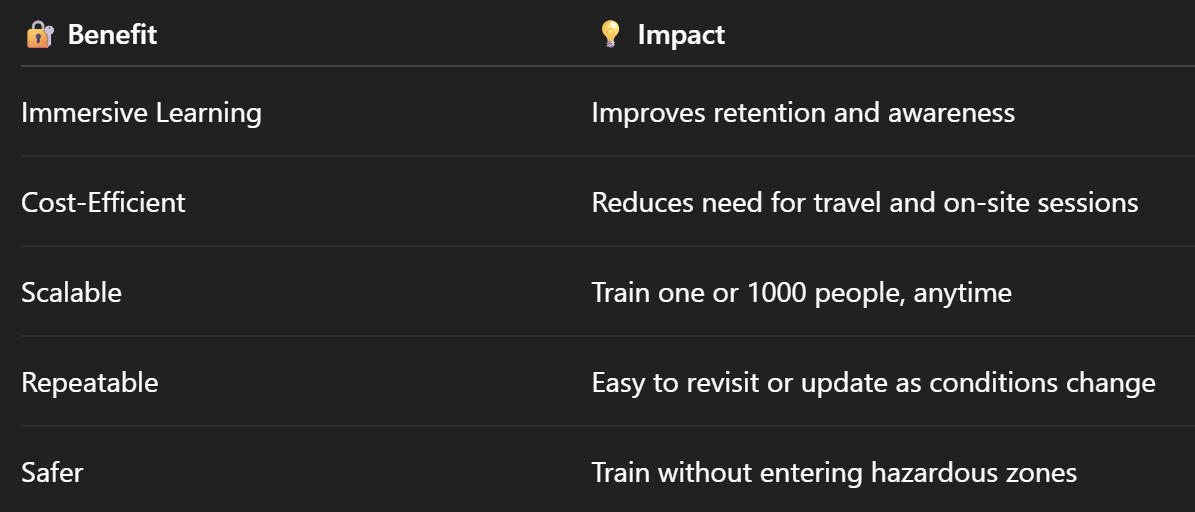
📊 Benefits of Virtual Tours for Safety Training

📈 Measurable Outcomes

Companies implementing 360° training programs report:

🔗 Related: From Ground to Cloud: Tracking Oilfield Workflows with 360 Virtual Tours

🎯 Final Thoughts: Training for the Future

Oilfield safety is evolving. With more crews operating in remote locations, and a younger workforce expecting digital-first experiences, 360° virtual safety tours are no longer optional — they’re essential.

They help:
✅ Train smarter
✅ Scale faster
✅ Stay compliant
✅ Protect lives

Whether you're managing one rig or a nationwide portfolio, virtual safety training ensures your team is prepared — wherever they are. 🌐🛡️

Share this post
Cloudpano

Choose The Right 360° Camera

Insta360 ONE RS 1-Inch 360 Edition

  • Compact, ready to go anywhere

  • Interchangeable lens that’s upgradeable

  • Dual 1-inch sensors for improved clarity and low light performance

  • Dynamic range and 6K 360° capture

  • 360° photo resolution at 21MP

Learn More

Insta360 X4

  • 8K 360° video recording for ultra-detailed visuals.

  • 4K single-lens mode for traditional wide-angle shots.

  • Invisible selfie stick effect for drone-like perspectives.

  • 2.5-inch touchscreen with Gorilla Glass protection.

  • Waterproof up to 33ft for underwater shooting.

Learn More

Ricoh Theta Z1

  • 360° photo resolution in 23MP

  • Slim design at 24 mm thick

  • Built-in image stabilization for smooth video capture.

  • Internal 19GB storage for photo and video storage.

  • Wireless connectivity for remote control and sharing.

Learn More

Ricoh Theta X

  • 60MP 360° still images for high-resolution photography.

  • 5.7K 360° video recording at 30fps.

  • 2.25-inch touchscreen for intuitive control.

  • USB Type-C port for fast charging and data transfer.

  • MicroSD card slot for expandable storage.

Learn More
Property Marketing
Allows potential buyers to explore properties in detail from anywhere, enhancing the real estate marketing process.
Automotive Spins
Create an interactive virtual showroom and engage affluent digital buyers with live 360º video calls, all through the CloudPano mobile app for a complete automotive sales solution.
Interactive Floor Plans
Create 2D and 3D floor plans with measurements in 4 minutes or less, all from your phone. Download the Floor Plan Scanner app and get your first scan free.

360 Virtual Tours With CloudPano.com. Get Started Today.

Try it free. No credit card required. Instant set-up.

Try it free
Latest posts

See our other posts

Interviews, tips, guides, industry best practices, and news.

Background Removal for Car Photos: What Dealerships Need to Know

This evergreen guide explains what background removal for car photos is and why it matters for dealerships selling vehicles online. It covers how background removal improves listing consistency, removes distracting lot clutter, and creates a more professional first impression that increases buyer trust and clicks. The post also breaks down background removal vs background replacement, best practices for clean results (framing, angles, shadows, and consistency), common mistakes to avoid, and how to integrate background removal into a scalable “lot-to-listing” dealership workflow.
Read post

How AI Background Replacement Improves Car Listing Photos

This evergreen guide explains how AI background replacement for car photos improves dealership and marketplace listings by creating clean, consistent, professional-looking vehicle images at scale. It covers why backgrounds affect buyer trust and click-through rates, how AI background replacement works, and the biggest performance benefits—including better thumbnails, consistent inventory grids, faster listing turnaround, and improved merchandising. The post also includes best practices and common mistakes to avoid so dealerships can standardize photo presentation and generate more leads from the same inventory.
Read post

Background Replacement vs Background Removal for Car Photos

This evergreen guide explains the difference between background replacement vs background removal for car photos and helps dealerships choose the best option for better online listings. It covers how to remove car background for clean cutout images, when it makes sense to change car photo background using replacement backgrounds for a studio-like look, and which method improves consistency and conversions on dealership websites and marketplaces. The post also includes best practices, common mistakes, and a simple decision framework for using background editing as a competitive advantage.
Read post



