


.png)




A brokerage does not have a video problem until every agent solves video differently.
One agent uses a freelancer.
Another uses a slideshow app.
Another posts branded videos everywhere.
A team leader has a designer creating custom Reels.
A new agent uploads a video link without knowing whether the page around it includes branding.
A listing coordinator is left trying to figure out which version is safe for the MLS, which version is meant for Instagram, and which one the seller already approved.
That is where video turns into a brokerage operations problem.
Choosing MLS approved real estate video software is not just about finding a tool that makes attractive listing videos. For a brokerage, the bigger question is whether the software helps agents create media consistently, reduce publishing mistakes, separate branded and unbranded assets, and support local MLS workflows.
PhotoAIVideo helps real estate professionals turn property photos into AI-generated videos. For brokerages comparing the best AI video software for real estate agents, the value is not only speed. It is standardization. It gives agents a practical way to create listing videos from existing property photos while giving the brokerage a cleaner path for training, review, and media consistency. It gives agents a practical way to create listing videos from existing property photos while giving the brokerage a cleaner path for training, review, and media consistency.
MLS rules vary by board, brokerage, and region. Always confirm your local requirements before publishing listing media. For broader context, review NAR’s MLS policy resources, NAR’s Handbook on Multiple Listing Policy, and NAR’s Clear Cooperation Policy.
The phrase “MLS approved” can be tricky.
Many software tools are not officially approved by every MLS. Local rules vary. Brokerages may also have their own internal policies. A tool that is acceptable in one market may still require adjustments in another.
So when a brokerage searches for MLS approved real estate video software, the real goal is usually this:
Find software that can support MLS-aware listing media workflows.
That means the software should help agents create videos that can be reviewed, organized, and used appropriately across channels such as:
A brokerage should not choose video software only by asking, “Can it make a nice video?” The better question is whether the platform can function as an AI app to turn property photos into videos while still supporting broker review, file organization, version control, and channel-specific publishing.
That is too narrow.
The better questions are:
That is where an MLS compliant video maker for property listings becomes more than a content tool. It becomes part of the brokerage’s operating system. It becomes part of the brokerage’s operating system.
A solo agent can get away with a messy workflow for a while.
A brokerage cannot.
At brokerage scale, small media mistakes multiply.
If every agent creates listing videos differently, the brokerage ends up with inconsistent branding, uneven quality, unclear file management, and more risk around MLS-aware publishing. The problem usually shows up in the handoff.
The agent thinks the file is ready.
The listing coordinator sees the logo.
The marketing manager notices the caption is too promotional.
The broker asks whether the video is safe for the MLS.
The seller wants the listing launched now.
Nobody wants to restart the video.
This is why brokerages need systems instead of random tools.
A strong brokerage video workflow should help with:
NAR’s MLS policy resources and Handbook on Multiple Listing Policy are useful references for understanding broader MLS policy context, but each brokerage still needs to apply its own local rules and internal standards. NAR’s Code of Ethics also provides professional standards context around cooperation and client interests. Review NAR’s Code of Ethics resources when building brokerage-level policies.
A video tool should make those standards easier to follow, not harder.
Brokerage video problems usually start with good intentions.
Leadership wants agents to use more video. Agents want better listing media. Sellers want polished marketing. The marketing team wants consistency. The brokerage wants fewer compliance headaches.
Then everyone chooses their own tools.
That creates six common issues.
Some listing videos look professional. Some look like generic slideshows. Some include too much branding. Some have no branding at all. The brokerage brand becomes inconsistent.
A file named final-listing-video.mp4 tells the brokerage almost nothing.
Is it branded?
Is it unbranded?
Is it approved?
Is it for MLS?
Is it for Instagram?
Is it a seller preview?
The branded social video gets created first. Then someone asks for an MLS-safe version. The team manually removes logos, trims the intro, changes the caption, and exports again.
That slows down the launch.
A video file can look clean, but the page where it is hosted may show agent branding, brokerage information, suggested videos, contact buttons, or lead capture forms.
For MLS-aware workflows, context matters.
A brokerage cannot train 100 agents on 100 different tools.
Agents need a repeatable workflow that can be taught, documented, and supported.
When agents create videos outside the brokerage workflow, leadership may not know what is being published, where it is being used, or whether it meets internal standards.
That is not sustainable.
For brokerages, automated video marketing software for Realtors should help reduce this fragmentation. The goal is not just faster content creation. The goal is a repeatable system agents, coordinators, photographers, and marketing teams can all understand.
PhotoAIVideo helps agents create real estate videos from photos with AI. That matters because listing photos are already part of the brokerage workflow. They are usually approved before other marketing assets are created.
That matters because listing photos are already part of the brokerage workflow. They are usually approved before other marketing assets are created. Turning those photos into videos gives the brokerage a practical path for video creation without requiring every agent to hire an editor or learn complex software.
For brokerages, PhotoAIVideo can support:
PhotoAIVideo is especially useful when a brokerage wants an MLS compliant real estate video generator that starts with existing listing images instead of raw footage or custom editing timelines.
The brokerage still needs internal review standards.
The software does not replace local MLS knowledge.
But it can make the production side easier to standardize.
That is the key advantage.
Do not start by comparing features.
Start by listing the jobs the software needs to handle.
Common brokerage use cases include:
A brokerage buying tool should support the actual work agents need to do every week. That includes choosing real estate video software that works with MLS rules while still giving agents the flexibility to create branded social videos, seller preview clips, open house videos, and property website assets.
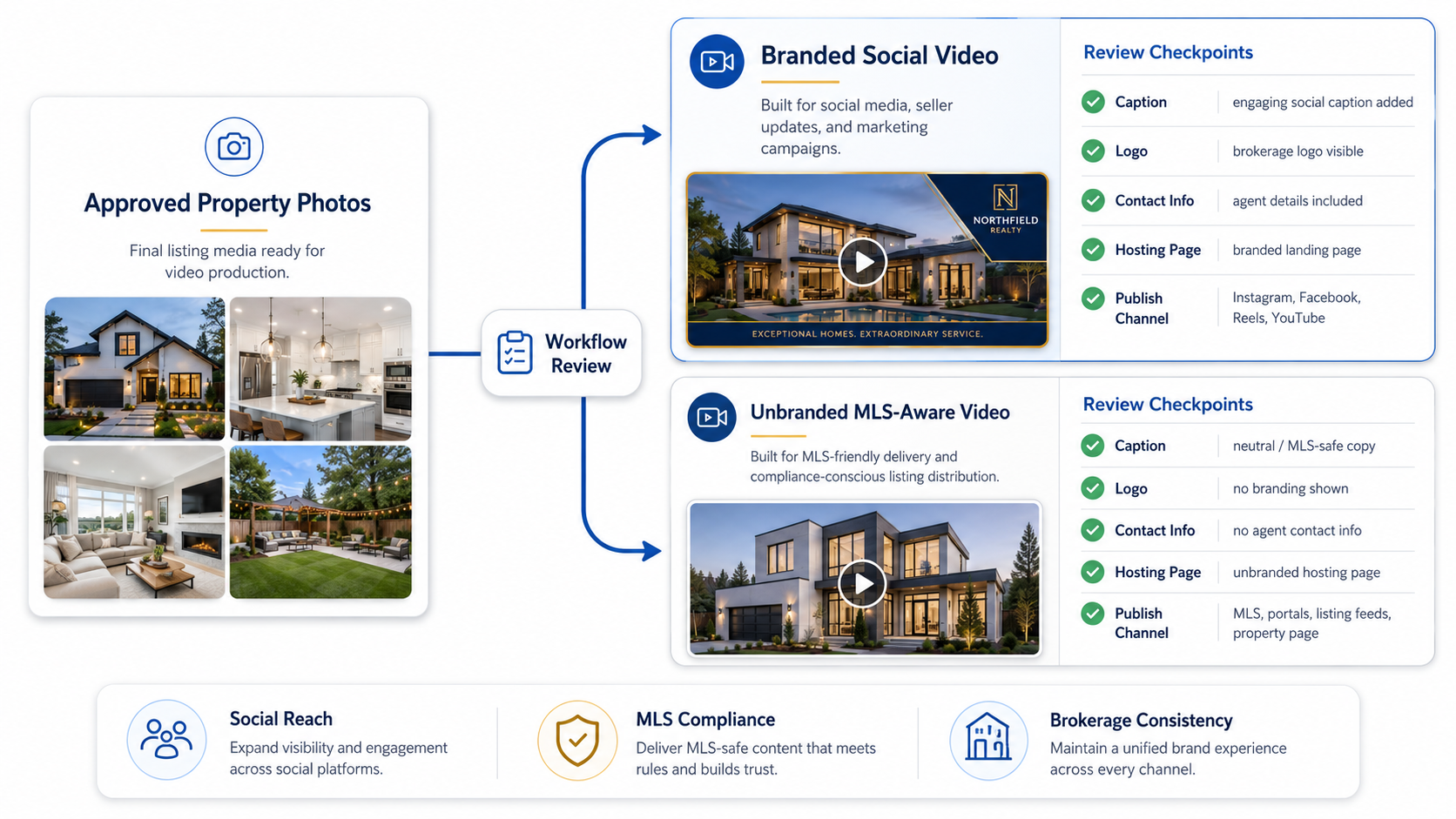
This is the most important operational decision.
A brokerage should define categories clearly:
Once categories are defined, agents and coordinators can make better decisions.
This is where an AI tool for making unbranded real estate videos becomes useful. The brokerage needs a way to create clean assets where branding may not be appropriate and promotional assets where branding is the entire point. The brokerage needs a way to create clean assets where branding may not be appropriate and promotional assets where branding is the entire point.The brokerage needs a way to create clean assets where branding may not be appropriate and promotional assets where branding is the entire point.
A tool that only the marketing director understands will not scale.
Ask:
Adoption matters more than feature overload.
A brokerage should define what “good enough” means.
Review:
The video should feel professional enough to represent the brokerage.
The software does not need to solve every file management problem by itself, but the workflow should make versioning easier.
Use naming standards such as:
This makes the brokerage workflow safer.

Before agents publish listing videos, define what must be checked.
A simple brokerage review checklist might include:
This turns video review into a process instead of a guessing game.
Do not test only with your most tech-savvy agent.
Test with:
A brokerage video tool needs to work for normal users, not just early adopters.
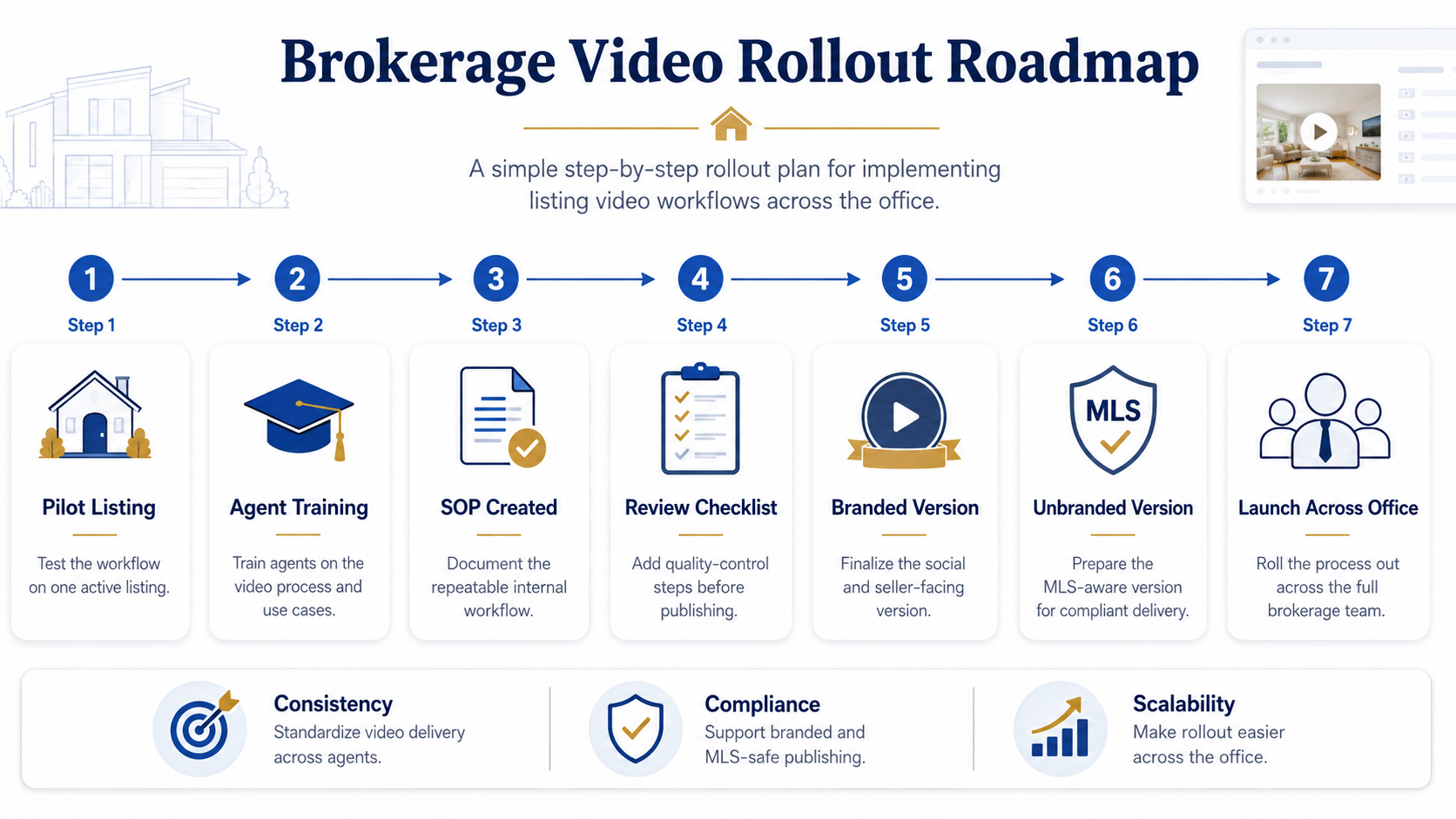
Once the brokerage chooses a tool, agents need a simple plan.
Start with:
Do not launch with a 40-page manual.
Agents will not read it.
A brokerage does not need the most complicated tool.
It needs the tool agents will actually use correctly.
That is a different buying decision.
Brokerage leaders can use PhotoAIVideo to create a more consistent listing media standard.
Instead of asking agents to “do more video,” leadership can give agents a practical workflow:
This makes video adoption easier to manage.
Listing coordinators can use PhotoAIVideo to help agents get listing videos ready without waiting on a full editing team.
They can create or organize:
That gives coordinators more control over the launch process.
Individual Realtors inside the brokerage benefit because they do not need to become video editors.
They can use approved listing photos to create video assets for marketing and listing promotion.
This helps agents look more professional without adding a complex production step.
Photographers working with brokerages can use AI video software for real estate photographers to deliver video add-ons from the same photo shoot. A brokerage may standardize a media package that includes listing photos, an AI-generated property video, a branded social version, an unbranded listing version, and a property website video.
A brokerage may standardize a media package that includes:
This creates a better deliverable package.
Brokerages with rental or property management divisions can use the same system for rental listings.
A rental unit photo set can become:
No tool is automatically approved for every situation in every MLS.
Brokerages should treat “MLS approved” as shorthand for MLS-aware workflow support, not a replacement for local review.
Quality matters.
But for a brokerage, workflow matters just as much.
A beautiful video tool that agents cannot use consistently will not solve the operational problem.
If the brokerage does not define when agents should use branded or unbranded videos, agents will guess.
Guessing creates inconsistency.
The video file is not the only issue.
The page where the video appears may include branding, lead capture, agent information, or promotional elements. The brokerage should review the whole viewing experience when MLS-aware use is involved.
Agents need simple instructions.
If the rollout feels too technical, adoption will drop.
Start with one workflow and one example listing.
If the brokerage publishes guides, blog posts, or media instructions, keep the important instructions in crawlable text.
Google’s image SEO best practices recommend using descriptive filenames, helpful alt text, and relevant surrounding content. Google’s Article structured data documentation also explains how structured data can help Google understand article pages, including title, images, author, and date information. Review Google’s image SEO best practices and Google’s Article structured data documentation.
If your brokerage wants a cleaner listing media workflow, the right AI real estate marketing software for agents should help your team create property videos faster, separate branded and unbranded versions, reduce publishing mistakes, and give agents a repeatable process they can actually use.


Compact, ready to go anywhere
Interchangeable lens that’s upgradeable
Dual 1-inch sensors for improved clarity and low light performance
Dynamic range and 6K 360° capture
360° photo resolution at 21MP

8K 360° video recording for ultra-detailed visuals.
4K single-lens mode for traditional wide-angle shots.
Invisible selfie stick effect for drone-like perspectives.
2.5-inch touchscreen with Gorilla Glass protection.
Waterproof up to 33ft for underwater shooting.

360° photo resolution in 23MP
Slim design at 24 mm thick
Built-in image stabilization for smooth video capture.
Internal 19GB storage for photo and video storage.
Wireless connectivity for remote control and sharing.

60MP 360° still images for high-resolution photography.
5.7K 360° video recording at 30fps.
2.25-inch touchscreen for intuitive control.
USB Type-C port for fast charging and data transfer.
MicroSD card slot for expandable storage.
.png)

.png)

Try it free. No credit card required. Instant set-up.







.svg)


.svg)