


.png)


Real estate marketing moves fast. Agents need listing videos, social media clips, virtual tours, property websites, email assets, and MLS-ready media — often within the same day. But there is one problem that can slow everything down: compliance.
A video that works perfectly on Instagram, Facebook, YouTube, or an agent’s website may not be appropriate for the MLS. Many MLS systems and local boards require listing media to be unbranded, especially when it appears inside shared listing feeds. That means no agent names, no brokerage logos, no phone numbers, no promotional overlays, no branded intros, and no lead-capture calls to action.
That is why MLS-friendly video software for Realtors is becoming more important.
With the right workflow, agents can create polished property videos for marketing while also producing clean, unbranded real estate videos for MLS use. PhotoAIVideo helps make this easier by turning listing photos into AI-generated real estate videos that can be used across modern property marketing workflows.
Instead of manually editing every video from scratch, Realtors, photographers, and brokerages can create video assets faster, reduce compliance mistakes, and keep their listing media organized.
Important note: MLS rules vary by board, brokerage, and region. Always confirm your specific media requirements with your local MLS before publishing listing videos. For broader industry context, Realtors can review the NAR Handbook on Multiple Listing Policy and the NAR Code of Ethics and Standards of Practice.
MLS-friendly video software for Realtors helps real estate professionals create property videos that are designed to fit MLS listing requirements. The goal is to make video content that showcases the home clearly without including branding elements that may violate local MLS rules.
In simple terms, MLS-friendly video software helps agents create:
This matters because real estate agents often need two different versions of the same listing video.
The branded version can be used for social media, email marketing, ads, YouTube, and agent websites. This version may include the agent’s name, brokerage, phone number, website, call to action, logo, or personal branding.
The unbranded version is the clean version that can be submitted to the MLS or used in environments where promotional branding is restricted.
A strong MLS compliant real estate video generator should help agents move faster while keeping these versions separate and easy to manage.
MLS compliance is not just a technical detail. It affects how listings are displayed, distributed, and approved across real estate platforms.
When a Realtor uploads media to the MLS, that content may be syndicated to brokerage sites, IDX feeds, consumer search portals, and cooperating agent tools. Because the MLS is designed to support fair cooperation between agents and brokers, many boards limit visible branding inside listing media.
A property video that includes an agent logo, brokerage name, direct phone number, branded end screen, or promotional website may be flagged depending on the rules of the local MLS.
That creates several risks:
Even worse, these mistakes usually happen at the worst time — right before a listing goes live.
MLS safe AI video for listings helps solve this problem by making the creation process faster and more structured. Instead of scrambling to remove branding after the video has already been created, Realtors can build a cleaner workflow from the start.
.png)
One of the biggest mistakes agents make is assuming that one property video can be used everywhere.
In reality, real estate video marketing usually needs two versions.
A branded video is designed for promotion. It can include:
This version is great for Facebook, Instagram, YouTube, email campaigns, paid ads, listing presentations, and seller updates.
An unbranded real estate video is designed for MLS and listing distribution environments where visible promotion may not be allowed.
An unbranded listing video should avoid:
This is where unbranded real estate video software becomes valuable. It helps agents keep their marketing content flexible without mixing up the version meant for the MLS and the version meant for promotion.
MLS rules vary by market, so Realtors should always confirm specific requirements with their local board or brokerage. However, most MLS-friendly listing videos follow the same general principle: the media should focus on the property, not the agent.
A cleaner MLS compliant video tour usually includes:
A good rule of thumb is this:
If the video promotes the agent more than the property, it may not belong in an MLS listing field.
This does not mean Realtors should stop using branded videos. Branded content is still powerful for marketing. The key is to create the correct version for the correct channel.
Use branded videos for marketing.
Use unbranded videos for MLS-safe listing distribution.
For broader professional standards around truthful and responsible real estate marketing, Realtors can review the NAR Code of Ethics.
Many agents and real estate photographers still use a manual video workflow.
The process usually looks like this:
This works in theory, but it breaks down quickly.
When agents are busy, files get mixed up. The branded version gets uploaded where the unbranded version should have gone. A logo gets left in the corner. A branded thumbnail is used by accident. A YouTube link shows the agent’s channel name. A video description includes a phone number. A voiceover mentions the brokerage.
These are small mistakes, but they can create big delays.
This is why automated and AI-assisted workflows are becoming more valuable for listing media. Realtors need faster ways to create clean, MLS-safe videos without building every asset manually.
MLS compliant branded video removal is not just about deleting a logo. It is about creating a repeatable media workflow where the right version is created, labeled, reviewed, and published in the correct place.

PhotoAIVideo is designed to help real estate professionals turn property photos into professional video content faster.
Instead of needing a full video shoot, complex editing timeline, or manual animation process, Realtors can use existing listing photos to create AI-generated real estate videos.
This is especially useful for agents who already have professional listing photos but need video assets for:
For MLS-friendly workflows, the advantage is simple: PhotoAIVideo can help agents create video content from property photos while keeping the final media clean, simple, and property-focused.
That makes it easier to create MLS compliant unbranded property videos for MLS use and separate branded versions for marketing channels.

Here is a simple workflow Realtors can use with PhotoAIVideo.
Begin with the best property photos available. Choose images that show the strongest features of the home, including the exterior, kitchen, living areas, bedrooms, bathrooms, outdoor spaces, and unique selling points.
Before generating the video, check the images for visible branding. Watch for yard signs, agent signs, brokerage materials, business cards, logos, or anything that could create a compliance issue.
Upload the selected property photos into PhotoAIVideo. The goal is to turn still images into motion-based video content that feels more engaging than a static photo gallery.
This helps Realtors create listing videos without needing to film the property again.
Use PhotoAIVideo to create movement from the photos. This can make the listing feel more dynamic by adding cinematic camera motion, smooth transitions, and a more polished presentation.
This is where AI can save time. Instead of building motion manually in editing software, the video can be created faster from the listing images.
Before using the video in an MLS environment, review it carefully.
Check for:
This review step is important because MLS rules can vary by location. Always follow local guidelines.
Once the video is clean, export the unbranded version for MLS-safe use.
Use a simple filename such as:
123-main-street-unbranded-listing-video.mp4
Avoid filenames that include agent names, brokerage names, or promotional language.
After the unbranded version is ready, create a separate branded version for social media, email marketing, ads, and agent promotion.
This version can include:
This two-version workflow gives Realtors the best of both worlds: MLS-safe media for listing compliance and branded media for lead generation.
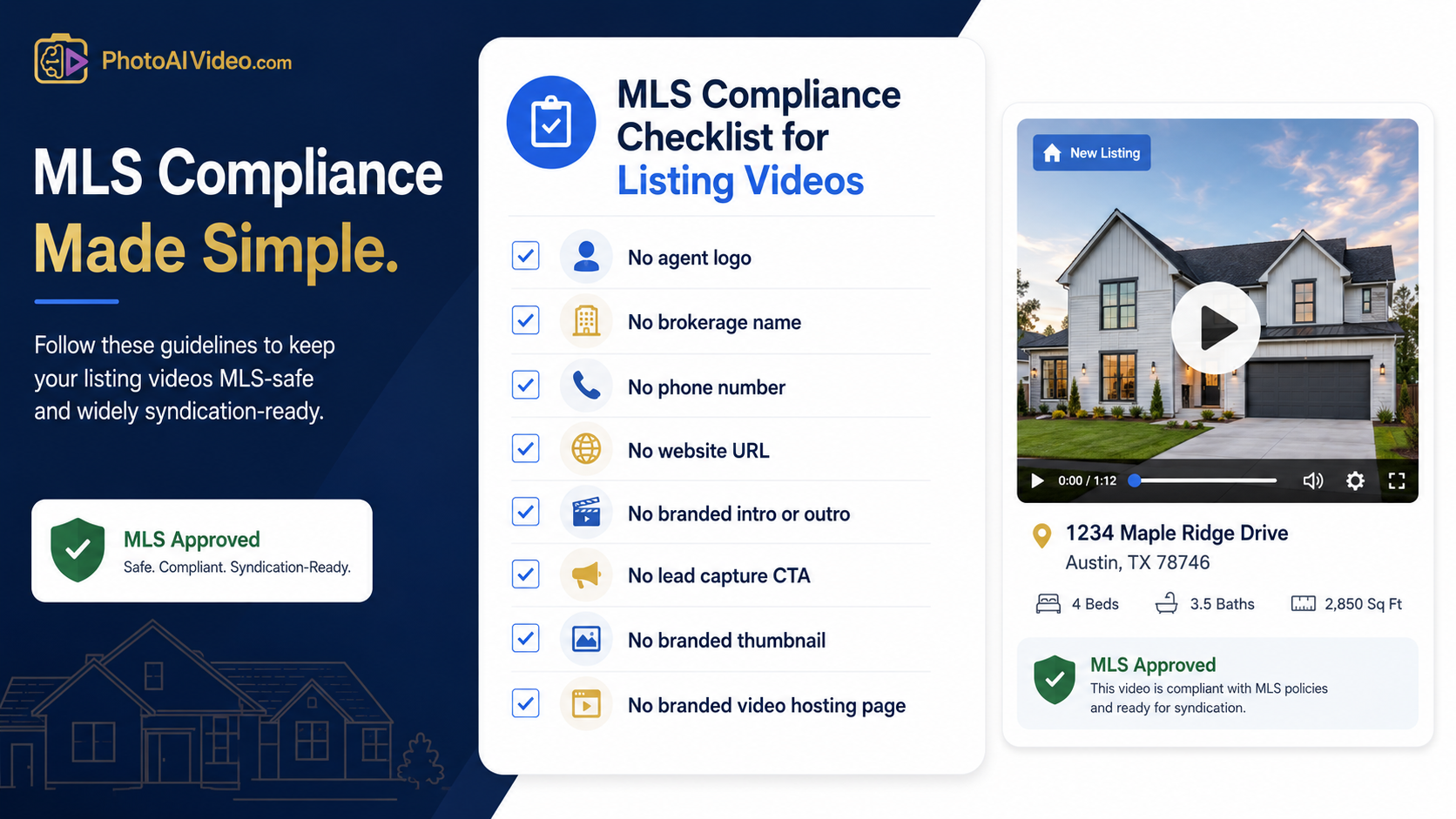
Before uploading any video to the MLS or linking it inside a listing, use this checklist.
Make sure the video does not include:
Make sure the audio does not include:
Make sure the hosting page does not show:
This is why standard YouTube or Vimeo links can sometimes create issues. Even if the video file itself is clean, the surrounding video page may still display branding.
For MLS-safe use, keep the video and the viewing experience as neutral as possible.
MLS compliant real estate media software is useful for more than just individual agents.
Individual Realtors can use PhotoAIVideo to create faster listing videos from photos, reduce editing time, and avoid last-minute MLS compliance problems.
This is especially useful for agents who want better listing media but do not want to hire a videographer for every property.
Real estate photographers can use AI video tools to offer video as an upsell. If a photographer already captures listing photos, they can turn those photos into video content and deliver both branded and unbranded versions to their agent clients.
This can create a new revenue stream without adding a full video shoot.
Brokerages can use MLS-safe video workflows to create more consistent listing media across teams. This helps reduce mistakes, protect brand standards, and give agents a repeatable process for creating compliant listing assets.
Property managers can use unbranded listing videos for rental marketing, leasing pages, and property websites. Clean video assets can help renters understand the layout and features of a unit before scheduling a tour.
Teams can use branded videos for lead generation while keeping unbranded versions ready for listing distribution. This helps marketing coordinators, transaction coordinators, and listing managers stay organized.
Even experienced agents can make simple video compliance mistakes.
Here are some of the most common issues.
This is the classic mistake. The agent creates a beautiful branded video for social media, then accidentally uploads that version to the MLS.
The fix is to clearly label each file:
A video can be unbranded, but the thumbnail may still show the agent’s logo, photo, or brokerage name.
Always check the thumbnail before publishing.
If a video is hosted on a branded YouTube channel, Vimeo profile, or landing page, the page itself may include branding even if the video does not.
For MLS use, the full viewing experience matters.
A video may have no logos or text, but the voiceover may say the agent’s name, brokerage, phone number, or website.
That can still create an issue.
Look closely at the source images. Yard signs, agent flyers, brochures, refrigerator magnets, and branded materials can appear inside listing photos.
If those images are used in the video, the final video may no longer be unbranded.
Captions like “Call Zach today” or “Visit our website for a private showing” may be fine for social media, but they are not ideal for MLS-safe media.
Use neutral property-focused captions instead.
AI video tools are changing how real estate agents create listing content.
In the past, producing a property video usually required:
That process can still be valuable for luxury listings and high-end campaigns. But for everyday listings, agents need speed.
PhotoAIVideo makes it easier to create real estate videos from photos that agents already have. This gives Realtors a practical way to add motion, improve listing presentation, and create more marketing assets without starting from zero.
For MLS-friendly workflows, AI video is especially useful because it can help agents create clean, property-focused content quickly.
The result is a better listing media system:
The agents who build this system can market listings faster and more professionally.
Sellers want to know their home will be marketed well.
When a Realtor can show a complete listing media strategy, it creates confidence. Instead of saying, “We will upload photos to the MLS,” the agent can explain a stronger plan:
That sounds more modern, more professional, and more valuable.
MLS-friendly video software for Realtors helps agents deliver this without creating a complicated production process. It gives Realtors a repeatable way to create polished media while staying aware of compliance requirements.
This can help with:
In competitive listing appointments, better media can be the difference between looking average and looking prepared.
PhotoAIVideo is built for real estate professionals who want to create video content without overcomplicating the process.
Instead of starting with raw video footage, you can start with listing photos. That makes it easier to create video assets for more properties, more often.
For Realtors, this means:
For photographers, this means:
For brokerages, this means:
If your goal is to create MLS compliant unbranded property videos while still using branded content for promotion, PhotoAIVideo gives you a practical place to start.
MLS rules vary by board, brokerage, and region. Always confirm your specific media requirements with your local MLS before publishing listing videos.

MLS-friendly video software for Realtors is no longer just a nice extra. It is becoming an important part of modern listing media.
Agents need content that looks professional, moves fast, and works across different platforms. But they also need to avoid compliance mistakes that can delay a listing or create problems with the MLS.
PhotoAIVideo helps Realtors, photographers, teams, and brokerages create AI-generated listing videos from property photos. With the right workflow, you can create clean, MLS compliant unbranded property videos for MLS use and separate branded versions for social media, email marketing, ads, and seller promotion.
The best strategy is simple:
Use unbranded videos where compliance matters.
Use branded videos where promotion matters.
And use PhotoAIVideo to make the entire process faster, cleaner, and easier to repeat.


Compact, ready to go anywhere
Interchangeable lens that’s upgradeable
Dual 1-inch sensors for improved clarity and low light performance
Dynamic range and 6K 360° capture
360° photo resolution at 21MP

8K 360° video recording for ultra-detailed visuals.
4K single-lens mode for traditional wide-angle shots.
Invisible selfie stick effect for drone-like perspectives.
2.5-inch touchscreen with Gorilla Glass protection.
Waterproof up to 33ft for underwater shooting.

360° photo resolution in 23MP
Slim design at 24 mm thick
Built-in image stabilization for smooth video capture.
Internal 19GB storage for photo and video storage.
Wireless connectivity for remote control and sharing.

60MP 360° still images for high-resolution photography.
5.7K 360° video recording at 30fps.
2.25-inch touchscreen for intuitive control.
USB Type-C port for fast charging and data transfer.
MicroSD card slot for expandable storage.
.png)

.png)

Try it free. No credit card required. Instant set-up.







.svg)


.svg)