


.png)


If you're using AppFolio for property management, you already know the power of streamlined workflows. But are you fully optimizing your listings for conversions? If you haven’t added virtual tours yet—you’re leaving money on the table. 💸
In this post, you'll learn how adding virtual tours to your AppFolio listings boosts engagement, builds renter trust, and helps you lease faster. We'll cover how to do it in minutes, without coding, and why it’s the ultimate competitive edge for property managers in 2025. 🔥
In today’s rental market, renters shop with their eyes. If your listing looks average, they’ll scroll right past it. 😬 But if you include a virtual tour that lets them walk through the space—you instantly build trust and emotional buy-in.
Whether you're renting out apartments, duplexes, or single-family homes, virtual tours shorten the decision-making cycle. No more back-and-forth scheduling or cold leads. Just better-qualified applicants who are ready to lease.
👉 See how this works in Why Virtual Tours Are the Secret to High-Converting AppFolio Listings
In leasing, a "conversion" might mean:
Adding a tour directly impacts all of the above by creating a smoother, more confident renter experience.
Learn more in How Virtual Tours Help You Lease Properties Faster in AppFolio
Not all virtual tours are created equal. Choose one that matches your listing and workflow:
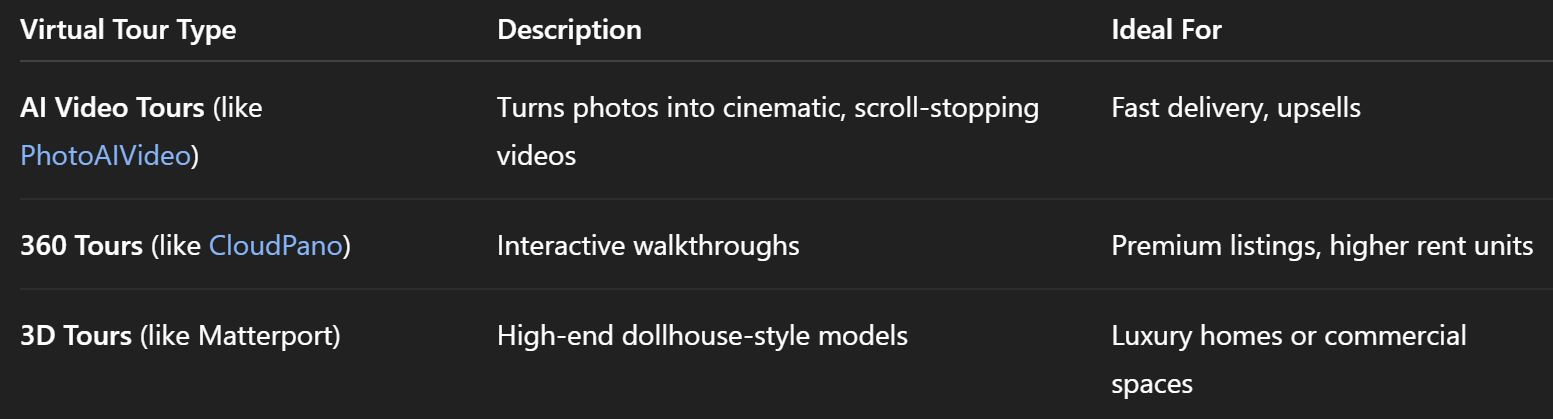
👉 Need help picking one? Check out Boost Rental Engagement: Best Way to Add 360 Tours to AppFolio
The best part? No code or developer needed.
Use a tool like PhotoAIVideo, CloudPano, or Matterport. Get the shareable link.
Open your listing’s edit screen and scroll to the “Virtual Tour Link” field.
Add the URL. Save. Done.
🔗 Need more help? Follow the full guide: Virtual Tours Made Simple: Add Them to AppFolio in Minutes
One user who switched to PhotoAIVideo reported:
“We started adding AI videos to every new listing. Within 30 days, our applications per listing increased by 22%. It’s the easiest upsell we’ve ever done.” — Sarah, Leasing Manager 🏢
Some platforms (like PhotoAIVideo) let you automate video creation using just your listing photos. Combine that with your AppFolio workflow, and you’ve got a lead-generating machine. 🤖
Explore AppFolio Virtual Tours: The Most Efficient Way to Add Them
Here’s why renters love virtual tours:
This results in faster conversions. Period.
Read Why Virtual Tours Work in AppFolio for more psychology-backed insights.
Tap into these strategic blog posts:
Adding a virtual tour is the single most effective change you can make to your AppFolio listings today.
✅ No developers
✅ No delays
✅ No expensive hardware
Just one link = more engagement + more conversions = leased faster.
🔥 Try PhotoAIVideo and make your first AI video tour
📎 Paste it into AppFolio
📈 Watch your conversions climb


Compact, ready to go anywhere
Interchangeable lens that’s upgradeable
Dual 1-inch sensors for improved clarity and low light performance
Dynamic range and 6K 360° capture
360° photo resolution at 21MP

8K 360° video recording for ultra-detailed visuals.
4K single-lens mode for traditional wide-angle shots.
Invisible selfie stick effect for drone-like perspectives.
2.5-inch touchscreen with Gorilla Glass protection.
Waterproof up to 33ft for underwater shooting.

360° photo resolution in 23MP
Slim design at 24 mm thick
Built-in image stabilization for smooth video capture.
Internal 19GB storage for photo and video storage.
Wireless connectivity for remote control and sharing.

60MP 360° still images for high-resolution photography.
5.7K 360° video recording at 30fps.
2.25-inch touchscreen for intuitive control.
USB Type-C port for fast charging and data transfer.
MicroSD card slot for expandable storage.
.png)

.png)

Try it free. No credit card required. Instant set-up.







.svg)


.svg)