


.png)


In today’s fast-paced rental market, grabbing attention online isn’t just a luxury — it’s a necessity. With AppFolio as the backbone of many property managers’ leasing operations, one question consistently comes up: Should I stick to photos, or level up to virtual tours? 🤔
Let’s break down what actually converts better in AppFolio listings — static images or immersive 360° virtual tours — and how to leverage this for faster leasing results.
Before diving into features, let’s look at the behavior of your prospective renters.
👉 This leads us to ask: Are your listings designed to convert curious browsers into booked showings and signed leases?
You can absolutely use high-quality photos to support your listings. But when every other listing does the same, you risk getting lost in the shuffle.
When you embed a 360 virtual tour into your AppFolio listing, you're doing more than just adding flair — you're creating an interactive experience that builds trust and speeds up decision-making.
✅ Increased Time-On-Page
✅ Higher Conversion Rates for Inquiries
✅ Fewer Unqualified Leads
✅ Faster Leasing Cycles
According to a study by Zillow, listings with virtual tours received 49% more engagement. On platforms like AppFolio, where renters are actively searching, this advantage multiplies. 🔥
🧭 Learn how to set this up in our Step-by-Step Guide: Embedding Virtual Tour Links in AppFolio
Want to really stand out?
Use a video walkthrough or an AI-generated cinematic reel to showcase the highlights of your tour. Then pair that with your 360 view. 🎬
Learn more in:
➡️ How Real Estate Agents Can Add Video Tours to AppFolio Listings
➡️ Create Better AppFolio Listings with Engaging Real Estate Video Tours
Use virtual tours when:
And if you're managing new construction rentals or high-end homes, this becomes even more powerful. Learn more in Using 3D Virtual Tours to Showcase New Construction Rentals on AppFolio
Need help? Check out
➡️ CloudPano + AppFolio: The Ultimate Virtual Tour Integration Guide
➡️ Step-by-Step Guide: Embedding CloudPano Tours in AppFolio
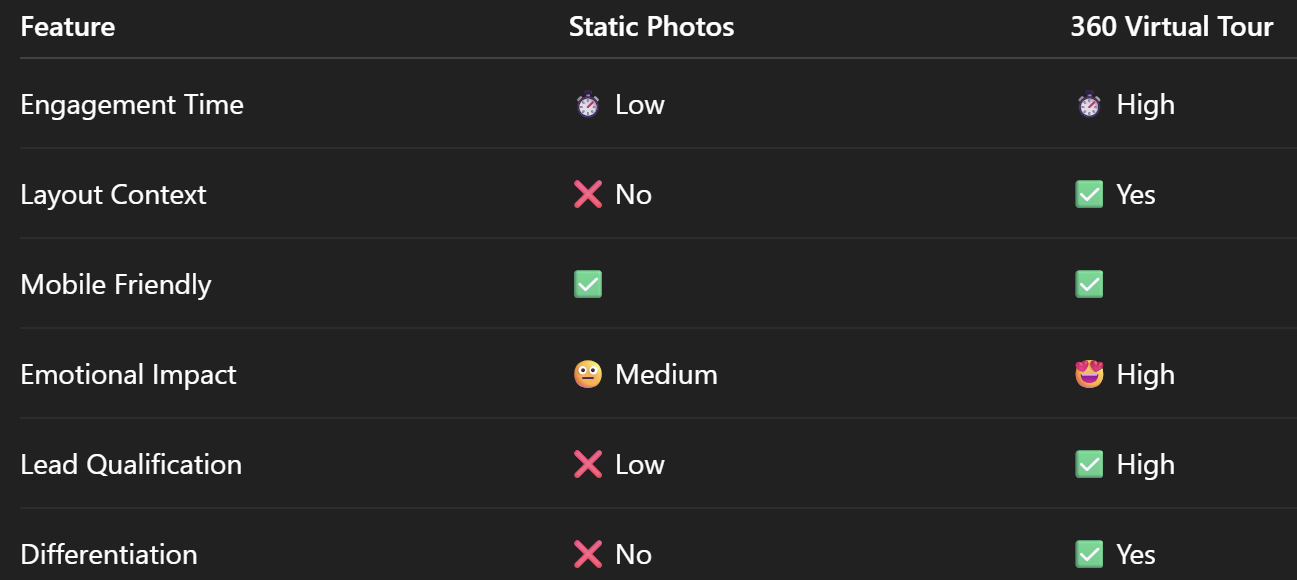
Let’s say two listings are otherwise identical — one has beautiful photos, the other adds a 360 tour. Which gets more clicks and applications?
Every. Single. Time.
🏆 The virtual tour wins — because it builds trust, shows layout, and answers questions before they're even asked.
Want to boost leasing results immediately?
Check out Boost Rental Listings for AppFolio: Add 360 Virtual Tours That Convert
You don’t need to ditch your photos — in fact, use them strategically alongside your tours. But if you’re not yet using 360 virtual experiences in AppFolio, you’re leaving conversions on the table.
Start with your next listing and embed a tour link today.
💡 Need a tutorial? Visit How to Add a Virtual Tour Link to Your AppFolio Listing
✅ Add a tour
✅ Add a video
✅ Add a cinematic touch
✅ Stand out, convert more, lease faster


Compact, ready to go anywhere
Interchangeable lens that’s upgradeable
Dual 1-inch sensors for improved clarity and low light performance
Dynamic range and 6K 360° capture
360° photo resolution at 21MP

8K 360° video recording for ultra-detailed visuals.
4K single-lens mode for traditional wide-angle shots.
Invisible selfie stick effect for drone-like perspectives.
2.5-inch touchscreen with Gorilla Glass protection.
Waterproof up to 33ft for underwater shooting.

360° photo resolution in 23MP
Slim design at 24 mm thick
Built-in image stabilization for smooth video capture.
Internal 19GB storage for photo and video storage.
Wireless connectivity for remote control and sharing.

60MP 360° still images for high-resolution photography.
5.7K 360° video recording at 30fps.
2.25-inch touchscreen for intuitive control.
USB Type-C port for fast charging and data transfer.
MicroSD card slot for expandable storage.
.png)

.png)

Try it free. No credit card required. Instant set-up.







.svg)


.svg)