


.png)


The first tour you rebuild on a new platform is almost always the slowest one — you're learning the interface, second-guessing decisions, and moving carefully because everything feels unfamiliar. That's normal, and it's also temporary. This article covers practical ways to rebuild virtual tour content more efficiently once you're past that initial learning curve, so your second, tenth, and fiftieth tour don't take nearly as long as your first.

It's worth setting expectations clearly here: your first rebuilt tour is not a fair representation of how long the rest of your library will take. You're simultaneously learning a new interface and doing the actual rebuild work, which naturally takes longer than either task alone would. Don't judge your overall migration timeline based on how long the first tour took — the tips below are specifically about what changes once that initial learning curve is behind you.
Before diving into your first tour, spend a bit of time deciding on a consistent structure you'll reuse across every tour: a standard order for rooms, a consistent naming convention for scenes, and a default set of branding elements you'll apply every time. Having this decided upfront, rather than figuring it out tour by tour, removes a surprising amount of decision fatigue that otherwise slows down each individual rebuild.
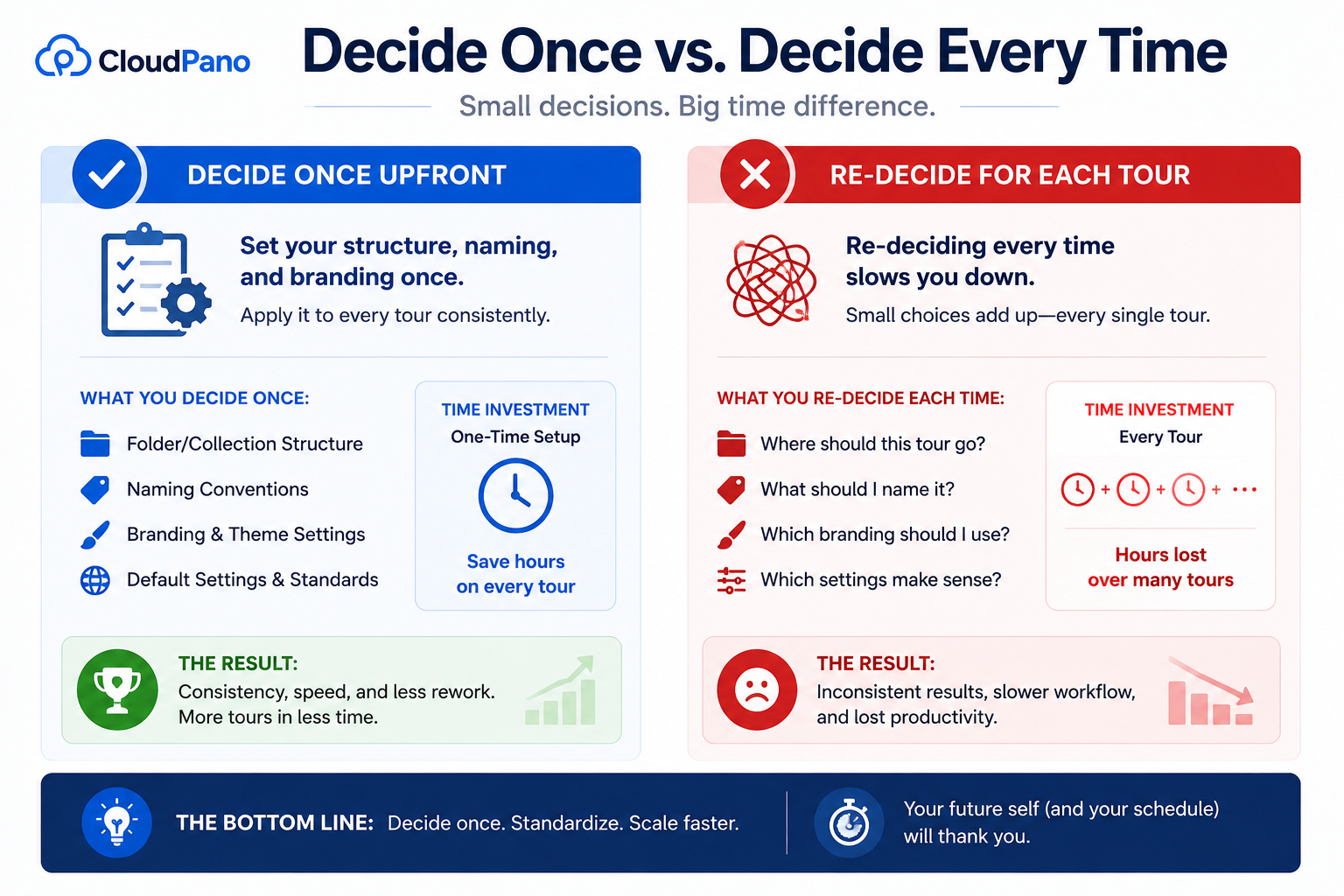
This is really about turning what could be dozens of small, one-off decisions into a single decision made once, then applied repeatedly. Consistency also makes your tour library easier to maintain and hand off to a team member later, which is a secondary benefit beyond just speed.
Virtual tour hotspots — the clickable points that let viewers navigate between scenes or reveal additional information — are one of the more time-consuming elements to place carefully, since they need to be positioned accurately within each panoramic scene. A few habits speed this up meaningfully: place navigation hotspots first, in a single pass across all scenes, before adding any informational or media hotspots, rather than trying to do both at once per scene. This lets you get the core navigational structure working end to end before layering in secondary detail.

It's also worth developing a mental template for where hotspots typically go in a given room type — a bedroom might reliably have a doorway hotspot in roughly the same relative position across many similar rooms — which lets you place them faster with less per-scene deliberation, especially once you've rebuilt a handful of similar spaces.
If you're specifically working through a backlog of tours that need to move over, prioritizing matters as much as technique. When you're working to recreate Matterport tour content on a new platform, start with your highest-traffic, most business-critical properties first — not because they're necessarily easier, but because getting your most important content live sooner reduces the pressure on your timeline and lets you defer lower-priority rebuilds to a later, less rushed pass.
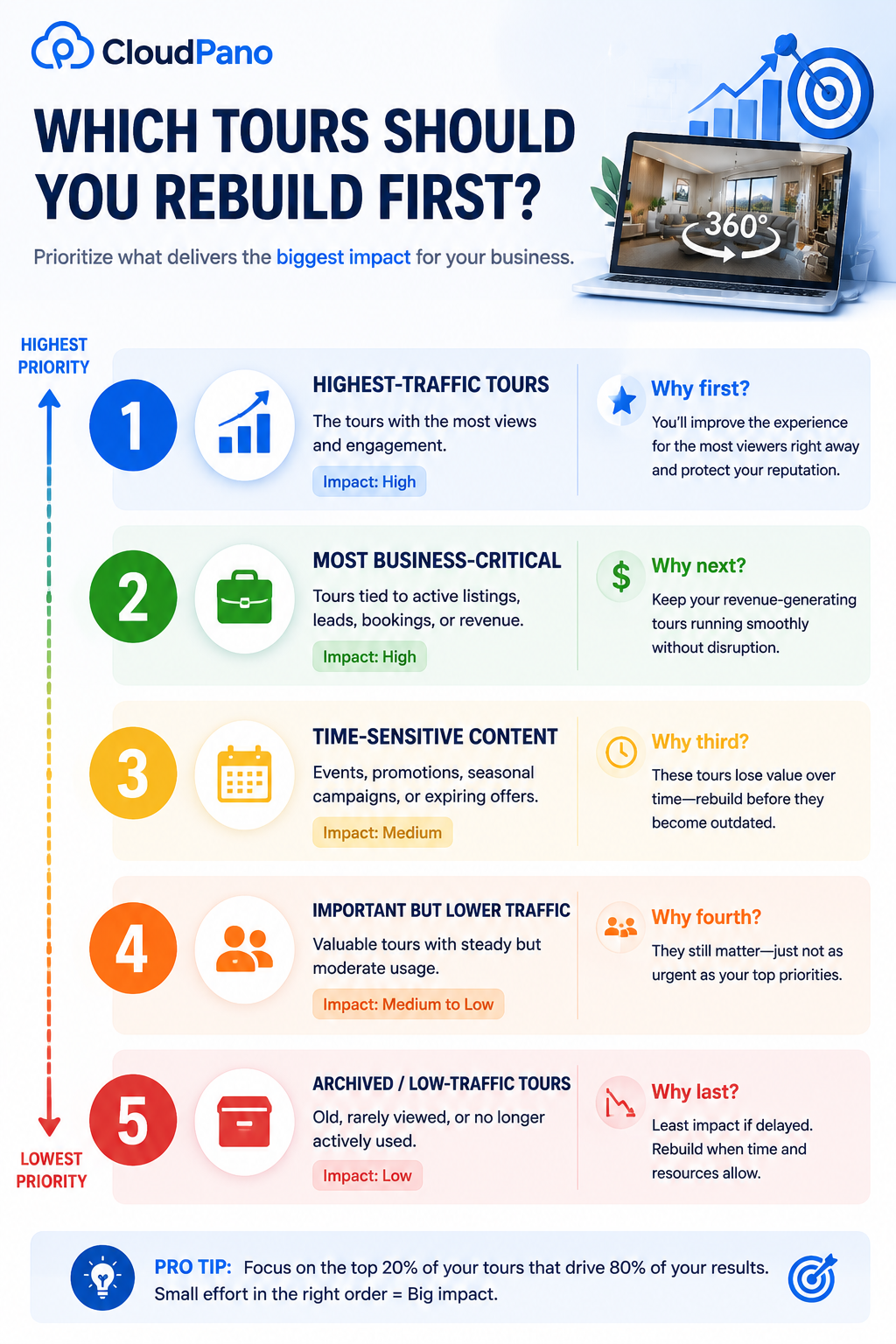
This pairs naturally with a client-safe migration sequence (covered in more depth in our migration checklist) — rebuilding your most visible tours first serves both the speed goal and the client-continuity goal simultaneously, rather than treating them as separate concerns.
It's worth being specific about what "prioritize" actually means in practice here. A property that's actively being shown to buyers or clients this week should come before a similar property that's simply sitting in your archive with no current traffic, even if the archived one happens to be next in your internal queue by date. Working to recreate Matterport tour content in the order your business actually needs it, rather than in whatever order feels administratively convenient, is what turns this from a purely technical exercise into one that actually protects your business while you rebuild.
Another habit worth adopting once you're rebuilding more than a handful of tours: rather than completing one tour entirely before moving to the next, consider batching similar tasks across multiple tours at once. Upload all your raw material for several properties first, then do a pass placing navigation hotspots across all of them, then a pass on branding, then a pass on informational hotspots. This reduces the mental overhead of constantly switching between different types of tasks, since your brain stays in one mode (navigation logic, or branding decisions, or detail work) for longer stretches rather than context-switching every few minutes.
This won't suit every workflow or every team structure, and some people genuinely prefer finishing one tour completely before starting the next, which is a perfectly reasonable alternative if it fits how you think. But if you haven't tried batching similar tasks across multiple tours, it's worth testing on a small batch to see whether it speeds up your particular process — the time savings from reduced context-switching can be substantial for some people and negligible for others, and the only way to know is to try it against your own workflow.
Speed gains compound the more deliberately you refine your virtual tour workflow rather than just repeating the same process by habit. After your first few tours, take a few minutes to note what actually slowed you down — was it hotspot placement, branding application, finding the right settings menu — and specifically address that friction point before your next rebuild, rather than assuming things will naturally get faster on their own.
Keeping a short, running list of shortcuts or settings you've discovered (a specific menu location, a keyboard shortcut, a template you've built) turns individual learning into a compounding advantage across your whole remaining library, rather than re-learning small efficiencies tour by tour.
On G2's virtual tour software category page, reviewers who've rebuilt a tour library after a platform switch frequently mention that per-tour time dropped substantially after the first handful, echoing the learning-curve pattern discussed above.
Community discussions on r/realtors occasionally include specific workflow tips from agents managing tour rebuilds themselves, and are worth searching for practical, field-tested shortcuts beyond what's covered in official documentation.
"Won't rushing to rebuild faster mean lower-quality tours?"
Not if the speed comes from removing decision fatigue and repeated friction rather than from skipping steps. The techniques above are about doing the same quality work with less wasted deliberation, not about cutting corners on the finished result. A consistent structure and a refined workflow should make tours more consistent, if anything, not less polished.
"What if my tours are all different enough that a repeatable structure doesn't really apply?"
Even meaningfully different properties usually share more structural similarity than it first appears — most residential properties, for instance, share a similar general room-type vocabulary even if the specific layout varies. The repeatable structure doesn't need to be rigid; it just needs to give you a starting default you can adjust per tour, rather than starting from a completely blank slate each time.

Rebuilding a tour library after switching platforms gets significantly faster once you move past the first tour or two, especially if you're deliberate about building a repeatable structure, streamlining hotspot placement, prioritizing by business impact, and actively refining your process rather than just repeating it. None of this requires cutting corners — it's about removing wasted friction, not the underlying quality work.
If you're earlier in the process and haven't started rebuilding yet, our migration checklist covers how to sequence this work around client continuity, and our complete migration guide covers the broader process end to end. Combined with the workflow habits above, these three pieces cover the planning, the sequencing, and the hands-on execution — everything most people actually need to get through a rebuild efficiently rather than treating it as one long, undifferentiated task.


Compact, ready to go anywhere
Interchangeable lens that’s upgradeable
Dual 1-inch sensors for improved clarity and low light performance
Dynamic range and 6K 360° capture
360° photo resolution at 21MP

8K 360° video recording for ultra-detailed visuals.
4K single-lens mode for traditional wide-angle shots.
Invisible selfie stick effect for drone-like perspectives.
2.5-inch touchscreen with Gorilla Glass protection.
Waterproof up to 33ft for underwater shooting.

360° photo resolution in 23MP
Slim design at 24 mm thick
Built-in image stabilization for smooth video capture.
Internal 19GB storage for photo and video storage.
Wireless connectivity for remote control and sharing.

60MP 360° still images for high-resolution photography.
5.7K 360° video recording at 30fps.
2.25-inch touchscreen for intuitive control.
USB Type-C port for fast charging and data transfer.
MicroSD card slot for expandable storage.
.png)

.png)

Try it free. No credit card required. Instant set-up.






.svg)


.svg)