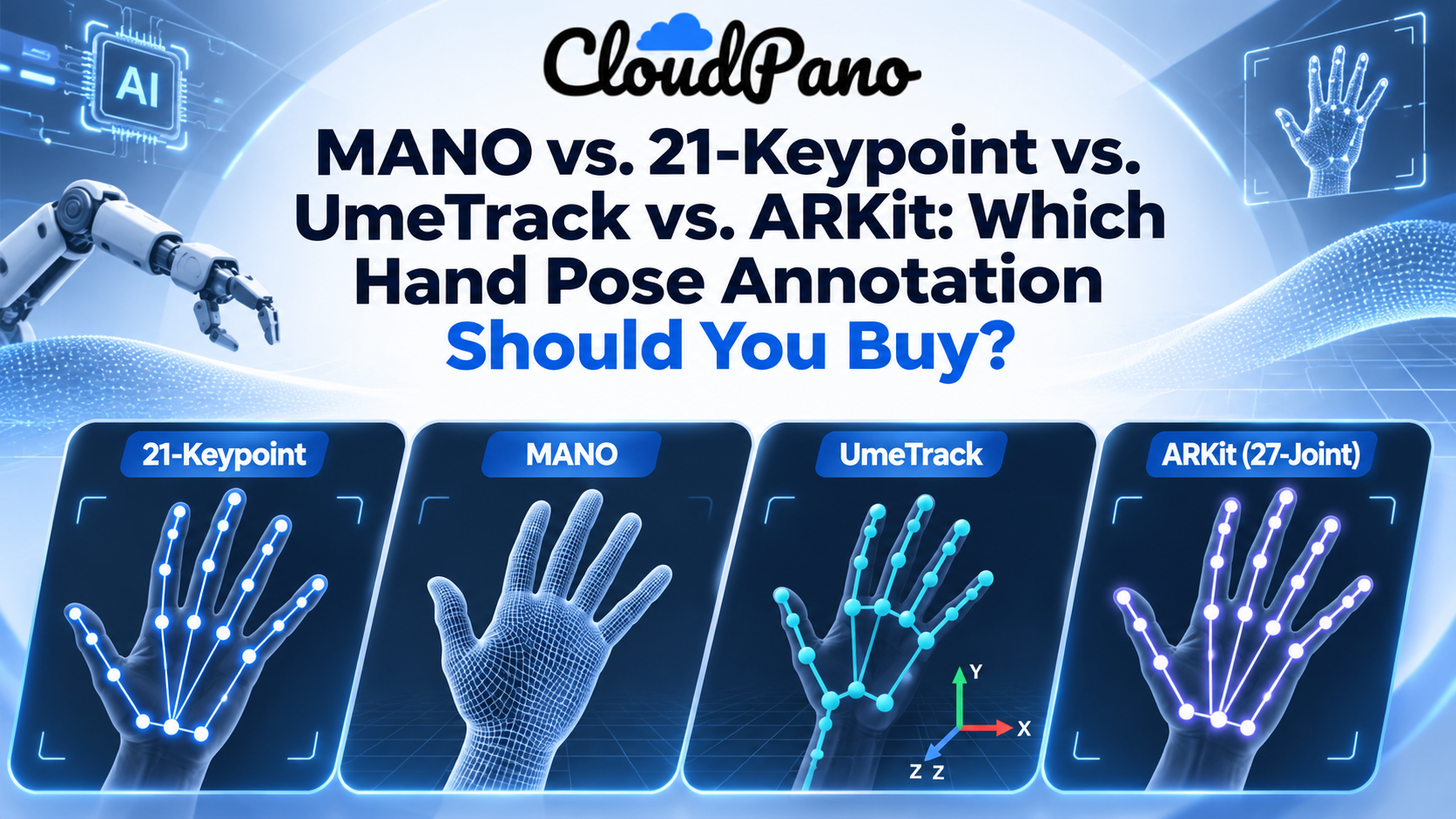
MANO, 21-keypoint, UmeTrack and ARKit are four ways to describe a hand. 21-keypoint is the simplest and most portable: 3D joint positions per hand. MANO adds a fitted mesh and pose parameters but needs a commercial license. UmeTrack is Meta's per-person skeleton, used in HOT3D. ARKit is Apple's visionOS skeleton. Most robot learning teams should buy 21-keypoint first.
Apple's EgoDex dataset holds 829 hours of egocentric video with paired 3D hand and finger tracking, yet its repository lists the data under CC BY-NC-ND terms, so a commercial robotics team can't train a product on it. Teams that buy or commission their own hand data then hit a second question before the first frame is labeled: which hand pose format should the annotations use?
That choice decides what your model can learn, how hard retargeting to a robot hand will be, and which licenses you have to sign. Hand pose is one layer of real-world video data, and it is the layer most tied to dexterous manipulation. This guide compares the four formats buyers usually see in a hand pose dataset annotation spec: MANO, 21-keypoint, UmeTrack and ARKit.
Hand pose dataset annotation is the labeling of where each joint of a hand is, frame by frame, in 2D image coordinates or in 3D space. The format is the rulebook for that label: how many joints, which joints, what coordinate frame, and whether you also get a surface mesh.
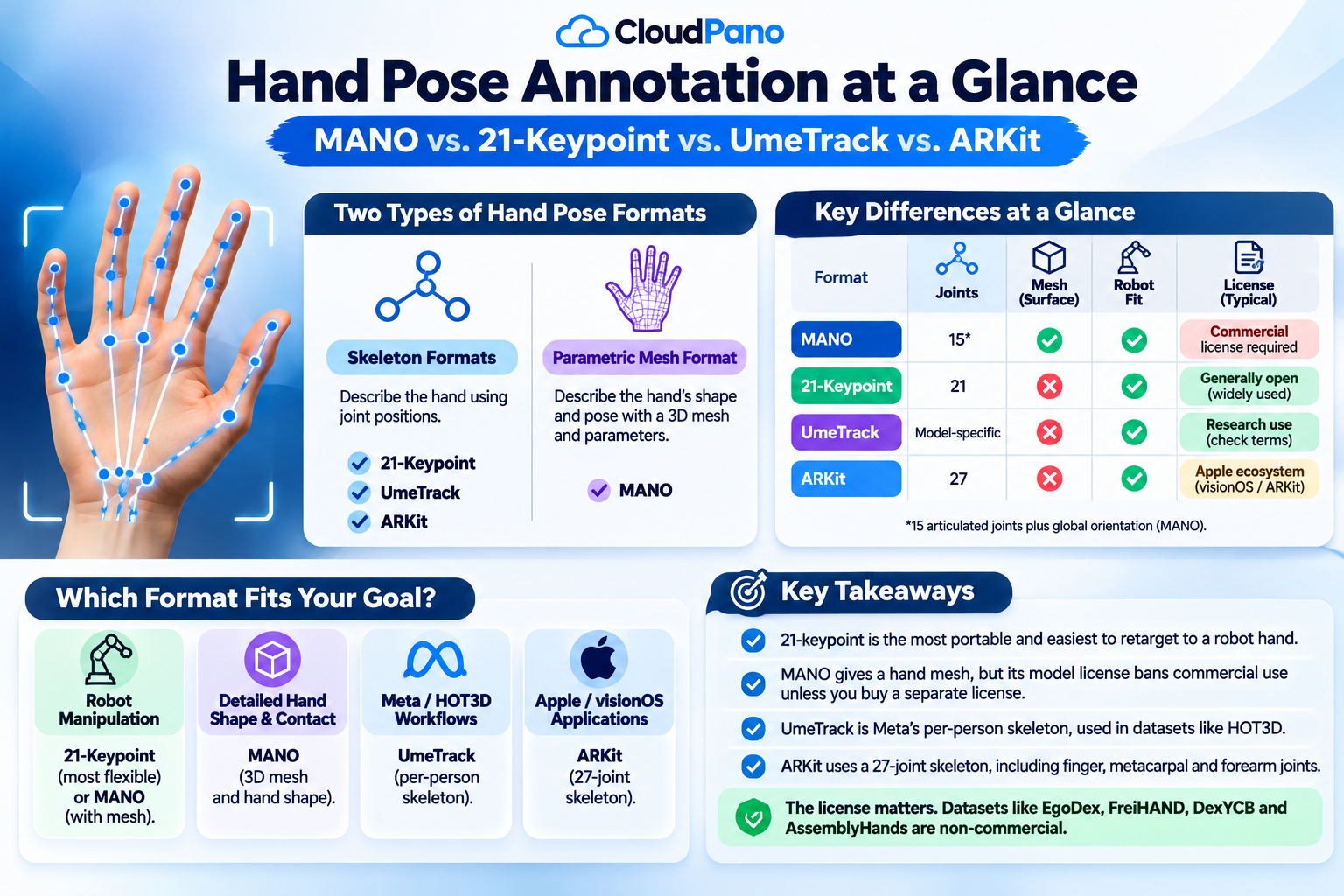
The four formats fall into two families:
That split matters more than any single joint count. A skeleton tells a policy where the fingertips are. A mesh tells it where the hand surface touches an object.
The 21-keypoint format labels the wrist plus four points on each of the five fingers, giving 21 points per hand. It is the most common hand pose layout in computer vision and the easiest to move between tools.
Apple's own 2D hand pose API uses exactly this layout. Vision's VNHumanHandPoseObservation joint list names a wrist point and, for each finger, a tip plus three joints (DIP, PIP and MCP for fingers; IP, MP and CMC for the thumb). The ARCTIC benchmark scores hand accuracy as the distance between 21 predicted and ground-truth joints for each hand.
What to check when a vendor offers 21-keypoint data:
The limit is that 21 points carry no surface. You know where the knuckles are, but not how thick the fingers are or where the palm presses.
MANO is a parametric 3D hand model from the Max Planck Institute, published in ACM Transactions on Graphics in 2017 and learned from about 1,000 high-resolution 3D scans of 31 subjects. Instead of storing joint positions, a MANO label stores parameters that pose and shape a full hand mesh.
The paper states that MANO contains 15 joints plus the global orientation. Pose lives in a compact PCA space; the authors found 6 components per hand cover most common poses. The widely used manopth layer takes 10 shape values per hand. From those parameters you can regenerate both the mesh and a 21-joint skeleton, which is why many datasets ship MANO alongside keypoints.
MANO's strengths:
MANO's catch is licensing. The MANO license prohibits commercial use and points companies to a separate commercial license from Max Planck. If your annotations are MANO parameters, the model files you need to turn them into a mesh fall under that license. ARCTIC's authors also note that MANO has no wrist articulation, so they used a body model for the wrist.
UmeTrack is Meta's hand tracking system and hand model, described in the paper UmeTrack: Unified multi-view end-to-end hand tracking for VR. It predicts 3D hand pose directly in world space from multiple headset cameras, which is how VR headsets see hands.
You will mostly meet UmeTrack through HOT3D, Meta's egocentric hand-object dataset with over 833 minutes and 3.7M+ images from 19 people handling 33 objects. In HOT3D:
Buy UmeTrack-format labels when your pipeline already runs on Meta's tooling or Quest and Aria hardware. Outside that ecosystem, fewer open tools read it, so plan to convert.
ARKit hand tracking is Apple's skeleton for hands tracked on Apple Vision Pro. The HandSkeleton.JointName list is available on visionOS and names 27 joints per hand: forearm arm, forearm wrist and wrist, four thumb joints, and five joints on each other finger, including a metacarpal joint.
Those extra metacarpal and forearm joints are the main difference from 21-keypoint data. They describe palm arch and wrist roll more completely.
EgoDex is the best-known ARKit-format dataset. Its repository says the skeletal poses were estimated using ARKit on visionOS and recorded at 30 Hz with 1080p video. Each joint can carry a confidence between 0 and 1, where 0 means fully occluded or not detected. That confidence field is useful, but remember the labels are an on-device model's estimate, not motion-capture ground truth.
One naming trap: Apple's iOS Vision framework uses a 2D 21-point hand layout, while visionOS ARKit uses the 27-joint 3D skeleton. "ARKit format" in a spec should mean the visionOS skeleton. Ask which one you are getting.
What is hand pose dataset annotation?
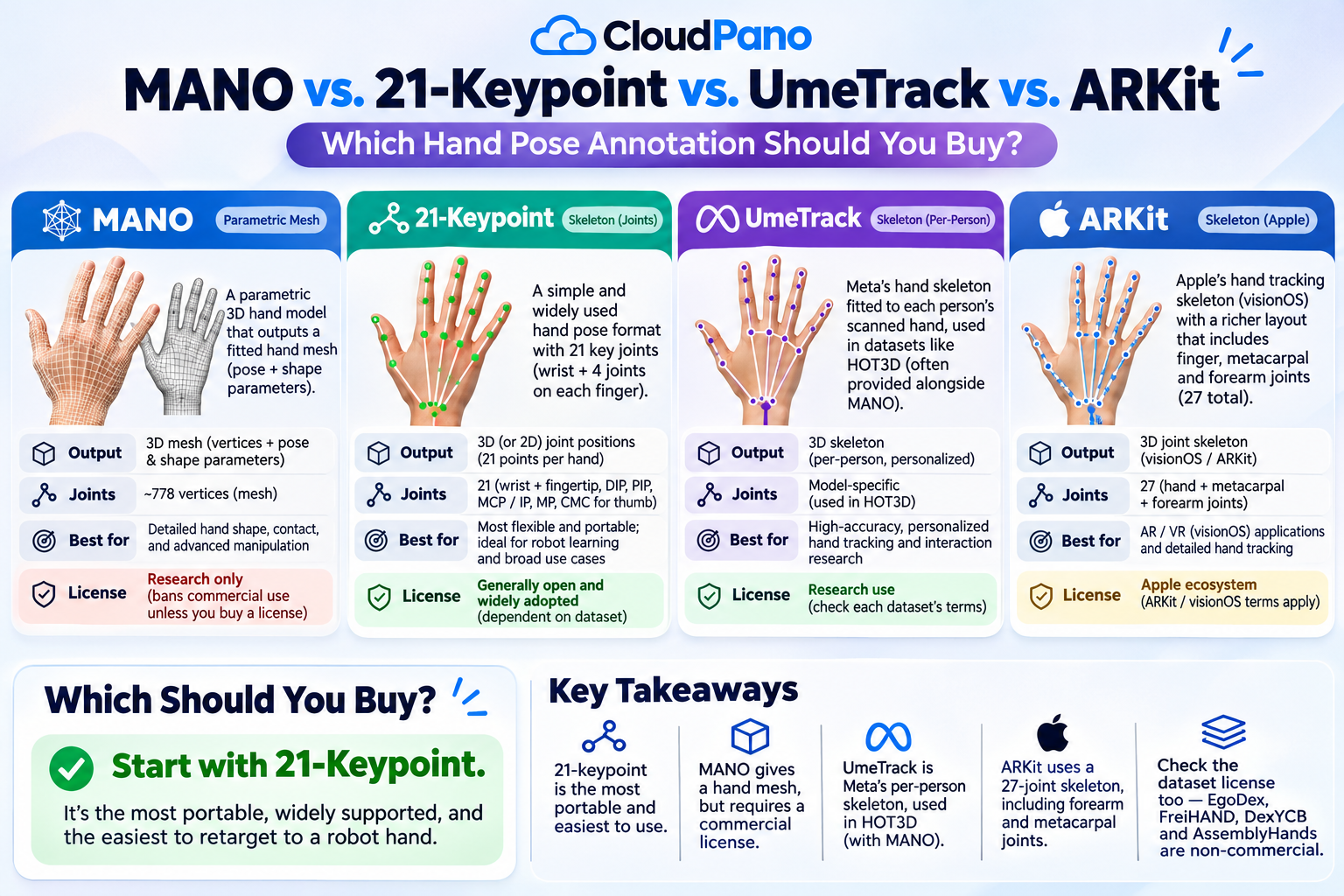
The short version: 21-keypoint for portability, MANO for meshes and contact, UmeTrack for Meta pipelines, ARKit for Apple pipelines.
For most robot learning work, buy 3D 21-keypoint labels in meters with per-joint visibility, and add MANO only if you need contact surfaces. Keypoints map cleanly onto robot hand kinematics, and you can fit MANO later if you hold a license.
Match the format to the job:
A perfect format is useless if the license blocks your use. Many popular hand datasets are research-only, and the format choice can add a second license on top.
For a wider view of who labels what, see our guide to object interaction datasets.
Firsthand ships hand pose as 21 keypoints on each of two hands, in 3D meters, in the head-camera frame, with a per-joint visibility flag and contact events on grasp and release. That is the layout in our annotation schema documentation, stored as hand_joints [T, 2, 21, 3] and delivered in RLDS, LeRobot, WebDataset, HDF5, zarr or Rerun .rrd.
What we can't do, stated plainly:
If 3D 21-keypoint hands fit your model, our hand-object interaction video data collection pairs that hand pose with depth, contact labels and a buyer-owned license.
Pick the format your model consumes, then check the license twice. For most robotics teams that means 3D 21-keypoint hands with visibility flags, plus MANO only when you need surfaces and have a commercial MANO license. UmeTrack and ARKit make sense when your product runs on Meta or Apple hardware. Whatever you choose, get the joint order, coordinate frame and units in writing before the first batch ships.
MANO is a parametric 3D hand model from the Max Planck Institute, learned from about 1,000 high-resolution scans of 31 people. Instead of listing joint positions, it uses pose and shape parameters to generate a full hand mesh. Its model license allows research use; companies need a separate commercial license.
In robotics, MANO is used to label human hands in demonstration data as a mesh, not just a skeleton. That lets teams reason about where fingers touch objects during a grasp. Datasets such as ARCTIC and HOT3D use MANO, and the parameters can be turned into a 21-joint skeleton for retargeting to robot hands.
Pose estimation is predicting the position of a body's or hand's joints from images or video. For hands, models output keypoints, such as the common 21-point layout, or the parameters of a hand model like MANO. Annotated hand pose datasets are what those models learn from and are tested against.
A hand pose is the configuration of a hand at one moment: where the wrist sits and how each finger joint is bent. In datasets it is stored as joint positions, joint transforms, or model parameters. 21-keypoint, UmeTrack, ARKit and MANO are four different ways to write that pose down.
Dexterous manipulation means handling objects with fine finger control, such as tying shoelaces or turning a key, rather than a simple open-and-close grip. Robots learn it partly from human demonstrations, which is why a dexterous manipulation dataset needs accurate 3D hand pose, ideally with visibility flags and contact events.


Compact, ready to go anywhere
Interchangeable lens that’s upgradeable
Dual 1-inch sensors for improved clarity and low light performance
Dynamic range and 6K 360° capture
360° photo resolution at 21MP

8K 360° video recording for ultra-detailed visuals.
4K single-lens mode for traditional wide-angle shots.
Invisible selfie stick effect for drone-like perspectives.
2.5-inch touchscreen with Gorilla Glass protection.
Waterproof up to 33ft for underwater shooting.

360° photo resolution in 23MP
Slim design at 24 mm thick
Built-in image stabilization for smooth video capture.
Internal 19GB storage for photo and video storage.
Wireless connectivity for remote control and sharing.

60MP 360° still images for high-resolution photography.
5.7K 360° video recording at 30fps.
2.25-inch touchscreen for intuitive control.
USB Type-C port for fast charging and data transfer.
MicroSD card slot for expandable storage.


Try it free. No credit card required. Instant set-up.