Object Interaction Datasets for CV and Robotics

CloudPano
October 12, 2026
•
5 min read
Share this post

What is an object interaction dataset, and which ones can computer vision and robotics teams use?

An object interaction dataset is video or sensor data showing hands touching, grasping, moving and using objects, labeled so a model can learn from it. Computer vision teams use it to detect hands, objects and actions. Robotics teams use it to teach manipulation. Popular open sets include EPIC-KITCHENS, HOI4D and EgoDex, but most carry non-commercial licenses.

Key Takeaways

  • Object interaction data captures hands touching, grasping, moving and using real objects, plus labels that explain what happened.
  • Computer vision uses it for hand, object and action recognition; robotics uses it to learn grasping and manipulation.
  • Open datasets range from EPIC-KITCHENS-100 (100 hours, 90,000 actions) to EgoDex (829 hours with 3D hand tracking).
  • EPIC-KITCHENS, HOI4D, DexYCB, ARCTIC and EgoDex all restrict commercial use under their published terms.
  • Check the view, the sensors, the labels and the license before you pick a dataset or commission new data.

Object Interaction Datasets for CV and Robotics

A robot that can see a mug still has to learn how to pick it up. That gap is why teams go looking for an object interaction dataset: footage of real hands reaching for, grasping, turning and using everyday things. Apple's EgoDex alone packs 829 hours of hands-on video of people doing 194 tabletop tasks, from tying shoelaces to folding laundry.

This guide explains what object interaction data is, how computer vision and robotics teams use it, which open datasets are worth knowing, and what to check before you train a commercial model on any of them.

What is an object interaction dataset?

An object interaction dataset is a collection of video or sensor recordings that show people (usually their hands) touching, moving and using objects, plus labels that describe what happened. In plain terms, it is a record of "hand meets thing" that a model can learn from.

The recordings can be ordinary RGB video, depth (RGB-D) video, or multi-camera captures. The labels vary by dataset, but they usually answer some of these questions:
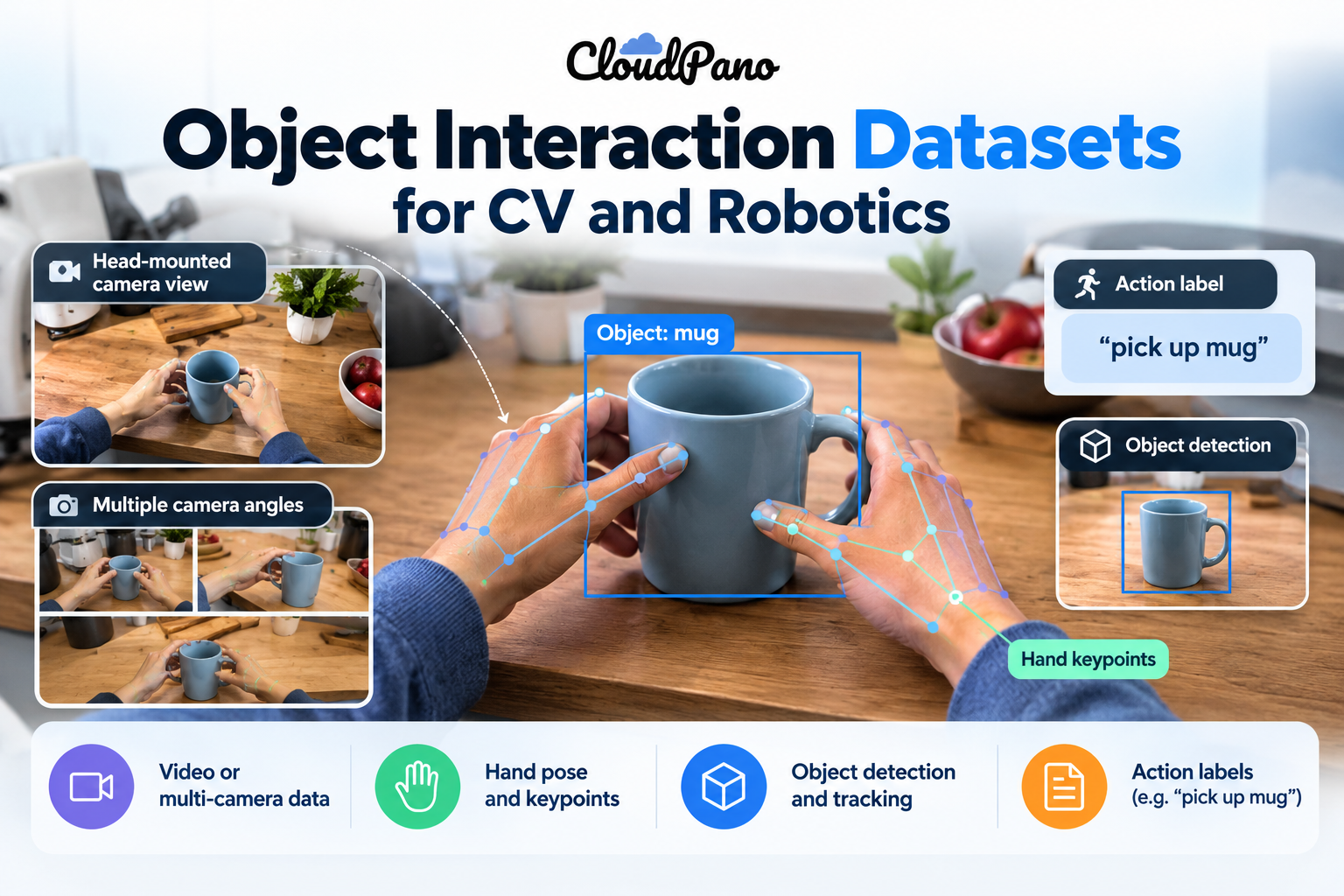
  • What action happened? For example "open drawer" or "pour water", often as a verb plus a noun.
  • Where are the hands? 2D keypoints or full 3D hand pose, sometimes finger by finger.
  • Where is the object? Bounding boxes, segmentation masks, or a 6D object pose (position plus rotation).
  • When did contact happen? The moment a grasp starts and ends.

Why do computer vision and robotics need object interaction data?

Both fields need to understand how hands and objects move together, and most general image datasets don't show that. Object interaction data gives models many examples of grasps, tool use and object state changes in real settings.

For computer vision, it trains models to detect hands and objects, recognize actions, estimate 3D hand pose and predict what someone will do next. The Ego4D benchmark suite, for example, includes a dedicated Hand + Object Interaction track alongside its other benchmarks.

For robotics, it is a source of human demonstrations. A robot learning to grasp benefits from seeing how people place their fingers, how hard they grip and how objects move in response. DexYCB, for instance, includes a robotics-relevant task: generating safe robot grasps for human-to-robot object handover.

Human video doesn't replace robot data, though. It is one ingredient. Our guide to what humanoid robots actually need explains how human video, teleoperation and simulation fit together.

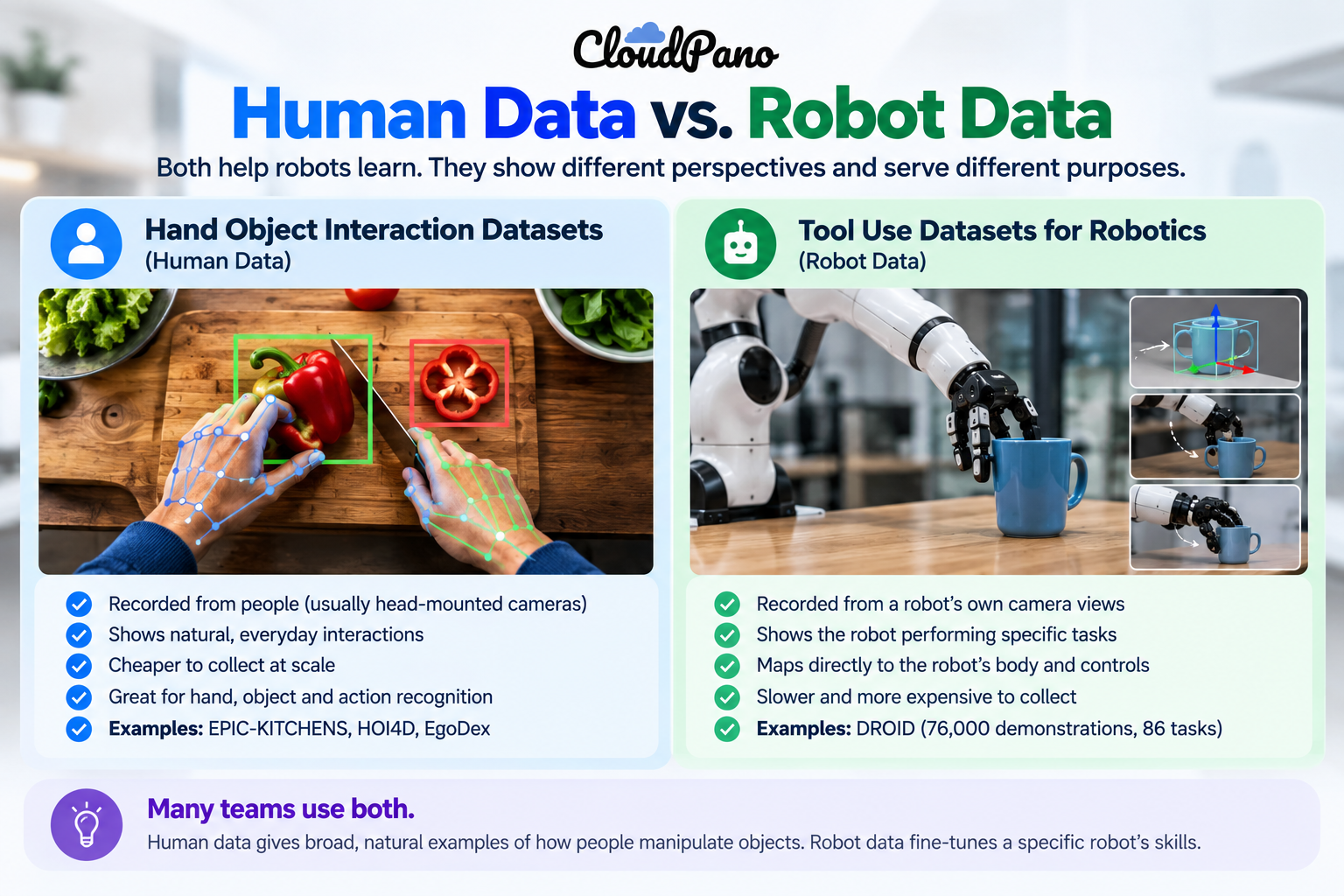
What's the difference between a hand object interaction dataset and a tool use dataset for robotics?

A hand object interaction dataset is recorded from people, while a tool use dataset for robotics is usually recorded from robots. The first teaches what manipulation looks like; the second shows a specific robot doing it.

  • Hand object interaction datasets capture human hands on real objects, often from a head-mounted camera. They are cheaper to collect at scale and show natural, varied behavior. Examples: EPIC-KITCHENS, HOI4D, EgoDex.
  • Robot manipulation datasets capture a robot arm's own camera views and joint actions. They map directly to a robot's body but are slower to collect. Example: DROID, which has 76,000 demonstration trajectories (350 hours) on a Franka Panda arm across 564 scenes and 86 tasks.

Many teams use both: human data for breadth, robot data to fine-tune a specific embodiment.
‍

Which object interaction datasets are most widely used?

Seven datasets come up again and again. Each has a different strength, and most restrict commercial use.

  • EPIC-KITCHENS-100: 100 hours of head-mounted video in 45 kitchens across 4 cities, with 90,000 action segments labeled using 97 verb and 300 noun classes. License: CC BY-NC 4.0; commercial licenses are handled by email.
  • Ego4D: Over 3,670 hours of daily-life video from 923 participants in 74 locations across 9 countries, with a Hand + Object Interaction benchmark. Use is governed by Ego4D's own license agreement, so review it before any commercial work.
  • HOI4D: 2.4 million RGB-D egocentric frames over 4,000+ sequences, covering 800 object instances from 16 categories in 610 indoor rooms. Labels include panoptic and motion segmentation, 3D hand pose and category-level object pose. License: CC BY-NC 4.0.
  • DexYCB: Hands grasping objects, recorded from 10 subjects and benchmarked for 2D object and keypoint detection, 6D object pose and 3D hand pose. License: CC BY-NC 4.0.
  • ARCTIC: 2.1 million video frames paired with 3D hand and object meshes, focused on two hands working articulated objects such as scissors or laptops. Its license prohibits commercial use without a separate agreement.
  • EgoDex: 829 hours of 30 Hz, 1080p video captured on Apple Vision Pro, with 3D hand and finger tracking recorded at capture time across 194 tabletop tasks. License: CC-BY-NC-ND.
  • DROID: The robot-side contrast: 350 hours of Franka Panda demonstrations collected by 50 data collectors over 12 months in North America, Asia and Europe.

What should you look for in an object interaction dataset?

Start with your use case, then check five things: viewpoint, sensors, labels, coverage and license. A dataset that is strong on one can be useless on another.

  • Viewpoint: Egocentric (first-person) video matches what a robot's head camera sees. Third-person or multi-view rigs give cleaner 3D ground truth.
  • Sensors: RGB alone is cheapest. Depth, IMU and wrist cameras add 3D information, but only if every stream shares one clock.
  • Labels: Action labels suit recognition models. 3D hand pose, contact events and object pose suit manipulation learning.
  • Coverage: Count environments, objects and people, not just hours. Ten hours in one kitchen teaches less than ten hours in fifty.
  • License: Many academic datasets are non-commercial. Read the terms before a model ships, not after.

For a broader look at why coverage matters more than raw volume, see our guide to real-world video data.

Can you use open object interaction datasets commercially?

Usually not without permission. EPIC-KITCHENS, HOI4D and DexYCB use CC BY-NC 4.0, EgoDex uses CC-BY-NC-ND, and ARCTIC's license prohibits commercial use outright.

Non-commercial terms are fine for academic research and benchmarking. For a product, you have three options: negotiate a commercial license with the dataset owner where one is offered, build on data with commercial-friendly terms, or commission new data you own.

When does custom object interaction data make sense?

Custom collection makes sense when the open datasets don't match your objects, environments, sensors or license needs. A warehouse picking robot, for example, gains little from kitchen footage alone.

Firsthand collects hand-object interaction video data to a buyer's spec. Per its service page, captures run on a synchronized rig (RGB, depth and IMU on one hardware clock, with an optional wrist camera), and annotation covers 3D hand joint pose with per-joint visibility, contact onsets and grasp events, with instance segmentation as an option. Data ships in RLDS, LeRobot, WebDataset or HDF5 under a perpetual, buyer-owned license.

What we can't do

Custom data has limits, and it's worth being plain about them:

  • No instant off-the-shelf corpus: Firsthand's page describes custom collection, not a ready-made hand-object library. Its stated first validated batch arrives in a median of 48 hours, and only where coverage is deep.
  • Object pose isn't listed: The service page doesn't offer 6D object pose or object meshes like ARCTIC or HOI4D provide.
  • Results aren't transferable: The benchmark results reported by the datasets above were measured on their own data, not on Firsthand data.

The bottom line

An object interaction dataset teaches models what hands do with things, which is the core of both action recognition and robot manipulation. Open datasets like EPIC-KITCHENS, HOI4D, ARCTIC and EgoDex are excellent for research, but most restrict commercial use. Match the dataset's view, sensors and labels to your task, read the license early, and commission custom data when nothing open fits.

🚀 Your All‑In‑One Virtual Experience Stack
🎬
PhotoAIVideo
Turn photos into scroll‑stopping AI videos.
Get Started →
🏡
Pictastic
Instantly stage listings with AI.
Try Staging →
🌀
CloudPano
Create stunning 360° tours in minutes.
Launch Tour →
💰
VirtualTourProfit
Build a profitable virtual tour business.
Learn More →
🤝
CloudPano Reseller
Resell AI visual software without building it.
Become a Reseller →
📹
iFirstHand
Custom first‑person video & sensor data for AI & robotics.
Get Data →
🏗️
AI Floor Plan Builder
Generate detailed floor plans with AI.
Build Now →
📐
3D Measure
Capture accurate floor plans & 3D measurements.
Measure Now →
🧠
AI Training Data
Custom AI training data services.
Learn More →

Frequently Asked Questions

What is object interaction?

Object interaction is any moment when a person or robot touches, grasps, moves or uses an object, such as opening a drawer or pouring water. In AI, it is recorded as video or sensor data and labeled with the action, hand pose, object position and contact timing so models can learn from it.

What are interacting objects?

Interacting objects are things that affect each other through contact or use, such as a hand gripping a mug, scissors cutting paper, or a lid twisting off a jar. Datasets like ARCTIC capture two hands working articulated objects such as scissors and laptops, with 3D meshes for both hands and objects.

What kind of data does AI use to learn?

AI learns from examples: images, video, text, audio and sensor readings, usually paired with labels. For physical tasks, models also learn from demonstrations, such as egocentric video of human hands or recorded robot trajectories. The right mix depends on the task, and real-world coverage matters as much as volume.

How large is the DROID dataset?

DROID contains 76,000 robot demonstration trajectories, or about 350 hours of interaction data, recorded on a Franka Panda arm. It spans 564 scenes and 86 tasks, collected by 50 data collectors over 12 months across North America, Asia and Europe.

Can you give me an example of object detection?

Object detection finds and labels things in an image, for example drawing a box around a cup and tagging it "cup". Human-object interaction detection goes further, linking a person to the object and the action, such as "person holding cup". Benchmarks like DexYCB test 2D object detection alongside hand pose estimation.

Share this post
CloudPano

Choose The Right 360° Camera

Insta360 ONE RS 1-Inch 360 Edition

  • Compact, ready to go anywhere

  • Interchangeable lens that’s upgradeable

  • Dual 1-inch sensors for improved clarity and low light performance

  • Dynamic range and 6K 360° capture

  • 360° photo resolution at 21MP

Learn More

Insta360 X4

  • 8K 360° video recording for ultra-detailed visuals.

  • 4K single-lens mode for traditional wide-angle shots.

  • Invisible selfie stick effect for drone-like perspectives.

  • 2.5-inch touchscreen with Gorilla Glass protection.

  • Waterproof up to 33ft for underwater shooting.

Learn More

Ricoh Theta Z1

  • 360° photo resolution in 23MP

  • Slim design at 24 mm thick

  • Built-in image stabilization for smooth video capture.

  • Internal 19GB storage for photo and video storage.

  • Wireless connectivity for remote control and sharing.

Learn More

Ricoh Theta X

  • 60MP 360° still images for high-resolution photography.

  • 5.7K 360° video recording at 30fps.

  • 2.25-inch touchscreen for intuitive control.

  • USB Type-C port for fast charging and data transfer.

  • MicroSD card slot for expandable storage.

Learn More
Property Marketing
Allows potential buyers to explore properties in detail from anywhere, enhancing the real estate marketing process.
Automotive Spins
Create an interactive virtual showroom and engage affluent digital buyers with live 360º video calls, all through the CloudPano mobile app for a complete automotive sales solution.
Interactive Floor Plans
Create 2D and 3D floor plans with measurements in 4 minutes or less, all from your phone. Download the Floor Plan Scanner app and get your first scan free.

360 Virtual Tours With CloudPano.com. Get Started Today.

Try it free. No credit card required. Instant set-up.

Try it free
Latest posts

See our other posts

Interviews, tips, guides, industry best practices, and news.

How Daily Activity Videos Help Train AI

AI teams are training models on huge amounts of everyday footage, from cooking to laundry. This guide explains what a daily activity video dataset is, how models use it, which public datasets exist, and what to check before using one..
Read post

Object Interaction Datasets for CV and Robotics

Robots and vision models learn manipulation by watching hands grasp, move and use objects. This guide explains what an object interaction dataset contains, compares seven well-known datasets and their licenses, and covers what to check before training a commercial model.
Read post

How to Add Listing Videos to a Real Estate CRM: A Step-by-Step Guide

Adding listing videos to a real estate CRM makes it easier to share property content with leads, organize marketing assets, and build personalized follow-up campaigns. Whether you're using a video link, an email thumbnail, or an automated workflow, connecting listing videos to your CRM can simplify how you market properties. This step-by-step guide explains how to organize, upload, link, and distribute real estate videos through a CRM while keeping your workflow efficient and scalable.
Read post


