


.png)


"It's quick and easy" is a common thing to hear about switching platforms, and it's not exactly false — but it's also not a planning-grade answer if you have client deadlines, active listings, or a team schedule to coordinate around. This article breaks down CloudPano migration time stage by stage, so you can plan around a realistic estimate rather than a vague reassurance.
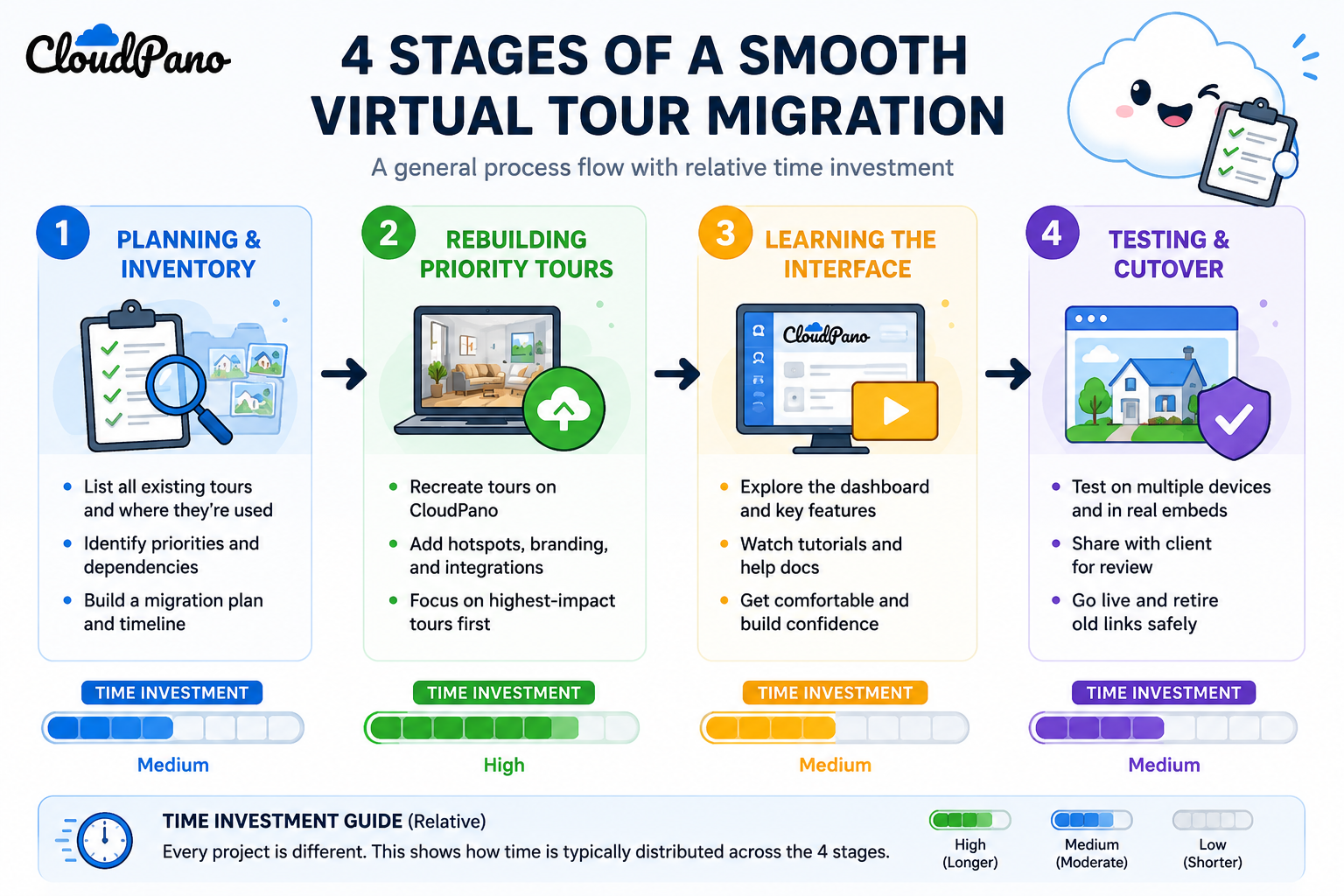
Anyone asking "how long will this take" is really asking about their own specific situation, not a generic average. A business with three active tours and a business with sixty are not going to have the same experience, even on the exact same platform. Rather than offering one number that would be misleading for most readers, it's more useful to break the process into stages and let you estimate your own timeline based on your actual tour count and complexity.
This stage covers deciding what actually needs to move (as covered in more depth in our migration checklist), confirming what's exportable, and setting a rough sequence. For most businesses, this is a focused effort measured in hours rather than days — the work here is mostly decision-making and organizing, not technical execution.
This is typically the longest stage, and it scales directly with how many active, client-facing tours you have — not your total historical library, since archived tours generally don't need to be rebuilt at all. Virtual tour setup time per individual tour varies based on complexity (number of rooms, amount of custom branding, hotspot detail), but a straightforward tour is usually a matter of a couple of hours from raw material to a published, tested result once you're past the initial learning curve.
It's worth explaining why this article resists giving you one clean number, even though that would be a simpler answer to write. A single average across all business types would necessarily be wrong for most individual readers — too long for a solo user with three tours, too short for an agency with sixty. Breaking the Matterport to CloudPano timeline into stages, each scaling differently based on your specific situation, gives you a way to build your own accurate estimate instead of anchoring on a number that was never really about your business in the first place.
This also matters because virtual tour setup time per individual tour is the single biggest lever in the entire timeline. Everything else — planning, learning the interface, testing — tends to take a roughly similar amount of time regardless of your library size. Rebuild time is the one variable that multiplies directly with your active tour count, which is exactly why Stage Two deserves the most attention when you're estimating your own situation.
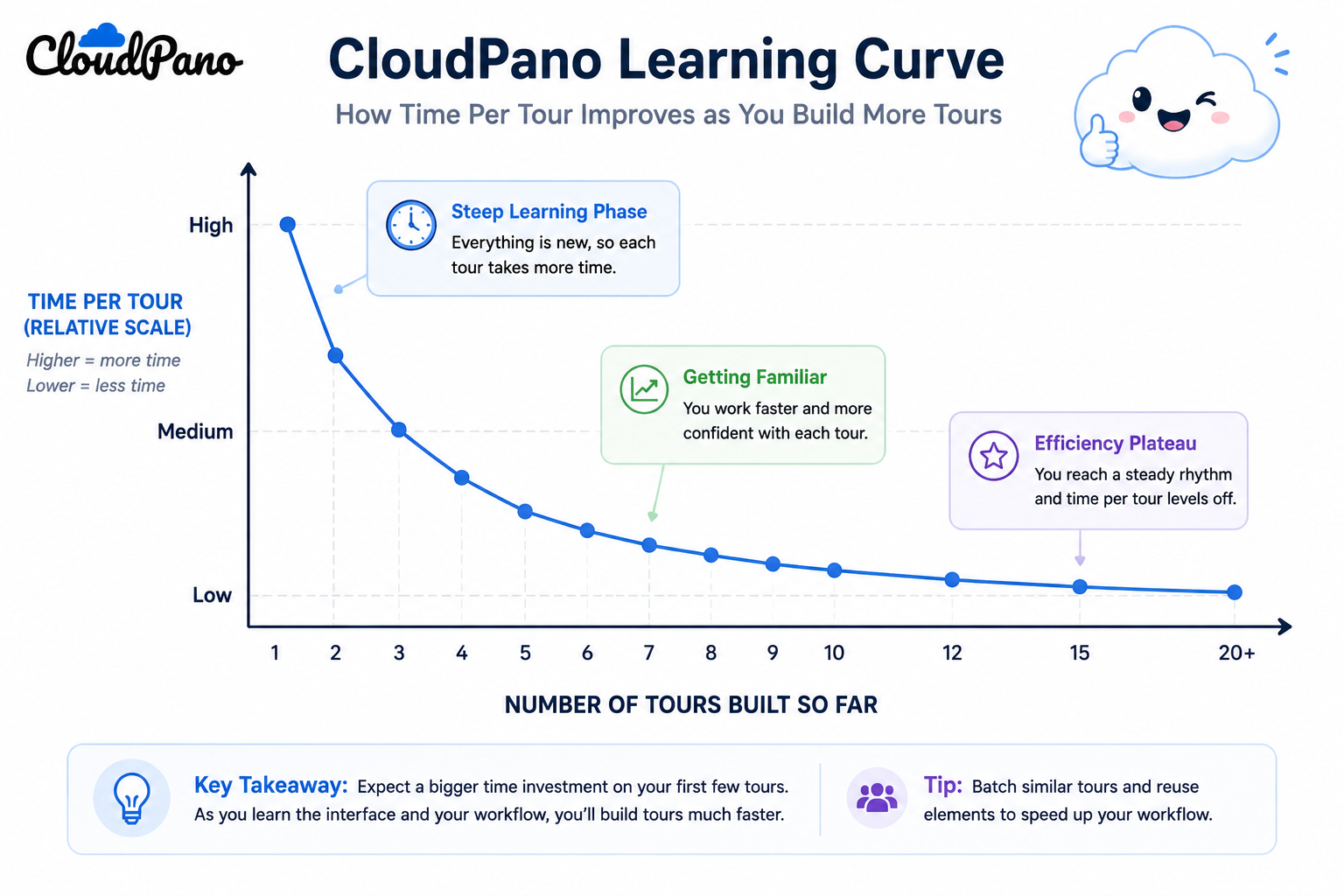
This stage is often underestimated in the other direction — people assume a new platform will take much longer to learn than it actually does. Onboarding CloudPano for someone already familiar with virtual tour software generally involves a short adjustment period, typically resolved within the first few tours built, rather than an extended training process. Familiarity with the general concept of tour editing (hotspots, branding, embedding) transfers across platforms even when the specific interface is new.
This stage is worth budgeting real time for, even though it's not the most labor-intensive part — testing rebuilt tours across devices and embed contexts, as covered in our client-continuity checklist, takes some calendar time even if the active work is brief, particularly if you're coordinating a specific cutover date around a client deadline.
For a solo user or small business with a handful of active tours, the full Matterport to CloudPano timeline — from initial planning through a tested, live cutover — is typically measured in days of calendar time, with only a few hours of hands-on work spread across those days. For a larger agency managing dozens of active client-facing tours, the same process reasonably extends to a couple of weeks, primarily because Stage Two scales with tour count and because coordinating testing and client communication across more properties takes more calendar time, not because any individual step becomes fundamentally harder.
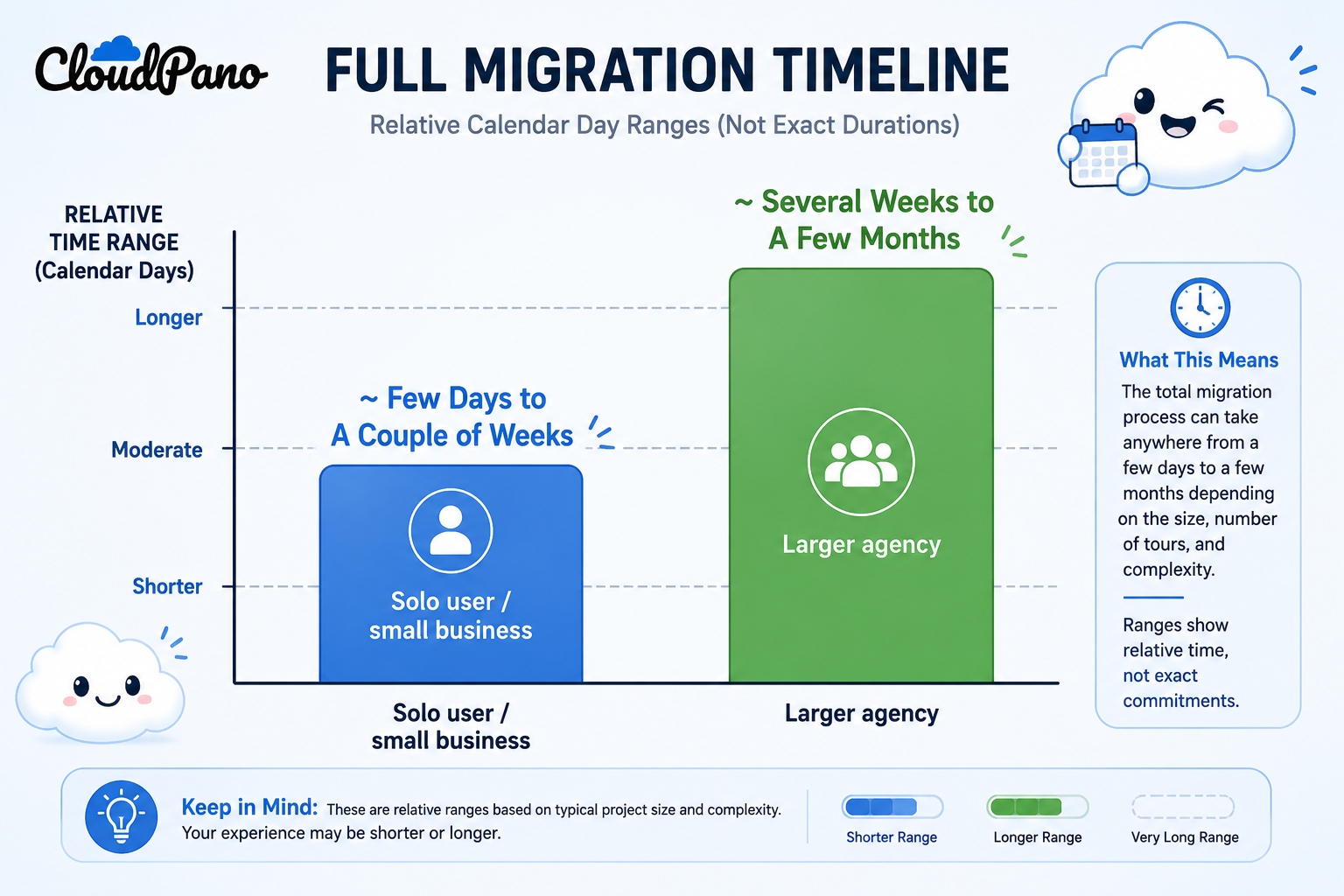
The important distinction: this timeline scales with your number of active tours, not your total historical output. A business with hundreds of archived tours but only a handful of currently active ones has a timeline much closer to the solo-user end of this range than the total library size might suggest.
On G2's virtual tour software category page, reviewers who've completed a platform switch frequently describe the actual time investment as smaller than they'd budgeted for going in, particularly once they realized archived content didn't need rebuilding.
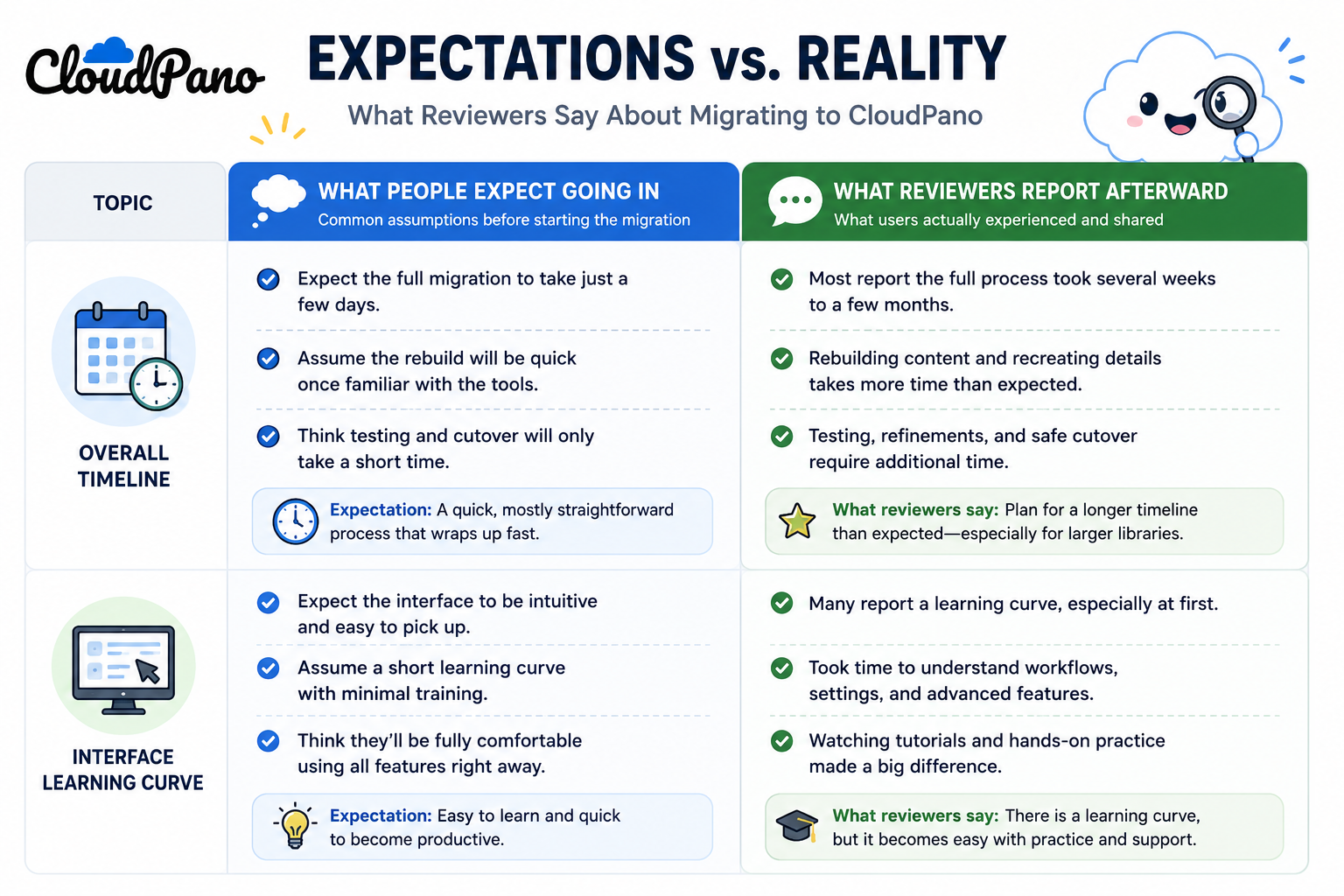
Community discussions on r/realtors provide a useful reality check here too — agents describing recent switches tend to report timelines in the range discussed above, and specifically call out that the anticipated timeline (based on imagining the whole library needing to move) was considerably longer than what actually happened once they scoped the project down to active tours only.
If your migration needs to align with something external — a lease renewal, a marketing campaign launch, a specific client commitment — work backward from that date using the stage breakdown above, and build in a buffer beyond your initial estimate rather than planning right up against the deadline. Testing in particular tends to reveal small issues that need a bit of extra time to resolve, and having that buffer available prevents a hard external deadline from forcing you to skip a step you'd otherwise want to complete carefully.
"What if my situation is more complicated than a typical case?"
Some situations genuinely are more complex — a very large active library, unusual embed requirements, or tight coordination needs across many stakeholders. In those cases, it's worth treating the estimate above as a floor rather than a ceiling, and building in extra buffer specifically around Stage Four's testing and coordination, since that's the stage most sensitive to added complexity.
"Can I speed this up if I'm in a hurry?"
To some degree — prioritizing only the most business-critical tours first, and deferring lower-priority rebuilds to a second pass after the essential cutover is complete, is a reasonable way to compress the timeline for what matters most. This trades a fully complete migration for a faster path to having your critical tours live, which is often the right tradeoff under real time pressure.
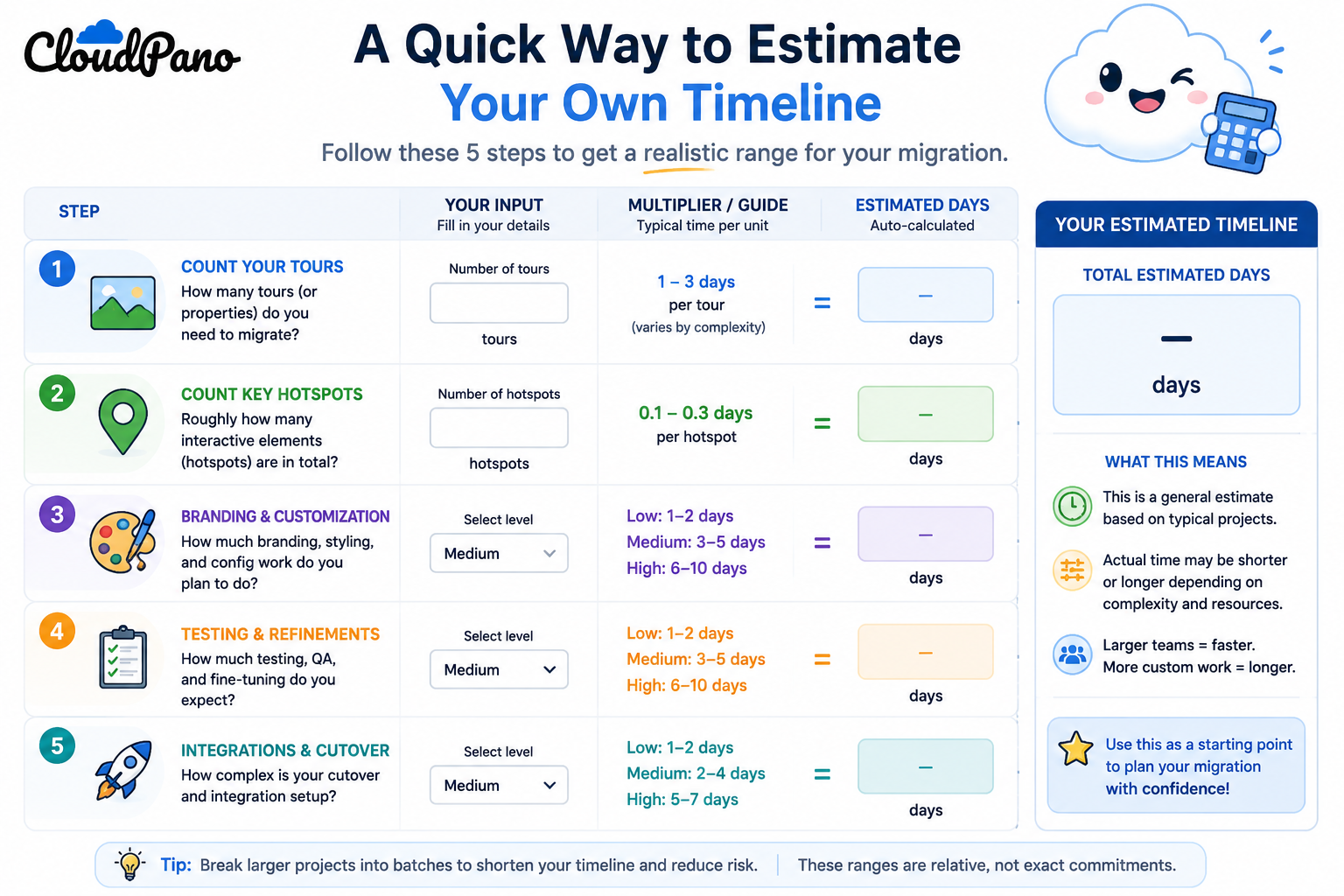
There isn't one honest answer to "how long does this take" — the real answer scales with how many active tours you're managing, not your total historical library, and breaks down into planning, rebuilding, learning the new interface, and testing before cutover. For most solo users and small teams, this adds up to days of calendar time. For larger agencies, a couple of weeks is a reasonable expectation, still driven mainly by active tour count rather than any single step becoming dramatically harder.
If you've been hesitant to switch specifically because the time commitment felt unclear or open-ended, this breakdown should give you enough to estimate your own realistic timeline. The most direct next step is running a small-scale trial — rebuild one or two tours yourself and time it — which will tell you more about your actual pace than any general estimate, including this one. That single test run, more than anything written here, is what turns an abstract timeline into a concrete number you can actually plan around.


Compact, ready to go anywhere
Interchangeable lens that’s upgradeable
Dual 1-inch sensors for improved clarity and low light performance
Dynamic range and 6K 360° capture
360° photo resolution at 21MP

8K 360° video recording for ultra-detailed visuals.
4K single-lens mode for traditional wide-angle shots.
Invisible selfie stick effect for drone-like perspectives.
2.5-inch touchscreen with Gorilla Glass protection.
Waterproof up to 33ft for underwater shooting.

360° photo resolution in 23MP
Slim design at 24 mm thick
Built-in image stabilization for smooth video capture.
Internal 19GB storage for photo and video storage.
Wireless connectivity for remote control and sharing.

60MP 360° still images for high-resolution photography.
5.7K 360° video recording at 30fps.
2.25-inch touchscreen for intuitive control.
USB Type-C port for fast charging and data transfer.
MicroSD card slot for expandable storage.
.png)

.png)

Try it free. No credit card required. Instant set-up.






.svg)


.svg)