


.png)


Whether you're evaluating CloudPano for the first time or already have tours live on the platform, it's common to have questions about exactly what the ADA widget does and doesn't cover. This CloudPano ADA FAQ brings together the most common questions we hear, with clear, direct answers.
Enabling the widget is an important foundational step, but accessibility also depends on content-level factors within your control — such as descriptive scene and hotspot labeling, clear navigation, and periodic testing. Think of the widget as part of the technical foundation; effective accessibility combines that foundation with thoughtful, accessible content. Full details are available on the CloudPano ADA compliance page.
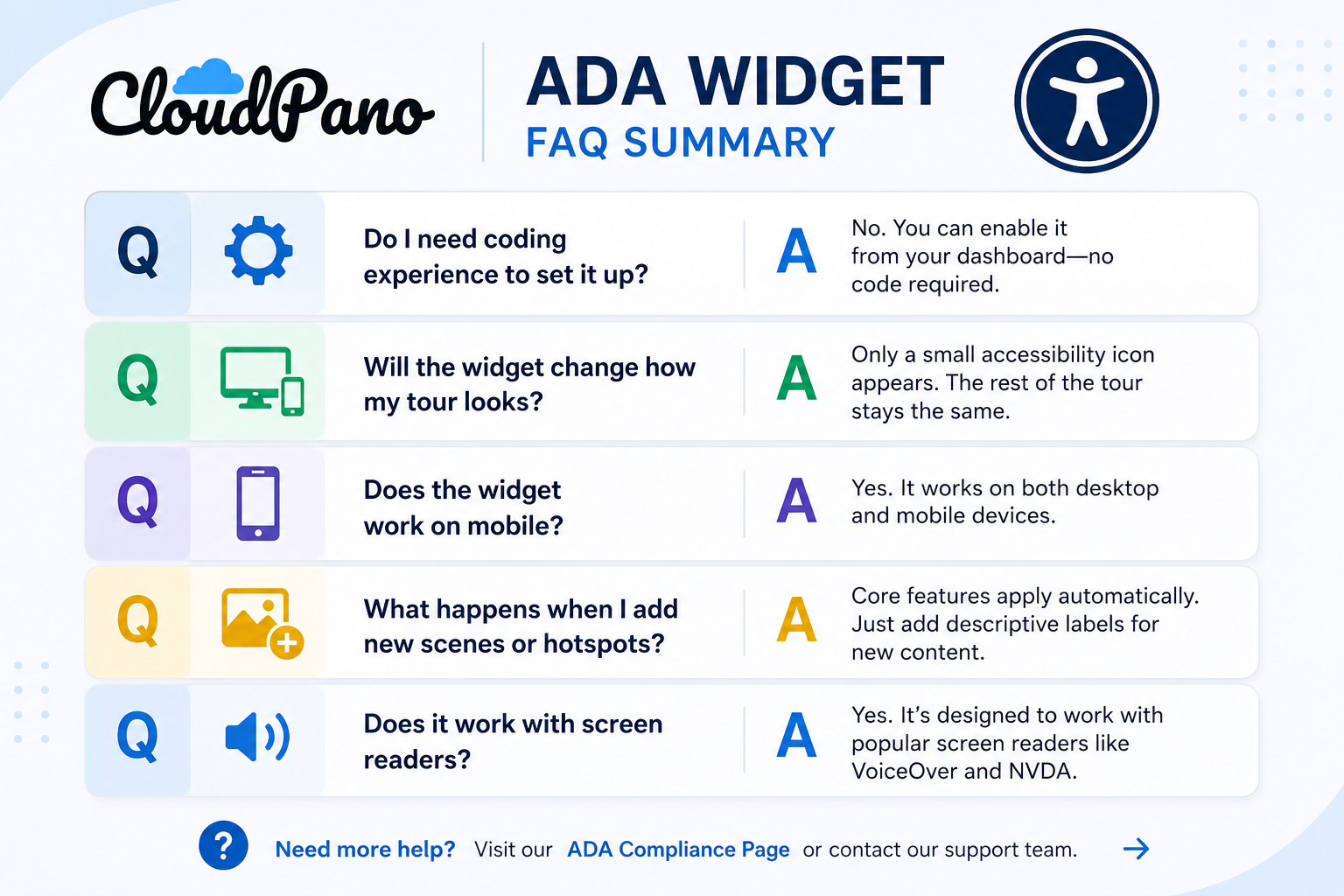
No. The widget is designed to be enabled directly from your tour settings dashboard, with no coding required. Basic customization — such as icon size — is also handled through the settings panel.
Only in a small, intentional way: an accessibility icon will appear on your published tour, typically positioned in a corner of the viewer. You can customize its appearance to better match your branding. For visitors who don't interact with it, the rest of the tour experience remains largely unchanged.
Yes. The widget is designed to function across desktop and mobile devices and to support accessible navigation across different screen sizes and input methods.
Because the ADA widget operates at the platform level rather than through one-time manual code, its core accessibility functionality can extend to newly added tour content. That said, descriptive labeling for new scenes and hotspots is still something you'll want to add yourself, since meaningful descriptions depend on the specific content of each scene.
The widget is designed with screen-reader accessibility in mind and follows established accessibility practices. Compatibility can vary depending on the browser, device, screen reader, and tour configuration, so testing your published tour with the assistive technologies your audience may use is always recommended. You can learn more about accessibility standards through the W3C's WCAG guidelines.
Yes. You can adjust available visual settings for the widget to better align with your brand while maintaining its underlying accessibility functionality.
Availability can vary by plan tier. Check the CloudPano pricing page or the ADA compliance page for current details on what's included with your specific plan.
No accessibility tool can guarantee that. Legal outcomes depend on many factors beyond any single feature or widget. The ADA widget is designed to help improve the accessibility of your virtual tours and support your broader accessibility efforts. For questions about specific legal obligations or risks, we recommend consulting an attorney familiar with digital accessibility law.
Direct testing is one of the best ways to evaluate accessibility. Try navigating your published tour using only a keyboard and, separately, with a screen reader such as VoiceOver or NVDA. Check whether you can move through available controls, understand scene and hotspot labels, and navigate the experience without relying exclusively on a mouse or visual cues.
In many cases, yes. The CloudPano ADA widget is designed to provide accessibility functionality within your virtual tour, while your website may have separate accessibility features or tools. Because configurations vary, it's a good idea to test the complete embedded experience to make sure the tools work together as expected.
If you notice unexpected behavior — such as the widget icon not appearing, labels not being announced as expected, or navigation issues — CloudPano's support team can help troubleshoot your specific configuration.
The CloudPano ADA compliance page provides more information about the accessibility features available for CloudPano tours, while the broader CloudPano feature set covers how accessibility fits alongside the platform's other tour-building tools.


Compact, ready to go anywhere
Interchangeable lens that’s upgradeable
Dual 1-inch sensors for improved clarity and low light performance
Dynamic range and 6K 360° capture
360° photo resolution at 21MP

8K 360° video recording for ultra-detailed visuals.
4K single-lens mode for traditional wide-angle shots.
Invisible selfie stick effect for drone-like perspectives.
2.5-inch touchscreen with Gorilla Glass protection.
Waterproof up to 33ft for underwater shooting.

360° photo resolution in 23MP
Slim design at 24 mm thick
Built-in image stabilization for smooth video capture.
Internal 19GB storage for photo and video storage.
Wireless connectivity for remote control and sharing.

60MP 360° still images for high-resolution photography.
5.7K 360° video recording at 30fps.
2.25-inch touchscreen for intuitive control.
USB Type-C port for fast charging and data transfer.
MicroSD card slot for expandable storage.
.png)

.png)

Try it free. No credit card required. Instant set-up.







.svg)


.svg)