


.png)


Avoiding ADA Lawsuits: How an Accessibility Widget Protects Your Business
Digital accessibility lawsuits and demand letters have become a significant concern for businesses with a meaningful online presence, and virtual tours — as visually rich, interactive content — can raise accessibility issues of their own. Understanding how to genuinely reduce the risk of an ADA lawsuit, rather than simply checking a superficial compliance box, starts with understanding what actually improves accessibility versus what only appears to.
Over the past decade, lawsuits and demand letters involving inaccessible websites and digital content under the ADA have drawn increasing attention. Many of these cases involve businesses that may not have intentionally excluded anyone but failed to address digital accessibility as part of their broader accessibility efforts, which historically focused more heavily on physical spaces.
The Department of Justice's guidance at ADA.gov explains that the ADA's requirements apply to the goods, services, privileges, and activities offered by businesses open to the public, including those offered on the web. However, the ADA does not provide a detailed technical standard specifically for private-sector websites. That has contributed to uncertainty for businesses trying to determine exactly what digital accessibility requires in practice.
Virtual tours combine several characteristics that can create accessibility barriers:
For someone using a keyboard, screen reader, or other assistive technology, an inaccessible virtual tour can create an immediate barrier to accessing information or navigating the experience.
It's important to be clear about something many "compliance" solutions gloss over: no single tool can guarantee immunity from an ADA claim or lawsuit.
A stronger approach is to maintain a documented, good-faith, ongoing effort to improve accessibility rather than treating accessibility as a one-time fix.
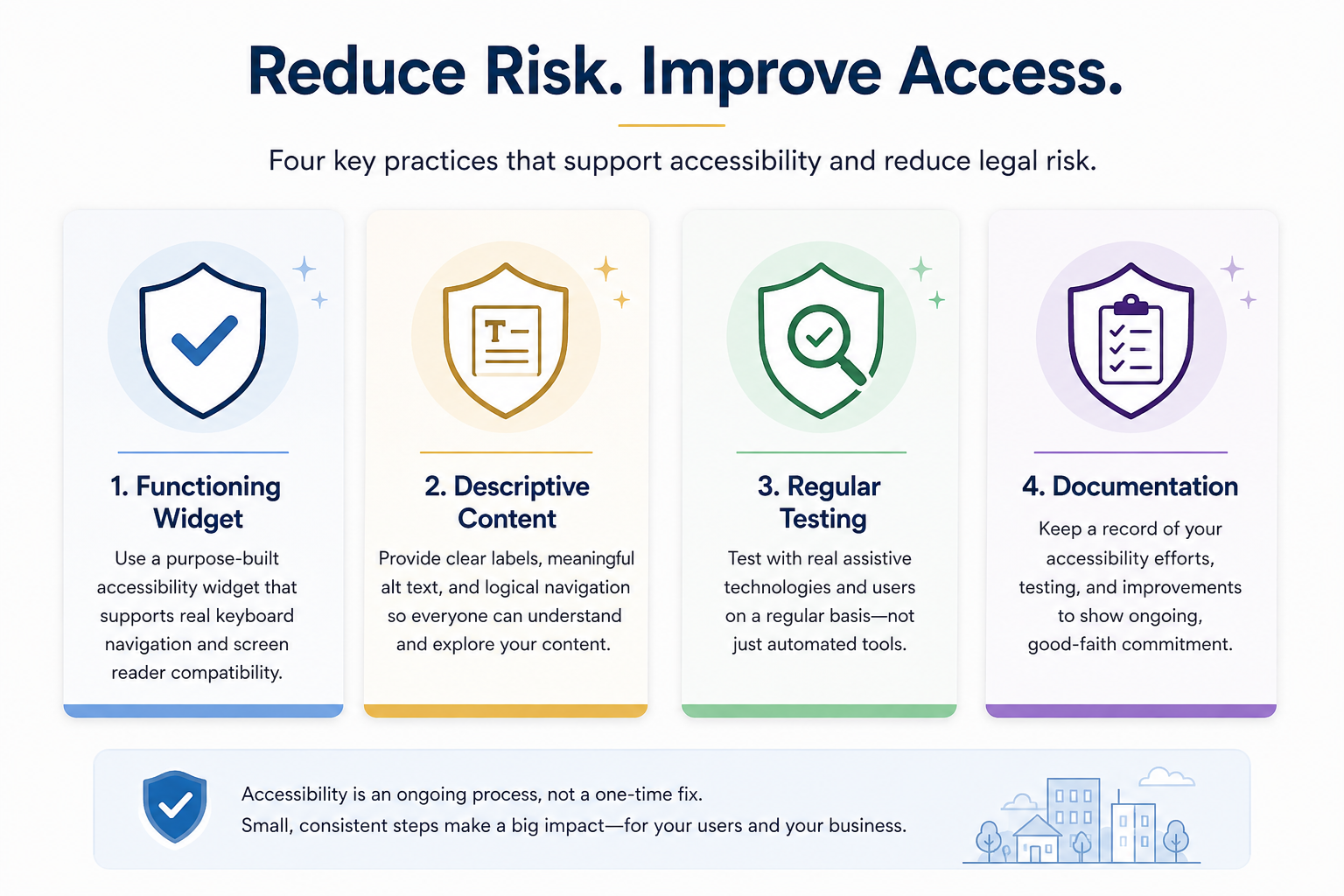
That can include:
A functioning, tour-specific accessibility solution. A purpose-built ADA widget for virtual tours can help address features such as keyboard navigation and screen reader support. What matters is whether those features actually work for users, not simply whether an accessibility icon appears on the tour.
Descriptive, accessible content. Clear scene and hotspot labels, meaningful text alternatives where appropriate, and a logical navigation structure are content-level considerations that technology alone may not fully address.
Regular testing. Periodically test the experience with a keyboard, screen reader, and other relevant assistive technologies rather than relying solely on automated accessibility scans. WebAIM provides extensive resources for understanding and testing web accessibility.
Documentation. Maintaining an internal record of accessibility testing, identified issues, remediation efforts, and improvements can help your organization manage accessibility as an ongoing process rather than an occasional project.
Be cautious of any solution marketed primarily as guaranteed "lawsuit protection" or automatic ADA compliance.
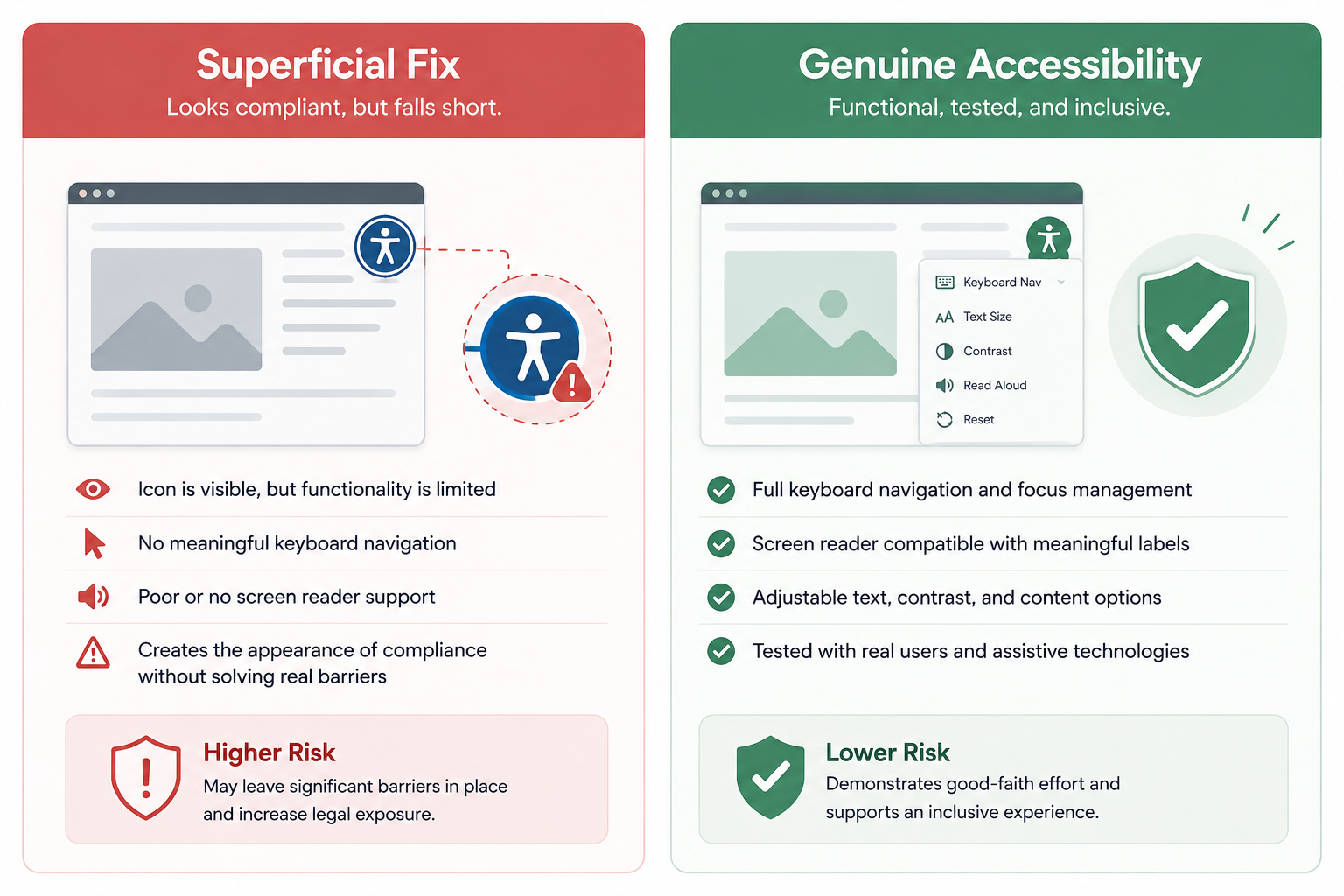
Adding an accessibility widget or overlay doesn't automatically make every element of a website or virtual tour accessible. The actual experience still needs to be evaluated.
An accessibility tool that appears on the screen but doesn't provide meaningful keyboard navigation, understandable labels, screen reader compatibility, or other necessary functionality may leave significant barriers unresolved.
The better question isn't simply:
"Do we have an accessibility widget?"
It's:
"Can people with disabilities actually use the tour?"
That distinction matters.
The most defensible approach for a business isn't chasing a guarantee that doesn't exist. It's building a genuine, demonstrable, ongoing accessibility practice.
That means choosing tools appropriate for the type of content you're publishing, testing those tools in real-world conditions, correcting problems when they're discovered, and treating accessibility as an ongoing responsibility rather than a checkbox marked "complete."
Section508.gov provides additional resources on accessibility testing and standards for federal agencies and organizations working under Section 508 requirements. While Section 508 isn't the same as ADA Title III requirements for private businesses, its testing resources can still provide useful technical context for accessibility work.
If you're evaluating the accessibility of your virtual tours, start with a functional audit.
Try navigating your published tour without a mouse. Test whether interactive controls and hotspots can be reached and activated with a keyboard. Check how scene names, controls, and other important information are communicated through a screen reader. Look for places where someone using assistive technology might become stuck or miss important content.
From there, a purpose-built accessibility solution such as CloudPano's ADA widget can provide part of the technical foundation, supported by descriptive content, thoughtful tour design, and regular testing.
Learn more on the CloudPano ADA compliance page, or explore the full CloudPano platform.
This article is for general informational purposes and isn't legal advice. Accessibility requirements and their application can vary depending on the circumstances and jurisdiction. If you have specific concerns about legal exposure or ADA compliance, consult an attorney familiar with digital accessibility law.


Compact, ready to go anywhere
Interchangeable lens that’s upgradeable
Dual 1-inch sensors for improved clarity and low light performance
Dynamic range and 6K 360° capture
360° photo resolution at 21MP

8K 360° video recording for ultra-detailed visuals.
4K single-lens mode for traditional wide-angle shots.
Invisible selfie stick effect for drone-like perspectives.
2.5-inch touchscreen with Gorilla Glass protection.
Waterproof up to 33ft for underwater shooting.

360° photo resolution in 23MP
Slim design at 24 mm thick
Built-in image stabilization for smooth video capture.
Internal 19GB storage for photo and video storage.
Wireless connectivity for remote control and sharing.

60MP 360° still images for high-resolution photography.
5.7K 360° video recording at 30fps.
2.25-inch touchscreen for intuitive control.
USB Type-C port for fast charging and data transfer.
MicroSD card slot for expandable storage.
.png)

.png)

Try it free. No credit card required. Instant set-up.







.svg)


.svg)