


.png)


Every dealership looking to streamline vehicle photography faces a similar challenge. Traditional turntable systems can require significant equipment, dedicated space, and a carefully managed capture workflow.
An API-driven alternative simplifies that process by allowing dealership staff to record a vehicle walk-around and submit the footage for processing into a 360° spin.

But for that workflow to operate reliably at scale, your systems need a secure way to communicate with the API without requiring someone to manually authenticate every request.
That’s where API authentication comes in.
This guide covers 360 Spin API authentication for the CloudPano Spin API, including Bearer keys, secure key storage, key rotation, revoking access, and using multiple keys to separate environments or integrations.
For the complete technical reference, see the Spin API developer documentation.
The Spin API uses Bearer-token authentication.
Each request to the API includes an API key that identifies and authenticates the account making the request.
This keeps the authentication model relatively straightforward. There’s no separate OAuth flow or user login required for each request. Instead, an API key is generated for your account and securely stored by the application or service that needs to communicate with the Spin API.
Keys are created through the CloudPano dashboard, and an account can currently maintain up to 10 active keys at once.
That ability to maintain multiple keys becomes especially useful when separating production, staging, internal tools, or partner integrations.
One of the most important things to understand when creating a key is that the raw key value is displayed only when it is initially generated.
CloudPano stores a hash of the key rather than keeping the raw value available for later retrieval.
That means you should copy the key immediately and store it somewhere secure.
If the original value is lost, you should create a replacement rather than expecting to reveal the existing key again.
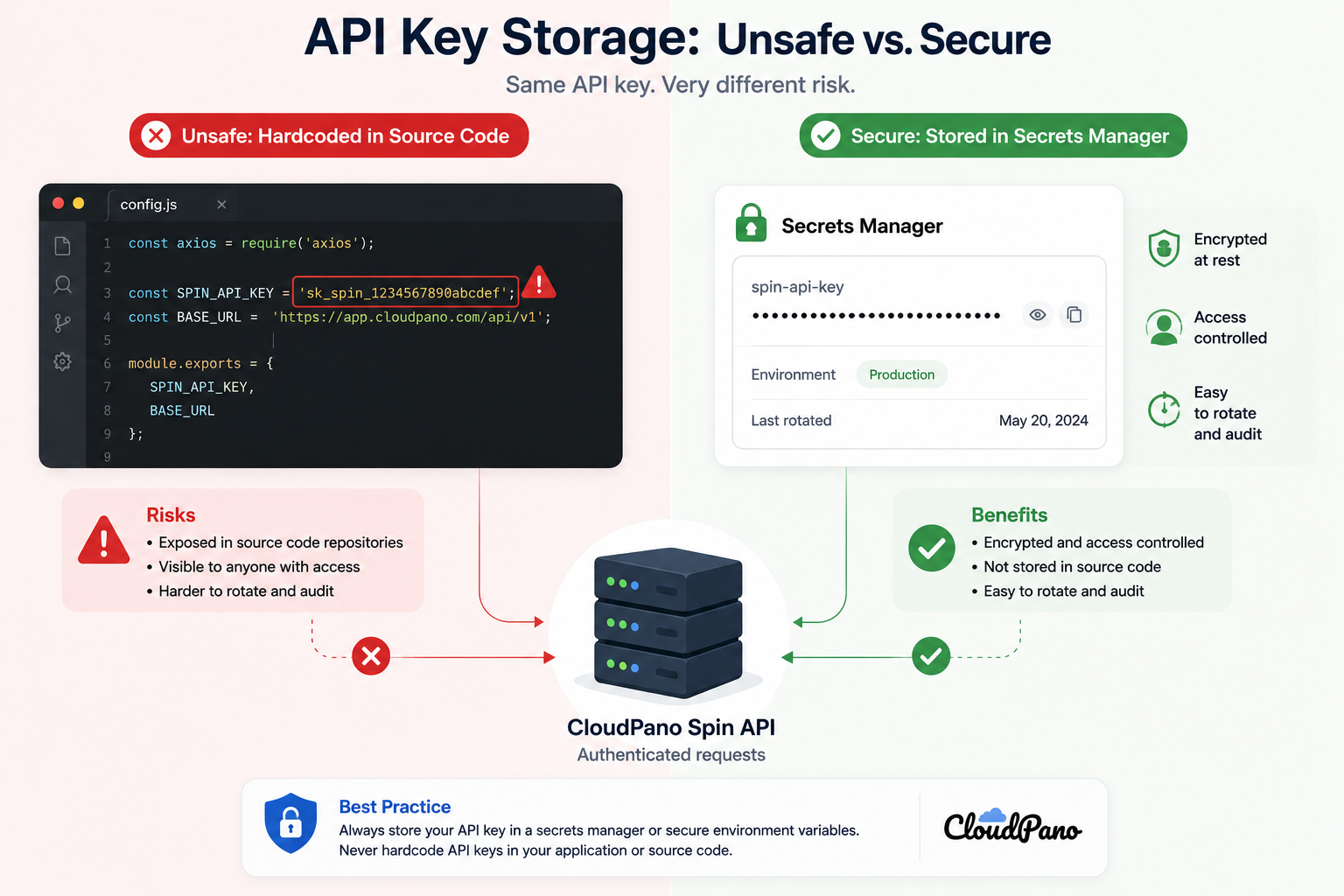
A secrets manager or encrypted environment-variable system is a much better location for an API key than a document, message, ticket, or source-code repository.
Your Spin API key should be treated as a server-to-server credential.
It should not be embedded in browser code, publicly accessible scripts, or mobile applications where someone could inspect the application and retrieve it.
If a user initiates a vehicle-spin workflow from a browser or mobile application, the safer architecture is:
User application → Your backend → Spin API
Your backend securely stores the API credential and communicates with CloudPano on behalf of the user.
This keeps the API key away from the public-facing portion of your application.
When a valid key is used to submit a vehicle walk-around successfully, the Spin API can accept the request and create a processing job.
The vehicle spin then progresses through its processing lifecycle:
Queued → Processing → Ready
A job may also reach a failed state if processing cannot be completed.
Because vehicle-spin generation happens asynchronously, your integration monitors the processing job until it reaches a finished state.
For more information about handling this workflow, see polling the 360 Spin API.
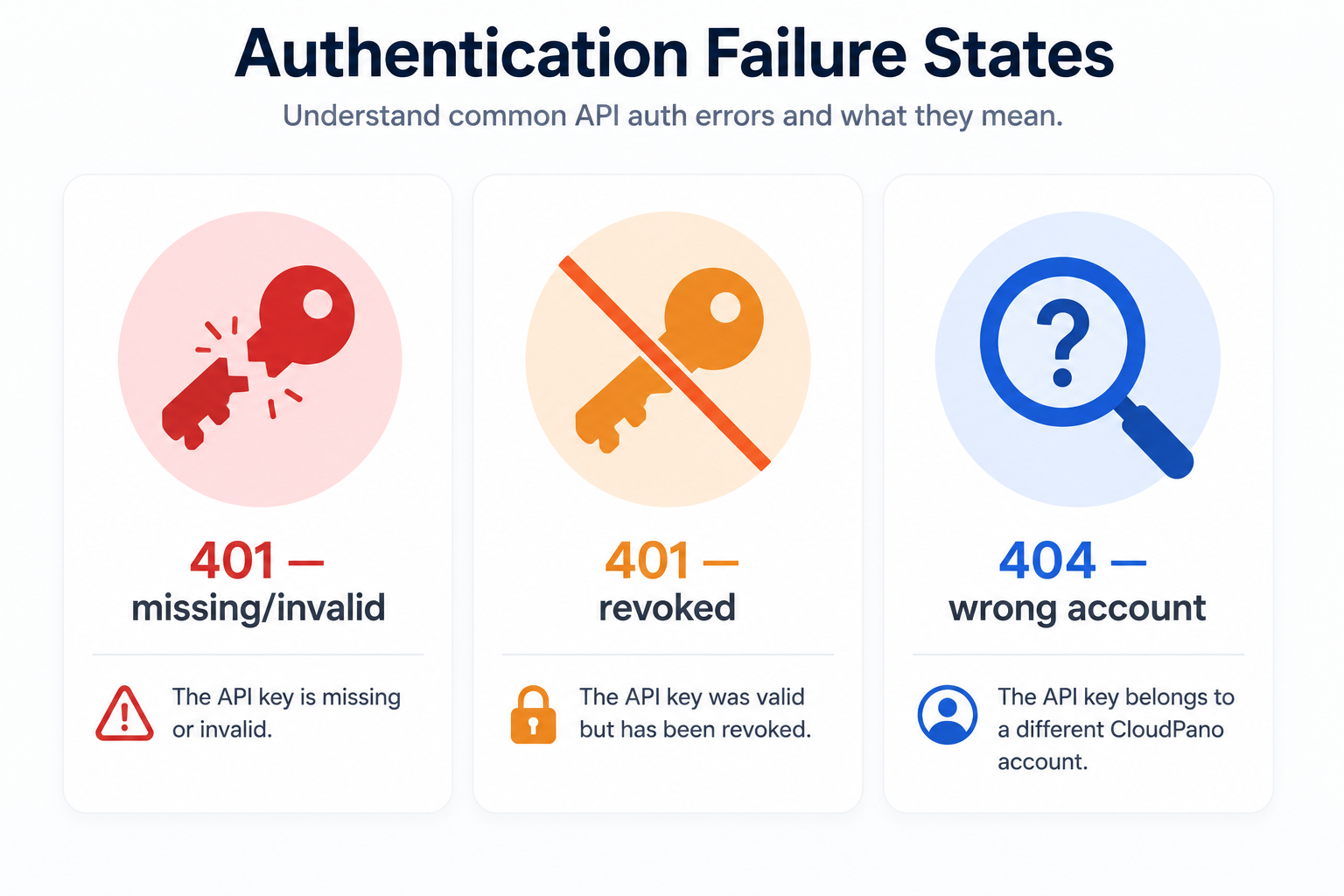
Authentication problems can sometimes look like general API failures, which is why it helps to understand the most common causes.
If an API key is missing, incorrectly entered, truncated, or no longer active, authentication will fail.
When troubleshooting an integration, check that the application is using the expected credential and that the key hasn't been replaced or revoked.
This is particularly important after rotating credentials because an older application instance or background service may still be using the previous key.
API credentials are associated with accounts.
That means the credential used to access a vehicle spin needs to belong to the appropriate account context.
This becomes especially important when teams maintain multiple environments, partner integrations, or separate accounts.
Keeping clear records of which credentials belong to which system can prevent confusing access problems later.
A few simple practices can significantly reduce the risk of exposing credentials:
These practices become increasingly important as an integration expands across multiple services or dealership locations.
API keys shouldn't necessarily remain unchanged forever.
If a credential may have been exposed, an employee or contractor who had access leaves, or your organization's security policies require periodic rotation, you may need to replace an existing key.
The safest approach is to avoid disabling the current credential before its replacement has been tested.
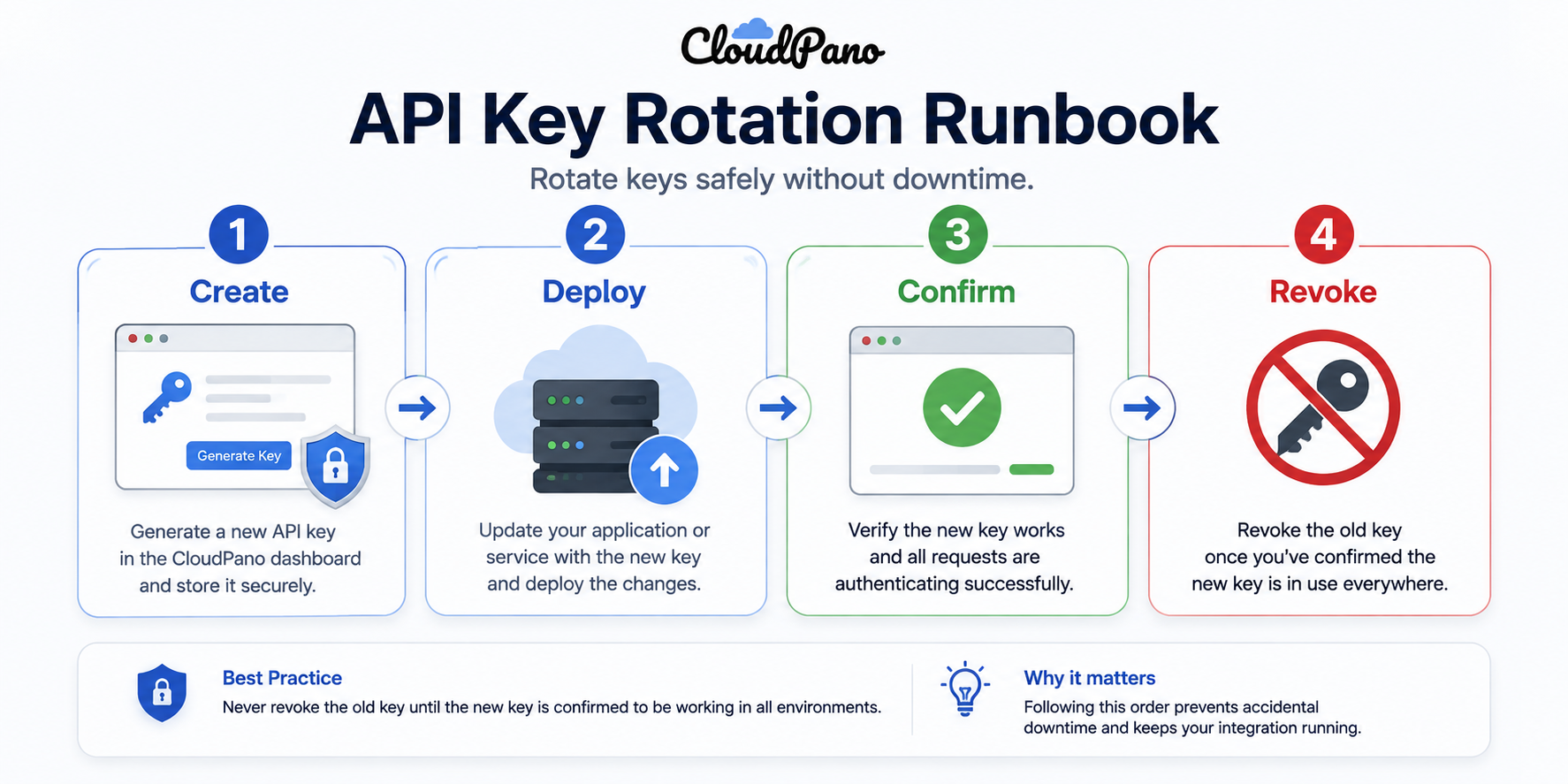
A practical rotation process looks like this:
This order helps avoid creating a window where your application has no working credential.
Your organization's security policies should determine how frequently credentials are rotated.
More importantly, replace a key whenever you believe it may have been exposed.
Examples could include accidentally sharing a credential in a support conversation, exposing it in a repository, or discovering that someone who no longer requires access still has the credential.
The goal isn't simply to rotate credentials frequently. It's to make sure you can replace a credential safely and quickly whenever necessary.
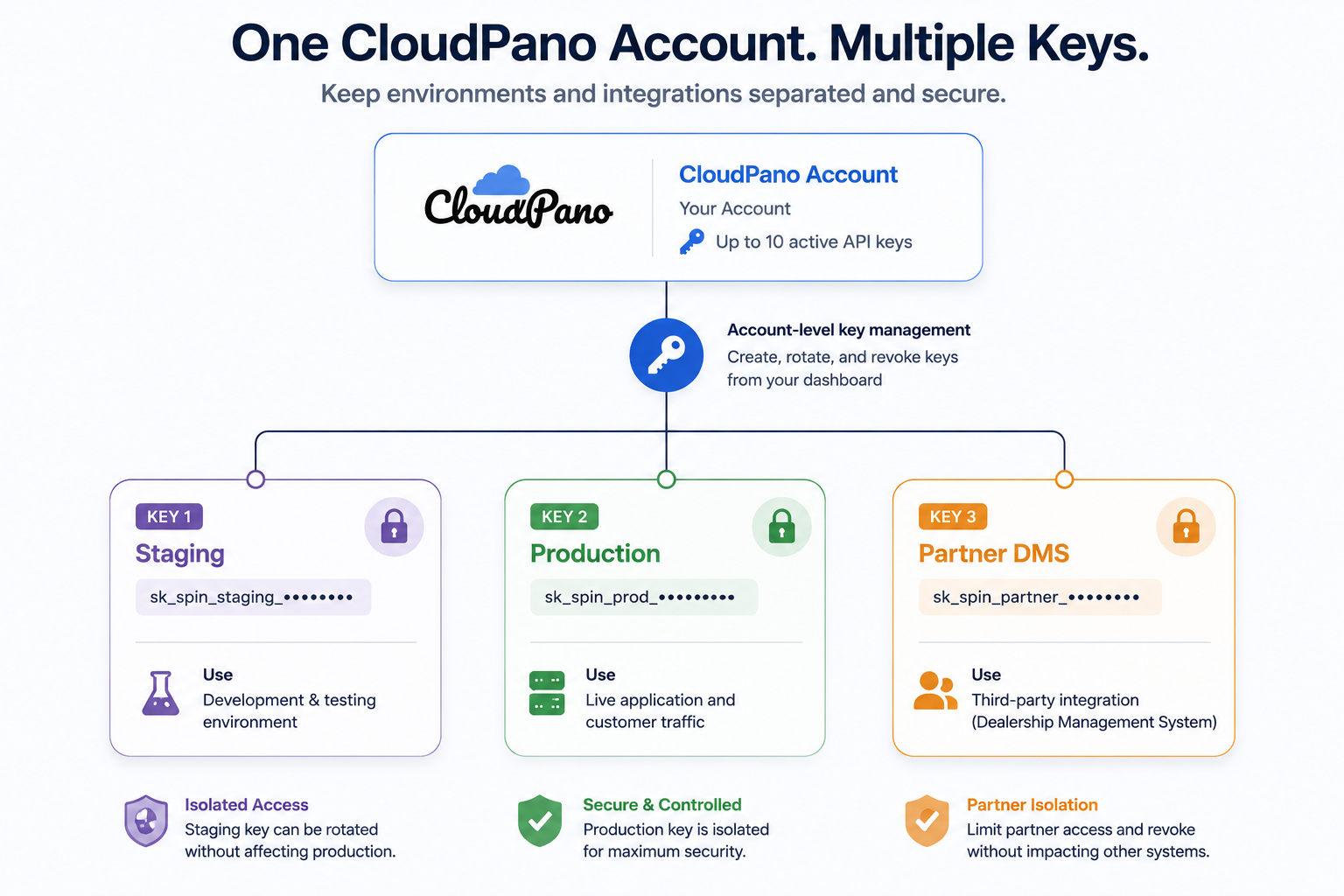
The ability to maintain multiple active keys isn't only useful for rotation.
It can also help you create clearer boundaries between different parts of your infrastructure.
Using different credentials for staging and production helps keep the two environments separate.
If a development credential needs to be replaced or revoked, you can do so without unnecessarily affecting production.
If multiple services communicate with the Spin API, giving them separate credentials can make access easier to manage.
For example, an internal inventory system and a partner integration don't necessarily need to share the same credential.
If one integration is retired or compromised, its credential can be revoked without replacing the credentials used by every other service.
The Spin API currently allows up to 10 active keys per account, providing room to separate credentials where appropriate.
Multiple-key support is useful, but it also creates the possibility of accumulating credentials that nobody remembers.
A key created for an old integration, former contractor, testing environment, or temporary project shouldn't remain active indefinitely simply because nobody removed it.
Periodically review your active credentials and ask:
What uses this key? Who owns the integration? Is it still needed?
If you can't associate a credential with a legitimate active system, investigate it and revoke it when appropriate.
Keeping the list clean makes future troubleshooting and credential rotation much easier.
Spin API authentication is intentionally straightforward:
Create a key → store it securely → use it from your backend → monitor its use → rotate or revoke it when necessary.
Most of the security work isn't about making authentication complicated. It's about managing the credential properly throughout its lifecycle.
Keep keys away from client-side applications and source repositories. Use separate credentials where they provide useful isolation. Make sure newly generated keys are stored immediately, and replace credentials carefully so you don't interrupt a working integration.
If you're building your first complete vehicle-spin workflow, see creating a car 360 spin with one API call for the broader upload-to-spin process.
The Spin API documentation contains the current authentication requirements, request parameters, processing statuses, and other implementation details.
Once your key is securely stored and your backend can authenticate successfully, you can move on to the rest of the workflow: submitting vehicle footage, monitoring processing, and connecting the finished 360° spin to your inventory.


Compact, ready to go anywhere
Interchangeable lens that’s upgradeable
Dual 1-inch sensors for improved clarity and low light performance
Dynamic range and 6K 360° capture
360° photo resolution at 21MP

8K 360° video recording for ultra-detailed visuals.
4K single-lens mode for traditional wide-angle shots.
Invisible selfie stick effect for drone-like perspectives.
2.5-inch touchscreen with Gorilla Glass protection.
Waterproof up to 33ft for underwater shooting.

360° photo resolution in 23MP
Slim design at 24 mm thick
Built-in image stabilization for smooth video capture.
Internal 19GB storage for photo and video storage.
Wireless connectivity for remote control and sharing.

60MP 360° still images for high-resolution photography.
5.7K 360° video recording at 30fps.
2.25-inch touchscreen for intuitive control.
USB Type-C port for fast charging and data transfer.
MicroSD card slot for expandable storage.
.png)

.png)

Try it free. No credit card required. Instant set-up.







.svg)


.svg)