


.png)



If you're new to the topic, "ADA compliance" can sound like a vague legal requirement rather than something with clear, actionable steps. That confusion can become even greater when you're dealing with an ADA-compliant virtual tour rather than a standard webpage because there is less established guidance specifically for 360° interactive content.
This guide is designed to clear up some of that confusion — starting with the basics and moving toward practical steps you can take to improve the accessibility of your virtual tours.
The Americans with Disabilities Act (ADA) is a U.S. civil rights law that prohibits discrimination against people with disabilities. Although the ADA was enacted before the modern web existed, digital accessibility has become an increasingly important consideration for businesses and organizations that provide goods, services, and information online.
The U.S. Department of Justice provides guidance on web accessibility at ADA.gov. It's worth noting, however, that understanding which requirements apply to a particular business or website can depend on the organization and circumstances.
In practice, the Web Content Accessibility Guidelines (WCAG), published by the W3C, provide widely recognized technical guidance for making digital content more accessible. Although WCAG and the ADA are not the same thing, WCAG is commonly used as an important reference when evaluating web accessibility.
Much of the guidance surrounding web accessibility focuses on traditional webpage elements such as text, images, forms, buttons, and navigation menus.
A virtual tour is a fundamentally different type of digital content. It's an interactive, spatial experience in which users move through scenes, rotate their view, select hotspots, and interact with visual elements rather than simply scrolling through a page.
This creates additional accessibility considerations.
For example, an otherwise accessible website could still contain an embedded virtual tour that presents barriers to users who rely on screen readers, keyboard navigation, or other assistive technologies.
That's why virtual tour accessibility should be considered specifically rather than assumed to be covered by broader, site-wide accessibility efforts.
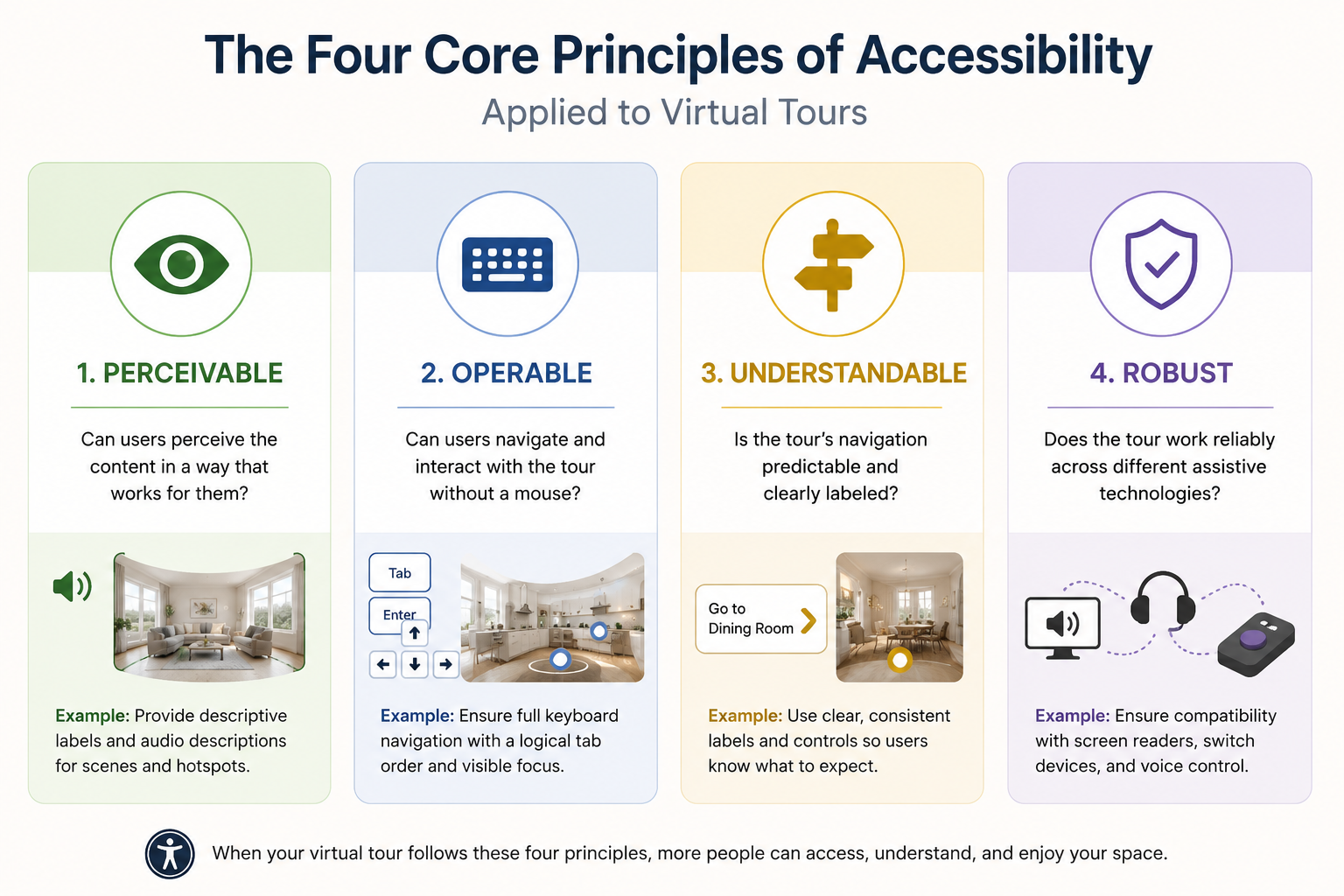
You don't need to become a WCAG expert to understand the basic principles. Many accessibility considerations for virtual tours can be understood through WCAG's four core principles:
These four principles come directly from WCAG's framework and provide a useful starting point for evaluating the accessibility of interactive virtual tours.
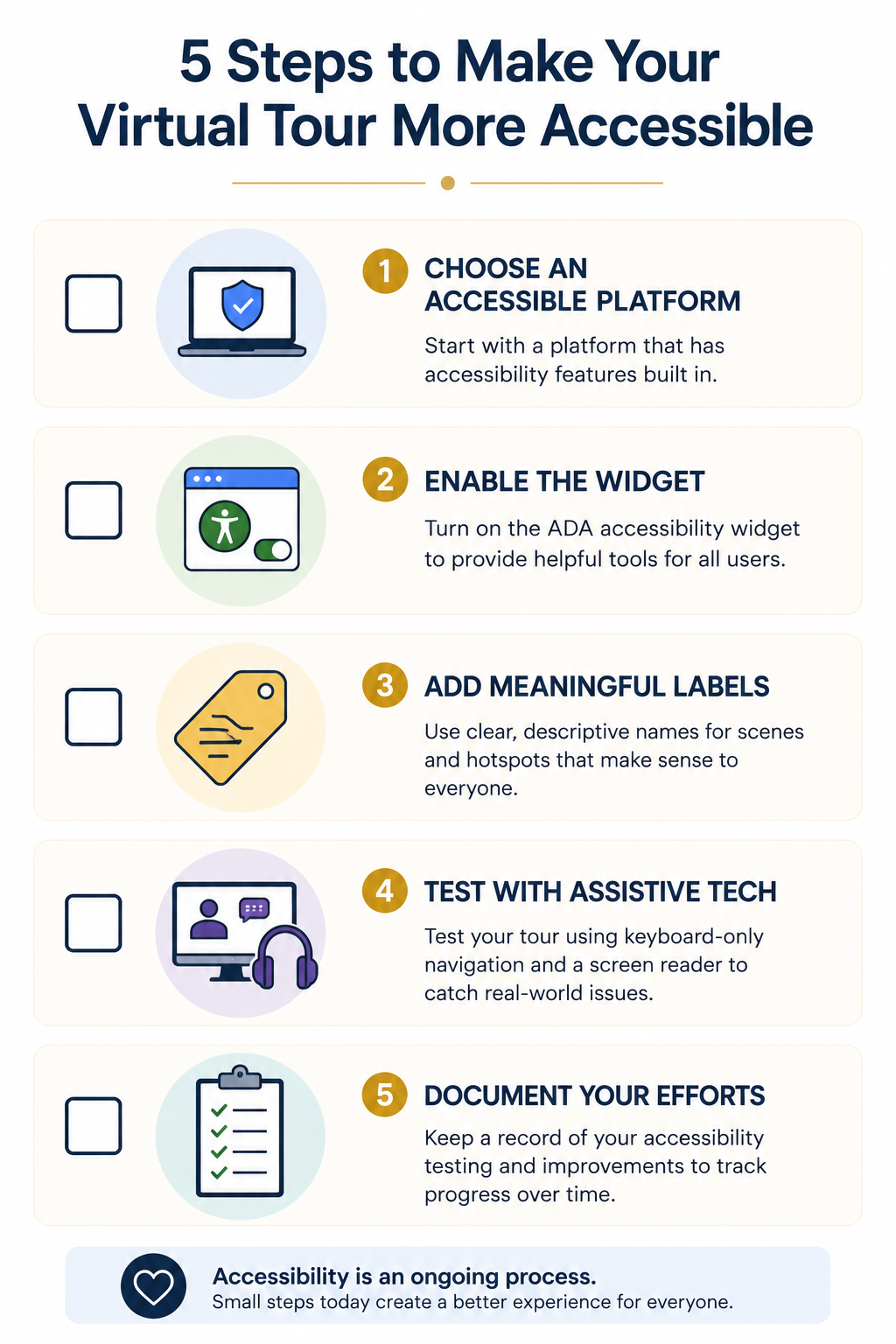
Start with the platform. Retrofitting accessibility onto a virtual tour that wasn't designed with it in mind can be challenging. Choosing a platform with accessibility functionality already built in — such as CloudPano's ADA compliance solution — can make implementing accessibility features significantly easier.
Enable the ADA widget. If your virtual tour platform offers an ADA accessibility widget, enable it for the tours where you want accessibility features available. Depending on the platform, the widget may provide visitors with additional accessibility controls and tools.
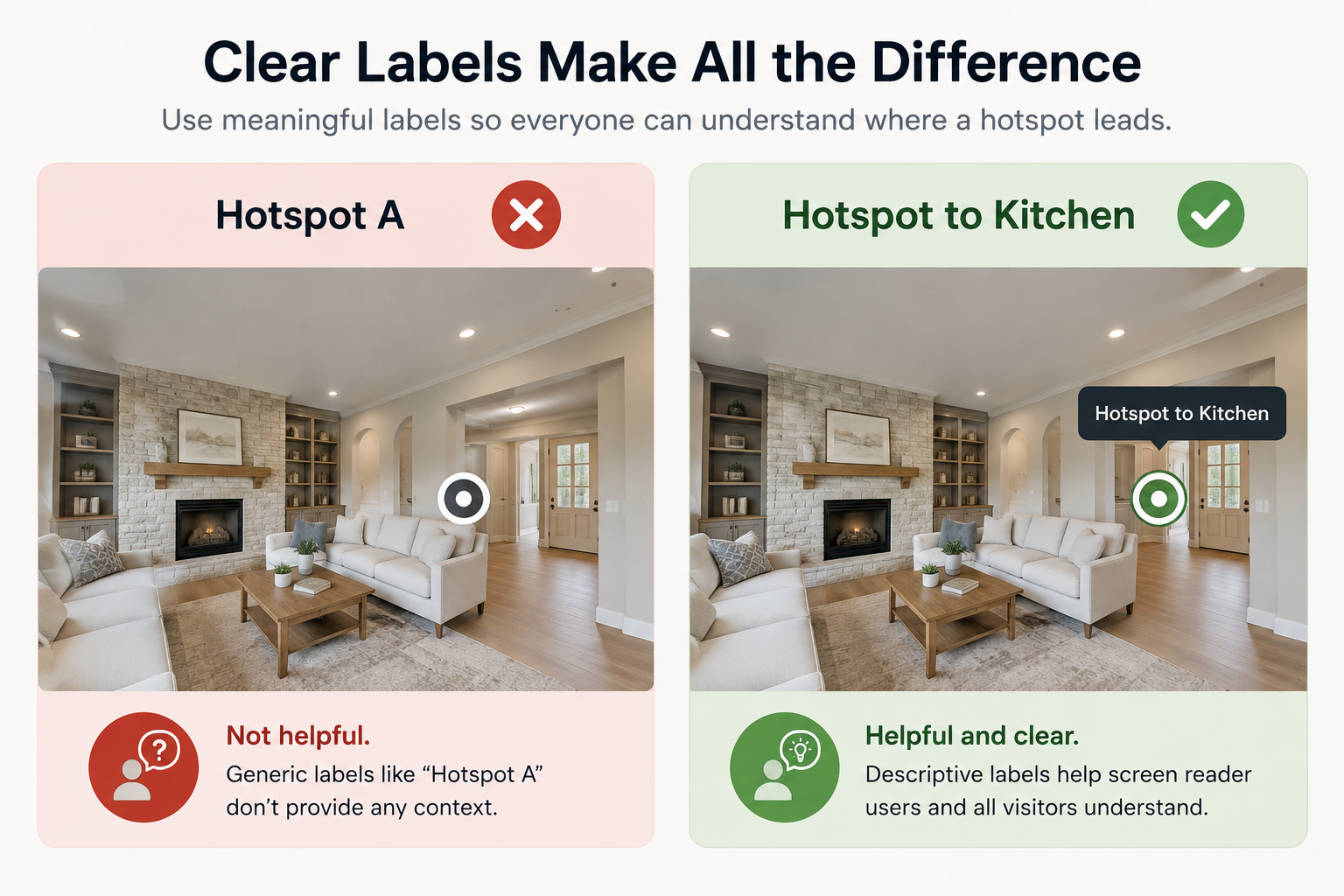
Add meaningful labels. Generic labels such as "Scene 1" or "Hotspot A" provide little context to someone using assistive technology. Instead, use descriptive names such as "Front Entrance," "Primary Bedroom," or "Hotspot to Kitchen" whenever the platform allows it.
Test with real assistive technology. Automated accessibility checkers can identify some problems, but they won't catch everything. Try navigating your tour using only a keyboard and, separately, test the experience with a screen reader. This can reveal usability barriers that automated tools may miss.
Document your efforts. Keep a simple record of your accessibility testing, updates, and improvements. Accessibility is an ongoing process, and documentation can help your team track what has been tested and what may still need attention.
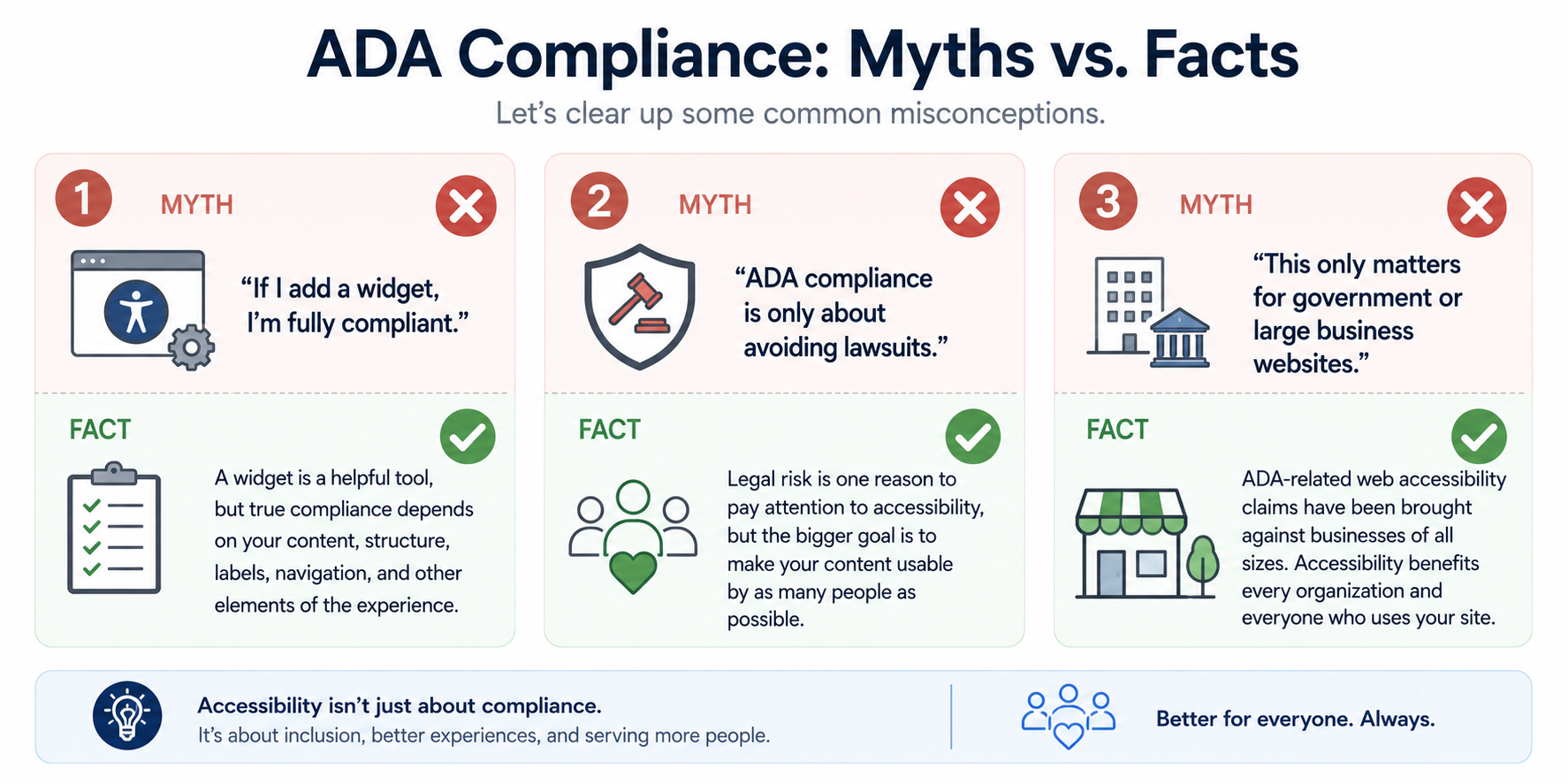
"If I add a widget, I'm fully compliant."
An accessibility widget can be a useful part of your accessibility strategy, but it doesn't automatically guarantee ADA or WCAG compliance. Accessibility also depends on the underlying content, structure, labels, navigation, and other aspects of the digital experience.
"ADA compliance is only about avoiding lawsuits."
Legal risk is one reason businesses pay attention to accessibility, but it's far from the only one. The larger goal is to make digital content and experiences usable by as many people as possible.
"This only matters for government or large business websites."
Digital accessibility isn't exclusively a concern for large organizations. Businesses of different sizes can benefit from making their websites and interactive experiences more accessible.
For additional information about accessibility requirements for federal agencies, Section508.gov provides resources related to Section 508 and accessible information and communications technology. Keep in mind that Section 508 specifically applies to the federal context and isn't the same as the ADA.
If your virtual tour doesn't currently include accessibility features, you don't have to address everything at once.
Start by reviewing the accessibility functionality available within your virtual tour platform. If an ADA accessibility widget is available, enabling it can be one practical step toward improving the experience. From there, focus on meaningful scene and hotspot labels, keyboard usability, and periodic accessibility testing.
CloudPano's ADA compliance page explains more about the accessibility functionality available for CloudPano virtual tours.
You can also visit the CloudPano homepage to learn more about creating and hosting interactive 360° virtual tours.


Compact, ready to go anywhere
Interchangeable lens that’s upgradeable
Dual 1-inch sensors for improved clarity and low light performance
Dynamic range and 6K 360° capture
360° photo resolution at 21MP

8K 360° video recording for ultra-detailed visuals.
4K single-lens mode for traditional wide-angle shots.
Invisible selfie stick effect for drone-like perspectives.
2.5-inch touchscreen with Gorilla Glass protection.
Waterproof up to 33ft for underwater shooting.

360° photo resolution in 23MP
Slim design at 24 mm thick
Built-in image stabilization for smooth video capture.
Internal 19GB storage for photo and video storage.
Wireless connectivity for remote control and sharing.

60MP 360° still images for high-resolution photography.
5.7K 360° video recording at 30fps.
2.25-inch touchscreen for intuitive control.
USB Type-C port for fast charging and data transfer.
MicroSD card slot for expandable storage.
.png)

.png)

Try it free. No credit card required. Instant set-up.







.svg)


.svg)