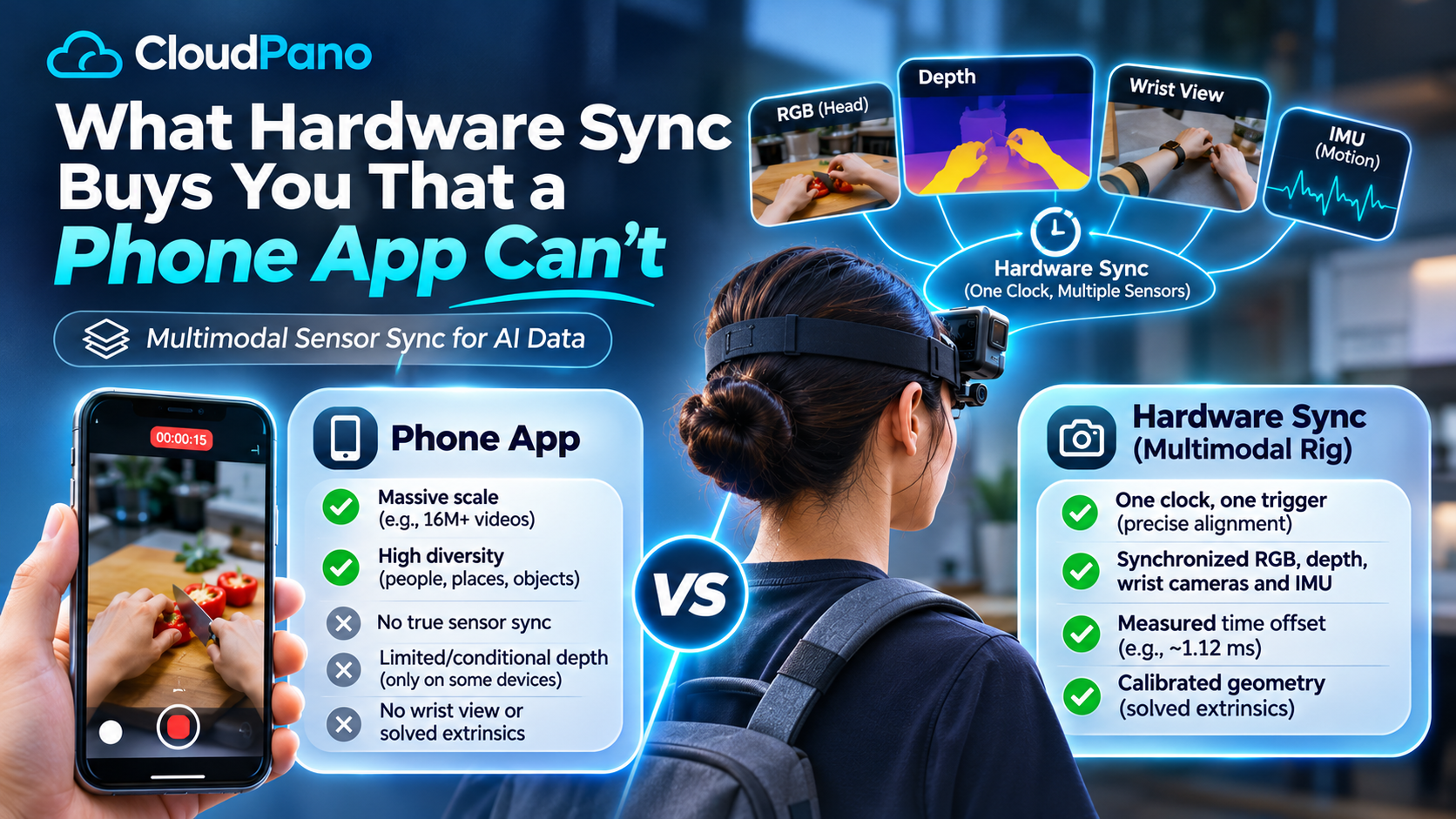
Hardware sync puts every stream on one clock, triggered together, so RGB, depth, wrist cameras and IMU describe the same instant. A phone app gives you one rolling-shutter RGB stream with timestamps the operating system does not guarantee are comparable to its own motion sensors. Sync buys you geometry and timing you can train a manipulation policy on. A phone app buys you diversity and volume.
In August 2026, Figure announced that its Index app had crossed 16 million uploaded videos from 264,000 downloads across 108 countries, processing 30 minutes of footage every second. No instrumented rig fleet on earth comes close to that throughput. If you are deciding where your data budget goes, that number deserves a straight answer rather than a dismissal.
The honest version is that the two methods buy different things, and the difference is not image quality. A phone app buys coverage: environments, objects and habits you could never specify in advance, which is exactly what real-world video data is for. Multimodal sensor sync AI data buys correspondence — the guarantee that the pixel, the depth value, the wrist view and the IMU sample you are about to fuse describe the same instant and the same geometry. This article is about what that guarantee costs to produce, and when you actually need it.
It means one clock and one trigger line. A single timing source tells every sensor when to capture, and every sample lands in the same time domain, so no software has to guess afterward which frame belongs with which depth map.
That is the whole idea, and it is narrower than the word "synced" usually implies in a vendor deck. Ten sensors recording at once are ten separate recordings until something forces them onto a shared timebase. Two things do that job:
Purpose-built research hardware is built exactly this way. Meta's Project Aria glasses timestamp sensor data on a dedicated microcontroller rather than in the Android OS, and Meta documents the resulting error: for the global-shutter SLAM and eye-tracking cameras, the timestamping error is bounded at 19 microseconds. Meta also states that Aria's sensors are temporally aligned to a shared device-time domain, and that multiple devices can be aligned to each other the same way.
The word to watch for is post-hoc. If streams are aligned after capture — by matching audio claps, by cross-correlating motion, by trusting file creation times — you do not have hardware sync. You have an estimate, and nobody has told you its error bars.
Diversity and throughput, by a margin no rig programme can close. A phone is already in the pocket of everyone who knows how to do the task you want recorded, which is why app-based collection reaches environments a rig fleet never books.
Figure's published Index figures are the clearest public evidence of this, and they are worth reading carefully rather than waving away:
Figure is also explicit that it tried the alternative first and that vendors could not hit its throughput, diversity or quality bar, so it built the app pipeline itself. Anyone selling instrumented capture who pretends this is not a real result is not arguing in good faith.
What the app approach is buying is prior over the world: what a kitchen looks like in 108 countries, how many ways a person opens a carton, which objects actually sit on real counters. For pretraining a visual policy on human behaviour, that distribution matters more than millimetres.
Four things, and none of them are fixable in an app update: cross-subsystem timing you can trust, reliable depth, a second viewpoint on the hands, and solved extrinsics between the two.
Timestamps you can compare across subsystems. This is the one people assume software solves. Android's own camera API says otherwise. A camera device reports its timestamp source, and where that source is SENSOR_INFO_TIMESTAMP_SOURCE_UNKNOWN, Google's documentation states the timestamps are monotonic but "can not be compared to timestamps from other subsystems" — accelerometer and gyro are the examples given. On such a handset, fusing the video with the phone's own IMU means fusing two clocks whose relationship the platform declines to guarantee. You can estimate the offset. You cannot look it up.
Depth, except conditionally. Apple's ARKit provides scene depth from the LiDAR scanner, and Apple's documentation is explicit that ARKit supports scene depth only on LiDAR-capable devices. A collection programme running on whatever phone a contributor already owns gets depth on some submissions and not others, at varying quality, which is a sampling problem rather than a format problem.
A wrist view. At the moment of contact, the hand and the object are frequently occluded from a head-mounted or hand-held viewpoint. A wrist camera sees the grasp the head camera cannot. One phone is one viewpoint, and asking a contributor to hold a second phone defeats the point.
Extrinsics. Even with two devices, you need the rigid transform between them, solved against a calibration target, or the two views cannot be related geometrically. A pair of unregistered video streams is not a multi-view dataset.
None of this makes app footage useless. It makes it single-stream RGB, and it should be priced and labelled as single-stream RGB.
Because a rolling shutter does not capture one instant. It reads the sensor row by row, so a frame taken during fast hand or head motion is a composite of slightly different moments, and the geometry in it is skewed.
A global shutter exposes every pixel at the same time, which is why research hardware uses it for the streams that feed pose and tracking. The split shows up inside Aria's own design: Meta's documentation notes that the SLAM and eye-tracking cameras use electronic global shutter sensors whose timestamps mark the centre of the exposure window, while the RGB camera uses an electronic rolling shutter whose timestamp marks the centre of the exposure of the middle row. That phrasing is the admission: with a rolling shutter, the top and bottom of the frame were not taken at the timestamp written in the file.
Phone cameras are overwhelmingly rolling shutter. For a slow, deliberate demonstration that costs you little. For the fast reach-and-grasp segments that manipulation policies actually need, it means the hand position implied by the pixels and the hand position implied by the IMU disagree, and the disagreement varies with where in the frame the hand happens to be.
Global shutter is not free — the sensors are larger, more expensive and generally noisier in low light at equal resolution, which is precisely why phones do not use them. That trade is a reasonable one for a consumer camera and a bad one for training data on fast motion.
Ask for per-stream nanosecond timestamps in the delivered files and recompute the error distribution yourself. Any vendor claiming hardware sync who cannot hand you the timestamps is asking you to take timing on faith.
The check is short. For each frame of the reference camera, find the nearest sample in every other stream, take the absolute offset, and look at the median and the p99 rather than the best case. What you want back from a vendor, before you sign anything:
timeStampNs as int64 per stream, in whatever container you take — RLDS, LeRobotDataset, WebDataset, HDF5 — so the check is reproducible on your side.If your own recomputation disagrees with the vendor's figure on a delivered batch, that is a defect, and it should be treated as one contractually.
Match the tier to what the model has to learn. If the training signal is "what do humans do and where", buy breadth. If the training signal is "where exactly was the hand relative to the object at this millisecond", buy sync.
What hardware sync cannot do for you. It does not scale like an app, and anyone implying otherwise is selling. A rig programme is gated on recruiting, training and retaining operators — Firsthand's own published funnel shows 4,180 applicants producing 287 currently active collectors, roughly 7 percent. It costs more per hour, because operators are paid for setup and calibration time, not per clip. It reaches fewer countries than a phone app does. And Firsthand's second, contributor-worn 360 tier explicitly gives up depth, wrist views and sub-millisecond sync in exchange for that reach, which is why every multi-stream claim on our capture rig specifications is scoped to the instrumented tier only.
One more honest note: the third-party results cited here — Figure's Index figures, Meta's Aria timestamping bounds — were measured on those organisations' own systems and datasets, not on Firsthand data. They establish how the technology behaves. They are not benchmarks of what Firsthand delivers, and nobody should read them that way.
A phone app and an instrumented rig are not competing on quality. They are competing on what they guarantee. The app guarantees reach — 16 million videos across 108 countries is a real achievement and a real asset. Hardware sync guarantees correspondence: one trigger, one clock, published error bars, and a calibration solve at both ends of every session.
Buy the app tier when the model needs to see the world. Buy the synced tier when the model needs to know exactly where and exactly when. And in either case, ask for the timestamps and check the number yourself.
A rolling shutter exposes the sensor row by row, so each frame is built from slightly different moments and fast motion appears skewed. A global shutter exposes every pixel at the same instant, producing one true snapshot. For robotics data, that difference decides whether the pixels and the motion sensors agree about where the hand was.
Cost, size and low-light performance. A global-shutter pixel needs extra storage circuitry next to every photodetector, so sensors are larger and more expensive at the same resolution, and generally noisier in dim conditions. That trade is why phones ship rolling shutter and why instrumented capture rigs do not.
Because fusing two streams requires knowing they describe the same moment. If the camera clock and the IMU clock drift apart, a model learns a false relationship between what was seen and what was felt. Android's camera documentation warns that on some devices camera timestamps cannot be accurately compared to accelerometer or gyro timestamps.
In hardware, a trigger line fires every sensor together and a protocol such as PTP disciplines all device clocks to one grandmaster, so timestamps share a domain. In software, streams are aligned after capture by matching audio or motion. Hardware sync gives you a measurable error; software alignment gives you an estimate.
Decide what the model must learn first. For broad human behaviour, collect single-stream video at volume through an app or contributor network. For manipulation, use calibrated multi-camera rigs with depth, IMU and hardware-triggered timestamps, reject out-of-spec episodes, and keep per-stream nanosecond timestamps in the delivered files so buyers can verify the sync.


Compact, ready to go anywhere
Interchangeable lens that’s upgradeable
Dual 1-inch sensors for improved clarity and low light performance
Dynamic range and 6K 360° capture
360° photo resolution at 21MP

8K 360° video recording for ultra-detailed visuals.
4K single-lens mode for traditional wide-angle shots.
Invisible selfie stick effect for drone-like perspectives.
2.5-inch touchscreen with Gorilla Glass protection.
Waterproof up to 33ft for underwater shooting.

360° photo resolution in 23MP
Slim design at 24 mm thick
Built-in image stabilization for smooth video capture.
Internal 19GB storage for photo and video storage.
Wireless connectivity for remote control and sharing.

60MP 360° still images for high-resolution photography.
5.7K 360° video recording at 30fps.
2.25-inch touchscreen for intuitive control.
USB Type-C port for fast charging and data transfer.
MicroSD card slot for expandable storage.


Try it free. No credit card required. Instant set-up.