Choosing Wearable Camera Hardware for Egocentric Data Collection

Cloudpano
August 2, 2026
5 min read
Share this post

Choosing Wearable Camera Hardware for Egocentric Data Collection

Most teams choose a wearable camera for data collection based on whatever's convenient, popular, or already sitting in a drawer. That approach works until the resulting footage doesn't actually capture what the model needs — wrong field of view, wrong mounting angle, or insufficient battery life for the activities being recorded.

Egocentric Camera Hardware decisions carry more downstream consequence than they seem to at the point of purchase, since the camera's specific characteristics determine what's physically possible to capture, regardless of how well the rest of the collection protocol is designed.

Why It Matters

A camera mismatched to the task doesn't fail obviously at the point of purchase — it fails quietly during collection, producing footage that's missing exactly the detail a model needs, discovered only once annotation or training reveals the gap. Google Research's "Data Cascades" study documented how such quality issues introduced early in a pipeline compound into larger, harder-to-diagnose problems later (Sambasivan et al., Google Research), and hardware selection is about as early in the pipeline as a decision gets.

NIST's AI Risk Management Framework treats data fitness for the intended task as foundational to trustworthy AI, directly relevant to First-Person Capture Devices needing specifications genuinely matched to what a model actually needs to learn, not chosen for general convenience (NIST AI RMF).

The stakes rise with how much egocentric vision research and deployment has grown. Stanford HAI's AI Index has tracked increasing interest in wearable sensing and activity recognition applications (Stanford HAI, AI Index Report), and a hardware mismatch discovered after a large collection effort is a far more expensive problem than one caught during initial equipment selection.

How It Works

A POV Camera for AI Training purposes needs evaluation across a few specific hardware dimensions.

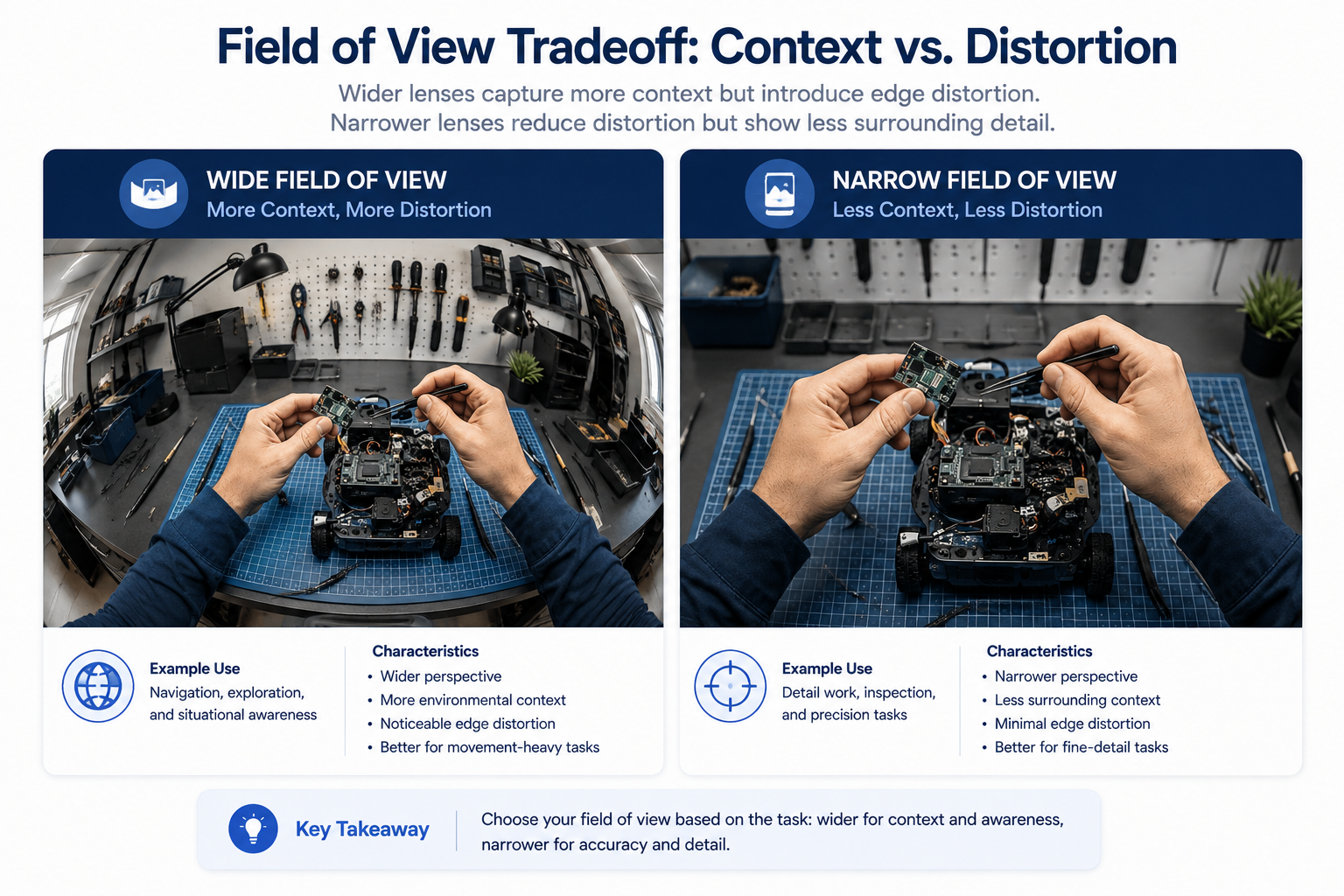
Field of view. Wider fields of view capture more context around an activity but can introduce distortion at the edges; narrower fields of view offer less distortion but may miss peripheral detail relevant to certain tasks.
Mounting position. Head-mounted cameras track directly with gaze and head orientation; chest-mounted cameras offer a more stable, less erratic viewpoint but disconnect from where the wearer is actually looking; glasses-mounted cameras sit close to natural eye-line but often carry more constraints on battery and storage.
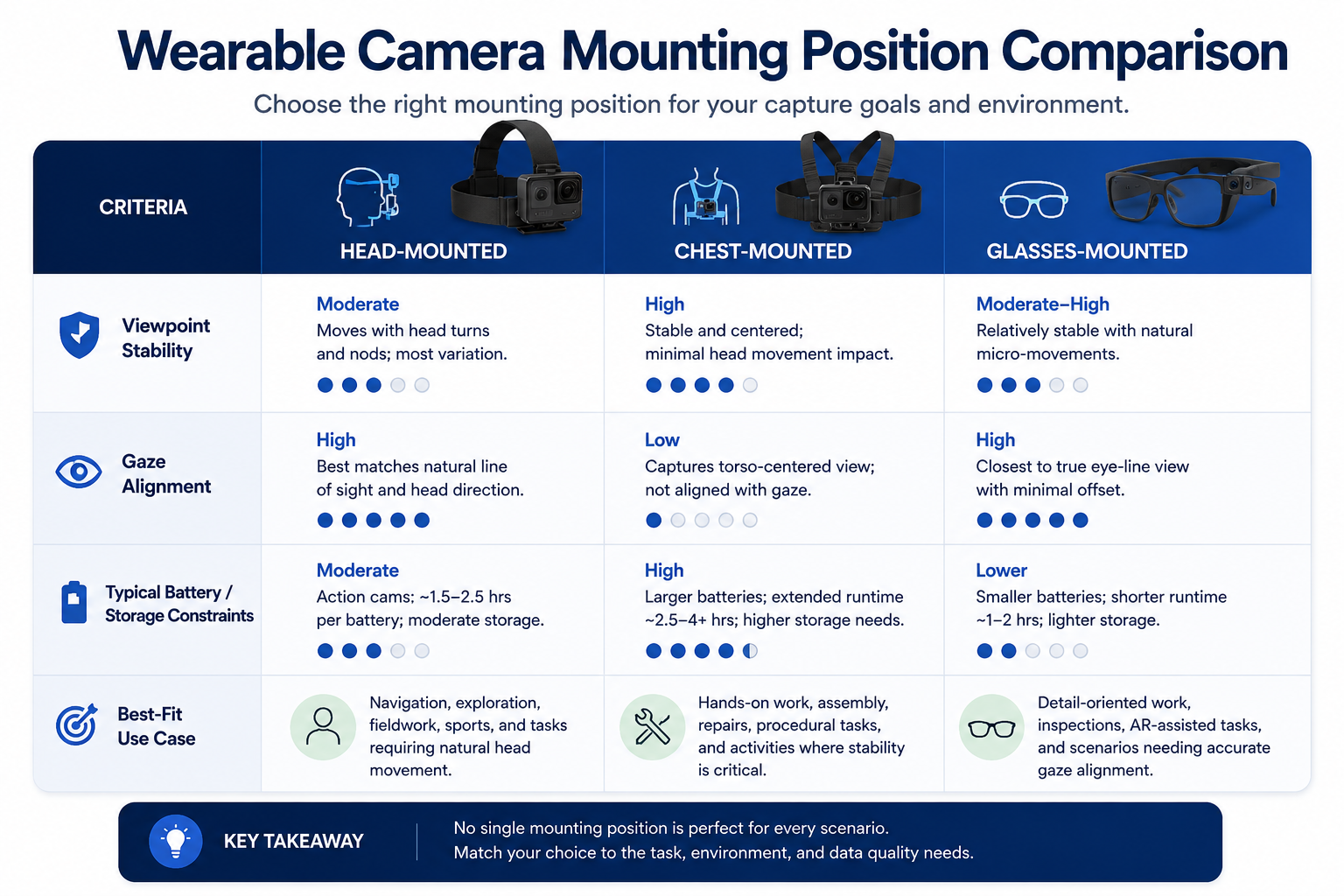
Comparison table of head-mounted, chest-mounted, and glasses-mounted wearable cameras

Resolution and frame rate. Higher resolution captures more visual detail but increases storage and processing demands; frame rate needs to match the speed of activity being recorded, since fast hand movements need a higher frame rate to avoid motion blur or dropped detail.

Battery life and storage capacity. Extended data collection sessions require hardware that can sustain recording for the actual duration needed, and running out of either mid-session creates unusable gaps in a demonstration or activity sequence.
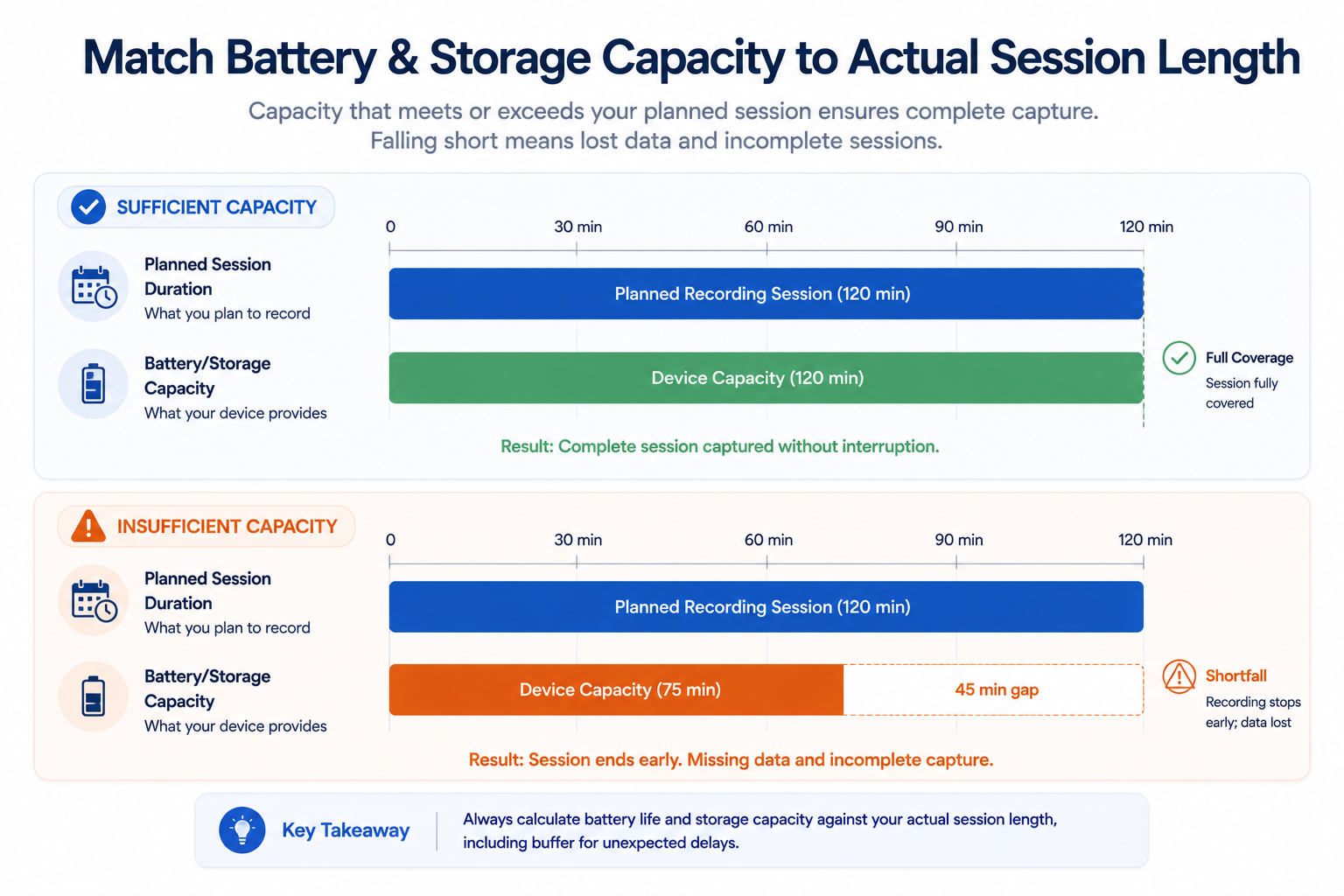
Understanding how these workflows operate as a matching exercise between hardware specification and specific task requirement — not a search for the single "best" camera — is what actually produces the right equipment choice for a given project.
Step-by-Step Workflow

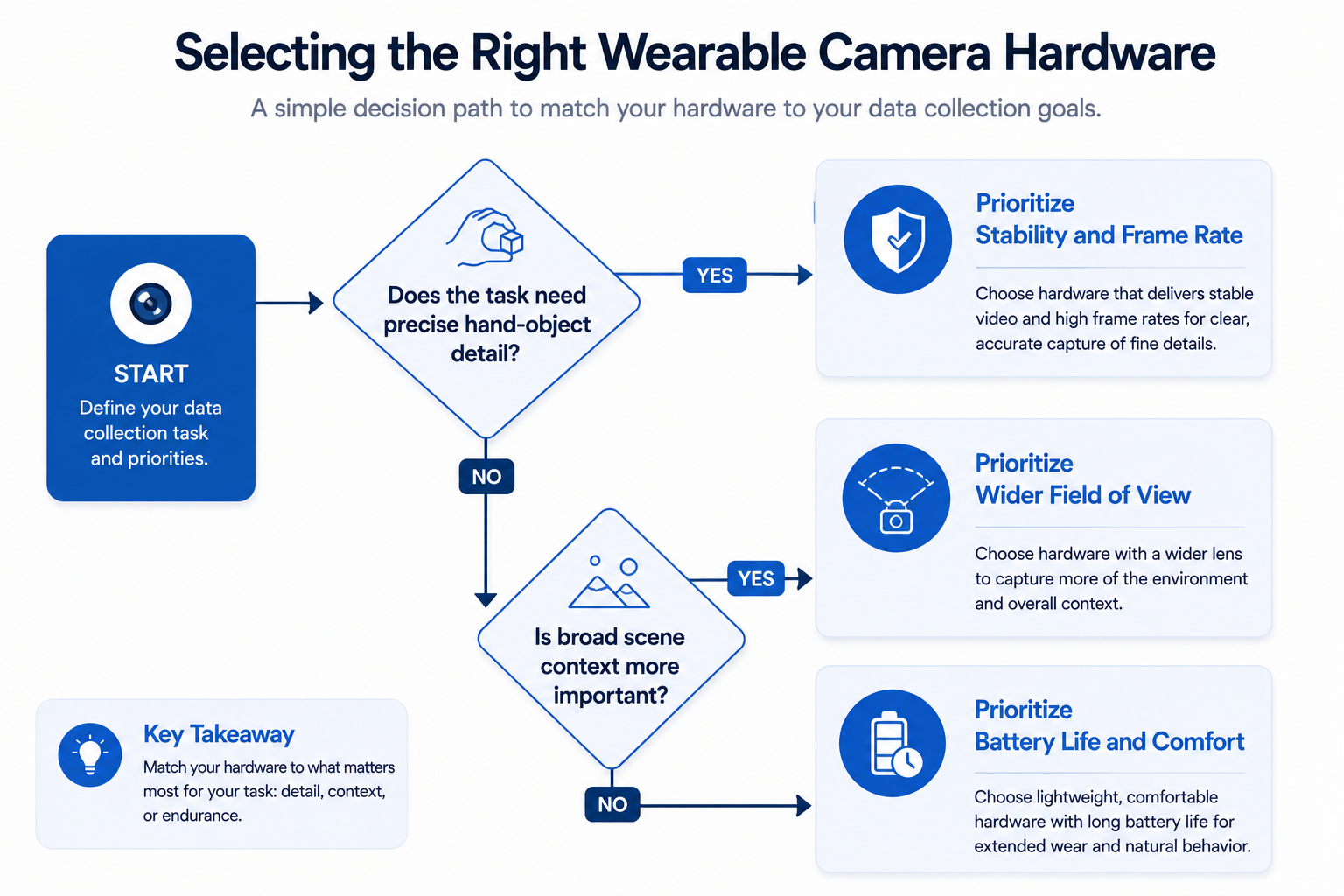
Flowchart for selecting wearable camera hardware for a specific data collection task
  1. Define the specific visual detail your model task requires. Precise hand-object interaction, broad scene context, or gaze-aligned viewpoint each point toward different hardware characteristics.
  2. Evaluate field of view options against that requirement. Wider or narrower framing should be selected based on what actually needs to be visible, not a default assumption.
  3. Choose a mounting position matched to the required viewpoint. Head, chest, or glasses-mounted options each produce meaningfully different footage characteristics.
  4. Confirm resolution and frame rate against the activity speed and detail needed. Match these specifications to the actual pace and precision of what's being recorded.
  5. Calculate battery and storage requirements against actual session length. Confirm hardware can sustain full recording sessions without running out mid-collection.
  6. Pilot the selected hardware on a small representative sample. Verify the equipment actually produces usable footage for the specific task before committing to full-scale purchase and deployment.
  7. Reassess hardware choice if task requirements evolve. A project that expands into new activity types or environments may need different specifications than the original selection.

Industry Use Cases

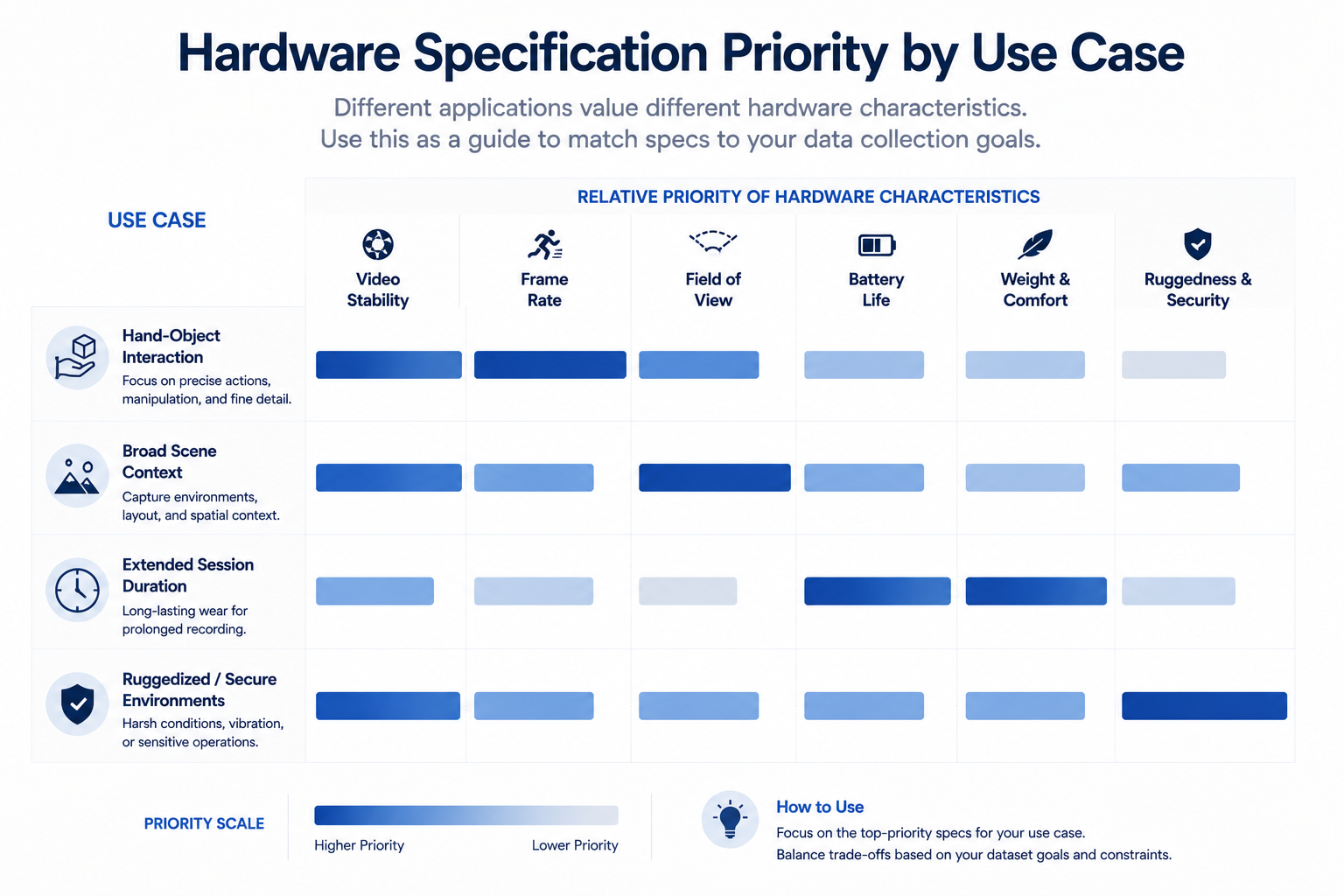
Bar chart showing wearable camera hardware spec priority by use case
  • Computer vision / robotics: Hand-object interaction detail typically demands closer, more stable mounting positions and higher frame rates to capture fast manipulation movements clearly.
  • Healthcare AI: Surgical or clinical applications often require specific field-of-view and stability characteristics matched to precise procedural detail requirements.
  • Manufacturing AI: Assembly and inspection task capture benefits from mounting positions that stay consistent across repetitive motions, often favoring chest-mounted stability over head-mounted variability.
  • Retail AI: In-store associate or customer viewpoint capture typically prioritizes battery life and unobtrusiveness over the highest possible resolution.
  • Government & defense: Hardware selection in this sector often layers ruggedization and security requirements on top of standard field-of-view and resolution considerations.
  • Autonomous vehicles: This specific wearable hardware context has limited direct application, since vehicle-mounted sensor selection follows different criteria entirely.

Benefits

  • Footage genuinely matched to model requirements. Deliberate hardware selection produces data with the specific detail a task actually needs, rather than generic recordings that may not transfer.
  • Reduced risk of unusable collection sessions. Confirming battery and storage capacity against actual session length avoids gaps that render a demonstration incomplete.
  • More efficient collection budget. Selecting hardware matched to actual requirements avoids overpaying for specifications a task doesn't need, or underpaying and needing to re-collect.
  • Better downstream annotation efficiency. Footage captured with the right field of view and stability is easier and faster to annotate accurately than mismatched or unstable recordings.
  • More predictable project outcomes. A hardware pilot before full-scale purchase reduces the risk of discovering a mismatch only after significant investment.

Common Mistakes

  • Choosing hardware based on convenience or familiarity. Defaulting to whatever camera is available rather than evaluating specifications against the actual task requirement.
  • Ignoring the tradeoff between field of view and distortion. Selecting the widest available field of view without considering how edge distortion might affect the specific detail needed.
  • Mismatching mounting position to the required viewpoint. Using a head-mounted camera when a stable, chest-mounted viewpoint would better serve the task, or vice versa.
  • Underestimating battery and storage needs for actual session length. Discovering mid-collection that hardware can't sustain the required recording duration.
  • Skipping a hardware pilot before full-scale purchase. Committing to equipment for an entire collection effort without first confirming it produces usable footage for the specific task.
  • Not revisiting hardware choice as project scope evolves. Continuing with original equipment specifications after task requirements have meaningfully changed.

Best Practices

  • Define the specific visual detail your model task requires before evaluating any hardware options.
  • Match field of view, mounting position, resolution, and frame rate deliberately to that requirement, not to convenience or popularity.
  • Calculate battery and storage needs against actual planned session lengths before committing to a purchase.
  • Pilot selected hardware on a small representative sample before scaling to full collection volume.
  • Reassess hardware specifications if project scope or activity types expand beyond the original plan.
  • Treat hardware selection as a task-matching exercise, not a search for a single universally best camera.

FAQ

What factors matter most when selecting a wearable camera for data collection?

Field of view, mounting position, resolution and frame rate, and battery or storage capacity, each evaluated against the specific model task the resulting footage needs to support.

How does mounting position affect egocentric camera hardware choice?

Head-mounted cameras track with gaze and head movement, chest-mounted cameras offer more stability but disconnect from exact gaze direction, and glasses-mounted cameras sit close to natural eye-line with typically more constrained battery and storage.

What field of view is best for a POV camera for AI training?

It depends on the task: wider fields of view capture more context but risk edge distortion, while narrower fields of view reduce distortion but may miss relevant peripheral detail.

How much battery life does egocentric data collection hardware typically need?

Enough to sustain the actual planned recording session length without interruption; calculating this against real session duration before purchase avoids mid-collection gaps.

Should hardware be piloted before a full-scale purchase for a data collection project?

Yes. A small-scale pilot confirms the selected camera actually produces usable footage for the specific task before committing budget to full deployment.

Is there a single best wearable camera for all egocentric data collection projects?

No. The right choice depends entirely on matching specific hardware characteristics to a particular model task's requirements, not finding one universally superior camera.

How does frame rate affect first-person capture devices for fast-motion tasks?

Higher frame rates are needed for fast hand movements or rapid activity to avoid motion blur or dropped visual detail, while slower-paced tasks may not require as high a frame rate.

Conclusion

Choosing a wearable camera for data collection is a task-matching exercise, not a search for one universally best device. Field of view, mounting position, resolution, frame rate, and battery or storage capacity all need to be evaluated deliberately against what a specific model task actually requires, and piloting that choice before full-scale deployment is what keeps a collection project from discovering a costly hardware mismatch after significant investment.

🚀 Your All‑In‑One Virtual Experience Stack
🎬
PhotoAIVideo
Turn photos into scroll‑stopping AI videos.
Get Started →
🏡
Pictastic
Instantly stage listings with AI.
Try Staging →
🌀
CloudPano
Create stunning 360° tours in minutes.
Launch Tour →
💰
VirtualTourProfit
Build a profitable virtual tour business.
Learn More →
🤝
CloudPano Reseller
Resell AI visual software without building it.
Become a Reseller →
🚗
Auto CloudPano
Sell more vehicles with 360° experiences.
Explore Auto →
🏗️
AI Floor Plan Builder
Generate detailed floor plans with AI.
Build Now →
📐
3D Measure
Capture accurate floor plans & 3D measurements.
Measure Now →
🧠
AI Training Data
Custom AI training data services.
Learn More →
Share this post
Cloudpano

Choose The Right 360° Camera

Insta360 ONE RS 1-Inch 360 Edition

  • Compact, ready to go anywhere

  • Interchangeable lens that’s upgradeable

  • Dual 1-inch sensors for improved clarity and low light performance

  • Dynamic range and 6K 360° capture

  • 360° photo resolution at 21MP

Learn More

Insta360 X4

  • 8K 360° video recording for ultra-detailed visuals.

  • 4K single-lens mode for traditional wide-angle shots.

  • Invisible selfie stick effect for drone-like perspectives.

  • 2.5-inch touchscreen with Gorilla Glass protection.

  • Waterproof up to 33ft for underwater shooting.

Learn More

Ricoh Theta Z1

  • 360° photo resolution in 23MP

  • Slim design at 24 mm thick

  • Built-in image stabilization for smooth video capture.

  • Internal 19GB storage for photo and video storage.

  • Wireless connectivity for remote control and sharing.

Learn More

Ricoh Theta X

  • 60MP 360° still images for high-resolution photography.

  • 5.7K 360° video recording at 30fps.

  • 2.25-inch touchscreen for intuitive control.

  • USB Type-C port for fast charging and data transfer.

  • MicroSD card slot for expandable storage.

Learn More
Property Marketing
Allows potential buyers to explore properties in detail from anywhere, enhancing the real estate marketing process.
Automotive Spins
Create an interactive virtual showroom and engage affluent digital buyers with live 360º video calls, all through the CloudPano mobile app for a complete automotive sales solution.
Interactive Floor Plans
Create 2D and 3D floor plans with measurements in 4 minutes or less, all from your phone. Download the Floor Plan Scanner app and get your first scan free.

360 Virtual Tours With CloudPano.com. Get Started Today.

Try it free. No credit card required. Instant set-up.
Try it free
Latest posts

See our other posts

Interviews, tips, guides, industry best practices, and news.

Choosing Wearable Camera Hardware for Egocentric Data Collection

A wearable camera for data collection should be selected based on field of view, mounting position, resolution, and battery or storage capacity matched to the specific model task — not convenience or popularity. Head-mounted, chest-mounted, and glasses-style cameras each produce meaningfully different footage suited to different activity and interaction types.
Read post

Egocentric Video Capture: A Practical Guide for AI Training Data

Egocentric video capture involves recording first-person footage from a wearable or body-mounted camera, requiring deliberate hardware selection, a defined recording protocol, and attention to environmental variability and consent that conventional fixed-camera data collection doesn't. Getting capture right upfront determines how usable the resulting footage actually is for downstream training.
Read post

Scaling a Video Annotation Pipeline: Workforce, Throughput, and Tooling

Video annotation at scale requires workforce sizing matched to actual throughput needs, tooling that supports parallel task distribution, and pipeline architecture that doesn't create single-point bottlenecks. Practices that work at pilot volume — manual task assignment, informal quality checks — typically break down well before reaching production-scale annotation volume.
Read post