Egocentric Video Capture: A Practical Guide for AI Training Data

Cloudpano
August 2, 2026
5 min read
Share this post

Egocentric Video Capture: A Practical Guide for AI Training Data

Deciding you need first-person video data is the easy part. Egocentric video capture that actually produces usable training data requires specific decisions most teams don't face with conventional fixed-camera collection — which hardware to use, how to structure a recording protocol, and how to handle the environmental and consent challenges that come with recording from a person's own viewpoint.

First-Person Video Recording at any meaningful scale is a genuinely different collection exercise than setting up a stationary camera and letting it run. The camera moves with the wearer, conditions shift constantly, and the people being recorded — including the wearer themselves — need to be accounted for differently than a fixed installation ever requires.

Why It Matters

Capture decisions made poorly don't just produce lower-quality footage — they can make the resulting data unusable or unnecessarily expensive to annotate downstream, since problems introduced at capture propagate into every later stage of the pipeline. Google Research's "Data Cascades" study documented how issues that seem minor early in a data pipeline compound into much larger, harder-to-diagnose problems later (Sambasivan et al., Google Research), and capture-stage decisions are about as early as a data pipeline gets.
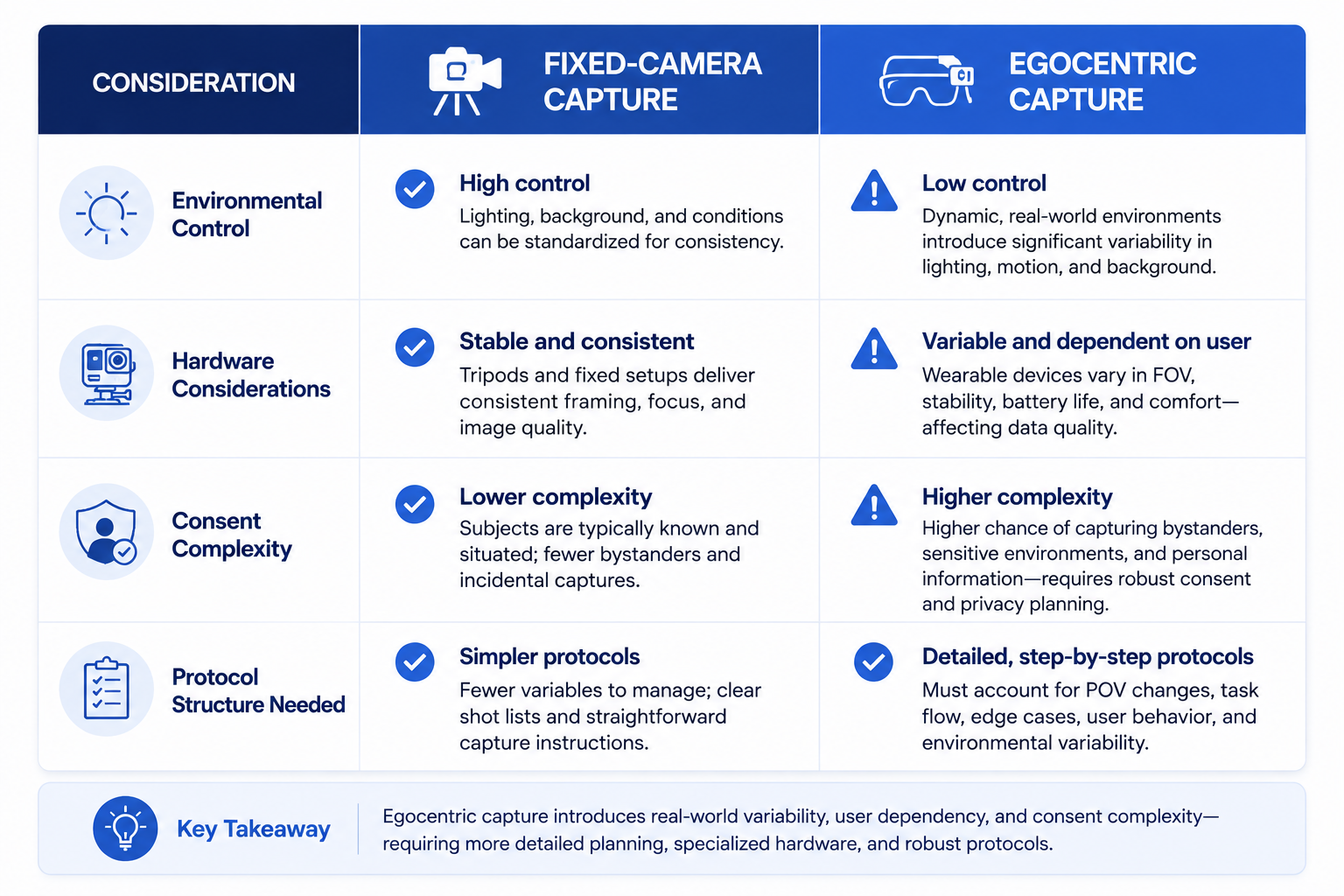
Comparison table of fixed-camera vs egocentric video capture considerations

NIST's AI Risk Management Framework treats data fitness for the intended task as foundational to trustworthy AI, directly relevant to Wearable Camera Video capture, since hardware and protocol choices determine whether the resulting footage genuinely supports the model task it's meant to train (NIST AI RMF).

The stakes rise as interest in egocentric vision grows across research and industry. Stanford HAI's AI Index has tracked increasing attention to human activity recognition and wearable sensing applications (Stanford HAI, AI Index Report), and capture-stage mistakes at that scale are considerably more expensive to correct than issues caught before large-scale collection begins.

How It Works

Egocentric Vision Datasets depend on decisions made across a few specific capture dimensions.
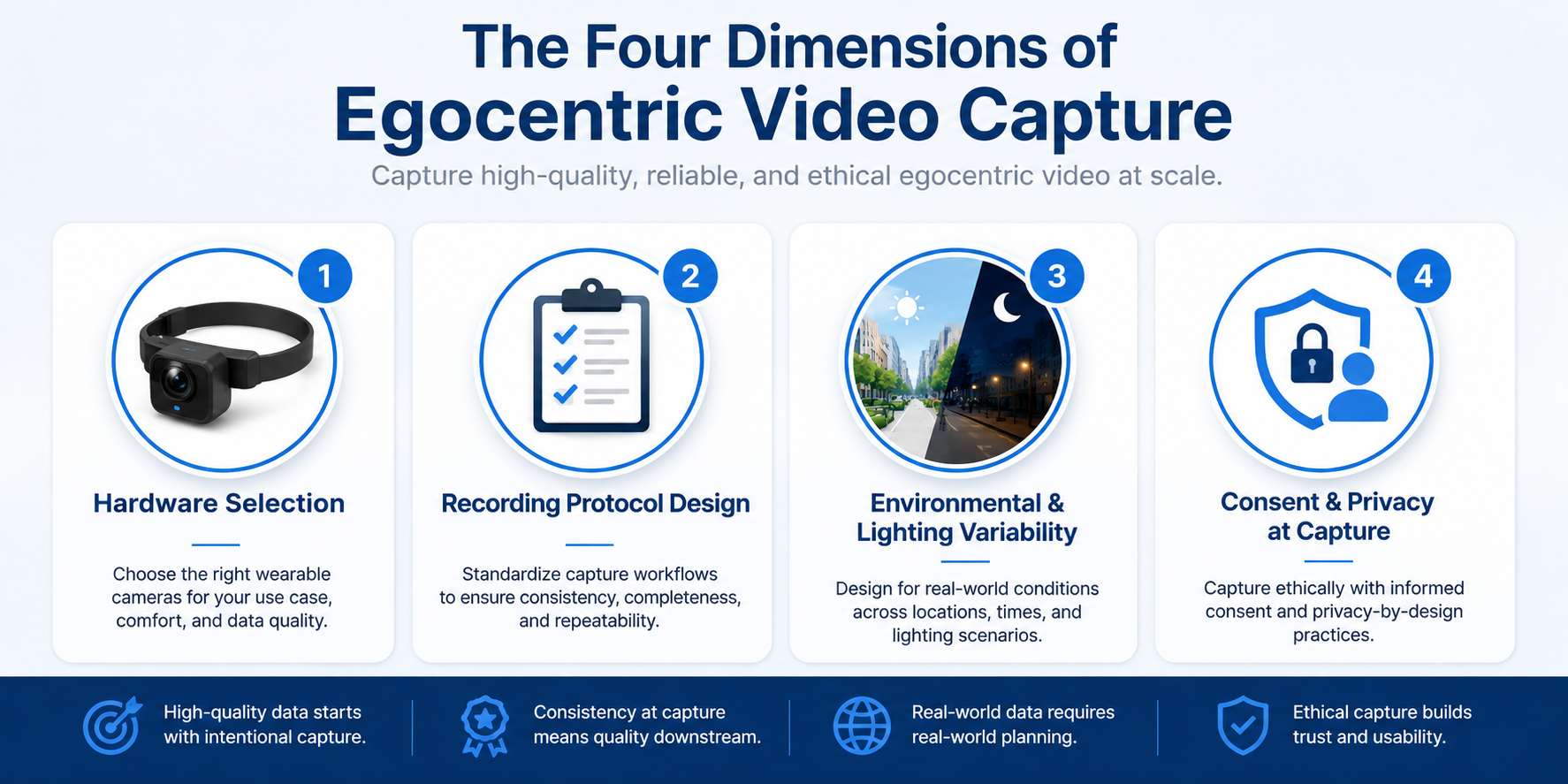
Infographic of four core dimensions of egocentric video capture

Hardware selection. Camera field of view, mounting position (head, chest, glasses-mounted), resolution, and battery life all affect what the resulting footage actually captures and for how long, and the right choice depends on the specific task the data needs to support.
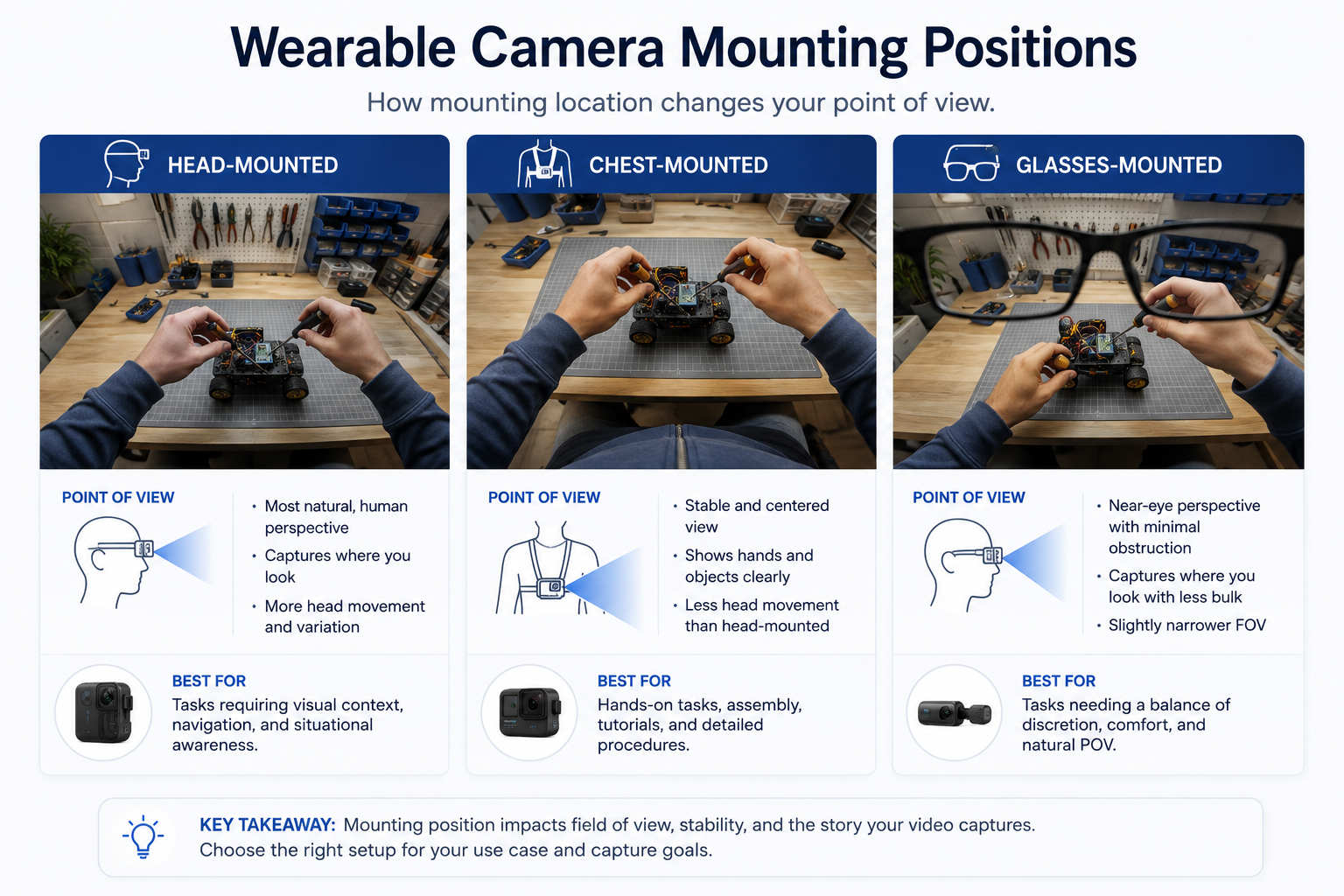
Illustration comparing wearable camera mounting positions for egocentric video capture

Recording protocol design. A structured plan for what activities to capture, in what conditions, and for how long, rather than open-ended recording that produces footage without the specific coverage a training task requires.

Environmental and lighting variability. Egocentric capture happens wherever the wearer goes, meaning lighting, background, and motion conditions vary far more than a controlled, fixed-camera setup, requiring a protocol that accounts for this variability deliberately.

Consent and privacy at the point of capture. Both the wearer's own participation and any bystanders who may appear in footage need to be addressed as part of the capture process itself, not as an afterthought.

Understanding how these workflows operate as a deliberate collection design problem — not just "put a camera on someone and record" — is what actually determines whether the resulting footage supports the model task it's meant for.
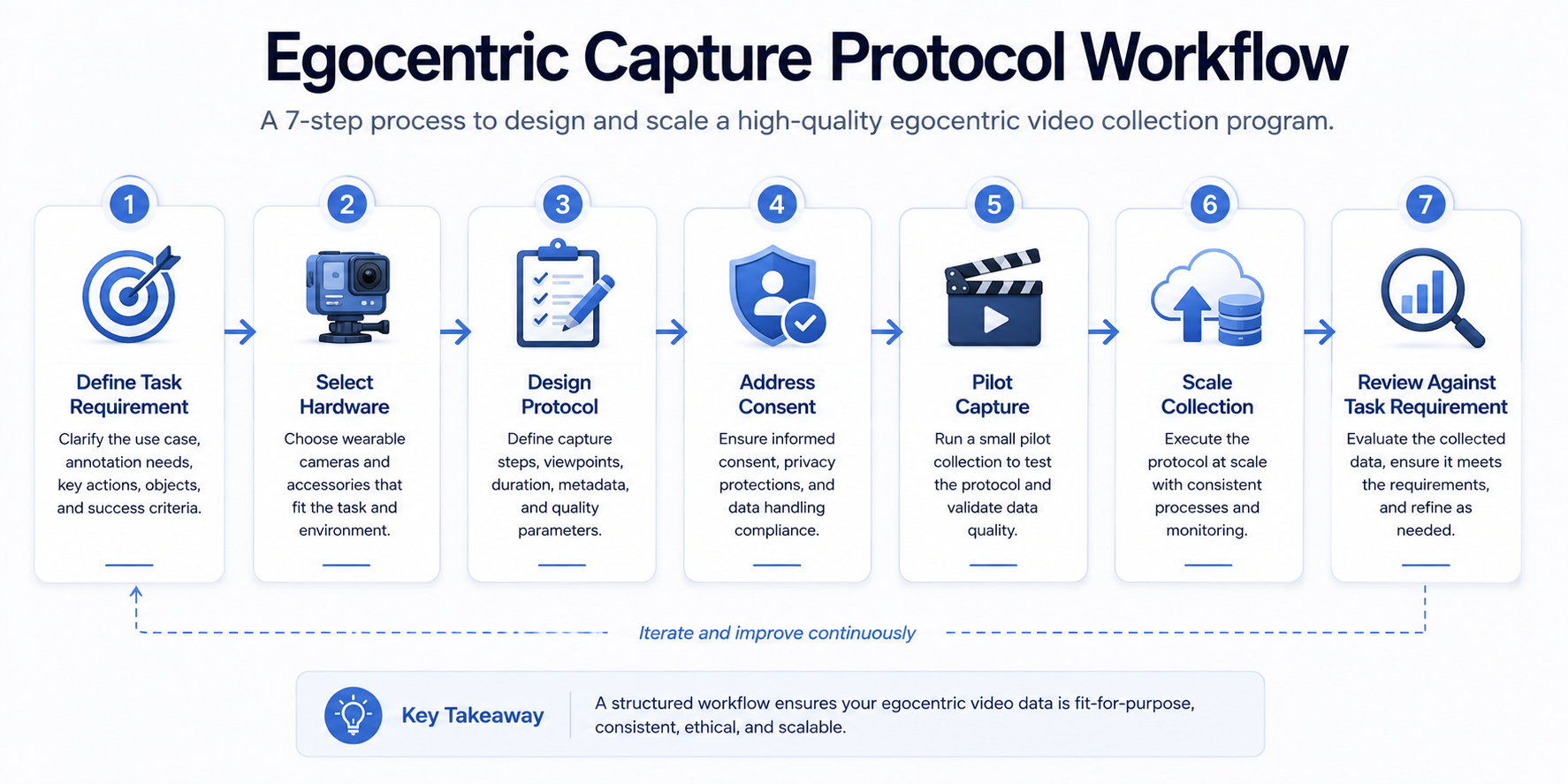
Step-by-Step Workflow

Flowchart for designing an egocentric video capture protocol
  1. Define the specific task your captured footage needs to support. Activity recognition, object interaction, or navigation each point toward different hardware and protocol choices.
  2. Select camera hardware matched to that task. Field of view, mounting position, and resolution requirements differ meaningfully depending on what needs to be visible in frame.
  3. Design a structured recording protocol. Specify activities, environments, and durations to capture deliberately, rather than relying on open-ended recording.
  4. Address consent for both wearers and potential bystanders before recording begins. Build this into the capture plan itself, not as a step handled after footage already exists.
  5. Pilot the capture setup on a small scale first. Confirm hardware, protocol, and environmental handling actually produce usable footage before committing to full-scale collection.
  6. Scale collection according to the validated protocol. Expand volume using the same structured approach confirmed during the pilot.
  7. Review captured footage against the original task requirement. Confirm the collected data genuinely supports the model task before moving into annotation.

Industry Use Cases

Bar chart showing egocentric video capture complexity across industries
  • Computer vision / robotics: Egocentric capture supports robot learning from human demonstration, where the specific viewpoint and interaction detail captured directly shapes downstream training data quality.
  • Healthcare AI: Capture protocols here often require particularly careful consent design given clinical or patient-facing contexts, alongside task-specific hardware choices for surgical or rehabilitation applications.
  • Manufacturing AI: Wearable-camera capture of assembly or inspection tasks benefits from a structured protocol capturing consistent activity types across different workers and shifts.
  • Retail AI: Egocentric capture from associates supports understanding in-store interaction patterns, though typically with less environmental variability than field-based collection in other industries.
  • Government & defense: Capture protocols in this sector often layer security and access considerations on top of standard hardware and consent planning.
  • Autonomous vehicles: This specific first-person capture context has limited direct application, since vehicle-mounted sensor capture follows a different set of hardware and protocol considerations.

Benefits

  • Footage that actually supports the intended model task. Deliberate hardware and protocol decisions produce data matched to specific training requirements, rather than generic recordings that may not transfer.
  • More efficient downstream annotation. Well-captured footage with consistent coverage and quality is faster and cheaper to annotate than inconsistent, poorly planned recordings.
  • Reduced consent and privacy risk. Addressing these considerations at the capture stage avoids costly rework or unusable footage discovered after the fact.
  • More predictable collection timelines and costs. A validated protocol, piloted before scaling, produces more reliable planning than open-ended recording approaches.
  • Better coverage of the conditions a deployed model will actually encounter. Deliberately capturing environmental variability produces training data more representative of real-world deployment conditions.

Common Mistakes

  • Treating egocentric capture like setting up a fixed camera. Missing that hardware selection, protocol design, and environmental variability all require different planning than stationary recording.
  • Recording without a structured protocol. Producing open-ended footage that lacks the specific activity and condition coverage a downstream training task actually needs.
  • Selecting hardware without matching it to the specific task. Choosing a camera based on convenience or cost rather than the field of view and mounting position the task genuinely requires.
  • Addressing consent only after footage has been recorded. Treating wearer and bystander consent as an afterthought rather than building it into the capture plan itself.
  • Skipping a pilot before scaling collection. Committing to full-scale capture without first validating that hardware, protocol, and consent handling actually work in practice.
  • Not reviewing captured footage against the original task requirement. Moving into annotation without confirming the collected data genuinely supports what the model actually needs to learn.

Best Practices

  • Define the specific model task your footage needs to support before selecting hardware or designing a protocol.
  • Match camera hardware — field of view, mounting position, resolution — to the specific requirements of that task.
  • Build a structured recording protocol specifying activities, environments, and durations rather than relying on open-ended capture.
  • Address wearer and bystander consent as part of the capture plan itself, not a later addition.
  • Pilot the capture setup on a small scale before committing to full collection volume.
  • Review captured footage against the original task requirement before moving into annotation.

FAQ

What does egocentric video capture actually require beyond a wearable camera?

Deliberate hardware selection matched to the specific task, a structured recording protocol covering the right activities and conditions, and consent handling for both wearers and bystanders built into the capture plan.

How is first-person video recording different from standard fixed-camera collection?

The camera moves with the wearer, environmental conditions vary far more than a controlled setup, and consent considerations apply differently since the wearer and any bystanders are both part of the capture context.

What hardware factors matter most for egocentric vision datasets?

Field of view, mounting position (head, chest, or glasses-mounted), resolution, and battery life, each of which should be matched to the specific activity or interaction the footage needs to capture.

Why does egocentric capture need a structured protocol rather than open-ended recording?

Because open-ended recording often fails to capture the specific activity types, conditions, and duration a downstream training task actually requires, producing footage that doesn't transfer well to the intended model.

How should consent be handled for wearable camera video that may include bystanders?

By addressing both wearer participation and potential bystander presence as part of the capture plan itself, rather than treating consent as something to resolve after footage already exists.

Should egocentric capture always be piloted before scaling?

Yes. A small-scale pilot confirms that hardware, protocol, and consent handling genuinely work in practice before committing to the cost and effort of full-scale collection.

How does capture quality affect downstream annotation cost?

Well-captured footage with consistent coverage and quality is typically faster and cheaper to annotate than inconsistent recordings, since annotators spend less time working around gaps or unusable segments.

Conclusion

Egocentric video capture that actually produces usable training data requires treating collection as a deliberate design problem — matching hardware to the specific task, structuring a recording protocol around real coverage needs, and addressing consent from the start rather than after the fact. Getting capture right is what determines whether the resulting footage genuinely supports the model it's meant to train, and whether downstream annotation is efficient or unnecessarily costly.

🚀 Your All‑In‑One Virtual Experience Stack
🎬
PhotoAIVideo
Turn photos into scroll‑stopping AI videos.
Get Started →
🏡
Pictastic
Instantly stage listings with AI.
Try Staging →
🌀
CloudPano
Create stunning 360° tours in minutes.
Launch Tour →
💰
VirtualTourProfit
Build a profitable virtual tour business.
Learn More →
🤝
CloudPano Reseller
Resell AI visual software without building it.
Become a Reseller →
🚗
Auto CloudPano
Sell more vehicles with 360° experiences.
Explore Auto →
🏗️
AI Floor Plan Builder
Generate detailed floor plans with AI.
Build Now →
📐
3D Measure
Capture accurate floor plans & 3D measurements.
Measure Now →
🧠
AI Training Data
Custom AI training data services.
Learn More →
Share this post
Cloudpano

Choose The Right 360° Camera

Insta360 ONE RS 1-Inch 360 Edition

  • Compact, ready to go anywhere

  • Interchangeable lens that’s upgradeable

  • Dual 1-inch sensors for improved clarity and low light performance

  • Dynamic range and 6K 360° capture

  • 360° photo resolution at 21MP

Learn More

Insta360 X4

  • 8K 360° video recording for ultra-detailed visuals.

  • 4K single-lens mode for traditional wide-angle shots.

  • Invisible selfie stick effect for drone-like perspectives.

  • 2.5-inch touchscreen with Gorilla Glass protection.

  • Waterproof up to 33ft for underwater shooting.

Learn More

Ricoh Theta Z1

  • 360° photo resolution in 23MP

  • Slim design at 24 mm thick

  • Built-in image stabilization for smooth video capture.

  • Internal 19GB storage for photo and video storage.

  • Wireless connectivity for remote control and sharing.

Learn More

Ricoh Theta X

  • 60MP 360° still images for high-resolution photography.

  • 5.7K 360° video recording at 30fps.

  • 2.25-inch touchscreen for intuitive control.

  • USB Type-C port for fast charging and data transfer.

  • MicroSD card slot for expandable storage.

Learn More
Property Marketing
Allows potential buyers to explore properties in detail from anywhere, enhancing the real estate marketing process.
Automotive Spins
Create an interactive virtual showroom and engage affluent digital buyers with live 360º video calls, all through the CloudPano mobile app for a complete automotive sales solution.
Interactive Floor Plans
Create 2D and 3D floor plans with measurements in 4 minutes or less, all from your phone. Download the Floor Plan Scanner app and get your first scan free.

360 Virtual Tours With CloudPano.com. Get Started Today.

Try it free. No credit card required. Instant set-up.
Try it free
Latest posts

See our other posts

Interviews, tips, guides, industry best practices, and news.

Egocentric Video Capture: A Practical Guide for AI Training Data

Egocentric video capture involves recording first-person footage from a wearable or body-mounted camera, requiring deliberate hardware selection, a defined recording protocol, and attention to environmental variability and consent that conventional fixed-camera data collection doesn't. Getting capture right upfront determines how usable the resulting footage actually is for downstream training.
Read post

Scaling a Video Annotation Pipeline: Workforce, Throughput, and Tooling

Video annotation at scale requires workforce sizing matched to actual throughput needs, tooling that supports parallel task distribution, and pipeline architecture that doesn't create single-point bottlenecks. Practices that work at pilot volume — manual task assignment, informal quality checks — typically break down well before reaching production-scale annotation volume.
Read post

How Structured Metadata Improves Video Dataset Value

Structured metadata video datasets rely on includes consistent fields describing content, provenance, annotation status, and quality — searchable in a way raw video files alone aren't. Without this structure, large video datasets become difficult to find, reuse, or govern, even when the underlying annotation work is high quality.
Read post