Virtual Reality Meets 360° Documentation for Oil and Gas Workforce Safety

Cloudpano
July 21, 2025
5 min read
Share this post

🛢️ Virtual Reality Meets 360° Documentation for Oil and Gas Workforce Safety 🦺🎥

The oil and gas industry faces some of the most hazardous working conditions in the world — high-pressure systems, combustible materials, and remote locations make workforce safety a constant challenge. ⚠️

But now, two powerful technologies — Virtual Reality (VR) and 360° documentation — are coming together to revolutionize safety training and hazard awareness in oilfields and refineries. 💡👷‍♂️

Let’s dive into how these tools are transforming the way companies train, prepare, and protect their teams.

🧠 What is 360° Documentation?

360° documentation involves using panoramic cameras or drones to capture real-world environments in full spherical view. These immersive visuals are then mapped into interactive virtual tours that simulate on-site conditions. 📸🌍

👉 Learn more: Why 360° Documentation Software Is Essential for Oil and Gas Safety Training

🥽 What Happens When You Add VR?

By integrating VR headsets like Oculus Quest or HTC Vive with these 360° captures, you allow your team to:

  • 🚶 Walk through dangerous environments safely
  • 🔍 Identify risks in a controlled setting
  • 🧯 Practice emergency scenarios
  • 📈 Train without shutting down operations

💥 That’s immersive, hands-on safety training — no hard hat required.

🔄 How VR + 360° Docs Improve Workforce Safety

1. 🔁 Realistic Hazard Simulations

Instead of explaining hazards in a classroom, workers can experience a virtual simulation of high-risk zones — like confined spaces, explosive material storage, or offshore rigs.

👉 Related post: Visualize Safety Hazards: The Power of Virtual Training Tours in Oil and Gas

2. 👷 Faster and Safer Onboarding

New hires or contractors can complete full site walkthroughs without stepping foot on site, reducing accidents caused by unfamiliarity.

Explore: Preparing New Hires with Oil and Gas Virtual Safety Orientation Tours

3. 🧰 Emergency Response Practice

Simulated drills in VR allow teams to react to fires, spills, or blowouts in a risk-free environment — improving reaction times and coordination.

Read more: Improve Incident Response in Oil and Gas with 360° Safety Documentation

4. 🔎 Safety Compliance and Audits

All safety data, annotations, and tour paths are digitally recorded — perfect for audit trails and compliance verification.

👉 Related: Streamlining Compliance: 360° Safety Documentation in the Oil and Gas Sector

5. 🌐 Remote Training for Global Teams

Teams in different locations can all access the same virtual safety tour — perfect for multinational operations.

Check out: Train Your Oil and Gas Workforce Remotely with Interactive Virtual Tours

🧪 Case Study: VR & 360° in Action

Company: PetroLogix
Challenge: High turnover and safety incidents at remote sites
Solution: Implemented VR-based onboarding using 360° virtual tours
Results:

  • 🕒 42% reduction in training time
  • ⚠️ 60% fewer first-month safety incidents
  • 📉 25% improvement in audit compliance scores

🔗 Related Resources to Expand Your Strategy

Here’s a full internal link strategy to maximize topic coverage:

📦 How to Implement VR + 360° Safety Training

Step 1: Capture the Environment

Use a 360° camera like the Insta360 Pro 2 or Ricoh Theta Z1. Capture:

  • Hazard zones
  • Control rooms
  • Evacuation paths
  • Emergency equipment

Step 2: Build the Interactive Tour

Use platforms like CloudPano, Matterport, or 3DVista to stitch together your visuals into a navigable VR-ready tour.

Step 3: Deploy to VR Headsets

Export your tour to run on Meta Quest, HTC Vive, or even desktop browsers for team-wide access.

👉 Bonus: Add interactive buttons for SOPs, emergency contacts, or hazard callouts.
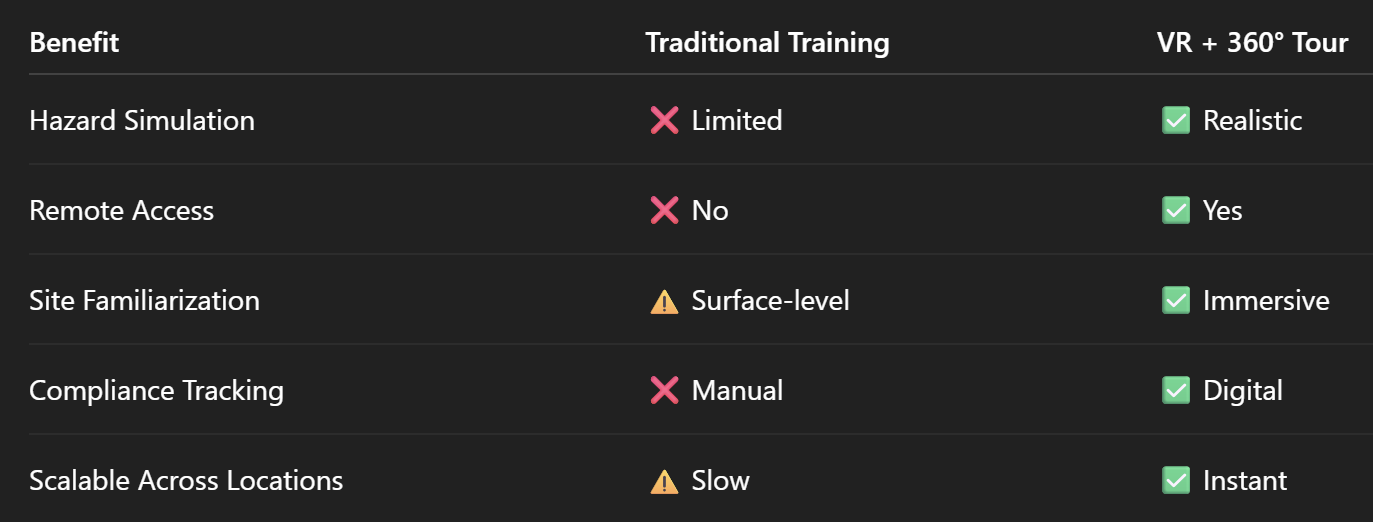
📊 Key Benefits at a Glance

🧠 Final Thoughts: Safety Through Immersion

The oil and gas industry is no stranger to risk — but today’s safety tools are smarter, more immersive, and more effective than ever.

By combining 360° documentation with virtual reality, you can bring real-world sites to your workforce — before they ever set foot on them. That’s safer, faster, and smarter training. 🚀

🚀 Next Steps

📍 Want to see it in action?
Read: From Classroom to Field: Virtual Tours for Realistic Oil and Gas Training

📍 Building a digital safety twin?
Explore: Integrating 360° Virtual Tours with Safety Protocols in Oil and Gas

📍 Want full remote control?
Try: Modern Safety Solutions: Virtual Tours for High-Risk Oil and Gas Environments

Share this post
Cloudpano

Choose The Right 360° Camera

Insta360 ONE RS 1-Inch 360 Edition

  • Compact, ready to go anywhere

  • Interchangeable lens that’s upgradeable

  • Dual 1-inch sensors for improved clarity and low light performance

  • Dynamic range and 6K 360° capture

  • 360° photo resolution at 21MP

Learn More

Insta360 X4

  • 8K 360° video recording for ultra-detailed visuals.

  • 4K single-lens mode for traditional wide-angle shots.

  • Invisible selfie stick effect for drone-like perspectives.

  • 2.5-inch touchscreen with Gorilla Glass protection.

  • Waterproof up to 33ft for underwater shooting.

Learn More

Ricoh Theta Z1

  • 360° photo resolution in 23MP

  • Slim design at 24 mm thick

  • Built-in image stabilization for smooth video capture.

  • Internal 19GB storage for photo and video storage.

  • Wireless connectivity for remote control and sharing.

Learn More

Ricoh Theta X

  • 60MP 360° still images for high-resolution photography.

  • 5.7K 360° video recording at 30fps.

  • 2.25-inch touchscreen for intuitive control.

  • USB Type-C port for fast charging and data transfer.

  • MicroSD card slot for expandable storage.

Learn More
Property Marketing
Allows potential buyers to explore properties in detail from anywhere, enhancing the real estate marketing process.
Automotive Spins
Create an interactive virtual showroom and engage affluent digital buyers with live 360º video calls, all through the CloudPano mobile app for a complete automotive sales solution.
Interactive Floor Plans
Create 2D and 3D floor plans with measurements in 4 minutes or less, all from your phone. Download the Floor Plan Scanner app and get your first scan free.

360 Virtual Tours With CloudPano.com. Get Started Today.

Try it free. No credit card required. Instant set-up.

Try it free
Latest posts

See our other posts

Interviews, tips, guides, industry best practices, and news.

Using AI Avatars Inside Virtual Tours and 360 Walkthroughs

This article explores how real estate professionals can integrate AI avatars inside virtual tours and 360 walkthroughs to create more engaging property experiences for buyers. It explains how an AI avatar virtual tour works, including generating AI presenters, adding voiceovers, and guiding viewers step-by-step through a property. The guide also discusses how agents can clone themselves or team members to act as digital presenters and how these avatars can be reused across listing videos, social media, and interactive tours. By combining immersive 360 tours with AI narration, agents can create interactive AI property walkthroughs that provide guided property experiences, improve engagement, and help listings stand out in competitive real estate markets.
Read post

How to Add Branding and Logos to AI Avatar Videos

This article explains how real estate professionals can create branded AI real estate videos by adding logos, colors, and identity elements to AI avatar property walkthroughs. It walks through the process of generating AI avatar presenters, uploading scripts or voice recordings, and inserting a real estate logo in video to ensure every listing promotes the agent or brokerage. The guide also explores how white label AI avatar videos allow real estate media companies and photographers to create branded marketing content for clients while maintaining their own identity. By combining AI-generated scenes, voiceovers, avatars, and branding, agents can transform every property video into a powerful marketing asset that builds recognition and attracts more leads.
Read post

Landscape vs Portrait AI Videos: Best Format for Real Estate

This article explores the key differences between landscape and vertical real estate video formats and explains when each should be used for maximum marketing impact. Landscape videos remain ideal for cinematic property tours, website embeds, and long-form YouTube content, while vertical real estate video and portrait listing videos dominate social media platforms like Instagram Reels, TikTok, and YouTube Shorts. The guide also explains how modern AI tools allow agents to quickly generate videos from photos, add voiceovers, and even include AI avatar presenters to walk viewers through a property. By combining both formats, real estate professionals can attract attention on social platforms while delivering deeper property presentations through landscape tours, creating a powerful and scalable marketing strategy.
Read post



