The Smart Property Manager’s Guide to Adding Tours in AppFolio

Cloudpano
July 18, 2025
5 min read
Share this post

🧠 The Smart Property Manager’s Guide to Adding Tours in AppFolio

In today’s competitive rental market, the smartest property managers aren’t just listing properties—they’re showcasing experiences. And the most powerful tool in their arsenal? 🏆 Virtual tours.

If you're managing listings inside AppFolio and haven’t added virtual tours yet, you’re missing out on higher conversions, faster leasing cycles, and a big leap in renter trust. This guide shows you exactly how to integrate tours, which tools to use, and why it’s a must in 2025.

💡 Why Smart Property Managers Use Virtual Tours

The numbers don’t lie—virtual tours increase engagement by up to 300% and cut vacancy times by weeks. Renters want to see the space before they even schedule a tour. When you embed a walkthrough directly in the listing, you're giving them confidence and convenience.

📌 Related: Why Smart Property Managers Add Virtual Tours to AppFolio

🚀 The Benefits of Adding Tours to AppFolio

Here’s what happens when you plug tours into your listings:

  • 🔄 More engagement – renters stay longer on your listing
  • 📝 More qualified leads – you weed out the “just-looking” crowd
  • 💨 Faster leasing – renters pre-qualify themselves
  • 🏆 Higher ROI – fewer days on market = better margins

Want proof? Read How Virtual Tours Help You Lease Properties Faster in AppFolio

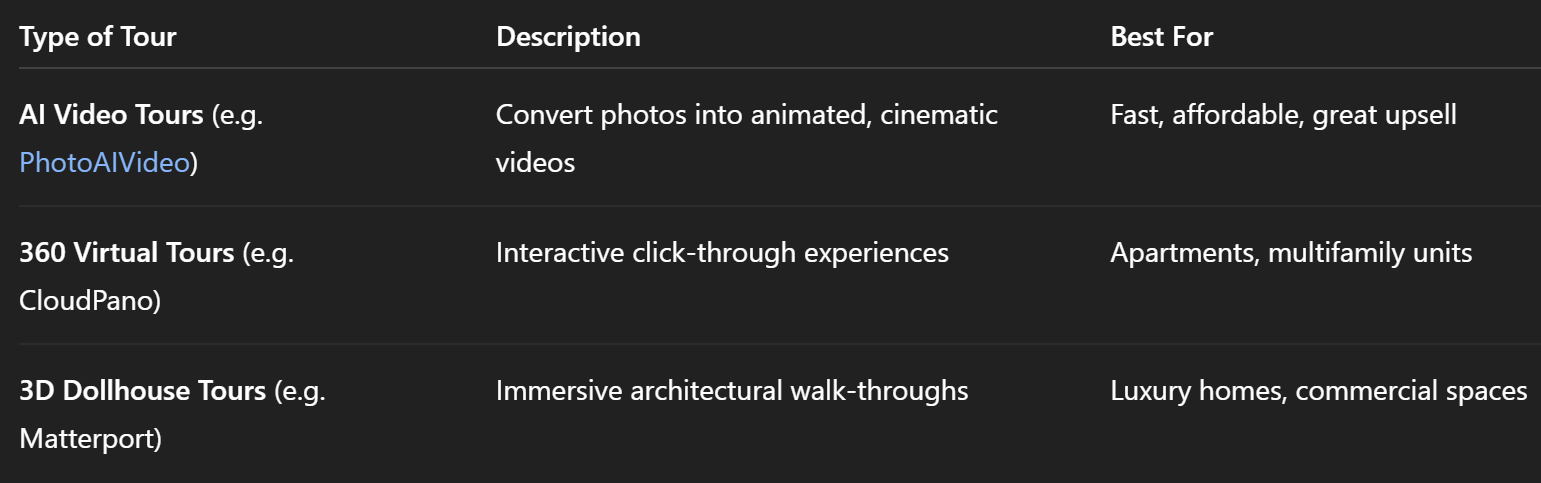
🔍 What Kind of Tours Can You Use?

You’ve got options. Depending on your property type and budget, choose one of these:
📌 See: Boost Rental Engagement: Best Way to Add 360 Tours to AppFolio

🛠️ How to Add a Virtual Tour in AppFolio

Adding a tour takes under 2 minutes:

  1. Generate Your Virtual Tour
    Use your preferred platform. Get the shareable link.
  2. Open the AppFolio Listing Editor
    Navigate to the unit and click “Edit Listing.”
  3. Paste the Link into the Virtual Tour Field
    Save and publish. That’s it. 🚀

Need help? Try the Step-by-Step Guide: Add Virtual Tours to AppFolio the Right Way

⚙️ No-Code = No Problem

Don’t worry if you’re not a tech whiz. Most modern tour platforms generate a simple link or iframe. You don’t need to touch code.

👉 Read: Simplify Your Workflow: Add Virtual Tours to AppFolio Without Code

📈 From Tour to Lease: How It Converts

Here’s what a smart funnel looks like:

  1. Renter sees your AppFolio listing
  2. Clicks the embedded tour
  3. Feels confident about layout + quality
  4. Books a showing or applies immediately 📝
  5. You close faster ✅

Want to supercharge that even more? Combine it with PhotoAIVideo to create tours in under 60 seconds.

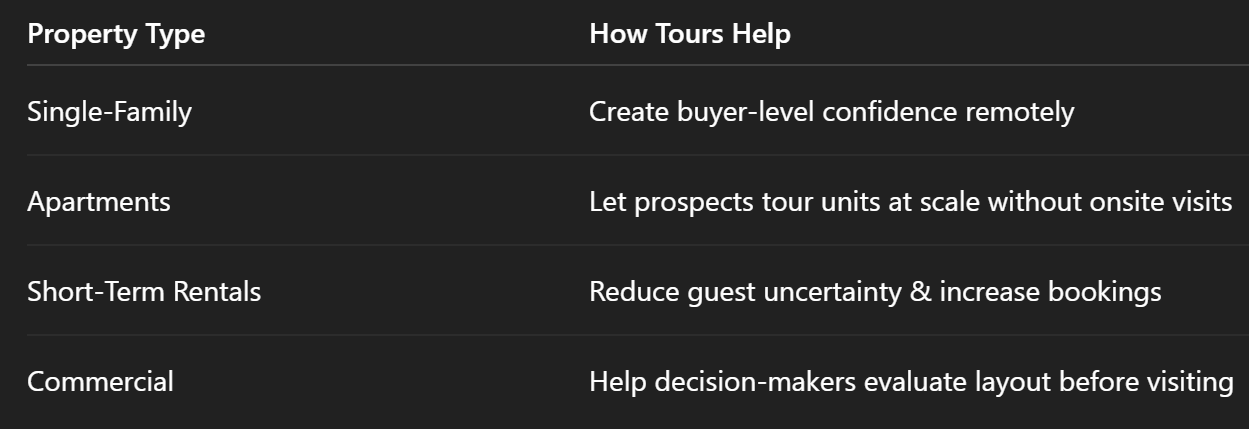
🎯 Use Cases for Every Type of Property Manager

Whether you're a one-person shop or a full-service management firm, virtual tours fit into your workflow:
See real-world application: Virtual Tours in AppFolio: Increase Views, Engagement, and Leases

🔗 Internal Posts You’ll Want to Bookmark

These posts go deeper on strategy, tools, and real estate marketing automation:

🧠 Smart Takeaway

Great property managers market space. Smart property managers market an experience. Virtual tours are no longer optional—they’re expected.

You don’t need a big team or fancy gear. Just the right link in the right place.

🔥 Get Started Today

Ready to stand out and convert more renters?

👉 Use PhotoAIVideo to generate AI listing videos from your photos
📎 Paste the tour into your AppFolio listing
📈 Watch engagement and conversions soar

Share this post
Cloudpano

Choose The Right 360° Camera

Insta360 ONE RS 1-Inch 360 Edition

  • Compact, ready to go anywhere

  • Interchangeable lens that’s upgradeable

  • Dual 1-inch sensors for improved clarity and low light performance

  • Dynamic range and 6K 360° capture

  • 360° photo resolution at 21MP

Learn More

Insta360 X4

  • 8K 360° video recording for ultra-detailed visuals.

  • 4K single-lens mode for traditional wide-angle shots.

  • Invisible selfie stick effect for drone-like perspectives.

  • 2.5-inch touchscreen with Gorilla Glass protection.

  • Waterproof up to 33ft for underwater shooting.

Learn More

Ricoh Theta Z1

  • 360° photo resolution in 23MP

  • Slim design at 24 mm thick

  • Built-in image stabilization for smooth video capture.

  • Internal 19GB storage for photo and video storage.

  • Wireless connectivity for remote control and sharing.

Learn More

Ricoh Theta X

  • 60MP 360° still images for high-resolution photography.

  • 5.7K 360° video recording at 30fps.

  • 2.25-inch touchscreen for intuitive control.

  • USB Type-C port for fast charging and data transfer.

  • MicroSD card slot for expandable storage.

Learn More
Property Marketing
Allows potential buyers to explore properties in detail from anywhere, enhancing the real estate marketing process.
Automotive Spins
Create an interactive virtual showroom and engage affluent digital buyers with live 360º video calls, all through the CloudPano mobile app for a complete automotive sales solution.
Interactive Floor Plans
Create 2D and 3D floor plans with measurements in 4 minutes or less, all from your phone. Download the Floor Plan Scanner app and get your first scan free.

360 Virtual Tours With CloudPano.com. Get Started Today.

Try it free. No credit card required. Instant set-up.

Try it free
Latest posts

See our other posts

Interviews, tips, guides, industry best practices, and news.

How to Embed AI Avatars Inside CloudPano Tours

AI avatars are transforming how virtual tours are presented online. This guide explains how to embed AI avatars inside CloudPano tours to create interactive, guided property walkthroughs. Learn how to generate an AI presenter using Photo AI Video, copy the hosted embed code, and place it inside the CloudPano Custom JavaScript section. By combining CloudPano virtual tours with AI avatar presenters, real estate professionals can create more engaging listings, improve viewer retention, and offer premium marketing services. This tutorial walks through the complete process step-by-step so agents, photographers, and marketers can easily add an AI avatar to their CloudPano tour.
Read post

Best Cameras for Creating Virtual Tours with AI Avatars

Creating immersive property experiences requires the right combination of virtual tour cameras, 360 capture technology, and AI-powered tools. This article explores the best cameras for creating virtual tours with AI avatars, including popular options like Ricoh Theta and Insta360. It also explains how to combine 360 camera real estate photography with AI avatar presenters to produce engaging, guided property tours. Readers will learn what gear works best, how to capture high-quality panoramic images, and how to integrate AI avatars into virtual tours to elevate real estate marketing.
Read post

How AI Avatars Are Transforming Real Estate Virtual Tours

AI avatars are revolutionizing how properties are presented online. Instead of static images or silent virtual tours, agents can now add AI-powered presenters that guide buyers through listings, explain features, and create a more engaging property experience. This article explores how AI avatars in real estate marketing work, how to add an AI virtual tour presenter to property tours, and why AI avatar property tours are becoming one of the most powerful tools for modern real estate marketing. Learn how agents and media creators can use AI to enhance virtual tours, create scalable video content, and deliver more immersive property experiences.
Read post



