


.png)



Photographing five vehicles is easy. Photographing hundreds of vehicles every month across multiple dealership locations is an operations problem.
Traditional automotive photography systems often solve consistency with turntables, fixed cameras, photo booths, or dedicated studio installations. Those systems can work well, but rolling $40,000-class photography setups across an entire dealer group can require significant capital, physical space, training, and maintenance.
A software-driven dealership inventory API creates another option.
Instead of forcing every rooftop to reproduce the same physical studio, employees can capture vehicle walk-around videos using a phone or camera. The 360 Spin API processes those videos into standardized spins that can be connected to VINs, stock numbers, websites, inventory systems, marketplaces, and DMS workflows.
The challenge shifts from installing photography hardware to designing an inventory workflow that can scale.
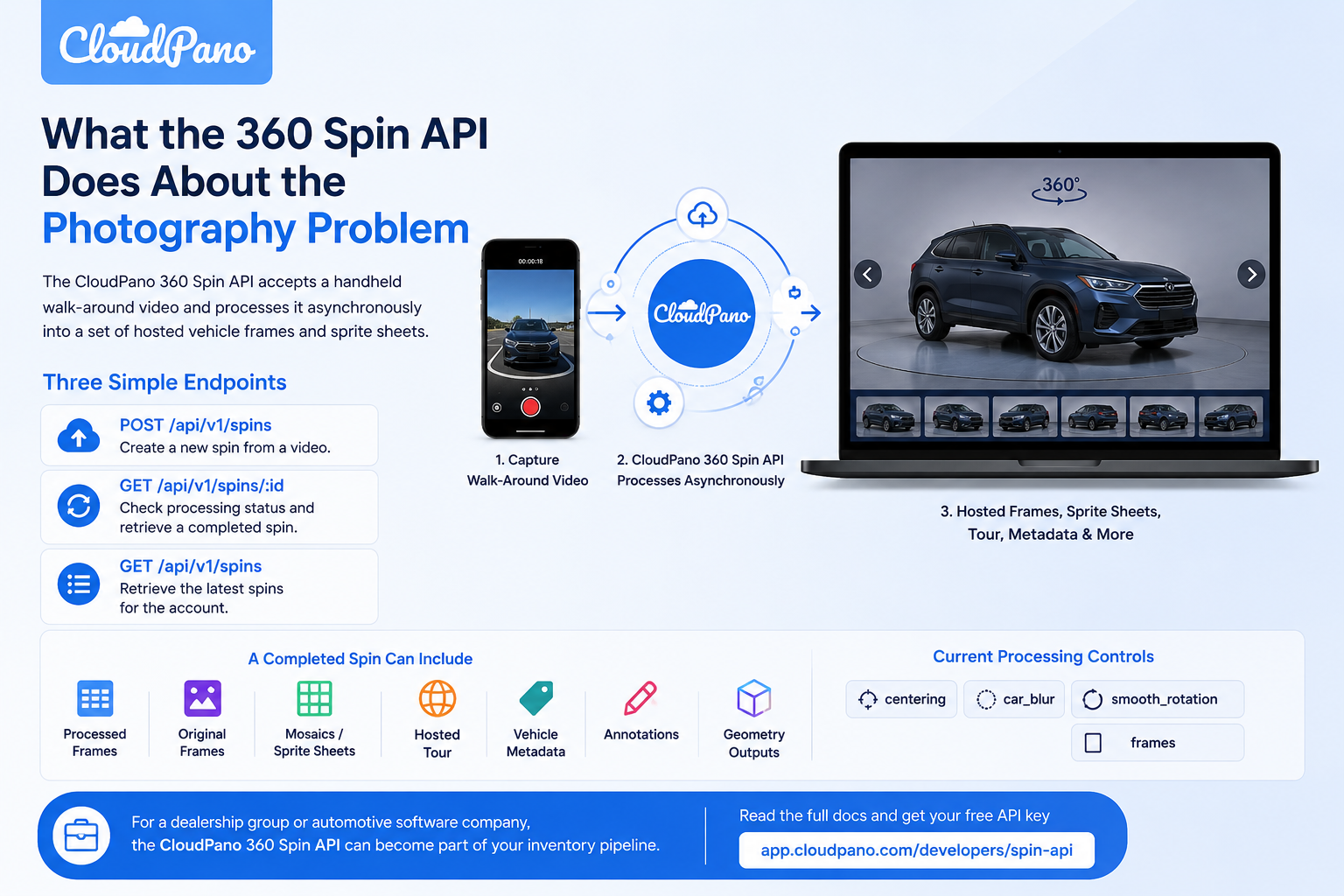
The CloudPano 360 Spin API accepts a handheld walk-around video and processes it asynchronously into a set of hosted vehicle frames and sprite sheets.
The API currently uses three primary endpoints:
POST /api/v1/spins — create a new spin from a video.GET /api/v1/spins/:id — check processing status and retrieve a completed spin.GET /api/v1/spins — retrieve the latest spins for the account.A completed spin can include processed frames, original frames, mosaics for fast web playback, a hosted tour, vehicle metadata, annotations, and geometry outputs. The API's current processing controls include centering, car_blur, smooth_rotation, and frames.
For a dealership group or automotive software company, that makes the API useful as more than an image-processing tool. It can become part of the inventory pipeline.
The most important part of a scalable implementation is identifying the vehicle at upload time.
The API supports optional vin and stock_number fields.
A real request can look like this:
curl -X POST https://app.cloudpano.com/api/v1/spins \
  -H "Authorization: Bearer sk_spin_YOUR_KEY" \
  -F "video=@walkaround.mp4" \
  -F "stock_number=A4821" \
  -F "vin=1FTFW1E50MFA00000" \
  -F "centering=true" \
  -F "car_blur=true" \
  -F "smooth_rotation=true" \
  -F "frames=96"
These are documented multipart fields rather than custom parameters added only for the dealership's application. The VIN can contain up to 17 alphanumeric characters, while stock_number supports up to 32 characters. Both values are echoed back in the completed result metadata.
The upload returns immediately with a processing job:
{
  "id": "rJx0aB1c",
  "object": "spin",
  "status": "queued",
  "poll": "/api/v1/spins/rJx0aB1c"
}
Your inventory platform can store that spin ID next to the corresponding vehicle record.
At dealership scale, relying on filenames such as car-video-final-2.mp4 is not enough.
Inventory identifiers should drive the automation.
A practical workflow could look like:
Vehicle enters inventory
        ↓
VIN and stock number created in DMS
        ↓
Walk-around video captured
        ↓
POST /api/v1/spins
        ↓
Spin ID stored with inventory record
        ↓
Processing status polled
        ↓
Spin becomes ready
        ↓
Media automatically attached to VDP
That is where a dealership inventory API becomes especially valuable.
The spin is no longer an isolated photography project. It becomes another media asset belonging to a known VIN.
This makes it easier to automate publishing, replace outdated media, identify missing spins, manage multi-rooftop inventory, and perform bulk backfills.
Spin processing is asynchronous.
The documented pattern is to poll:
curl https://app.cloudpano.com/api/v1/spins/rJx0aB1c \
  -H "Authorization: Bearer sk_spin_YOUR_KEY"
while the status is:
queued
or:
processing
The API documentation recommends polling approximately every 10 seconds. A successful job changes to ready, while footage that cannot be processed can return failed with an error. GET /api/v1/spins can also retrieve the latest 25 spins associated with the account.
This allows the dealership application to manage processing in the background without requiring an employee to repeatedly check whether a vehicle is finished.
Importantly, polling is the documented pattern. Production integrations should not assume undocumented webhooks or SDK behavior.
A completed response contains enough information to support several different automotive workflows.
A shortened example might look like:
{
  "id": "rJx0aB1c",
  "object": "spin",
  "status": "ready",
  "result": {
    "frames": [
      "https://.../spin-1.jpg",
      "https://.../spin-2.jpg"
    ],
    "mosaics": {
      "sheets": [
        "https://.../spin-mosaic-0.jpg",
        "https://.../spin-mosaic-1.jpg"
      ]
    },
    "geometry": {
      "carPoseUrl": "https://.../carpose.json",
      "carCloudUrl": "https://.../carcloud.json",
      "carMeshUrl": "https://.../carmesh.json"
    },
    "tour": {
      "shortId": "8xKq2vTp",
      "url": "https://app.cloudpano.com/tours/8xKq2vTp"
    },
    "meta": {
      "frameCount": 96,
      "vin": "1FTFW1E50MFA00000",
      "stock_number": "A4821"
    }
  }
}
The individual fields can serve different parts of the automotive stack. result.frames provides ordered JPEGs, result.mosaics provides sprite sheets optimized for web playback, result.tour provides a hosted viewer, and the geometry URLs expose camera poses, a sparse point cloud, and a low-poly vehicle hull.
That allows one processing job to support both a simple dealership implementation and a more sophisticated automotive platform.
Scaling photography is not simply about processing more vehicles.
The output also needs to look reasonably consistent across employees and locations.
The Spin API Processing Options are designed to handle several common inconsistencies in handheld capture.
centering=true adjusts the frames so the vehicle remains at a more consistent scale and position.
This is useful when one employee walks closer to the vehicle than another or allows the car to drift around the frame.
The process can expose areas beyond the original footage, so mirrored and blurred edge extensions are used to avoid moving black borders.
car_blur=true applies a studio-style background blur around the vehicle while retaining a sharper pavement area near the tires.
That can help reduce distracting lot backgrounds, parked vehicles, buildings, or other visual differences between dealership locations.
smooth_rotation=true addresses uneven walking speed.
A person may slow down around the front of the vehicle, move quickly along the passenger side, and pause behind it. Selecting frames solely by elapsed video time can therefore produce uneven viewing angles.
The processing pipeline estimates actual camera movement and selects frames at more consistent angular intervals. It also trims excess overlap when the operator walks beyond the original starting point.
The current default is 96 output frames, with a documented range from 12 to 120.
For most dealership workflows, beginning with the 96-frame default is a reasonable approach before changing the output based on VDP performance, bandwidth, or product requirements.

New arrivals are only part of the challenge.
A dealership may already have 300, 1,000, or several thousand active vehicles without interactive spins.
Instead of treating that backlog as one enormous photography project, organize it as a queue.
For example:
Inventory export
      ↓
Find vehicles without spins
      ↓
Group by rooftop
      ↓
Capture walk-around video
      ↓
Attach VIN + stock number
      ↓
Submit processing jobs
      ↓
Poll status
      ↓
Publish completed media
A useful dealership inventory API workflow should be idempotent wherever possible.
Before creating another spin, check your own inventory database to determine whether that VIN already has a current processing job or completed spin.
This helps prevent duplicate processing and makes it easier to restart a bulk job after interruptions.
Automation does not mean every result should automatically go live without checks.
The completed response includes information that can help your application decide whether a vehicle is ready for publication.
For example, the response can include azimuth information describing the captured rotation, including coverage and rotation-evenness data.
A large platform could combine those signals with internal business rules.
Possible outcomes include:
READY + acceptable QA → Publish automatically

READY + unusual result → Manual review

FAILED → Recapture queue
This is more scalable than having an employee manually inspect every frame of every vehicle.
Once the spin is ready, there are several delivery options.
result.tour for Faster ImplementationThe API provides a hosted CloudPano tour with a shareable URL.
This approach works well when the priority is getting interactive vehicle media online without building the entire viewer from scratch.
result.frames exposes the individual ordered images.
A marketplace, dealer website provider, DMS vendor, or inventory SaaS company can use these frames to build a fully branded experience.
result.mosaics packages frames into sprite sheets.
The current implementation uses interleaved sheets, allowing each loaded sheet to contain angles distributed around the full vehicle rotation. This can help a web viewer become useful earlier while additional assets continue loading.
A platform can therefore choose implementation speed, full interface control, or a hybrid approach.
A 360 spin can also produce structured information about the capture.
Current geometry outputs can include:
These outputs can support damage markers, inspection overlays, interactive hotspots, and other geometry-aware applications.
The optional annotations_prompt field can also request on-vehicle annotations in plain language. When suitable 3D geometry is available, those annotations can track the corresponding area of the vehicle as it rotates.
For a dealer group, these features may become useful for merchandising. For wholesale marketplaces or recon platforms, they can potentially support deeper inspection workflows.
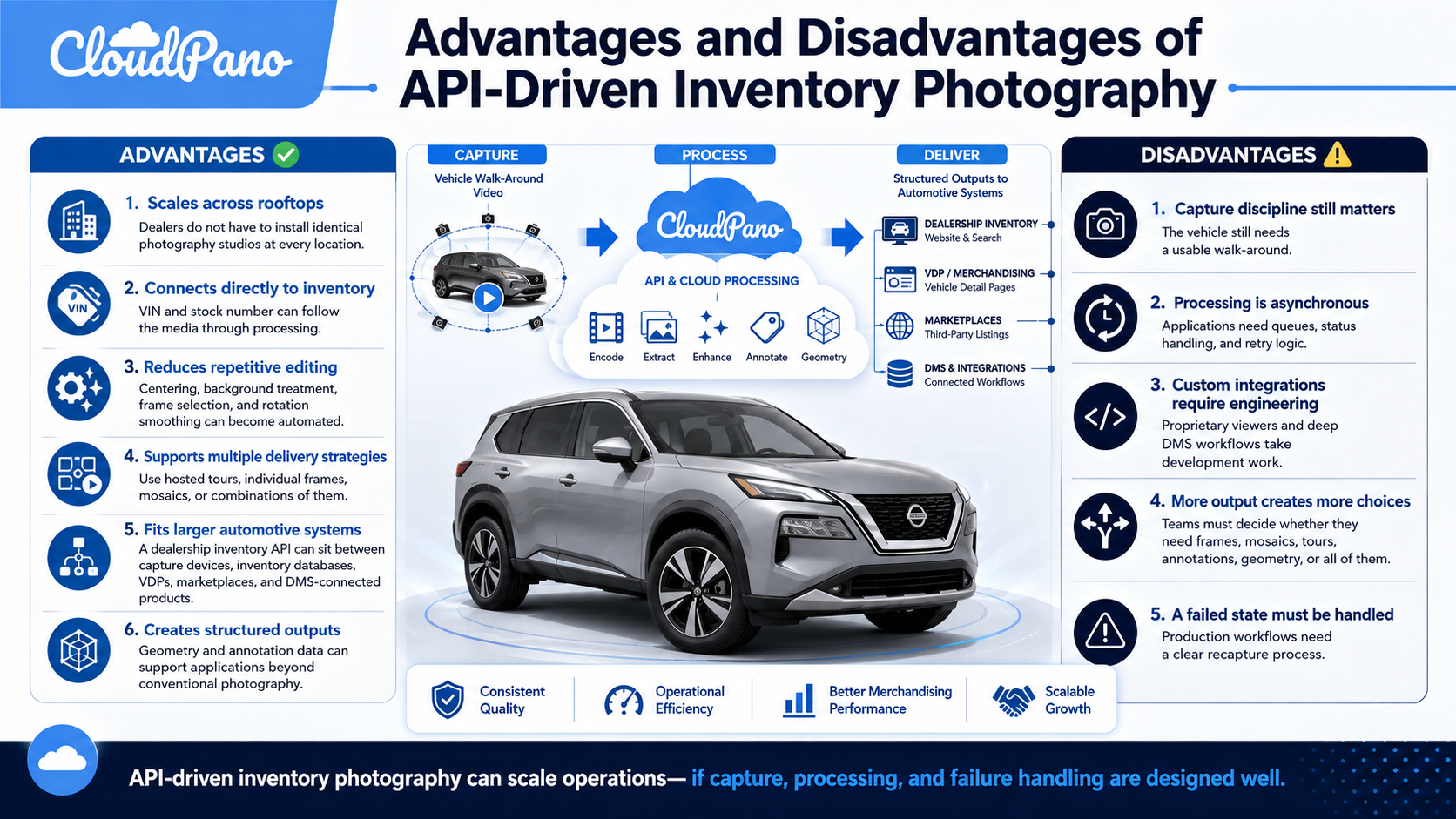
The current API accepts MP4, MOV, and WebM uploads up to 500 MB. Capture guidance recommends one full circle around the vehicle in landscape orientation, generally lasting about 20–60 seconds. Overshooting the starting point is acceptable because the smooth-rotation process can trim the overlap.
Your integration should also handle:
400 for missing or invalid video uploads;401 for missing, unknown, or revoked API keys;404 for an unknown spin ID or one belonging to another account;status: "failed" when footage cannot be processed.Do not let a failed spin disappear inside a large automated queue. Attach the failure to the VIN and return the vehicle to a clearly visible recapture list.
Train employees to use one repeatable workflow: landscape video, one complete walk-around, reasonable distance from the vehicle, and minimal obstructions.
Stock numbers can change between systems. VINs generally provide the strongest permanent connection between media and the physical vehicle.
Use the stock number as an additional operational identifier.
As soon as POST /api/v1/spins responds, save the returned id against the vehicle.
Do not wait for processing to finish.
The employee's job should ideally end when the video is successfully uploaded.
Your software should handle polling, result retrieval, QA, and VDP publishing.
Before processing thousands of vehicles, test the complete workflow with one dealership.
Measure capture time, failure rate, publishing time, mobile VDP performance, and employee adoption.
Then expand.
Yes. The optional vin field is stored with the hosted tour and echoed back through result.meta.vin.
Yes. stock_number supports up to 32 characters and is returned in the result metadata.
The default is currently 96, with a supported range of 12–120 frames.
Poll GET /api/v1/spins/:id approximately every 10 seconds while its status is queued or processing.
Yes. GET /api/v1/spins currently lists the latest 25 spins for the account.
The Spin API is currently free during the preview period, and accounts can maintain up to 10 active API keys.
The biggest opportunity in dealership photography is not simply making one car look better.
It is creating a process that can reliably handle the next 100, 1,000, or 10,000 vehicles.
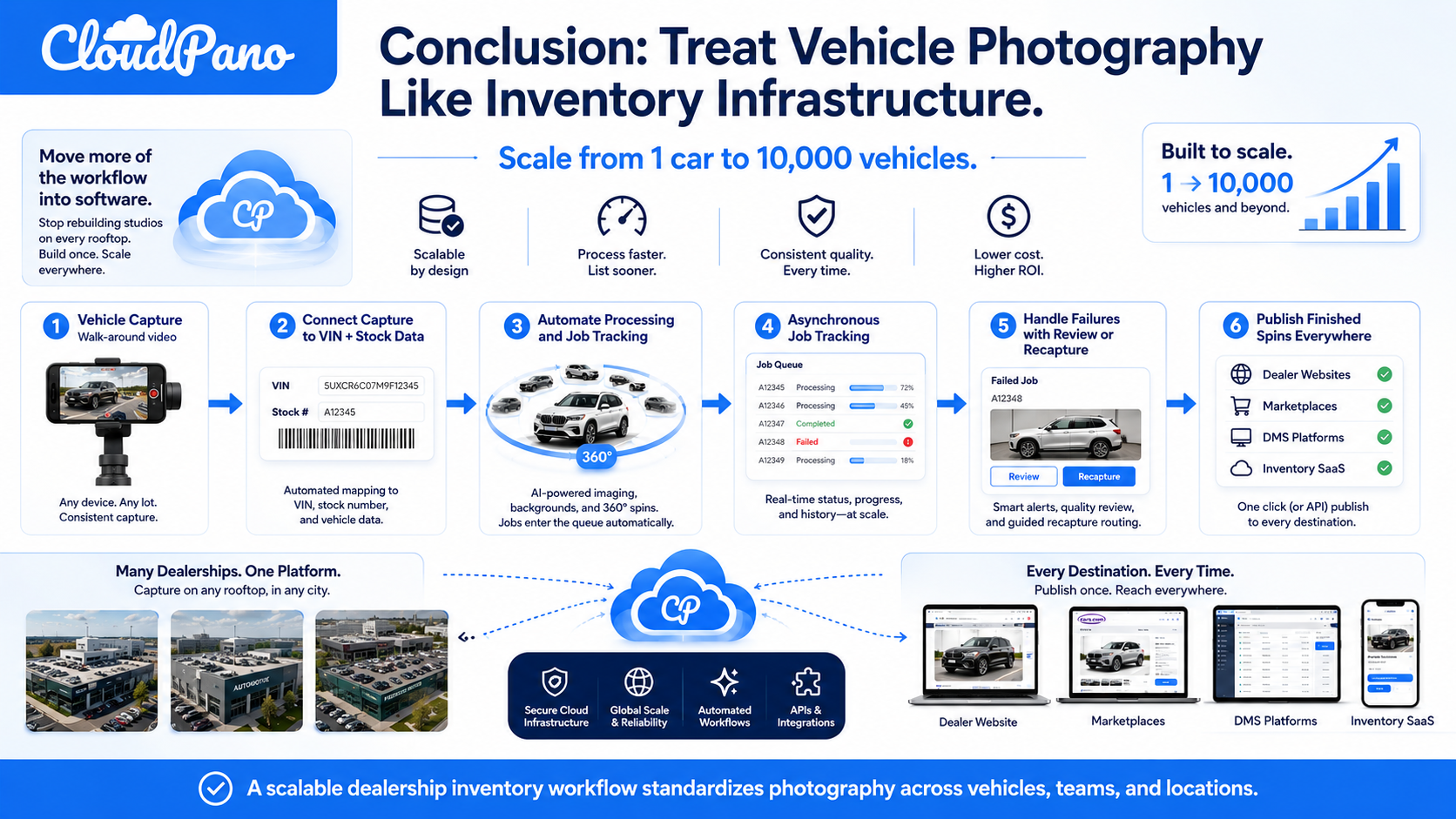
A scalable dealership inventory API workflow connects capture directly to VIN and stock-number data, automates image processing, tracks asynchronous jobs, handles failures, and publishes finished spins without requiring employees to manually manage every asset.
That approach can be particularly valuable for dealer groups, DMS companies, automotive marketplaces, dealer website providers, and inventory SaaS platforms that need a consistent photography workflow across many vehicles and locations.
Instead of asking every rooftop to build the same physical studio, move more of the workflow into software.
Read the full Spin API docs → app.cloudpano.com/developers/spin-api
The Spin API is currently free during the preview period, and accounts support up to 10 active API keys.
Start with one dealership, connect each walk-around to its VIN and stock number, and build a photography workflow designed to scale with the inventory rather than the studio.


Compact, ready to go anywhere
Interchangeable lens that’s upgradeable
Dual 1-inch sensors for improved clarity and low light performance
Dynamic range and 6K 360° capture
360° photo resolution at 21MP

8K 360° video recording for ultra-detailed visuals.
4K single-lens mode for traditional wide-angle shots.
Invisible selfie stick effect for drone-like perspectives.
2.5-inch touchscreen with Gorilla Glass protection.
Waterproof up to 33ft for underwater shooting.

360° photo resolution in 23MP
Slim design at 24 mm thick
Built-in image stabilization for smooth video capture.
Internal 19GB storage for photo and video storage.
Wireless connectivity for remote control and sharing.

60MP 360° still images for high-resolution photography.
5.7K 360° video recording at 30fps.
2.25-inch touchscreen for intuitive control.
USB Type-C port for fast charging and data transfer.
MicroSD card slot for expandable storage.
.png)

.png)

Try it free. No credit card required. Instant set-up.







.svg)


.svg)