


.png)


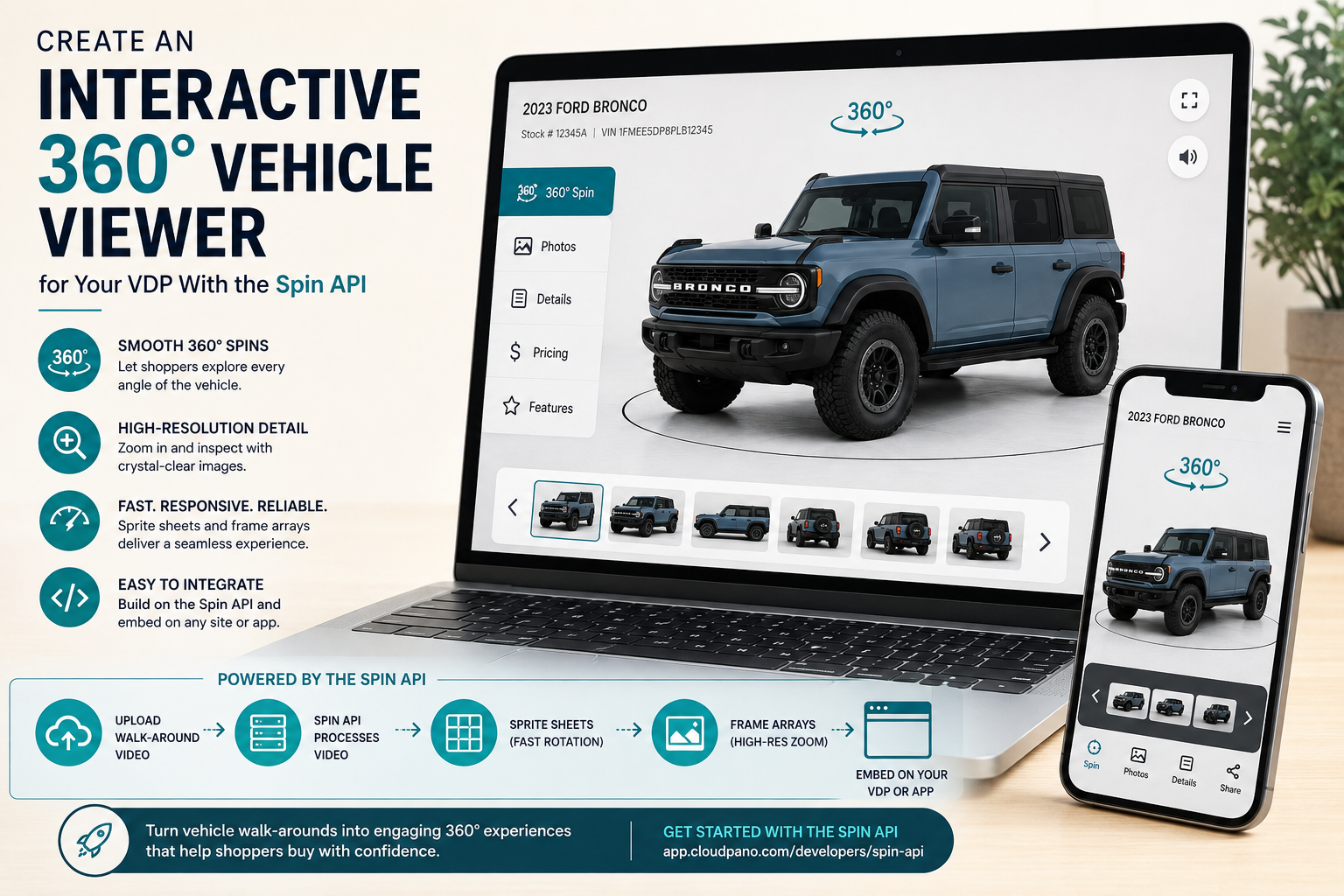
Vehicle detail pages have improved dramatically, but many dealerships still merchandise inventory with the same basic formula: a gallery of 30 or 40 static photos.
That works, but it leaves a gap between browsing online and walking around the vehicle in person.
Traditional 360° merchandising systems can solve that problem, but dedicated turntables, automated photo booths, and studio installations can require significant space, specialized equipment, and investments that can reach tens of thousands of dollars.
A software-first approach changes the equation.
With the CloudPano Spin API, a dealership, marketplace, DMS provider, or automotive software company can submit an ordinary vehicle walk-around video and receive the assets needed to build an interactive 360° vehicle experience directly into a VDP.
For developers building a VDP 360 spin API integration, the real opportunity is not simply creating another piece of vehicle media. It is making the spin fast, responsive, mobile-friendly, tied to inventory, and easy for shoppers to use.
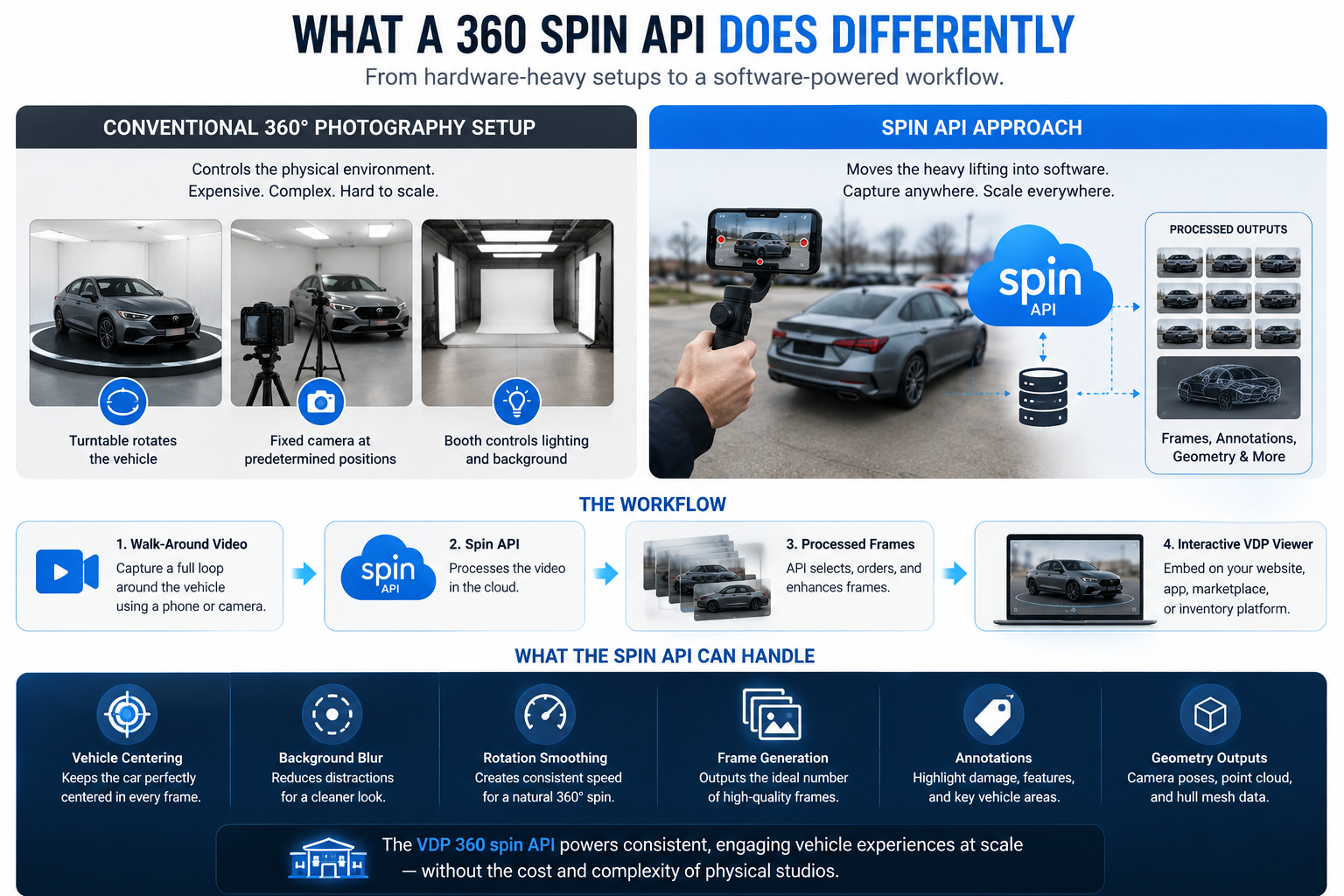
A conventional 360° photography setup often tries to control the physical capture environment.
A turntable rotates the vehicle.
A fixed camera photographs it at predetermined positions.
A booth controls lighting and background conditions.
The API approach moves more of that work into software.
Instead of requiring every dealership location to install specialized hardware, staff can capture a full walk-around video of the vehicle. The Spin API then processes that footage into an ordered set of views that can be used on a dealership website, mobile application, inventory platform, or marketplace.
The resulting workflow looks roughly like this:
Walk-around video → Spin API → processed frames → interactive VDP viewer
The API can also handle processing tasks including vehicle centering, background blur, rotation smoothing, frame generation, annotations, and geometry outputs.
That makes the VDP 360 spin API useful not only for dealerships, but also for companies building automotive merchandising infrastructure across hundreds or thousands of listings.
The core workflow begins with:
POST /api/v1/spins
The request is multipart and includes the vehicle video. VIN and stock number can also be supplied so the resulting spin remains connected to the dealership's inventory record.
curl -X POST https://app.cloudpano.com/api/v1/spins \
  -H "Authorization: Bearer sk_spin_YOUR_KEY" \
  -F "video=@walkaround.mp4" \
  -F "stock_number=A4821" \
  -F "vin=1FTFW1E50MFA00000"
The API does not keep the original request open while the entire spin is generated.
Instead, it returns a job immediately:
{
  "id": "rJx0aB1c",
  "object": "spin",
  "status": "queued",
  "poll": "/api/v1/spins/rJx0aB1c"
}
Your application stores that spin ID and checks its status using:
curl https://app.cloudpano.com/api/v1/spins/rJx0aB1c \
  -H "Authorization: Bearer sk_spin_YOUR_KEY"
The documented pattern is to poll approximately every 10 seconds while the job remains queued or processing.
Once processing finishes, the status changes to ready.
If the footage cannot be processed successfully, the spin can return a failed status with an error.
There are currently three primary endpoints to design around:
POST /api/v1/spins — create a new spinGET /api/v1/spins/:id — retrieve a specific spin and its statusGET /api/v1/spins — list your latest 25 spin jobsThis asynchronous pattern is important when building at scale. Do not architect around undocumented webhooks or SDKs. Polling is the documented integration method.
result.frames When You Want Full Viewer Controlresult.frames gives your application an ordered array of hosted JPEG images representing the vehicle from different angles.
This is one of the simplest ways to build a custom viewer.
Your JavaScript can:
On mobile, the same concept can be driven by touch gestures.
Because the frames are individually accessible, they are also useful for high-resolution inspection, thumbnails, native applications, and selecting individual beauty shots.
result.tour When You Want a Hosted Playerresult.tour provides a hosted CloudPano 360° player.
That creates a faster path for applications that do not want to build the entire front-end viewer themselves.
The returned tour URL can be used in listings, shared directly, or incorporated into an iframe-based experience.
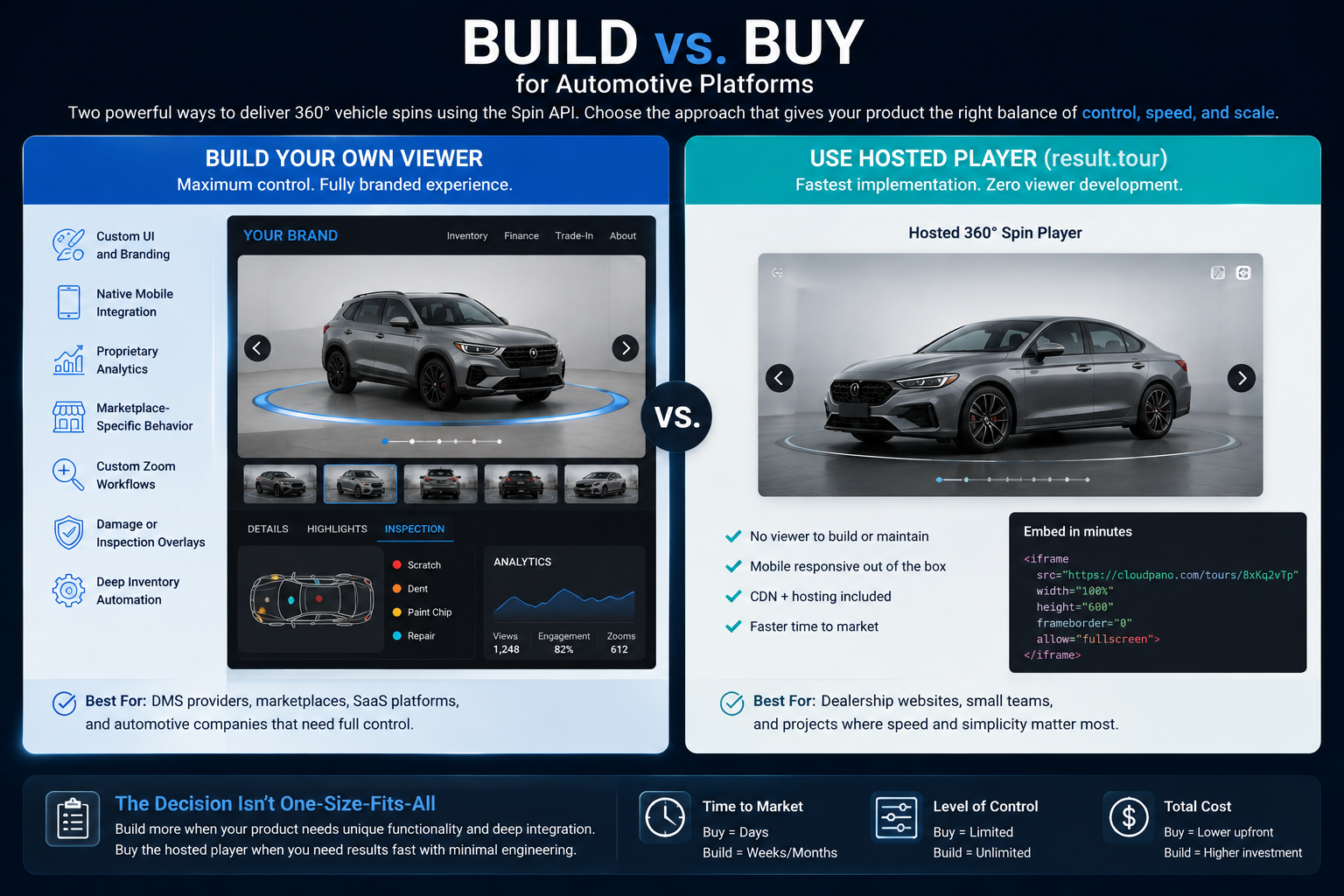
This gives developers an important build-vs-buy decision.
If your application needs complete control over gestures, branding, analytics, layout, and media behavior, build around result.frames and the other delivery assets.
If speed to implementation matters more, result.tour provides a ready-to-share experience with much less front-end engineering.
A good vehicle viewer should feel like part of the VDP, not like an external widget that was added afterward.
The most important interaction is simple:
drag left or right and immediately see the vehicle rotate.
Avoid forcing the shopper to wait for every high-resolution asset before enabling that interaction.
A strong loading sequence might be:
VDP loads
↓
Initial spin preview appears
↓
Shopper can begin dragging
↓
Additional high-resolution assets continue loading
↓
Full-detail zoom becomes available
The shopper does not care how many files are behind the experience.
They care whether it responds when they touch it.
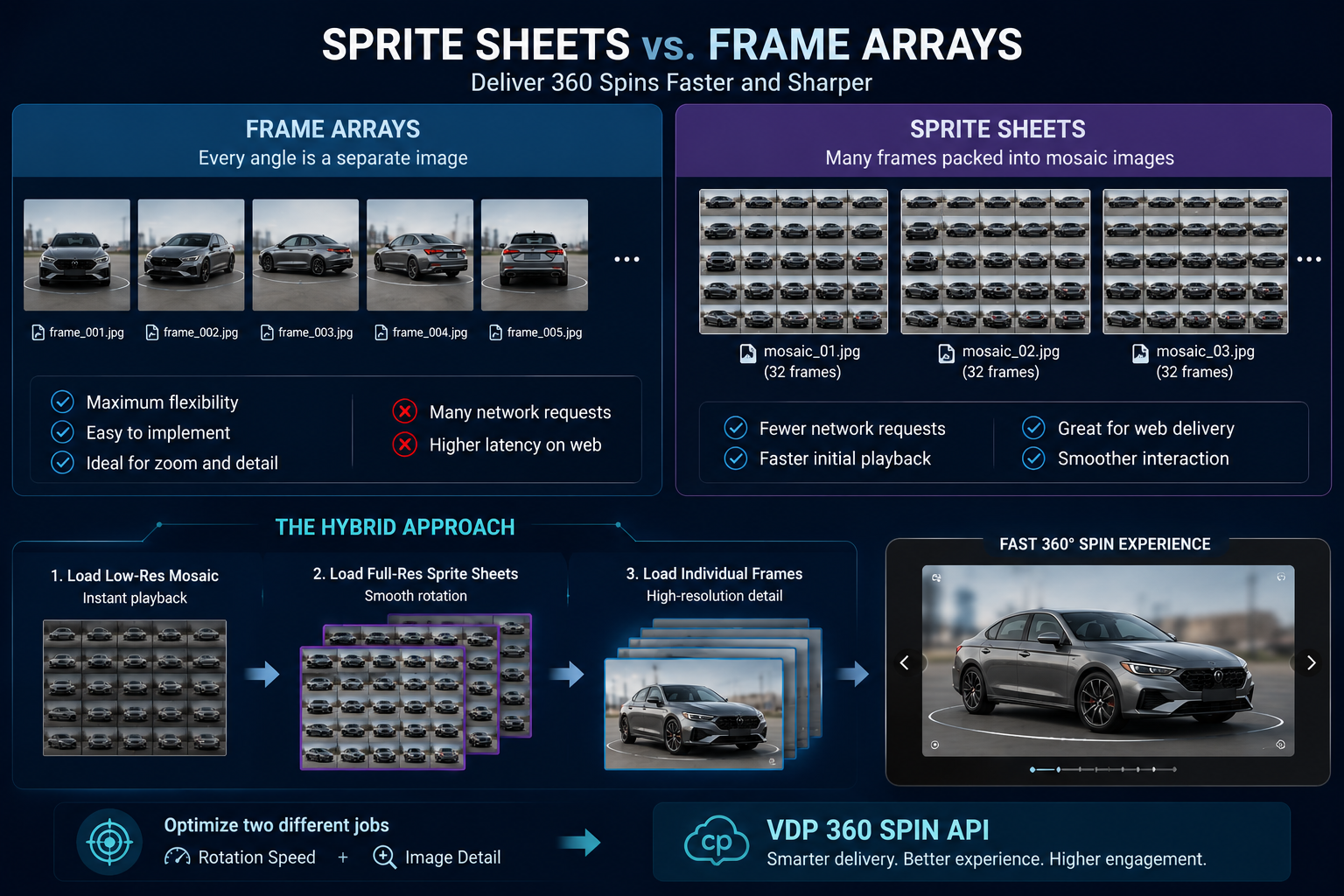
For web delivery, developers generally have two useful approaches.
Individual frame arrays offer flexibility. Every angle is available as a separate image.
Sprite sheets combine many frames into larger mosaic images, reducing the number of separate network requests required for playback.
For a deeper technical explanation, see How the Spin API Delivers 360 Spins With Sprite Sheets and Frame Arrays.
A hybrid approach is often useful.
Use mosaics or sprite sheets to make the initial rotation experience fast, then use individual frames when the shopper requests higher-resolution detail.
That lets the VDP 360 spin API optimize two different jobs separately:
rotation speed and image detail.
The API includes processing features that can directly affect how polished the VDP experience feels.
centering keeps the vehicle positioned at a more consistent size and location throughout the rotation.
Without centering, natural camera movement can cause the vehicle to drift or bob while the shopper drags.
For an interactive viewer, stability matters because movement should feel like the vehicle is rotating—not like the camera operator is walking around it.
car_blurcar_blur creates a more studio-style background treatment around the vehicle.
This can reduce the visual impact of dealership clutter, parked vehicles, buildings, signs, and background movement.
It is particularly useful for dealer groups that want more consistent merchandising across multiple rooftops.
smooth_rotationOperators do not walk at a perfectly consistent speed.
They may slow down near the front of the vehicle and move faster around the passenger side.
smooth_rotation addresses that problem by selecting output frames at more consistent angular intervals and creating a cleaner loop.
For the shopper, the benefit is simple: dragging feels more predictable.
The current default is 96 frames, with configurable output between 12 and 120.
More frames do not automatically mean a better VDP.
Start with the default, test it using real dealership traffic conditions, and evaluate how the viewer performs on both desktop and mobile.
The Spin API can also return more advanced outputs.
An annotations_prompt can request on-car annotations such as noting a ding, wheel package, mirror damage, or another visible feature.
When sufficient 3D reconstruction is available, annotations can be attached to the reconstructed vehicle instead of being permanently painted onto one image.
The geometry response can include:
carPoseUrl — per-frame camera posescarCloudUrl — sparse vehicle point cloudcarMeshUrl — low-poly vehicle hullThese outputs create possibilities beyond basic merchandising.
A marketplace could use them for damage inspection.
A wholesale application could place condition notes on specific vehicle panels.
A recon platform could allow employees to click the vehicle and attach inspection information to a physical location.
The same spin infrastructure that powers a shopper-facing viewer can therefore support operational workflows behind the scenes.
A spin is much more valuable when nobody has to manually figure out which vehicle it belongs to.
Include vin and stock_number whenever they are available.
When the job completes, those identifiers are echoed in the response and can be mapped back into the dealership's inventory database.
A scalable workflow can become:
Vehicle enters inventory
↓
Stock number created
↓
Walk-around captured
↓
Spin submitted with VIN + stock number
↓
Processing completes
↓
Spin automatically attached to VDP
↓
Vehicle sells
↓
Listing and related media are retired
That is the difference between creating individual spins and building real merchandising infrastructure.
The same architecture can also handle existing inventory.
Suppose a dealer group has 2,000 active vehicles across multiple locations.
Rather than manually processing each listing through a separate interface, an integration can queue available walk-around footage, attach inventory identifiers, submit jobs, poll their statuses, and automatically update the corresponding VDP when each spin becomes ready.
GET /api/v1/spins can also help applications review recent processing jobs.
The important operational rule is to treat every spin as a job with a lifecycle—not simply as an uploaded file.
Capture quality still matters.
The documented capture guidance recommends completing one full circle around the vehicle with the phone in landscape orientation. Supported uploads include MP4, MOV, and WebM, with uploads currently limited to 500 MB.
Your system should also assume that some captures will fail.
For example:
{
  "status": "failed",
  "error": "..."
}
Do not allow a failed processing job to create an empty or broken VDP viewer.
Instead, route the vehicle into an exception workflow:
failed → review → recapture → resubmit
Also plan for caching.
Once a spin is complete, the underlying vehicle media may be viewed hundreds or thousands of times. Do not treat every shopper session as if the spin needs to be generated again.
A dealership building one website may choose the hosted result.tour route.
A DMS company, automotive marketplace, dealer website provider, or inventory SaaS platform may want to build its own branded viewer around the returned frames and mosaics.
Neither approach is automatically better.
The important question is where your product needs control.
Build more yourself when you need:
Use the hosted player when implementation speed and simplicity are the priority.
The goal of a VDP 360 spin API should not be to generate the largest possible collection of images.
The goal is to help shoppers understand a vehicle quickly and confidently.
Use the API to automate the difficult processing work. Use result.frames when your application needs control over the viewer. Use result.tour when you want a hosted 360° experience without building the full playback layer yourself.
Then connect the workflow to VINs, stock numbers, inventory systems, DMS platforms, dealer websites, and automotive marketplaces.
That changes 360° vehicle merchandising from a specialized photography installation into software infrastructure that can scale across locations.
The Spin API is currently free during the preview period, and accounts can maintain up to 10 active API keys.
Read the full Spin API docs → app.cloudpano.com/developers/spin-api
Create an API key, upload a real vehicle walk-around, inspect result.frames and result.tour, and test how quickly you can turn the footage your dealership already captures into an interactive 360° VDP experience.


Compact, ready to go anywhere
Interchangeable lens that’s upgradeable
Dual 1-inch sensors for improved clarity and low light performance
Dynamic range and 6K 360° capture
360° photo resolution at 21MP

8K 360° video recording for ultra-detailed visuals.
4K single-lens mode for traditional wide-angle shots.
Invisible selfie stick effect for drone-like perspectives.
2.5-inch touchscreen with Gorilla Glass protection.
Waterproof up to 33ft for underwater shooting.

360° photo resolution in 23MP
Slim design at 24 mm thick
Built-in image stabilization for smooth video capture.
Internal 19GB storage for photo and video storage.
Wireless connectivity for remote control and sharing.

60MP 360° still images for high-resolution photography.
5.7K 360° video recording at 30fps.
2.25-inch touchscreen for intuitive control.
USB Type-C port for fast charging and data transfer.
MicroSD card slot for expandable storage.
.png)

.png)

Try it free. No credit card required. Instant set-up.







.svg)


.svg)