


.png)


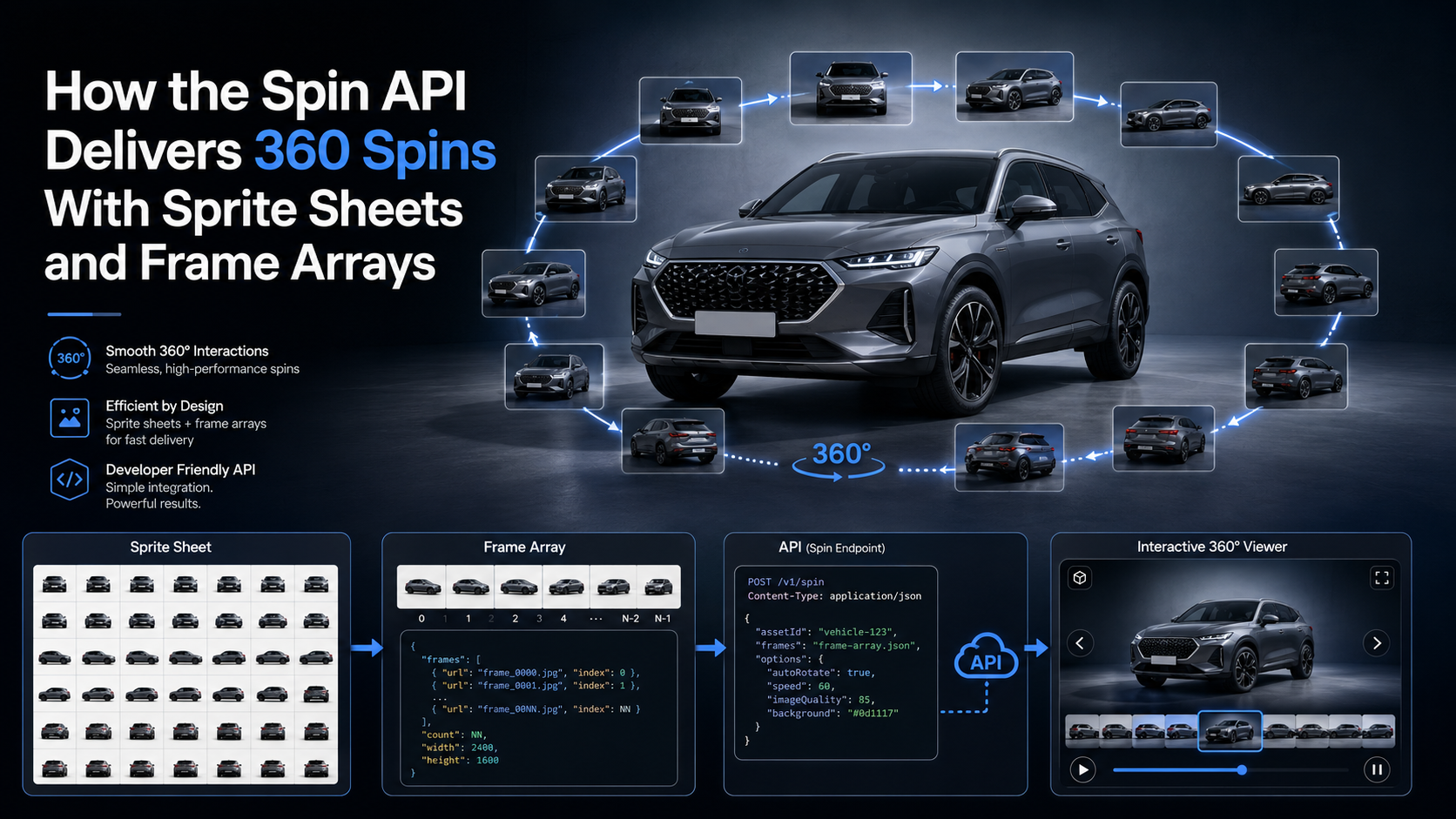
A dealership can upload 40 vehicle photos to a VDP and still leave shoppers clicking through a flat, disconnected gallery.
Interactive 360° spins create a more natural way to inspect a vehicle, but traditional approaches often depend on turntables, fixed photo booths, dedicated studio space, or automotive imaging installations that can cost tens of thousands of dollars. Scaling that setup across multiple rooftops can quickly become complicated.
A software-driven 360 spin embed API takes a different approach.
Instead of moving the vehicle on a turntable, dealership staff can walk around it with a phone or camera. The Spin API processes that video, selects the appropriate viewing angles, improves rotation consistency, centers the vehicle, processes the background, and returns media that can be displayed inside a dealership website, marketplace, DMS-connected application, or Vehicle Detail Page.
The important engineering question then becomes: How should those 360° frames be delivered to the shopper?
That is where frame arrays and sprite sheets come in.
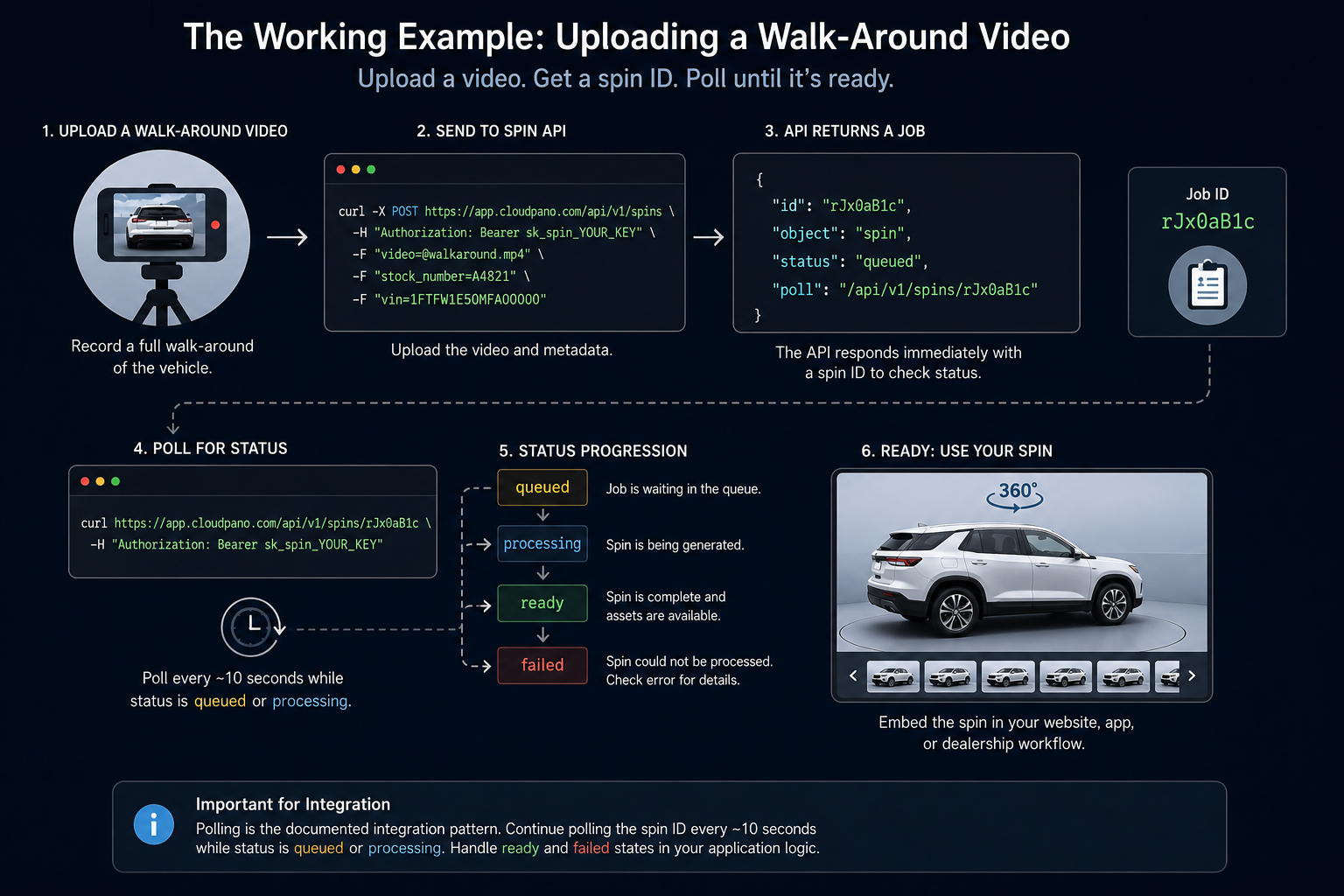
The CloudPano Spin API accepts a handheld vehicle walk-around video and processes it asynchronously into a finished spin.
The basic workflow uses three endpoints:
POST /api/v1/spins — upload and start processing a spin.GET /api/v1/spins/:id — retrieve the status and result for one spin.GET /api/v1/spins — list recent spins associated with the account.The current API returns hosted individual frames as well as sprite-sheet outputs specifically designed for faster web delivery. Processing options include centering, car_blur, smooth_rotation, and a configurable frames count. Optional VIN, stock-number, and annotation data can also travel through the workflow.
For automotive platforms, that means capture, processing, delivery, and inventory metadata can all become part of one automated pipeline.
A basic request can be made with cURL:
curl -X POST https://app.cloudpano.com/api/v1/spins \
  -H "Authorization: Bearer sk_spin_YOUR_KEY" \
  -F "video=@walkaround.mp4" \
  -F "stock_number=A4821" \
  -F "vin=1FTFW1E50MFA00000"
The upload does not keep the connection open until all processing is finished.
Instead, the API returns a job:
{
  "id": "rJx0aB1c",
  "object": "spin",
  "status": "queued",
  "poll": "/api/v1/spins/rJx0aB1c"
}
Your application can then poll the returned spin ID:
curl https://app.cloudpano.com/api/v1/spins/rJx0aB1c \
  -H "Authorization: Bearer sk_spin_YOUR_KEY"
The documented approach is to continue polling approximately every 10 seconds while the status is queued or processing. A completed job becomes ready; footage that cannot be processed can return failed with an error.
This is important when planning an automated 360 spin embed API workflow. Polling is the documented integration pattern, so developers should not build production architecture around undocumented webhooks or SDKs.
Once processing succeeds, the response contains much more than one finished image.
A trimmed example looks like this:
{
  "id": "rJx0aB1c",
  "object": "spin",
  "status": "ready",
  "result": {
    "frames": [
      "https://.../spin-1.jpg",
      "https://.../spin-2.jpg"
    ],
    "mosaics": {
      "sheets": [
        "https://.../spin-mosaic-0.jpg",
        "https://.../spin-mosaic-1.jpg",
        "https://.../spin-mosaic-2.jpg"
      ],
      "low": "https://.../spin-mosaic-low.jpg",
      "meta": {
        "cols": 8,
        "count": 96,
        "frameWidth": 1600,
        "frameHeight": 900,
        "sheetFrames": [32, 32, 32],
        "interleaved": true
      }
    }
  }
}
The two fields developers should pay particular attention to are result.frames and result.mosaics.
result.frames provides the ordered individual JPEGs used for the spin.
result.mosaics packages those views into sprite sheets intended to make web playback more efficient. The current response also includes a low-resolution mosaic and metadata describing the sprite-sheet grid.
These outputs make it possible to choose a delivery strategy based on the application instead of forcing every integration into the same viewer architecture.
A frame array is the easiest delivery format to understand.
Imagine that processing produces 96 vehicle images.
The array might conceptually look like:
const frames = [
  "spin-001.jpg",
  "spin-002.jpg",
  "spin-003.jpg",
  // ...
  "spin-096.jpg"
];
Each image represents another viewing angle around the vehicle.
When the shopper drags right, your viewer advances through the array.
When the shopper drags left, it moves backward.
For example:
Frame 22 → Frame 23 → Frame 24 → Frame 25
The browser simply swaps the currently displayed image.
Frame arrays give developers substantial flexibility.
They work well for:
The Spin API currently defaults to 96 output frames, with a documented range of 12–120.
The challenge is delivery.
If your VDP needs 96 images to make the complete rotation available, the browser may need to request many individual resources.
That is where sprite sheets become useful.
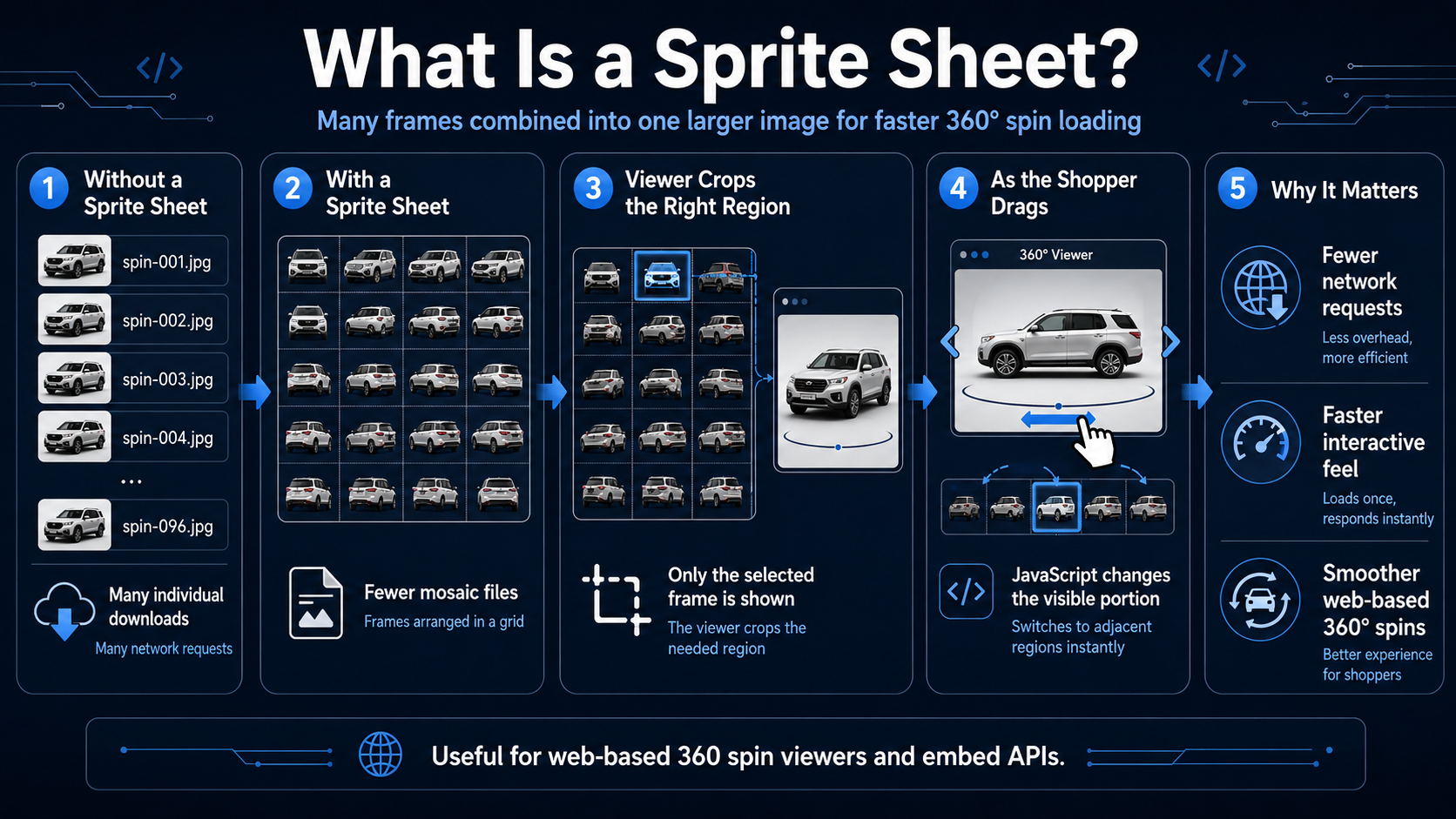
A sprite sheet combines many individual frames into one larger image.
Instead of downloading:
spin-001.jpg
spin-002.jpg
spin-003.jpg
spin-004.jpg
...
spin-096.jpg
the browser can download a much smaller number of mosaic files containing those images arranged in a grid.
Your viewer then displays only the appropriate region of the sheet.
As the shopper drags the vehicle, JavaScript changes which portion of the sprite sheet is visible.
This technique can reduce the number of network requests required to make the entire rotation available.
For a web-based 360 spin embed API, that can make an important difference in how quickly the experience feels interactive.
result.mosaics Matters for VDP Performance 🚗The API's result.mosaics output is built for fast web playback.
According to the current documentation, a 96-frame example can be packed into three full sprite sheets plus one low-resolution sheet. That allows a web player to retrieve only a handful of larger image resources instead of separately requesting all 96 frames.
The low-resolution sheet creates an additional performance opportunity.
A VDP can:
result.frames images when a shopper requests detailed zoom.This is a form of progressive delivery.
The goal is not simply to reduce total bytes. It is to shorten the amount of time between opening a VDP and being able to interact with the vehicle.
The current mosaic metadata can include:
{
  "interleaved": true
}
This detail matters.
The sheets are not necessarily organized like:
Instead, the documented interleaved system distributes frames throughout the rotation.
For frame i, the sheet is determined by:
i % sheets.length
and its position within that sheet is based on:
floor(i / sheets.length)
Because the frames are distributed this way, the first full-quality sheet can contain angles from around the entire vehicle rather than only one consecutive section of the spin.
That means progressive loading can still give shoppers access to a complete 360° range early in the process, with additional sheets filling in more intermediate viewing angles.
For dealership VDPs, that is generally more useful than loading one side of the vehicle perfectly while the rest remains unavailable.
Neither format should automatically be considered the winner.
They serve different jobs.
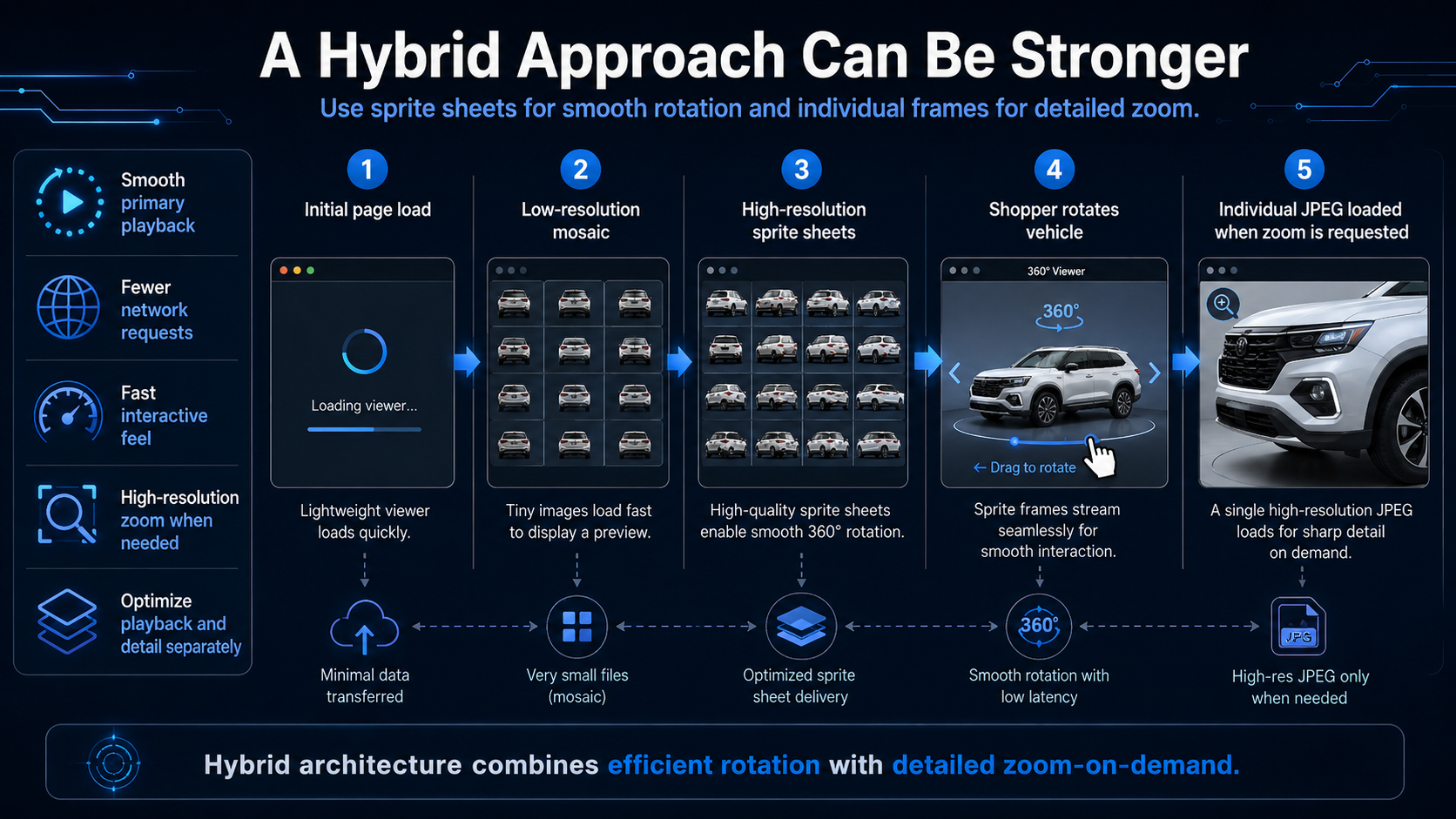
In many cases, the best 360 spin embed API architecture uses both.
Sprite sheets can power the primary rotation.
Individual frames can provide high-resolution zoom.
That might look like:
Initial page load
      ↓
Low-resolution mosaic
      ↓
High-resolution sprite sheets
      ↓
Shopper rotates vehicle
      ↓
Individual JPEG loaded when zoom is requested
This lets developers optimize playback and detail separately.
Sprite sheets and arrays determine how the output reaches the customer.
They are not responsible for creating the spin itself.
Before those assets are delivered, the Spin API can perform several processing operations.
centeringCentering keeps the vehicle at a more consistent position and scale throughout the sequence. When repositioning exposes areas outside the original image, blurred mirrored edge extensions are used to fill those margins.
car_blurcar_blur applies background treatment around the vehicle while retaining a sharper area near the tires and pavement.
This can reduce dealership-lot distractions and provide a more consistent presentation across inventory.
smooth_rotationThis option addresses one of the biggest problems with handheld capture: people do not walk at a perfectly constant speed.
The pipeline estimates the actual camera movement and selects frames at more consistent angular intervals instead of relying only on equally spaced moments in time. It also handles overlap around the starting position to create a cleaner loop.
framesDevelopers can choose how many viewing angles should be returned.
The current default is 96, with supported values from 12 through 120.
annotations_promptDevelopers can also provide natural-language instructions for on-vehicle annotations.
When suitable 3D geometry is reconstructed, annotations can be anchored to the vehicle and projected across the appropriate spin frames.
The finished result can also expose geometry resources such as:
carPoseUrl;carCloudUrl;carMeshUrl.These represent per-frame camera poses, a sparse vehicle point cloud, and a simplified 3D hull respectively.
Those outputs can support more advanced applications such as on-vehicle hotspots, inspection annotations, click-to-identify interfaces, and geometry-aware visualization.
For a deeper explanation, read 3D Vehicle Geometry From the 360 Spin API: Camera Poses, Point Clouds, and Hull Meshes.
A 360 viewer becomes more valuable when it fits naturally into dealership operations.
Optional vin and stock_number fields can be submitted with a spin and echoed back in the result metadata.
A dealership workflow could therefore look like:
Vehicle enters inventory
        ↓
VIN / stock record created
        ↓
Employee captures walk-around
        ↓
POST /api/v1/spins
        ↓
Spin ID stored with inventory record
        ↓
Application polls processing status
        ↓
Spin becomes ready
        ↓
VDP automatically publishes 360 viewer
That same architecture can support bulk inventory backfills.
Instead of manually attaching spin URLs to hundreds of vehicles, a dealership group, marketplace, or DMS integration can use VINs and stock numbers to associate processing jobs with existing inventory records.
A development team could build many components of a vehicle-spin system internally.
But doing so can mean solving:
The build-vs-buy decision should therefore consider more than API price.
It should consider engineering time, infrastructure, quality assurance, processing maintenance, and how much of the imaging pipeline actually differentiates your product.
For a DMS, marketplace, dealer website provider, merchandising platform, or automotive application, using a processing API can allow engineering resources to remain focused on the software the customer actually interacts with.
Fewer network requests. Multiple frames can be delivered inside a smaller number of image resources.
Faster perceived interaction. A low-resolution mosaic can help make a spin usable before all detailed assets are loaded.
Complete-rotation progressive loading. Interleaved sheets distribute viewing angles around the vehicle.
Flexible architecture. Developers still receive individual frame URLs.
Works well on VDPs. Sprite-based rendering is particularly useful for browser-based interactive spins.
Scales beyond dedicated studios. The capture workflow does not require installing a turntable at every dealership rooftop.
Viewer logic is more sophisticated. Developers need to calculate which sprite cell corresponds to the requested frame.
Large sheets still consume bandwidth. Reducing the number of requests does not mean network optimization becomes irrelevant.
High-resolution zoom may still need individual images. Sprite-sheet cells are optimized primarily for rotation playback.
Processing is asynchronous. The application must manage queued, processing, ready, and failed states.
Capture still matters. An incomplete vehicle walk-around can prevent successful processing.
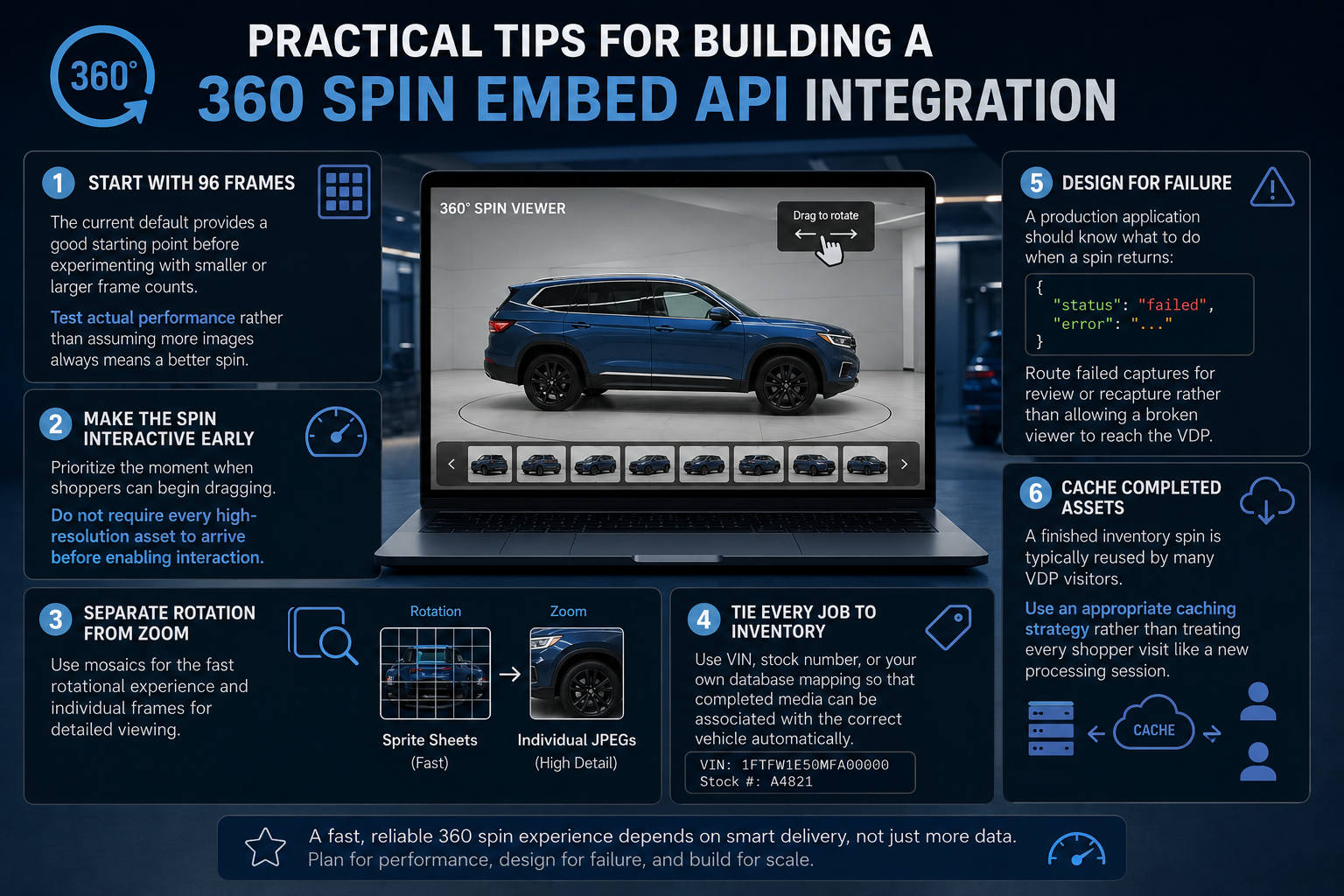
The current default provides a good starting point before experimenting with smaller or larger frame counts.
Test actual performance rather than assuming more images always means a better spin.
Prioritize the moment when shoppers can begin dragging.
Do not require every high-resolution asset to arrive before enabling interaction.
Use mosaics for the fast rotational experience and individual frames for detailed viewing.
Use VIN, stock number, or your own database mapping so that completed media can be associated with the correct vehicle automatically.
A production application should know what to do when a spin returns:
{
  "status": "failed",
  "error": "..."
}
Route failed captures for review or recapture rather than allowing a broken viewer to reach the VDP.
A finished inventory spin is typically reused by many VDP visitors.
Use an appropriate caching strategy rather than treating every shopper visit like a new processing session.
The current documentation supports MP4, MOV, and WebM video uploads up to 500 MB. Capture guidance recommends one full circle around the vehicle, landscape orientation, and approximately 20–60 seconds of video. Overshooting the original starting position is acceptable because the processing pipeline can trim the overlap.
Developers should also account for:
401 responses for missing, unknown, or revoked API keys;404 responses when a spin ID does not exist or belongs to another account;400 responses for missing or invalid video uploads;status: "failed" for footage that cannot be processed successfully.GET /api/v1/spins currently returns the latest 25 spins associated with the account.
Suggested image: Show a horizontal strip of vehicle rotation frames at the top, then underneath show those same frames packed into three sprite-sheet grids. Add arrows labeled:
Individual Frames → Sprite Sheets → Fast Interactive VDP
This visually explains the core difference between result.frames and result.mosaics without requiring readers to understand the code first.
A 360 spin embed API allows an application to programmatically create, retrieve, and display interactive vehicle rotations inside websites, marketplaces, DMS-connected tools, and other automotive software.
result.frames and result.mosaics?result.frames contains ordered individual JPEG URLs. result.mosaics contains sprite sheets designed for efficient web playback. Both can be used in the same implementation.
The current default is 96 frames, and the documented range is 12–120 frames.
The current documentation recommends polling GET /api/v1/spins/:id approximately every 10 seconds while the job is queued or processing.
Webhooks are not documented in the current API documentation. Polling is the documented processing pattern.
Yes. Both can be submitted as optional multipart fields and returned with the spin metadata.
The Spin API is currently free during the preview period. The current documentation states that accounts can maintain up to 10 active API keys.
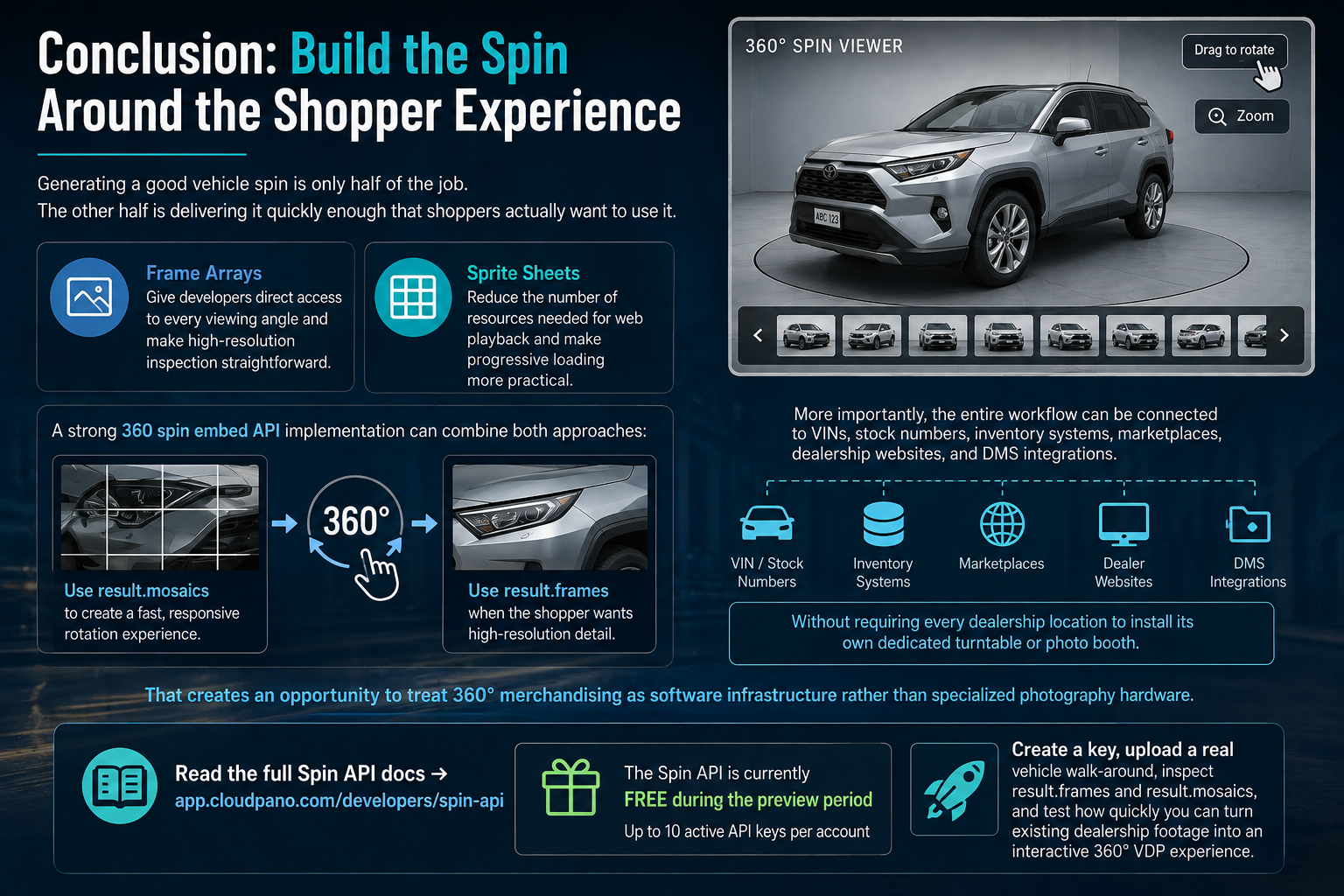
Generating a good vehicle spin is only half of the job.
The other half is delivering it quickly enough that shoppers actually want to use it.
Frame arrays give developers direct access to every viewing angle and make high-resolution inspection straightforward.
Sprite sheets reduce the number of resources needed for web playback and make progressive loading more practical.
A strong 360 spin embed API implementation can combine both approaches: use result.mosaics to create a fast, responsive rotation experience and use result.frames when the shopper wants high-resolution vehicle detail.
More importantly, the entire workflow can be connected to VINs, stock numbers, inventory systems, marketplaces, dealership websites, and DMS integrations without requiring every dealership location to install its own dedicated turntable or photo booth.
That creates an opportunity to treat 360° merchandising as software infrastructure rather than specialized photography hardware.
Read the full Spin API docs → app.cloudpano.com/developers/spin-api
The Spin API is currently free during the preview period, and accounts support up to 10 active API keys.
Create a key, upload a real vehicle walk-around, inspect result.frames and result.mosaics, and test how quickly you can turn existing dealership footage into an interactive 360° VDP experience.


Compact, ready to go anywhere
Interchangeable lens that’s upgradeable
Dual 1-inch sensors for improved clarity and low light performance
Dynamic range and 6K 360° capture
360° photo resolution at 21MP

8K 360° video recording for ultra-detailed visuals.
4K single-lens mode for traditional wide-angle shots.
Invisible selfie stick effect for drone-like perspectives.
2.5-inch touchscreen with Gorilla Glass protection.
Waterproof up to 33ft for underwater shooting.

360° photo resolution in 23MP
Slim design at 24 mm thick
Built-in image stabilization for smooth video capture.
Internal 19GB storage for photo and video storage.
Wireless connectivity for remote control and sharing.

60MP 360° still images for high-resolution photography.
5.7K 360° video recording at 30fps.
2.25-inch touchscreen for intuitive control.
USB Type-C port for fast charging and data transfer.
MicroSD card slot for expandable storage.
.png)

.png)

Try it free. No credit card required. Instant set-up.







.svg)


.svg)