


.png)


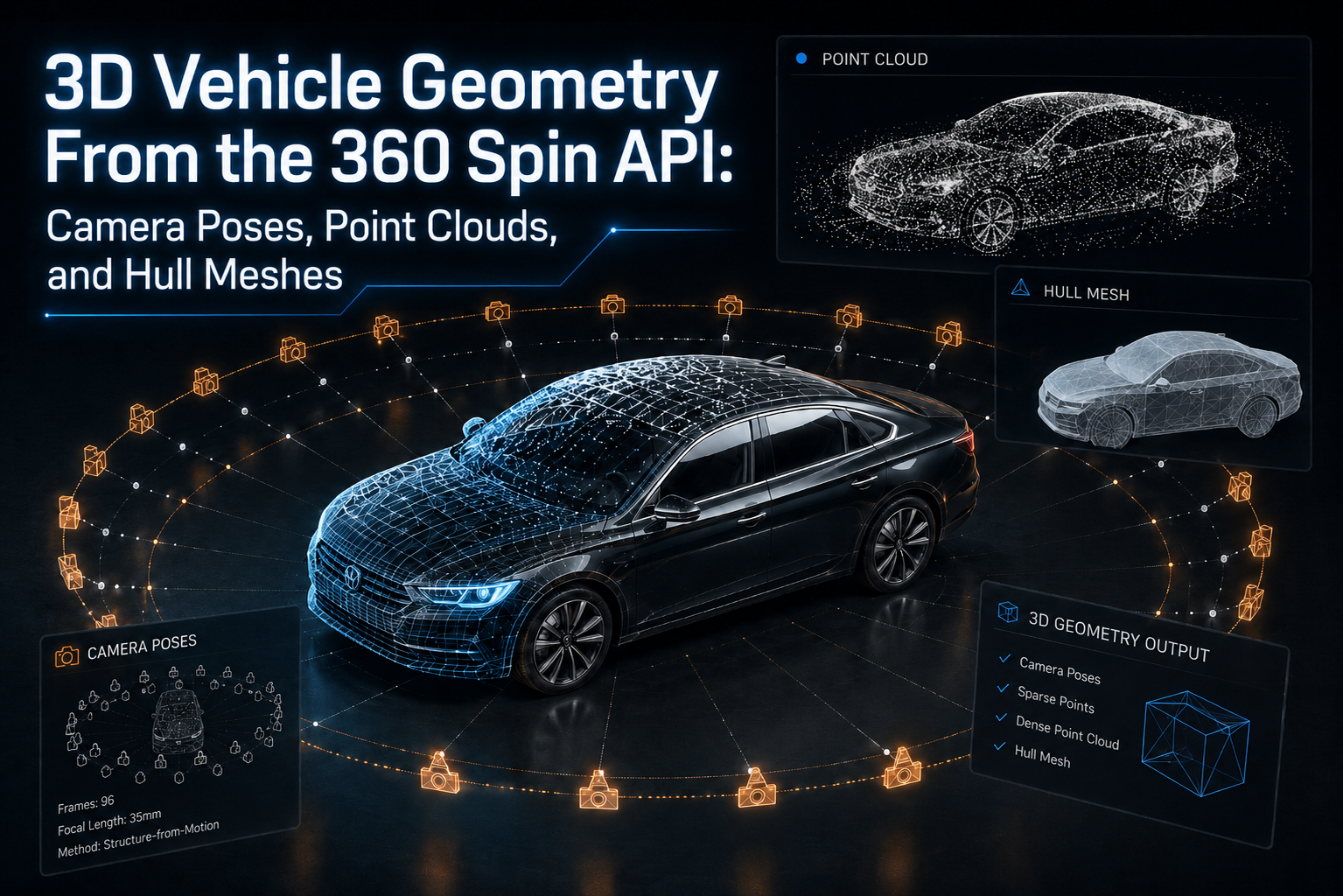
A 360° vehicle spin may look simple from the shopper's perspective.
Drag left. Drag right. Inspect the wheels, doors, bumpers, and body panels.
Behind that interaction, however, the processing system can understand much more than a sequence of photographs.
When a walk-around video is analyzed, the camera's movement around the vehicle can be estimated in three-dimensional space. Visual features can be matched between frames. Those observations can contribute to point-cloud data and simplified geometric representations of the vehicle.
That makes a modern vehicle 3D reconstruction API useful for more than simply producing a rotating image viewer.
For automotive software companies, dealerships, marketplaces, inspection platforms, and DMS providers, geometry outputs can become another structured data layer associated with each vehicle.
This guide explains what camera poses, point clouds, and hull meshes represent, how they fit into the 360 Spin API workflow, and where developers may be able to use them.
Traditional vehicle photography is primarily image-based.
A photographer captures the front, rear, driver's side, passenger side, interior, wheels, and other important details.
A turntable or dedicated automotive studio improves consistency by controlling where the vehicle and camera are positioned.
Those systems can work well, but they may require permanent equipment, dedicated photography space, specialized workflows, and significant capital investment.
A software-driven approach changes the capture process.
With the CloudPano 360 Spin API, dealership staff can record a handheld walk-around video and submit that video for processing.
The resulting workflow can generate the frames required for an interactive vehicle spin while also performing processing such as vehicle centering, background treatment, rotation smoothing, and other automated operations.
Instead of requiring every location to install a turntable or expensive vehicle photography studio, the capture device can simply move around the car.
That movement is important because it gives the reconstruction system multiple views of the same physical object.
Those changing views are what make 3D geometry estimation possible.
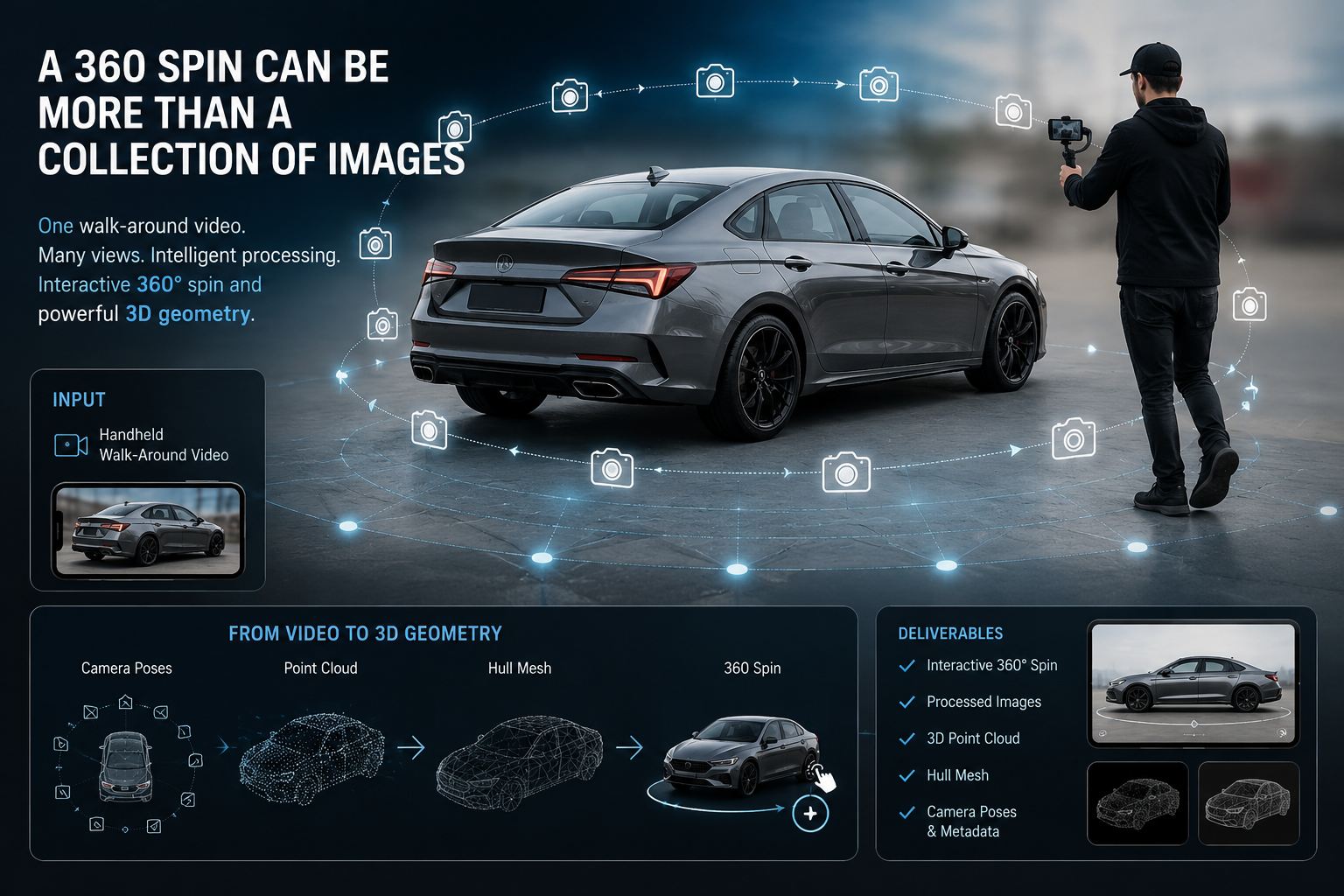
A vehicle 3D reconstruction API analyzes visual relationships across multiple frames.
Imagine a camera moving around the front corner of a vehicle.
A headlight appears in one frame.
The same headlight appears again in the next frame, but from a slightly different angle.
The wheel, mirror, door handles, windshield edges, grille, and dozens or thousands of other visual features also move relative to the camera.
By identifying corresponding features across multiple images, a reconstruction pipeline can estimate how the camera moved and where observed points are located in three-dimensional space.
This general process is commonly associated with photogrammetry and Structure-from-Motion techniques.
The important distinction is that the system is not simply asking:
Which video frames should become the 360° spin?
It can also ask:
Where was the camera when this image was captured, and what does the observed vehicle geometry look like from those positions?
That creates several useful geometry outputs.
One of the foundational outputs of a reconstruction pipeline is the camera pose.
A camera pose describes the estimated position and orientation of the camera for a particular frame.
In practical terms, it answers questions such as:
That information becomes extremely useful when creating a smooth automotive spin.
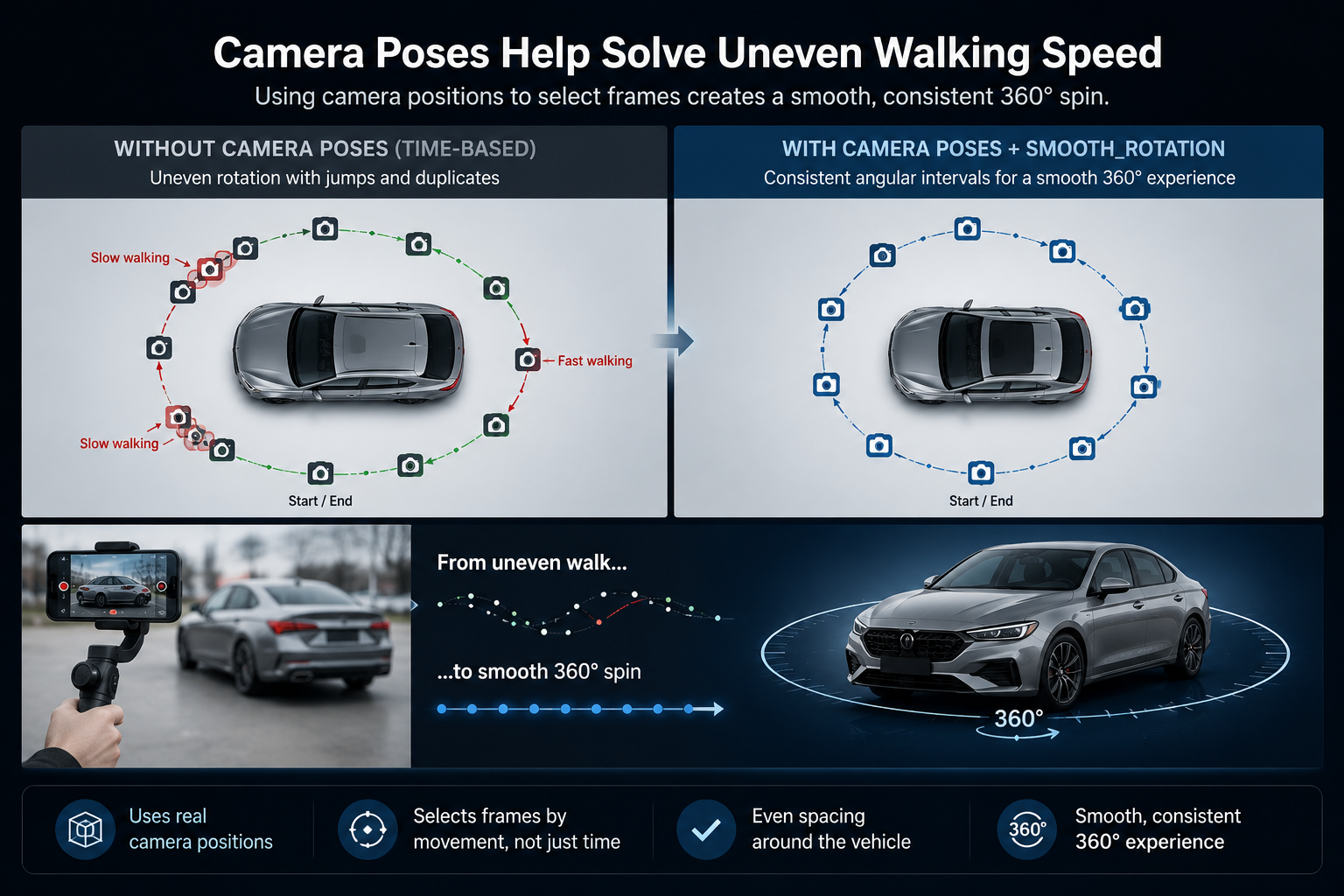
A person recording a vehicle rarely walks at exactly the same speed throughout the capture.
They may slow down near the front bumper.
They may walk quickly along one side.
They may pause behind the vehicle.
They may even walk slightly beyond the original starting point.
Selecting frames using only timestamps can therefore produce uneven rotation.
Several nearly identical angles might appear together, followed by a large jump.
Camera-position information gives the processing pipeline another way to understand the capture.
Instead of relying only on elapsed video time, frame selection can account for how the camera actually moved around the vehicle.
CloudPano's smooth_rotation processing option is designed to produce frames at more consistent angular intervals around the vehicle rather than depending only on evenly spaced moments in the video.
That means geometry is already closely connected to the quality of the 360° experience.
Once camera movement has been estimated, visual features observed across multiple frames can be represented as points in three-dimensional space.
Collectively, those points form a point cloud.
Think of the vehicle as being covered by thousands of tiny floating dots.
A point may correspond to part of:
Viewed together, those points begin to reveal the shape and structure of the vehicle.
3D reconstruction systems may work with different levels of point-cloud density.
A sparse point cloud contains fewer high-confidence points and is often useful for establishing the general spatial relationship between cameras and the object.
A denser point cloud attempts to represent substantially more of the visible surfaces.
The result is not necessarily intended to replace engineering-grade CAD or LiDAR scanning.
Instead, the value is that visual capture can produce useful geometric context without requiring specialized scanning hardware.
That distinction matters when designing a vehicle 3D reconstruction API workflow.
The output should be treated according to the purpose and accuracy level for which it was generated rather than assumed to be a manufacturing-grade vehicle model.
A point cloud consists of individual points.
A mesh goes one step further.
A mesh connects geometric vertices to create surfaces, usually through triangles or polygons.
For vehicle reconstruction, a hull mesh can provide a simplified representation of the vehicle's overall exterior shape.
Imagine stretching a lightweight digital skin over the reconstructed points.
The resulting geometry may capture broad characteristics such as:
The objective does not always need to be a perfectly detailed digital twin.
For many applications, simplified geometry is more useful because it is easier to process, transfer, visualize, and integrate into downstream software.
The Spin API follows an asynchronous workflow.
A vehicle walk-around can be submitted using:
POST /api/v1/spins
The application can then retrieve the individual spin with:
GET /api/v1/spins/:id
Recent spins can be retrieved with:
GET /api/v1/spins
Processing can move through states such as:
Queued → Processing → Ready
A failed state may also be returned if the job cannot be completed successfully.
This architecture is important because extracting frames, analyzing camera movement, processing imagery, and creating geometry are not operations that should block the original user request.
A typical dealership workflow might therefore look like:
Capture video → submit spin → process media and geometry → retrieve results → attach assets to inventory
Your inventory system can continue operating while processing occurs separately.
3D reconstruction is only one part of the processing pipeline.
The Spin API also provides configurable processing controls that developers can use depending on the experience they are building.
Review the current Spin API Proceing Options before implementing these settings in production.
centeringHandheld capture naturally changes as the photographer walks.
The vehicle may appear slightly higher, lower, larger, or smaller from frame to frame.
Centering helps maintain a more consistent vehicle position throughout the finished spin.
smooth_rotationThis processing option helps compensate for uneven camera movement by creating more consistent angular spacing between selected frames.
framesDevelopers can control the number of images generated for the finished spin.
CloudPano currently documents a configurable range of 12 to 120 frames, with 96 frames as the default. At 96 frames, each image represents approximately 3.75 degrees of a complete rotation.
car_blurDealership lots frequently contain other cars, signage, buildings, poles, people, and traffic.
Background treatment can reduce those distractions and create a more controlled presentation around the vehicle.
annotations_promptAnnotation-based processing can provide another layer of structured vehicle analysis.
Depending on the workflow being built, this type of output can complement the visual spin and geometry information rather than forcing dealership employees to manually inspect every frame.
Together, these controls turn the API into a broader vehicle-processing pipeline rather than a simple video-to-image converter.
Geometry does not replace the traditional 360° viewer.
The shopper-facing experience can still be built using the finished vehicle images.
The API can provide ordered hosted frames that developers can display sequentially as a shopper drags across the vehicle.
It can also provide sprite-sheet or mosaic assets containing multiple frames in larger combined images.
Frame arrays can be useful when you need:
Sprite sheets can be attractive for browser-based VDPs because several vehicle angles can be loaded through a smaller number of initial network requests.
The viewer simply changes which region of the sprite sheet is displayed as the shopper rotates the vehicle.
For production implementations, geometry processing and delivery engineering should therefore be considered separately.
One solves spatial understanding.
The other determines how efficiently shoppers receive the experience.
The technology becomes considerably more useful when it is connected to dealership operations.
A dealership does not simply have "a vehicle."
It has:
VIN → stock number → inventory record → photos → spin → geometry → merchandising assets
Preserving that relationship is essential when processing hundreds or thousands of vehicles.
The API workflow can carry VIN and stock-number metadata so completed media can be associated with the correct inventory record.
This makes larger automation workflows possible.
A vehicle arrives.
The VIN enters the DMS.
An employee records a walk-around.
Your system submits the video.
The processing job completes.
The finished frames, spin assets, metadata, and available geometry are attached automatically to that vehicle.
No employee needs to manually determine which files belong to which car.
The immediate use case is improving the spin itself, but a vehicle 3D reconstruction API creates additional possibilities.
Geometry information could support products involving:
Not every integration needs every output.
A dealership website may only need smooth frames and a fast viewer.
An automotive inspection company may care much more about geometry and annotations.
A marketplace may want both.
That flexibility is one of the advantages of treating the spin API as infrastructure rather than a single-purpose photography tool.
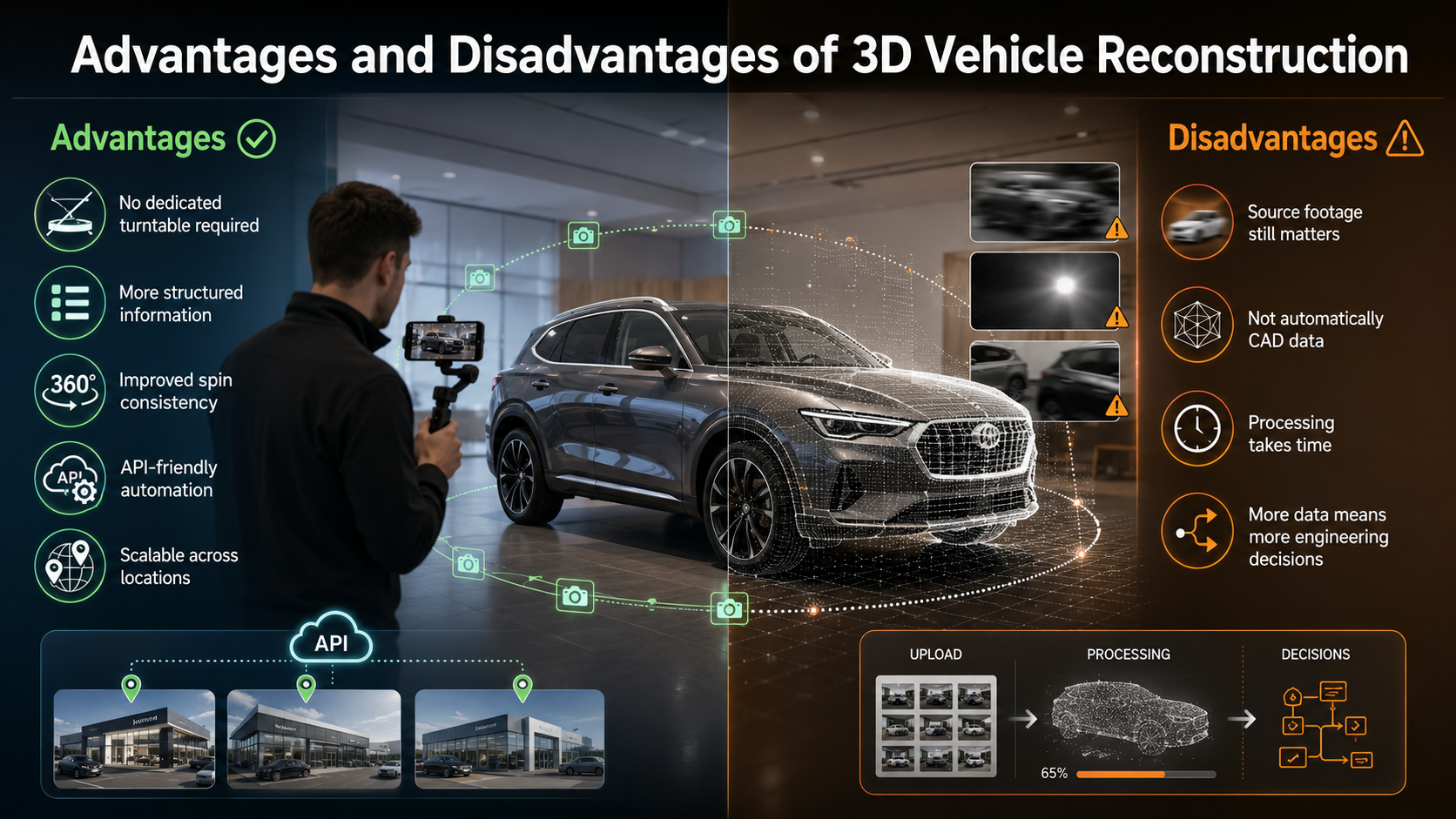
No dedicated turntable required. A normal vehicle walk-around can provide the multi-angle imagery needed for processing.
More structured information. Camera poses and geometry provide information beyond flat images.
Improved spin consistency. Camera-motion analysis can contribute to more evenly spaced viewing angles.
API-friendly automation. Geometry can travel through the same workflow as the vehicle's media and inventory metadata.
Scalable across locations. Dealers do not need identical physical studios installed at every rooftop.
Source footage still matters. Poor lighting, incomplete walk-arounds, obstruction, motion blur, or weak visual overlap can affect reconstruction quality.
It is not automatically CAD data. Reconstructed geometry should not be assumed to provide engineering or manufacturer-level precision.
Processing takes time. Reconstruction is asynchronous rather than instantaneous.
More data creates more engineering decisions. Developers must determine which outputs they actually need to store, transmit, visualize, or analyze.
Start with one vehicle before attempting a large inventory backfill.
Use a complete landscape walk-around with good visibility of the vehicle throughout the capture.
Keep the camera moving steadily and avoid dramatic distance changes.
Send VIN and stock-number metadata consistently from the beginning.
Test the resulting spin on the actual VDP where shoppers will use it.
Compare frame-array and sprite-sheet delivery on mobile connections.
Do not assume every geometry output needs to be exposed to the shopper.
Most importantly, inspect the current Processing Options when designing your integration so your implementation reflects the controls and output behavior currently available.
A vehicle 3D reconstruction API processes multiple views of a vehicle to estimate spatial information such as camera positions, point clouds, or simplified geometry.
A camera pose describes the estimated location and orientation of the camera when a particular image or video frame was captured.
A point cloud is a collection of points positioned in three-dimensional space. Together, those points can represent portions of the visible surface of a vehicle.
A hull mesh connects geometric points or vertices into surfaces, producing a simplified representation of the vehicle's overall shape.
No. Geometry and the visual spin serve different purposes. The shopper-facing viewer can still use individual frames or sprite sheets while geometry supports processing and more advanced applications.
The Spin API workflow is designed around vehicle walk-around video rather than requiring a traditional turntable or dedicated 3D scanning studio.
The biggest opportunity in a 360 Spin API is not simply making a car rotate on a webpage.
It is understanding what can be extracted from the capture.
The same walk-around video that produces an interactive 360° spin can also provide information about how the camera moved, where visual features exist in three-dimensional space, and what the overall vehicle geometry looks like.
Camera poses help describe the capture path.
Point clouds begin reconstructing the observed vehicle.
Hull meshes turn that spatial information into a simplified surface.
Combined with centering, smooth rotation, background processing, annotations, frame generation, VIN metadata, and modern web delivery, those outputs create a much more powerful automotive media pipeline.
For developers building dealership software, DMS integrations, marketplaces, inspection products, or automotive AI applications, a vehicle 3D reconstruction API can turn an ordinary walk-around into media and structured geometry that can flow directly into the rest of the inventory stack.
Review the CloudPano Spin API Processing Options, submit a real dealership walk-around, and follow the resulting camera, geometry, and spin outputs through your application.
Start with one vehicle, connect the result to your existing inventory workflow, and build from there.


Compact, ready to go anywhere
Interchangeable lens that’s upgradeable
Dual 1-inch sensors for improved clarity and low light performance
Dynamic range and 6K 360° capture
360° photo resolution at 21MP

8K 360° video recording for ultra-detailed visuals.
4K single-lens mode for traditional wide-angle shots.
Invisible selfie stick effect for drone-like perspectives.
2.5-inch touchscreen with Gorilla Glass protection.
Waterproof up to 33ft for underwater shooting.

360° photo resolution in 23MP
Slim design at 24 mm thick
Built-in image stabilization for smooth video capture.
Internal 19GB storage for photo and video storage.
Wireless connectivity for remote control and sharing.

60MP 360° still images for high-resolution photography.
5.7K 360° video recording at 30fps.
2.25-inch touchscreen for intuitive control.
USB Type-C port for fast charging and data transfer.
MicroSD card slot for expandable storage.
.png)

.png)

Try it free. No credit card required. Instant set-up.







.svg)


.svg)