


.png)


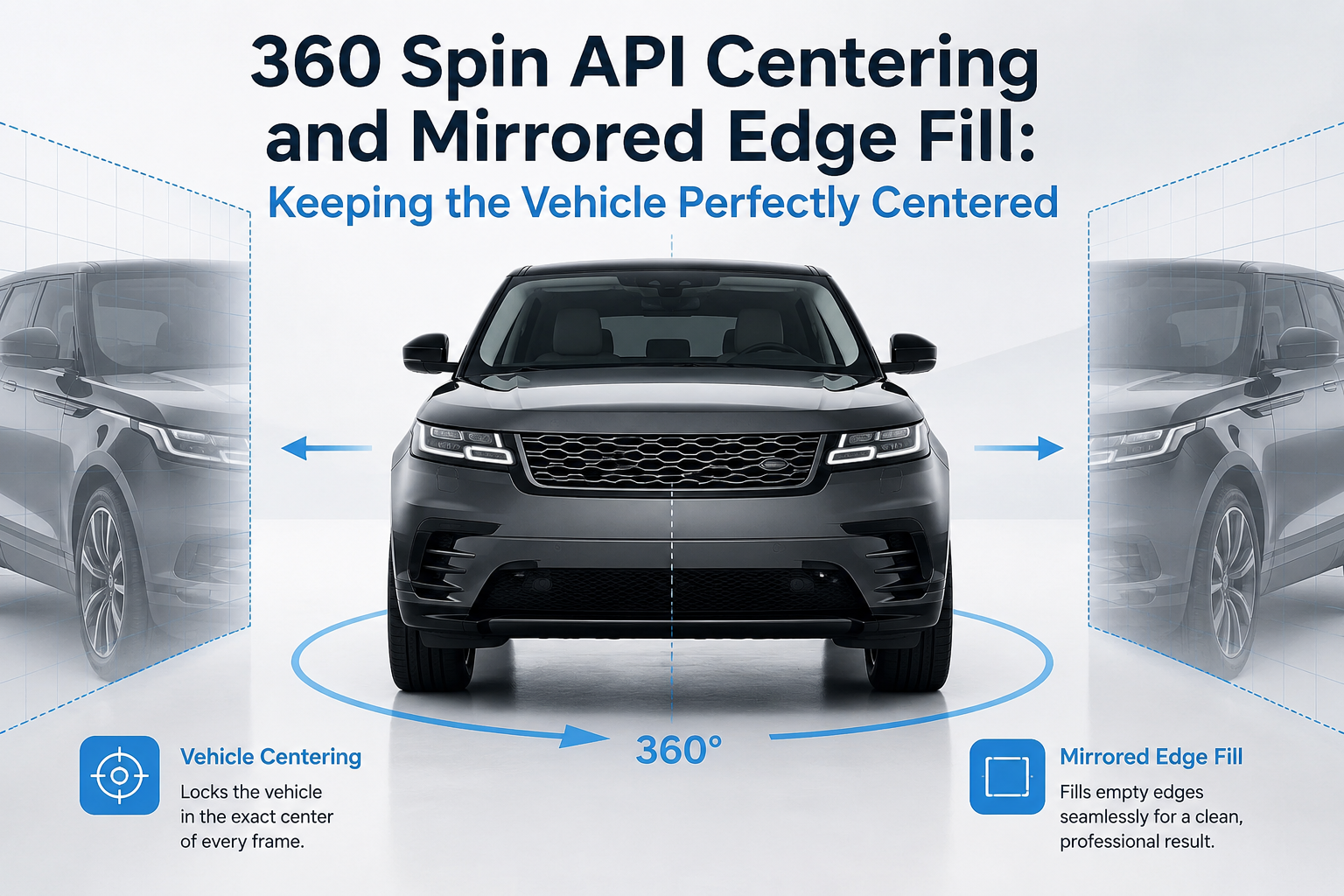
A 360° vehicle spin can contain sharp images, smooth rotation, and excellent lighting—and still feel unprofessional if the car moves around the screen as the shopper rotates it.
One frame may position the vehicle slightly left. The next may move it down. Another angle may suddenly make the car appear larger or smaller.
That visual movement is especially common when a spin starts with a normal walk-around video rather than a fixed turntable or automotive photo booth.
The challenge is not simply extracting frames from video. The vehicle needs to remain visually anchored throughout the entire rotation.
That is where automated centering becomes valuable.
A vehicle centering API can help standardize the position and scale of the vehicle across a sequence of spin frames. Combined with techniques such as mirrored edge fill, it can produce a more consistent canvas without requiring dealership employees to capture every angle with studio-level precision.
For automotive marketplaces, DMS platforms, dealer groups, and developers building vehicle merchandising tools, this seemingly small processing step can make a major difference in how polished the finished 360° experience feels.
A normal dealership walk-around is rarely perfect.
The person recording the vehicle may move closer to the car while passing the front bumper, step farther away near the rear quarter panel, raise or lower the phone, or change their walking path slightly.
Those movements are barely noticeable while watching the original video.
Once individual frames are extracted and turned into an interactive spin, however, the differences become much easier to see.
The shopper drags the vehicle left or right and expects the car to rotate.
Instead, an unprocessed sequence can make the vehicle appear to:
The goal of a vehicle centering API is to reduce those inconsistencies automatically.
Instead of forcing the person holding the camera to maintain the exact same distance, angle, and framing throughout an entire lap, processing can help normalize the output afterward.
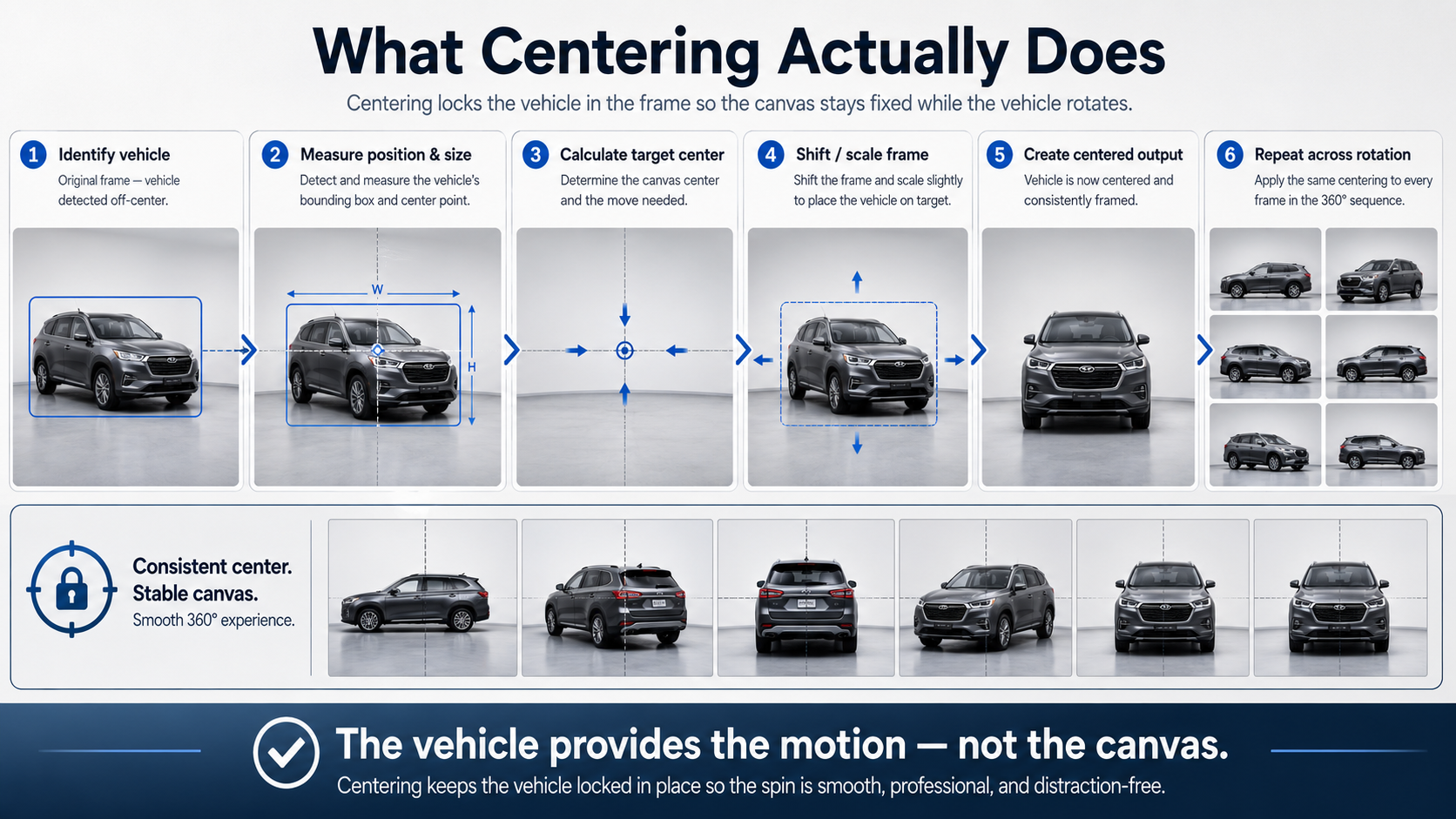
Centering is more sophisticated than simply placing every image inside a square or rectangular canvas.
The system first needs to understand where the vehicle is located within each frame.
Conceptually, the workflow looks something like this:
The result is a sequence in which the car remains much closer to a fixed visual position.
This matters because the vehicle itself should provide the motion in a 360° spin—not the canvas.
When the shopper rotates from the driver-side profile toward the front three-quarter view, the vehicle should feel like it is turning in place.
That visual stability is one of the biggest differences between a collection of extracted video frames and a polished automotive 360° experience.
Centering introduces another challenge.
Imagine that the vehicle is positioned too far to the right in the original frame.
To center it, the processing system may shift the entire image toward the left.
But shifting the image creates new canvas space along the opposite edge.
There were no original pixels captured there.
Without additional processing, several undesirable things could happen:
None of those approaches is ideal for a consistent 360° viewer.
This is where edge-fill strategies become useful.
Mirrored edge fill extends available image information beyond an original boundary by reflecting pixels near the edge outward.
Instead of inserting a solid black region into newly exposed canvas space, the processing pipeline can use visual information already present near that edge.
For example, if centering moves an image and creates a narrow empty area beside a dealership parking lot, the pixels closest to that border can be reflected outward to occupy the additional space.
The objective is not to invent important new scene content.
It is to make small areas created by repositioning less visually disruptive.
Zooming can solve some edge problems, but excessive zoom introduces new ones.
A vehicle may suddenly fill too much of the canvas. Rooflines, mirrors, bumpers, or shadows can move dangerously close to the edges. SUVs and trucks may require different amounts of cropping than compact cars.
Mirrored edge fill gives a processing pipeline another way to maintain a stable output canvas while avoiding unnecessary enlargement.
For a vehicle centering API, this is particularly useful because consistent framing is the real goal.
The shopper should notice the vehicle—not the corrections happening behind the scenes.
An API-driven workflow changes how dealerships can think about 360° capture.
Traditionally, producing highly consistent vehicle spins could mean installing a turntable, constructing a photography booth, creating a dedicated capture bay, or investing tens of thousands of dollars into specialized studio equipment.
An API workflow shifts more of that complexity into software.
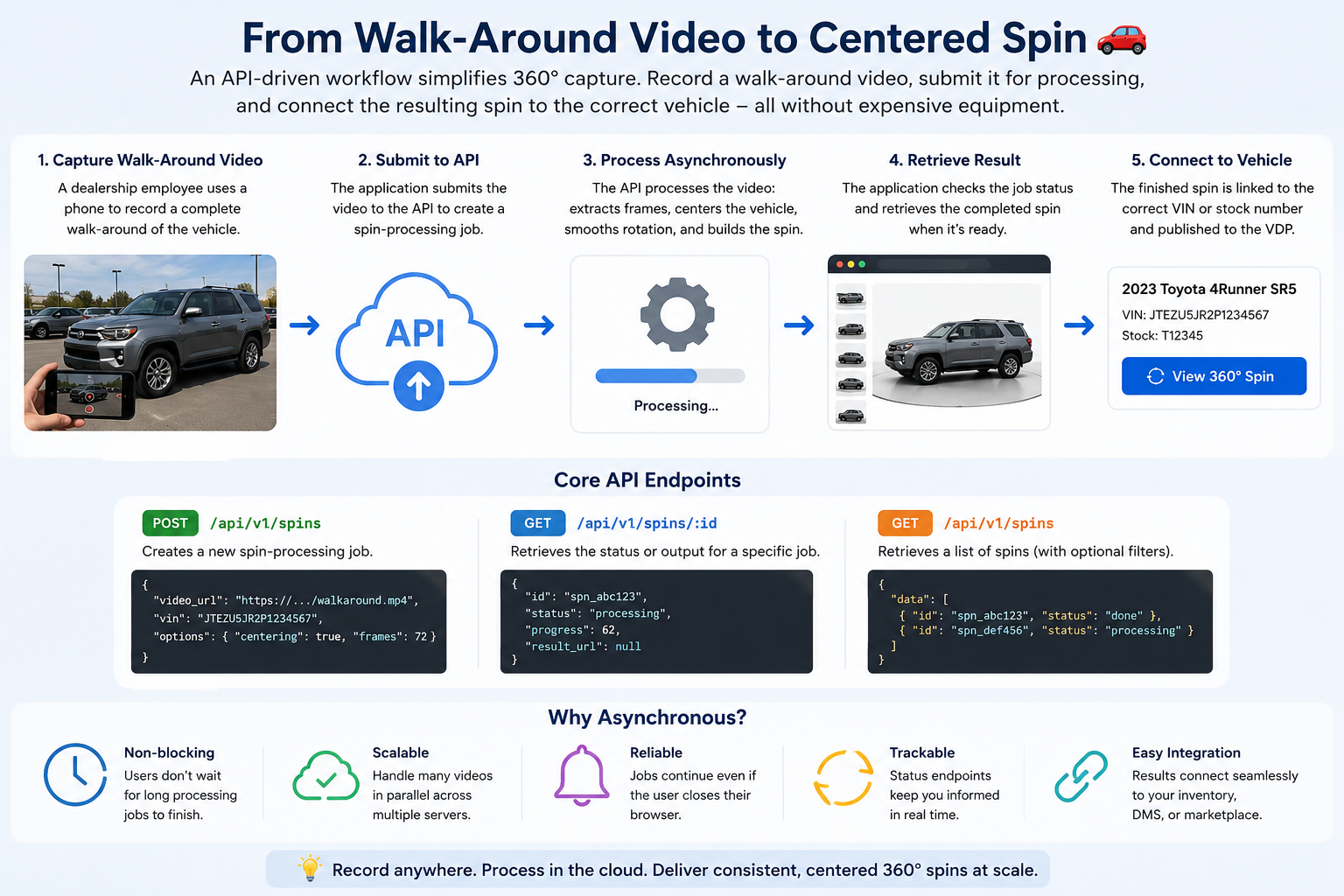
A dealership employee can capture a complete walk-around video. The application submits that video for processing, monitors the job, and then connects the resulting spin with the appropriate vehicle.
A basic integration may revolve around endpoints such as:
POST /api/v1/spins
GET /api/v1/spins/:id
GET /api/v1/spins
The POST request creates the spin-processing job.
The individual GET request can be used to retrieve the status or output associated with a specific spin.
The collection endpoint can support workflows where an application needs to retrieve or manage multiple spins.
This asynchronous architecture is important because video processing should not require a dealership employee to leave a browser window open while waiting for a result.
Centering should not be evaluated in isolation.
A polished vehicle spin usually depends on several processing decisions working together.
Depending on the integration, these can include options such as:
centering
Helps maintain a consistent vehicle position across the rotation.
car_blur
Can reduce distracting background detail and make the vehicle visually dominant.
smooth_rotation
Helps compensate for inconsistent walking speed and frame spacing.
frames
Controls how many individual viewing angles are included in the finished rotation.
annotations_prompt
Can support workflows that extract or associate additional vehicle information with the processed experience.
Geometry outputs can extend the workflow further by providing structured spatial information useful for advanced interfaces, inspection systems, annotations, or automotive applications.
Developers implementing these capabilities should use the current Spin API Processing Options documentation as the technical source of truth for supported fields and configuration.
It is easy to confuse centering with rotational smoothing.
They address different types of movement.
Centering controls where the vehicle appears inside each frame.
Smooth rotation controls how evenly the sequence progresses around the vehicle.
Consider a photographer who walks slowly around the front of the car and quickly around the rear.
The vehicle might be perfectly centered in every frame while the rotation still feels uneven.
Likewise, frames could be distributed at excellent rotational intervals while the vehicle moves several inches across the canvas.
A strong processing workflow handles both.
This is why a vehicle centering API becomes more powerful when centering is combined with frame selection and rotational normalization rather than treated as a standalone cosmetic filter.
Once the frames have been centered and processed, they still need to reach the shopper efficiently.
There are two common approaches.
The API can return or reference a sequence of individual image URLs.
Your viewer loads the appropriate image as the user drags left or right.
This approach is straightforward and gives developers significant control over caching, progressive loading, image resolution, and CDN delivery.
A sprite sheet combines multiple rotational frames into a smaller number of larger image assets.
The viewer displays different regions of the sprite as the shopper rotates the vehicle.
Sprite sheets can reduce the number of individual network requests and are useful for highly optimized viewer implementations.
The right delivery architecture depends on the VDP, expected traffic, device mix, caching strategy, and viewer implementation.
Centering matters in either case because every source frame still needs to line up visually.
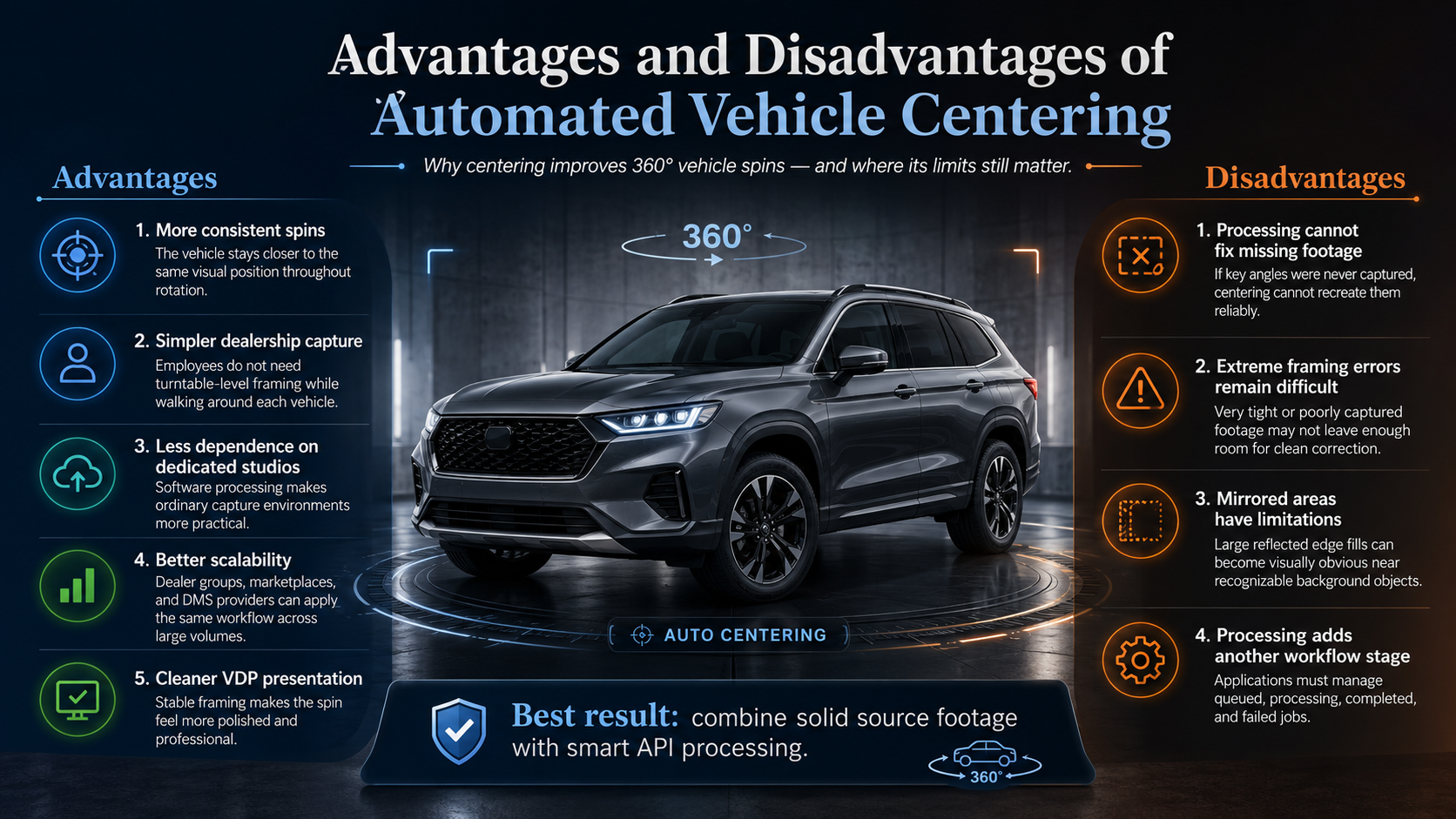
More consistent spins
The vehicle remains closer to the same visual location throughout the rotation.
Simpler dealership capture
Employees do not need to reproduce turntable-level framing while walking around every vehicle.
Less dependence on dedicated studios
Processing can make ordinary capture environments more practical for inventory merchandising.
Better scalability
Dealer groups, marketplaces, and DMS providers can apply the same processing workflow across large volumes of inventory.
Cleaner VDP presentation
Stable framing makes the spin feel more intentional and professional.
Processing cannot fix missing footage
If the roof, bumper, or an entire vehicle angle was never captured, centering cannot recreate it reliably.
Extreme framing errors remain difficult
A video captured far too close to the vehicle may leave insufficient edge information for a clean correction.
Mirrored areas have limitations
Large mirrored regions can become visually obvious, particularly near signs, vehicles, pavement markings, poles, or recognizable objects.
Processing adds another workflow stage
Applications must account for queued, processing, completed, and failed jobs rather than expecting an instant synchronous response.
Software can correct normal capture variation, but better source footage still produces better output.
Leave reasonable space around the vehicle during capture. More surrounding image area gives the centering process room to reposition the frame.
The photographer does not need to walk a mathematically perfect circle, but dramatic changes in distance should be avoided.
Capture the entire vehicle from every exterior angle. Missing sections are much harder to correct than slight positioning errors.
A tight capture may look impressive in one frame but leave almost no canvas available for repositioning.
Do not validate your integration using only a midsize sedan.
Test trucks, SUVs, compact vehicles, sports cars, and vehicles with unusual proportions.
A frame can look excellent by itself while still creating an awkward transition during rotation.
Quality assurance should include dragging through the complete finished spin.
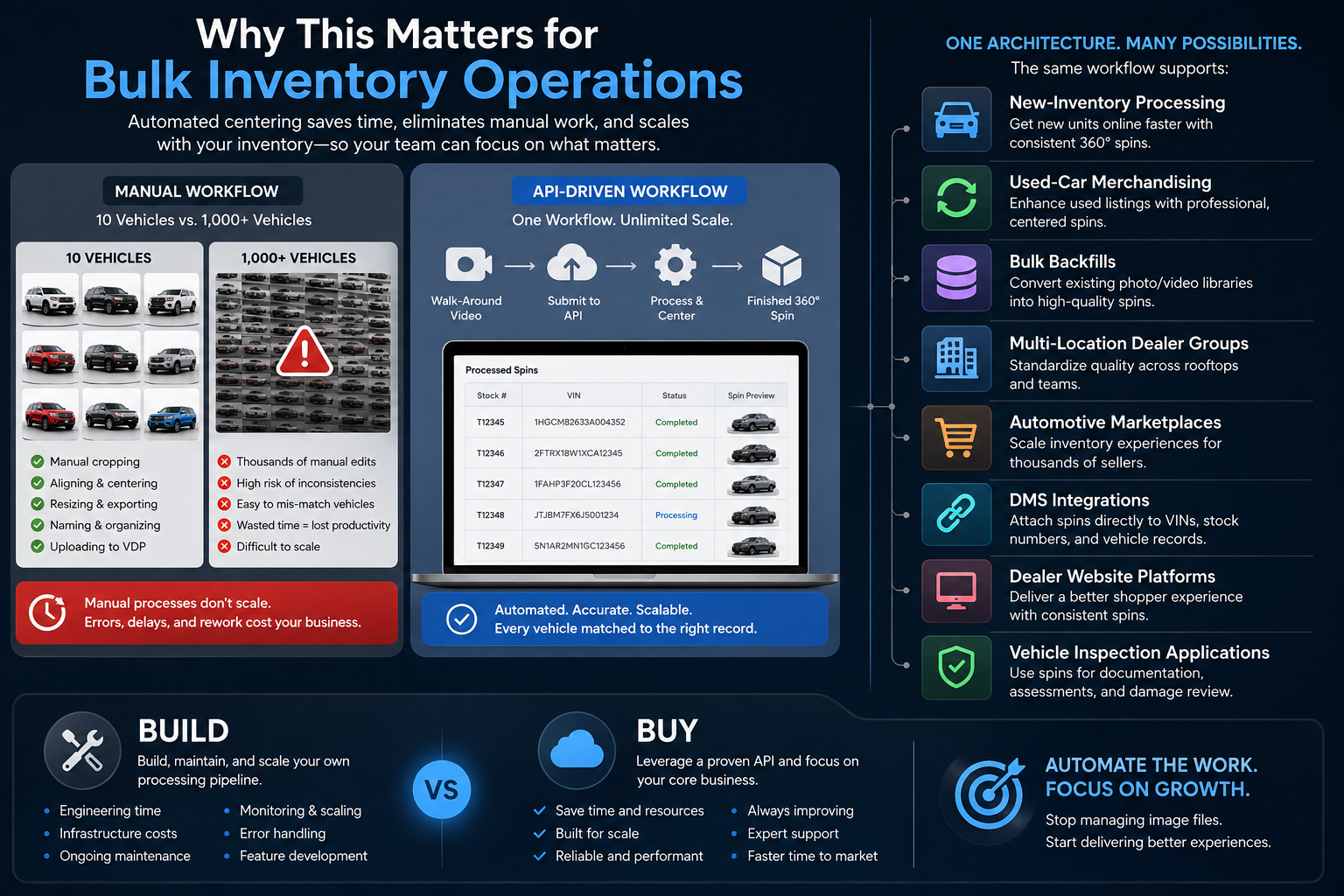
The real value of automated centering becomes clearer at scale.
Imagine processing 10 vehicles.
Manual adjustment might be manageable.
Now imagine processing 1,000 vehicles across multiple rooftops.
Manual cropping, aligning, resizing, naming, exporting, and matching every spin to the correct VDP quickly becomes an operations problem.
An API workflow can associate a processing request with inventory identifiers such as VINs, stock numbers, dealership IDs, or internal listing records.
Once processing finishes, the application can automatically attach the correct assets to the correct vehicle.
That same architecture can support:
This is where the build-versus-buy calculation changes.
The question is no longer whether your development team could write basic image-positioning code.
It is whether your team wants to build, maintain, monitor, and scale the entire vehicle-processing pipeline behind it.
Vehicle centering sounds like a small technical feature.
Inside a 360° spin, it is anything but small.
When a vehicle drifts across the screen, changes scale, or exposes ugly empty borders during rotation, shoppers immediately feel that something is off—even if they cannot explain why.
Automated centering helps transform imperfect real-world capture into a more standardized visual experience. Mirrored edge fill can support that process by handling narrow areas exposed when frames are repositioned, reducing the need for distracting borders or aggressive cropping.
Combined with smooth rotation, configurable frame counts, background processing, inventory metadata, geometry data, and efficient viewer delivery, a vehicle centering API becomes one component of a much larger automotive merchandising workflow.
Dealerships should not need a $40,000 photography studio at every location to create consistent interactive inventory.
Developers should be able to start with a vehicle walk-around, send it through an API, connect the result to a VIN or stock number, and deliver a polished spin directly to the VDP.
Review the Spin API Processing Options, submit a real dealership walk-around, enable centering, and see how much more stable your vehicle spin can feel when the car stays exactly where the shopper expects it: at the center of the experience.


Compact, ready to go anywhere
Interchangeable lens that’s upgradeable
Dual 1-inch sensors for improved clarity and low light performance
Dynamic range and 6K 360° capture
360° photo resolution at 21MP

8K 360° video recording for ultra-detailed visuals.
4K single-lens mode for traditional wide-angle shots.
Invisible selfie stick effect for drone-like perspectives.
2.5-inch touchscreen with Gorilla Glass protection.
Waterproof up to 33ft for underwater shooting.

360° photo resolution in 23MP
Slim design at 24 mm thick
Built-in image stabilization for smooth video capture.
Internal 19GB storage for photo and video storage.
Wireless connectivity for remote control and sharing.

60MP 360° still images for high-resolution photography.
5.7K 360° video recording at 30fps.
2.25-inch touchscreen for intuitive control.
USB Type-C port for fast charging and data transfer.
MicroSD card slot for expandable storage.
.png)

.png)

Try it free. No credit card required. Instant set-up.







.svg)


.svg)