


.png)


Choosing between matterport vs cloudpano for real estate work is a slightly different question than a general software comparison, because agents have a specific, recurring workflow: shoot a property, publish a tour quickly, embed it on a listing, and keep it live and reliable for as long as that listing is active. Generic feature comparisons often miss this rhythm entirely, focusing on capability breadth rather than how well a platform fits the actual pace of real estate work.
This article looks at the comparison specifically through that lens — not "which platform has more features," but "which platform fits how agents actually operate day to day."
Most industries using virtual tour software produce content occasionally — a hotel might create a handful of tours once and leave them largely unchanged for a long time. Real estate is different: virtual tours for real estate are tied to individual listings with a defined, often short lifespan. A listing goes live, gets marketed intensively for weeks, then comes down once the property sells or the listing expires. This creates a much higher turnover rate than most other use cases, and it means speed, reliability, and cost predictability at volume matter more here than in almost any other industry using this category of software.
This turnover pattern is also why agencies handling many listings simultaneously feel platform friction faster and more acutely than a business producing a handful of tours per year.
For an agent juggling multiple showings and a tight listing timeline, the time between finishing a capture and having a live, shareable tour matters directly to how quickly a listing can go to market. Matterport's tightly integrated hardware-to-software pipeline can make this fast if you're using Matterport-compatible equipment, since the capture and publishing workflow is built around that specific hardware relationship.
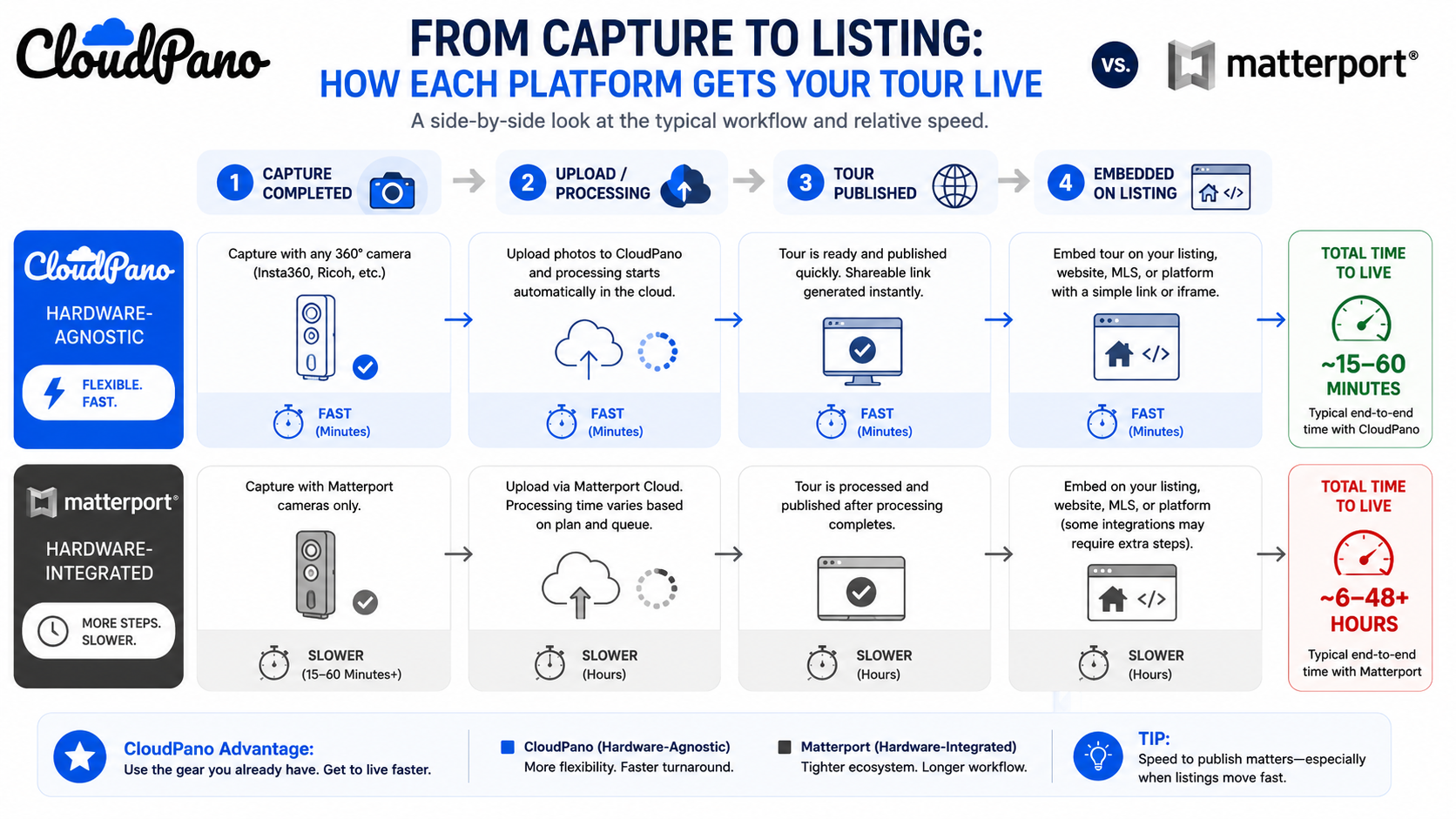
CloudPano's broader hardware compatibility means a wider range of existing camera equipment can be used without needing to standardize on a specific brand, which matters for agents or teams who've already invested in different gear, or who want the flexibility to use whatever camera happens to be available for a given shoot.
A tour embedded on an active listing needs to load quickly and stay live without interruption — buyers browsing listings rarely tolerate a slow-loading or broken tour, and an agent has no good way to recover that lost impression once it happens. This is one of the more consequential differences in real estate virtual tour software, since it directly affects how a property is perceived by prospective buyers during the exact window when that impression matters most.
Both platforms are generally reliable for this, but bandwidth handling under real traffic conditions — a listing that gets shared widely, or picked up by a real estate portal — is worth testing directly rather than assuming based on a quiet demo environment.
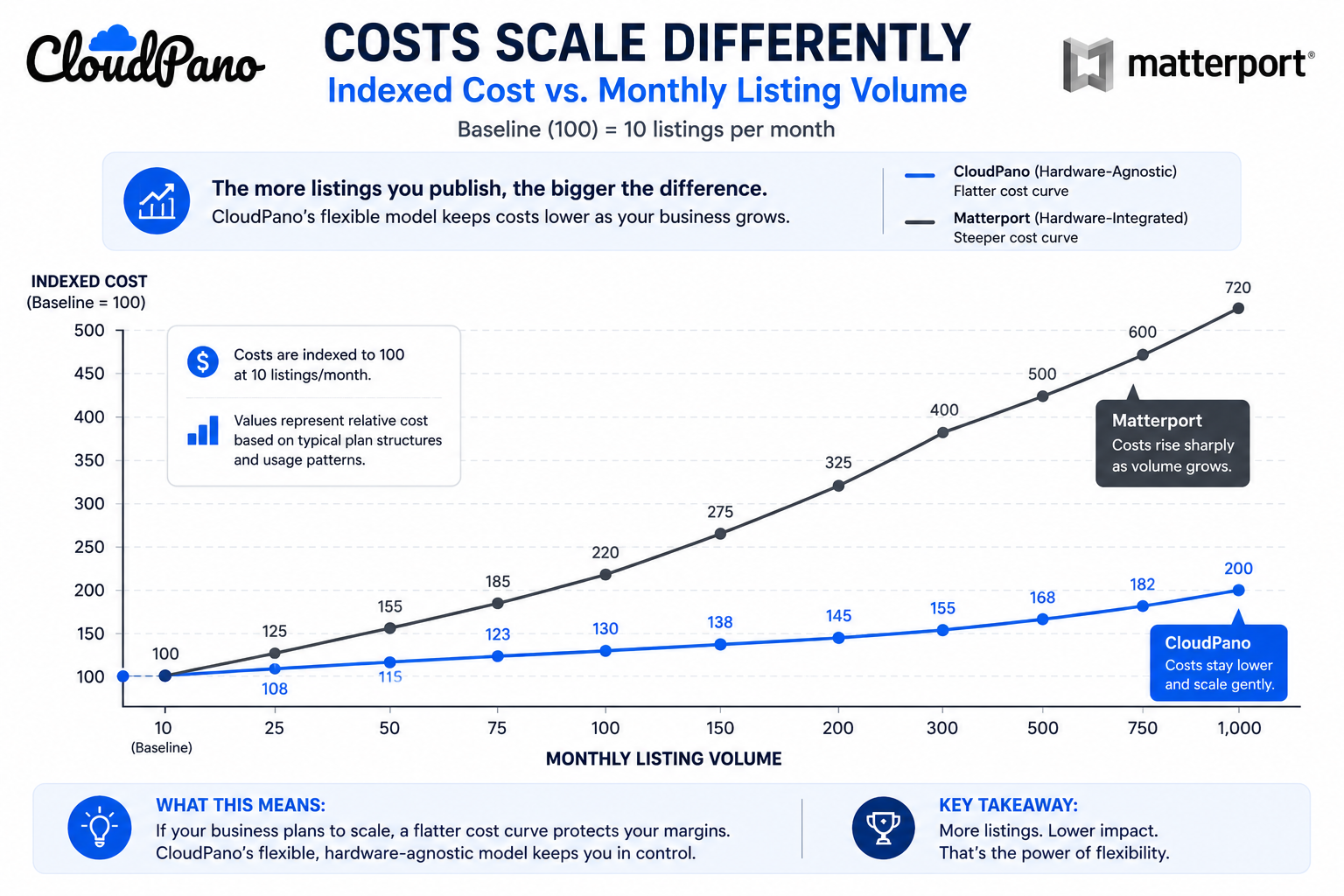
Real estate agents and agencies producing tours regularly, rather than occasionally, feel the pricing-structure differences discussed elsewhere in our comparison content more acutely than most other industries, simply because of volume. An agent producing several tours a month accumulates a growing library faster than most other use cases, which makes cost-scaling behavior — not just entry-level price — a meaningfully bigger factor in the real estate context specifically.
A virtual tour rarely stands alone in a listing's marketing — it typically sits alongside photos, a listing description, and often integration with an MLS or real estate portal. How easily a platform's tour link or embed fits into that broader set of property marketing tools matters more than it might initially seem, particularly for agencies with an established marketing workflow they don't want to significantly disrupt.
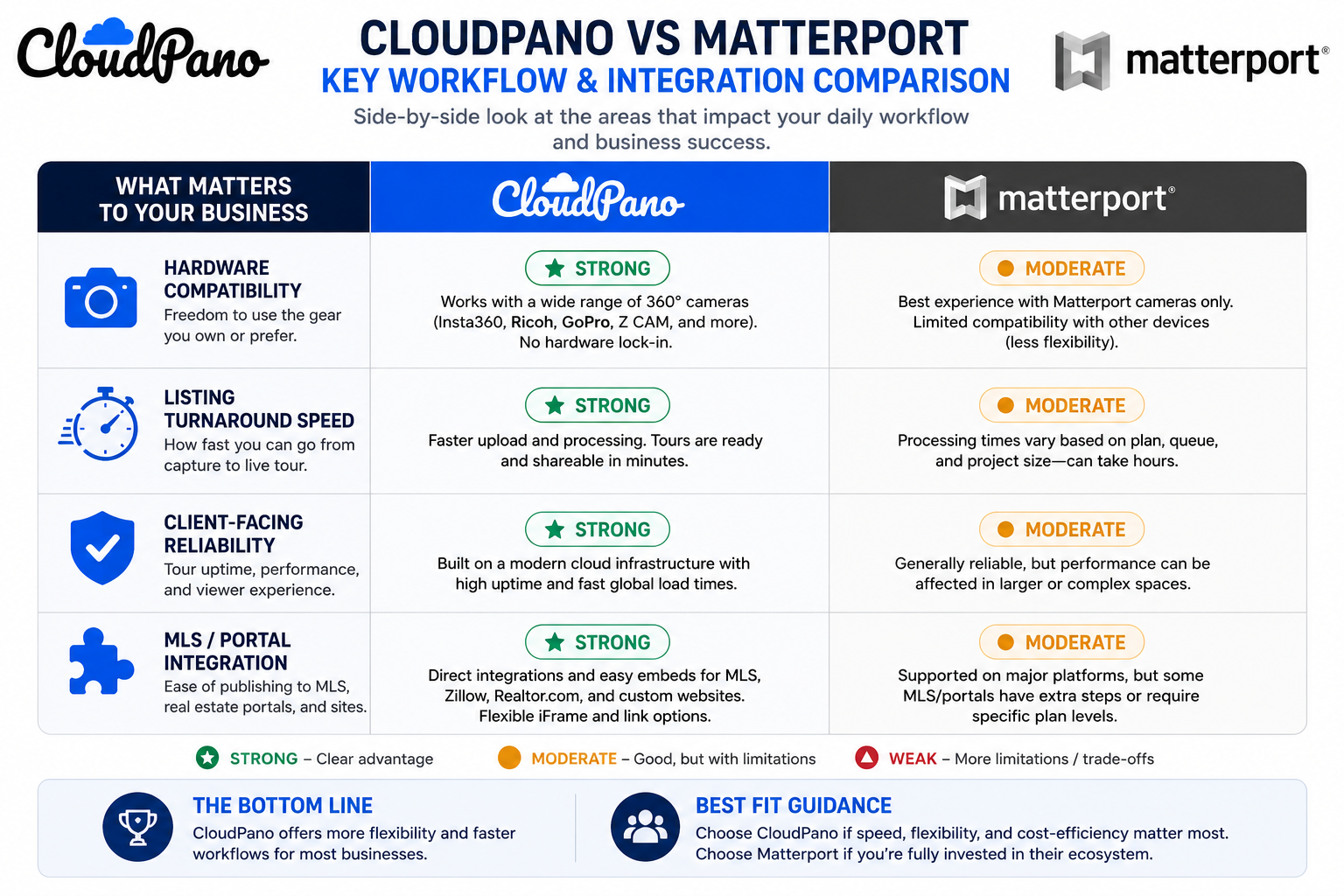
This is worth confirming directly with your specific MLS or portal setup, since embed and integration behavior can vary and isn't always covered clearly on a general features page. Agents who already rely on a specific set of property marketing tools — a particular MLS, a syndication service, a CRM that pulls in listing media — should treat compatibility with that existing stack as a required check, not an assumption, before committing to either platform.
It's worth separating two related but distinct audiences within real estate: the individual agent producing a handful of virtual tours for real estate listings personally, and the agency or brokerage coordinating tours across many agents at once. An individual agent's priorities tend to center on speed and ease of use for a single, familiar workflow. An agency coordinating multiple agents cares more about consistency across listings, centralized billing, and making sure every agent's tours meet the same presentation standard regardless of who captured them.
This distinction matters when evaluating real estate virtual tour software, because a platform that feels perfectly smooth for a solo agent might introduce friction at the agency level if it doesn't handle multi-agent coordination cleanly — and conversely, a platform built with agency coordination in mind might feel like more setup than a solo agent actually needs. Being honest about which category your situation falls into before comparing platforms avoids optimizing for the wrong set of priorities.
If your brokerage is coordinating tours across a team, it's also worth reading our dedicated comparison on team and multi-user support, since that covers permissions and shared libraries in more depth than this real estate-specific piece does.
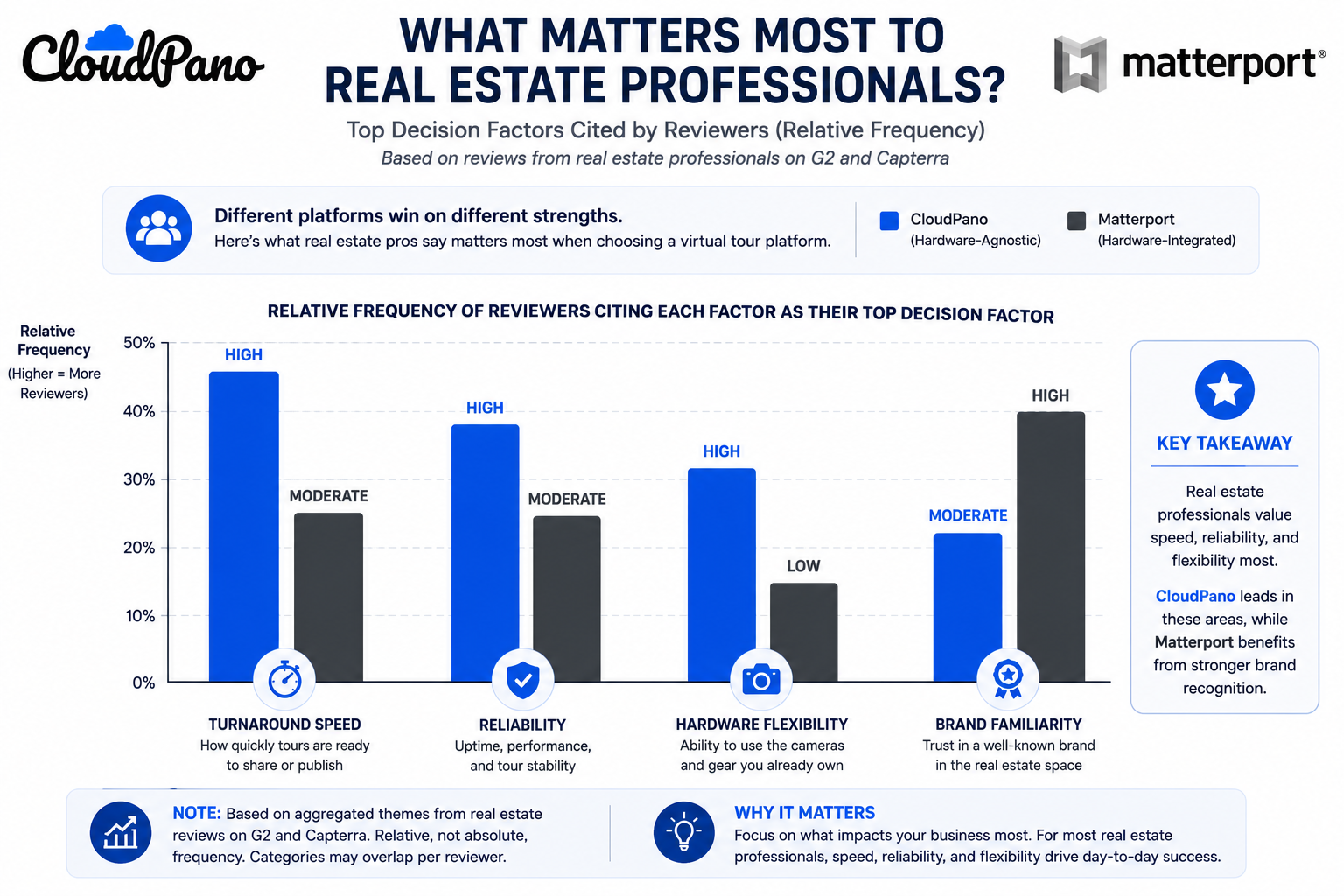
Industry-specific coverage is useful here beyond generic software reviews. Inman, a real estate industry publication, periodically covers virtual tour and proptech trends relevant to how agents actually use this kind of software in practice, and is worth following for real estate-specific context beyond a features comparison. On G2's virtual tour software category page, real estate-specific reviewers frequently cite listing turnaround speed and client-facing reliability as their top decision factors, echoing the priorities outlined above.
"Isn't Matterport just what buyers and other agents expect to see?"
Brand familiarity is real, but it doesn't necessarily translate into a better outcome for the seller or the agent's workflow. Buyers browsing a listing generally care about the quality and usability of the tour itself, not which platform's logo appears in the corner. It's worth separating "what's familiar in the industry" from "what actually serves this specific listing and workflow best."
"Would switching disrupt tours on my active listings?"
This is worth planning around deliberately rather than assuming either outcome. Active listings can generally be migrated with stable links, but timing a switch around a natural lull between listings — rather than mid-campaign on a hot property — is a reasonable, low-risk approach if you decide to move.
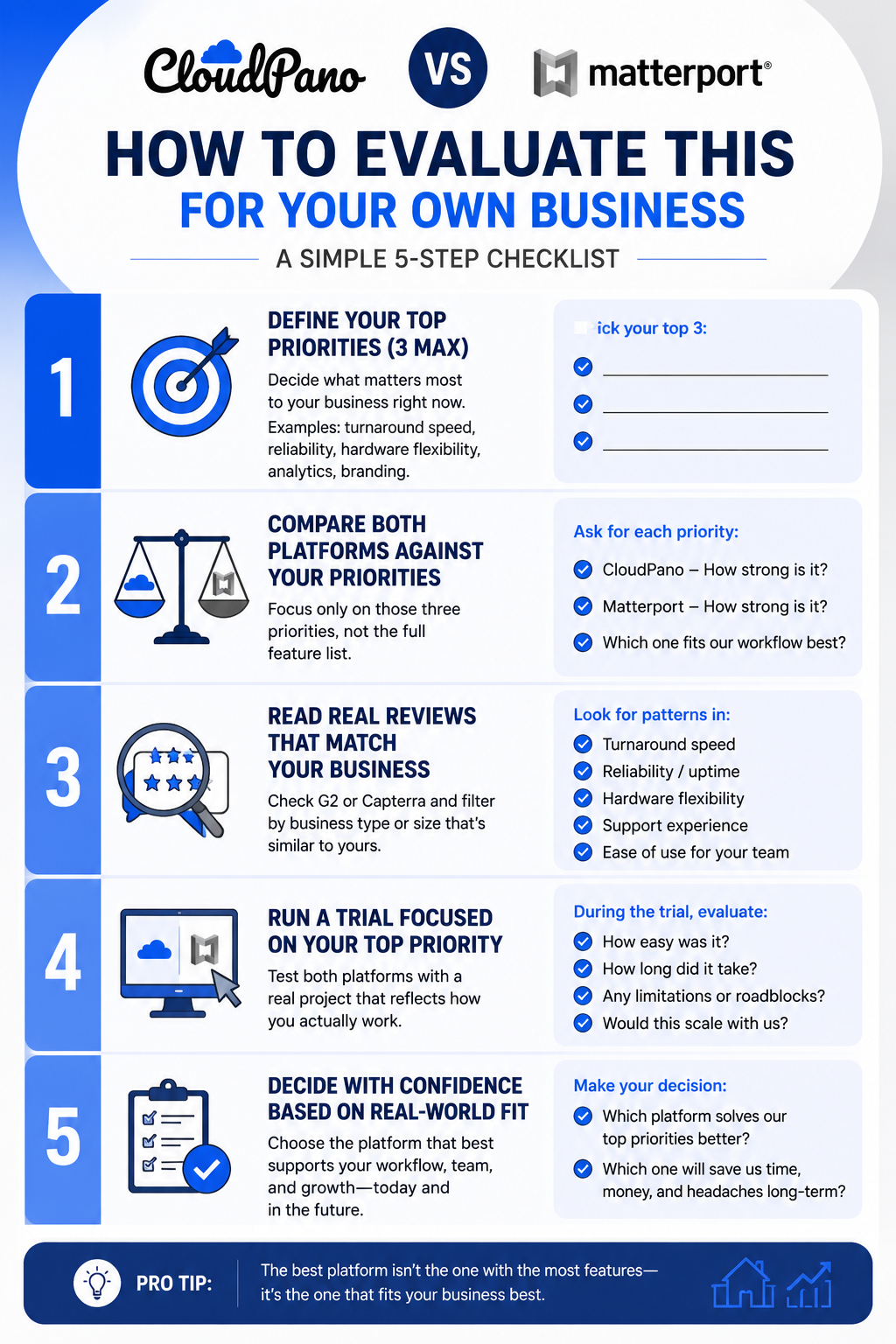
Real estate has a distinct rhythm — high turnover, tight timelines, and a direct link between tour quality and how a listing is perceived by buyers — that makes this comparison meaningfully different from a generic software evaluation. Matterport's hardware-integrated workflow suits agents standardized on its own camera ecosystem with a steady, moderate listing volume. CloudPano's broader compatibility and generally more predictable cost scaling tend to suit agents or agencies with mixed equipment or a higher, growing listing volume.
If your listing volume is climbing or your equipment doesn't neatly match Matterport's ecosystem, it's worth testing CloudPano directly with a real listing before your next renewal. And if you want the fuller platform-wide comparison beyond real estate specifically, our complete comparison guide covers pricing, features, and support side by side.


Compact, ready to go anywhere
Interchangeable lens that’s upgradeable
Dual 1-inch sensors for improved clarity and low light performance
Dynamic range and 6K 360° capture
360° photo resolution at 21MP

8K 360° video recording for ultra-detailed visuals.
4K single-lens mode for traditional wide-angle shots.
Invisible selfie stick effect for drone-like perspectives.
2.5-inch touchscreen with Gorilla Glass protection.
Waterproof up to 33ft for underwater shooting.

360° photo resolution in 23MP
Slim design at 24 mm thick
Built-in image stabilization for smooth video capture.
Internal 19GB storage for photo and video storage.
Wireless connectivity for remote control and sharing.

60MP 360° still images for high-resolution photography.
5.7K 360° video recording at 30fps.
2.25-inch touchscreen for intuitive control.
USB Type-C port for fast charging and data transfer.
MicroSD card slot for expandable storage.
.png)

.png)

Try it free. No credit card required. Instant set-up.







.svg)


.svg)