


.png)


If you're comparing Matterport vs CloudPano, you're probably not doing it out of idle curiosity. You're either about to commit to a virtual tour platform for the first time, or you're already using one and something isn't sitting right — maybe it's the cost, maybe it's a feature you assumed was included but wasn't, maybe it's just a nagging sense that you should check what else is out there before you renew.
That instinct is worth trusting. Virtual tour software is one of those categories where the differences between platforms don't show up in a sales pitch — they show up six months in, when you're trying to add a team member, explain a bill, or move a tour from one client account to another. This guide walks through where Matterport and CloudPano actually diverge, so you can make the comparison on your own terms rather than a vendor's.
Virtual tour platforms look similar from the outside — capture a space, host a 3D walkthrough, share a link. But the underlying architecture of each platform shapes what your day-to-day experience will actually look like as you scale. A platform that works fine for one or two properties can behave very differently once you're managing dozens of tours across a team.
This is really a question of fit, not a question of which brand is "better" in the abstract. Matterport built its reputation as an early mover in 3D capture technology, with strong brand recognition in real estate specifically. CloudPano built its positioning around flexibility — supporting more camera types, offering more transparent hosting terms, and generally staying agnostic about how you captured your content in the first place. For businesses weighing a matterport alternative, this difference in philosophy matters more than any single feature.
Neither of those starting points is wrong. But they lead to different tradeoffs, and those tradeoffs are what this article is about.
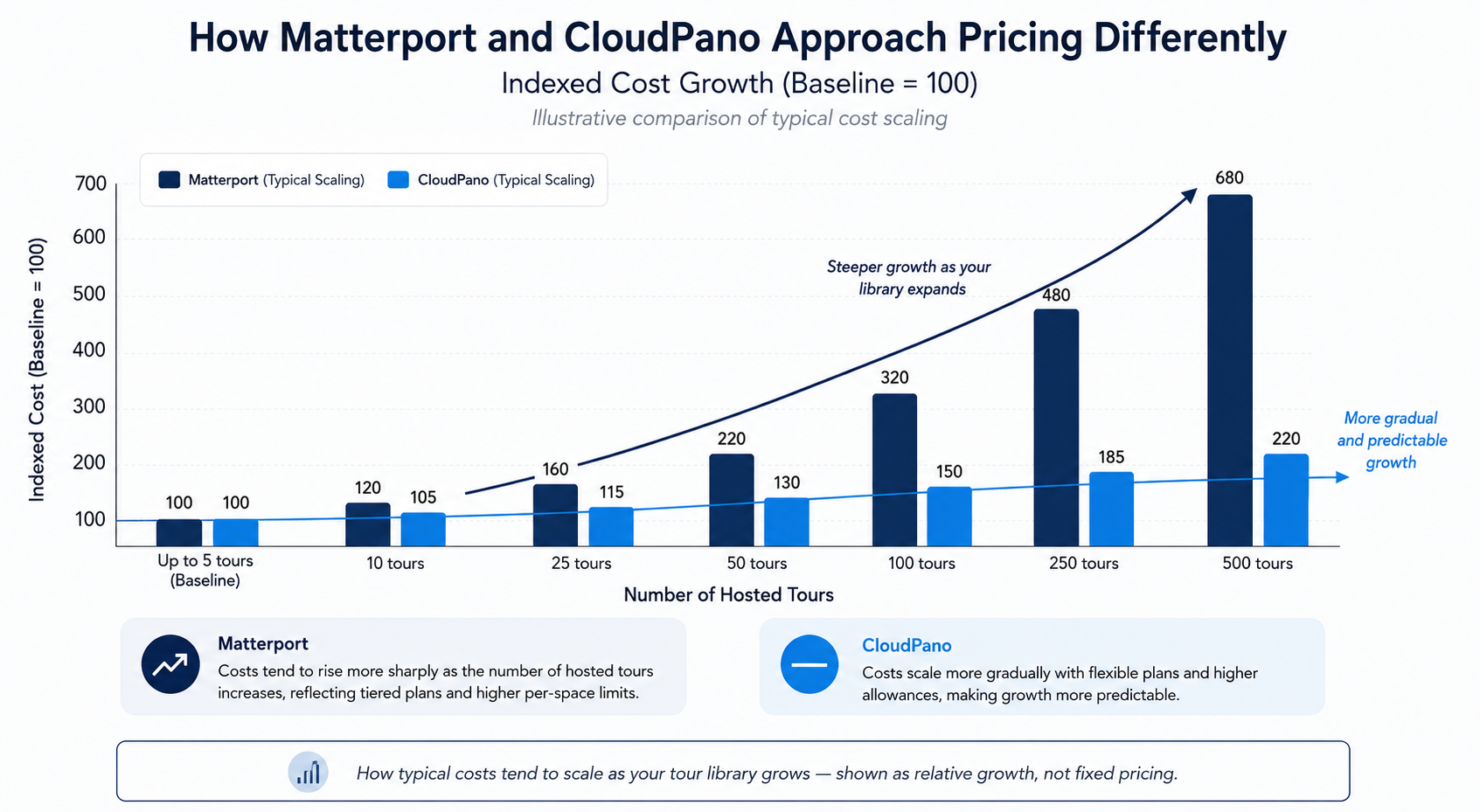
The biggest source of frustration people report when comparing platforms isn't the sticker price — it's the pricing structure. Matterport's model has historically been built around subscription tiers tied to the number of active spaces you host, with storage and bandwidth consumption factoring into what tier you need. This works well if your library of tours is small and stable, but it can get expensive quickly if you're producing tours regularly or managing a growing portfolio, because you're often paying to keep older tours "alive" even if they're rarely viewed.
CloudPano's pricing model, by contrast, has generally leaned toward transparency around what's included at each tier, without penalizing you as heavily for scaling your library. The practical result: teams that produce a high volume of tours, or agencies managing tours on behalf of multiple clients, tend to find the total cost of ownership more predictable over time.
Exact numbers here will drift as both companies adjust their offerings. Treat the comparison above as directional — a description of how each company tends to structure pricing — rather than a fixed dollar comparison. Before making a decision, pull current published rates directly from each company's pricing page.
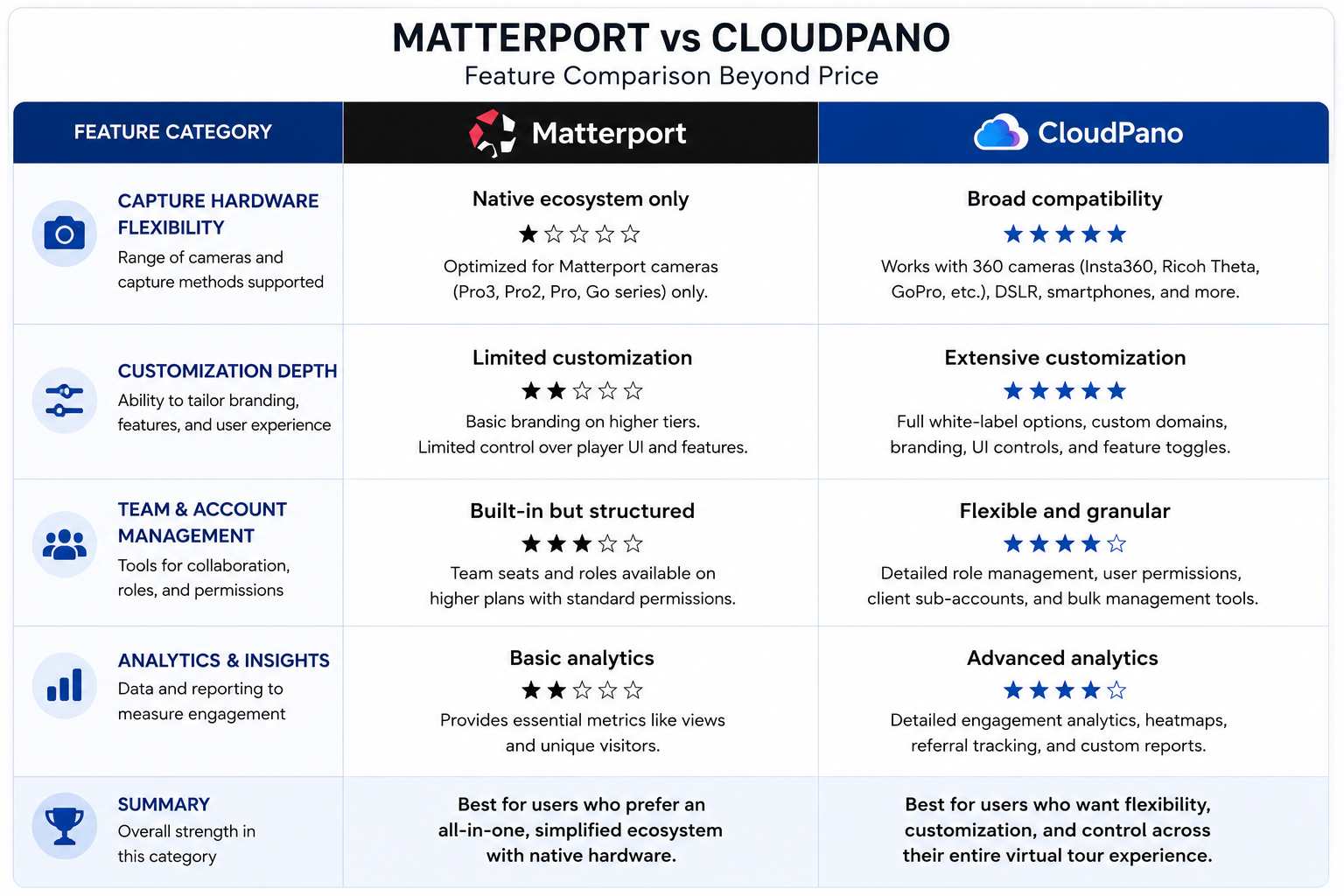
A thorough virtual tour software comparison goes beyond a feature checklist — most platforms in this category can technically do most of the same things. The more useful question is how much friction is involved in doing them.
Capture flexibility. Matterport is closely associated with its own camera hardware, and its software experience is optimized around that ecosystem. CloudPano takes a more hardware-agnostic approach, supporting a wider range of 360° cameras and capture devices. If you've already invested in camera equipment that isn't Matterport's own, this is often the single biggest practical differentiator.
Editing and customization. Both platforms allow branding, hotspots, and embedded media within a tour. Where they tend to differ is in how deep that customization goes without requiring a higher-tier plan — CloudPano has generally positioned more customization options as standard rather than gated behind premium tiers.
Team and account management. As organizations grow past a single user, the ability to manage permissions, shared libraries, and multi-user billing becomes important. This is an area worth testing directly with a trial account rather than trusting either company's marketing copy, since account structures change more frequently than headline features.
Analytics. Both platforms offer some form of viewer analytics (view counts, engagement time, drop-off points). The depth of that data, and whether it's exportable, varies — if analytics feed into your sales or marketing reporting, test this specifically before committing.
Marketing pages naturally present a company in its best light, so it's worth checking how each platform is discussed on independent review platforms where users have less incentive to be diplomatic.
On G2's virtual tour software category page, reviewers frequently discuss Matterport's strength in capture quality and real estate brand recognition, alongside recurring feedback about cost scaling as portfolios grow — this maps directly to the pricing structure difference described above. A recurring cloudpano review theme on the same category page highlights ease of setup and hardware flexibility as consistent positives.
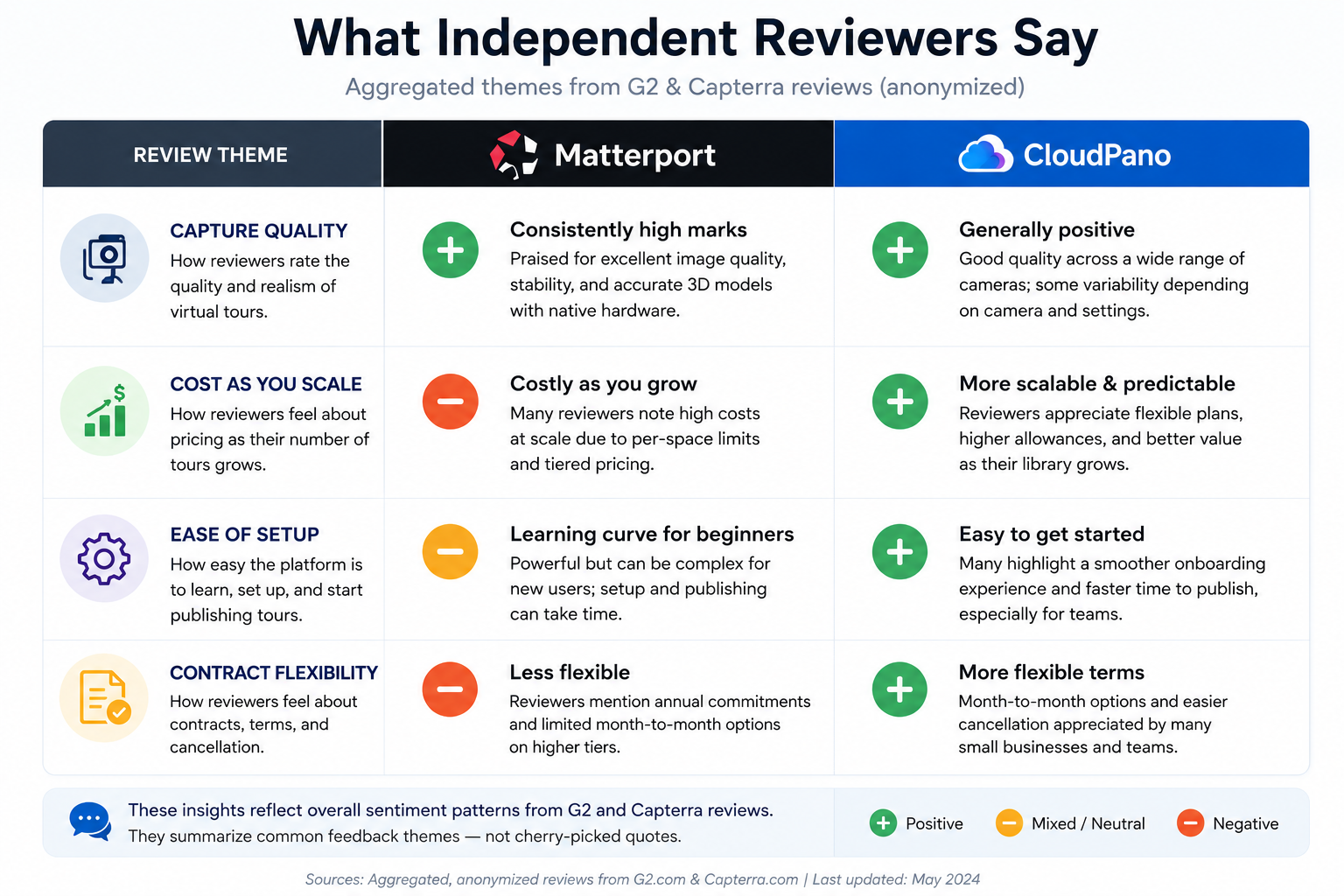
Capterra's software comparison listings offer a similar pattern — useful less for any single review and more for spotting repeated themes across many reviewers, which is a stronger signal than any one testimonial.
For a more unfiltered read, discussion threads in communities like r/realtors and r/Matterport surface real complaints that don't always make it into formal reviews — particularly around contract terms and what happens to hosted tours after a plan changes. These threads are worth reading not for definitive answers, but for the actual questions real users are asking before you ask them yourself.
"Isn't Matterport just the industry standard at this point? " Brand recognition and technical superiority aren't the same thing. Matterport's early market presence, especially in residential real estate, means more agents recognize the name — but recognition doesn't tell you which platform fits your specific workflow, budget, or growth plans better. It's worth separating "well-known" from "well-suited for me."
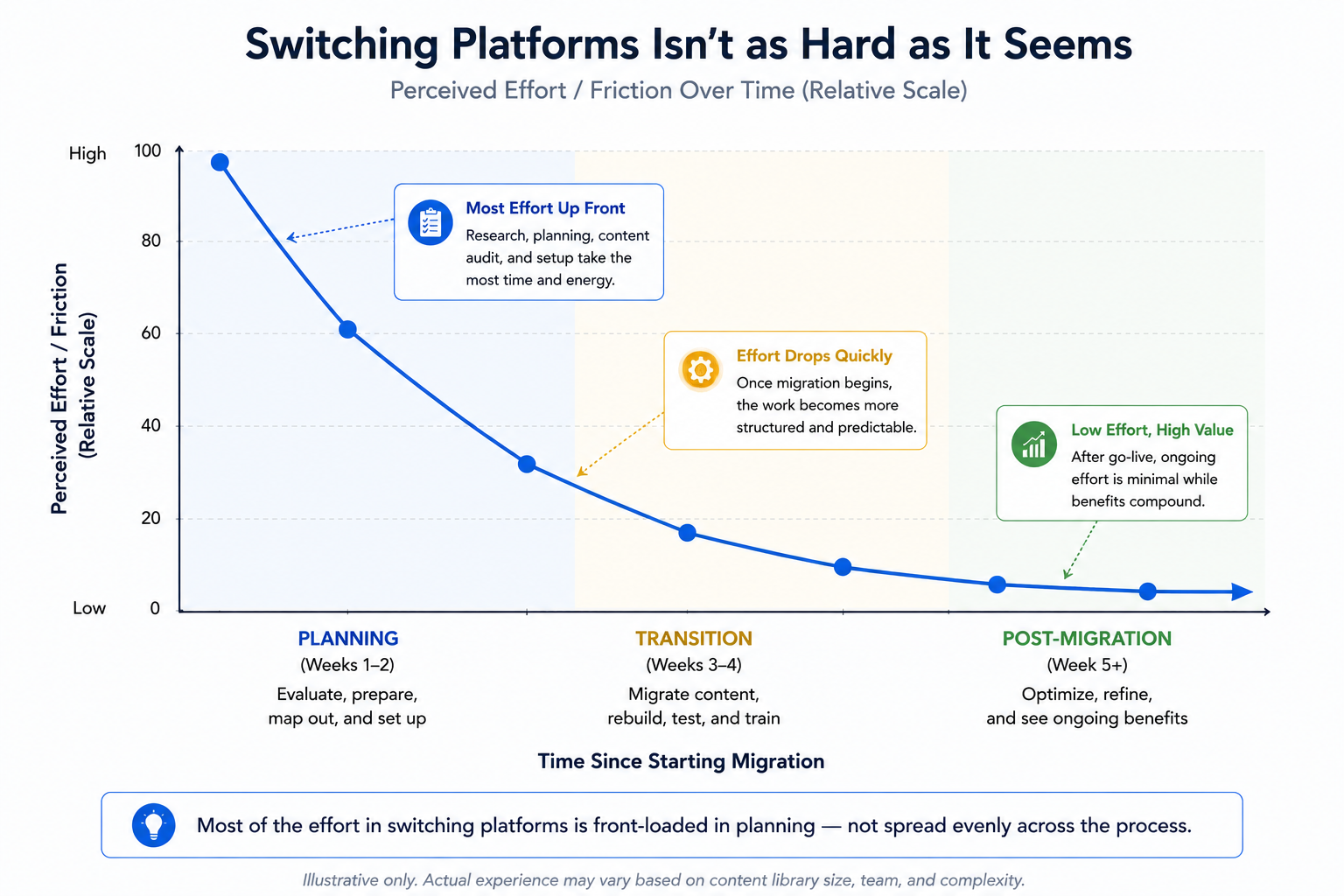
"Switching platforms sounds like a hassle. "This is a fair concern, and it deserves a direct answer rather than dismissal: migrating does require some planning, particularly around re-hosting existing tours and updating shared links. It is not, however, the multi-week ordeal it's sometimes assumed to be — most of the friction is in planning the transition, not executing it.
"What if CloudPano doesn't have a feature I currently rely on? "This is the right question to ask before switching anything — and the honest answer is to test it directly. Free trials exist precisely so you can validate your specific workflow, rather than relying on a feature comparison chart that may not reflect your exact use case.
One factor that rarely gets its own heading in comparison articles, but probably should, is how easy each platform makes it to leave if your needs change. This isn't a hypothetical concern — businesses grow, pivot, get acquired, or simply outgrow a tool that once fit fine. Before signing anything, it's worth understanding the actual contract terms rather than assuming month-to-month flexibility.
Some platforms structure agreements around annual commitments with limited proration if you need to downgrade or exit early. Others keep terms closer to month-to-month, accepting some revenue predictability tradeoff in exchange for lower switching friction on the customer's end. Neither approach is inherently better for every business, but it's a meaningfully different bet depending on how confident you are in your current setup a year from now.
This is worth asking about directly during a sales conversation, rather than inferring from a pricing page. A vendor's willingness to answer plainly, without hedging, is itself useful information about how they'll treat you if you ever do decide to leave.
Rather than taking any comparison article's word for it — including this one — the most reliable approach is a short, structured evaluation:
Matterport and CloudPano solve the same basic problem — turning physical spaces into shareable 3D experiences — but they've built around different priorities. Matterport leans on brand familiarity and its own hardware ecosystem. CloudPano leans on flexibility and more predictable scaling economics.
If your priority is working with a wider range of capture hardware, keeping costs more predictable as your tour library grows, or avoiding the sense that you're paying more each year for the same output, it's worth spending 20 minutes in a CloudPano trial with your own content before renewing anywhere else. That's a small time investment against a decision you'll likely live with for a while.
If you want to see what a real transition looks like in practice, our migration guide walks through exactly what happens to existing tours when you switch platforms — including what does and doesn't carry over.


Compact, ready to go anywhere
Interchangeable lens that’s upgradeable
Dual 1-inch sensors for improved clarity and low light performance
Dynamic range and 6K 360° capture
360° photo resolution at 21MP

8K 360° video recording for ultra-detailed visuals.
4K single-lens mode for traditional wide-angle shots.
Invisible selfie stick effect for drone-like perspectives.
2.5-inch touchscreen with Gorilla Glass protection.
Waterproof up to 33ft for underwater shooting.

360° photo resolution in 23MP
Slim design at 24 mm thick
Built-in image stabilization for smooth video capture.
Internal 19GB storage for photo and video storage.
Wireless connectivity for remote control and sharing.

60MP 360° still images for high-resolution photography.
5.7K 360° video recording at 30fps.
2.25-inch touchscreen for intuitive control.
USB Type-C port for fast charging and data transfer.
MicroSD card slot for expandable storage.
.png)

.png)

Try it free. No credit card required. Instant set-up.







.svg)


.svg)