A Guide to Image, Text, and Video Labeling Workflows

Cloudpano
July 19, 2026
5 min read
Share this post

A Data Labeling Workflow Guide for Image, Text, and Video Annotation

Most teams start with a single data labeling workflow guide they picked up from a computer vision project, then try to apply the same steps to a text classification task or a video tracking dataset. It usually doesn't fit cleanly.

Image, text, and video data each carry different sources of ambiguity, require different annotator skills, and break in different ways when quality assurance is weak. A workflow that treats all three the same tends to underperform on at least one of them.

Why It Matters

The cost of a mismatched workflow isn't obvious until a model underperforms in a way nobody can trace back to its source. Google Research's "Data Cascades" study documented how small, unaddressed data preparation issues compound over time into expensive, hard-to-diagnose production failures — a pattern that shows up differently depending on data modality (Sambasivan et al., Google Research).

NIST's AI Risk Management Framework treats data quality and provenance as foundational to trustworthy AI, and a workflow that doesn't account for how image, text, and video data actually differ makes that foundation harder to build correctly (NIST AI RMF).

The pressure to move fast compounds this. Stanford HAI's AI Index has tracked how quickly organizations are deploying models from research into production (Stanford HAI, AI Index Report), which means a labeling workflow built for the wrong modality often surfaces its weaknesses right when a team can least afford the delay.

How It Works

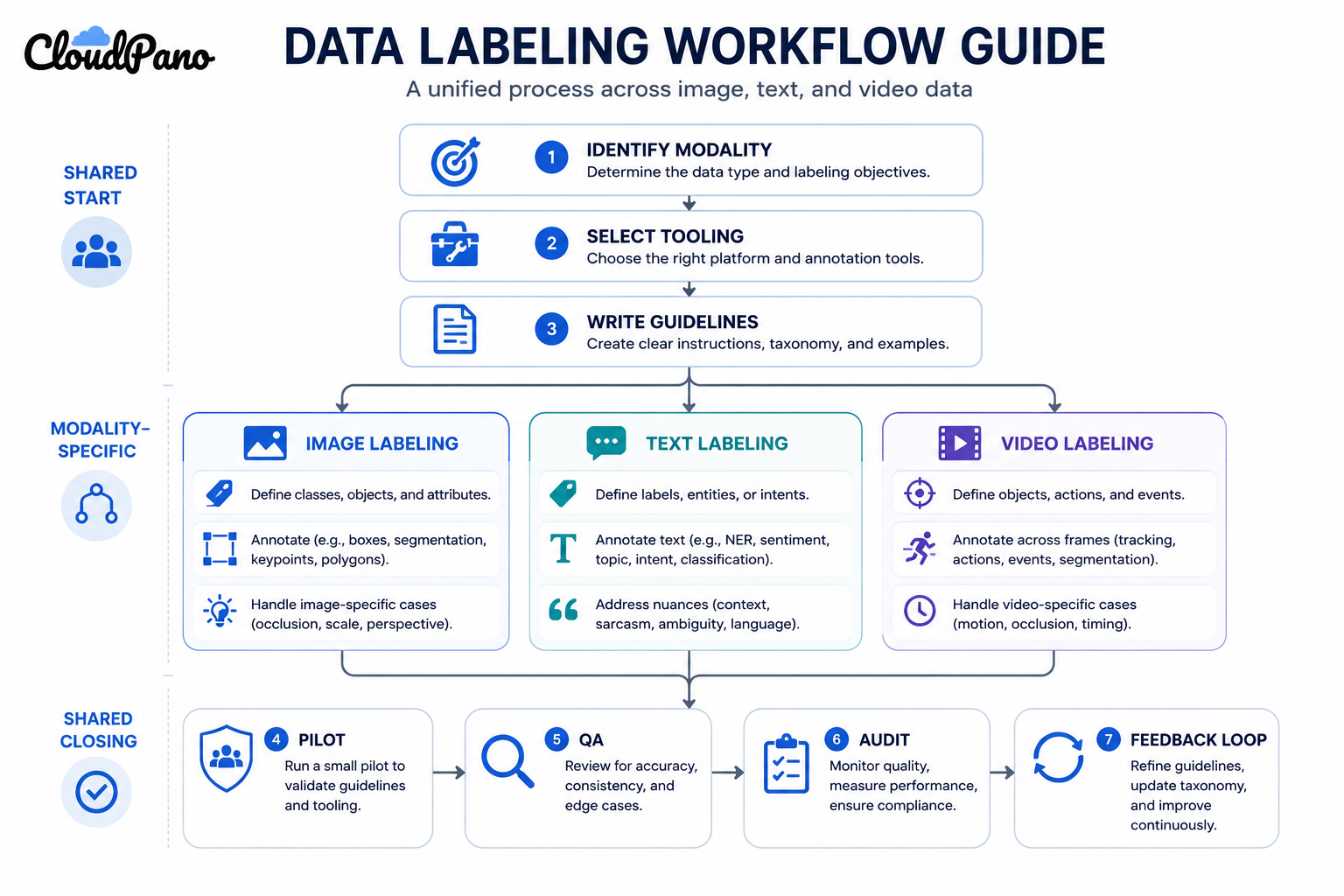
Each modality's annotation workflow shares a common backbone — taxonomy, tooling, workforce, QA — but the details of each step diverge meaningfully. Understanding how these workflows operate for your specific data type matters more than following a single generic process.

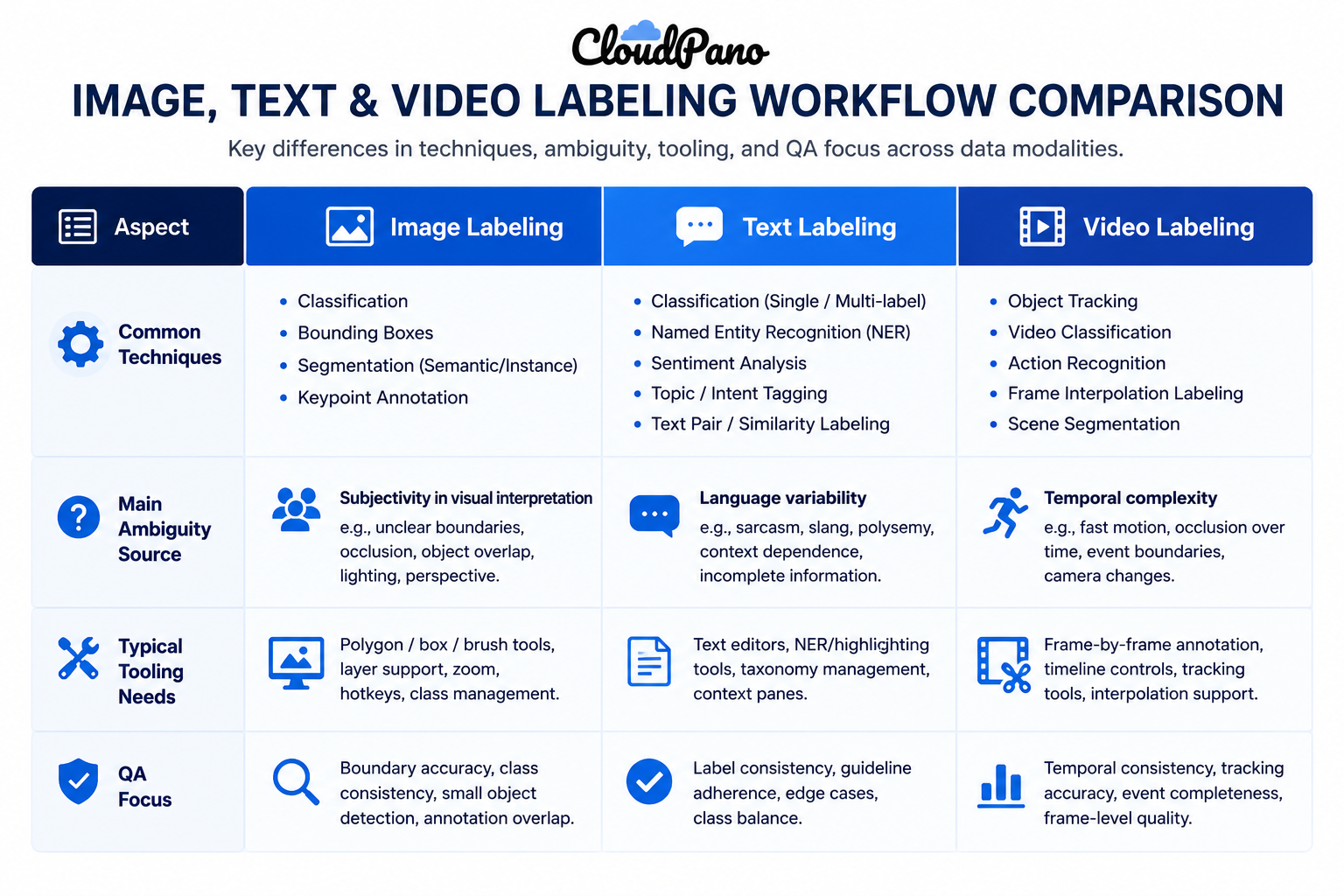
Image labeling workflows center on spatial techniques: bounding boxes, semantic segmentation, polygon annotation, and keypoint tagging. Ambiguity here usually comes from occlusion, unusual angles, or boundary placement disagreement between annotators.

Text labeling workflows center on classification, sentiment tagging, named entity recognition, and intent labeling. Ambiguity here usually comes from subjective judgment calls — sarcasm, context-dependent meaning, or overlapping categories.

Video labeling workflows center on frame-by-frame object tracking, temporal event tagging, and action recognition across sequences. Ambiguity here usually comes from tracking consistency across frames and defining exact start/end points for events.

Training data preparation for each modality also differs in what "clean" data looks like going in — image data preparation often involves resolution and format standardization, text preparation involves handling encoding and noise removal, and video preparation involves frame extraction and sampling rate decisions before annotation even begins.
Step-by-Step Workflow

  1. Identify your data modality and its specific ambiguity sources. Image, text, and video each fail differently, so guidelines should address the failure mode specific to that type.
  2. Select tooling matched to the modality. Bounding box and segmentation tools for images, text annotation platforms with entity and classification support for text, frame-level tracking tools for video.
  3. Write modality-specific annotation guidelines. A generic guideline document rarely covers the edge cases unique to spatial, textual, or temporal data.
  4. Match annotator expertise to the modality's skill demands. Image segmentation, text classification, and video tracking each require different training even when annotators are otherwise experienced.
  5. Pilot the workflow on a representative sample of your actual data. Confirm tooling and guidelines hold up before committing to full volume for that specific modality.
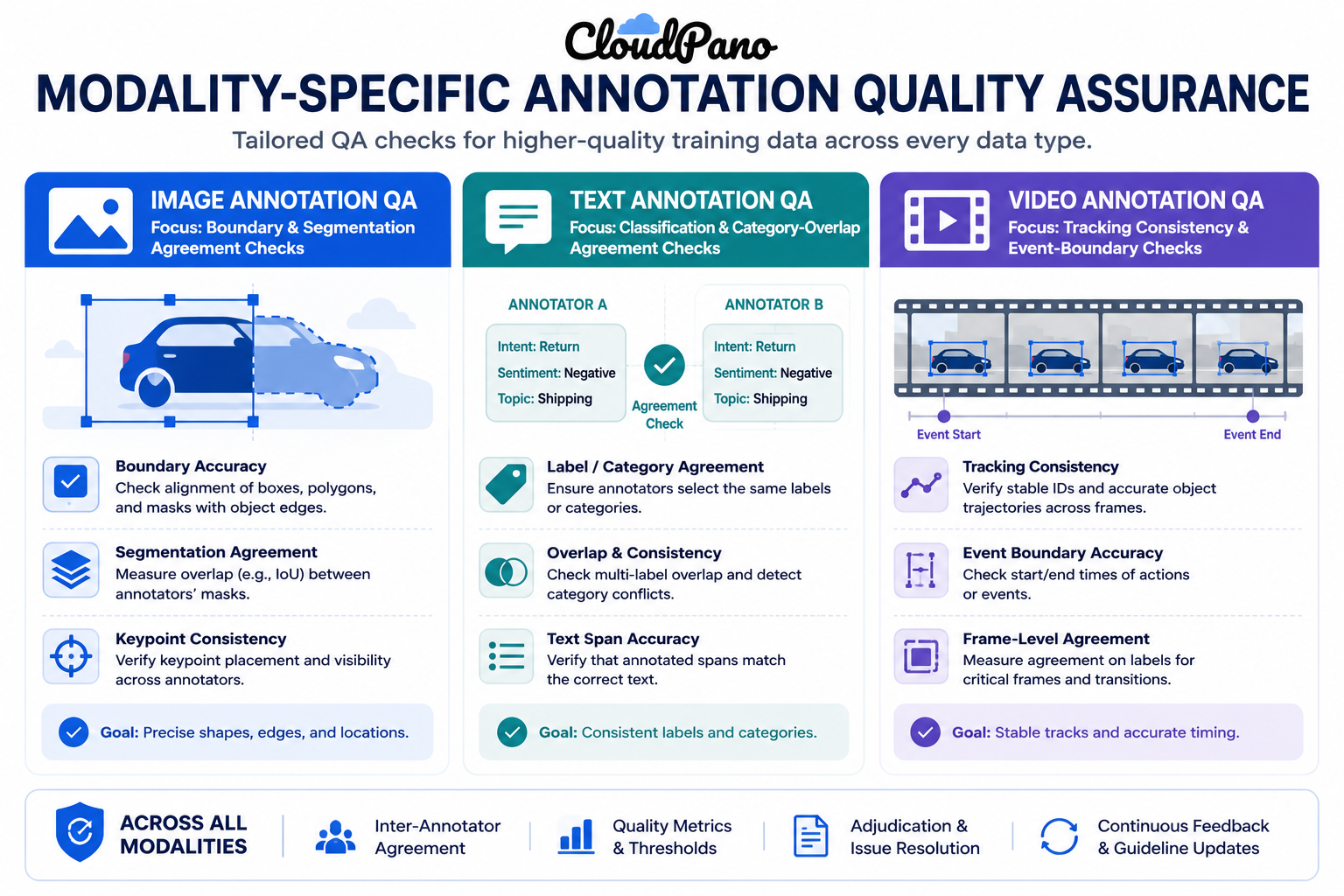
  6. Apply modality-appropriate annotation quality assurance. Boundary agreement checks for image data, classification agreement for text, tracking consistency checks for video.
  7. Run rolling audits throughout the project. Quality drift shows up differently by modality — annotator fatigue on repetitive video frames looks different from guideline drift on ambiguous text categories.
  8. Feed modality-specific findings back into guidelines. Recurring image boundary disputes, text category overlaps, or video tracking gaps each point to a different guideline fix.

Industry Use Cases

  • Computer vision / robotics: Almost entirely image and video labeling workflows — bounding boxes, segmentation, and frame-by-frame tracking dominate here.
  • Autonomous vehicles: Heavy reliance on video labeling workflows for multi-object tracking across driving footage, layered with image annotation for individual frame analysis.
  • Healthcare AI: A mix of image labeling for diagnostic imaging and text labeling for clinical notes, each requiring domain-specific annotator training.
  • Retail AI: Primarily image labeling for product categorization, with text labeling for review sentiment and product description tagging.
  • LLM developers: Almost entirely text labeling workflows — classification, entity tagging, and preference ranking on written content.
  • Government & defense: A blend of image labeling for geospatial imagery and video labeling for surveillance or reconnaissance footage, often under strict security requirements.

Benefits of a Modality-Specific Workflow

  • Higher annotation accuracy. Guidelines and QA built for the actual ambiguity sources in your data catch more errors than a generic process would.
  • Better tooling fit. Matching the annotation platform to the modality reduces friction and annotator error rates from working around an ill-fitting tool.
  • Faster onboarding for annotators. Training focused on the specific skill demands of image, text, or video work gets annotators productive faster than generic training.
  • More accurate project timelines. Recognizing that video labeling, for example, typically takes longer per item than text classification helps set realistic expectations upfront.
  • Cleaner root-cause diagnosis. When quality issues emerge, modality-specific QA data makes it easier to pinpoint whether the problem is guidelines, tooling, or annotator training.

Common Mistakes

Infographic of modality-specific annotation quality assurance checks
  • Applying one generic workflow across all data types. Using an image-labeling process for text data, or vice versa, misses the specific ambiguity sources each modality actually has.
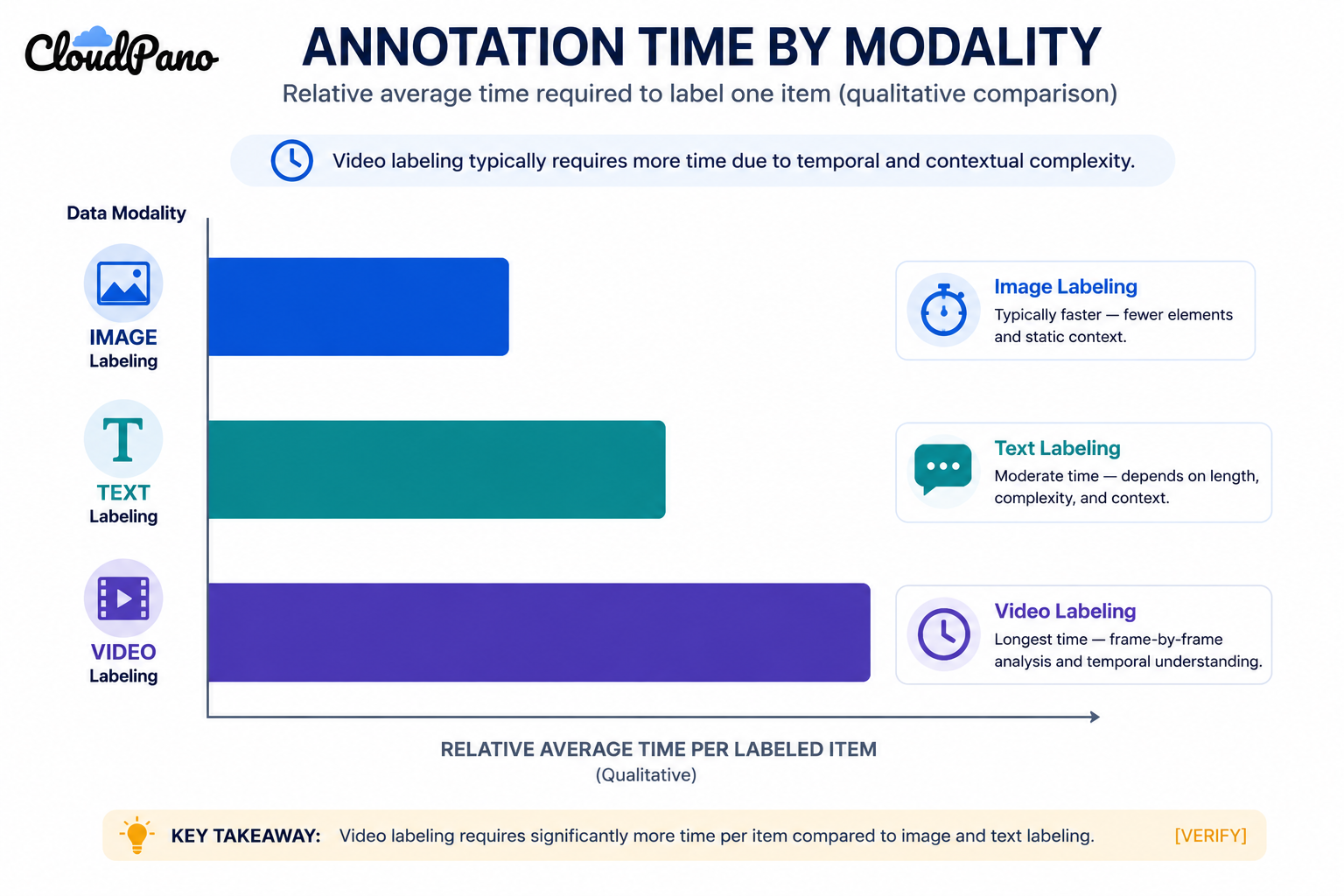
  • Underestimating video labeling time and cost. Frame-by-frame annotation is significantly more time-intensive per unit of footage than most teams initially plan for.
  • Ignoring text-specific ambiguity in guidelines. Sarcasm, context-dependent meaning, and overlapping categories need explicit guidance, not just a general classification rubric.
  • Skipping modality-specific tooling evaluation. Assuming a single annotation platform handles image, text, and video equally well when most tools specialize in one or two.
  • Treating training data preparation as an afterthought. Skipping proper data cleaning, format standardization, or frame sampling decisions before annotation begins creates avoidable downstream issues.
  • Applying the same QA cadence regardless of modality. Video quality drift from annotator fatigue shows up differently than text guideline drift, and a one-size QA schedule can miss both.

Best Practices

Bar chart comparing relative annotation time across image, text, and video labeling
  • Build separate, modality-specific annotation guidelines rather than adapting a single generic document.
  • Choose tooling deliberately based on modality — don't default to whatever platform your team already has for a different data type.
  • Set annotator training and pilot timelines that account for the actual complexity of the modality, especially for video.
  • Track annotation quality assurance metrics separately by modality if a project spans more than one data type.
  • Treat training data preparation as its own workflow step, not a quick pre-processing pass before annotation.
  • Revisit modality-specific guidelines and tooling choices as a project scales, since what works for a small pilot doesn't always hold at full volume. McKinsey's research on generative AI adoption notes that data readiness — including how well-matched preparation and annotation processes are to the actual data type — remains a consistently underestimated factor in AI project outcomes (McKinsey, "The economic potential of generative AI").

FAQ

What's the difference between image, text, and video labeling workflows?

Image labeling centers on spatial techniques like bounding boxes and segmentation, text labeling centers on classification and entity tagging, and video labeling centers on frame-by-frame tracking and temporal event tagging — each with different tooling and quality assurance needs.

Which data modality takes the longest to label?

Video labeling is typically the most time-intensive per unit of data, since it often requires frame-by-frame annotation and tracking consistency across sequences rather than a single judgment per item.

Do I need different tools for image, text, and video labeling?

Usually, yes. Most annotation platforms specialize in one or two modalities, so evaluate tooling based on your specific data type rather than assuming one platform handles all three equally well.

How does annotation quality assurance differ by modality?

Image QA typically focuses on boundary and segmentation agreement, text QA focuses on classification and category-overlap agreement, and video QA focuses on tracking consistency and event-boundary agreement across frames.

What is training data preparation, and does it differ by modality?

It's the cleaning and standardization work done before annotation begins — resolution and format standardization for images, encoding and noise cleanup for text, and frame extraction and sampling decisions for video.

Can the same annotators handle image, text, and video labeling?

Some can, but each modality requires distinct training, and specialization tends to produce higher accuracy than expecting one workforce to handle all three equally well.

How do I choose the right data annotation workflow for a new project?

Start by identifying your data's modality and its specific ambiguity sources, then select tooling, guidelines, and quality assurance methods built for that modality rather than reusing a workflow designed for a different data type.

Conclusion

Flowchart for choosing labeling tooling and QA by data modality

A data labeling workflow guide is only useful if it accounts for how differently image, text, and video data actually behave. The teams that get the most reliable training data out of their pipelines are the ones that build tooling, guidelines, and quality assurance around the specific modality they're working with, not a single generic process stretched across all three.

🚀 Your All‑In‑One Virtual Experience Stack
🎬
PhotoAIVideo
Turn photos into scroll‑stopping AI videos.
Get Started →
🏡
Pictastic
Instantly stage listings with AI.
Try Staging →
🌀
CloudPano
Create stunning 360° tours in minutes.
Launch Tour →
💰
VirtualTourProfit
Build a profitable virtual tour business.
Learn More →
🤝
CloudPano Reseller
Resell AI visual software without building it.
Become a Reseller →
🚗
Auto CloudPano
Sell more vehicles with 360° experiences.
Explore Auto →
🖼️
AutoBackgrounding
Replace backgrounds instantly with AI precision.
Try it Now →
📐
3D Measure
Capture accurate floor plans & 3D measurements.
Measure Now →
🧠
AI Training Data
Custom AI training data services.
Learn More →
Share this post
Cloudpano

Choose The Right 360° Camera

Insta360 ONE RS 1-Inch 360 Edition

  • Compact, ready to go anywhere

  • Interchangeable lens that’s upgradeable

  • Dual 1-inch sensors for improved clarity and low light performance

  • Dynamic range and 6K 360° capture

  • 360° photo resolution at 21MP

Learn More

Insta360 X4

  • 8K 360° video recording for ultra-detailed visuals.

  • 4K single-lens mode for traditional wide-angle shots.

  • Invisible selfie stick effect for drone-like perspectives.

  • 2.5-inch touchscreen with Gorilla Glass protection.

  • Waterproof up to 33ft for underwater shooting.

Learn More

Ricoh Theta Z1

  • 360° photo resolution in 23MP

  • Slim design at 24 mm thick

  • Built-in image stabilization for smooth video capture.

  • Internal 19GB storage for photo and video storage.

  • Wireless connectivity for remote control and sharing.

Learn More

Ricoh Theta X

  • 60MP 360° still images for high-resolution photography.

  • 5.7K 360° video recording at 30fps.

  • 2.25-inch touchscreen for intuitive control.

  • USB Type-C port for fast charging and data transfer.

  • MicroSD card slot for expandable storage.

Learn More
Property Marketing
Allows potential buyers to explore properties in detail from anywhere, enhancing the real estate marketing process.
Automotive Spins
Create an interactive virtual showroom and engage affluent digital buyers with live 360º video calls, all through the CloudPano mobile app for a complete automotive sales solution.
Interactive Floor Plans
Create 2D and 3D floor plans with measurements in 4 minutes or less, all from your phone. Download the Floor Plan Scanner app and get your first scan free.

360 Virtual Tours With CloudPano.com. Get Started Today.

Try it free. No credit card required. Instant set-up.

Try it free
Latest posts

See our other posts

Interviews, tips, guides, industry best practices, and news.

What Are Data Labeling Services? A Complete Guide for Enterprise AI

Data labeling services are outsourced or managed offerings that provide the workforce, tooling, and quality assurance needed to turn raw data into labeled training data for machine learning. For enterprise AI teams, they typically add security certifications, dedicated account management, and volume-scalable workforce networks beyond what a smaller-scale provider offers.
Read post

How to Decide Between In-House and Outsourced Data Labeling

To decide between in-house and outsourced data labeling, answer four questions first: how sensitive is the data, how steady is your volume, how much internal management capacity do you have, and how fast do you need to scale. The answers point toward in-house, outsourced, or a hybrid model more reliably than cost alone.
Read post

Common Data Labeling Mistakes That Hurt Model Performance

The most common data labeling mistakes include inconsistent guidelines, skipping inter-annotator agreement checks, letting quality drift go unaudited, and treating automated pre-labeling as error-free. Each one degrades training data quality silently, showing up later as edge-case model failures that are difficult to trace back to their source.
Read post