Matterport vs CloudPano: Features, Pricing, and Usability Compared

Cloudpano
January 29, 2026
5 min read
Share this post

Matterport vs CloudPano: Features, Pricing, and Usability Compared 🏡📸

If you're a real estate agent, property marketer, or media creator, you've probably asked:

“Should I use Matterport or CloudPano for virtual tours?” 🤔

Both platforms are powerful — but they serve very different needs. In this post, we’ll compare their features, pricing, and ease of use and explain why CloudPano is the clear winner for most professionals today 🚀

🔍 What Are Matterport and CloudPano?

Both Matterport and CloudPano are virtual tour platforms that let you create immersive, 360° walkthroughs of physical spaces. They're used for:
  • 🏠 Real estate showings
  • 🏗️ Construction documentation
  • 🏢 Commercial marketing
  • 🧑‍🎨 Architecture and interior design
  • 🔍 Insurance and property inspections

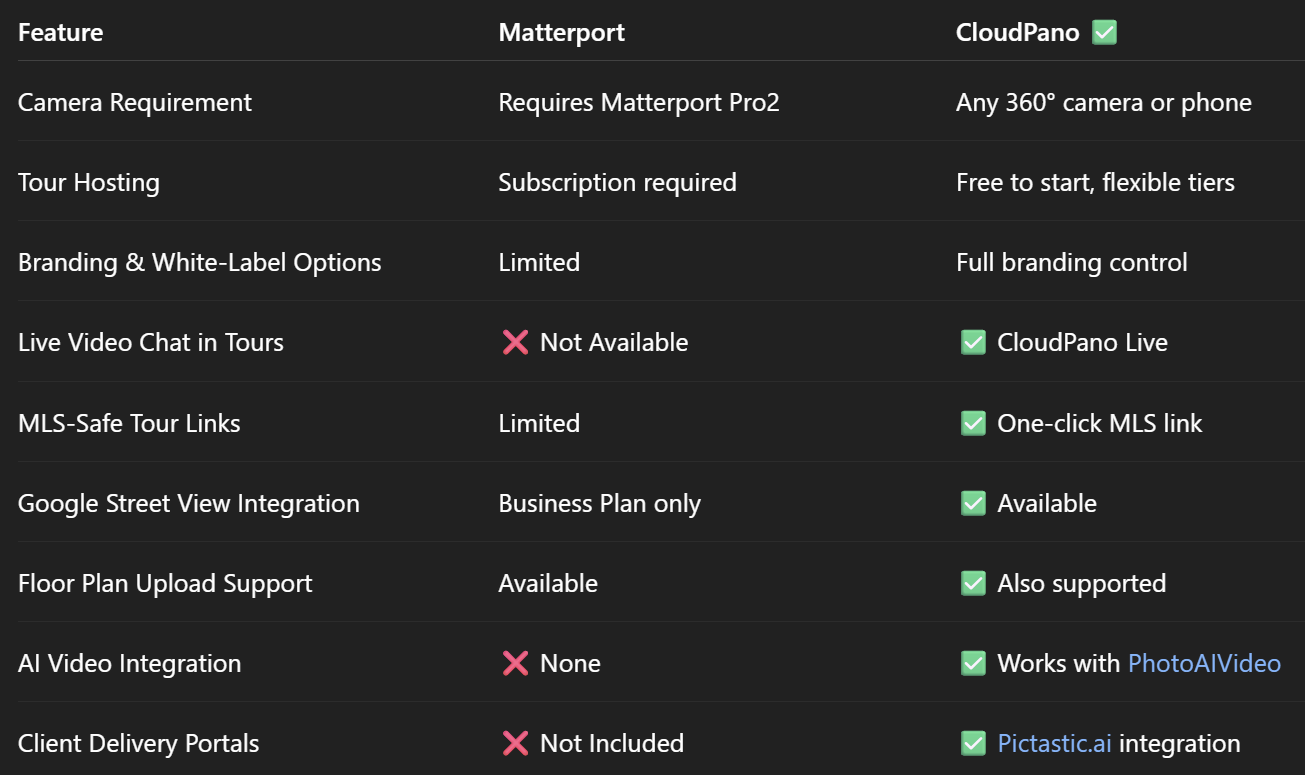
⚖️ Feature-by-Feature Comparison

👉 Related: CloudPano vs Matterport: The Best Virtual Tour Solution for Real Estate Agents

💸 Pricing Differences

🏷 Matterport Pricing:

  • $9.99 – $69.99+/mo
  • Requires proprietary hardware ($3,000+ for Pro2)
  • Charges hosting fees for each active tour
  • Limited plan flexibility

✅ CloudPano Pricing:

  • Free to start
  • Upgrade only when needed
  • One-time or monthly Pro+ plans
  • No required hardware investment

Result? CloudPano offers way more flexibility — and you keep more of your profit 💰

🎨 Branding & Client Control

With Matterport, your virtual tour lives in their ecosystem. Branding options are limited, and you're often forced to send buyers to a Matterport.com URL.

CloudPano changes that:

  • Custom domains
  • Your own logo and colors
  • Embed in your website
  • MLS-safe links with one click
  • Export and deliver with Pictastic

📞 CloudPano Live: Game-Changing for Agents

This is where CloudPano really shines 💥

CloudPano Live lets you host live video walkthroughs right inside the virtual tour. That means:

  • You can walk remote buyers through listings
  • Answer questions in real time
  • Close deals faster
  • Run virtual open houses

Matterport? ❌ No live chat feature.

📲 Use Any 360° Camera (Or Just Your Phone)

Matterport locks you into its proprietary hardware. Want full features? You’ll need to spend thousands on their Pro2 camera 😬

CloudPano supports:

  • 📷 Ricoh Theta
  • 📷 Insta360
  • 📷 GoPro Max
  • 📱 Smartphone panoramas

You already have the tools — CloudPano helps you use them.

🛠️ Bonus: Use CloudPano with These Tools

🎥 PhotoAIVideo.com

Turn listing photos into AI-generated cinematic videos for:

  • Social media
  • YouTube
  • Listing pages
  • Client updates

👉 Related: How to Generate Real Estate Videos From Just Photos

📁 Pictastic.ai

Deliver full project sites with:

  • CloudPano tours
  • Listing videos
  • Downloadable assets
  • White-label branding
  • Client collaboration tools

💬 What Agents Say About CloudPano

“CloudPano gives me full control over my tours and branding. It’s faster and more affordable than Matterport.”
— Jenna B., Realtor in Tampa

“I closed three remote buyer deals using CloudPano Live. Game-changer.”
— Luis R., Houston Agent

🧩 Who Should Use CloudPano?

✅ Solo agents and real estate teams
✅ Virtual tour photographers
✅ Property managers and leasing pros
✅ Restoration and insurance documentation experts
✅ Designers and architects

👉 Related: Best Matterport Alternative for Architecture and Design Firms

✅ Call to Action: Try CloudPano Today — It’s Free to Start!

🚀 Want a virtual tour platform that’s faster, more affordable, and built for modern real estate marketing?

Here’s where to begin:

Share this post
Cloudpano

Choose The Right 360° Camera

Insta360 ONE RS 1-Inch 360 Edition

  • Compact, ready to go anywhere

  • Interchangeable lens that’s upgradeable

  • Dual 1-inch sensors for improved clarity and low light performance

  • Dynamic range and 6K 360° capture

  • 360° photo resolution at 21MP

Learn More

Insta360 X4

  • 8K 360° video recording for ultra-detailed visuals.

  • 4K single-lens mode for traditional wide-angle shots.

  • Invisible selfie stick effect for drone-like perspectives.

  • 2.5-inch touchscreen with Gorilla Glass protection.

  • Waterproof up to 33ft for underwater shooting.

Learn More

Ricoh Theta Z1

  • 360° photo resolution in 23MP

  • Slim design at 24 mm thick

  • Built-in image stabilization for smooth video capture.

  • Internal 19GB storage for photo and video storage.

  • Wireless connectivity for remote control and sharing.

Learn More

Ricoh Theta X

  • 60MP 360° still images for high-resolution photography.

  • 5.7K 360° video recording at 30fps.

  • 2.25-inch touchscreen for intuitive control.

  • USB Type-C port for fast charging and data transfer.

  • MicroSD card slot for expandable storage.

Learn More
Property Marketing
Allows potential buyers to explore properties in detail from anywhere, enhancing the real estate marketing process.
Automotive Spins
Create an interactive virtual showroom and engage affluent digital buyers with live 360º video calls, all through the CloudPano mobile app for a complete automotive sales solution.
Interactive Floor Plans
Create 2D and 3D floor plans with measurements in 4 minutes or less, all from your phone. Download the Floor Plan Scanner app and get your first scan free.

360 Virtual Tours With CloudPano.com. Get Started Today.

Try it free. No credit card required. Instant set-up.

Try it free
Latest posts

See our other posts

Interviews, tips, guides, industry best practices, and news.

How Structured Metadata Improves Video Dataset Value

Structured metadata video datasets rely on includes consistent fields describing content, provenance, annotation status, and quality — searchable in a way raw video files alone aren't. Without this structure, large video datasets become difficult to find, reuse, or govern, even when the underlying annotation work is high quality.
Read post

Synchronizing Video and Motion Data for Robot Imitation Learning

Video annotation robotics motion data for imitation learning requires precise synchronization between video frames and the robot's own joint angles or end-effector trajectory, not just labeling visible objects. Timing misalignment between video and motion data teaches a model an inaccurate mapping between what it sees and how it should move.
Read post

Annotating First-Person and Human Activity Video Datasets

First-person video annotation addresses challenges third-person video doesn't — constant camera motion from the wearer's own movement, frequent close-range hand-object interaction, and a viewpoint that shifts unpredictably rather than staying fixed. These conditions require annotation guidelines and quality checks distinct from standard, fixed-camera video labeling approaches.
Read post