


.png)


Matterport's pricing page uses familiar-sounding terms — plans, tiers, spaces — that make the model seem simple at a glance, but the actual mechanics behind those terms matter a lot once you're trying to predict what you'll pay six months or a year from now. This is Matterport pricing explained without the jargon, focused on how the model actually behaves as your usage changes, not just what the current numbers say.
At its core, Matterport's model has historically been built around subscription tiers, with the number of "active spaces" (essentially, live hosted tours) you can maintain increasing as you move up in tier. This is a fairly standard SaaS pattern — pay more, get more capacity — but the specific mechanics of how "active" is defined, and what happens when you exceed your tier's allowance, are where the real complexity lives.
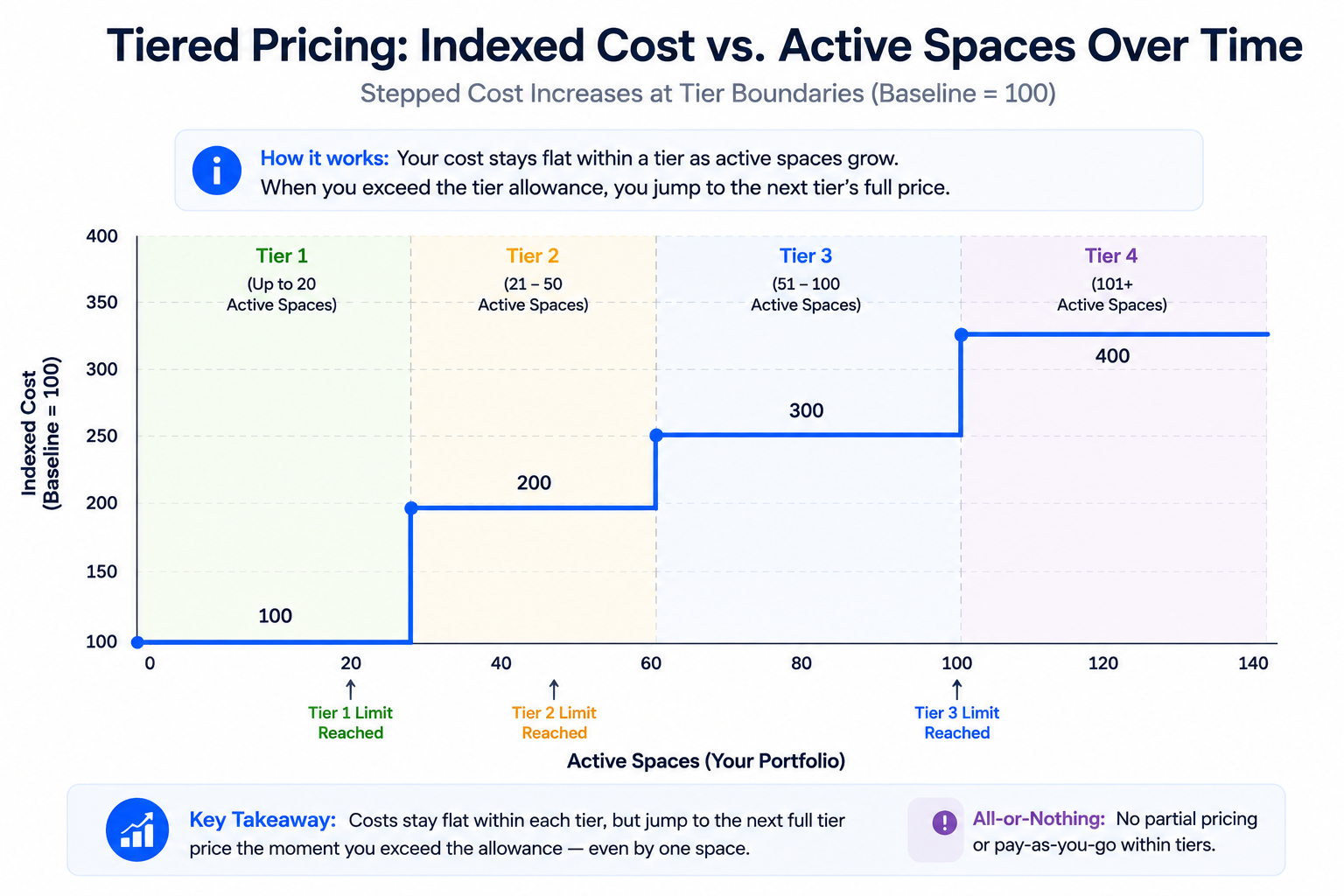
The practical driver of Matterport subscription cost for most users isn't the base tier price — it's what happens as your library of active spaces grows. Because tiers are generally structured around a cap on active spaces, a business producing tours regularly will eventually need to either upgrade to a higher tier or manage which spaces remain active versus archived. This is the mechanic most responsible for cost climbing over time for growing businesses, more than any single line-item price increase.
Understanding this mechanic in advance helps explain why some users report their bill increasing even when they don't recall actively choosing to pay more — the tier boundary, not a deliberate upgrade decision, often drives the change.
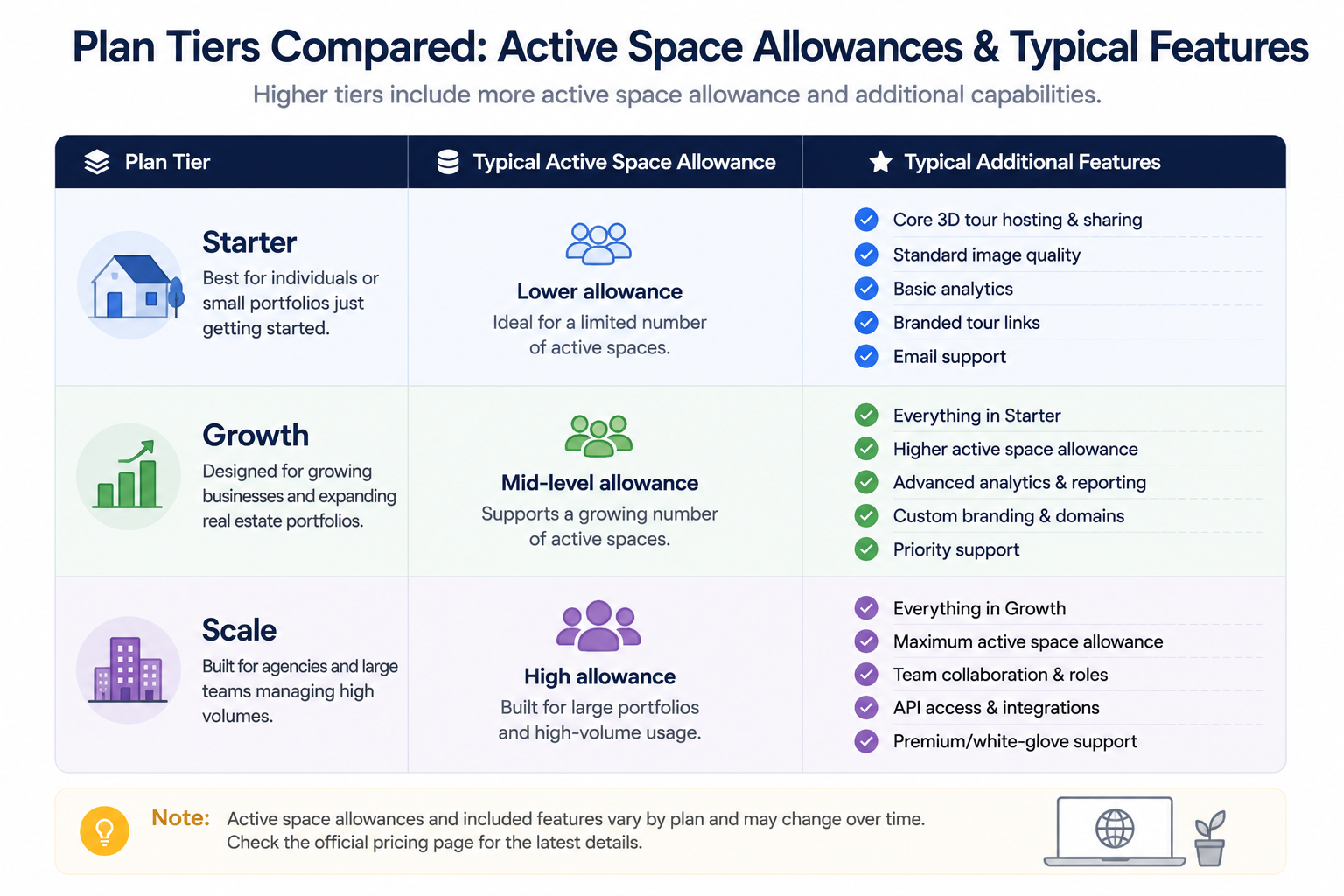
Different Matterport plans are generally differentiated by their active space allowance and, at higher tiers, additional features like expanded team access or advanced analytics. The practical implication: a business evaluating which plan to choose should think primarily in terms of "how many active spaces will I realistically need," rather than which tier sounds most appropriate for a business "our size" in the abstract.
This is worth working out concretely — count your current active, client-facing tours, estimate realistic growth over the coming year, and compare that number against each tier's specific allowance, rather than guessing based on general impressions of what tier fits a business like yours.
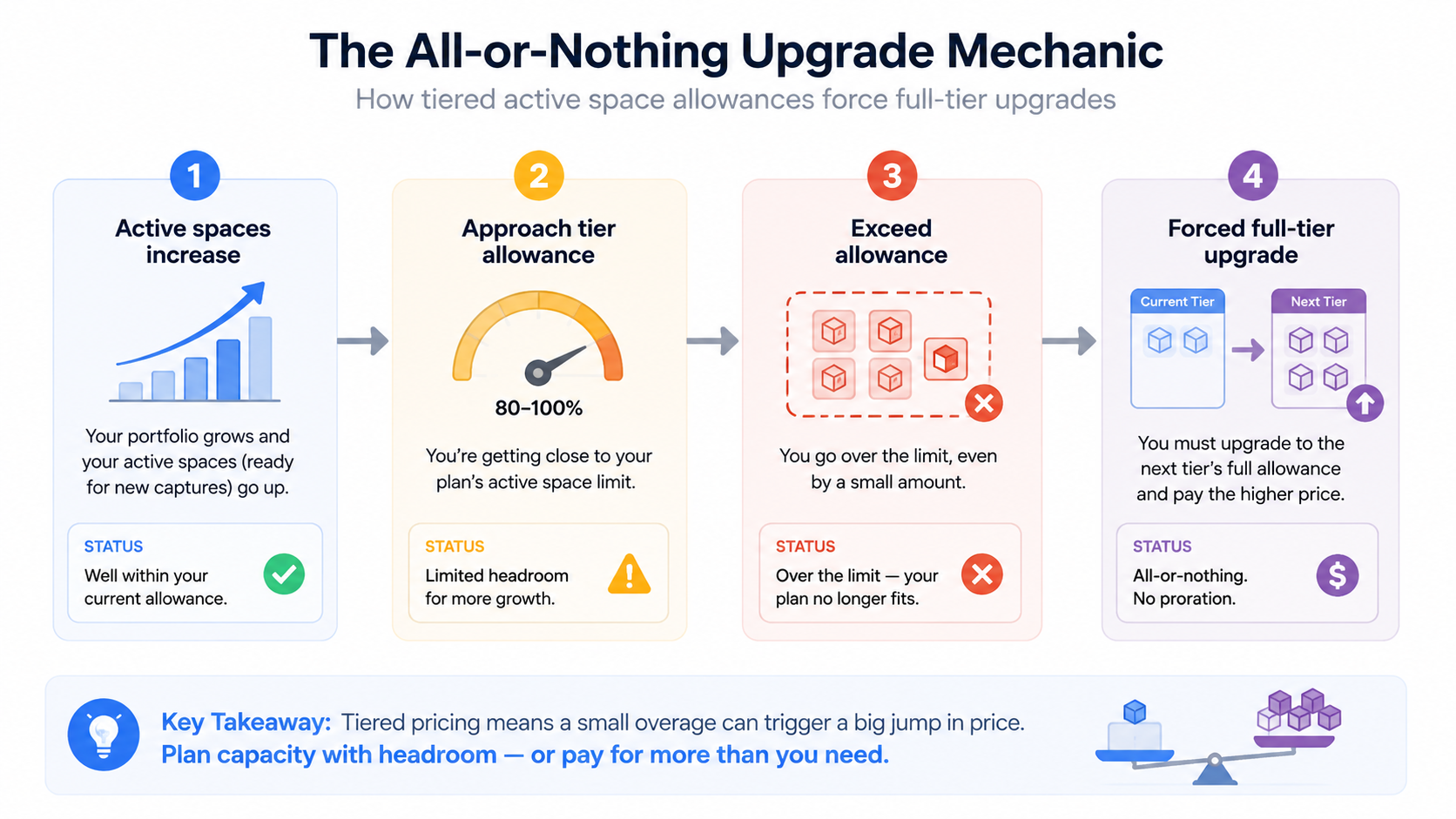
Understanding how Matterport charges once you exceed your current tier's allowance is where a lot of the reported frustration in independent reviews originates. Rather than a smaller incremental charge for exceeding your allowance by a modest amount, the typical pattern involves needing to upgrade to the next full tier, even if you're only slightly over your current allowance. This "all or nothing" tier boundary is a structural feature of the model, not an occasional glitch, and it's worth planning around rather than being surprised by.
This is also why proactively archiving genuinely inactive spaces — rather than letting them silently count against your active total — can meaningfully delay the point at which a tier upgrade becomes necessary, for businesses managing a library that includes older, less relevant content alongside active work.
It's worth understanding why this specific mechanic trips people up more than a simple price increase would. A straightforward price increase is usually announced and easy to notice. The active-space tier boundary, by contrast, is a threshold you can cross gradually and almost invisibly — each new tour you publish nudges you slightly closer, without any single action feeling like a deliberate decision to spend more. By the time an upgrade prompt appears, it can feel sudden even though the underlying cause was a slow accumulation you may not have been tracking closely.
This is precisely why the account-management habits covered later in this article matter — not because the mechanic is unreasonable, but because it rewards active monitoring in a way that a flat price increase never would.
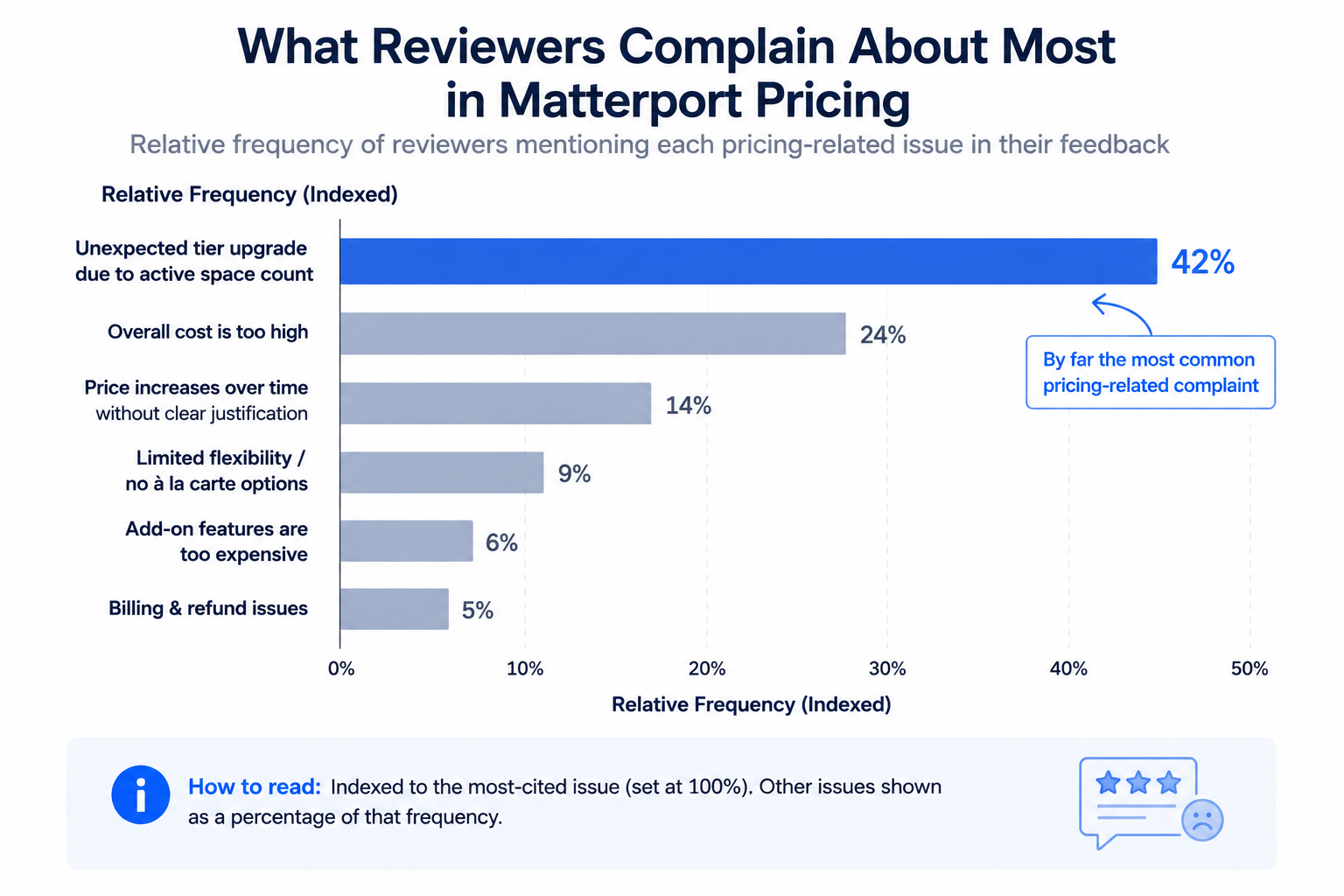
On G2's Matterport review page, a recurring theme is reviewers describing an unexpected tier upgrade requirement tied to active space count, rather than a deliberate feature-driven upgrade decision — directly reflecting the mechanics described above.
Capterra's Matterport listing shows a similar pattern when filtered for pricing-related comments specifically, and community discussion on r/Matterport regularly includes users working through exactly this kind of tier-boundary question in real time, which is a useful, current supplement to any general pricing explanation.
It might seem like overkill to dig this deeply into one specific mechanic within one company's pricing model. But this active-space, all-or-nothing tier boundary is genuinely the single detail most responsible for the gap between what businesses expect to pay and what they actually end up paying over time in this category. Most other aspects of Matterport's pricing — the base tier cost, feature differences between plans — are relatively transparent and easy to compare on the pricing page itself. This particular mechanic is the one that isn't obvious from a quick glance, which is exactly why it deserves this much explanation rather than a passing mention.
"Isn't a tier-based model pretty standard across software in general?"
Yes, broadly — tiered SaaS pricing is common well beyond this category. What's worth understanding specifically about Matterport's version is the active-space mechanic and its all-or-nothing overage behavior, since that's the part that catches people off guard more than the general concept of tiered pricing itself.
"Does understanding this actually change anything if I'm staying with Matterport anyway?"
Yes, in a practical sense — understanding the active-space mechanic lets you manage your account more deliberately, archiving genuinely inactive spaces before they force an unplanned upgrade, rather than discovering the boundary only after you've already crossed it.
If more than one person manages your Matterport account — a marketing coordinator publishing tours, an office manager handling billing, an owner making the final call on upgrades — it's worth making sure everyone involved understands this active-space mechanic, not just whoever originally set up the account. A common failure mode is that the person managing day-to-day tour publishing has no visibility into how close the account is to a tier boundary, while the person who'd notice a billing change has no visibility into which spaces are being added or archived.
A simple shared habit — checking active space count against tier allowance on a regular cadence, and having a clear owner for that check — prevents the kind of surprise upgrade that shows up as a confusing line item to whoever eventually notices the bill changed.
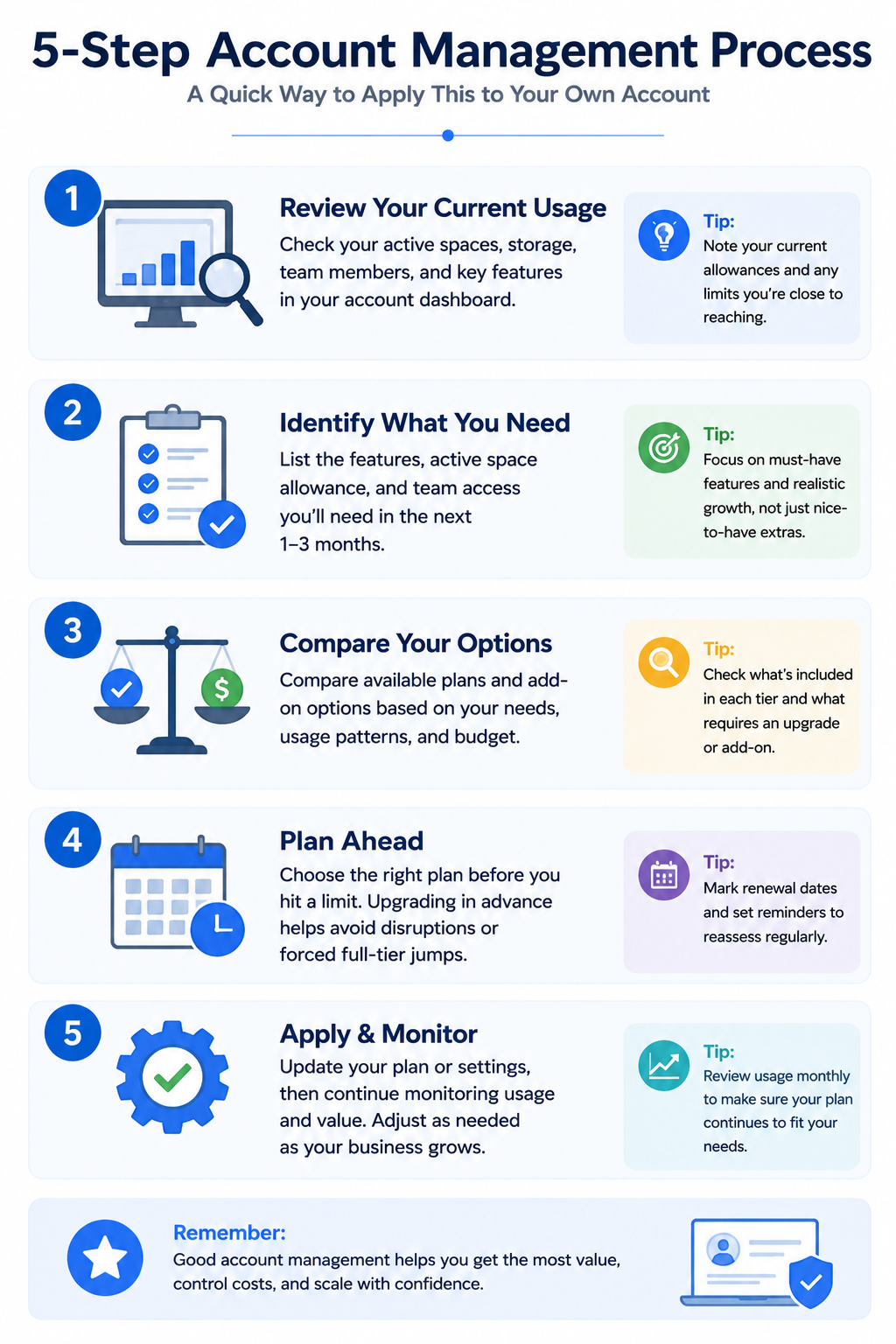
Matterport's pricing model is built around active space tiers, and understanding that mechanic — rather than just the current headline numbers — explains most of the cost behavior reported by long-term users. The all-or-nothing nature of tier upgrades, triggered by active space count rather than a deliberate feature decision, is the detail most worth understanding if you want to manage your account proactively rather than being surprised by it.
If this mechanic sounds like it's already affecting your account, or you're evaluating whether a different pricing structure would serve your growing library better, our comparison of Matterport and CloudPano's approaches to storage and hosting costs covers that ground directly, and our broader pricing guide covers the same underlying cost drivers across the category more generally. Whether you end up staying with Matterport and managing this mechanic more deliberately, or exploring whether a different structure fits your growing library better, understanding exactly how the model works is what turns a reactive, surprised response to your next bill into a planned, informed decision.


Compact, ready to go anywhere
Interchangeable lens that’s upgradeable
Dual 1-inch sensors for improved clarity and low light performance
Dynamic range and 6K 360° capture
360° photo resolution at 21MP

8K 360° video recording for ultra-detailed visuals.
4K single-lens mode for traditional wide-angle shots.
Invisible selfie stick effect for drone-like perspectives.
2.5-inch touchscreen with Gorilla Glass protection.
Waterproof up to 33ft for underwater shooting.

360° photo resolution in 23MP
Slim design at 24 mm thick
Built-in image stabilization for smooth video capture.
Internal 19GB storage for photo and video storage.
Wireless connectivity for remote control and sharing.

60MP 360° still images for high-resolution photography.
5.7K 360° video recording at 30fps.
2.25-inch touchscreen for intuitive control.
USB Type-C port for fast charging and data transfer.
MicroSD card slot for expandable storage.
.png)

.png)

Try it free. No credit card required. Instant set-up.







.svg)


.svg)