


.png)



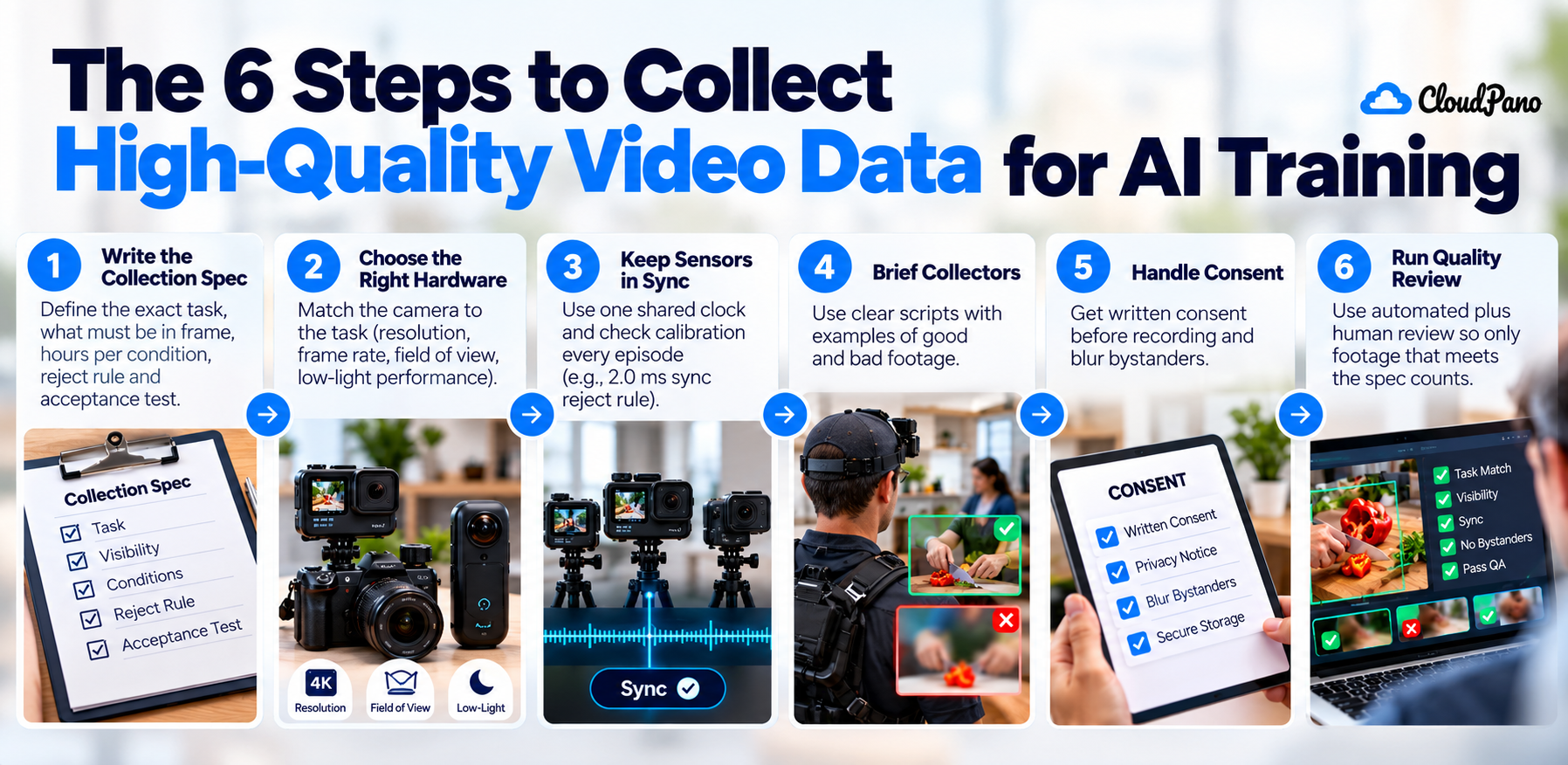
To collect high-quality video data for AI training, start with a written spec that names the task, what must stay in frame, the hours needed per condition, and a reject rule. Then match the camera to the task, keep every sensor on one clock, get written consent before recording, blur bystanders, and run automated plus human review so only footage that meets the spec counts.
Most teams that plan video data collection for AI find out the hard part isn't recording. It's getting footage that matches the task, from enough people and places, with consent you can prove. The Ego4D project needed 931 camera wearers across 74 locations in 9 countries to build 3,670 hours of everyday video (Ego4D, arXiv).
Scale is only half of it. Even well-known benchmark datasets carry mistakes: one study estimated label errors average at least 3.3% across the test sets of 10 widely used datasets (Northcutt et al., arXiv). If you're collecting real-world video data for a model, quality has to be designed in from the first brief, not checked at the end.
This guide walks through six steps: write the spec, pick the hardware, keep sensors in sync, brief collectors, handle consent, and run quality review.
High-quality training video is footage that shows exactly what the model needs to learn and passes checks you defined before collection. It doesn't have to look cinematic. A sharp, well-lit clip is useless if the hands leave the frame at the moment of the grasp.
We covered the quality criteria in detail in what makes a video dataset useful. In short, collection quality comes down to a few things you can check:
Write a short spec that names the exact task, what must be visible, the hours needed per condition, a reject rule, and one acceptance test. A spec turns "collect some kitchen video" into something a reviewer can accept or reject without a meeting.
Firsthand's skill spec guide breaks a spec into five parts:
The condition budget matters more than the total. A model fails on the conditions it never saw, and a single hour count hides exactly those gaps. Budgeting by condition means your coverage report shows where data is thin before training does.
Pick the camera position and sensors based on what the model must observe, not on what is easiest to record. For hand-object work, a head-mounted or chest-mounted camera shows reaching, grasping and tool use from the worker's point of view. For full-body movement or interaction between people, third-person or multi-view setups often work better.
Public datasets show the range. EPIC-KITCHENS-100 used head-mounted cameras to capture 100 hours of unscripted activity in 45 environments (Rescaling Egocentric Vision, arXiv). Parts of Ego4D add audio, 3D environment meshes, eye gaze, stereo, or several synchronized cameras at the same event (Ego4D, arXiv).
A practical rule for data collection for computer vision and robotics:
Put every sensor on one shared clock, record a timestamp per stream, and measure the leftover offset on every episode. If depth lags video by tens of milliseconds during a fast reach, the labels are wrong exactly when the motion is interesting.
As one example of what to measure, Firsthand publishes its sync method: every sensor is hardware-triggered onto one PTP (IEEE 1588) clock, and the measured offset between streams is:
Calibration drifts too. Firsthand's calibration procedure runs one calibration before and one after each episode, so drift is measured rather than assumed, and only ships episodes with RMS reprojection error under 0.28 px.
You don't need these exact numbers. You do need a written sync limit and a calibration check that can reject an episode on its own.
Give collectors a one-page script per task: the action, what must stay in frame, how much natural variation you want, and which failure cases to include. Then run a small pilot batch and review it against the spec before scaling.
Good scripts share a few traits:
Get written consent from every person recorded before capture starts, and de-identify anyone who didn't sign. Ego4D, for example, describes collecting with consenting participants and de-identification where needed (Ego4D, arXiv).
A workable privacy checklist:
Run automated checks first (sync, calibration, file integrity, duration), then have people review each clip against the reject rule. Keep a reject log so you can see what failed and why, not just what passed.
Human review matters because automated tools are not enough on their own. In the label-error study above, only 51% of the candidates flagged by the algorithm turned out to be real errors once people checked them (Northcutt et al., arXiv).
Two habits make review useful:
Collect in-house when the task is narrow, the location is fixed and your own team can be the camera wearers. Use a service when you need many people, many places or languages, or consent standards you can't easily run yourself.
Global reach is the main reason teams hand collection off. Firsthand says its custom collection sources contributors through a vetted crowd across 150+ countries, and that thin segments, such as rare settings or low-resource languages, take longer to staff (Firsthand custom collection). Whichever route you choose, the spec, sync limit, consent process and reject log above are what you should ask any vendor to show you.
Firsthand is not the right fit for every project, and its own pages say so:
If your project fits, you can see our custom video collection process, from intake and spec through capture, QA and delivery.
Good video data collection for AI starts on paper. Write a spec with a reject rule and a per-condition hour budget, choose hardware for what the model must see, set a sync limit, brief collectors clearly, get consent before recording, and count only footage that passes review. Do those six things and every hour you pay for is an hour you can train on.
AI training data is usually collected in one of three ways: licensing existing datasets, scraping or reusing public content where the license allows it, or running a custom collection where people are recorded doing defined tasks. For video, custom collection means a written spec, briefed contributors, documented consent and quality review before the footage counts.
Decide what the model must learn, then write a spec covering the task, what must stay in frame, hours per condition and a reject rule. Record with cameras matched to the task, keep every stream timestamped on one clock, get consent first, and review each clip against the spec before accepting it.
Computer vision models train on images and video, often paired with labels such as bounding boxes, segmentation masks, keypoints or action segments. Robotics and embodied AI models may also use depth, motion (IMU), hand or body pose and synchronized multi-camera footage, which is why multi-sensor collection needs a shared clock and calibration checks.
Start with a clear task definition and the conditions the model will face. Choose existing data if it covers those conditions and its license allows your use; otherwise run a custom collection. Either way, budget data by condition, document consent, and count only examples that pass review against written acceptance criteria.
You can license public datasets such as Ego4D or EPIC-KITCHENS-100 (check each license for commercial use), buy off-the-shelf datasets from vendors, or commission a custom collection. Custom collection costs more upfront but gives you the exact tasks, environments and consent terms your model needs.


Compact, ready to go anywhere
Interchangeable lens that’s upgradeable
Dual 1-inch sensors for improved clarity and low light performance
Dynamic range and 6K 360° capture
360° photo resolution at 21MP

8K 360° video recording for ultra-detailed visuals.
4K single-lens mode for traditional wide-angle shots.
Invisible selfie stick effect for drone-like perspectives.
2.5-inch touchscreen with Gorilla Glass protection.
Waterproof up to 33ft for underwater shooting.

360° photo resolution in 23MP
Slim design at 24 mm thick
Built-in image stabilization for smooth video capture.
Internal 19GB storage for photo and video storage.
Wireless connectivity for remote control and sharing.

60MP 360° still images for high-resolution photography.
5.7K 360° video recording at 30fps.
2.25-inch touchscreen for intuitive control.
USB Type-C port for fast charging and data transfer.
MicroSD card slot for expandable storage.
.png)

.png)

Try it free. No credit card required. Instant set-up.





.svg)


.svg)