How to Analyze AI Video Performance to Scale Smarter

June 29, 2025
5 min read
Share this post

📊 How to Analyze AI Video Performance to Scale Smarter

Creating video content at scale is no longer the problem — especially with AI tools that can turn photos, scripts, or blogs into branded videos in minutes. The real challenge in 2025 is knowing:
“What’s working? What’s wasting time? And how do I scale smarter?”

If you’re using AI video to build your brand, generate leads, or drive traffic, then performance analysis isn’t optional — it’s essential.

In this guide, we’ll break down:

  • Why video performance tracking matters more than ever
  • The top metrics to monitor
  • Tools that help you evaluate results
  • How to optimize based on what you learn
  • A complete link strategy to drive traffic across your content funnel

🎯 Why You Need to Analyze AI Video Performance

AI makes video creation easier — but it also makes it easier to publish low-impact content at scale. Without a performance system in place, you’ll keep generating… without improving.

Performance analytics help you:

  • 🚀 Identify what content actually drives clicks, views, and leads
  • 📉 Stop wasting time on formats that don’t convert
  • 🔁 Double down on high-performing styles, scripts, and platforms
  • 🎯 Align video content with your marketing goals (sales, traffic, retention)

📈 Key Metrics to Track Across Platforms

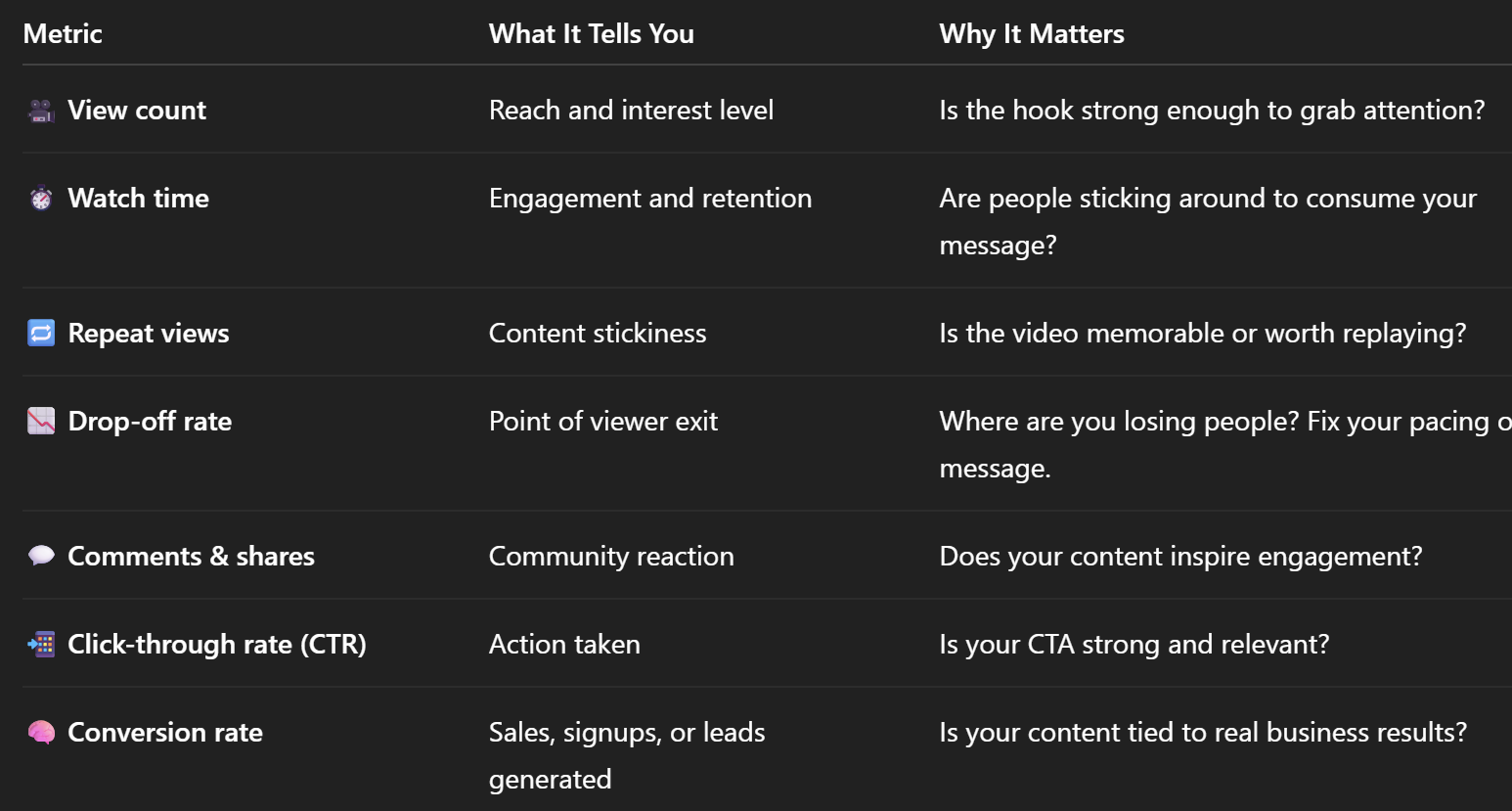
Different platforms offer different data — but here are the core KPIs every AI-powered video creator should monitor:
🧰 Tools for Analyzing AI Video Performance

Here’s a stack of tools that let you measure performance — across YouTube, Instagram, TikTok, and AI-driven systems:

📊 YouTube Studio

Provides in-depth analytics like:

  • Real-time view tracking
  • Audience retention graphs
  • Suggested content pathways
  • Traffic sources and device views

📖 Related: One Workflow, Three Platforms: Automating Video for TikTok, Instagram, and YouTube

📱 TikTok Analytics

See:

  • Engagement rate
  • Audience watch behavior
  • Trending video comparisons
  • Weekly or monthly reach growth

📈 Instagram Insights (Reels Tab)

Gives you:

  • Plays, likes, comments, shares, saves
  • Profile activity driven by each Reel
  • Follower vs non-follower reach

🔁 Repurpose.io Dashboard

Used to automate distribution, but also tracks:

  • Best-performing platforms
  • Top video formats
  • Posting schedules that drive the most views

🧠 Google Analytics + UTM Tags

Want to track how AI video actually drives leads and revenue? Use custom URLs and track:

  • Landing page click-throughs
  • Signups or purchases from video viewers
  • Funnel attribution

📖 Related: The Weekly AI Video Content Plan (Template + Tools)

🧪 Optimization: How to Scale Smarter With Data

Let’s say you publish 10 AI-generated videos per week. Here’s how to evaluate and optimize:

1️⃣ Identify Your Winners

Sort your content by:

  • Highest watch time
  • Most engagement (likes/comments)
  • Best click-through rates

These videos are your templates. Reverse engineer:

  • Their hooks
  • Their pacing
  • Their format or CTA

2️⃣ Pinpoint What’s Failing

If a video has:

  • High drop-off in first 3 seconds
  • Zero clicks or low play rate
  • No comments or reactions

Then something needs fixing:

  • Is the hook too slow or boring?
  • Is the video too long for the platform?
  • Is the message unclear or generic?

📖 Related: 10 Mistakes to Avoid When Scaling With AI Video Tools

3️⃣ Test Variations

Use ChatGPT to create script variants:

  • Different CTA wording
  • Altered hooks
  • Shorter or more emotional versions

Then test them using tools like PropertyEdits.ai or Captions.ai to generate and deploy.

4️⃣ Track Platform-Specific Trends

For example:

  • TikTok may reward behind-the-scenes content
  • YouTube Shorts may prefer educational formats
  • Instagram Reels may perform better with aesthetic transitions

Build a mini content plan per platform based on top performers.

5️⃣ Repurpose Top Performers

Found a great video? Use it to:

  • Create a vertical short for Reels
  • Turn it into a GIF for emails
  • Add it to your landing page
  • Embed it in your blog

📖 Related: How to Turn Every Blog Post Into 5 Branded AI Videos

📌 Key Takeaways

To scale video marketing effectively in 2025, performance beats production.

✅ Smart scaling looks like:

  • Reviewing analytics weekly
  • Optimizing the top 20% of content
  • Killing low-performing formats
  • Letting data shape your future scripts, CTAs, and video formats

Whether you're publishing 5 videos a week or 50, this system ensures you’re not just creating — you're compounding.

🎬 Start Now With Smarter Creation

Want to create videos faster — and track how they perform?

🡆 Try https://www.photoaivideo.com/ for free and generate your first AI video in minutes. Then analyze your results with YouTube, Instagram, or TikTok tools — and scale what works.

✔️ Upload media
✔️ Add narration and captions
✔️ Publish across platforms
✔️ Track results and iterate fast

Share this post

Choose The Right 360° Camera

Insta360 ONE RS 1-Inch 360 Edition

  • Compact, ready to go anywhere

  • Interchangeable lens that’s upgradeable

  • Dual 1-inch sensors for improved clarity and low light performance

  • Dynamic range and 6K 360° capture

  • 360° photo resolution at 21MP

Learn More

Insta360 X4

  • 8K 360° video recording for ultra-detailed visuals.

  • 4K single-lens mode for traditional wide-angle shots.

  • Invisible selfie stick effect for drone-like perspectives.

  • 2.5-inch touchscreen with Gorilla Glass protection.

  • Waterproof up to 33ft for underwater shooting.

Learn More

Ricoh Theta Z1

  • 360° photo resolution in 23MP

  • Slim design at 24 mm thick

  • Built-in image stabilization for smooth video capture.

  • Internal 19GB storage for photo and video storage.

  • Wireless connectivity for remote control and sharing.

Learn More

Ricoh Theta X

  • 60MP 360° still images for high-resolution photography.

  • 5.7K 360° video recording at 30fps.

  • 2.25-inch touchscreen for intuitive control.

  • USB Type-C port for fast charging and data transfer.

  • MicroSD card slot for expandable storage.

Learn More
Property Marketing
Allows potential buyers to explore properties in detail from anywhere, enhancing the real estate marketing process.
Automotive Spins
Create an interactive virtual showroom and engage affluent digital buyers with live 360º video calls, all through the CloudPano mobile app for a complete automotive sales solution.
Interactive Floor Plans
Create 2D and 3D floor plans with measurements in 4 minutes or less, all from your phone. Download the Floor Plan Scanner app and get your first scan free.

360 Virtual Tours With CloudPano.com. Get Started Today.

Try it free. No credit card required. Instant set-up.

Try it free
Latest posts

See our other posts

Interviews, tips, guides, industry best practices, and news.

AI-Powered MLS Listing Videos: Turning Property Listings into High-Converting Social Media Assets

This editorial-style guide reveals how real estate professionals can transform static MLS imagery into high-performing vertical videos using an AI listing reels for Realtors application. It addresses key industry pain points, including agent content fatigue, high multimedia production agency fees, and complex manual video editing suites. By breaking down the engineering mechanics behind platforms like PhotoAIVideo.com, the piece demonstrates how monocular depth map estimation, layer segmentation, and smooth cinematic tracking curves can instantly turn flat listing photos into mobile-native 9:16 assets. It maps out a seamless four-phase workflow from ingestion to omni-channel delivery, providing an actionable strategy for realtors looking to capture buyer attention within the critical opening three-second hook, satisfy short-form discovery algorithms, maximize watch time, optimize ad spend, and generate a steady stream of hot inbound showing requests.
Read post

Why Top-Producing Realtors Are Turning MLS Listings into AI Real Estate Video Reels

This thought-leadership article highlights why elite real estate agents are replacing manual video production workflows with automated AI property reels software. It targets the massive content fatigue and high operational costs agents face when trying to keep up with short-form video algorithms. By analyzing the engineering design behind tools like PhotoAIVideo.com, the post explains how computer vision, intelligent monocular depth mapping, and dynamic visual pacing instantly convert flat MLS photography into mobile-native, 9:16 vertical video assets. It outlines a frictionless four-stage pipeline from upload to multi-channel social syndication, showing real estate teams how to hook buyer attention in under three seconds, maximize audience retention metrics, lower inbound lead acquisition costs (CAC), and capture measurable local brand equity.
Read post

From MLS Listing to TikTok Viral Video: AI-Powered Real Estate Marketing Guide

This comprehensive guide provides real estate professionals with an actionable blueprint for converting static MLS photos into high-performing vertical video assets. It addresses the core operational challenges facing modern realtors—content fatigue, high video production costs, and complex editing software. By breaking down the engineering mechanics of computer-vision automated tools like PhotoAIVideo.com, the guide demonstrates how spatial depth mapping, parallax creation, and platform-specific pacing can be leveraged to capture user attention within the critical opening 3 seconds. Ultimately, the article reveals how automated real estate video creation scales content velocity, aligns perfectly with the short-form algorithms of TikTok, Instagram, and YouTube Shorts, and fuels low-cost customer acquisition funnels to turn casual viewers into hot inbound leads.
Read post