How to Get Started with AI Real Estate Video Fast

Cloudpano
September 2, 2026
5 min read
Share this post

How to Get Started with AI Real Estate Video Fast

Getting your first listing video off the ground doesn't require a production budget, camera crew, or editing experience — just a folder of photos you probably already have. If you've been curious about AI real estate video but assumed it was too technical or time-consuming to try, this guide walks you through the process, from account setup to a finished, shareable video.
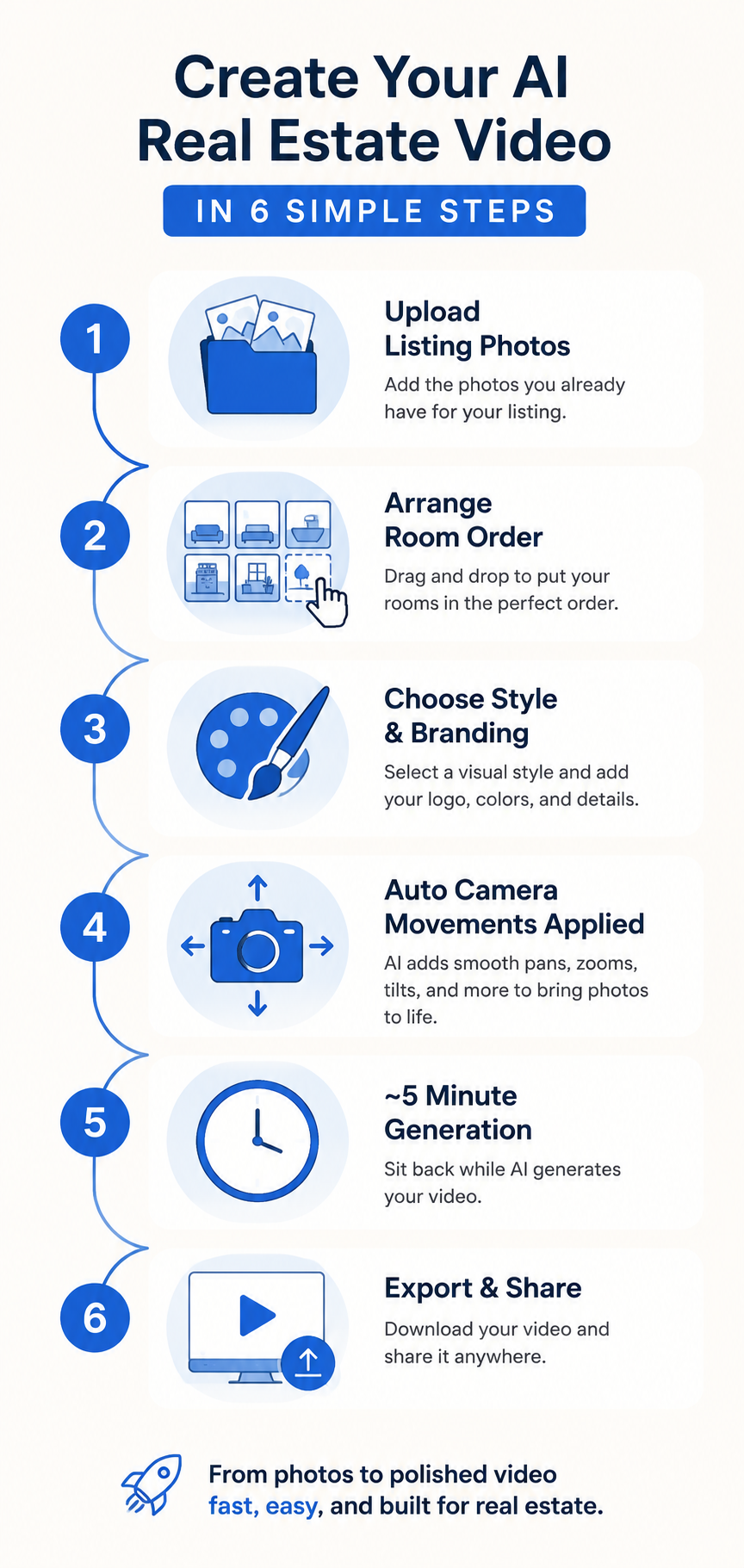
Infographic showing the step-by-step AI real estate video workflow from photo upload to finished export

What You Need Before You Start

One of the advantages of AI real estate video is how little it requires upfront. You don't need a gimbal, drone, or videography experience. You primarily need:

  • Listing photos you already have. The images you use for your listing can serve as the starting point for your video. There's no need for a separate on-site video shoot when the software is designed to create motion from still photos.
  • A rough sense of room order. Knowing whether you want to lead with the exterior, kitchen, or primary suite helps, but you can also adjust the sequence as you build the video.
  • Optional branding assets. Your logo, brand colors, and contact details can make the finished video feel more consistent with your marketing, but you can always add these once you're ready.

That's essentially the starting checklist. Because AI real estate video tools work from static images rather than raw video footage, there's no filming or lighting setup involved. If you want to see how this fits into a broader agent workflow, the platform built for real estate agents explains how listing photos can be transformed into a walkthrough-style property video.

Why Use AI Real Estate Video?

Video has become an important part of digital marketing, including real estate marketing. Property photos remain essential, but video provides another way to present those same spaces in a more dynamic format.

Industry research from organizations such as the National Association of Realtors continues to track how digital and visual content shapes the home-search process. Broader marketing research, including HubSpot's video marketing statistics, also highlights the role video plays across digital marketing channels.

Historically, one of the challenges of property video has been the additional time, equipment, and production work involved. AI real estate video offers an alternative workflow: instead of scheduling a separate video shoot, agents can start with existing listing photos and use software to generate motion and assemble them into a finished video.

The Walkthrough: From Signup to Finished Video

Here's a typical sequence for going from "I've never tried this" to having a video ready to review:

  1. Create your account. Head to PhotoAIVideo and create an account.
  2. Start a new project and upload your listing photos. Add the images you want to feature in your property video. Starting with clear, well-lit listing photography will generally give the software stronger source material to work with.
  3. Arrange your room sequence. Use the available controls to put your photos in the order you want the video to follow — perhaps starting with the exterior, moving through the main living spaces and bedrooms, and finishing with a standout feature such as the backyard or view.
  4. Pick a visual style or template. Choose a look that complements the property and your personal brand, whether that's clean and modern or warmer and more traditional.
  5. Apply your branding. If available within your plan, add elements such as your logo, brand colors, contact information, and intro or outro content to give the finished video a consistent identity.
  6. Decide whether to add voiceover or an avatar. If you'd like narration, AI voiceover can be used to present property highlights. Depending on the features available to you, an AI avatar can also provide an on-camera-style introduction.
  7. Apply or select camera movement. AI-generated movement can transform still listing photos into dynamic clips using effects such as pans, zooms, tilts, dolly-style movements, and orbits.
  8. Generate your video. Once your photos, sequence, style, and other options are ready, generate the finished video. Processing time can vary depending on the project and platform conditions.
  9. Preview and export. Review the finished result before sharing it. Choose an available format that fits where you intend to publish the video.
  10. Share it. Once you're happy with the result, publish it through your usual marketing channels, add it to your listing where supported, or share it directly with clients and prospects.

What to Expect on Your First Attempt

Your first AI real estate video doesn't require extensive preparation, but a few things are worth keeping in mind:

  • The result should feel more dynamic than a traditional slideshow. AI-generated camera movement can create a sense of motion within still images rather than relying entirely on simple transitions between photos.
  • Photo quality matters. Clear, well-lit, well-composed source images give the system stronger material to work with and can contribute to a more polished result.
  • Experiment with different approaches. If the platform allows it, try different visual styles, camera movements, or room sequences to see which presentation best suits the property.
  • Set up your branding carefully. If reusable branding tools are available, taking a little extra time to configure your logo, colors, and contact information can make future projects easier.
  • Consider where you'll publish the video. A video intended for a website or YouTube may need a different aspect ratio from one designed for short-form social media.

The advantage of this workflow is that experimenting doesn't require returning to the property for another video shoot. You're working with the listing photography you already have, so you can refine the presentation within the software.

Common Beginner Questions About the Process

Do I need different photos from the ones I already use for listings?

Not necessarily. Existing listing photography can serve as the source material for an AI-generated property video. As with any visual marketing asset, higher-quality source photos will generally give you more to work with.

What if I don't have a logo or brand colors yet?

You can start without elaborate branding and add those elements later. If the platform offers reusable branding presets or kits, setting one up can also help keep future property videos visually consistent.

Which export format should I choose first?

Choose based on where you plan to publish the video. Widescreen 16:9 is commonly used for websites and YouTube, while vertical 9:16 is suited to platforms such as Instagram Reels and TikTok. Square 1:1 can work for certain social feed placements.

Do I need voiceover or avatar features to get a good result?

No. Voiceover and avatar features can add another dimension to a property video, but they're not essential to the basic concept. A visually strong video can rely on listing photography, camera movement, transitions, branding, and music or other available audio options.

Try It Before Choosing a Long-Term Plan

Before deciding which subscription tier best fits your workflow, explore the currently available options and determine which features you actually need.

After creating a video or two, you'll have a better sense of how AI real estate video fits into your listing routine and which features matter most to you. You can then compare the available pricing options and choose the plan that best fits your production needs.

For agents who prefer a more hands-off workflow, it's also worth checking whether managed or done-for-you production options are currently available.

The simplest way to evaluate a new tool is to try the workflow with an actual listing and judge the finished result for yourself.

Frequently Asked Questions

Do I need video editing experience to use AI real estate video?

Not necessarily. These platforms are designed to simplify much of the traditional editing process by turning choices such as photo order, visual style, branding, and camera movement into straightforward controls rather than requiring users to work with a professional editing timeline.

How long does it take to create one video?

Processing time varies depending on the platform, project complexity, number of photos, selected features, and current system conditions. The hands-on portion of the process can be relatively straightforward once your listing photos and branding assets are ready.

Can I reuse my branding across multiple listings?

If your plan includes reusable branding features, you may be able to save elements such as your logo, colors, contact information, and intro or outro settings for future projects.

What video formats can I export?

Available export formats depend on the platform and plan. Common video aspect ratios include widescreen 16:9, vertical 9:16, and square 1:1. Check PhotoAIVideo's current export options before publishing to confirm which formats are available for your account.

🚀 Your All‑In‑One Virtual Experience Stack
🎬
PhotoAIVideo
Turn photos into scroll‑stopping AI videos.
Get Started →
🏡
Pictastic
Instantly stage listings with AI.
Try Staging →
🌀
CloudPano
Create stunning 360° tours in minutes.
Launch Tour →
💰
VirtualTourProfit
Build a profitable virtual tour business.
Learn More →
🤝
CloudPano Reseller
Resell AI visual software without building it.
Become a Reseller →
🚗
Auto CloudPano
Sell more vehicles with 360° experiences.
Explore Auto →
🏗️
AI Floor Plan Builder
Generate detailed floor plans with AI.
Build Now →
📐
3D Measure
Capture accurate floor plans & 3D measurements.
Measure Now →
🧠
AI Training Data
Custom AI training data services.
Learn More →
Share this post
Cloudpano

Choose The Right 360° Camera

Insta360 ONE RS 1-Inch 360 Edition

  • Compact, ready to go anywhere

  • Interchangeable lens that’s upgradeable

  • Dual 1-inch sensors for improved clarity and low light performance

  • Dynamic range and 6K 360° capture

  • 360° photo resolution at 21MP

Learn More

Insta360 X4

  • 8K 360° video recording for ultra-detailed visuals.

  • 4K single-lens mode for traditional wide-angle shots.

  • Invisible selfie stick effect for drone-like perspectives.

  • 2.5-inch touchscreen with Gorilla Glass protection.

  • Waterproof up to 33ft for underwater shooting.

Learn More

Ricoh Theta Z1

  • 360° photo resolution in 23MP

  • Slim design at 24 mm thick

  • Built-in image stabilization for smooth video capture.

  • Internal 19GB storage for photo and video storage.

  • Wireless connectivity for remote control and sharing.

Learn More

Ricoh Theta X

  • 60MP 360° still images for high-resolution photography.

  • 5.7K 360° video recording at 30fps.

  • 2.25-inch touchscreen for intuitive control.

  • USB Type-C port for fast charging and data transfer.

  • MicroSD card slot for expandable storage.

Learn More
Property Marketing
Allows potential buyers to explore properties in detail from anywhere, enhancing the real estate marketing process.
Automotive Spins
Create an interactive virtual showroom and engage affluent digital buyers with live 360º video calls, all through the CloudPano mobile app for a complete automotive sales solution.
Interactive Floor Plans
Create 2D and 3D floor plans with measurements in 4 minutes or less, all from your phone. Download the Floor Plan Scanner app and get your first scan free.

360 Virtual Tours With CloudPano.com. Get Started Today.

Try it free. No credit card required. Instant set-up.

Try it free
Latest posts

See our other posts

Interviews, tips, guides, industry best practices, and news.

How to Get Started with AI Real Estate Video Fast

New to AI real estate video and not sure where to begin? This beginner-friendly walkthrough shows exactly how to go from listing photos to a finished, shareable property video in under ten minutes — no camera crew or editing skills required.
Read post

The Technology Behind AI Real Estate Video Explained

Ever wondered how a still listing photo becomes a smooth, cinematic property tour? This guide breaks down the technology behind AI real estate video — from simulated camera movement and automatic pacing to branding, voiceover, and AI avatar intros — in plain, agent-friendly terms.
Read post

Automotive Marketplace Image Standardization: Creating Retail-Ready Images Automatically

Explore how automotive marketplace image standardization helps marketplaces, dealer groups, and automotive technology platforms turn inconsistent vehicle photography into clean, retail-ready images automatically. The article covers background processing, vehicle centering, scaling, quality control, multi-format exports, and API-driven workflows.
Read post



