


.png)


The agents who fall behind usually do not fall behind all at once.
It happens quietly.
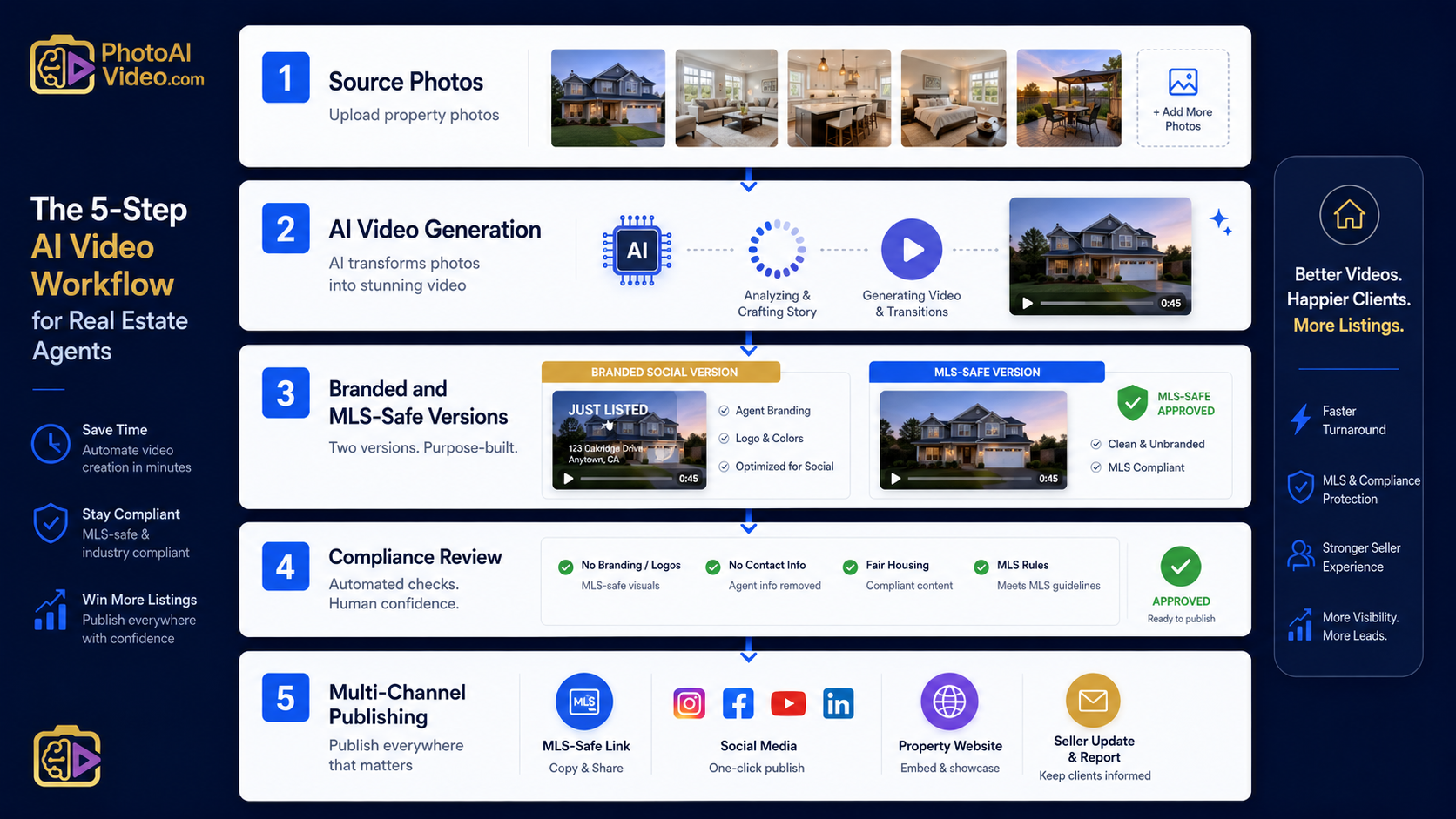
One competitor starts using better listing videos. Another starts sending polished seller updates. A brokerage down the street rolls out cleaner media packages. A photographer begins offering AI-generated listing videos as an add-on. Then suddenly, the old package — photos, a basic slideshow, and a generic property link — feels thin.
That is the real risk.
Not just MLS compliance.
Not just AI.
Not just video.
The bigger issue is whether your real estate marketing system can keep up with how listings are now being packaged, promoted, reviewed, syndicated, and judged by sellers.
That is why MLS safe AI video for listings matters. It gives Realtors, real estate photographers, brokerages, and listing teams a way to create more video content without losing control of compliance, branding, or publishing standards.
PhotoAIVideo helps real estate professionals turn property photos into AI-generated listing videos. Used correctly, it can become part of a future-proof media system: one where agents create more content from every listing, separate branded and unbranded versions, and build repeatable marketing assets without starting from scratch every time.
MLS rules vary by board, brokerage, and region. Always confirm your local requirements before publishing listing media. For broader MLS policy context, review NAR’s MLS policy resources and NAR’s Handbook on Multiple Listing Policy.
A lot of agents hear “AI video” and immediately think of shortcuts.
That is the wrong frame.
Future-proofing your real estate business is not about using every new app that shows up. It is about building a durable listing media system that can survive changes in platforms, seller expectations, MLS rules, social algorithms, and team size.
A future-proof media system should answer questions like:
That is where AI real estate marketing software for agents becomes more than a convenience. It becomes part of the operating system behind your listing business.
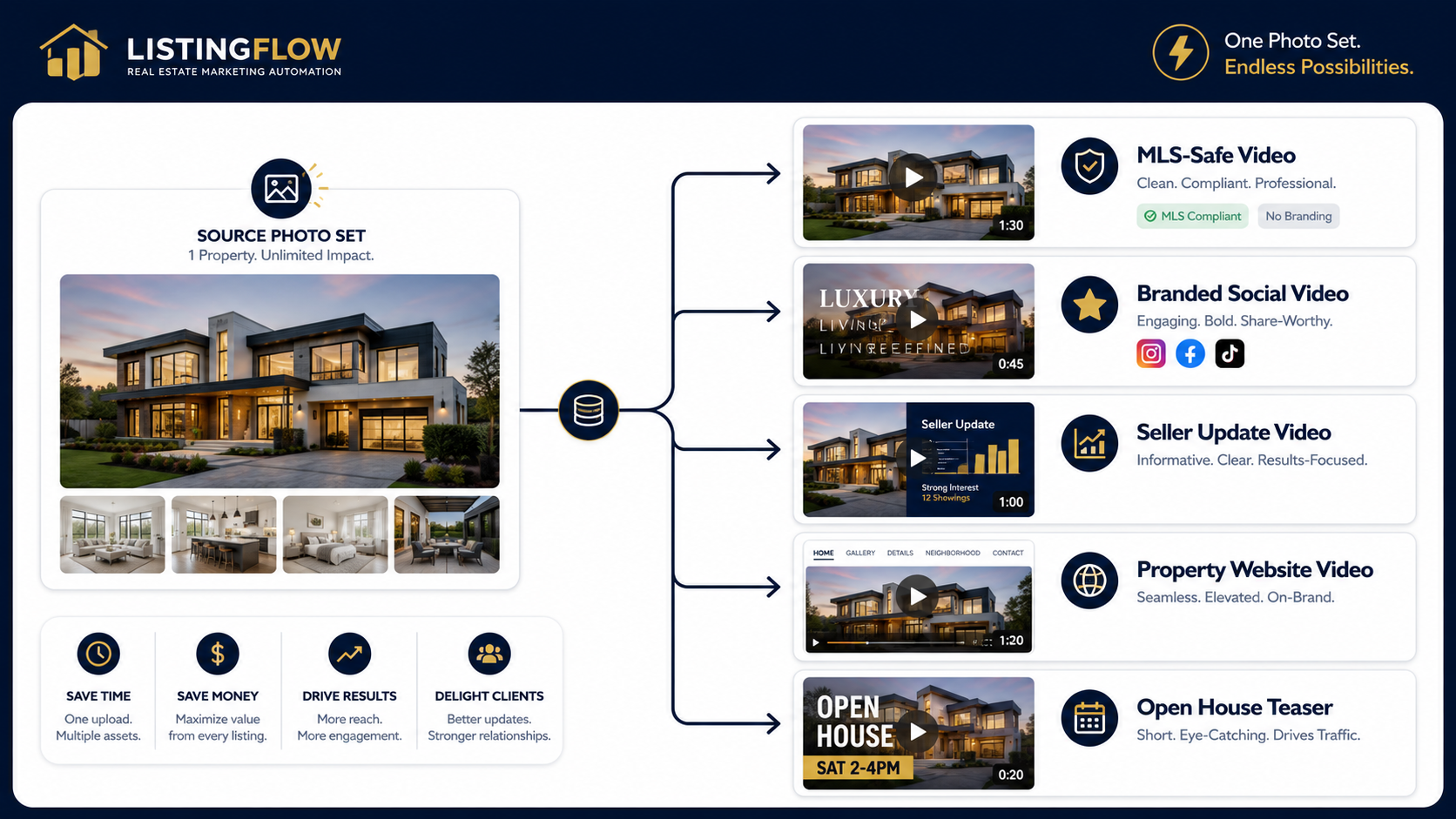
PhotoAIVideo fits into that system by helping agents turn existing property photos into video assets. That means every photo shoot can produce more than a static gallery. It can become the foundation for social videos, MLS-safe listing videos, seller updates, property website media, and lead-generation content.
For years, a basic listing media package was enough.
Professional photos. Maybe a simple slideshow. Maybe a virtual tour link. Maybe a social post.
That is no longer a strong moat.
Sellers are seeing more media online. Buyers are used to video. Agents are competing with better visuals. Real estate photographers are adding new deliverables. Brokerages are looking for scalable marketing systems.
A listing presentation that used to feel premium can now feel average.
The problem is not that photos stopped mattering. Photos still matter. They are still the base layer of most listing media.
The problem is that photos are no longer the whole package.
A stronger listing media package now includes:
This is where PhotoAIVideo gives agents leverage. It helps them get more from the listing photos they already have.
Instead of treating photos as the final deliverable, agents can treat photos as source material.
That one shift changes the economics of listing media.
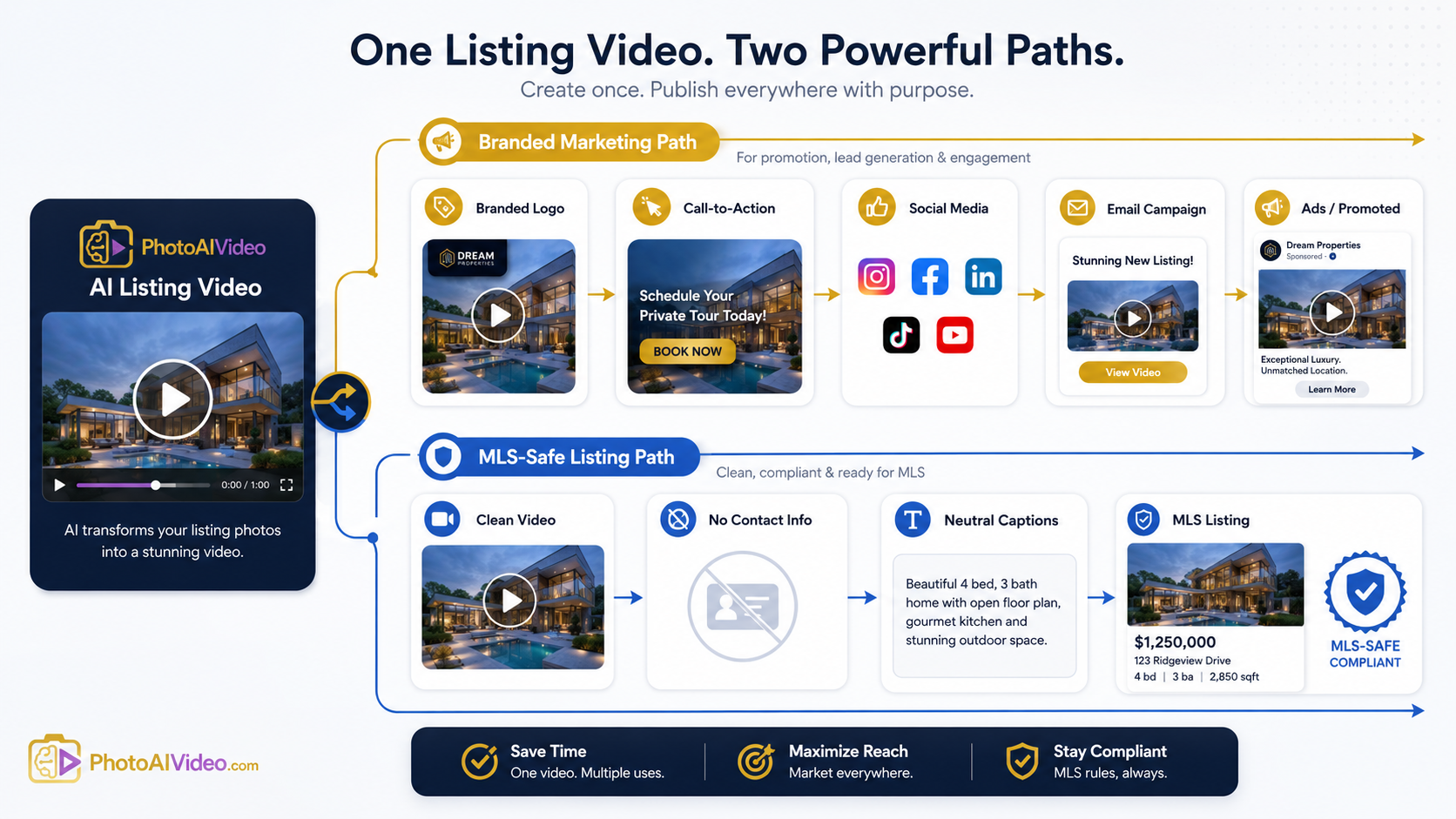
The word “safe” matters.
A video can look great and still be wrong for the channel.
A branded video might be perfect for Instagram. It may include the agent’s name, logo, phone number, call to action, voiceover, or brokerage branding. That same video may not be appropriate for certain MLS listing fields.
This is why real estate video software that works with MLS rules is not just about creating video. It is about helping the team think through where the video will be used.
There are usually two categories of listing video:
This is the version designed to promote the agent, team, or brokerage.
It may include:
This version is useful for social media, ads, email campaigns, seller updates, and listing presentations.
This version is cleaner.
It is focused on the property, not the agent.
It typically avoids:
The mistake is assuming these two videos are interchangeable.
They are not.
A future-proof media system creates both versions intentionally.
Traditional video has a cost structure.
Someone has to shoot it. Someone has to edit it. Someone has to revise it. Someone has to export versions. Someone has to deliver files. That can still make sense for luxury listings, large campaigns, or high-end custom media packages.
But not every listing needs a full production day.
Many agents already have professional photos. Those photos are edited, approved, and ready to publish. The opportunity is to turn those still images into additional media assets without rebuilding the entire creative process.
That is why an AI app to turn property photos into videos can be so useful.
It changes the starting point.
Instead of asking, “Do we have time and budget for video on this listing?”
The agent can ask, “How many useful video assets can we create from the photos we already have?”
That unlocks a different kind of media package:
This is not just a production upgrade.
It is a business model upgrade.
A future-proof listing media stack should not depend on one file, one person, or one platform.
It should be layered.
These are the approved property visuals.
This layer must be accurate. Bad source material creates bad downstream content.
This is where PhotoAIVideo comes in.
The approved listing photos become motion-based video assets. This gives the agent or media team a faster way to produce listing videos without starting from raw footage.
This is where agents can create real estate videos from photos with AI and build more content from every listing shoot.
One video is not enough.
Create versions based on where the asset will be used:
Each version has a different job.
This is the control layer.
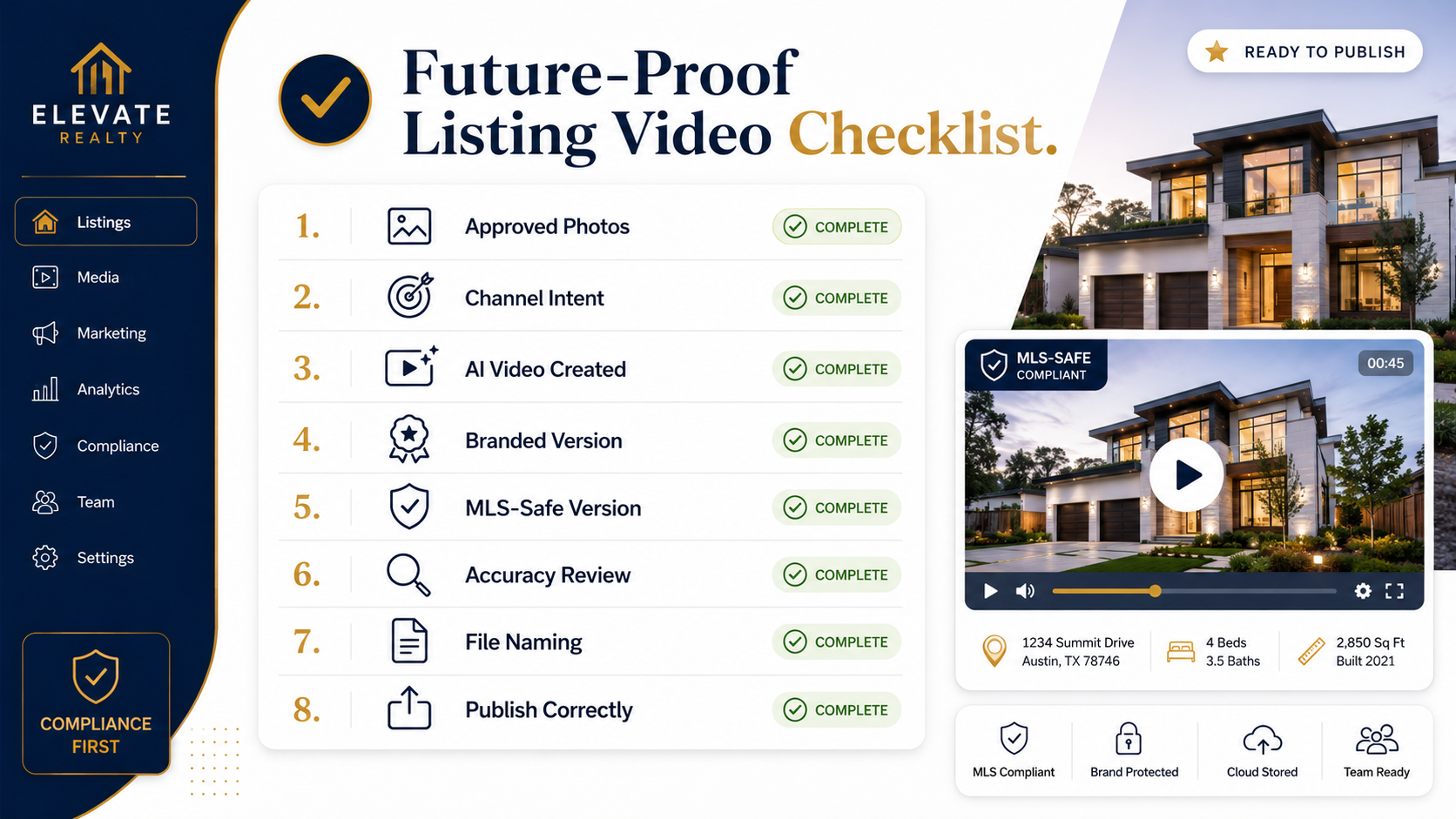
Before publishing, the team checks:
This layer keeps the system from becoming sloppy.
This is where the media gets used.
The stack works because every layer has a job.
That is future-proofing.
Most agents focus only on the content.
Better operators focus on the system behind the content.

PhotoAIVideo helps real estate professionals create AI-generated videos from listing photos.
That sounds simple, but the impact is bigger when it is used as part of a system.
For an individual agent, it creates more content from every listing.
For a photographer, it creates a new deliverable from the same photo shoot.
For a brokerage, it creates a scalable way to help agents produce better listing media.
For a property manager, it creates faster rental marketing assets from existing unit photos.
For a listing coordinator, it creates a clearer process for turning static images into usable video content.
PhotoAIVideo is especially useful when a team wants an MLS compliant video maker for property listings that supports cleaner, more repeatable asset creation.
The value is not just “AI made a video.”
The value is:
The future belongs to agents who can create more useful content without adding more operational mess.
A solo agent can use PhotoAIVideo to make listings look more polished without hiring a video editor for every property.
This helps the agent compete against larger teams by offering more modern media packages from the same photo set.
A Realtor can create:
That gives the agent more ways to promote one listing.
Real estate photographers can use PhotoAIVideo to increase the value of every shoot.
Instead of delivering only photos, they can offer AI-generated listing video packages. This can be especially useful for agents who want video but do not want to pay for a separate video shoot.
This is a strong use case for an AI video app for real estate photographers.
Photographers can package it as:
That creates more upsell opportunities.
Brokerages need consistent standards.
If every agent uses different tools and random video formats, the brokerage loses control. A future-proof system helps standardize the process.
Brokerages can use PhotoAIVideo to give agents a repeatable way to create video assets from approved listing photos.
That supports:
Property managers often need media quickly.
A unit becomes available. The photos already exist. The leasing team needs better content for the listing page, email follow-up, and social media.
PhotoAIVideo can help turn rental photos into video assets without waiting for another media appointment.
That can support faster leasing communication and better online presentation.
Teams with multiple agents need structure.
PhotoAIVideo can help listing teams create video assets from a repeatable process instead of relying on one person with editing skills.
That matters as volume increases.
A system that works for five listings should also work for fifty.
AI video should not be used just because it is new.
It should solve a real business problem: creating more useful listing media from assets the team already has.
This is one of the fastest ways to create confusion.
The branded version should be used where promotion is appropriate. The MLS-safe version should be cleaner and more property-focused.
This creates inconsistency.
One agent uses one tool. Another uses a different template. Another sends files to a freelancer. Another uploads directly to social media. Nobody names files the same way.
That does not scale.
The video itself may be unbranded, but the surrounding page may not be.
If the video sits on a page with agent information, contact buttons, branded suggestions, or brokerage promotion, the viewing experience may not be appropriate for every MLS use case.
AI does not remove responsibility.
Every video should still be reviewed for accuracy, property representation, branding, and channel fit.
If you publish a great infographic but do not explain the same ideas in crawlable text, you lose SEO value.
Google’s image SEO best practices recommend using descriptive context around images. Google’s Article structured data documentation can also help you structure article pages more clearly for search engines.


Compact, ready to go anywhere
Interchangeable lens that’s upgradeable
Dual 1-inch sensors for improved clarity and low light performance
Dynamic range and 6K 360° capture
360° photo resolution at 21MP

8K 360° video recording for ultra-detailed visuals.
4K single-lens mode for traditional wide-angle shots.
Invisible selfie stick effect for drone-like perspectives.
2.5-inch touchscreen with Gorilla Glass protection.
Waterproof up to 33ft for underwater shooting.

360° photo resolution in 23MP
Slim design at 24 mm thick
Built-in image stabilization for smooth video capture.
Internal 19GB storage for photo and video storage.
Wireless connectivity for remote control and sharing.

60MP 360° still images for high-resolution photography.
5.7K 360° video recording at 30fps.
2.25-inch touchscreen for intuitive control.
USB Type-C port for fast charging and data transfer.
MicroSD card slot for expandable storage.
.png)

.png)

Try it free. No credit card required. Instant set-up.







.svg)


.svg)