Storage and Transfer Architecture for Continuous Egocentric Capture

Cloudpano
August 2, 2026
5 min read
Share this post

Storage and Transfer Architecture for Continuous Egocentric Capture

A great capture protocol and well-selected hardware still hit a wall if the data they produce can't actually be stored and moved efficiently. Egocentric video data storage and transfer planning is where a lot of otherwise well-designed collection efforts run into practical trouble — continuous, high-resolution video from multiple wearers generates volume that on-device storage and typical transfer methods can struggle to keep up with.

Wearable Camera Data Pipeline design needs to address this specifically, since the actual bottleneck in scaling egocentric collection is often not the hardware or the protocol, but what happens to the data after it's captured — where it's stored, how it gets transferred, and how quickly it becomes usable.

Why It Matters

Storage or transfer bottlenecks don't just slow a project down — they can create actual data loss if on-device capacity fills mid-session, or delays that push data availability far behind when a project actually needs it for annotation or training. Google Research's "Data Cascades" study documented how operational gaps that seem manageable early compound into larger problems as a project scales (Sambasivan et al., Google Research), and storage and transfer planning is exactly the kind of infrastructure decision that's cheap to get right early and expensive to fix once collection has scaled.

NIST's AI Risk Management Framework treats process reliability as a relevant consideration for trustworthy AI development, directly applicable to Continuous Capture Data Transfer needing to hold up operationally, not just work in a small pilot with limited data volume (NIST AI RMF).

The stakes rise given how much video data modern egocentric collection efforts can generate. Stanford HAI's AI Index has tracked the growing data volumes underlying computer vision and multimodal AI development (Stanford HAI, AI Index Report), and a storage or transfer architecture that can't scale becomes the actual constraint on a collection project's timeline and completeness.

How It Works

First-Person Video Infrastructure for egocentric capture generally requires deliberate decisions across a few specific areas.
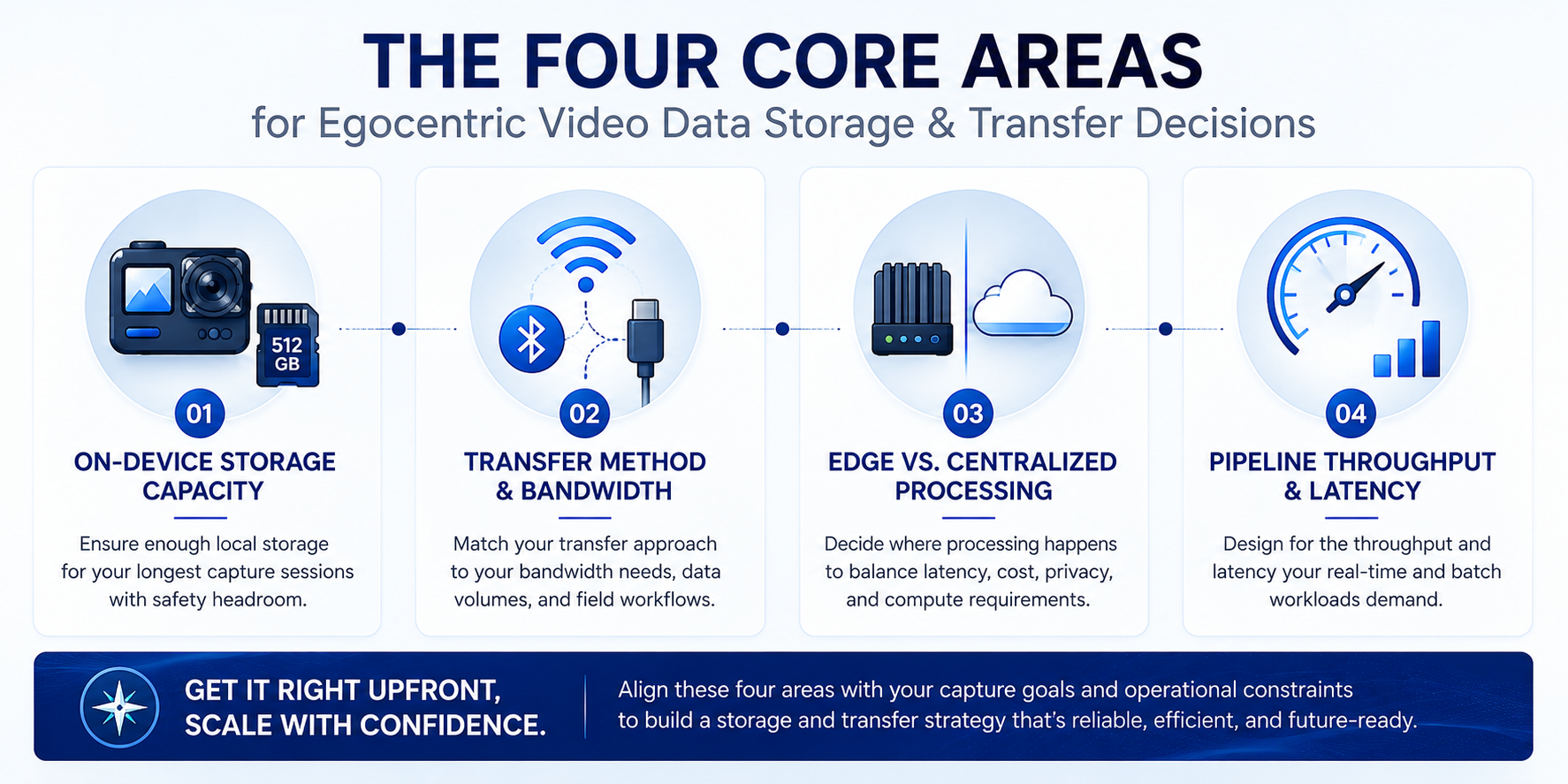
Infographic of four core decision areas for egocentric video data storage and transfer

On-device storage capacity planning. Matching a device's storage capacity to the actual planned session length and resolution, since running out mid-session creates unusable gaps in a recording.

Transfer method and bandwidth planning. Deciding how captured data moves from the device into a broader pipeline — direct cable transfer, wireless upload, or periodic batch offload — matched to actual data volume and available bandwidth.
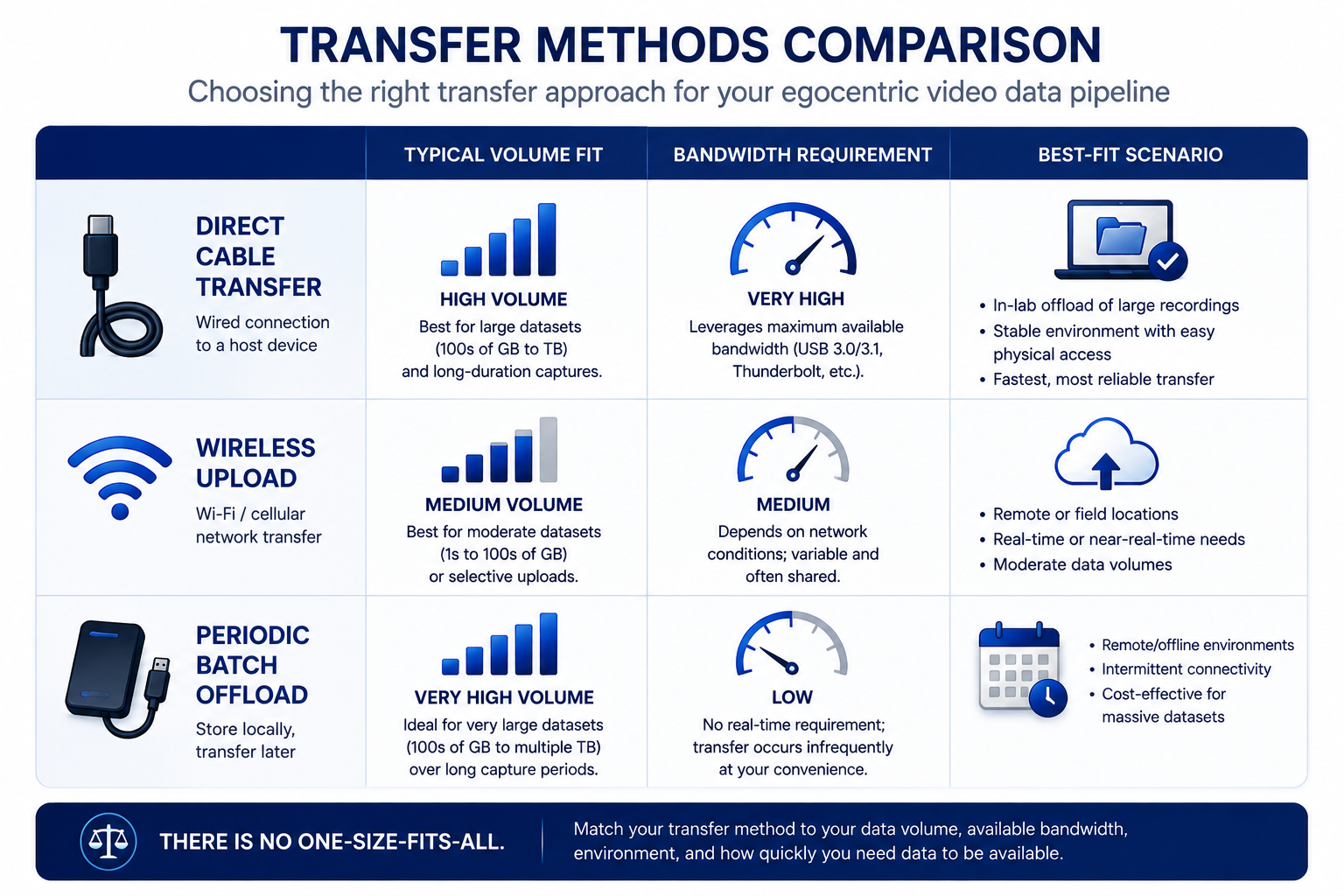
Comparison table of transfer methods for egocentric video data storage pipelines

Edge versus centralized processing decisions. Determining what processing, such as compression or basic quality checks, happens on the device itself versus after data reaches centralized storage, balancing device constraints against pipeline efficiency.

Pipeline throughput and latency planning. Ensuring the full path from capture to usable, accessible storage can keep pace with actual collection volume, rather than creating a growing backlog of unprocessed data.

Understanding how these workflows operate as genuine infrastructure engineering — not an afterthought handled once hardware and protocol are settled — is what prevents an otherwise well-planned collection effort from bottlenecking on the practical mechanics of moving and storing video data.
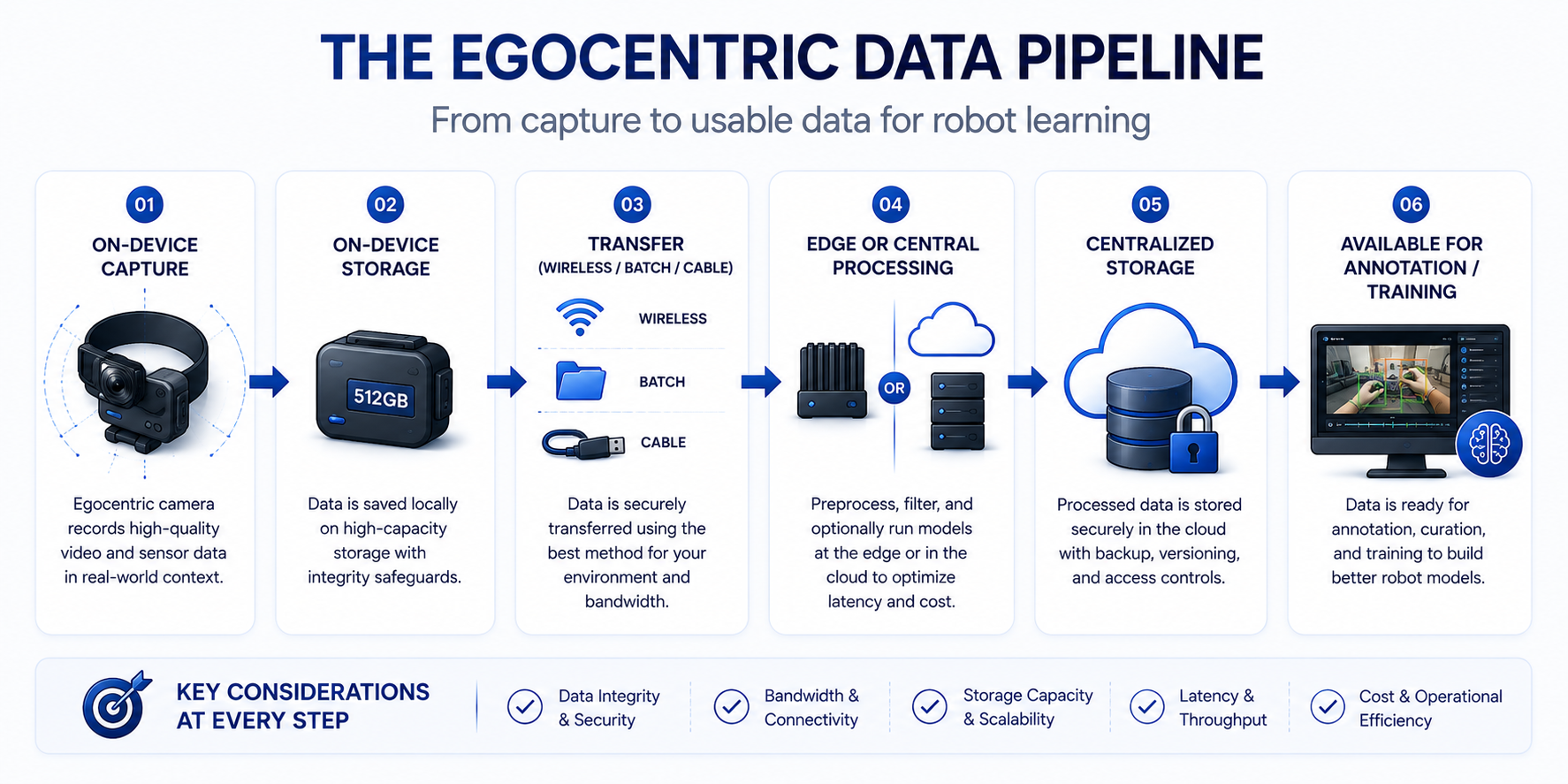
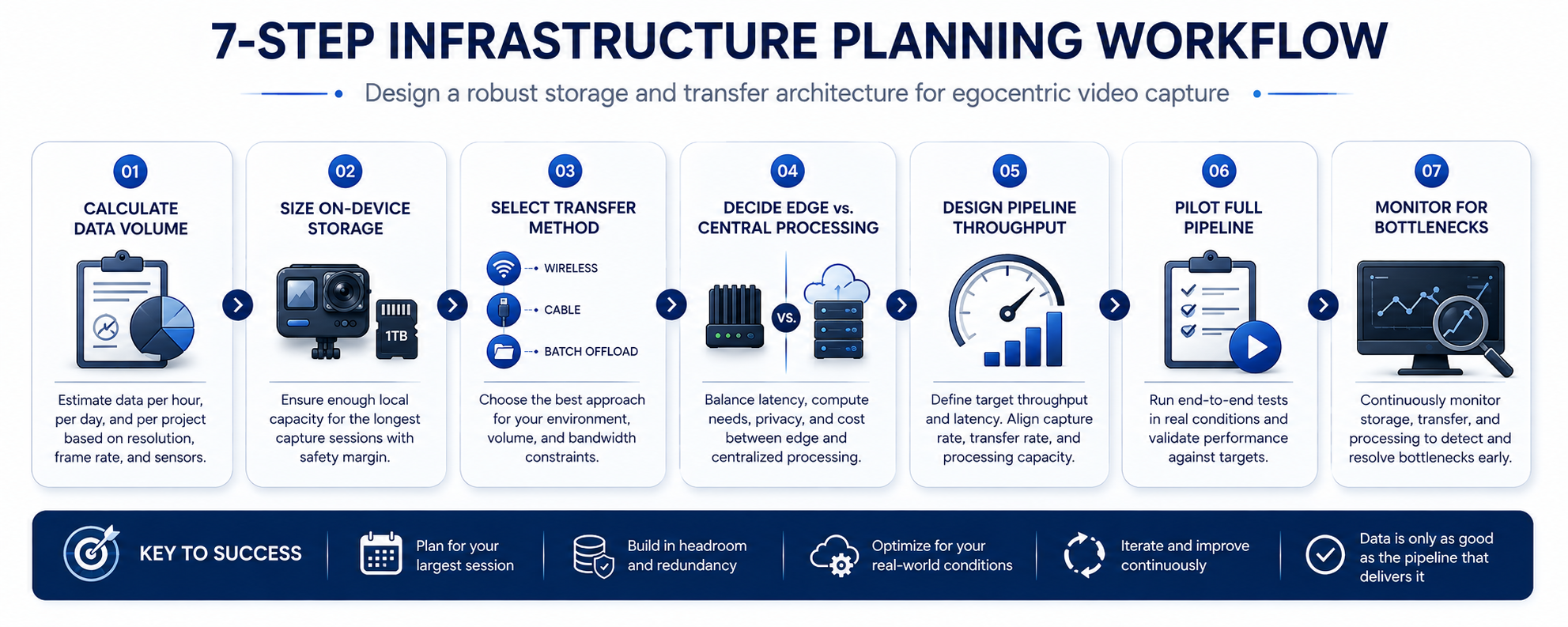
Diagram of the data pipeline from egocentric capture to usable centralized storage

Step-by-Step Workflow

Flowchart for planning storage and transfer architecture for egocentric video capture
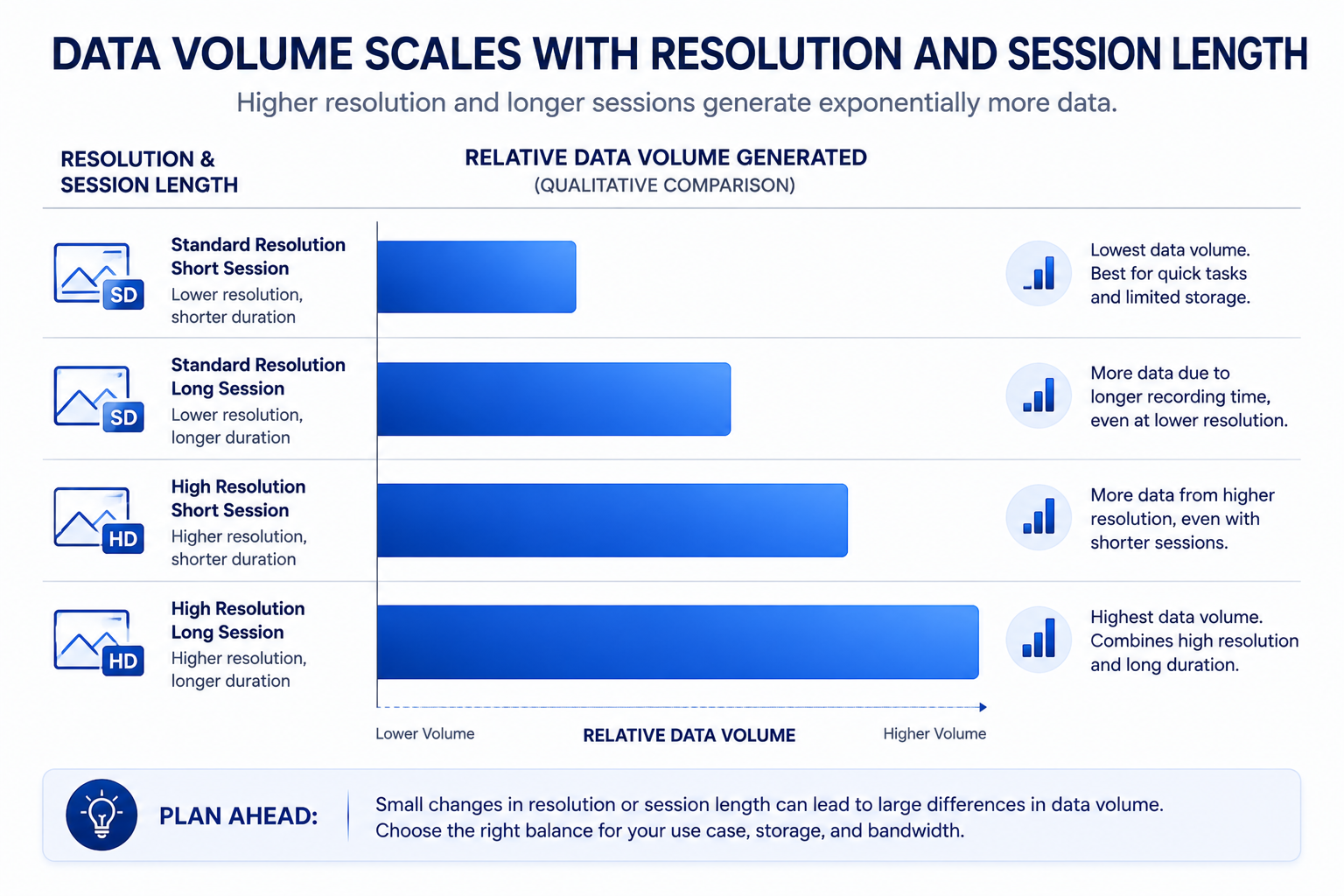
  • Calculate actual data volume based on planned resolution, frame rate, and session length. Establish realistic storage and transfer requirements before selecting infrastructure.
Bar chart showing egocentric video data volume by resolution and session length
  • Match on-device storage capacity to planned session length with margin. Avoid running right at capacity limits, which risks mid-session data loss.
  • Select a transfer method matched to actual data volume and available bandwidth. Confirm the chosen approach can realistically move the volume of data your protocol will generate.
  • Decide what processing happens at the edge versus centrally. Balance on-device processing constraints against the efficiency gains of handling certain tasks before transfer.
  • Design pipeline throughput to match collection pace. Confirm the path from capture to usable storage can keep up with actual data generation, not just handle occasional bursts.
  • Pilot the full storage and transfer pipeline before scaling collection. Confirm the infrastructure actually performs as expected under realistic data volume before committing to full-scale collection.
  • Monitor for bottlenecks as collection scales. Watch specifically for storage or transfer delays that emerge only once volume grows beyond pilot-scale levels.

Industry Use Cases

  • Computer vision / robotics: Large-scale demonstration or activity-recognition collection efforts generate substantial continuous video volume requiring deliberate storage and transfer planning.
  • Healthcare AI: Clinical or surgical egocentric capture often requires particularly reliable transfer infrastructure given the limited opportunity to recollect procedural footage if data is lost.
  • Manufacturing AI: Continuous process monitoring capture generates high-volume, ongoing video requiring infrastructure designed for sustained, not just burst, data flow.
  • Government & defense: Storage and transfer architecture in this sector often layers security and access control requirements on top of standard capacity and bandwidth planning.
  • Retail AI: In-store egocentric collection at scale requires storage and transfer planning matched to the volume typical large retail operations generate across many locations.
  • Autonomous vehicles: This specific wearable infrastructure context has more limited direct application, since vehicle-based data infrastructure follows a different set of architectural considerations.

Benefits

  • Reduced risk of data loss during collection. Adequate storage capacity planning with margin avoids mid-session gaps caused by devices reaching capacity limits.
  • Faster data availability for annotation and training. Well-designed transfer and pipeline architecture gets captured data into usable form more quickly than an ad hoc approach.
  • More predictable collection timelines. Understanding actual infrastructure throughput supports realistic project planning rather than assuming data movement will simply keep pace.
  • Efficient use of edge processing capability. Deliberate decisions about what happens on-device versus centrally can reduce unnecessary data volume moving through the pipeline.
  • Scalable infrastructure that holds up beyond pilot volume. Architecture designed with realistic volume in mind avoids the disruptive bottleneck of discovering infrastructure limits mid-project.

Common Mistakes

  • Underestimating actual data volume from resolution and frame rate choices. Not calculating realistic storage and transfer requirements before committing to a hardware and protocol combination.
  • Sizing on-device storage too close to actual session length. Leaving no margin for storage capacity, risking mid-session data loss if a session runs longer than planned.
  • Choosing a transfer method without confirming it handles actual volume. Assuming a transfer approach that worked for a small pilot will scale to full collection volume without verification.
  • Not deciding deliberately what processing happens at the edge. Missing opportunities to reduce data volume through on-device processing, or overloading device capability with more processing than it can handle.
  • Designing pipeline throughput for average rather than peak volume. Building infrastructure that handles typical data flow but bottlenecks during periods of higher collection activity.
  • Not piloting the full storage and transfer pipeline before scaling. Discovering infrastructure limitations only once a large-scale collection effort is already underway.

Best Practices

  • Calculate realistic data volume based on actual resolution, frame rate, and session length before selecting storage and transfer infrastructure.
  • Size on-device storage with meaningful margin beyond planned session length, not right at the calculated minimum.
  • Confirm transfer methods can handle actual full-scale data volume, not just pilot-scale volume.
  • Make deliberate decisions about edge versus centralized processing based on device capability and pipeline efficiency needs.
  • Design pipeline throughput for peak, not just average, collection volume.
  • Pilot the complete storage and transfer pipeline under realistic conditions before committing to full-scale collection.

FAQ

What does egocentric video data storage planning actually involve?

Matching on-device storage capacity to planned session length and resolution, selecting a transfer method suited to actual data volume, and designing pipeline throughput that keeps pace with collection activity.

Why does on-device storage need margin beyond the calculated session length?

Because sessions can run longer than planned, and storage capacity sized right at the calculated minimum risks running out mid-session, creating unusable gaps in the recording.

How do you choose a transfer method for a wearable camera data pipeline?

By matching the method — direct transfer, wireless upload, or batch offload — to actual data volume and available bandwidth, confirmed at full collection scale, not just pilot volume.

What is edge processing in the context of egocentric video infrastructure?

Handling certain tasks like compression or basic quality checks directly on the capture device before transfer, which can reduce data volume moving through the pipeline but requires balancing against device processing constraints.

How can continuous capture data transfer bottlenecks be avoided at scale?

By designing pipeline throughput for peak collection volume rather than just average conditions, and by piloting the full storage and transfer architecture under realistic conditions before scaling.

Should storage and transfer infrastructure be piloted before full-scale collection?

Yes. A pilot under realistic data volume confirms the infrastructure actually performs as expected, catching bottlenecks or capacity issues before they disrupt a full-scale collection effort.

What happens if first-person video infrastructure isn't designed to scale?

Data can be lost due to storage capacity limits, or transfer and processing delays can create a growing backlog that leaves collected footage unavailable for annotation and training far longer than planned.

Conclusion

Egocentric video data storage and transfer architecture is infrastructure engineering that deserves the same deliberate planning as hardware selection or protocol design, not an afterthought addressed once those decisions are settled. Matching storage capacity to real session needs, choosing transfer methods that hold up at actual data volume, and designing pipeline throughput for peak collection activity is what prevents an otherwise well-planned egocentric collection effort from bottlenecking on the practical mechanics of moving and storing its own data.

🚀 Your All‑In‑One Virtual Experience Stack
🎬
PhotoAIVideo
Turn photos into scroll‑stopping AI videos.
Get Started →
🏡
Pictastic
Instantly stage listings with AI.
Try Staging →
🌀
CloudPano
Create stunning 360° tours in minutes.
Launch Tour →
💰
VirtualTourProfit
Build a profitable virtual tour business.
Learn More →
🤝
CloudPano Reseller
Resell AI visual software without building it.
Become a Reseller →
🚗
Auto CloudPano
Sell more vehicles with 360° experiences.
Explore Auto →
🏗️
AI Floor Plan Builder
Generate detailed floor plans with AI.
Build Now →
📐
3D Measure
Capture accurate floor plans & 3D measurements.
Measure Now →
🧠
AI Training Data
Custom AI training data services.
Learn More →
Share this post
Cloudpano

Choose The Right 360° Camera

Insta360 ONE RS 1-Inch 360 Edition

  • Compact, ready to go anywhere

  • Interchangeable lens that’s upgradeable

  • Dual 1-inch sensors for improved clarity and low light performance

  • Dynamic range and 6K 360° capture

  • 360° photo resolution at 21MP

Learn More

Insta360 X4

  • 8K 360° video recording for ultra-detailed visuals.

  • 4K single-lens mode for traditional wide-angle shots.

  • Invisible selfie stick effect for drone-like perspectives.

  • 2.5-inch touchscreen with Gorilla Glass protection.

  • Waterproof up to 33ft for underwater shooting.

Learn More

Ricoh Theta Z1

  • 360° photo resolution in 23MP

  • Slim design at 24 mm thick

  • Built-in image stabilization for smooth video capture.

  • Internal 19GB storage for photo and video storage.

  • Wireless connectivity for remote control and sharing.

Learn More

Ricoh Theta X

  • 60MP 360° still images for high-resolution photography.

  • 5.7K 360° video recording at 30fps.

  • 2.25-inch touchscreen for intuitive control.

  • USB Type-C port for fast charging and data transfer.

  • MicroSD card slot for expandable storage.

Learn More
Property Marketing
Allows potential buyers to explore properties in detail from anywhere, enhancing the real estate marketing process.
Automotive Spins
Create an interactive virtual showroom and engage affluent digital buyers with live 360º video calls, all through the CloudPano mobile app for a complete automotive sales solution.
Interactive Floor Plans
Create 2D and 3D floor plans with measurements in 4 minutes or less, all from your phone. Download the Floor Plan Scanner app and get your first scan free.

360 Virtual Tours With CloudPano.com. Get Started Today.

Try it free. No credit card required. Instant set-up.
Try it free
Latest posts

See our other posts

Interviews, tips, guides, industry best practices, and news.

Capture Protocol Differences: Activity Recognition vs. Manipulation Datasets

Egocentric capture protocol design should differ meaningfully depending on target use case: activity recognition prioritizes broad activity and scene diversity, while manipulation datasets prioritize close-range hand-object interaction detail and precise framing. Applying one use case's protocol assumptions to the other typically produces data that's mismatched to what the model actually needs.
Read post

Lighting and Environmental Conditions in Egocentric Video Collection

Egocentric capture environmental conditions create quality challenges general video collection guidance doesn't fully address — rapid lighting transitions, exposure mismatches between indoor and outdoor scenes, and motion blur in low light. Managing these requires real-time quality monitoring during capture, not just planning for environmental variety in advance.
Read post

Storage and Transfer Architecture for Continuous Egocentric Capture

Egocentric video data storage planning requires matching on-device capacity to actual session length, designing a transfer pipeline that can handle continuous high-volume video without bottlenecking, and deciding what processing happens at the edge versus after transfer. Underestimating any of these creates gaps or delays that compromise an otherwise well-designed collection effort.
Read post