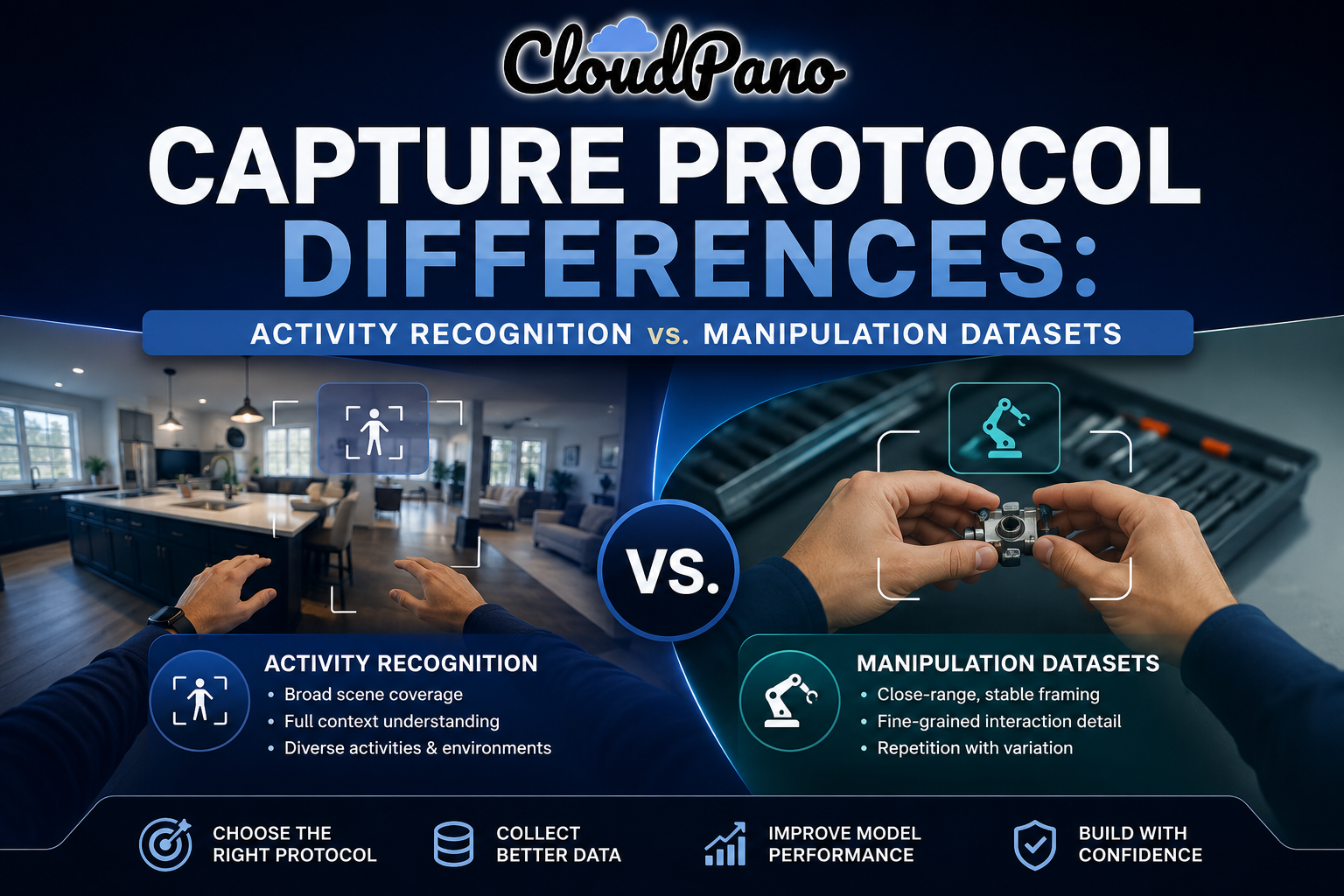
Capture Protocol Differences: Activity Recognition vs. Manipulation Datasets

Cloudpano
August 2, 2026
5 min read
Share this post

Capture Protocol Differences: Activity Recognition vs. Manipulation Datasets

A protocol built to teach a model what kind of activity is happening in a scene and a protocol built to teach a robot exactly how to grasp an object are not the same protocol wearing different labels. Egocentric capture protocol design needs to diverge meaningfully depending on which of these use cases a project is actually targeting, since the specific detail each one needs from footage is genuinely different.

Activity Recognition Data Collection prioritizes breadth — enough activity types, scene variety, and situational diversity for a model to learn to distinguish between different kinds of behavior. Manipulation Dataset Capture prioritizes depth on a much narrower slice of activity — precise hand-object interaction detail that a broad activity-recognition protocol was never designed to capture.

Why It Matters

Applying an activity-recognition protocol to a manipulation dataset effort, or vice versa, doesn't fail obviously during collection — it produces footage that looks reasonable but is missing exactly the detail the actual target use case needs, discovered only once annotation or training reveals the mismatch. Google Research's "Data Cascades" study documented how such gaps introduced early in a data pipeline compound into larger, harder-to-diagnose problems as a project progresses (Sambasivan et al., Google Research), and a protocol mismatched to its actual use case is exactly this kind of foundational error.

NIST's AI Risk Management Framework treats data fitness for the intended task as foundational to trustworthy AI, directly relevant to First-Person Capture Use Case Design needing to be built around the actual target application from the start, not adapted from a generic template (NIST AI RMF).

The stakes rise given how differently these two use cases have developed as distinct research and application areas. Stanford HAI's AI Index has tracked growing, increasingly specialized interest in both activity recognition and manipulation learning as separate strands of computer vision and robotics research (Stanford HAI, AI Index Report), and a protocol that doesn't reflect this specialization risks producing data that satisfies neither use case particularly well.

How It Works

Egocentric capture protocol design diverges across a few specific dimensions depending on target use case.
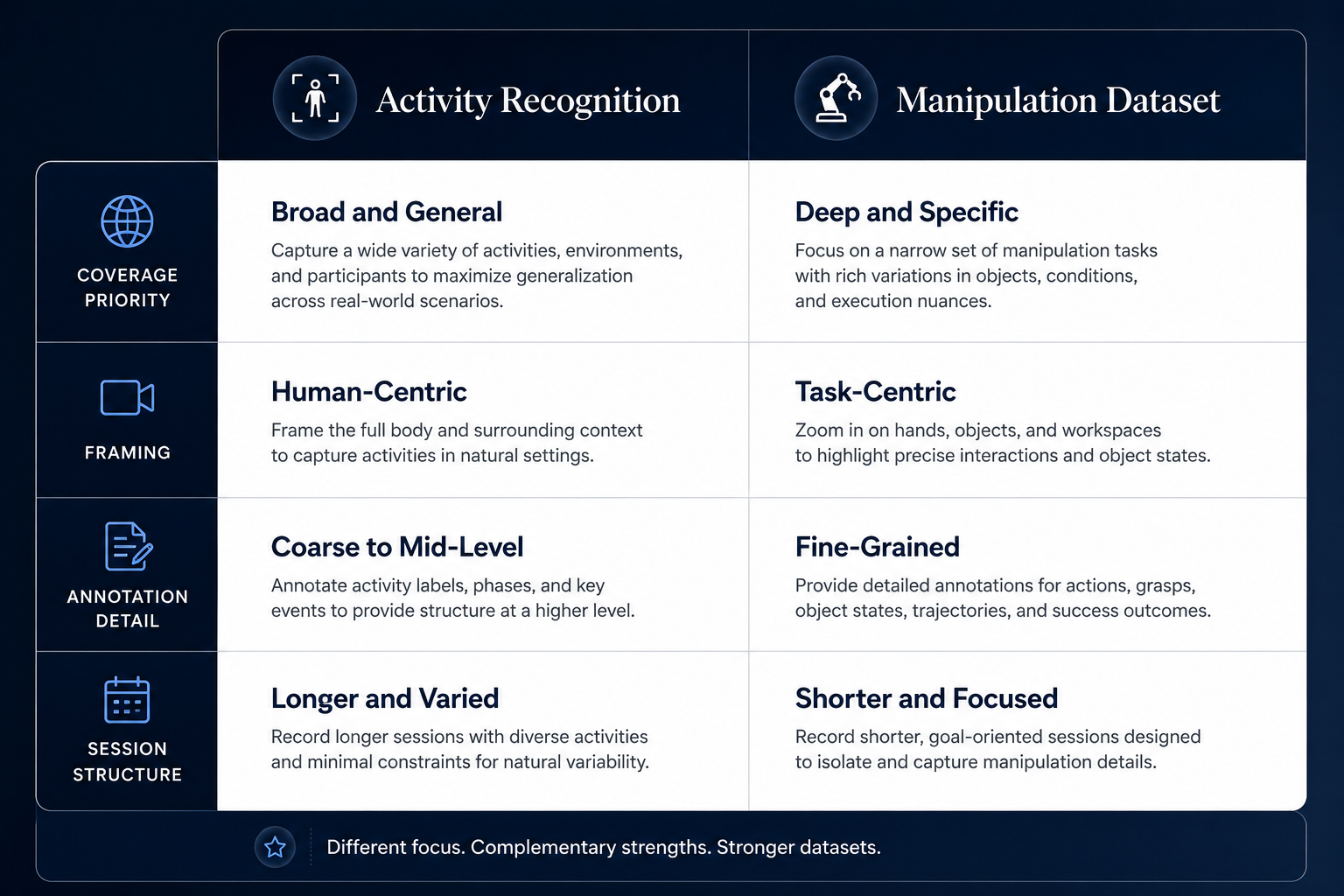
Comparison table of activity recognition vs manipulation dataset capture protocol priorities

Activity and scene diversity versus interaction depth. Activity recognition protocols prioritize covering many different activity types and scenes; manipulation protocols prioritize deep, repeated coverage of a narrower set of specific object interactions.

Framing priorities. Activity recognition benefits from framing that captures broader scene context to help distinguish activity type; manipulation datasets need close, stable framing on hands and objects, often at the expense of broader scene visibility.
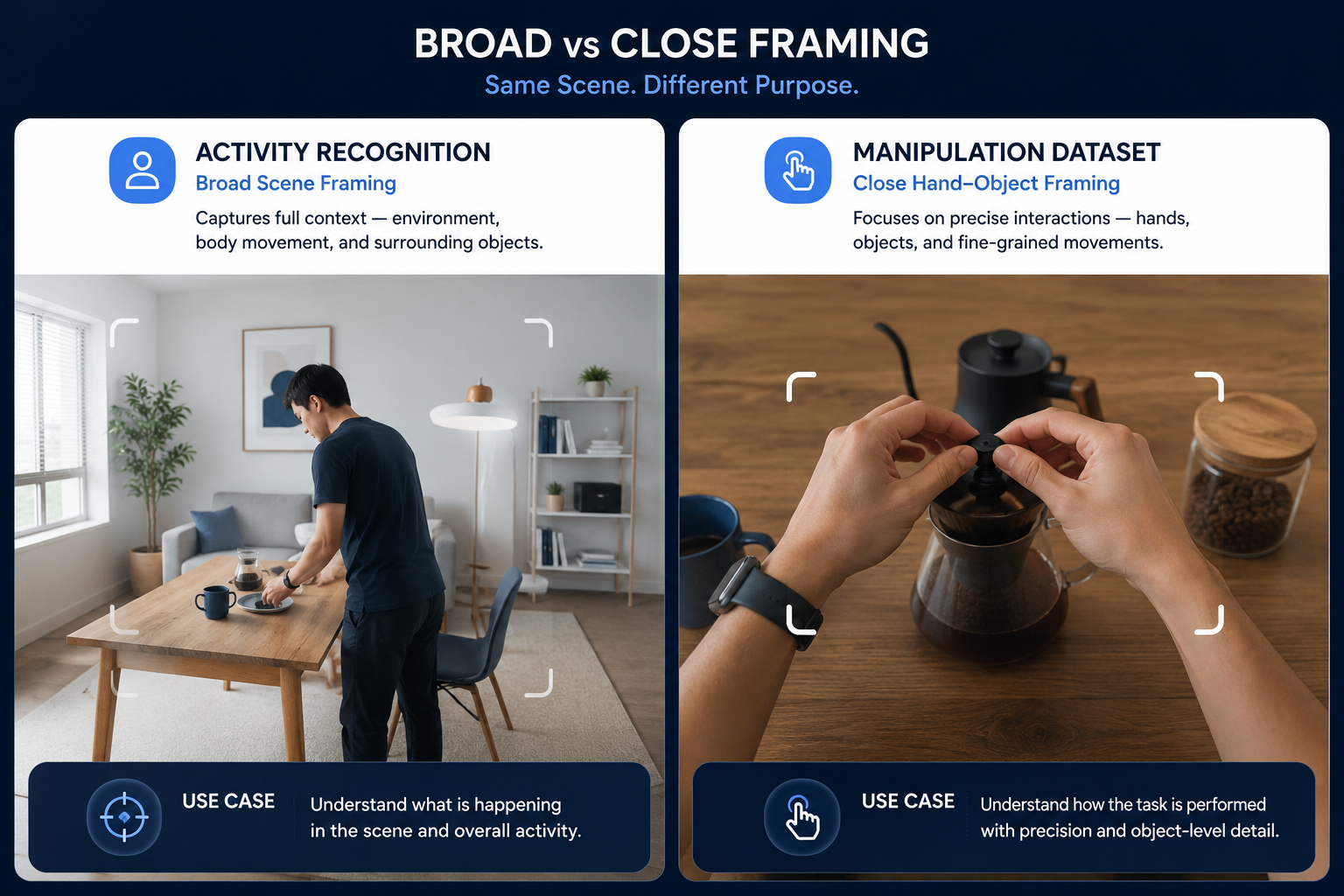
Illustration comparing broad scene framing and close manipulation framing in egocentric capture

Interaction annotation detail requirements. Manipulation datasets typically require far more granular interaction detail — grip type, contact point, object state — than activity recognition, which usually only needs activity-level labeling.

Session structure and repetition. Activity recognition protocols often favor varied, non-repeated activities across sessions; manipulation protocols frequently benefit from repeated variations of the same core interaction to build robust, generalizable grasp or manipulation data.
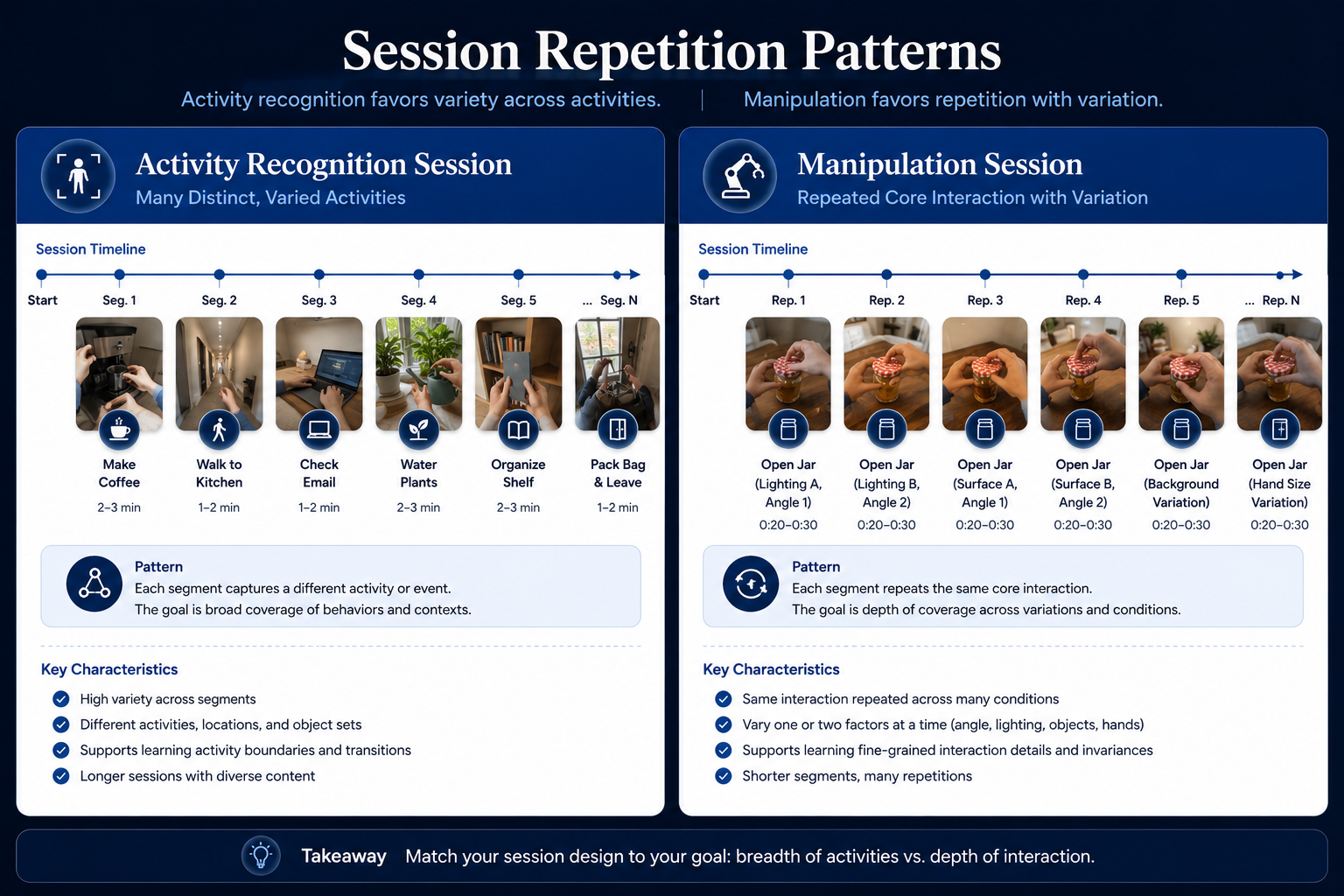
Illustration comparing session repetition patterns for activity recognition and manipulation capture

Understanding how these workflows operate as genuinely distinct protocol design problems — not a single generic egocentric capture template — is what determines whether a collection effort actually produces data matched to its specific target use case.

Step-by-Step Workflow

Flowchart for choosing between activity recognition and manipulation capture protocol design
  1. Identify which use case your project actually targets. Confirm whether the goal is activity recognition, manipulation learning, or genuinely both, since this determines the entire protocol approach.
  2. For activity recognition, prioritize activity and scene diversity in the capture plan. Script a broad range of distinct activities and environments rather than deep repetition of a narrow set.
  3. For manipulation datasets, prioritize close-range interaction coverage. Script repeated variations of core object interactions with attention to hand positioning and contact detail.
  4. Set framing requirements matched to the specific use case. Broader scene framing for activity recognition, close and stable framing for manipulation.
  5. Define interaction annotation requirements appropriate to the use case. Plan for activity-level labeling for recognition tasks, granular interaction detail for manipulation tasks.
  6. Structure session repetition according to use case needs. Vary activities broadly for recognition protocols; repeat core interactions with controlled variation for manipulation protocols.
  7. Validate the captured protocol against the actual target task before scaling. Confirm the specific detail and coverage genuinely support the intended use case, not just that footage looks generally usable.

Industry Use Cases

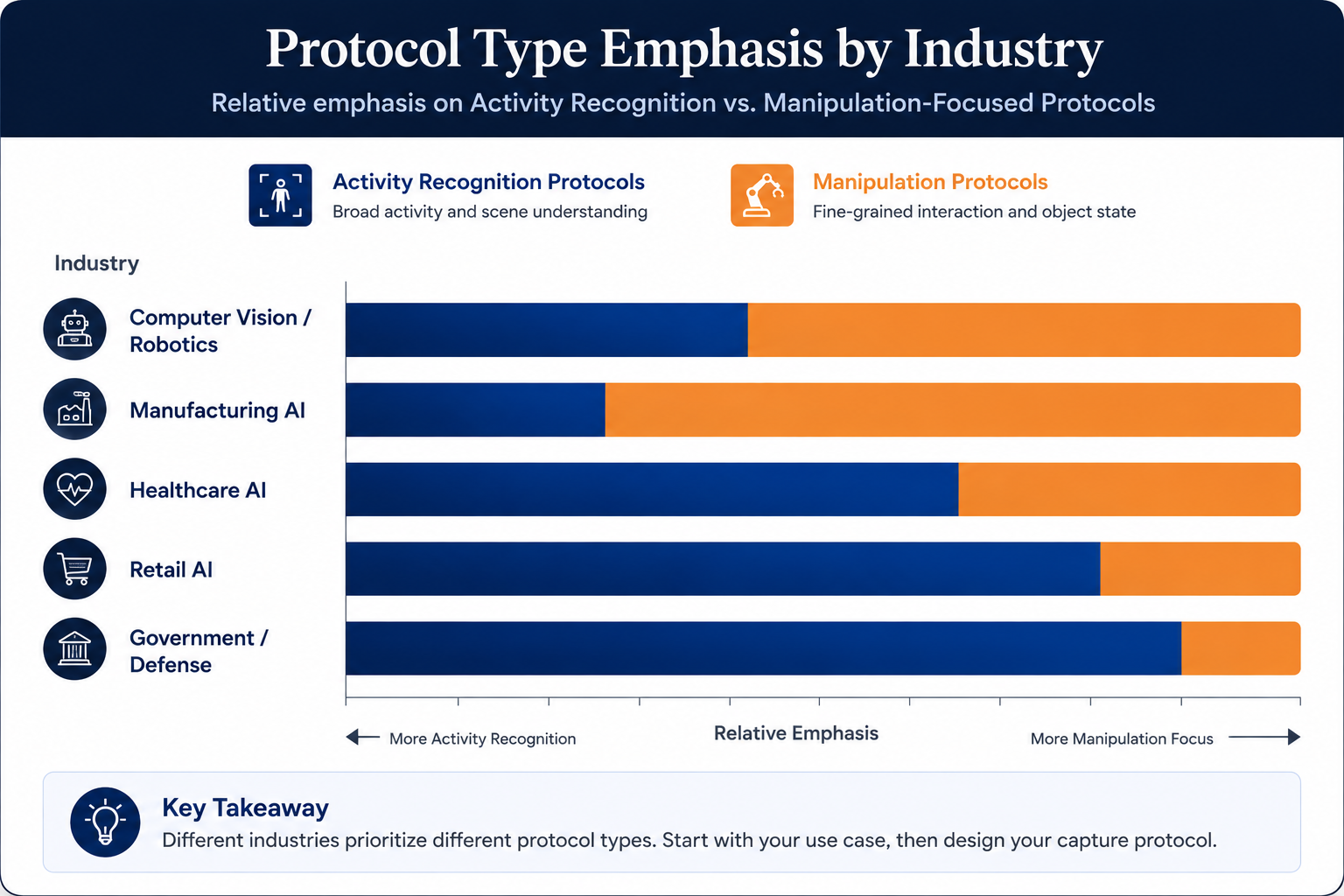
Bar chart showing emphasis on activity recognition vs manipulation protocols by industry
  • Computer vision / robotics: Both use cases are directly relevant here, often within the same organization pursuing different specific projects requiring genuinely different protocol approaches.
  • Manufacturing AI: Manipulation-focused protocols support assembly and handling task learning, while activity-recognition protocols support broader process or safety monitoring applications.
  • Healthcare AI: Manipulation dataset capture supports surgical or procedural skill learning, while activity recognition supports broader clinical workflow or patient monitoring applications.
  • Retail AI: Activity recognition protocols are more commonly relevant here, supporting understanding of general in-store behavior patterns rather than precise manipulation tasks.
  • Government & defense: Both use cases can apply depending on the specific application, from general activity monitoring to precise equipment handling training.
  • Autonomous vehicles: Neither of these specific egocentric protocol distinctions has significant direct application, since vehicle data collection follows different protocol considerations entirely.

Benefits

  • Data genuinely matched to the target use case. Designing protocol around the specific priorities of activity recognition or manipulation learning produces footage that actually supports the intended model task.
  • More efficient use of collection effort. Avoiding a generic, one-size-fits-all approach means collection time is spent on the detail and coverage the actual use case needs, not wasted on the wrong priorities.
  • Better downstream annotation planning. Clear understanding of use-case-specific requirements supports more accurate annotation scoping for the resulting dataset.
  • Reduced risk of late-discovered protocol mismatch. Designing deliberately for the specific use case from the start avoids discovering only during annotation or training that the captured data lacks needed detail.
  • Clearer basis for combined-use-case projects. Understanding the genuine differences between these protocols supports more deliberate design when a project genuinely needs elements of both.

Common Mistakes

  • Applying a single generic protocol regardless of target use case. Missing that activity recognition and manipulation datasets have genuinely different priorities that a one-size-fits-all approach doesn't serve well.
  • Prioritizing broad scene diversity for a manipulation-focused project. Capturing wide activity and scene variety when the actual need is deep, close-range interaction detail on a narrower set of tasks.
  • Prioritizing narrow interaction depth for an activity-recognition project. Focusing collection effort on repeated close-range interaction detail when the actual need is broad activity and scene coverage.
  • Not defining framing requirements specific to the use case. Using the same broad or close framing approach regardless of whether the target task actually needs scene context or interaction precision.
  • Applying the wrong annotation detail assumption during protocol design. Planning for activity-level labeling when the target task actually needs granular interaction detail, or vice versa.
  • Not validating the protocol against the actual target task before scaling. Assuming a protocol design is correct without confirming it produces data with the specific detail the use case genuinely requires.

Best Practices

  • Identify the specific target use case — activity recognition, manipulation, or both — before designing a capture protocol.
  • Prioritize activity and scene diversity for recognition tasks, and close-range interaction depth for manipulation tasks.
  • Set framing requirements explicitly matched to the specific use case's priorities.
  • Define interaction annotation detail expectations appropriate to the target task during protocol design, not after collection.
  • Structure session repetition according to use case needs — broad variety for recognition, controlled repetition for manipulation.
  • Validate the protocol against the actual target task on a small pilot before committing to full-scale collection.

FAQ

How does capture protocol design differ between activity recognition and manipulation datasets?

Activity recognition prioritizes broad activity and scene diversity with wider framing, while manipulation datasets prioritize close-range hand-object interaction detail with narrower, more stable framing and often more granular interaction annotation.

What does activity recognition data collection typically prioritize?

Coverage of many distinct activity types and environments, since the goal is helping a model distinguish between different kinds of behavior across varied situations.

What does manipulation dataset capture typically prioritize?

Deep, repeated coverage of specific object interactions with precise hand positioning and contact detail, since the goal is teaching a model or robot exactly how to perform a physical interaction.

Can a single capture protocol serve both activity recognition and manipulation use cases?

It's possible with deliberate design, but generally requires explicitly addressing both priorities rather than assuming a protocol optimized for one use case will naturally serve the other well.

Why does framing priority differ between these two use cases?

Because activity recognition benefits from scene context that helps distinguish activity type, while manipulation datasets need close, stable framing on hands and objects, often at the expense of broader scene visibility.

How does session repetition differ between activity recognition and manipulation protocols?

Activity recognition protocols typically favor varied, non-repeated activities to build broad coverage, while manipulation protocols often benefit from repeated variations of the same core interaction to build robust, generalizable data.

Should a capture protocol be validated against the specific target use case before scaling collection?

Yes. Piloting the protocol and confirming it produces the specific detail and coverage the actual target task requires helps avoid discovering a mismatch only after a full-scale collection effort has concluded.

Conclusion

Egocentric capture protocol design genuinely needs to differ between activity recognition and manipulation dataset use cases, since these two targets prioritize fundamentally different things — breadth of activity and scene coverage versus depth of close-range interaction detail. Treating one generic protocol as suitable for both is a common way collection efforts end up with data that looks reasonable but doesn't actually serve the specific model task it was meant to support.

🚀 Your All‑In‑One Virtual Experience Stack
🎬
PhotoAIVideo
Turn photos into scroll‑stopping AI videos.
Get Started →
🏡
Pictastic
Instantly stage listings with AI.
Try Staging →
🌀
CloudPano
Create stunning 360° tours in minutes.
Launch Tour →
💰
VirtualTourProfit
Build a profitable virtual tour business.
Learn More →
🤝
CloudPano Reseller
Resell AI visual software without building it.
Become a Reseller →
🚗
Auto CloudPano
Sell more vehicles with 360° experiences.
Explore Auto →
🏗️
AI Floor Plan Builder
Generate detailed floor plans with AI.
Build Now →
📐
3D Measure
Capture accurate floor plans & 3D measurements.
Measure Now →
🧠
AI Training Data
Custom AI training data services.
Learn More →

Activity Recognition Data Collection

Share this post
Cloudpano

Choose The Right 360° Camera

Insta360 ONE RS 1-Inch 360 Edition

  • Compact, ready to go anywhere

  • Interchangeable lens that’s upgradeable

  • Dual 1-inch sensors for improved clarity and low light performance

  • Dynamic range and 6K 360° capture

  • 360° photo resolution at 21MP

Learn More

Insta360 X4

  • 8K 360° video recording for ultra-detailed visuals.

  • 4K single-lens mode for traditional wide-angle shots.

  • Invisible selfie stick effect for drone-like perspectives.

  • 2.5-inch touchscreen with Gorilla Glass protection.

  • Waterproof up to 33ft for underwater shooting.

Learn More

Ricoh Theta Z1

  • 360° photo resolution in 23MP

  • Slim design at 24 mm thick

  • Built-in image stabilization for smooth video capture.

  • Internal 19GB storage for photo and video storage.

  • Wireless connectivity for remote control and sharing.

Learn More

Ricoh Theta X

  • 60MP 360° still images for high-resolution photography.

  • 5.7K 360° video recording at 30fps.

  • 2.25-inch touchscreen for intuitive control.

  • USB Type-C port for fast charging and data transfer.

  • MicroSD card slot for expandable storage.

Learn More
Property Marketing
Allows potential buyers to explore properties in detail from anywhere, enhancing the real estate marketing process.
Automotive Spins
Create an interactive virtual showroom and engage affluent digital buyers with live 360º video calls, all through the CloudPano mobile app for a complete automotive sales solution.
Interactive Floor Plans
Create 2D and 3D floor plans with measurements in 4 minutes or less, all from your phone. Download the Floor Plan Scanner app and get your first scan free.

360 Virtual Tours With CloudPano.com. Get Started Today.

Try it free. No credit card required. Instant set-up.
Try it free
Latest posts

See our other posts

Interviews, tips, guides, industry best practices, and news.

Capture Protocol Differences: Activity Recognition vs. Manipulation Datasets

Egocentric capture protocol design should differ meaningfully depending on target use case: activity recognition prioritizes broad activity and scene diversity, while manipulation datasets prioritize close-range hand-object interaction detail and precise framing. Applying one use case's protocol assumptions to the other typically produces data that's mismatched to what the model actually needs.
Read post

Lighting and Environmental Conditions in Egocentric Video Collection

Egocentric capture environmental conditions create quality challenges general video collection guidance doesn't fully address — rapid lighting transitions, exposure mismatches between indoor and outdoor scenes, and motion blur in low light. Managing these requires real-time quality monitoring during capture, not just planning for environmental variety in advance.
Read post

Storage and Transfer Architecture for Continuous Egocentric Capture

Egocentric video data storage planning requires matching on-device capacity to actual session length, designing a transfer pipeline that can handle continuous high-volume video without bottlenecking, and deciding what processing happens at the edge versus after transfer. Underestimating any of these creates gaps or delays that compromise an otherwise well-designed collection effort.
Read post