Data Annotation Types Explained: Image, Video, Text, Audio, and 3D Data
Cloudpano
July 18, 2026
•
5 min read
Share this post
Data Annotation Types Explained: Image, Video, Text, Audio, and 3D Data
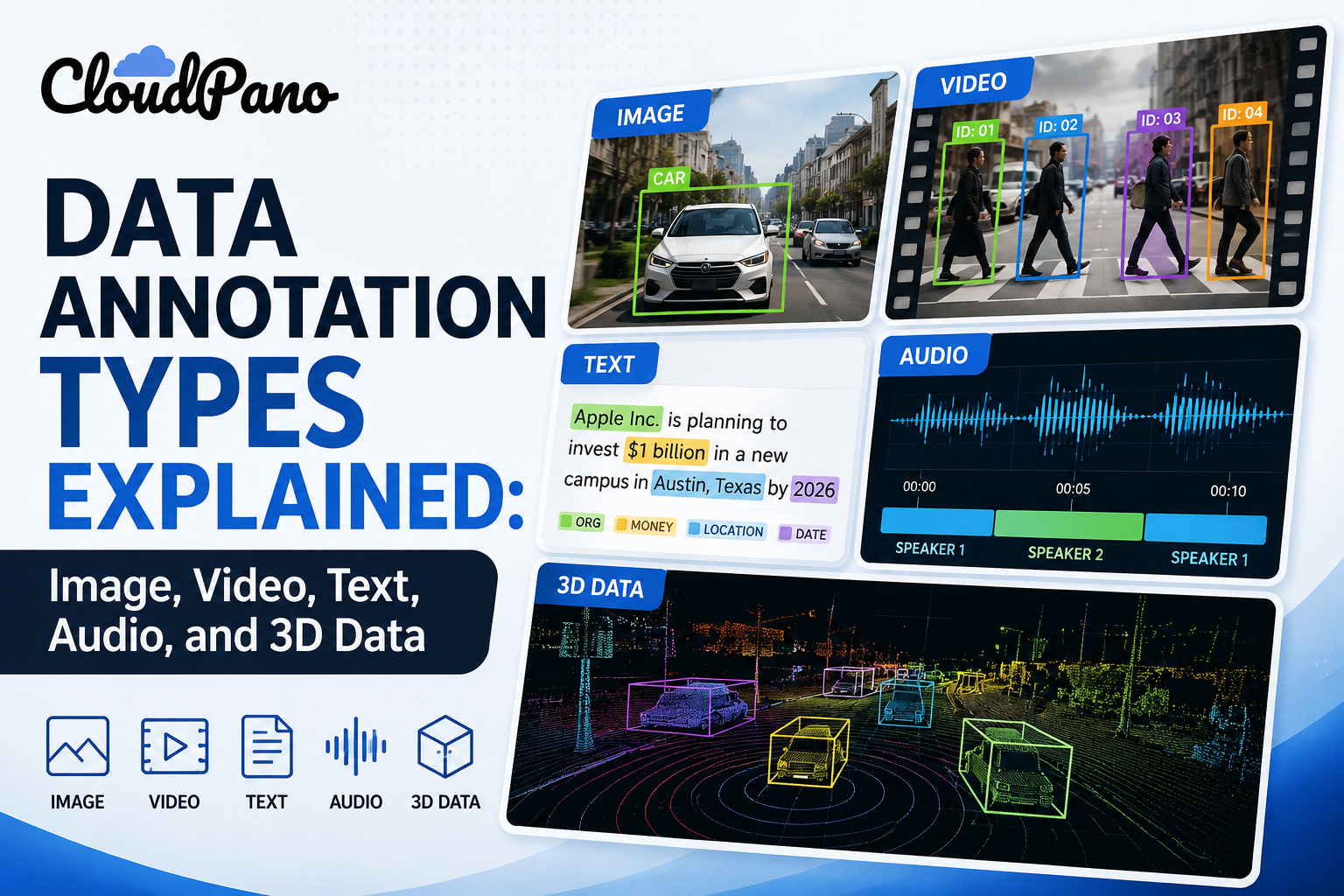
Ask someone to "annotate the data" and the answer depends entirely on what kind of data they're holding. Data annotation types differ so much by modality that a technique standard in computer vision — pixel-level segmentation, for instance — has almost no equivalent in text annotation, and vice versa.
This guide organizes annotation types the way a project actually gets scoped: by modality first, technique second. If you're building a model on image, video, text, audio, or 3D/sensor data, you can go straight to the section that matches your dataset.
Why It Matters
Choosing the wrong annotation technique for a modality doesn't just slow a project down — it can produce labels that don't actually capture what the model needs to learn. A bounding box tells a model where an object is, but not its exact shape; if a manufacturing defect-detection model needs precise boundaries, bounding boxes alone will underperform regardless of how consistently they're applied.
IEEE has published extensively on how label granularity affects model performance across modalities, generally finding that mismatched annotation techniques — using a coarser method than a task requires — is a recurring, avoidable source of model error. Getting data labeling techniques right for the modality at hand matters more than getting them perfectly consistent if the technique itself is the wrong fit.
This matters across every industry represented here, but the specific technique-to-task fit varies:
Computer vision teams need to match bounding box, polygon, or segmentation precision to their actual detection requirements
LLM developers need to distinguish between entity-level, sentiment-level, and preference-level text annotation
Robotics and autonomous vehicle teams often need annotation types (3D point cloud, keypoint) that don't exist in standard 2D image annotation toolkits
How It Works
Each modality supports a distinct set of annotation techniques, generally matched to what a model needs to detect or understand within that data type.
Image Annotation
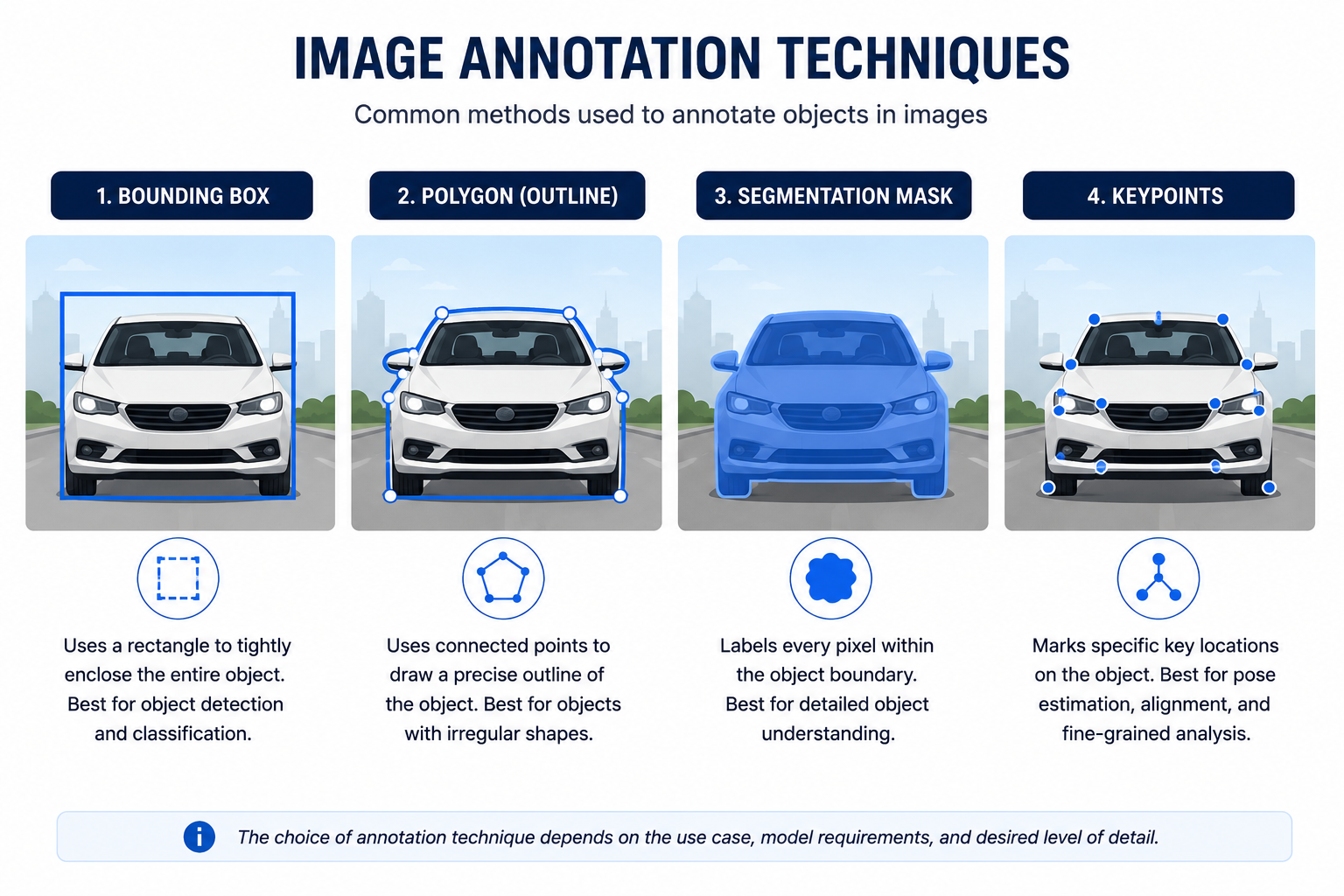
Image annotation is the most widely used category, covering:
Bounding boxes — rectangular regions marking object location, common in object detection
Polygon annotation — irregular shape outlines for objects that don't fit a rectangle well (produce packaging, agricultural imagery)
Semantic segmentation — pixel-level classification, used where exact boundaries matter (medical imaging, autonomous driving)
Keypoint/landmark annotation — specific points marked on a subject, used for pose estimation and facial analysis
Text Annotation
Text annotation supports a different set of techniques entirely:
Named entity recognition (NER) — tagging entities (names, dates, locations) within text
Sentiment and intent labeling — tagging emotional tone or user intent, common in chatbot and customer service AI training
Preference/comparison labeling — ranking or comparing model outputs, central to RLHF-style LLM fine-tuning
Part-of-speech and syntactic tagging — used in more traditional NLP pipelines, less common in modern LLM workflows but still relevant for certain tasks
Video, Audio, and 3D Annotation
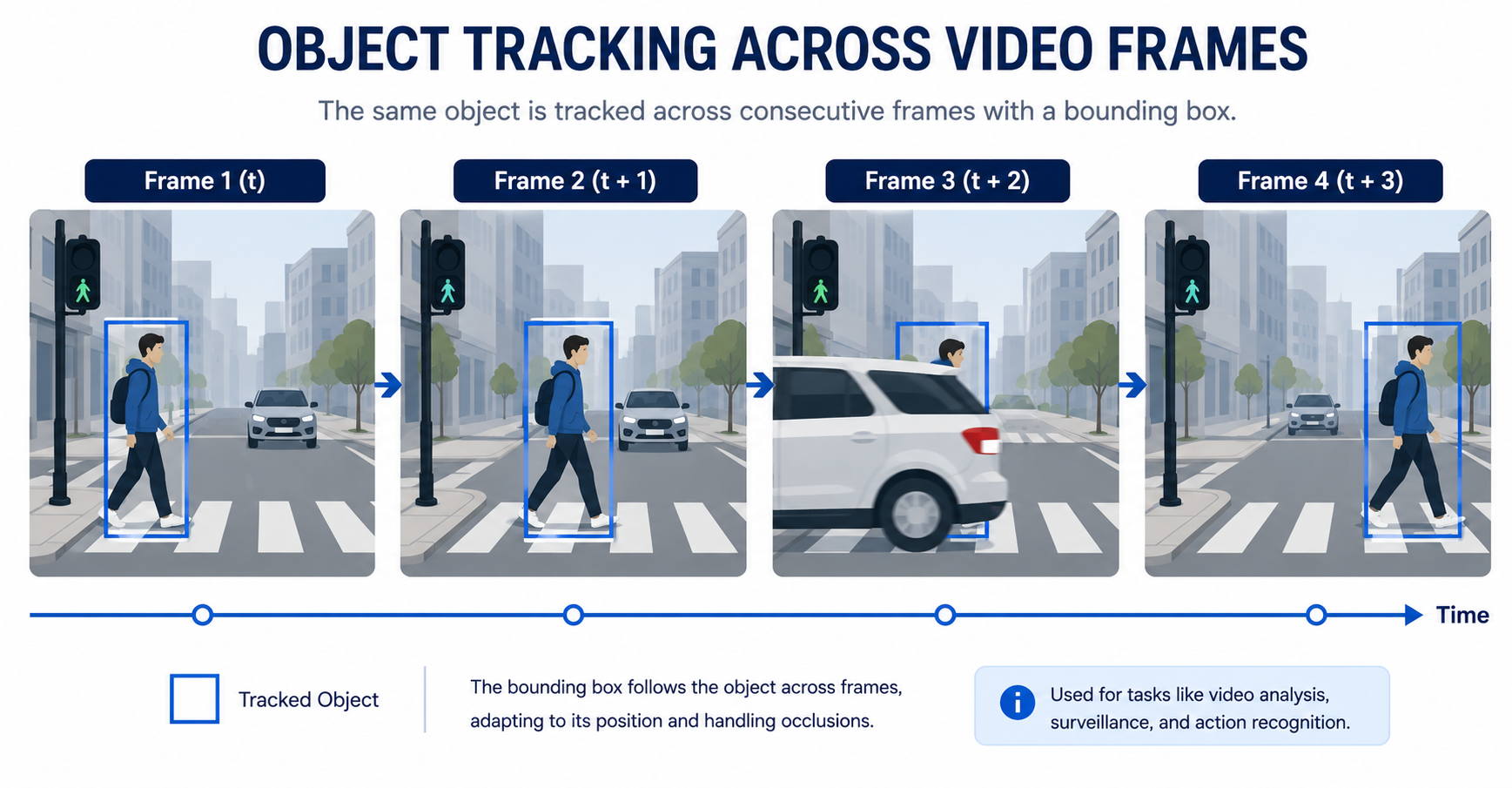
Video annotation — extends image techniques (bounding boxes, segmentation) across frames, adding object tracking as objects move or become occluded
Audio annotation — includes transcription, speaker diarization (identifying who spoke when), and event tagging (detecting specific sounds)
3D/sensor annotation — point cloud labeling for LiDAR and depth-sensor data, used heavily in robotics and autonomous vehicles where 2D bounding boxes can't capture spatial depth
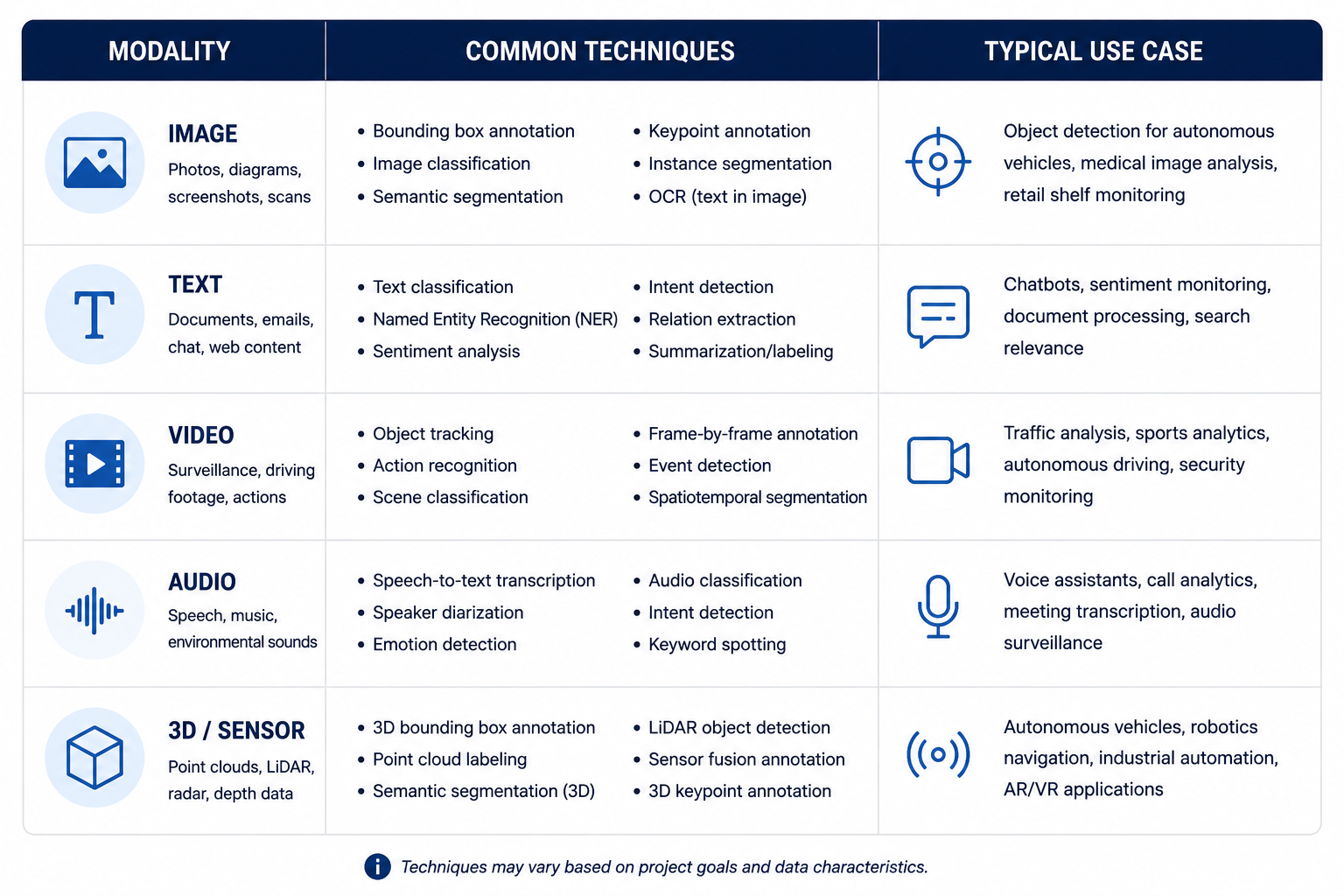
📊 Annotation Types by Modality
Reference
Common techniques and typical use cases for each data modality.
Modality
Common Techniques
Typical Use Case
🖼️ Image
Bounding box, polygon, segmentation, keypoint
Object detection, medical imaging, pose estimation
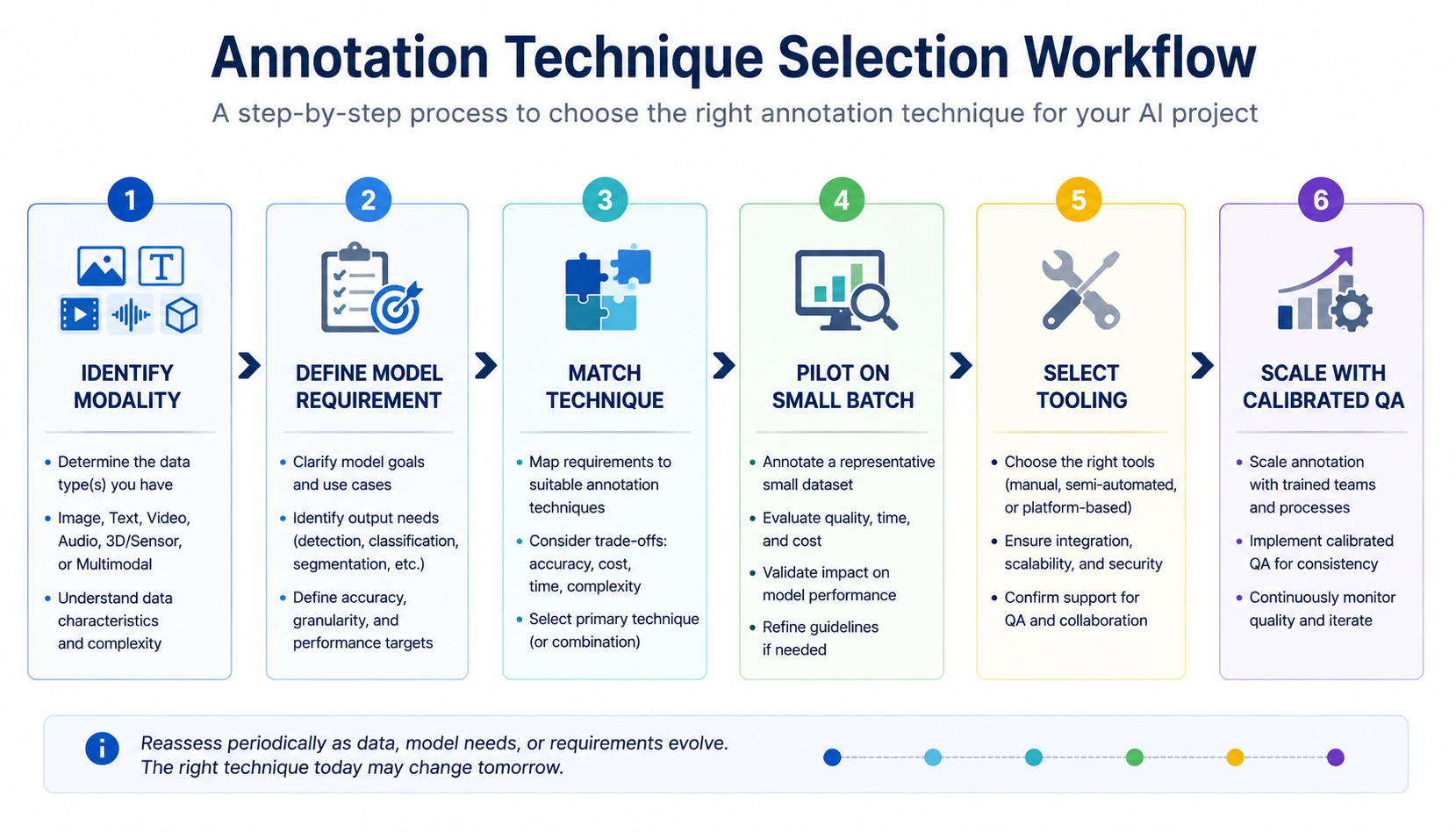
Regardless of modality, scoping an annotation project generally follows the same sequence:
Identify the data modality. Confirm whether the raw data is image, video, text, audio, or 3D/sensor — this determines which techniques are even available.
Define what the model needs to detect or understand. A model needing exact object boundaries requires segmentation, not bounding boxes; a model doing entity extraction needs NER, not sentiment tagging.
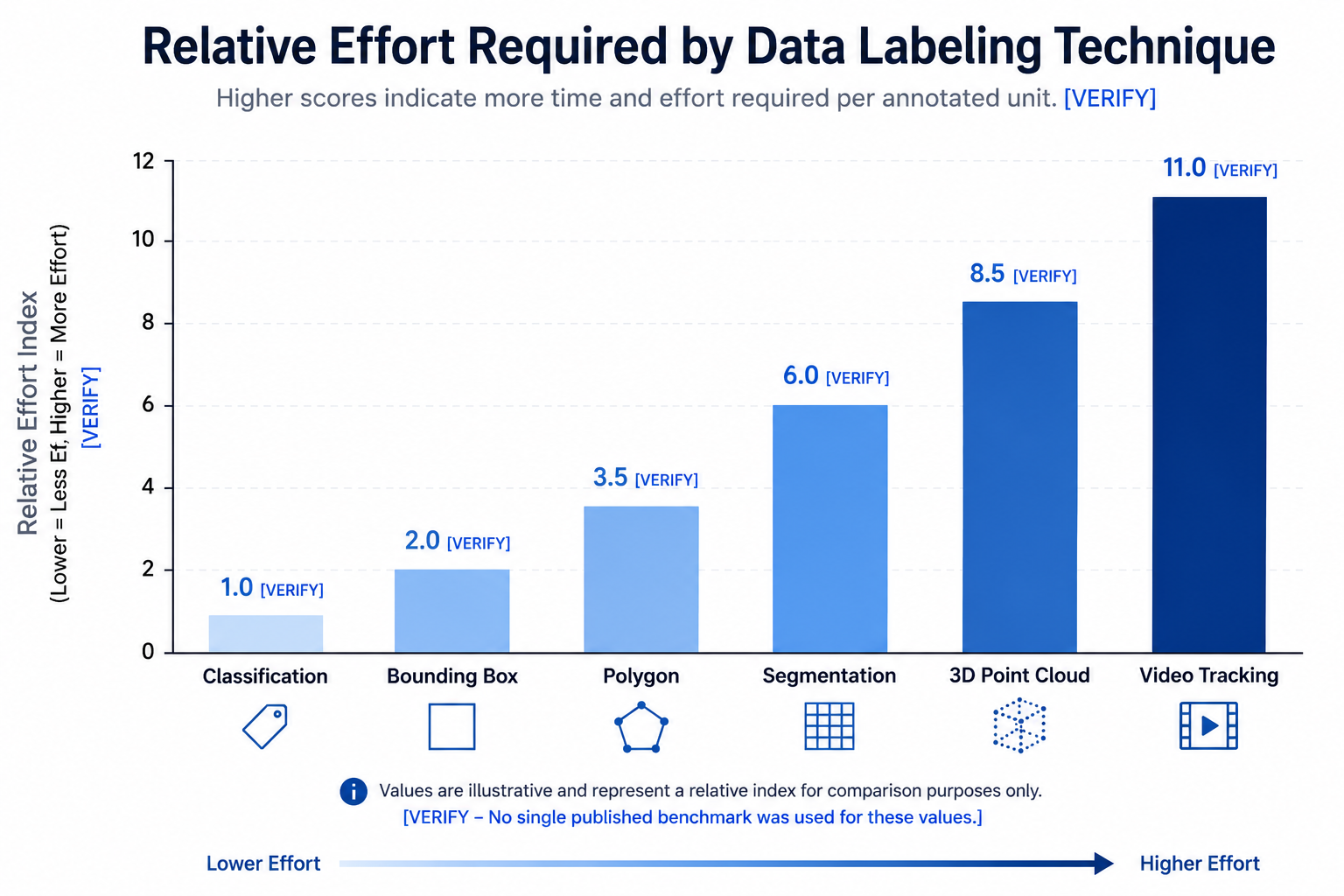
Match technique to requirement, not to what's easiest to implement. The lowest-effort technique for annotators isn't always the one that captures what the model actually needs.
Pilot the chosen technique on a small batch. Confirm the technique produces usable labels on your actual data before committing to full-scale annotation.
Select tooling built for that specific technique. A general-purpose tool may handle bounding boxes and classification well but lack precision drawing tools for segmentation or frame-tracking for video.
Scale annotation with QA calibrated to technique complexity. Pixel-level segmentation typically needs heavier QA than simple classification, regardless of modality.
Industry Use Cases
Computer vision teams: Rely heavily on image annotation — segmentation for precise boundary tasks, bounding boxes for faster object detection where exact shape matters less.
Autonomous vehicle companies: Combine 3D point cloud annotation with video object tracking to handle both spatial depth and motion across frames.
Robotics companies: Use keypoint and 3D annotation for manipulation and navigation tasks, often alongside video tracking for dynamic environments.
LLM developers: Depend on text annotation techniques — NER for structured extraction, preference labeling for alignment and fine-tuning work.
Healthcare AI: Uses semantic segmentation heavily for diagnostic imaging, where pixel-level precision affects clinical relevance.
Retail AI: Uses bounding box and classification-style image annotation for shelf audits and product recognition, generally without needing segmentation-level precision.
Government & defense: Uses geospatial and 3D annotation for satellite and sensor data, often layered with strict compliance documentation.
Hugging Face has documented how the growth of multimodal AI systems has increased demand for annotation across combined modalities (image plus text, video plus audio) rather than single-modality projects alone — a trend that's reshaping how annotation techniques get combined within a single project.
Benefits
Matching the right data labeling technique to the right modality delivers concrete advantages:
Higher model accuracy, since labels actually capture the granularity the model needs rather than approximating it
Lower rework risk, since choosing the correct technique upfront avoids re-annotating a dataset after discovering bounding boxes weren't precise enough
More efficient tooling investment, since technique-appropriate tools reduce annotator time compared to forcing a general-purpose tool to handle a specialized task
Clearer QA design, since QA rigor can be calibrated to technique complexity rather than applied uniformly across unrelated tasks
Common Mistakes
Defaulting to bounding boxes when segmentation is actually needed. Bounding boxes are faster to produce, but if a model needs to understand exact object shape, bounding boxes leave a gap segmentation would close.
Treating all text annotation as the same task. NER, sentiment labeling, and preference labeling require different annotator skills and different tooling — bundling them under one workflow often produces inconsistent results.
Using image annotation tools for video data. Frame-by-frame annotation without tracking support is slow and prone to inconsistency across frames — video-specific tooling with tracking support solves this directly.
Underestimating audio annotation complexity. Transcription is often treated as a simple task, but diarization and event tagging require more specialized annotator training than teams initially budget for.
Assuming 3D annotation tools are interchangeable with 2D tools. Point cloud labeling requires spatial reasoning and tooling that standard 2D bounding-box tools don't support.
Best Practices
Identify the data modality and the model's actual detection requirement before selecting an annotation technique
Match tooling to technique — don't force a general-purpose image tool to handle video tracking or 3D point clouds
Treat different text annotation techniques (NER, sentiment, preference labeling) as distinct workflows requiring distinct annotator training
Pilot the chosen technique on a small batch before scaling, regardless of modality
Calibrate QA rigor to technique complexity — segmentation and 3D annotation typically need heavier review than simple classification
MIT research on computer vision annotation techniques has noted that annotation granularity mismatches — using a technique coarser than a task requires — remain a common, correctable source of downstream model error, reinforcing that technique selection deserves as much attention as annotator training quality.
FAQ
What's the difference between image annotation and video annotation?
Video annotation extends image annotation techniques across multiple frames and adds object tracking, since objects can move, become occluded, or re-enter the frame — image annotation techniques alone don't handle that continuity.
Do I need segmentation, or will bounding boxes work for my project?
This depends on what your model needs to understand. If exact object shape or boundary matters (medical imaging, defect detection), segmentation is usually necessary. If approximate location is sufficient (general object detection), bounding boxes are typically faster and adequate.
Is text annotation only relevant for NLP models, or does it matter for LLMs too?
It matters significantly for LLMs. Preference and comparison labeling, a form of text annotation, is central to RLHF-style fine-tuning, alongside more traditional techniques like NER and sentiment tagging.
What annotation type is used for autonomous vehicle sensor data?
3D point cloud annotation is the dominant technique for LiDAR and depth-sensor data, often combined with video-based object tracking for camera data captured alongside sensor data.
How is audio annotation different from transcription alone?
Transcription is one component. Audio annotation can also include diarization (identifying which speaker said what) and event tagging (marking specific sounds or acoustic events), both of which require distinct annotator skills.
Can one annotation tool handle multiple data annotation types well?
General-purpose platforms can often handle several techniques reasonably well for mixed workloads, but high-volume, single-technique projects (large-scale segmentation or 3D point cloud work) typically benefit from tooling built specifically for that technique.
Which data labeling techniques require the most specialized annotator training?
Semantic segmentation, 3D point cloud annotation, and audio diarization tend to require more specialized training than bounding box or basic classification work, given the precision or acoustic judgment each requires.
Conclusion
Data annotation types aren't interchangeable across modalities, and treating them as if they were is a common, avoidable source of model underperformance. Matching image annotation, text annotation, video, audio, or 3D techniques to what a specific model actually needs to learn — rather than defaulting to the easiest technique to implement — is what separates a dataset that works from one that quietly falls short.
Create an interactive virtual showroom and engage affluent digital buyers with live 360º video calls, all through the CloudPano mobile app for a complete automotive sales solution.
Create 2D and 3D floor plans with measurements in 4 minutes or less, all from your phone. Download the Floor Plan Scanner app and get your first scan free.
Building a custom computer vision dataset takes more than collecting images and adding labels. Learn how to define annotation requirements, gather representative visual data, maintain labeling quality, and prepare reliable datasets for AI model training.
Bounding boxes, segmentation, and classification are three essential computer vision annotation methods, but they serve different purposes. Discover how each works, where it performs best, and how to choose the right annotation approach for accurate, scalable AI training data.
Home robots and vision models need video from real homes, yet the best-known indoor datasets cover a few dozen kitchens or a few hundred people. This guide explains why home footage is scarce, what public datasets offer, and how custom in-home collection works.


.png)




.png)

.png)








.svg)


.svg)