Computer Vision Annotation Types Explained: Bounding Boxes, Polygons, and Segmentation

Cloudpano
July 30, 2026
5 min read
Share this post

Computer Vision Annotation Types Explained: Bounding Boxes, Polygons, and Segmentation

The real distinction between computer vision annotation types isn't which one is "better" — it's how precisely each one captures an object's actual shape, and what that precision costs in annotation time. A rectangle, a traced outline, and a pixel-by-pixel mask are three genuinely different levels of geometric detail, not three names for the same idea.

Bounding Box Annotation sits at one end of that spectrum: fast, simple, and approximate. Segmentation sits at the other: slow, detailed, and pixel-precise. Polygon Annotation occupies the middle — more precise than a box, faster than a full mask — and it's the format most often chosen without fully understanding why it fits better than either extreme for certain shapes.

Why It Matters

Choosing an annotation format based on habit rather than the object's actual geometry produces training data that either wastes annotation budget on unnecessary precision or fails to capture the shape detail a model genuinely needs. Google Research's "Data Cascades" study documented how a mismatch introduced early in a data pipeline compounds into larger problems as a project progresses, which applies directly to picking the wrong geometric format for a given object type (Sambasivan et al., Google Research).

NIST's AI Risk Management Framework treats data fitness for the intended task as foundational to trustworthy AI, directly relevant to matching annotation format precision to what a computer vision model's task actually requires, rather than defaulting to whichever format a tool happens to support by default (NIST AI RMF).

The cost implications compound at scale. Stanford HAI's AI Index has tracked the growing volume of computer vision data being labeled across industrial and safety-critical applications (Stanford HAI, AI Index Report), and choosing a more detailed format than necessary across a large dataset multiplies an avoidable cost across every single item.

How It Works

Computer vision annotation types differ specifically in how they represent an object's boundary.
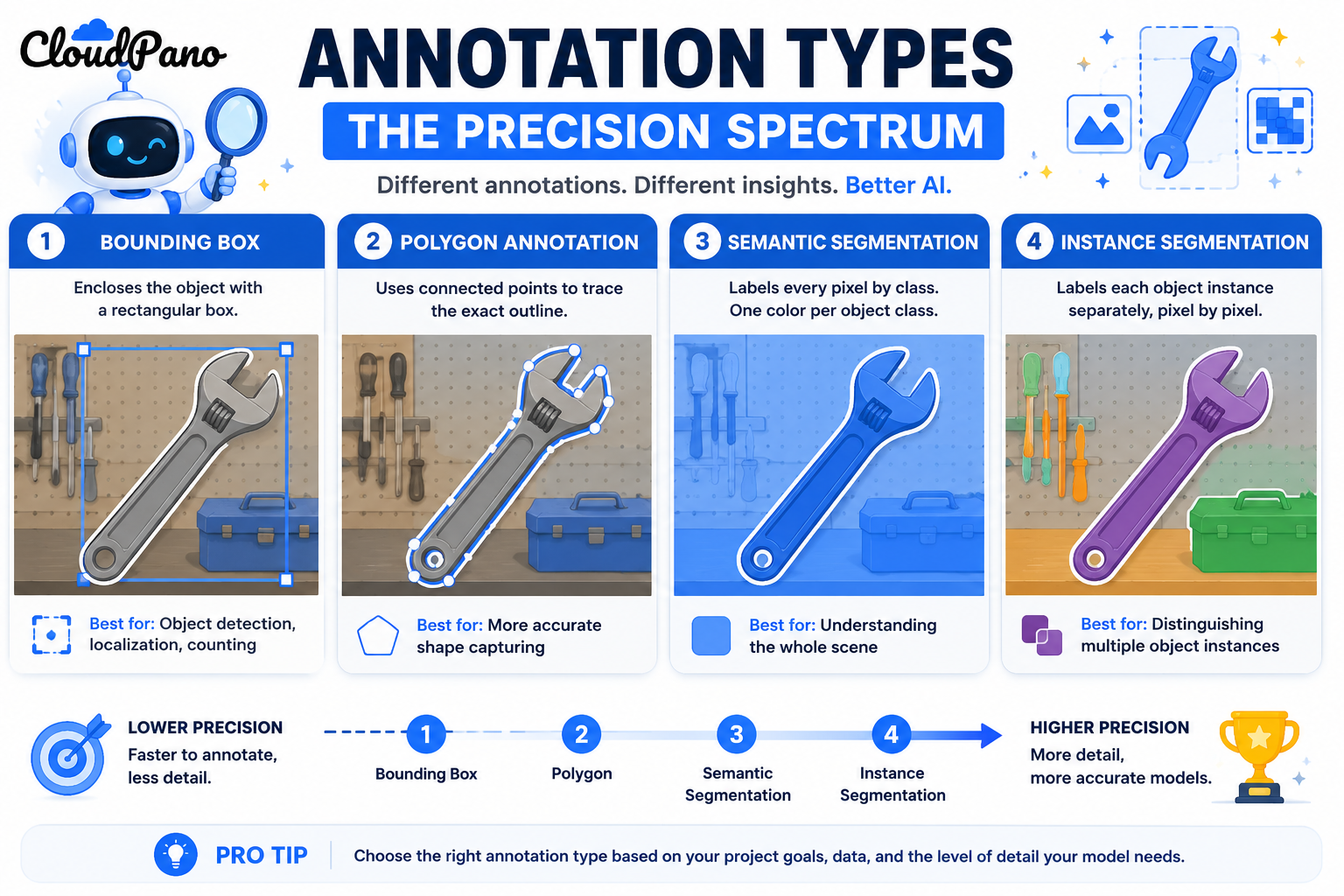
Bounding boxes. A rectangle defined by four coordinates, drawn to loosely enclose an object. Fast to annotate, but imprecise for irregularly shaped or angled objects, since a rectangle always includes background area the object itself doesn't occupy.

Polygon annotation. A shape traced using a series of connected straight-line vertices, following an object's actual outline more closely than a rectangle can. This captures irregular shapes — an L-shaped object, a curved edge approximated with enough vertices — without the per-pixel precision (and cost) of a full segmentation mask.

Semantic segmentation. Every pixel in an image is labeled by category, without distinguishing between individual instances of the same category — all pixels belonging to "road," for example, get one label regardless of how many separate road regions appear.

Instance segmentation. Every pixel is labeled by category and by individual object instance, so two overlapping objects of the same category are each distinguished at the pixel level, not merged into one labeled region.

Understanding how these workflows operate as a genuine precision spectrum — not just different names for "labeling an object" — is what lets a team pick the format that actually matches an object's geometry and a model's real requirement.
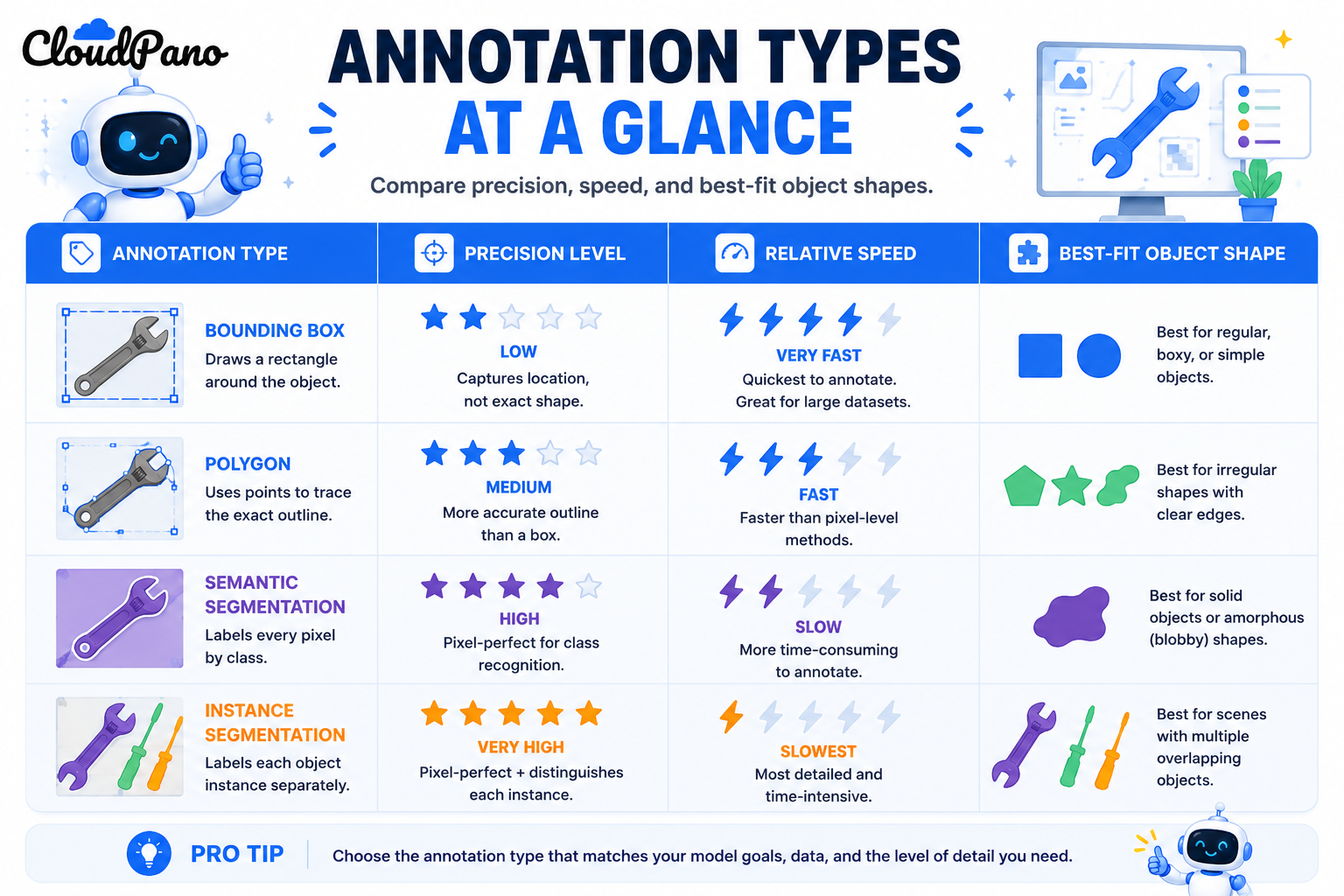
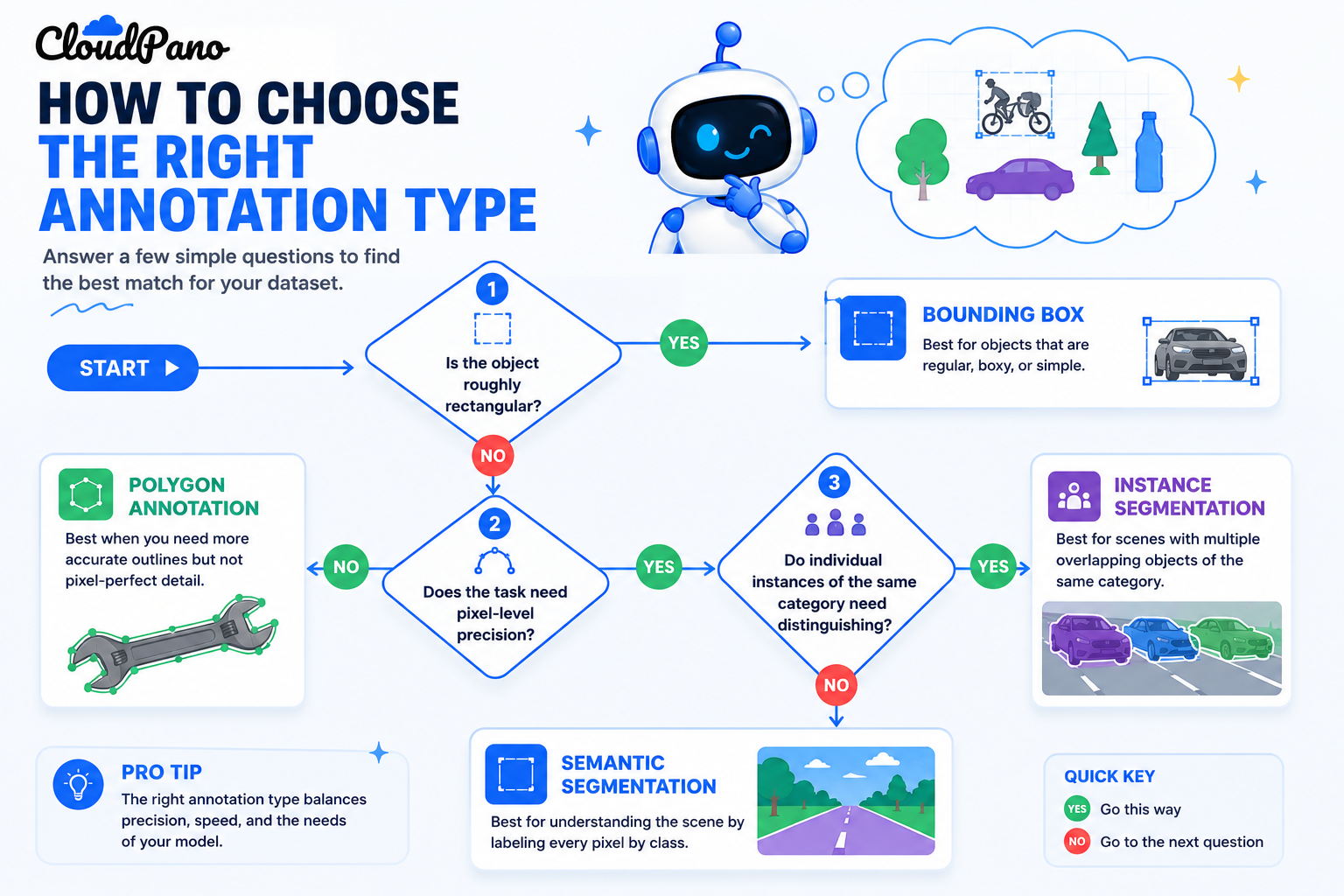
Step-by-Step Workflow

Flowchart for choosing the right computer vision annotation type
  1. Assess the actual shape of the objects you're annotating. Regular, roughly rectangular objects fit bounding boxes well; irregular or angled shapes often fit polygons better.
  2. Determine whether your model needs pixel-level precision. Tasks requiring exact area, shape, or boundary detail need segmentation; tasks needing only location and rough extent don't.
  3. Decide between semantic and instance segmentation if pixel-level detail is needed. Instance segmentation is necessary only if distinguishing between individual objects of the same category matters for your task.
  4. Select tooling that supports your chosen format efficiently. Polygon tools need vertex-editing support; segmentation tools need brush or auto-boundary-assist features to remain efficient.
  5. Write format-specific annotation guidelines. Polygon vertex density, box tightness standards, and segmentation boundary precision each need their own explicit guidance.
  6. Train annotators on the specific format's technique. Polygon tracing and pixel-level segmentation are different skills from box placement, and need separate training.
  7. Apply quality assurance matched to the format. Check vertex accuracy for polygons, box tightness consistency for bounding boxes, and boundary precision for segmentation masks.

Industry Use Cases

  • Computer vision / robotics: Polygon annotation is common for irregularly shaped objects on assembly lines, where a bounding box would include too much irrelevant background.
  • Autonomous vehicles: Semantic segmentation is central to road and drivable-area detection, while instance segmentation matters for distinguishing individual pedestrians or vehicles in dense scenes.
  • Healthcare AI: Polygon and segmentation annotation are both common for medical imaging, where the exact shape and extent of an anomaly directly affects diagnostic accuracy.
  • Retail AI: Bounding boxes typically suffice for product detection tasks where precise shape matters less than confirming presence and rough location.
  • Manufacturing AI: Polygon annotation frequently fits defect detection well, since manufacturing flaws are often irregularly shaped and a bounding box would poorly represent their actual extent.
  • Government & defense: Segmentation is common in geospatial and satellite imagery analysis, where precise boundary delineation of terrain features or structures matters.

Benefits

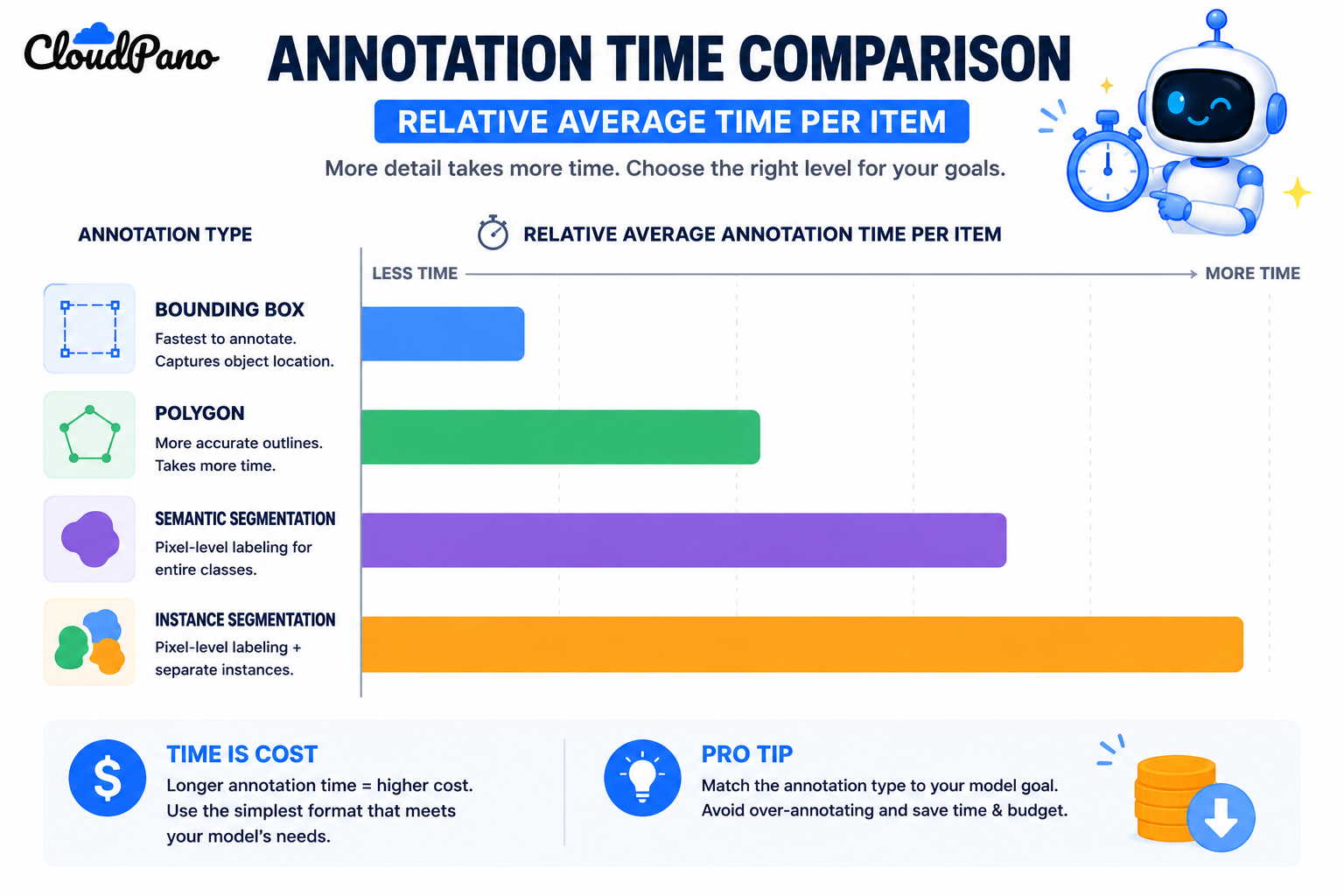
Bar chart comparing relative annotation time across computer vision annotation types
  • More accurate training data for the model's actual task. Matching format precision to genuine requirement avoids both under- and over-detailed labels.
  • More predictable annotation costs. Understanding the real time and cost difference between formats prevents budget surprises from defaulting to a more detailed format than needed.
  • Faster annotator onboarding. Clear, format-specific guidelines and training reduce the ramp-up time compared to vague, generic "labeling" instructions.
  • Better quality assurance targeting. Format-specific QA catches the errors most likely for that particular annotation type, rather than applying one generic check across all formats.
  • Clearer communication in project scoping. Naming the exact format needed — polygon versus box versus segmentation — produces more accurate vendor or internal team estimates.

Common Mistakes

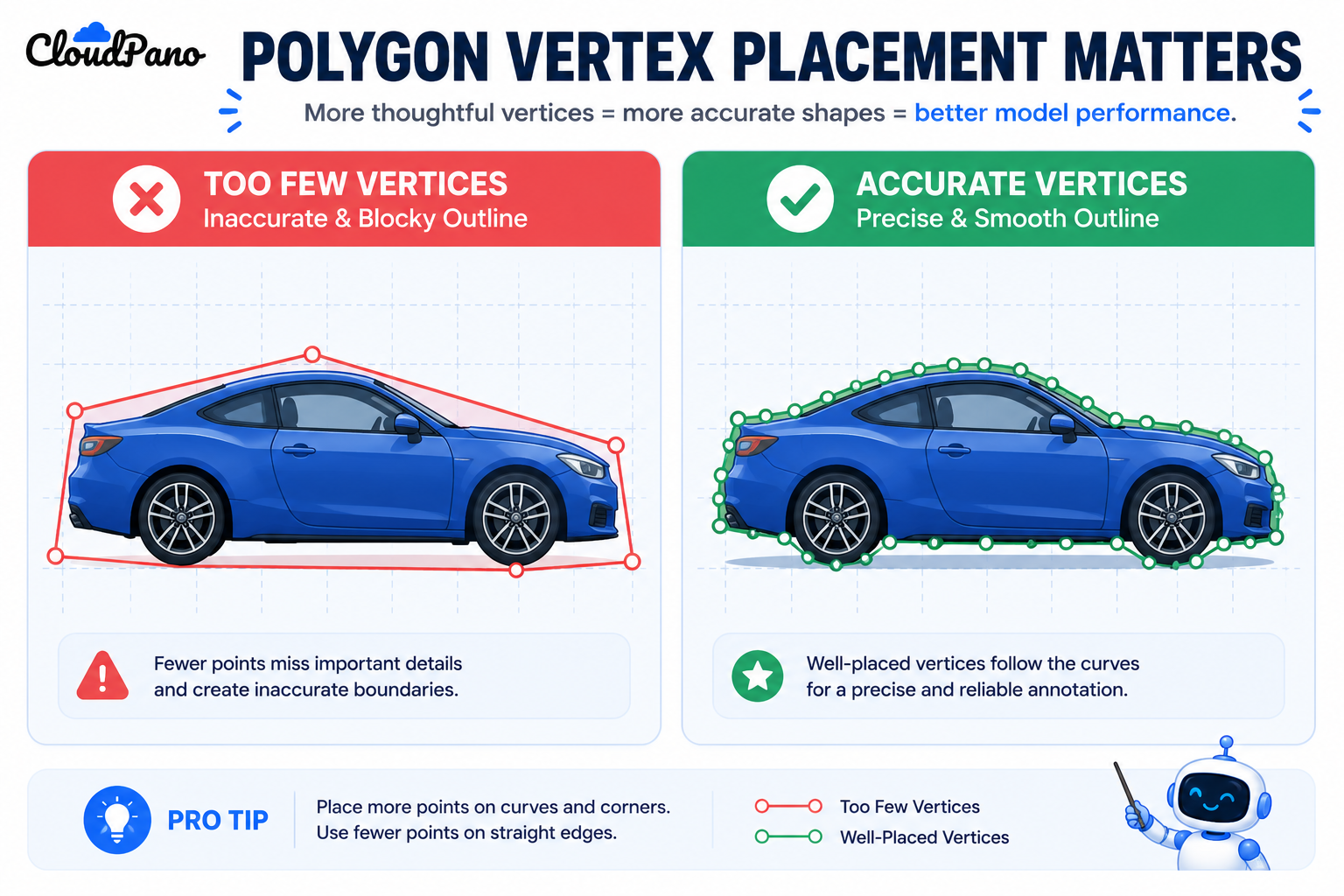
Illustration comparing good and poor polygon vertex placement in annotation
  • Using bounding boxes for irregularly shaped objects by default. Accepting the imprecision of a rectangle around an angled or non-rectangular object when a polygon would represent it more accurately for similar effort.
  • Jumping to full segmentation when a polygon would suffice. Paying for pixel-level precision when a task only needs a reasonably accurate outline.
  • Confusing semantic and instance segmentation requirements. Specifying general pixel labeling when the task actually needs individual object instances distinguished, or vice versa.
  • Using generic annotation guidelines across all formats. Applying one set of instructions to bounding boxes, polygons, and segmentation without addressing each format's specific edge cases.
  • Underestimating polygon annotation time for complex shapes. Assuming polygon annotation is close to bounding box speed when highly irregular shapes require many vertices and careful tracing.
  • Not training annotators specifically on vertex placement for polygons. Treating polygon annotation as a natural extension of box-drawing skill rather than its own distinct technique.

Best Practices

  • Assess each object type's actual geometry before defaulting to a familiar annotation format.
  • Reserve segmentation for tasks that genuinely require pixel-level precision, using polygons for irregular shapes that don't need that level of detail.
  • Write separate, format-specific guidelines rather than one generic annotation instruction set.
  • Train annotators specifically on the technique each format requires, since box placement, polygon tracing, and pixel segmentation are distinct skills.
  • Apply quality assurance methods matched to each format's specific error patterns.
  • Revisit format choice if a project's requirements evolve, since a task that starts needing simple boxes sometimes grows to require more precise polygon or segmentation detail.

FAQ

What are the main computer vision annotation types?

Bounding boxes (rectangles marking approximate location), polygon annotation (traced outlines following an object's actual shape), semantic segmentation (pixel-level category labeling), and instance segmentation (pixel-level labeling that also distinguishes individual object instances).

When should I use polygon annotation instead of a bounding box?

When an object's shape is irregular or angled enough that a rectangle would include a significant amount of background, and the task benefits from a more accurate outline without needing full pixel-level precision.

What's the difference between semantic segmentation and instance segmentation?

Semantic segmentation labels every pixel by category without distinguishing individual objects of the same category, while instance segmentation also separates distinct object instances at the pixel level.

Is polygon annotation faster than segmentation?

Generally yes, since polygon annotation traces an outline with a manageable number of vertices rather than labeling every individual pixel, though highly irregular shapes can still require significant annotator time.

Do all annotation tools support polygon annotation the same way?

No. Tooling varies in how efficiently it supports vertex editing, auto-snapping to edges, and other features that affect how quickly and accurately polygon annotation can actually be done.

Can a single computer vision project use more than one annotation type?

Yes, and this is common — a project might use bounding boxes for general object detection and segmentation specifically for objects where precise shape matters, within the same dataset.

How do I decide between a bounding box and a polygon for a specific object type?

Consider how much irrelevant background a bounding box would include for that object's typical shape; if that background area is substantial, a polygon likely represents the object more accurately for a similar level of annotation effort.

Conclusion

Computer vision annotation types represent a genuine precision spectrum, not interchangeable labels for the same underlying task. Bounding boxes, polygon annotation, semantic segmentation, and instance segmentation each capture an object's shape at a different level of detail, and matching that detail to what a model's task actually requires — rather than defaulting to habit — is what produces training data that's both accurate and cost-effective.

🚀 Your All‑In‑One Virtual Experience Stack
🎬
PhotoAIVideo
Turn photos into scroll‑stopping AI videos.
Get Started →
🏡
Pictastic
Instantly stage listings with AI.
Try Staging →
🌀
CloudPano
Create stunning 360° tours in minutes.
Launch Tour →
💰
VirtualTourProfit
Build a profitable virtual tour business.
Learn More →
🤝
CloudPano Reseller
Resell AI visual software without building it.
Become a Reseller →
🚗
Auto CloudPano
Sell more vehicles with 360° experiences.
Explore Auto →
🏗️
AI Floor Plan Builder
Generate detailed floor plans with AI.
Build Now →
📐
3D Measure
Capture accurate floor plans & 3D measurements.
Measure Now →
🧠
AI Training Data
Custom AI training data services.
Learn More →
Share this post
Cloudpano

Choose The Right 360° Camera

Insta360 ONE RS 1-Inch 360 Edition

  • Compact, ready to go anywhere

  • Interchangeable lens that’s upgradeable

  • Dual 1-inch sensors for improved clarity and low light performance

  • Dynamic range and 6K 360° capture

  • 360° photo resolution at 21MP

Learn More

Insta360 X4

  • 8K 360° video recording for ultra-detailed visuals.

  • 4K single-lens mode for traditional wide-angle shots.

  • Invisible selfie stick effect for drone-like perspectives.

  • 2.5-inch touchscreen with Gorilla Glass protection.

  • Waterproof up to 33ft for underwater shooting.

Learn More

Ricoh Theta Z1

  • 360° photo resolution in 23MP

  • Slim design at 24 mm thick

  • Built-in image stabilization for smooth video capture.

  • Internal 19GB storage for photo and video storage.

  • Wireless connectivity for remote control and sharing.

Learn More

Ricoh Theta X

  • 60MP 360° still images for high-resolution photography.

  • 5.7K 360° video recording at 30fps.

  • 2.25-inch touchscreen for intuitive control.

  • USB Type-C port for fast charging and data transfer.

  • MicroSD card slot for expandable storage.

Learn More
Property Marketing
Allows potential buyers to explore properties in detail from anywhere, enhancing the real estate marketing process.
Automotive Spins
Create an interactive virtual showroom and engage affluent digital buyers with live 360º video calls, all through the CloudPano mobile app for a complete automotive sales solution.
Interactive Floor Plans
Create 2D and 3D floor plans with measurements in 4 minutes or less, all from your phone. Download the Floor Plan Scanner app and get your first scan free.

360 Virtual Tours With CloudPano.com. Get Started Today.

Try it free. No credit card required. Instant set-up.
Try it free
Latest posts

See our other posts

Interviews, tips, guides, industry best practices, and news.

Computer Vision Annotation Types Explained: Bounding Boxes, Polygons, and Segmentation

Computer vision annotation types differ mainly in how precisely they capture an object's shape. Bounding boxes draw a rectangle around an object, polygon annotation traces its actual outline with straight-line vertices, and semantic segmentation labels every pixel by category. Each format trades precision against annotation speed and cost differently.
Read post

Computer Vision Annotation Services: Techniques, Workflow, and Quality

Computer vision annotation services apply structured labels to images and video for AI training — bounding boxes, segmentation masks, keypoints, and 3D cuboids among them — matched to what a model needs to detect or understand. The right technique depends on the specific spatial detail your model's task actually requires.
Read post

Why High-Quality Human Feedback Is Essential for LLM Fine-Tuning

Human evaluation for LLM fine tuning works best when reviewers are qualified specifically for the judgment task, not just recruited in volume. Domain expertise, consistency under a defined rubric, and calibration against known-good examples determine whether feedback data actually improves a model or just teaches it a different, still-inconsistent pattern.
Read post