Computer Vision Annotation Services: Techniques, Workflow, and Quality

Cloudpano
July 30, 2026
5 min read
Share this post

Computer Vision Annotation Services: Techniques, Workflow, and Quality

Most people picture computer vision annotation services as drawing boxes around objects in photos. That's one technique among several, and it's often not the right one for what a specific model actually needs to learn — the real scoping question is which spatial technique matches your model's task, not whether annotation happens at all.

Image annotation services cover a range of techniques with real differences in cost, time, and what they teach a model. Getting this distinction right before a project starts avoids the common mismatch of paying for more annotation detail than a task requires, or discovering mid-project that a simpler technique won't support what the model actually needs to do.

Why It Matters

Choosing the wrong annotation technique for a computer vision task doesn't fail obviously — it produces a dataset that trains a model to detect the wrong level of detail, discovered only once the model underperforms on its actual deployment task. Google Research's "Data Cascades" study documented how mismatches introduced early in a data pipeline compound into larger, harder-to-diagnose problems as a project progresses (Sambasivan et al., Google Research).

NIST's AI Risk Management Framework treats data fitness for the intended task as foundational to trustworthy AI, which applies directly to matching annotation technique to a computer vision model's actual requirement rather than defaulting to whatever technique a project happened to start with (NIST AI RMF).

The stakes rise with how widely computer vision models are now deployed. Stanford HAI's AI Index has tracked the growing footprint of computer vision applications across industrial, retail, and safety-critical contexts (Stanford HAI, AI Index Report), and a mismatched annotation technique discovered after deployment is significantly more expensive to correct than one caught during initial scoping.

How It Works

Computer vision data labeling spans several distinct techniques, each suited to a different kind of task.
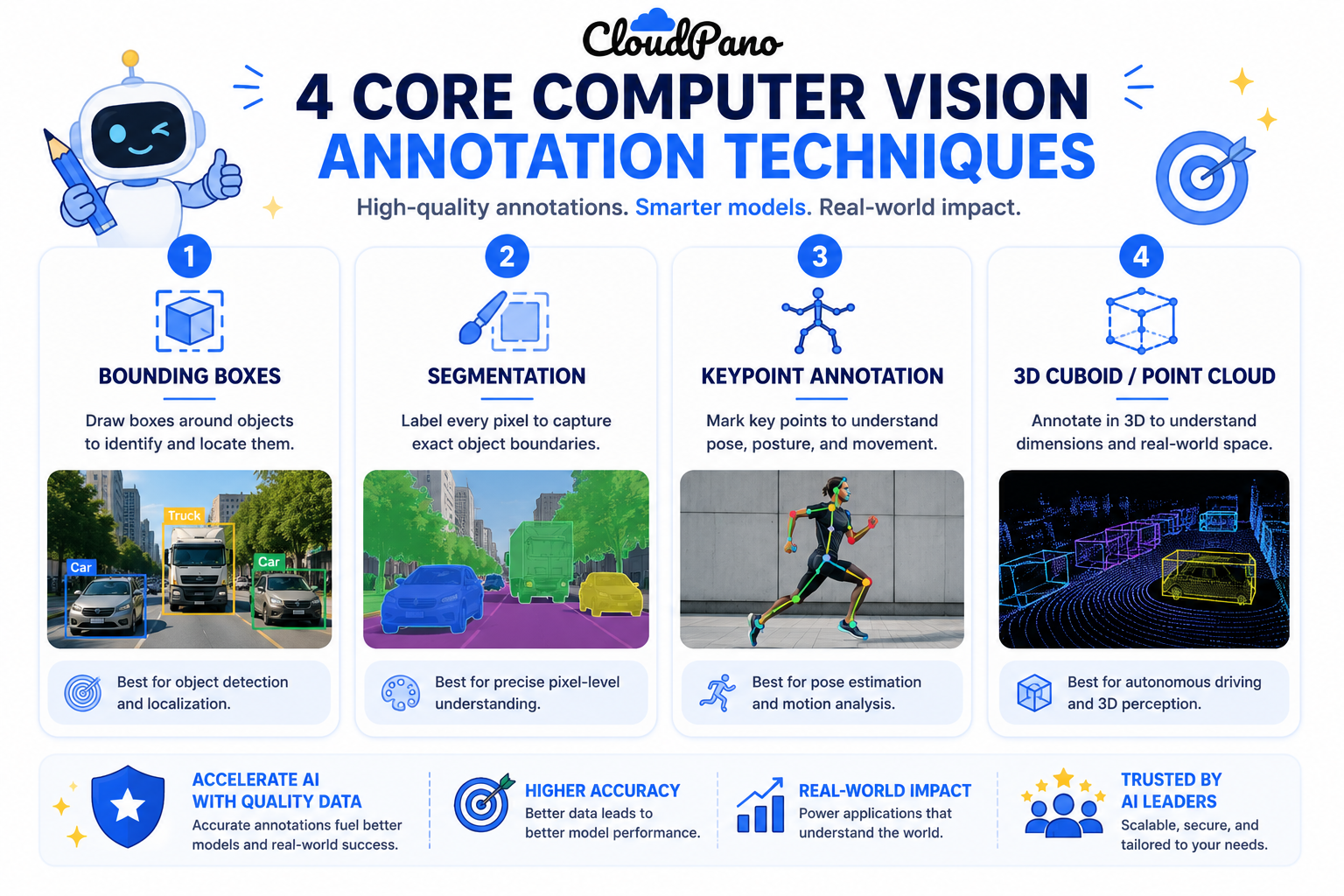
Infographic of four core computer vision annotation services techniques

Bounding boxes. Rectangular boxes marking an object's location — the fastest and most common technique, well suited to tasks needing to know an object is present and roughly where.

Semantic and instance segmentation. Pixel-level masks marking exact object boundaries, needed when a model requires precise shape information, not just approximate location.

Keypoint annotation. Marking specific points on an object — joints for pose estimation, facial landmarks — used when a model needs to understand structure or orientation, not just presence.

3D cuboid and point cloud annotation. Marking objects in three-dimensional space, common in autonomous vehicle and robotics applications working with LiDAR or depth-sensor data.

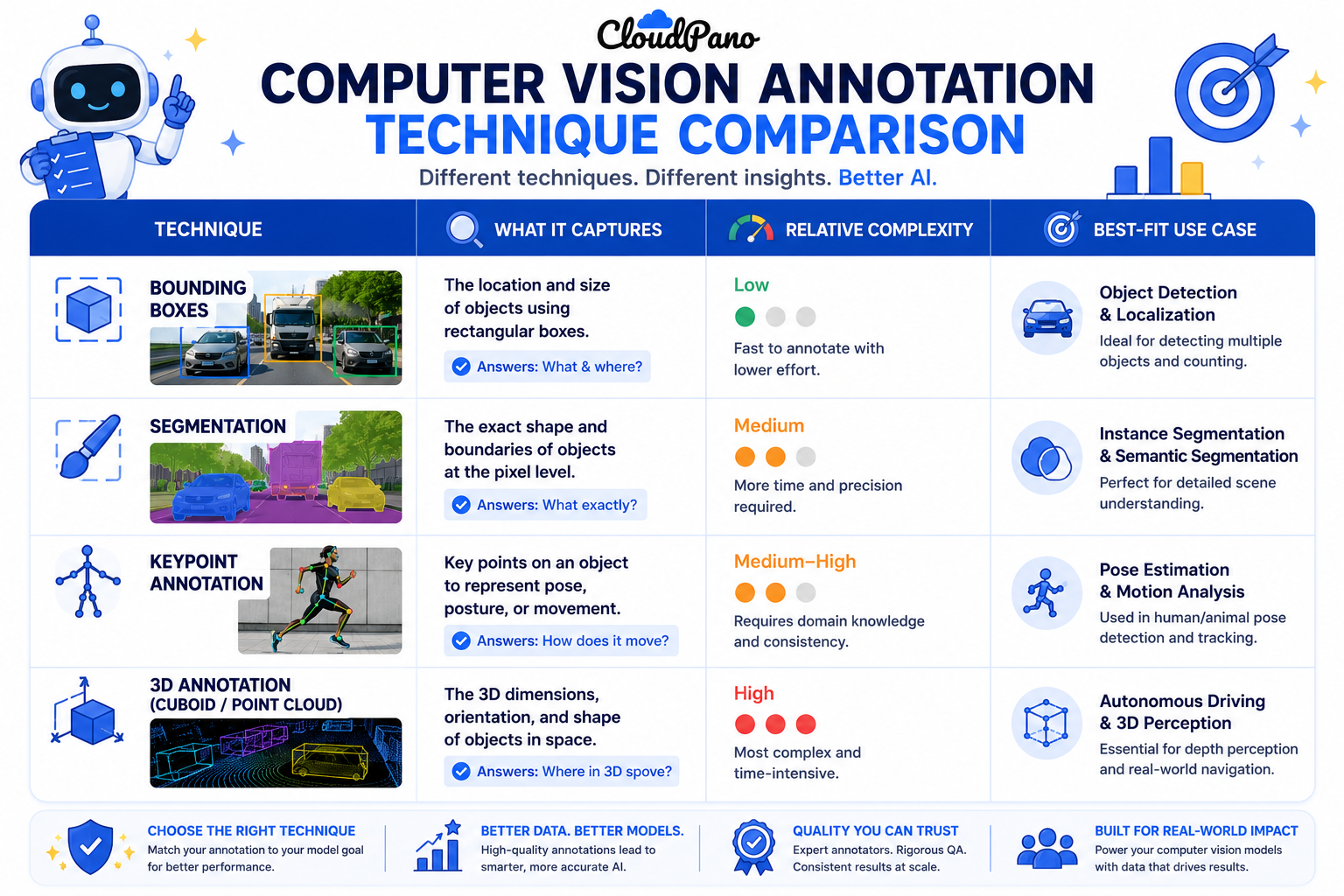
Illustration showing visual examples of computer vision annotation techniques

Object detection annotation specifically usually refers to bounding-box-based labeling for identifying and localizing objects, distinct from the pixel-precise detail of segmentation or the structural detail of keypoints.

Understanding how these workflows operate at the technique level — not just "image annotation" as a single undifferentiated service — is what lets a team scope a project accurately and communicate requirements clearly to a provider.
Step-by-Step Workflow

  1. Define what your model actually needs to detect or understand. Presence, precise shape, structural orientation, or 3D spatial position each point to a different technique.
  2. Match the technique to that requirement, not to the most detailed option available. Choosing segmentation when bounding boxes would suffice adds unnecessary cost and time.
  3. Write technique-specific annotation guidelines. Bounding box edge cases (partial occlusion, overlapping objects) differ from segmentation edge cases (ambiguous boundaries) and keypoint edge cases (obscured landmarks).
  4. Select or train annotators with the relevant technique skill. Segmentation and keypoint annotation typically require more training than basic bounding box work.
  5. Pilot the chosen technique on representative data. Confirm the technique and guidelines actually produce usable training data before committing to full volume.
  6. Apply technique-specific quality assurance. Boundary agreement checks for segmentation, precise landmark accuracy for keypoints, consistent box tightness for bounding boxes.
  7. Validate the finished dataset against the model's actual training requirements. Confirm the annotated data format and detail level genuinely support the model architecture being trained.

Industry Use Cases

  • Computer vision / robotics: The full range of techniques applies here, often within a single project — bounding boxes for general detection, segmentation for precise part identification, keypoints for robotic manipulation tasks.
  • Autonomous vehicles: 3D cuboid and point cloud annotation is central to this industry, layered with 2D bounding boxes and segmentation for camera-based perception.
  • Healthcare AI: Segmentation is heavily used for diagnostic imaging, where precise boundary identification of anomalies directly affects diagnostic model accuracy.
  • Retail AI: Bounding boxes dominate for product detection and inventory tasks, where precise location matters more than exact pixel boundaries.
  • Manufacturing AI: Segmentation is common for defect detection, where the exact shape and extent of a flaw matters for quality classification.
  • Government & defense: A mix of techniques applies to geospatial imagery and surveillance analysis, often requiring higher security handling alongside standard annotation work.

Benefits

  • More accurate model training. Matching annotation technique to the model's actual requirement produces training data that genuinely supports the task, rather than under- or over-detailed labels.
  • More accurate project cost and timeline estimates. Understanding technique-specific complexity upfront avoids the common surprise of a project taking longer than expected because the wrong technique was assumed.
  • Clearer vendor communication. Specifying the actual technique needed — not just "image annotation" — produces more accurate proposals and fewer scope mismatches.
  • Better quality assurance design. Technique-specific QA methods catch the errors most relevant to that specific type of annotation.
  • Scalability without losing precision. Understanding which techniques scale efficiently and which require more careful, slower human judgment helps plan realistic throughput.

Common Mistakes

  • Defaulting to the most detailed technique available. Choosing segmentation or keypoint annotation when bounding boxes would fully support the model's actual task.
  • Underestimating the complexity of segmentation and keypoint work. Scoping these techniques with the same timeline and cost assumptions as simpler bounding box annotation.
  • Requesting "image annotation" without specifying the technique. Leaving too much room for a vendor or internal team to guess at what's actually needed.
  • Applying uniform quality assurance across different techniques. Missing that segmentation, keypoints, and bounding boxes each need their own specific QA checks.
  • Not accounting for 3D annotation complexity in autonomous vehicle or robotics projects. Underestimating the specialized tooling and expertise point cloud annotation requires compared to standard 2D techniques.
  • Skipping a pilot before committing to full-volume annotation. Assuming a chosen technique and guideline set will work at scale without testing on representative data first.

Best Practices

  • Define your model's actual spatial or structural requirement before selecting an annotation technique.
  • Specify the exact technique needed when communicating requirements internally or to a vendor, rather than using "image annotation" as a generic term.
  • Match annotator training and expertise to the specific technique's complexity, especially for segmentation, keypoints, and 3D annotation.
  • Design quality assurance specific to each technique in use within a project.
  • Pilot the chosen technique on representative data before scaling to full volume.
  • Reassess technique choice if a project's model requirements evolve, since a task that starts needing simple detection sometimes grows to require more precise segmentation or structural detail.

FAQ

What do computer vision annotation services typically include?

Bounding box annotation, semantic and instance segmentation, keypoint annotation, and 3D cuboid or point cloud annotation, each suited to different model requirements around location, shape, structure, or spatial position.

What's the difference between object detection annotation and segmentation?

Object detection annotation typically uses bounding boxes to mark an object's approximate location, while segmentation provides pixel-precise boundaries, needed when a model requires exact shape information rather than approximate position.

When do I need keypoint annotation instead of bounding boxes?

When a model needs to understand structure or orientation — pose estimation, facial landmark detection — rather than simply detecting that an object is present and roughly where it is.

How is 3D annotation different from standard image annotation services?

3D cuboid and point cloud annotation marks objects in three-dimensional space, typically using LiDAR or depth-sensor data, common in autonomous vehicle and robotics applications rather than standard 2D camera imagery.

How do I know which computer vision data labeling technique my project needs?

Start by defining exactly what your model needs to detect or understand — presence, precise shape, structural points, or 3D position — and match the technique to that specific requirement.

Does more detailed annotation always produce a better model?

Not necessarily. Using a more detailed technique than the task requires adds unnecessary cost and time without improving the model, since the extra detail isn't relevant to what the model actually needs to learn.

How much do computer vision annotation services typically cost?

Cost varies significantly by technique, with segmentation, keypoint annotation, and 3D annotation typically costing more per item than bounding boxes.

Conclusion

Computer vision annotation services cover a genuinely broad range of techniques, and the right one for a given project depends on what a model actually needs to detect or understand — not on defaulting to the most common or most detailed option. Matching technique to task, scoping projects with the specific technique in mind, and applying technique-appropriate quality assurance is what turns a computer vision annotation project into training data that actually supports the model it's meant to serve.

🚀 Your All‑In‑One Virtual Experience Stack
🎬
PhotoAIVideo
Turn photos into scroll‑stopping AI videos.
Get Started →
🏡
Pictastic
Instantly stage listings with AI.
Try Staging →
🌀
CloudPano
Create stunning 360° tours in minutes.
Launch Tour →
💰
VirtualTourProfit
Build a profitable virtual tour business.
Learn More →
🤝
CloudPano Reseller
Resell AI visual software without building it.
Become a Reseller →
🚗
Auto CloudPano
Sell more vehicles with 360° experiences.
Explore Auto →
🏗️
AI Floor Plan Builder
Generate detailed floor plans with AI.
Build Now →
📐
3D Measure
Capture accurate floor plans & 3D measurements.
Measure Now →
🧠
AI Training Data
Custom AI training data services.
Learn More →
Share this post
Cloudpano

Choose The Right 360° Camera

Insta360 ONE RS 1-Inch 360 Edition

  • Compact, ready to go anywhere

  • Interchangeable lens that’s upgradeable

  • Dual 1-inch sensors for improved clarity and low light performance

  • Dynamic range and 6K 360° capture

  • 360° photo resolution at 21MP

Learn More

Insta360 X4

  • 8K 360° video recording for ultra-detailed visuals.

  • 4K single-lens mode for traditional wide-angle shots.

  • Invisible selfie stick effect for drone-like perspectives.

  • 2.5-inch touchscreen with Gorilla Glass protection.

  • Waterproof up to 33ft for underwater shooting.

Learn More

Ricoh Theta Z1

  • 360° photo resolution in 23MP

  • Slim design at 24 mm thick

  • Built-in image stabilization for smooth video capture.

  • Internal 19GB storage for photo and video storage.

  • Wireless connectivity for remote control and sharing.

Learn More

Ricoh Theta X

  • 60MP 360° still images for high-resolution photography.

  • 5.7K 360° video recording at 30fps.

  • 2.25-inch touchscreen for intuitive control.

  • USB Type-C port for fast charging and data transfer.

  • MicroSD card slot for expandable storage.

Learn More
Property Marketing
Allows potential buyers to explore properties in detail from anywhere, enhancing the real estate marketing process.
Automotive Spins
Create an interactive virtual showroom and engage affluent digital buyers with live 360º video calls, all through the CloudPano mobile app for a complete automotive sales solution.
Interactive Floor Plans
Create 2D and 3D floor plans with measurements in 4 minutes or less, all from your phone. Download the Floor Plan Scanner app and get your first scan free.

360 Virtual Tours With CloudPano.com. Get Started Today.

Try it free. No credit card required. Instant set-up.
Try it free
Latest posts

See our other posts

Interviews, tips, guides, industry best practices, and news.

How to Deliver Property Photos Professionally and Impress Real Estate Clients

Learn how to deliver property photos professionally and create a smooth, impressive experience for real estate clients. This guide covers organized photo galleries, easy downloads, professional presentation, fast delivery, and practical ways photographers can build stronger client relationships and encourage repeat business.
Read post
CloudPano

Choosing ADA Compliant Walkthrough Software: What to Look For

Not all walkthrough software is built with accessibility in mind, and choosing the wrong platform can quietly exclude a meaningful portion of your audience. This guide breaks down exactly what to look for when evaluating ADA compliant walkthrough software — from keyboard navigation and screen reader support to alt text and caption features — plus the key questions to ask vendors before you commit.
Read post
CloudPano

Should Your Virtual Tour Be ADA Compliant, Even If It's Not Required?

Not every business is legally required to make its virtual tours ADA compliant—but accessibility is still worth considering. This article explores why accessible virtual tours can help businesses reach more people, improve user experience, support inclusive digital experiences, and demonstrate a commitment to accessibility. Discover practical ways to make your virtual tours more accessible and why doing so can be a smart business decision.
Read post