Computer Vision Annotation for Robotics and Autonomous Systems

Cloudpano
July 31, 2026
5 min read
Share this post

Computer Vision Annotation for Robotic Manipulation and Perception

Standard object detection tells a robot that an object exists and roughly where it is. It doesn't tell the robot how to actually pick that object up, or how close it can safely get to a person working nearby. Computer vision annotation robotics teams need addresses a different set of questions than general detection or vehicle-centric spatial annotation, because a robot doesn't just perceive its environment — it has to physically act within it.

Robotics Data Annotation covers a few specific challenges that don't come up in most other computer vision applications: labeling where and how to grasp an object, marking safe interaction boundaries around people, and making sure data collected in simulation actually transfers to how the robot performs in the real world.

Why It Matters

A robot acting on incomplete or poorly annotated perception data doesn't just make a classification error — it can physically fail a task or, in shared workspaces, create a genuine safety risk. Google Research's "Data Cascades" study documented how small, unaddressed data quality gaps compound into larger problems as they propagate through a system, a dynamic that carries direct physical consequences when the system in question is a robot acting in the real world (Sambasivan et al., Google Research).
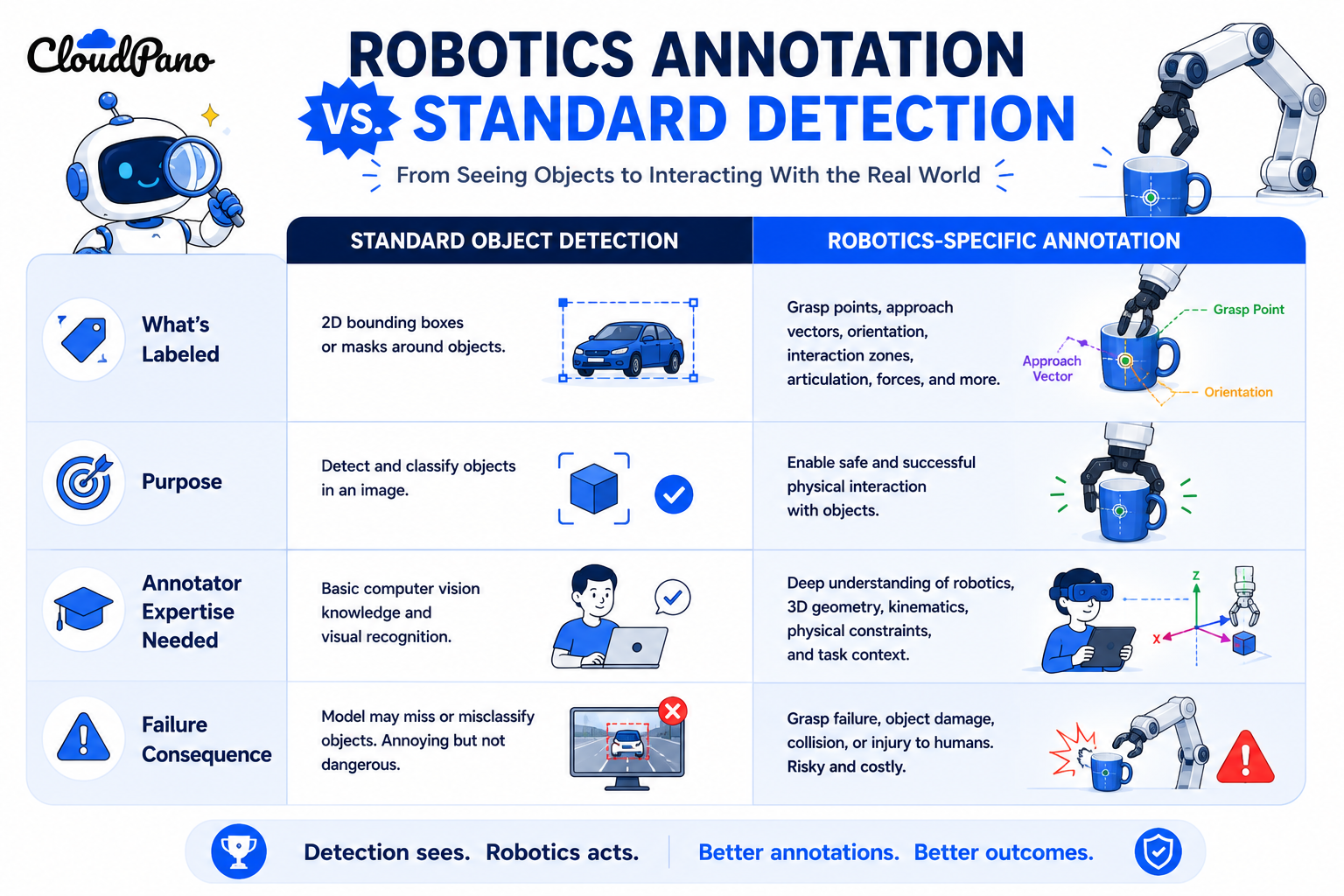
NIST's AI Risk Management Framework treats data fitness for the intended task as foundational to trustworthy AI, which for Robot Vision Training Data means annotation specifically addressing manipulation and interaction, not just object presence, since that's what the robot actually needs to act correctly (NIST AI RMF).

The stakes grow as robotics applications expand into shared human workspaces. Stanford HAI's AI Index has tracked increasing deployment of AI systems that interact directly with physical environments, including collaborative robotics (Stanford HAI, AI Index Report), and annotation gaps in this context carry safety consequences that a purely digital application wouldn't.

How It Works

Computer Vision Data Labeling for robotics generally addresses three challenges specific to physical manipulation and interaction.
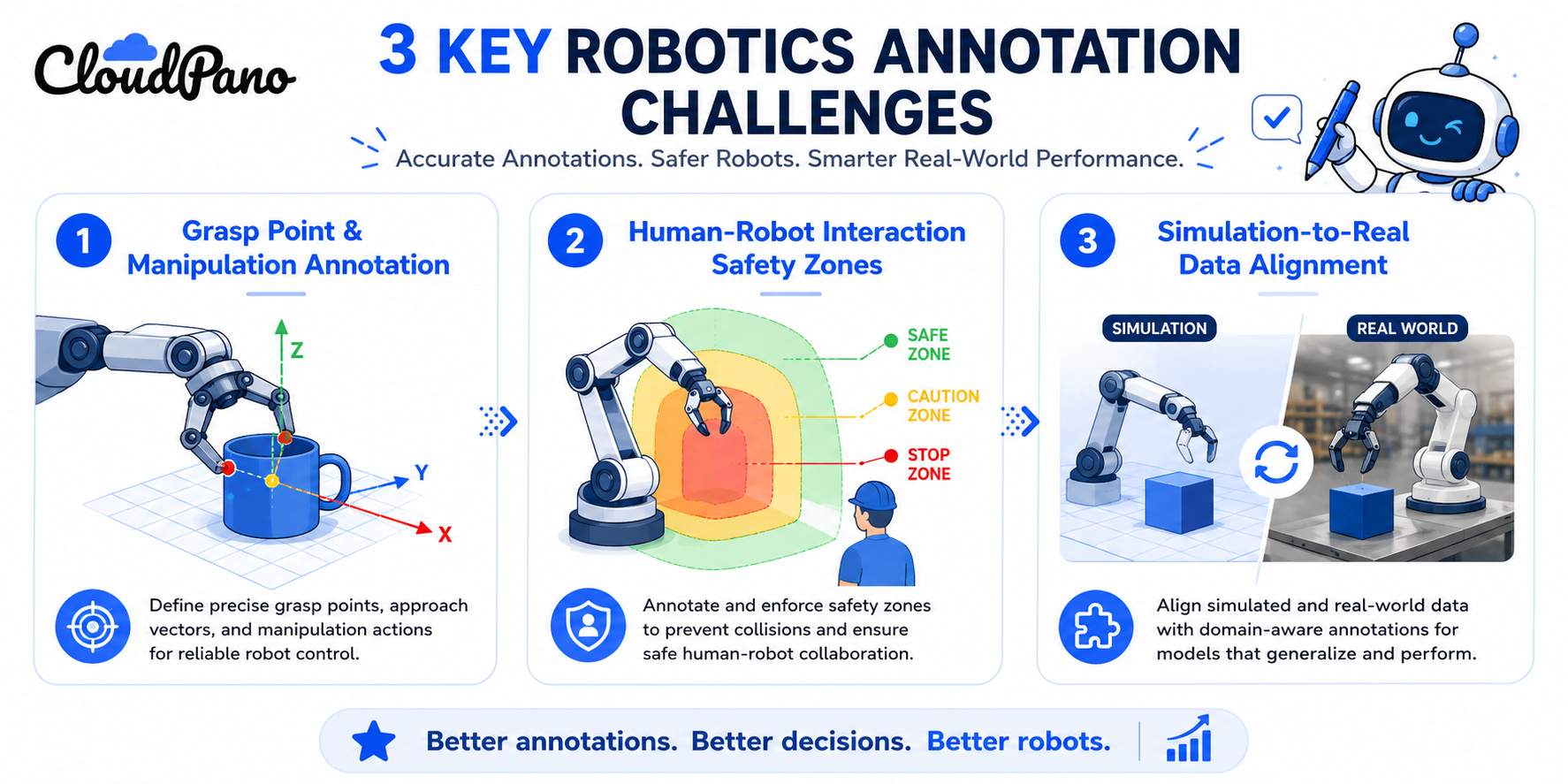
Infographic of three robotics-specific computer vision annotation challenges

Grasp point and manipulation annotation. Beyond marking that an object exists, annotators label where and how a gripper should approach and hold it — a specific point or region, often with orientation information, that standard object detection doesn't capture.
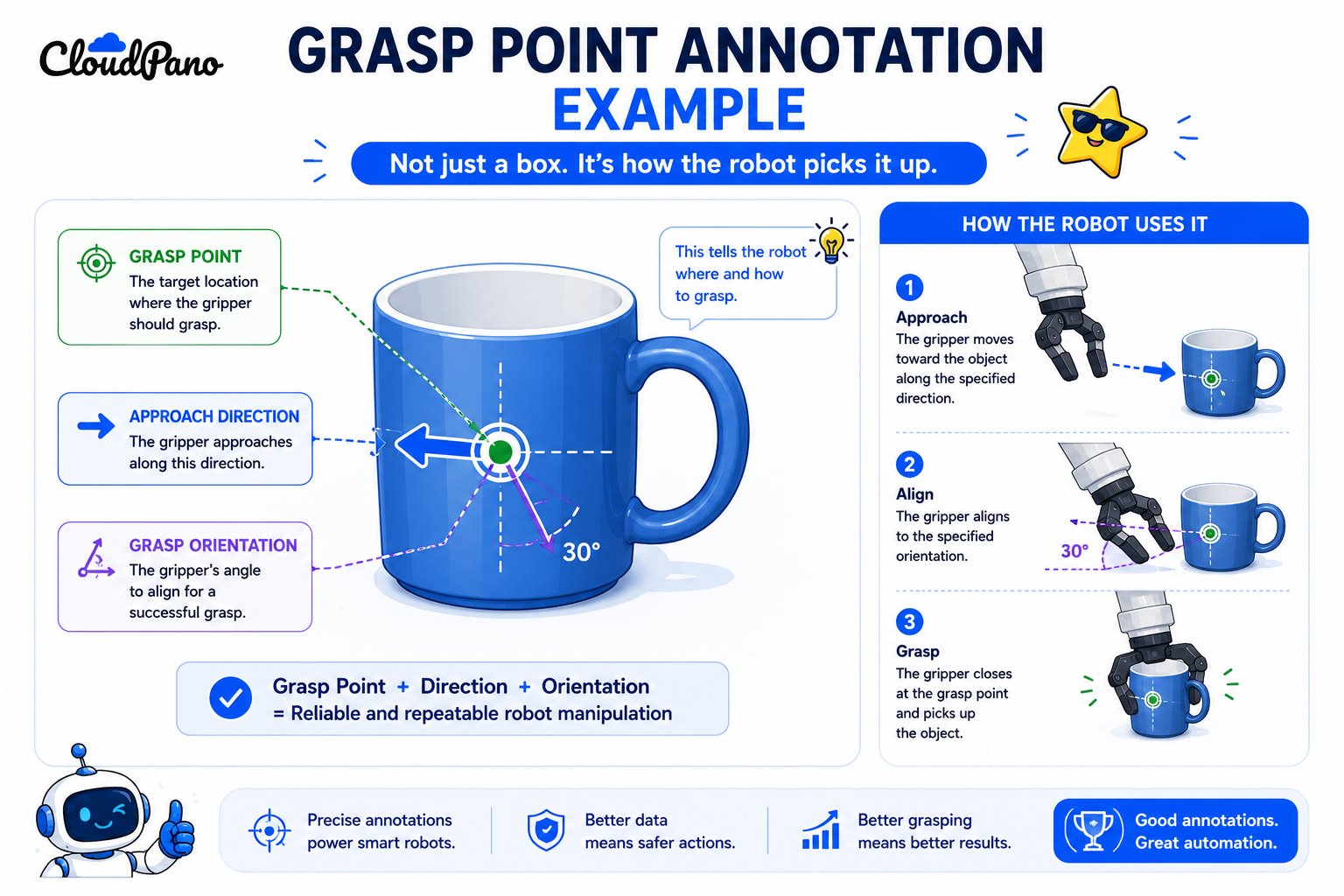
Illustration of grasp point annotation for robotic manipulation

Human-robot interaction safety zones. In collaborative environments, annotation needs to mark not just where people are, but defined safe-distance zones and interaction boundaries the robot's behavior needs to respect.

Illustration of a human-robot interaction safety zone annotation example

Simulation-to-real data alignment. Many robotics teams train partly on simulated data, which is faster and safer to generate at scale, but requires careful annotation and validation to confirm the simulated data's labels and characteristics transfer meaningfully to real-world sensor input.

Understanding how these workflows operate as physical-interaction-focused annotation — not just detection with an object list — is what separates robotics-ready training data from a computer vision dataset built for a purely observational task.
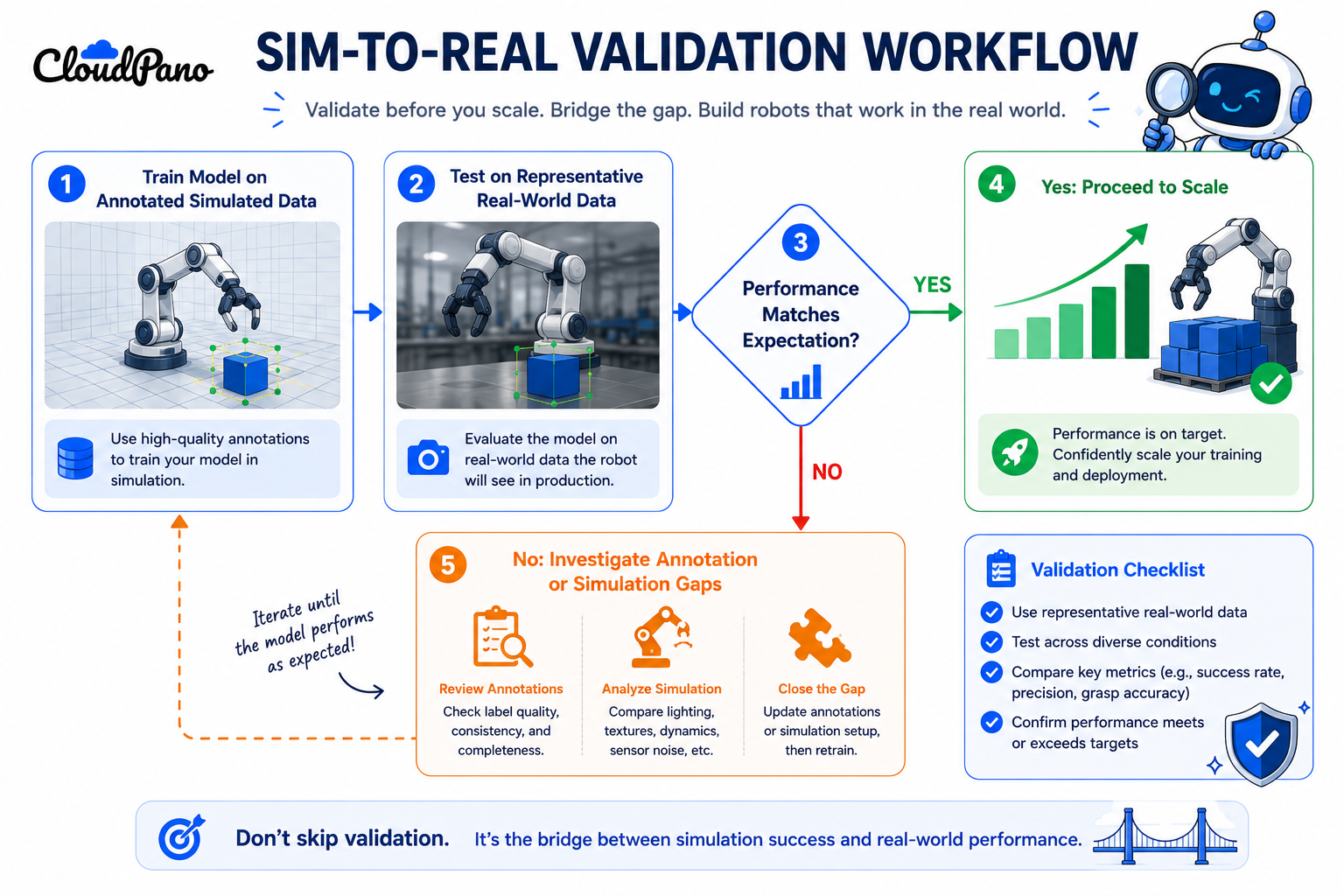
Step-by-Step Workflow

  • Define the specific physical action or interaction your robot needs to perform. Grasping, navigation around people, or general obstacle avoidance each require different annotation focus.
  • Design annotation guidelines specific to that action. Grasp point labeling needs different guidance than safety zone marking, which needs different guidance than general object detection.
  • Select or train annotators with relevant domain understanding. Grasp point annotation benefits from annotators who understand basic mechanical and gripper constraints, not just visual labeling skill.
  • Annotate simulated and real data with consistent standards. Use the same labeling criteria across both data sources so a model doesn't learn spurious differences between simulated and real inputs.
  • Validate simulation-to-real transfer on a representative sample. Confirm the model's performance on simulated-data-trained tasks actually holds up against real sensor input before scaling.
  • Apply quality assurance specific to physical feasibility. Check that labeled grasp points are mechanically plausible and that safety zones reflect actual required clearances, not just visually reasonable boundaries.
  • Re-validate annotation standards as the robot's task or environment changes. A new object type, gripper design, or workspace layout can all require revised annotation guidance.

Industry Use Cases

  • Robotics: Grasp point annotation, manipulation labeling, and human-robot interaction zones are central here, often combined within a single warehouse or manufacturing application.
  • Manufacturing AI: Collaborative robots on assembly lines rely heavily on human-robot interaction safety annotation, given how closely they often work alongside people.
  • Computer vision / robotics (broader perception tasks): General object detection and segmentation still apply, layered with manipulation-specific annotation for tasks requiring physical interaction.
  • Autonomous vehicles: Some sim-to-real annotation challenges overlap with robotics, though vehicle-focused spatial annotation typically emphasizes navigation and obstacle detection over object manipulation.
  • Healthcare AI: Surgical or assistive robotics applications require precise manipulation annotation, given the direct physical stakes of the tasks involved.
  • Government & defense: Robotics applications in this sector often combine manipulation annotation with strict security requirements around the underlying sensor and task data.

Benefits

  • Robots that can actually act on what they perceive. Manipulation-specific annotation gives a model the information needed to grasp or interact with objects correctly, not just detect them.
  • Safer human-robot collaboration. Explicit interaction zone annotation supports models that respect defined safety boundaries in shared workspaces.
  • More efficient use of simulation. Careful sim-to-real annotation alignment lets teams generate training data faster and more safely without sacrificing real-world performance.
  • Fewer costly physical failures. Catching manipulation annotation gaps during training avoids the more expensive alternative of discovering them through failed physical tasks in deployment.
  • Clearer scoping for robotics-specific projects. Understanding these distinct annotation needs upfront produces more accurate timelines and vendor communication than treating robotics as standard object detection.

Common Mistakes

  • Treating robotics annotation as standard object detection. Missing that manipulation and interaction tasks need labels standard detection guidelines don't address.
  • Skipping grasp point annotation entirely. Assuming a model can infer how to grasp an object correctly from bounding box or segmentation data alone.
  • Not validating simulation-to-real transfer before scaling. Assuming simulated training data performs equivalently on real sensor input without checking.
  • Applying inconsistent standards between simulated and real data. Letting subtle labeling differences between the two sources teach a model spurious distinctions.
  • Underestimating the domain expertise grasp annotation requires. Assigning generalist annotators without mechanical or robotics-specific understanding to label grasp points.
  • Not revisiting annotation standards as the robot's task changes. Continuing to use guidelines built for one gripper design or workspace layout after either has changed.

Best Practices

  • Define the specific physical action your robot needs to perform before designing annotation guidelines.
  • Build grasp point and manipulation annotation guidelines distinct from general object detection guidance.
  • Use annotators with relevant mechanical or robotics domain understanding for grasp and interaction annotation.
  • Apply consistent labeling standards across simulated and real data sources.
  • Validate simulation-to-real transfer on representative real-world data before scaling a simulation-heavy training approach.
  • Revisit annotation standards whenever the robot's task, gripper design, or workspace environment changes meaningfully.

FAQ

What makes computer vision annotation for robotics different from standard object detection?

Robotics annotation needs to address physical manipulation — where and how to grasp an object — and human-robot interaction safety zones, not just detecting that an object is present.

What is grasp point annotation?

Labeling where and how a robotic gripper should approach and hold an object, often including orientation information, which standard bounding box or segmentation annotation doesn't capture.

Why does robotics data annotation need to address human-robot interaction zones?

Because collaborative robots operating near people need to respect defined safe-distance boundaries, and annotation needs to mark those zones explicitly for a model to learn to respect them.

What is the simulation-to-real gap in robot vision training data?

The difference in performance between a model trained on simulated data and its actual performance on real-world sensor input, which requires careful annotation consistency and validation to minimize.

Can annotators without robotics experience label grasp points accurately?

Generally not reliably. Grasp point annotation benefits from annotators who understand basic mechanical and gripper constraints, not just general visual labeling skill.

How is computer vision data labeling for robotics different from labeling for autonomous vehicles?

Robotics annotation often emphasizes manipulation and close-range interaction, while autonomous vehicle annotation typically emphasizes navigation, obstacle detection, and longer-range spatial understanding.

How often should robotics annotation standards be revisited?

Whenever the robot's task, gripper design, or workspace environment changes meaningfully, since guidelines built for one configuration may not apply accurately to another.

Conclusion

Computer vision annotation robotics teams actually need goes beyond detecting that an object exists — it requires labeling how a robot should physically act on that object and interact safely with people around it. Grasp point annotation, interaction safety zones, and careful simulation-to-real alignment are what separate robotics-ready training data from a computer vision dataset built for observation alone.

🚀 Your All‑In‑One Virtual Experience Stack
🎬
PhotoAIVideo
Turn photos into scroll‑stopping AI videos.
Get Started →
🏡
Pictastic
Instantly stage listings with AI.
Try Staging →
🌀
CloudPano
Create stunning 360° tours in minutes.
Launch Tour →
💰
VirtualTourProfit
Build a profitable virtual tour business.
Learn More →
🤝
CloudPano Reseller
Resell AI visual software without building it.
Become a Reseller →
🚗
Auto CloudPano
Sell more vehicles with 360° experiences.
Explore Auto →
🏗️
AI Floor Plan Builder
Generate detailed floor plans with AI.
Build Now →
📐
3D Measure
Capture accurate floor plans & 3D measurements.
Measure Now →
🧠
AI Training Data
Custom AI training data services.
Learn More →
Share this post
Cloudpano

Choose The Right 360° Camera

Insta360 ONE RS 1-Inch 360 Edition

  • Compact, ready to go anywhere

  • Interchangeable lens that’s upgradeable

  • Dual 1-inch sensors for improved clarity and low light performance

  • Dynamic range and 6K 360° capture

  • 360° photo resolution at 21MP

Learn More

Insta360 X4

  • 8K 360° video recording for ultra-detailed visuals.

  • 4K single-lens mode for traditional wide-angle shots.

  • Invisible selfie stick effect for drone-like perspectives.

  • 2.5-inch touchscreen with Gorilla Glass protection.

  • Waterproof up to 33ft for underwater shooting.

Learn More

Ricoh Theta Z1

  • 360° photo resolution in 23MP

  • Slim design at 24 mm thick

  • Built-in image stabilization for smooth video capture.

  • Internal 19GB storage for photo and video storage.

  • Wireless connectivity for remote control and sharing.

Learn More

Ricoh Theta X

  • 60MP 360° still images for high-resolution photography.

  • 5.7K 360° video recording at 30fps.

  • 2.25-inch touchscreen for intuitive control.

  • USB Type-C port for fast charging and data transfer.

  • MicroSD card slot for expandable storage.

Learn More
Property Marketing
Allows potential buyers to explore properties in detail from anywhere, enhancing the real estate marketing process.
Automotive Spins
Create an interactive virtual showroom and engage affluent digital buyers with live 360º video calls, all through the CloudPano mobile app for a complete automotive sales solution.
Interactive Floor Plans
Create 2D and 3D floor plans with measurements in 4 minutes or less, all from your phone. Download the Floor Plan Scanner app and get your first scan free.

360 Virtual Tours With CloudPano.com. Get Started Today.

Try it free. No credit card required. Instant set-up.
Try it free
Latest posts

See our other posts

Interviews, tips, guides, industry best practices, and news.

Computer Vision Annotation for Robotics and Autonomous Systems

Computer vision annotation robotics teams need goes beyond standard object detection — it includes grasp point and manipulation annotation, human-robot interaction safety zone labeling, and simulation-to-real data alignment. These robotics-specific requirements differ from general object detection or vehicle-focused spatial annotation, since robots must physically act on what they perceive.
Read post

Annotating Data for Spatial AI and 3D Scene Understanding

Spatial AI data annotation labels three-dimensional sensor data — typically LiDAR point clouds or depth-camera output — with 3D bounding cuboids, per-point classifications, or tracked object trajectories across frames. It requires different tooling, annotator skill, and quality checks than standard 2D image annotation, since objects exist in real three-dimensional space, not a flat plane.
Read post

Computer Vision Annotation Types Explained: Bounding Boxes, Polygons, and Segmentation

Computer vision annotation types differ mainly in how precisely they capture an object's shape. Bounding boxes draw a rectangle around an object, polygon annotation traces its actual outline with straight-line vertices, and semantic segmentation labels every pixel by category. Each format trades precision against annotation speed and cost differently.
Read post