


.png)


Matterport tends to dominate the conversation around virtual tour software, but it's far from the only option worth comparing. This CloudPano vs iStaging vs Cupix comparison — with EyeSpy360 included as a fourth reference point — looks at how these platforms actually differ once you get past surface-level marketing, so you can evaluate them against your specific needs rather than assuming they're interchangeable.
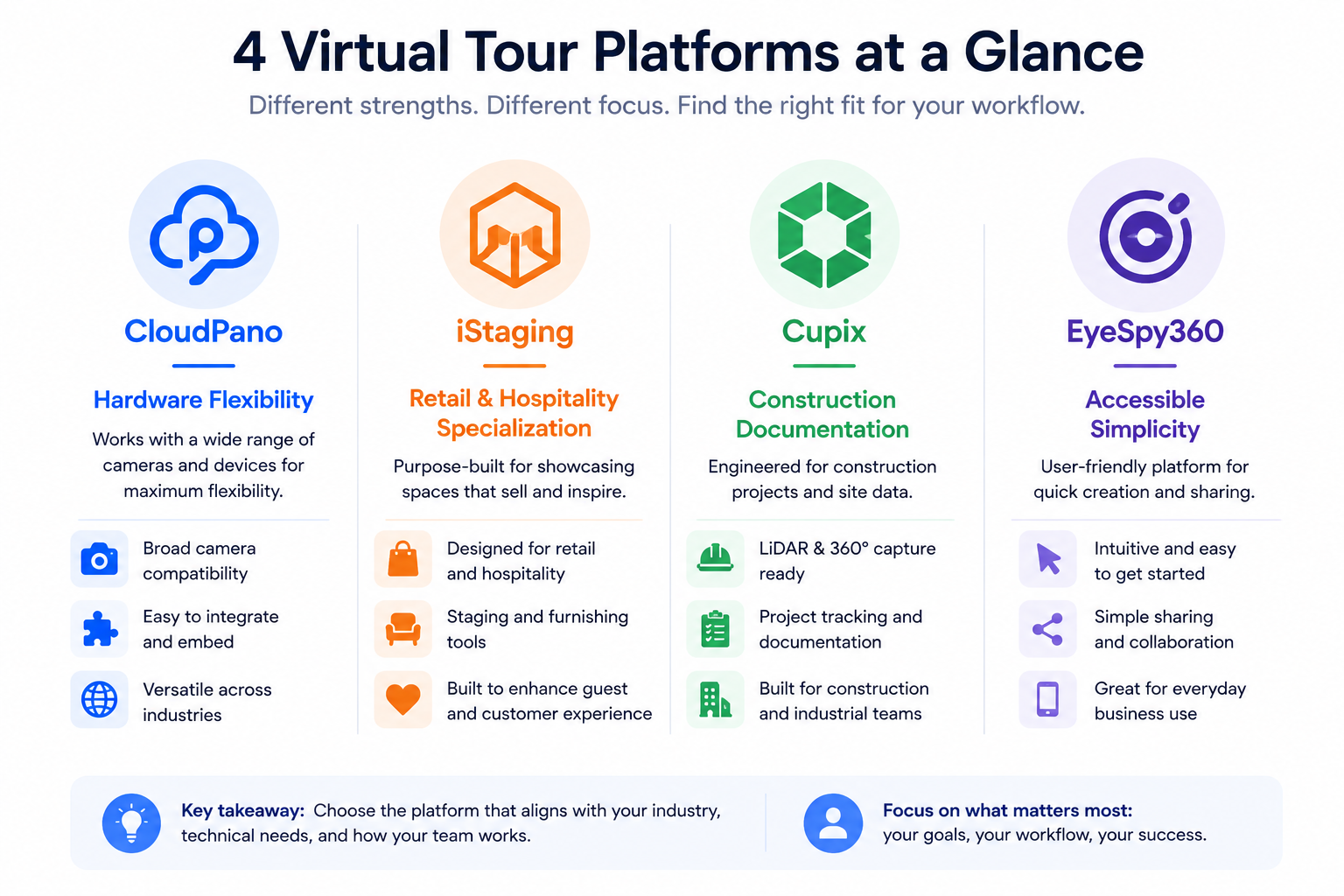
These four represent a reasonably broad cross-section of the non-Matterport virtual tour landscape: CloudPano positions itself around hardware flexibility and predictable pricing, iStaging has built particular strength in retail and hospitality use cases, Cupix is often associated with construction and real estate progress documentation alongside standard real estate tours, and EyeSpy360 has a reputation for accessible, straightforward tour creation aimed at smaller users and occasional creators. Comparing across this specific set gives a more useful picture than comparing CloudPano to Matterport alone, since it surfaces differences that a two-platform comparison wouldn't reveal.
Hardware support is one of the more consequential differences across this group. CloudPano is built to work with a broad range of 360° cameras rather than being tied to a single ecosystem. iStaging and EyeSpy360 similarly tend toward broad camera compatibility, reflecting their focus on accessibility for users who may already own a range of consumer or prosumer 360 cameras. Cupix has historically emphasized compatibility with a mix of consumer cameras and, in its construction-documentation use case, integration with a wider range of capture workflows tied to ongoing site documentation rather than a single point-in-time tour.
If you already own specific camera equipment, checking direct compatibility with whichever platform you're considering remains the most reliable approach — general positioning is a useful starting filter, not a substitute for confirming your specific hardware.
Pricing approaches vary meaningfully across this group, though exact rates should always be checked directly given how often they change.
Generally speaking, platforms in this category tend to fall along a spectrum from more affordable, simplified tiers (often associated with EyeSpy360's positioning toward smaller or occasional users) to more fully-featured tiers aimed at businesses with growing libraries and team needs (where CloudPano and iStaging tend to compete more directly). Cupix's pricing, particularly for its construction-documentation use case, often reflects the more specialized, ongoing-project nature of that use case rather than a simple per-tour model.
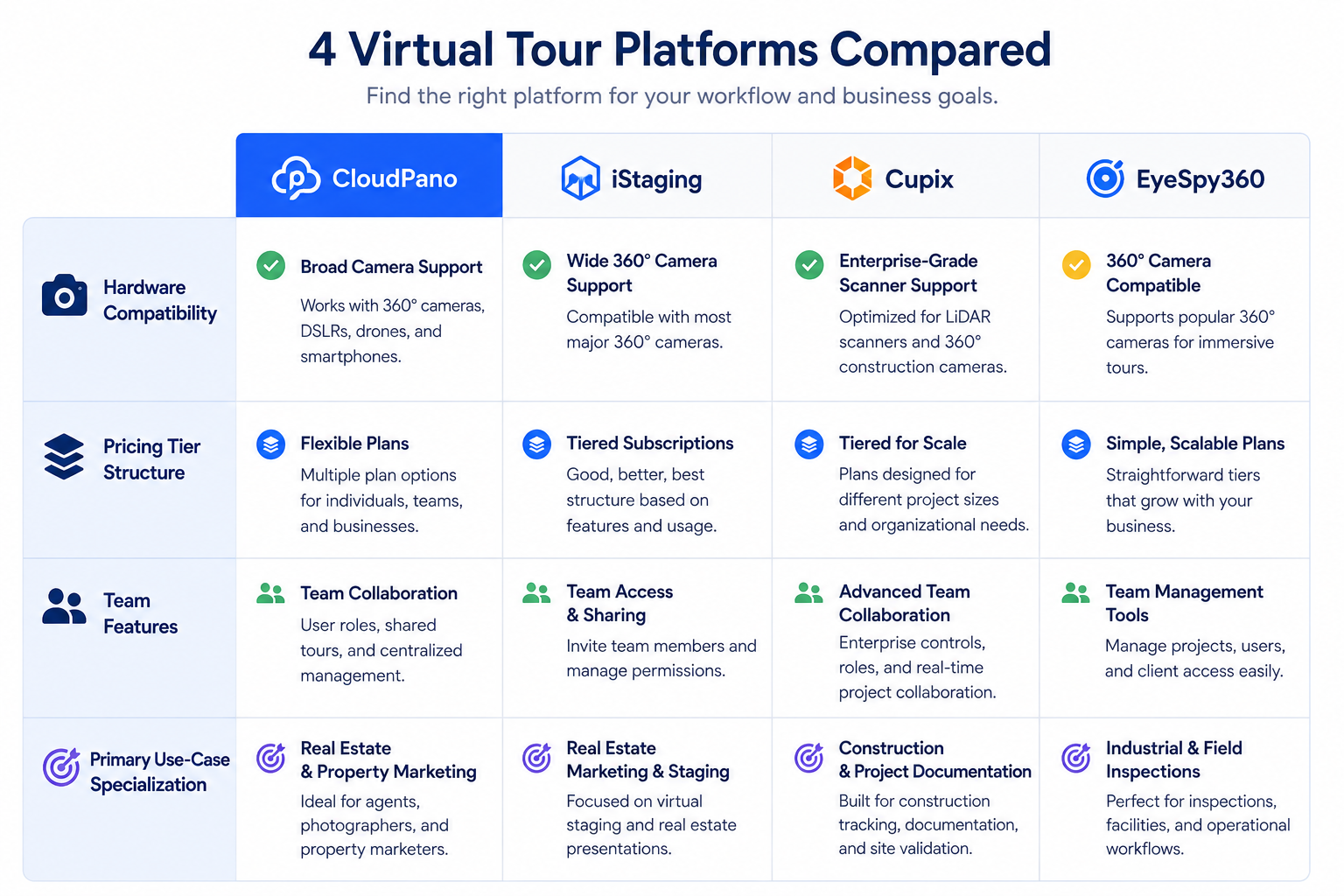
For businesses beyond a single user, team and collaboration features become a meaningful differentiator. CloudPano has generally positioned team and shared-library features as accessible at earlier tiers, which matters for growing teams. iStaging's strength in retail and hospitality often comes with collaboration features suited to multi-location brands managing tours across several sites under shared branding. EyeSpy360's simpler positioning tends to come with correspondingly simpler team features, reflecting its focus on individual or small-scale use. Cupix's team features, particularly in construction contexts, often emphasize project-based collaboration (multiple stakeholders tracking a single ongoing site) rather than a marketing-team-style shared tour library.
It's worth situating these four within the wider landscape rather than treating them as the entire field. Among the full range of Matterport competitors, CloudPano, iStaging, Cupix, and EyeSpy360 represent a reasonably representative sample of the different strategic approaches you'll encounter — broad flexibility, industry specialization, niche technical use cases, and accessible simplicity, respectively. Other platforms exist too, but most tend to fall into some variation of these same four general strategies, which is part of why comparing across this specific set is useful even if you eventually end up considering a platform outside these four.
If you're evaluating a platform not covered here, it's worth asking which of these four general strategies it most closely resembles, since that framing tends to predict its likely strengths and weaknesses better than treating every new platform as a completely novel comparison.
Rather than relying solely on general positioning, running your own virtual tour software comparison against your specific priorities is the more reliable approach. This means identifying your top few requirements — hardware compatibility, team structure, industry-specific needs, budget — and checking each of these four platforms specifically against that list, rather than assuming general reputation translates directly to fit for your situation.
This is really the same category-and-priorities framework covered in our broader guide on choosing a Matterport alternative, applied here to a specific four-way comparison rather than the full market.
Search results and roundup articles about the best 3D tour tools frequently include some combination of these four platforms alongside Matterport, which is a reasonable signal that they're all considered credible options within the category. On G2's virtual tour software category page, you can compare reviewer sentiment across all four directly, filtering by business size or industry to see which patterns match your own situation.
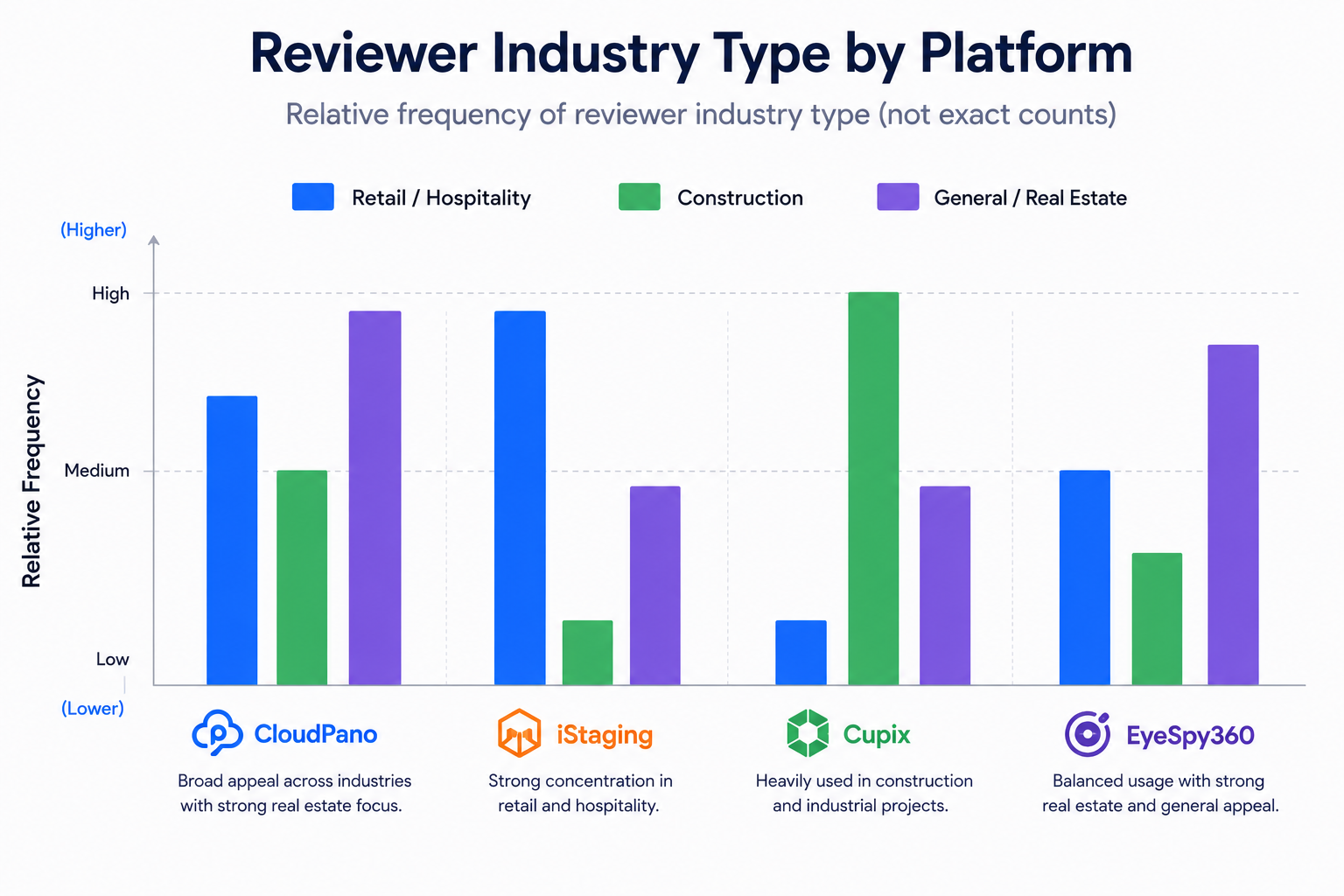
Capterra's virtual tour software listings offer a similar side-by-side view, and are particularly useful for spotting industry-specific reviewer clusters — retail and hospitality reviewers commenting on iStaging, construction-focused reviewers commenting on Cupix, and so on.
General positioning is a useful filter, but it shouldn't be the final word on any of these four platforms. Company strategies shift, feature sets expand, and a platform's reputation for a specific niche doesn't guarantee every claim about it is still accurate by the time you're reading this. Before committing to any of the four based on the positioning described above, it's worth spending a few minutes on each company's own site confirming the specific features that matter most to you are actually still part of their current offering, rather than assuming a general reputation holds indefinitely.
This is a reasonable habit regardless of which platform you're evaluating, and it costs very little time relative to the cost of committing to an annual plan based on outdated general impressions.
"With this many options, how do I avoid analysis paralysis?"
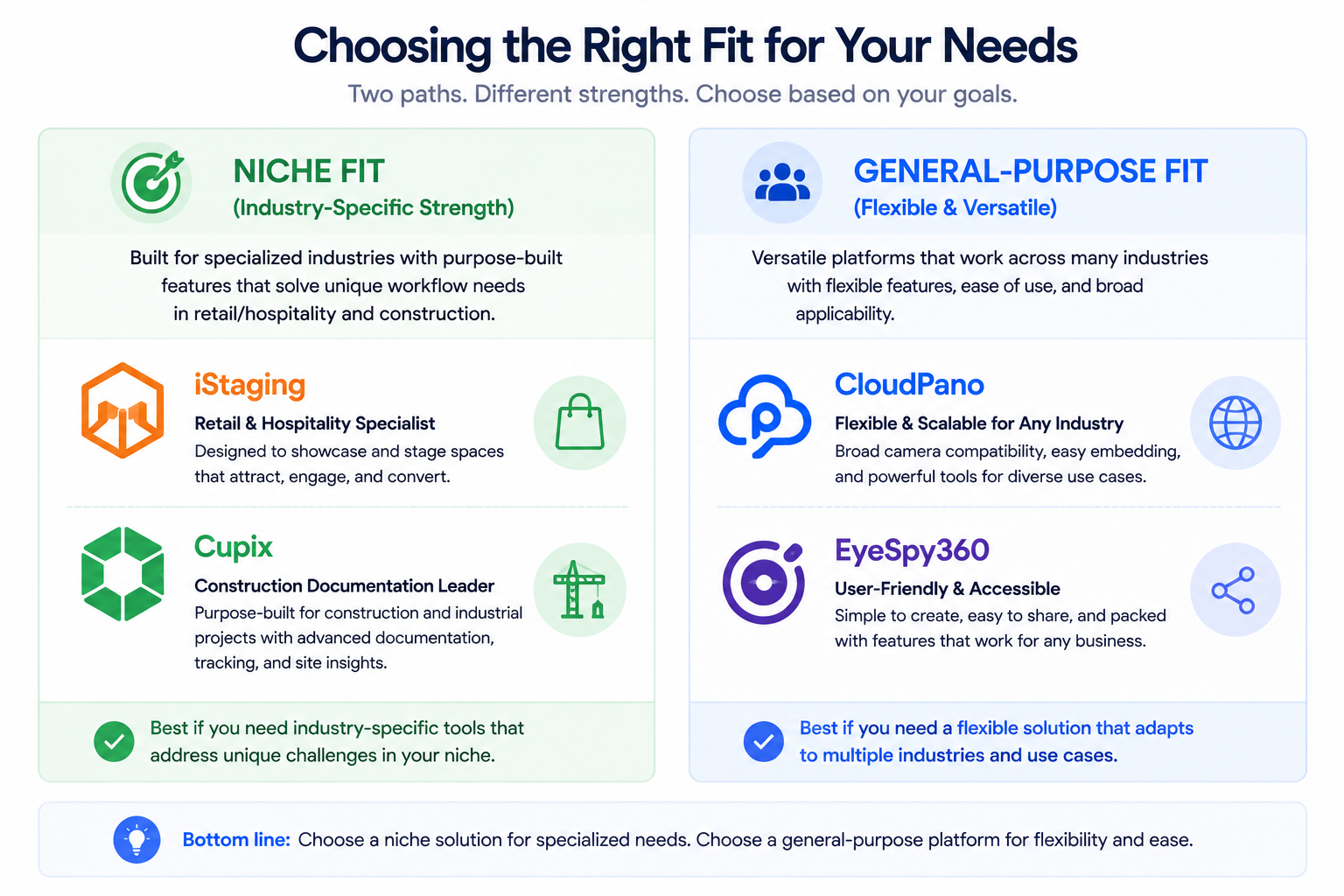
Narrow quickly using industry fit as a first filter. If you're in retail or hospitality, iStaging deserves a closer look specifically for that reason. If you're doing ongoing construction documentation rather than one-time real estate tours, Cupix's specialization is worth checking first. If you want broad flexibility without a narrow specialization, CloudPano and EyeSpy360 are more general-purpose starting points, differentiated mainly by team features and pricing tier structure.
"Isn't this list missing other Matterport competitors?"
Yes, deliberately — this comparison focuses on four platforms specifically to stay useful and specific rather than becoming an exhaustive, shallow list of every competitor in the category. If none of these four fit your specific niche, our broader guide on evaluating Matterport alternatives covers a wider range of categories and options.
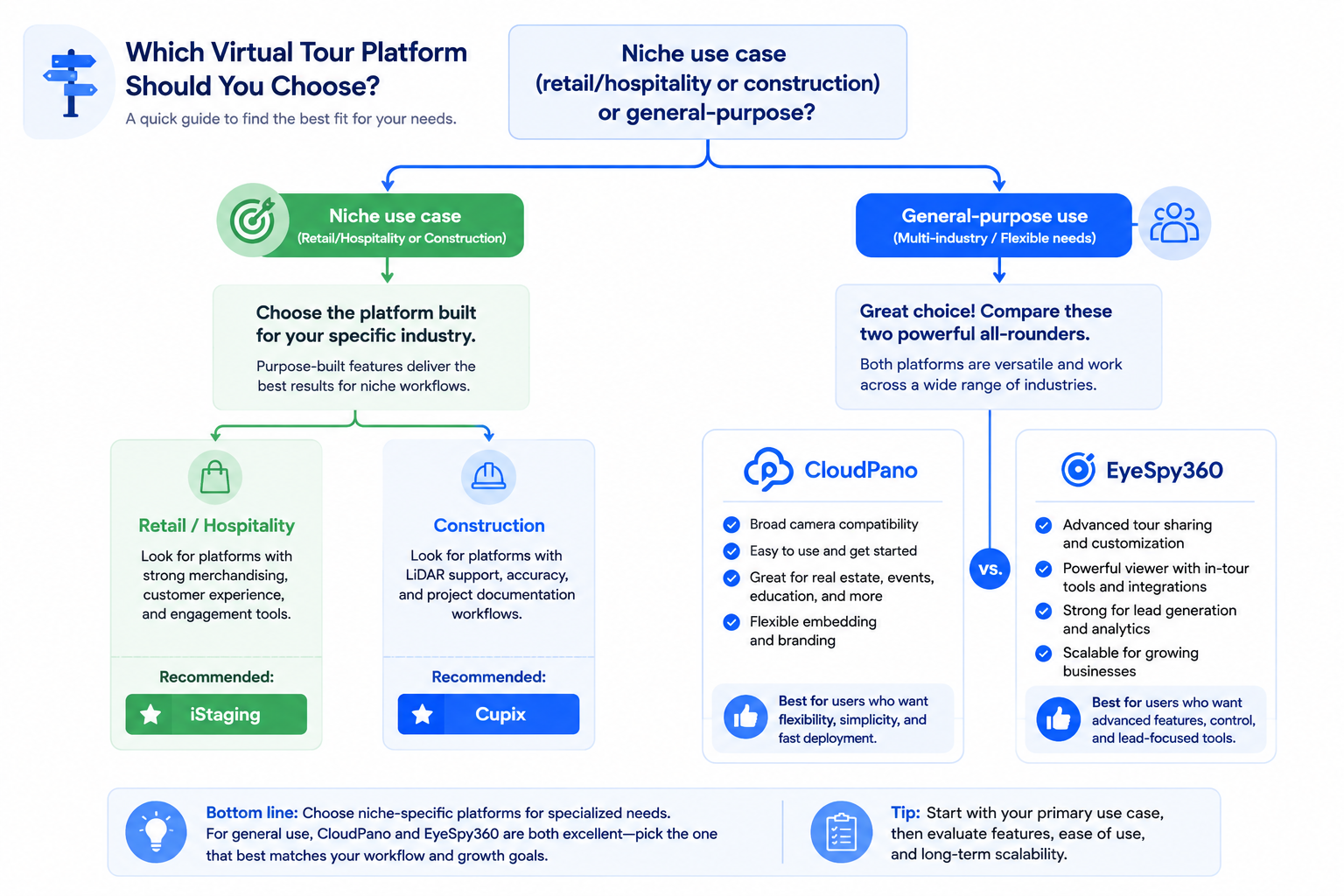
CloudPano, iStaging, Cupix, and EyeSpy360 each carry distinct general positioning — hardware flexibility and team scalability, retail/hospitality specialization, construction documentation, and accessible simplicity, respectively. None of these four is a universal "best" choice; the right one depends on which of these positioning strengths actually maps to your specific business.
If your priorities lean toward broad hardware compatibility and team features that scale predictably as you grow, CloudPano is worth testing directly against your specific content. And if you want the fuller picture on evaluating alternatives beyond just these four, our complete guide on choosing a Matterport alternative covers the broader landscape. Whichever platform you land on, the underlying approach — matching general positioning to your specific priorities, then confirming with a direct trial — holds regardless of how many additional options you eventually consider beyond this particular set of four.


Compact, ready to go anywhere
Interchangeable lens that’s upgradeable
Dual 1-inch sensors for improved clarity and low light performance
Dynamic range and 6K 360° capture
360° photo resolution at 21MP

8K 360° video recording for ultra-detailed visuals.
4K single-lens mode for traditional wide-angle shots.
Invisible selfie stick effect for drone-like perspectives.
2.5-inch touchscreen with Gorilla Glass protection.
Waterproof up to 33ft for underwater shooting.

360° photo resolution in 23MP
Slim design at 24 mm thick
Built-in image stabilization for smooth video capture.
Internal 19GB storage for photo and video storage.
Wireless connectivity for remote control and sharing.

60MP 360° still images for high-resolution photography.
5.7K 360° video recording at 30fps.
2.25-inch touchscreen for intuitive control.
USB Type-C port for fast charging and data transfer.
MicroSD card slot for expandable storage.
.png)

.png)

Try it free. No credit card required. Instant set-up.





.svg)


.svg)