


.png)


Businesses should choose walkthrough software that supports keyboard navigation, screen readers, captions, and mobile accessibility. Test these features before purchasing, gather feedback from users with disabilities, and regularly review published tours. Consider accessibility alongside pricing, usability, and visual quality to provide an inclusive virtual tour experience.
Interactive walkthroughs have become a go-to tool for showcasing properties, venues, and spaces online. They let visitors explore a location remotely, get a real feel for the layout, and make more informed decisions before ever stepping inside. But as more businesses adopt this technology, a critical question often gets overlooked: is the software actually accessible to everyone who might want to use it?
Choosing ADA compliant walkthrough software isn't just a nice-to-have feature buried in a settings menu — it directly determines who can engage with your content, how your business is perceived, and in some cases, what legal exposure you're carrying. In this guide, we'll walk through exactly what to look for when evaluating walkthrough software, so you can make a confident, informed choice. 🔑
When most businesses shop for walkthrough software, they focus heavily on visual quality, ease of use for the person building the tour, and pricing. Accessibility often gets treated as an afterthought — something to address later, if at all.
This approach creates real risk. Roughly one in four adults in the U.S. lives with some form of disability, according to the CDC. If your walkthrough software isn't built with accessibility in mind, you're not just missing a technical feature — you're excluding a substantial portion of potential customers, clients, or renters from engaging with your content at all. 🚫
Beyond the audience impact, accessibility has also become increasingly relevant from a legal standpoint. While the ADA doesn't name walkthrough software specifically, courts have increasingly interpreted digital tools as falling under existing accessibility expectations, particularly in industries like real estate, hospitality, and property management.

Not every platform markets itself clearly around accessibility, so it helps to know exactly what to check for during your evaluation process.
One of the most fundamental accessibility requirements is the ability to navigate an entire walkthrough using only a keyboard. Users who can't operate a mouse — due to motor impairments or other reasons — need to be able to move between rooms, hotspots, and menu options using tab and arrow key controls. ⌨️
When evaluating software, actually test this yourself. Unplug your mouse and try navigating a demo walkthrough from start to finish. If you get stuck or certain elements are unreachable, that's a clear sign the platform falls short.
Screen readers convert on-screen content into speech or braille for users who are blind or have low vision. For this to work properly, walkthrough software needs to be built with semantic HTML and ARIA labeling that clearly identifies buttons, navigation elements, and interactive content.
Ask any vendor directly whether their platform has been tested with common screen readers, and if possible, request a demo you can test yourself with a screen reader enabled.
Look for software that allows you to add meaningful, descriptive alt text to images and hotspots — not just generic file names. A description like "Primary bedroom with hardwood floors and walk-in closet" is far more useful than no description at all, both for accessibility tools and for search engine indexing. 📝
If your walkthroughs include narration or embedded video content, confirm the software supports captions or transcripts. This is a commonly overlooked feature, and its absence can exclude users who are deaf or hard of hearing from fully understanding your content.
Text overlays, navigation menus, and labels need enough contrast against their background to remain readable for users with low vision or color blindness. Check whether the software gives you control over text color and background styling, or whether it enforces contrast-friendly defaults automatically.
Beyond specific accessibility features, the overall navigation flow matters. Software that supports clear, consistent starting points and predictable controls throughout a walkthrough creates a better experience for every visitor — and is especially important for users relying on assistive technology. 🧭
Accessibility questions often come up after a platform is already in use — a client asks whether a specific tour works with their screen reader, or your team needs help troubleshooting a navigation issue. Choosing a vendor with responsive, knowledgeable customer support makes it far easier to resolve these situations quickly, rather than being left to figure things out alone.
If you're managing walkthroughs across dozens or hundreds of properties, look for software that lets you apply accessibility settings consistently at scale, rather than requiring manual configuration for every single tour. Bulk editing tools, templates, and default accessibility settings can save significant time as your content library grows.
Beyond checking individual features, it helps to ask vendors direct questions during your evaluation process.
The Web Content Accessibility Guidelines (WCAG) are the most widely recognized benchmark for digital accessibility. Ask whether the platform has been evaluated against WCAG standards, and at what conformance level (A, AA, or AAA).
Some platforms offer accessibility as a core, built-in feature set. Others may require custom development work or third-party plugins to achieve similar results. Understanding which category a platform falls into affects both cost and long-term maintenance.
Accessibility standards and legal interpretations continue to evolve. Ask whether the vendor actively maintains and updates their accessibility features, or whether this was a one-time consideration during initial development.
Request a trial period or demo specifically so you can test keyboard navigation, screen reader compatibility, and alt text functionality yourself, rather than relying solely on marketing claims.

A visually impressive walkthrough can still be completely inaccessible under the surface. Don't let strong visual design distract from checking the underlying functionality that matters for accessibility.
Many users access walkthroughs on mobile devices, and accessibility considerations don't disappear on smaller screens. Confirm that keyboard navigation alternatives, screen reader support, and contrast standards carry over to the mobile experience as well.
Internal testing is valuable, but it can miss issues that only surface when someone with a disability actually tries to use your walkthrough. If possible, gather feedback from real users relying on assistive technology, or work with an accessibility consultant who can identify gaps your internal team might not catch.
It's common for businesses to prioritize accessibility for new walkthroughs while leaving older, already-published ones unchecked. Set a recurring schedule to review existing content, especially high-traffic listings, so accessibility gaps don't quietly persist across your library.
Even after choosing accessible software, it's important to actually use its accessibility features consistently — adding alt text, enabling captions, and maintaining logical navigation structure across every walkthrough you publish, not just your first one.
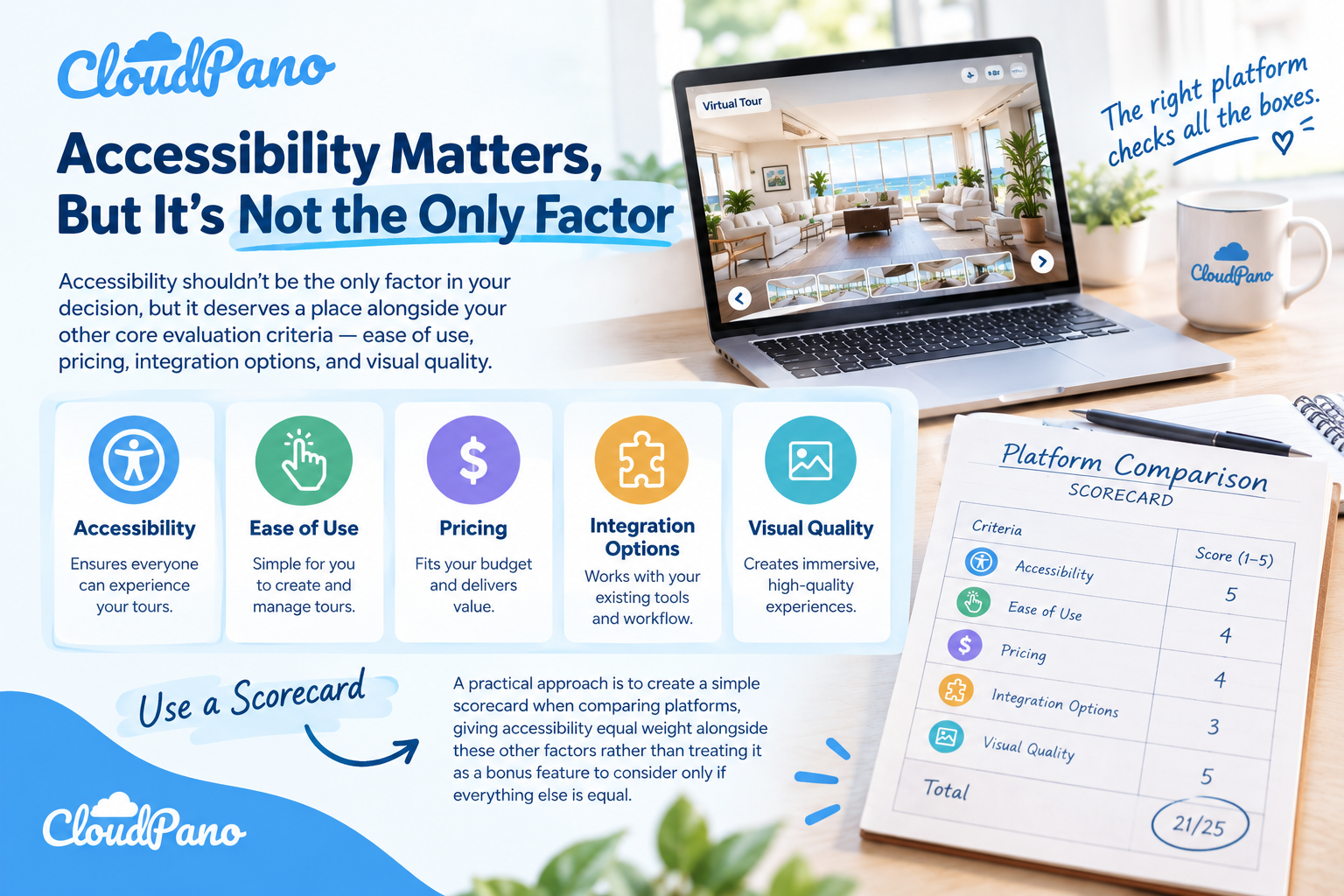
Accessibility shouldn't be the only factor in your decision, but it deserves a place alongside your other core evaluation criteria — ease of use, pricing, integration options, and visual quality.
A practical approach is to create a simple scorecard when comparing platforms, giving accessibility equal weight alongside these other factors rather than treating it as a bonus feature to consider only if everything else is equal. This ensures accessibility doesn't quietly get deprioritized once you start comparing pricing tiers or visual templates.
Some ADA compliant walkthrough software platforms may carry a higher upfront cost than bare-bones alternatives. However, the long-term value — wider audience reach, reduced legal risk, and improved search visibility — often outweighs a modest price difference, especially for businesses publishing walkthroughs regularly.
Choosing the right walkthrough software is ultimately about finding a platform that supports both your visual and functional needs while genuinely working for every potential visitor, regardless of ability. Testing accessibility features hands-on, asking vendors direct questions, and building accessibility into your evaluation criteria from the start all help ensure you're not left retrofitting compliance after the fact.
For businesses that rely on walkthroughs as a core part of their marketing — whether in real estate, hospitality, or property management — investing the time upfront to choose ADA compliant walkthrough software pays off in wider reach, reduced risk, and a stronger overall reputation with the customers and clients who matter most. 🚀
Accessible walkthrough software should support keyboard navigation, screen readers, captions, and sufficient color contrast. These features help users with disabilities navigate virtual tours. However, software features alone do not guarantee ADA compliance. Businesses must also ensure their published content is accessible.
Mobile accessibility ensures that users with disabilities can navigate virtual walkthroughs on smartphones and tablets. Businesses should test screen reader compatibility, navigation controls, and color contrast across mobile devices to provide an accessible viewing experience.
Test walkthrough software using keyboard-only navigation, screen readers, and mobile devices. Check captions, color contrast, and navigation controls. Gathering feedback from users with disabilities can also help identify accessibility issues that internal testing may overlook.
Businesses should regularly review both new and existing walkthroughs for accessibility issues. Prioritize high-traffic listings and repeat testing whenever content or software features change. Regular reviews help maintain accessibility across published virtual tours.
Consider accessibility features, pricing, ease of use, visual quality, and integration options. Test keyboard navigation, screen reader support, and mobile accessibility before purchasing. Choose software that supports accessible content creation and ongoing maintenance.


Compact, ready to go anywhere
Interchangeable lens that’s upgradeable
Dual 1-inch sensors for improved clarity and low light performance
Dynamic range and 6K 360° capture
360° photo resolution at 21MP

8K 360° video recording for ultra-detailed visuals.
4K single-lens mode for traditional wide-angle shots.
Invisible selfie stick effect for drone-like perspectives.
2.5-inch touchscreen with Gorilla Glass protection.
Waterproof up to 33ft for underwater shooting.

360° photo resolution in 23MP
Slim design at 24 mm thick
Built-in image stabilization for smooth video capture.
Internal 19GB storage for photo and video storage.
Wireless connectivity for remote control and sharing.

60MP 360° still images for high-resolution photography.
5.7K 360° video recording at 30fps.
2.25-inch touchscreen for intuitive control.
USB Type-C port for fast charging and data transfer.
MicroSD card slot for expandable storage.
.png)

.png)

Try it free. No credit card required. Instant set-up.







.svg)


.svg)