


.png)


A listing goes live on a Friday afternoon. The agent has forty photos, a drone clip from the photographer, and a showing scheduled for Sunday. By Saturday night, there's still no video — because the editor who usually turns this around is booked solid, and the agent doesn't have the software, the time, or honestly the patience to learn Premiere Pro on a weekend. This is the moment where most listing videos quietly die. Not from lack of good photos, but from a bottleneck nobody planned for.
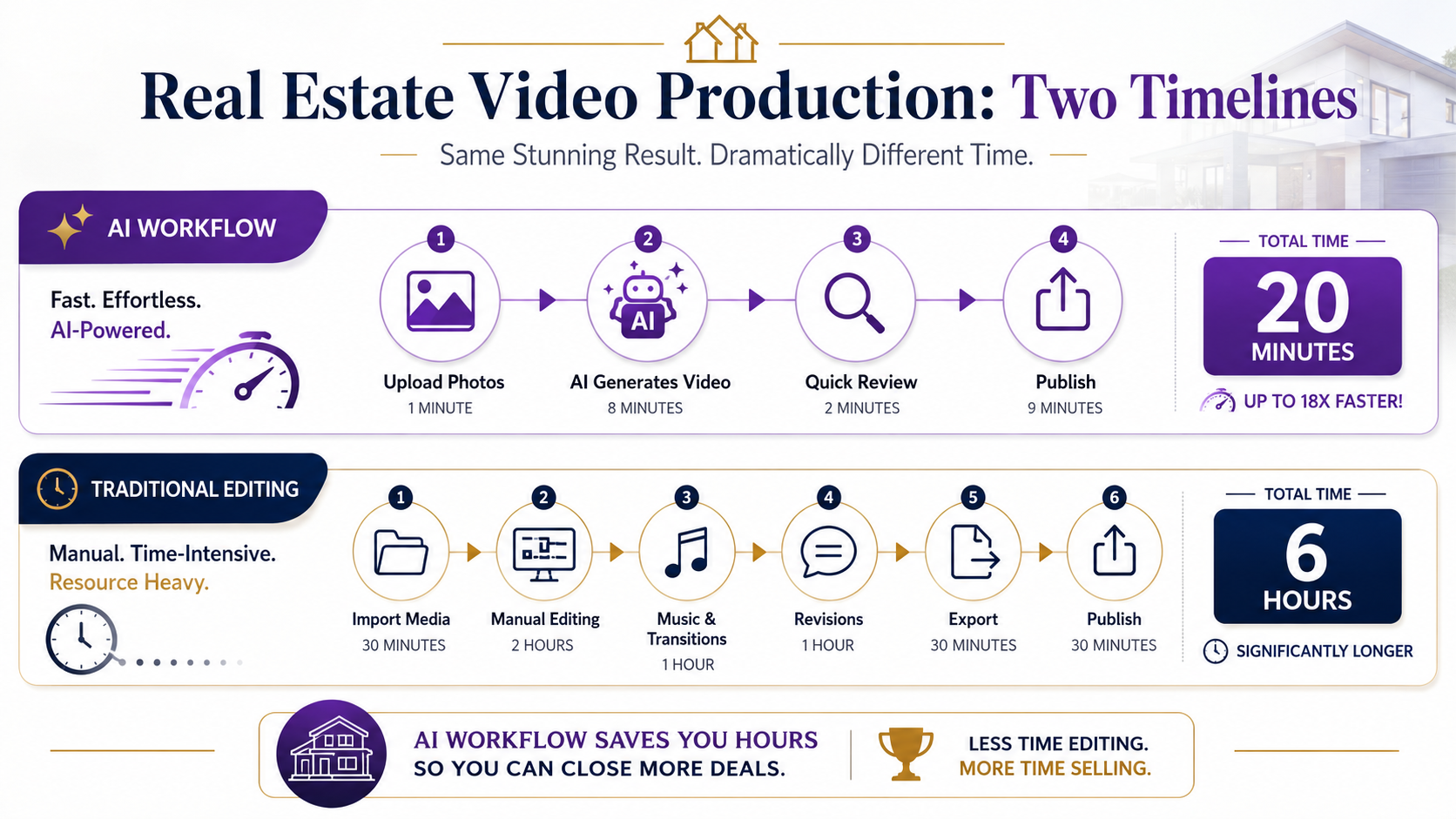
That bottleneck is exactly why the conversation around real estate video AI software comparison has gotten louder over the past two years. Agents aren't asking whether video helps sell listings anymore — they know it does. They're asking whether they can actually produce it consistently, on deadline, without hiring a full-time editor or becoming one themselves.
"AI real estate video software" refers to tools that automatically convert listing photos, drone footage, and property details into a finished, branded video — typically in minutes rather than hours. Traditional editing, by contrast, means manually assembling clips and stills in software like Premiere Pro, Final Cut, or CapCut, choosing transitions by hand, syncing music beats, and exporting in the right aspect ratio for wherever the video will live.

The distinction isn't just speed. It's who is doing the creative decision-making. Traditional editing puts every choice — pacing, color grading, branding placement, MLS-safe cropping — in the editor's hands. AI-driven tools make those decisions based on templates and rules you set once, then apply automatically to every listing after that.
Video listings get more engagement than static photo galleries — that part isn't controversial. What's less talked about is the operational side: a brokerage running 40 active listings a month can't realistically afford a bespoke edit for each one. According to the National Association of Realtors' Profile of Home Buyers and Sellers, buyers increasingly start their search online, which means the first thirty seconds of a listing's digital presence often decides whether a buyer books a showing at all.
That puts pressure on two things agents rarely have enough of: time and consistent output. A single missed video on a hot listing isn't just a cosmetic loss — it's a measurable dip in inbound leads for that property, especially in the first 48 hours when most of the traffic arrives.
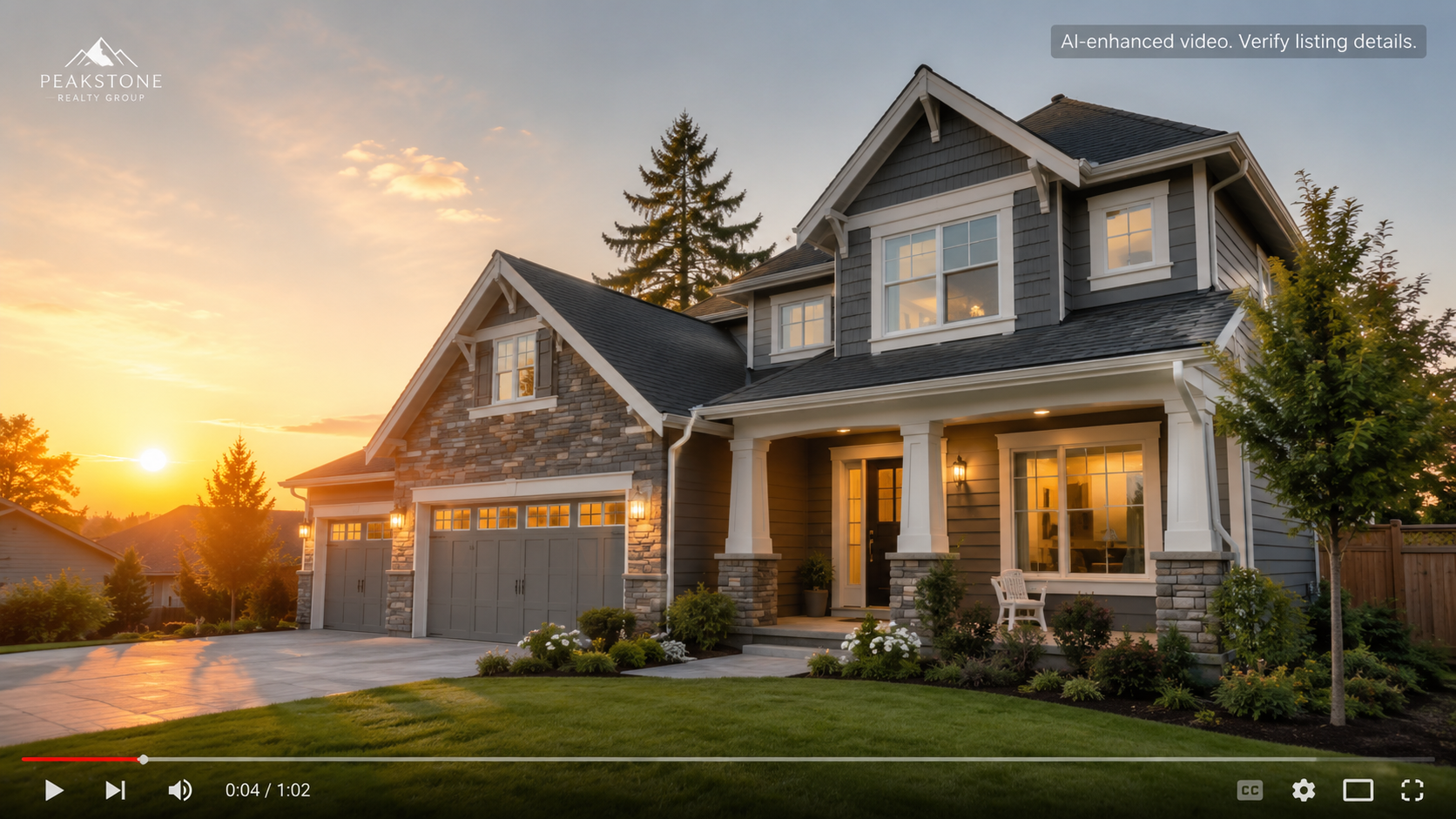
Here's what actually happens inside most brokerages. The photographer delivers RAW images Thursday night. The agent wants video by Friday morning because an open house is Saturday. If the workflow depends on a freelance editor, that editor is also fielding requests from four other agents with the same Saturday deadline. Something gives — usually the video gets rushed, delayed, or skipped entirely.
Even when an in-house editor exists, traditional editing software wasn't built for real estate's specific constraints: branding needs to appear the same way every time, aspect ratios need to match Instagram Reels and MLS-safe formats, and turnaround has to happen in hours, not days. Editors end up rebuilding near-identical timelines listing after listing, which is expensive time that doesn't scale.
This is the gap PhotoAIVideo is built around — not replacing good editing judgment, but removing the repetitive part of it. Upload the listing photos, and the platform assembles a branded video using pacing and transition logic trained specifically on real estate content, not generic social clips. Agents keep control over branding, music, and text overlays, but skip the hours of manual timeline work.
For teams worried about MLS compliant real estate software comparison research turning up conflicting answers, it's worth noting that MLS compliance is mostly about what appears in the video — no unauthorized contact info, no misleading claims, correctly disclosed brokerage branding — rather than which tool made it. A platform that lets you lock in compliant templates once, through the pricing plans, removes the guesswork per listing.
Here's what a same-day turnaround actually looks like in practice:
That last point is the one people underestimate. In traditional editing, the review cycle — not the initial edit — is usually where the extra hours go. Removing stylistic guesswork removes most of the back-and-forth too.
Neither approach is universally "better." A $4M listing with a dedicated marketing budget might still justify a custom cinematic edit. But for the other 90% of listings a typical agent handles in a year, the math favors automation heavily.
Treating AI video as "set and forget." The templates need occasional review — a logo that's slightly outdated or a call-to-action that no longer matches your current listings will get baked into every video until someone catches it.
Skipping the compliance check on text overlays. Automated price and detail overlays are only as accurate as the listing sheet you feed in — a stale price after a reduction is a common, avoidable error.
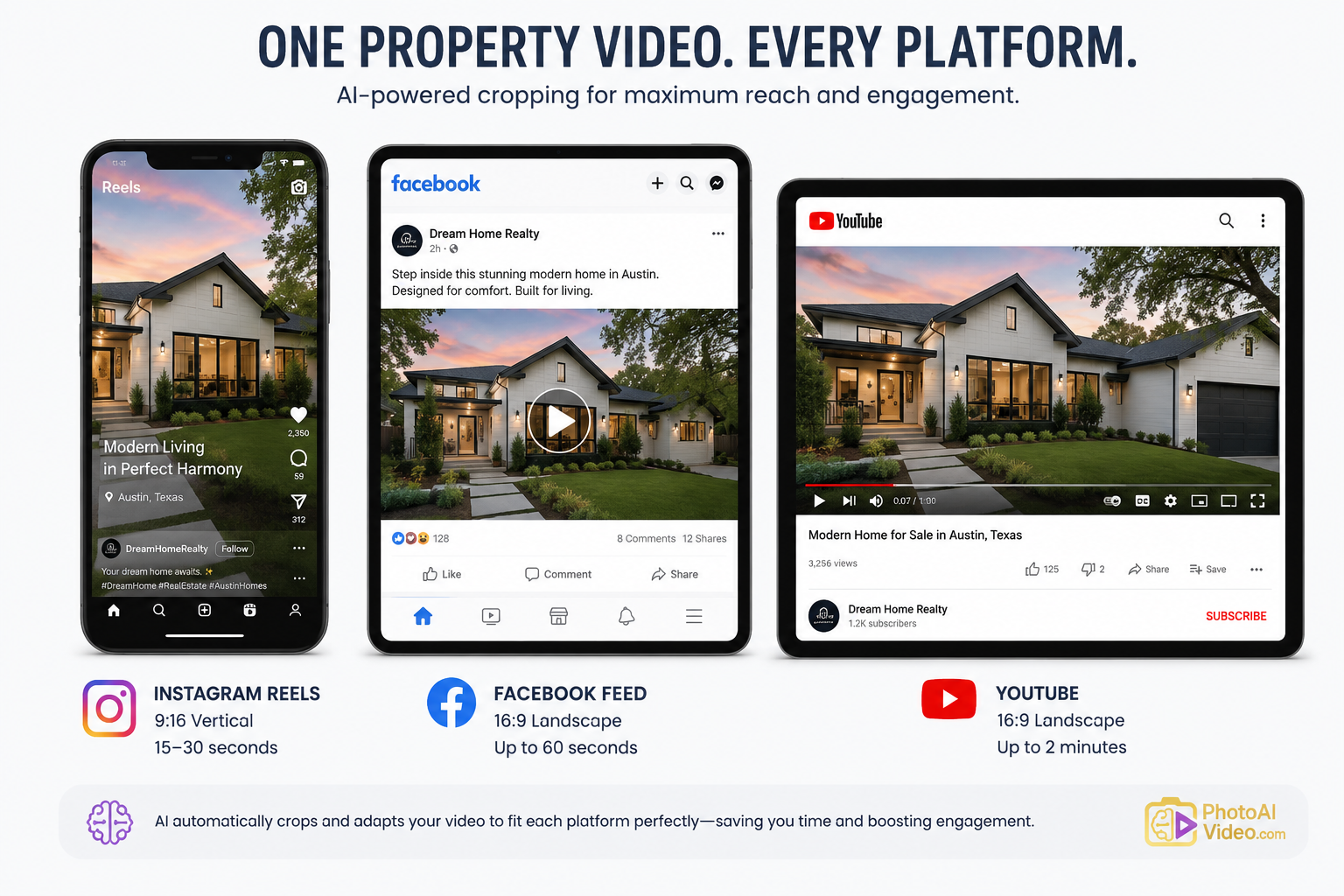
Exporting one aspect ratio and reusing it everywhere. A square video looks compressed and awkward when forced into MLS's horizontal video slot; this is a small detail that quietly hurts perceived professionalism.
Assuming faster means lower quality. This is the most common hesitation, and it's usually based on early, clunky AI tools rather than current ones. Search behavior backs this up too — Google Search Central's guidance on helpful content emphasizes that speed of production isn't a ranking or engagement penalty; relevance and usefulness are what matter to viewers and to search visibility alike.
Is AI real estate video software actually MLS compliant?
Compliance depends on what's shown in the video — accurate pricing, proper brokerage disclosure, no misleading claims — not on which software produced it. Most MLS boards evaluate content, not production method, so templates built with compliance in mind stay safe regardless of the tool.
Can AI video tools replace a professional videographer entirely?
For high-volume, standard listings, usually yes. For flagship luxury properties where cinematic storytelling is part of the sales pitch, many agents still blend both — AI for volume, custom video for standout listings.
How long does it actually take to produce a listing video with AI software?
Most platforms, including PhotoAIVideo, turn around a finished video in 10–20 minutes once photos are uploaded, versus several hours with manual editing.
Do AI-generated real estate videos perform worse on social media?
Not based on current engagement data — viewers respond to pacing, relevant content, and clear property information far more than to production method. Zillow Research has repeatedly found listing engagement correlates more with visual completeness and clarity than with editing sophistication.
What's the real cost difference between hiring an editor and using AI software?
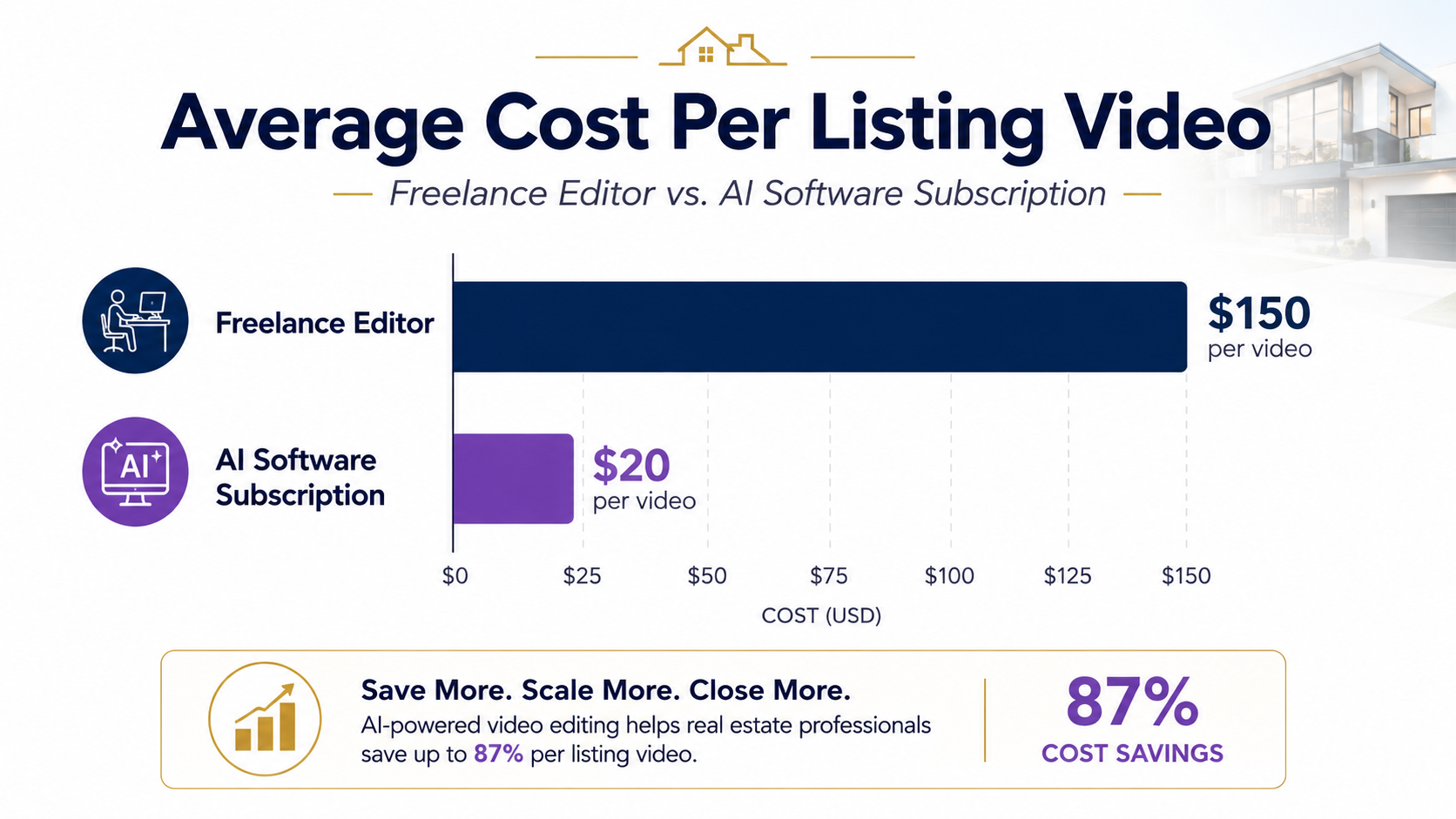
Freelance editors typically charge $75–$300+ per video depending on complexity. AI software runs on a flat monthly subscription, which becomes dramatically cheaper per video once you're producing more than a handful a month.
Will I lose creative control by switching to AI video tools?
No — most platforms let you lock in branding, music, and overlay styles once, then apply them automatically. You're not losing control, you're just not re-deciding the same choices every single listing.
Is it worth using AI video for rental or property management listings, not just sales?
Often more so — rental turnover moves faster than sales listings, and vacancy days are a direct cost, which makes fast, consistent video production even more valuable than in a typical sales workflow.


Compact, ready to go anywhere
Interchangeable lens that’s upgradeable
Dual 1-inch sensors for improved clarity and low light performance
Dynamic range and 6K 360° capture
360° photo resolution at 21MP

8K 360° video recording for ultra-detailed visuals.
4K single-lens mode for traditional wide-angle shots.
Invisible selfie stick effect for drone-like perspectives.
2.5-inch touchscreen with Gorilla Glass protection.
Waterproof up to 33ft for underwater shooting.

360° photo resolution in 23MP
Slim design at 24 mm thick
Built-in image stabilization for smooth video capture.
Internal 19GB storage for photo and video storage.
Wireless connectivity for remote control and sharing.

60MP 360° still images for high-resolution photography.
5.7K 360° video recording at 30fps.
2.25-inch touchscreen for intuitive control.
USB Type-C port for fast charging and data transfer.
MicroSD card slot for expandable storage.
.png)

.png)

Try it free. No credit card required. Instant set-up.







.svg)


.svg)