Real Estate Video AI Software Comparison: What Actually Separates the Options

Cloudpano
July 7, 2026
5 min read
Share this post

Real Estate Video AI Software Comparison: What Actually Separates the Options

A team lead at a mid-sized brokerage once sent me a spreadsheet she'd built comparing six AI video tools. Eighteen columns. Template count, price, export resolution, "AI features," customer support hours — everything you'd expect. She still couldn't decide. Three tools looked nearly identical on paper. It wasn't until she actually tested them on a rental unit with bad ceiling lighting that the real differences showed up — one tool auto-corrected the color cast, one didn't, and one produced a video so over-processed the walls looked painted a different shade than they were.

That's the problem with most comparisons in this category. They compare specs. They rarely compare what happens when you run a real, imperfect listing through the software — and that's exactly where the differences that matter actually surface.

What a Real Estate Video AI Software Comparison Should Actually Measure

A proper real estate video AI software comparison isn't a features checklist. It's a test of three things: how the tool handles imperfect source material (bad lighting, mixed room sizes, inconsistent photo quality), how fast a finished, MLS-safe video comes out the other end, and how the pricing structure holds up once your real listing volume — not a demo volume — is running through it.
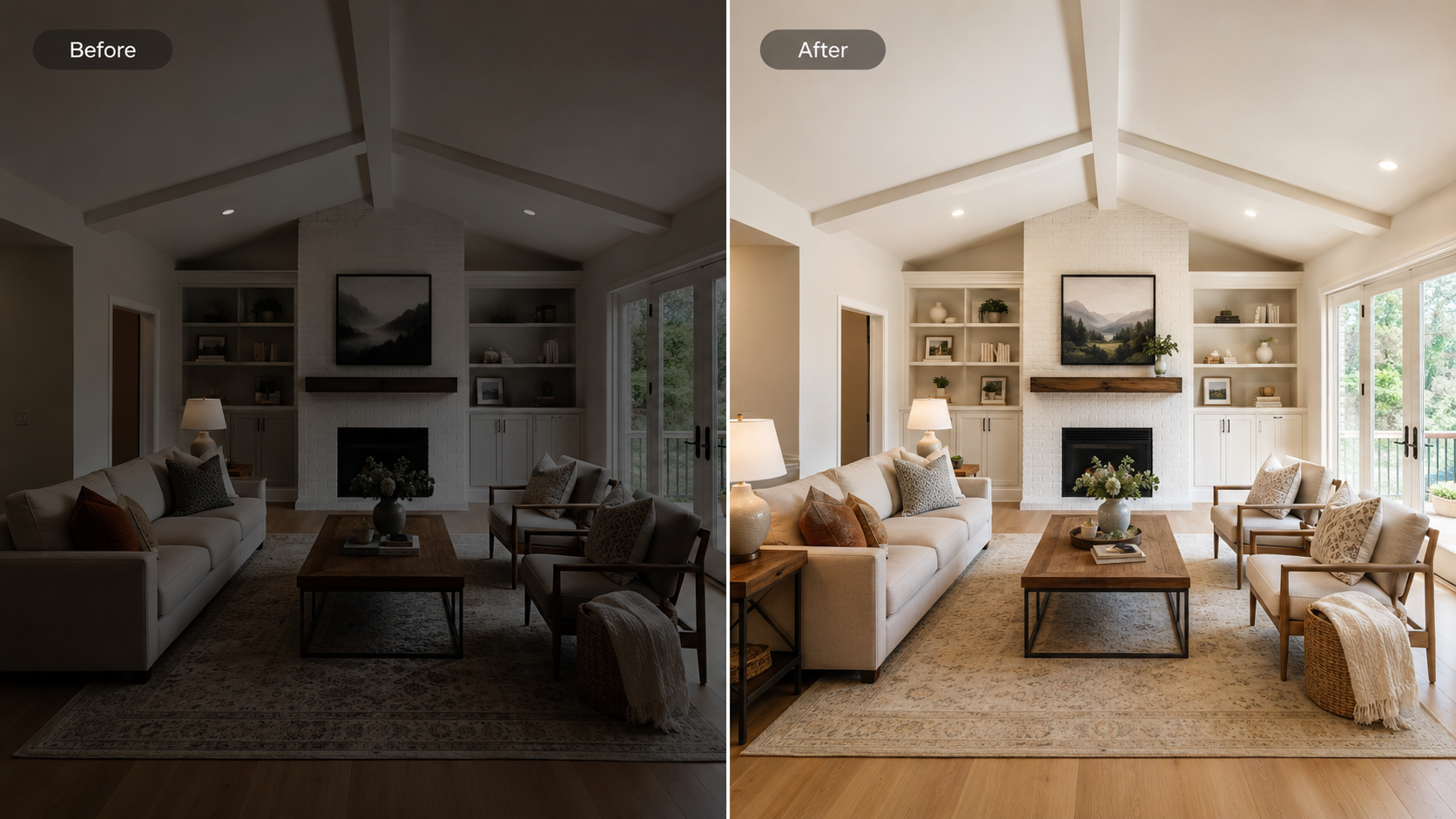
Side-by-side comparison of AI video output from mixed-quality real estate photos

Most comparison articles online skip the first point entirely. They test tools on clean, professionally shot sample photos, which tells you almost nothing about how a tool performs on a Tuesday afternoon shoot with a phone camera and a listing that needs to go live by 5 p.m.

Why the Right Comparison Framework Matters for Real Estate Specifically

Zillow Research has published data showing listings with video content receive meaningfully more views than listings without — which means the tool you pick isn't a back-office decision, it's a lead-generation decision. A slower, clunkier tool doesn't just cost you time; it costs you the window during which a listing gets the most buyer attention, typically the first 72 hours it's live.

There's also a compliance dimension that generic software comparisons ignore. An MLS compliant real estate software comparison has to account for the fact that MLS boards treat listing media differently — some require specific disclosure overlays, others restrict how agent branding appears on video content. A tool that scores well on editing power but poorly on compliance flexibility can create real liability for a brokerage operating across multiple boards.

The Common Workflow Problem With Side-by-Side Comparisons

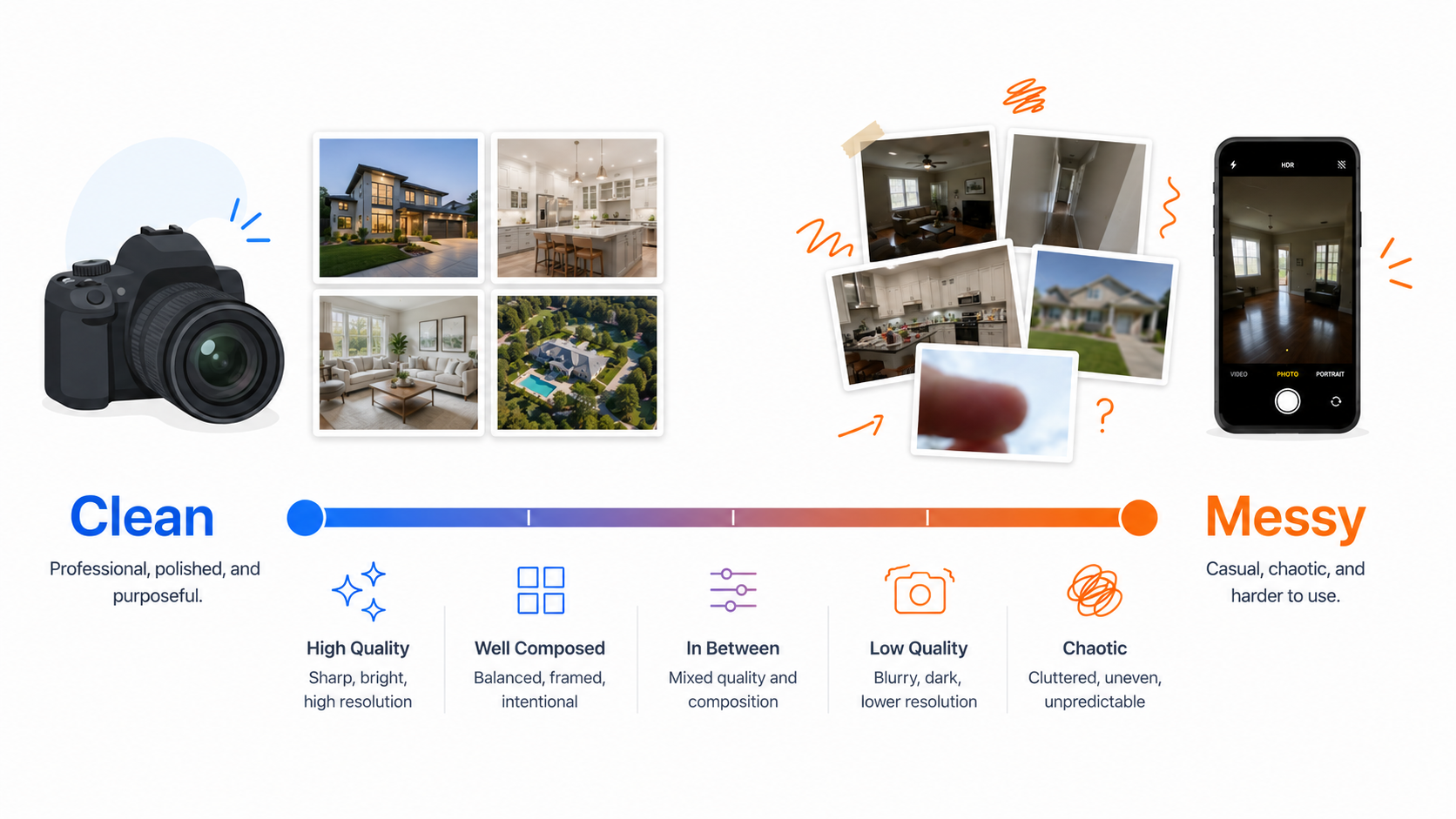
Here's what typically goes wrong when agents try to compare tools themselves: they sign up for three free trials, upload the same polished sample listing to each, and pick whichever produced the prettiest output. That test tells you almost nothing, because polished sample photos are exactly the input every tool is optimized to handle well.

The comparison that actually predicts real-world performance looks different. It means uploading a genuinely mixed batch — a dim hallway shot, an overexposed window shot, a slightly blurry wide-angle — and seeing which tool produces a usable, MLS-safe final video without heavy manual correction. This is the test almost nobody runs, and it's the one that separates tools that look similar in marketing screenshots.

How PhotoAIVideo Approaches the Comparison Problem

PhotoAIVideo.com was built around the assumption that most listing photos aren't studio-perfect — because most listing photos aren't. Rather than optimizing purely for demo-quality inputs, the platform is tuned to handle the kind of mixed-quality photo sets agents actually upload on a Tuesday between showings. If you're running your own AI real estate video software reviews process internally, testing this specifically — not just template variety — is where you'll see real separation between platforms.

MLS compliance overlay check on a finished real estate listing video

For brokerages weighing an AI listing video software alternatives search because their current tool isn't holding up at scale, the features page lays out exactly which compliance and branding controls are included by default versus what other platforms treat as premium add-ons.
Step-by-Step: How to Run Your Own Comparison Properly

 Spectrum of real estate listing photo quality from professional to phone-shot
  1. Pull three real listings from the last month — one clean shoot, one average, one genuinely messy (bad light, mixed angles).
  2. Run the same three listings through every tool you're evaluating — not the vendor's sample content.
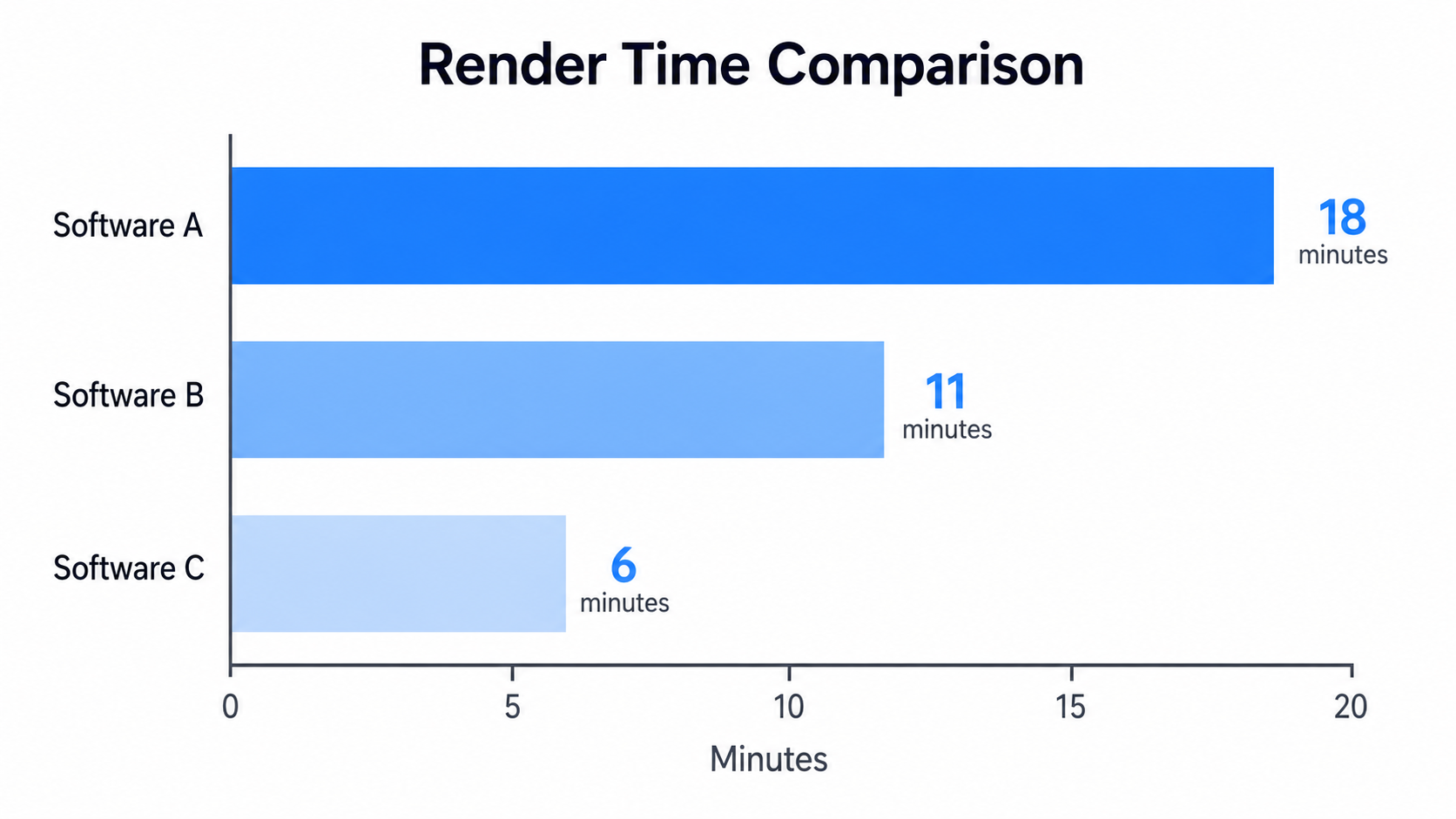
  3. Time each render from upload to finished, exportable video, not just "processing started."
  4. Check MLS compliance settings on the finished output — disclosure text, branding placement, contact overlays.
  5. Compare cost per listing at your actual monthly volume, not the advertised starting price.
  6. Get a second opinion from someone who didn't build the comparison — a colleague's fresh eyes will catch quality issues you've started to tune out.

🧠 Comparison Snapshot What to Weigh

Don't let the sticker price fool you — here's what actually matters and where the traps hide.

Criteria Why It Matters Common Blind Spot Watch Out
📸 Mixed‑quality photo handling 🎯 Predicts real‑world output quality ⚠️ Most tests use polished demo photos
⚡ Render speed ⏱️ Determines if video is ready before the listing window closes ⚠️ Vendors often quote "processing start," not finish
⚖️ MLS compliance controls 🛡️ Prevents brokerage liability across boards ⚠️ Sometimes gated behind higher pricing tiers
🏷️ Branding customization 🎨 Affects consistency across a team's listings ⚠️ Team plans may limit customization per seat
💰 True cost at your volume 📊 Prevents budget surprises after month one ⚠️ Advertised price rarely includes overage math
Chart comparing render speed across different real estate video AI software tools

Practical Use Cases

  • A solo agent testing tools before a listing surge should prioritize speed and simplicity over template depth — volume matters more than variety in a busy month.
  • A photographer comparing tools to recommend to Realtor clients needs to weigh how consistently a tool performs across different agents' shooting styles, not just their own.
  • A property manager comparing options for fast unit turnover should weight render speed and MLS-safe defaults above almost everything else.
Brokerage team testing real estate video software before a full rollout
  • A multi-office brokerage comparing tools for team-wide rollout needs to test seat-based pricing and branding consistency across offices, not just a single user's experience.
  • A team switching from an existing tool because of quality or pricing issues should specifically test the messy-photo scenario before assuming a competitor is actually better — sometimes the grass isn't greener, it's just differently priced.

Mistakes to Avoid When Comparing Tools

  • Testing only with polished sample photos. This is the single most common mistake and it inflates every tool's apparent quality equally, which defeats the point of comparing.
  • Comparing template count instead of output quality. More templates doesn't mean better final video; it often means more time spent choosing.
  • Ignoring render time under load. A tool that's fast with one video queued can slow dramatically with five queued at once — test it during a busy period, not a quiet one.
  • Skipping the compliance check on the actual export. Compliance settings sometimes don't carry through to the final rendered file the way they appear in the editor preview.
  • Relying only on AI real estate video software reviews written by affiliates. Cross-check third-party reviews against your own real-listing test before trusting star ratings alone.

Frequently Asked Questions

What's the best way to compare real estate video AI software before buying?

Run the same set of real, mixed-quality listing photos through each tool rather than relying on polished demo content or spec sheets alone.

Are the best real estate video apps always the most expensive ones?

Not necessarily. Price often correlates with template variety more than with actual output quality or render speed, which matters more for day-to-day use.

How do I know if a tool's MLS compliance features are actually reliable?

Check the compliance overlay on the final exported video file, not just the in-editor preview — some settings don't carry through consistently to the export.

Should I trust online AI real estate video software reviews?

Use them as a starting filter, but verify claims with your own test using a real, imperfect listing before making a final decision.

What's the biggest mistake agents make when comparing video tools?

Testing exclusively with polished sample photos, which makes every tool look better than it will perform on an actual rushed listing shoot.

Do real estate video editing software options for agents differ much in speed?

Yes, particularly under load — a tool that's fast with one video queued can slow considerably when multiple listings are being processed at once.

Is it worth switching tools if my current one seems "good enough"?

Only if a structured comparison — using real listings, not samples — shows a measurable difference in speed, compliance, or cost at your actual volume.

🚀 Your All‑In‑One Virtual Experience Stack Starts Here
🎬
PhotoAIVideo
Turn Photos into Scroll‑Stopping Videos with AI – get started now.
Get Started →
🏡
Pictastic
Stage your listings instantly – try virtual staging with Pictastic today.
Try Staging →
🌀
CloudPano
Create stunning 360° virtual tours in minutes – launch your first tour.
Launch Tour →
💰
VirtualTourProfit
Build a profitable virtual tour business – start scaling today.
Learn More →
🤝
CloudPano Reseller
Ready to sell visual AI software without building it yourself? Become a reseller.
Become a Reseller →
🚗
Auto CloudPano
Sell more vehicles with interactive 360° experiences.
Explore Auto →

Share this post
Cloudpano

Choose The Right 360° Camera

Insta360 ONE RS 1-Inch 360 Edition

  • Compact, ready to go anywhere

  • Interchangeable lens that’s upgradeable

  • Dual 1-inch sensors for improved clarity and low light performance

  • Dynamic range and 6K 360° capture

  • 360° photo resolution at 21MP

Learn More

Insta360 X4

  • 8K 360° video recording for ultra-detailed visuals.

  • 4K single-lens mode for traditional wide-angle shots.

  • Invisible selfie stick effect for drone-like perspectives.

  • 2.5-inch touchscreen with Gorilla Glass protection.

  • Waterproof up to 33ft for underwater shooting.

Learn More

Ricoh Theta Z1

  • 360° photo resolution in 23MP

  • Slim design at 24 mm thick

  • Built-in image stabilization for smooth video capture.

  • Internal 19GB storage for photo and video storage.

  • Wireless connectivity for remote control and sharing.

Learn More

Ricoh Theta X

  • 60MP 360° still images for high-resolution photography.

  • 5.7K 360° video recording at 30fps.

  • 2.25-inch touchscreen for intuitive control.

  • USB Type-C port for fast charging and data transfer.

  • MicroSD card slot for expandable storage.

Learn More
Property Marketing
Allows potential buyers to explore properties in detail from anywhere, enhancing the real estate marketing process.
Automotive Spins
Create an interactive virtual showroom and engage affluent digital buyers with live 360º video calls, all through the CloudPano mobile app for a complete automotive sales solution.
Interactive Floor Plans
Create 2D and 3D floor plans with measurements in 4 minutes or less, all from your phone. Download the Floor Plan Scanner app and get your first scan free.

360 Virtual Tours With CloudPano.com. Get Started Today.

Try it free. No credit card required. Instant set-up.

Try it free
Latest posts

See our other posts

Interviews, tips, guides, industry best practices, and news.

Best Real Estate Video Apps: A Buyer's Guide

Best" depends on who's asking. Here's how to pick the right video app based on whether you're a solo agent, a photographer, a property manager, or a brokerage — not a generic top-5 list.
Read post

Real Estate Video AI Software Comparison: What Actually Separates the Options

Most AI video comparisons test tools on polished sample photos — which tells you nothing about how they'll perform on your actual, imperfect listings. Here's the framework that does.
Read post

What Does AI Real Estate Video Software Actually Cost

Most AI video pricing pages hide the real cost behind render caps, seat limits, and compliance add-ons. Here's how to actually evaluate what you'll pay before you commit.
Read post