


.png)


A YouTube Short does not need to show the whole house.
That is where many real estate agents lose the viewer.
They try to squeeze the front exterior, kitchen, living room, bedrooms, bathrooms, backyard, neighborhood, price, open house date, and agent CTA into 35 seconds. The Short starts to feel like a compressed MLS slideshow.
The buyer scrolls.
Not because the home is bad.
Because the video gave them too much and too little at the same time.
A good YouTube Shorts listing teaser has one job: make the right viewer curious enough to click, save, message, or request the full property details.
That requires a tighter structure.
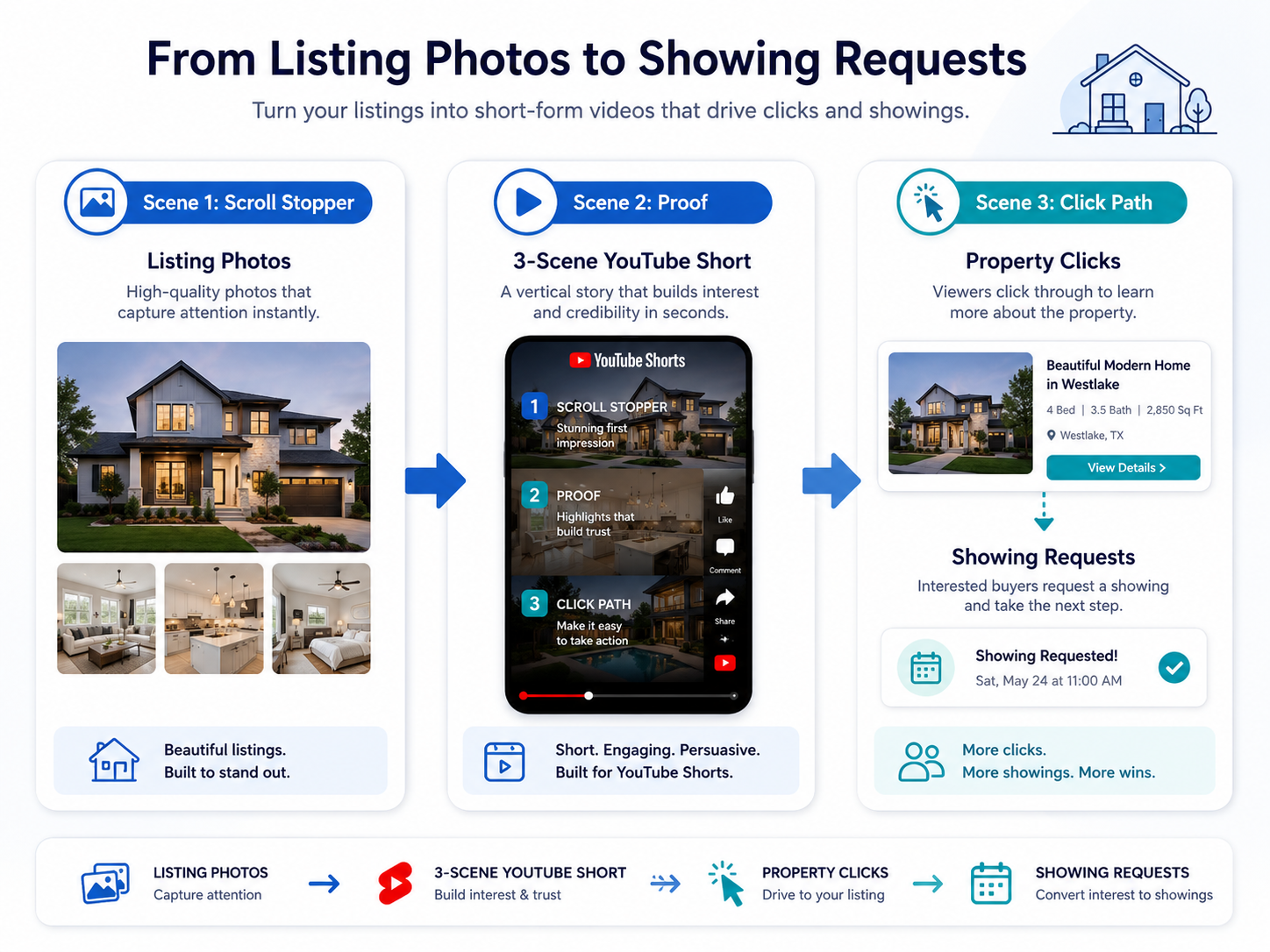
For most listing teasers, the simplest framework is three scenes:
Scene 1: Stop the scroll with the strongest property reason.
Scene 2: Prove the promise with one or two supporting visuals.
Scene 3: Point the viewer toward the next action.
That is it.
PhotoAIVideo helps agents, photographers, brokerages, and property managers turn listing photos into video assets that fit this kind of short-form structure. If you want to create real estate videos from photos with AI, YouTube Shorts are one of the best places to use a focused, repeatable formula instead of a full property tour.
A YouTube Shorts listing teaser is a short vertical real estate video designed to introduce a property quickly and drive a next action.
It is not the full listing video.
It is not the virtual tour.
It is not the MLS description in video form.
It is a teaser.
The goal is to create enough interest that the viewer wants to do something next:
Click the property page.
Watch the full video.
Ask for the address.
Request the floor plan.
Save the listing.
Message the agent.
Book a showing.
Attend the open house.
YouTube Shorts are vertical videos shown in YouTube’s short-form feed. YouTube explains that Shorts are vertical videos up to three minutes long, but real estate listing teasers usually work better when they are much shorter and more focused through YouTube’s official Shorts guidance.
For real estate, the practical sweet spot is often 10–30 seconds.
Long enough to create interest.
Short enough to avoid turning into a full tour.
A strong listing teaser should answer one question:
“Why should I stop and look at this property?”
That is why PhotoAIVideo works well inside this workflow. An AI app to turn property photos into videos can help you create a clean, vertical teaser from the listing images you already have, then adapt it for YouTube Shorts, Reels, Facebook, email, and open house promotion.
Buyers do not always begin with a full property search.
Sometimes they discover a home through a short video.
A kitchen catches their attention.
A backyard makes them pause.
A price point feels relevant.
A neighborhood name looks familiar.
A floor plan solves a problem.
A pool, guest suite, or office makes the home worth a closer look.
Short-form video helps agents bring listing discovery into the feed, where buyers and sellers already spend attention.
NAR has emphasized the importance of strong online listing presentation because buyers evaluate properties visually before deciding what to see in person through NAR’s online listing presentation guidance. YouTube Shorts can support that same buyer behavior when the video is clear, property-focused, and connected to a useful next step.
For sellers, Shorts can also show that the agent is actively marketing the listing beyond the standard MLS upload.
That matters during listing appointments.
A seller does not always understand syndication, indexing, or ad retargeting.
They do understand this:
“My home is being promoted in a modern way.”
But modern does not mean random.
A random Short is just another post.
A structured Short is a click path.
That is why agents need a repeatable formula for YouTube listing teasers. When paired with PhotoAIVideo’s real estate photo-to-video workflow, a listing photo gallery can become short-form video content without requiring a full video shoot for every property.
Most agents make YouTube Shorts from whatever media is easiest to grab.
They take the listing photos, pick a trending sound, add a “Just Listed” caption, and publish.
Sometimes it works.
Usually, it underperforms.
The problem is that a YouTube Short has less time to earn attention than a property page. If the first image is average, the text is generic, or the CTA is unclear, the video may never get the viewer to the listing details.
This actually happens all the time:
The best reason to tour the home is the backyard.
But the video starts with a plain front elevation.
The buyer who would have cared about the backyard scrolls before seeing it.
Or the best feature is the floor plan.
But the Short shows ten pretty room photos without explaining the layout.
The viewer likes the design but does not understand why the home is a fit.
Or the video includes everything.
Exterior, foyer, kitchen, living, dining, primary, bath, bedrooms, office, patio, pool, neighborhood, open house.
By the end, the viewer has seen a lot but remembered nothing.
The fix is not always better editing.
The fix is better scene selection.
PhotoAIVideo helps real estate professionals turn listing photos into video assets. For YouTube Shorts, the value is speed plus structure.
The agent does not need to manually edit a full vertical video from scratch.
The photographer does not need to film a walkthrough for every listing teaser.
The brokerage does not need every agent making videos in a different style.
The property manager does not need a production crew for every available unit.
PhotoAIVideo can help create short, motion-based videos from the media already available:
Exterior photos.
Kitchen images.
Living room photos.
Backyard images.
Amenity photos.
Floor plan visuals.
Neighborhood images.
Staged photos.
Rental unit photos.
For agents searching for the best AI real estate video generator for social media, the important question is not just whether the tool can create a good-looking clip. The better question is whether the workflow helps you build the right clip for the right channel.
A YouTube Short needs a different structure than a full listing video.
A branded Short needs different elements than an MLS-aware unbranded video.
A property teaser needs to create curiosity, not explain everything.
With PhotoAIVideo.com, the listing photo set becomes the source material. The 3-scene structure gives that source material a job.
Before choosing the photos, choose the reason someone would click.
This is the most important step.
A listing teaser should not start with “beautiful home.”
That could describe almost anything.
Choose one click reason:
Backyard.
Kitchen.
Price point.
Neighborhood.
One-story layout.
Pool.
Home office.
Luxury finishes.
Guest suite.
Acreage.
Waterfront.
Walkability.
Open house.
Primary suite.
New construction.
Move-in ready condition.
The click reason becomes the whole Short.
Example:
“This backyard is the reason to tour.”
Now you know what photos belong in the teaser.
Example:
“Need a one-story home with a real office?”
Now you know the video should show layout, office, living space, and maybe floor plan context.
Example:
“Relocating to this area? Start with this neighborhood.”
Now you know the teaser should include exterior, street, community, and lifestyle visuals.
The click reason filters the content.
Scene 1 should be 0–3 seconds.
This is where the viewer decides whether to keep watching.
Use the strongest image first, even if it is not the first photo in the listing gallery.
Good first-frame options:
Pool at dusk.
Bright kitchen.
Luxury exterior.
Backyard entertaining area.
Primary suite with design detail.
Great room with natural light.
Balcony view.
Waterfront or golf course view.
Dramatic staircase.
Modern exterior.
Floor plan if the layout is the hook.
Pair the image with short hook text.
Examples:
“Wait for the backyard.”
“This layout is the win.”
“15-second tour.”
“Kitchen first. Then the patio.”
“Need a home office?”
“Open house this weekend.”
“Luxury under 30 seconds.”
“Save this one.”
“Would you tour this?”
Do not waste the first frame on a logo.
Do not use a long intro.
Do not make viewers wait for the best part.
The best part goes first.
Scene 2 should be 4–15 seconds.
This is where you prove the hook.
If the hook is the backyard, show the outdoor space, patio, pool, and indoor-outdoor connection.
If the hook is the kitchen, show the island, appliances, dining connection, and living flow.
If the hook is the layout, show floor plan, room relationship, office placement, and backyard access.
If the hook is the neighborhood, show community entrance, exterior, street, amenities, and nearby lifestyle.
This is where an automated video marketing software for Realtors workflow helps because the agent can create multiple Shorts from the same photo gallery, each built around a different proof angle.
One listing could produce:
Backyard teaser.
Kitchen teaser.
Layout teaser.
Open house teaser.
Neighborhood teaser.
Price-position teaser.
Each one proves a different reason to click.
Scene 3 should be 16–25 seconds, or shorter if the video is tight.
This scene should not summarize the entire property.
It should direct the viewer.
Examples:
“Want the full video?”
“Ask for the floor plan.”
“Request a private showing.”
“See the full listing.”
“Open house Saturday.”
“Message ‘TOUR’ for details.”
“Save this before you tour.”
“Want the address?”
“Compare this with nearby homes.”
The CTA should match the viewer’s temperature.
A cold viewer may need “See the full listing.”
A warm viewer may need “Request a private showing.”
A relocation buyer may need “Ask for the neighborhood guide.”
A seller watching your marketing may need “Ask for the listing media plan.”
YouTube’s own creator guidance repeatedly emphasizes packaging and audience satisfaction: the title, thumbnail, opening, and viewer expectation should match what the content actually delivers. For real estate, that means your hook should lead to a useful property detail, not a bait-and-switch. You can review YouTube’s official creator resources when building a repeatable Shorts strategy.
YouTube Shorts are small-screen content.
Do not overload the frame.
Use:
Large readable text.
Short captions.
Strong image crops.
Clear play movement.
Minimal clutter.
One CTA.
Consistent branding only when appropriate.
For MLS-sensitive or compliance-aware workflows, create separate versions. A branded YouTube Short can include agent branding, social CTA, and contact direction. A clean version may need to avoid branding or promotional overlays depending on where it will be used.
That is where an AI tool for making unbranded real estate videos can support a safer two-version workflow. Use the clean version for property-first environments, and use the branded Short for social media.
Do not name every video “short-final.mp4.”
Use file names that explain the role.
Examples:
123-main-street-youtube-short-backyard-teaser.mp4
123-main-street-youtube-short-layout-click.mp4
123-main-street-youtube-short-open-house.mp4
123-main-street-youtube-short-neighborhood.mp4
123-main-street-youtube-short-branded.mp4
123-main-street-youtube-short-unbranded.mp4
This matters for teams.
A photographer, coordinator, assistant, or agent should know exactly what the file is for before opening it.
A YouTube Short should not end in a dead end.
Create a click path.
Depending on your setup, that could be:
Pinned comment with next step.
Description with listing page.
Link in profile.
Property website.
Buyer consultation link.
Open house registration.
Text keyword.
Email follow-up.
Neighborhood guide.
Full listing video.
Google Search Central recommends creating helpful content for people and making sure page content provides value beyond simple search targeting through Google’s helpful content guidance. The same applies to the landing page behind your Short. If someone clicks from a teaser, the page should deliver the property details promised in the video.
The Short earns the click.
The destination earns the lead.
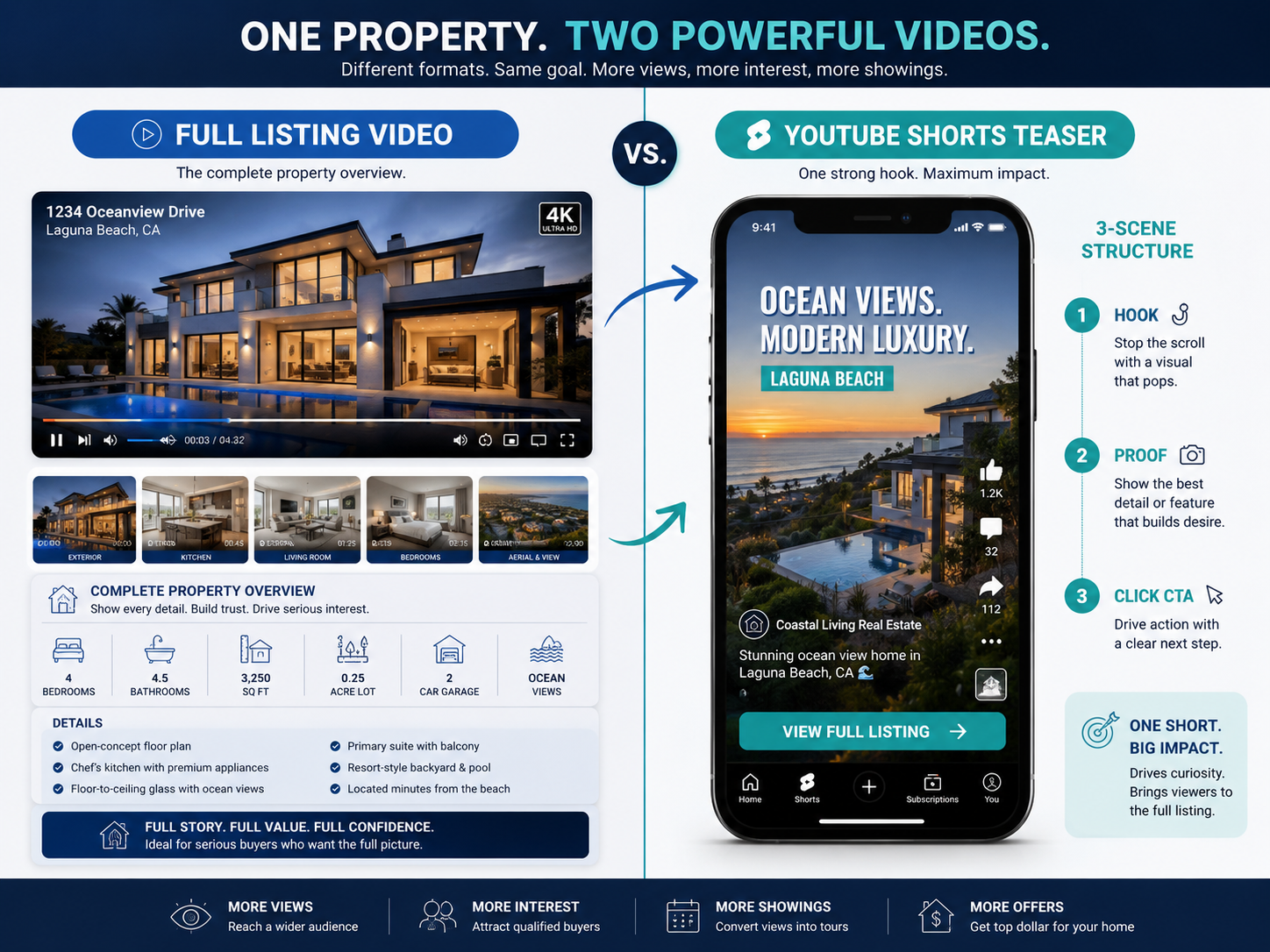
A full listing video helps buyers evaluate.
A Short helps buyers decide to look.
They are not the same asset.
A Realtor receives a new listing photo gallery on Wednesday and wants more than one “just listed” post.
Using PhotoAIVideo’s AI listing video workflow, the agent creates:
A full listing video.
A YouTube Short focused on the kitchen.
A YouTube Short focused on the backyard.
An open house Short.
A branded Reel for Instagram.
A clean property-first video if needed.
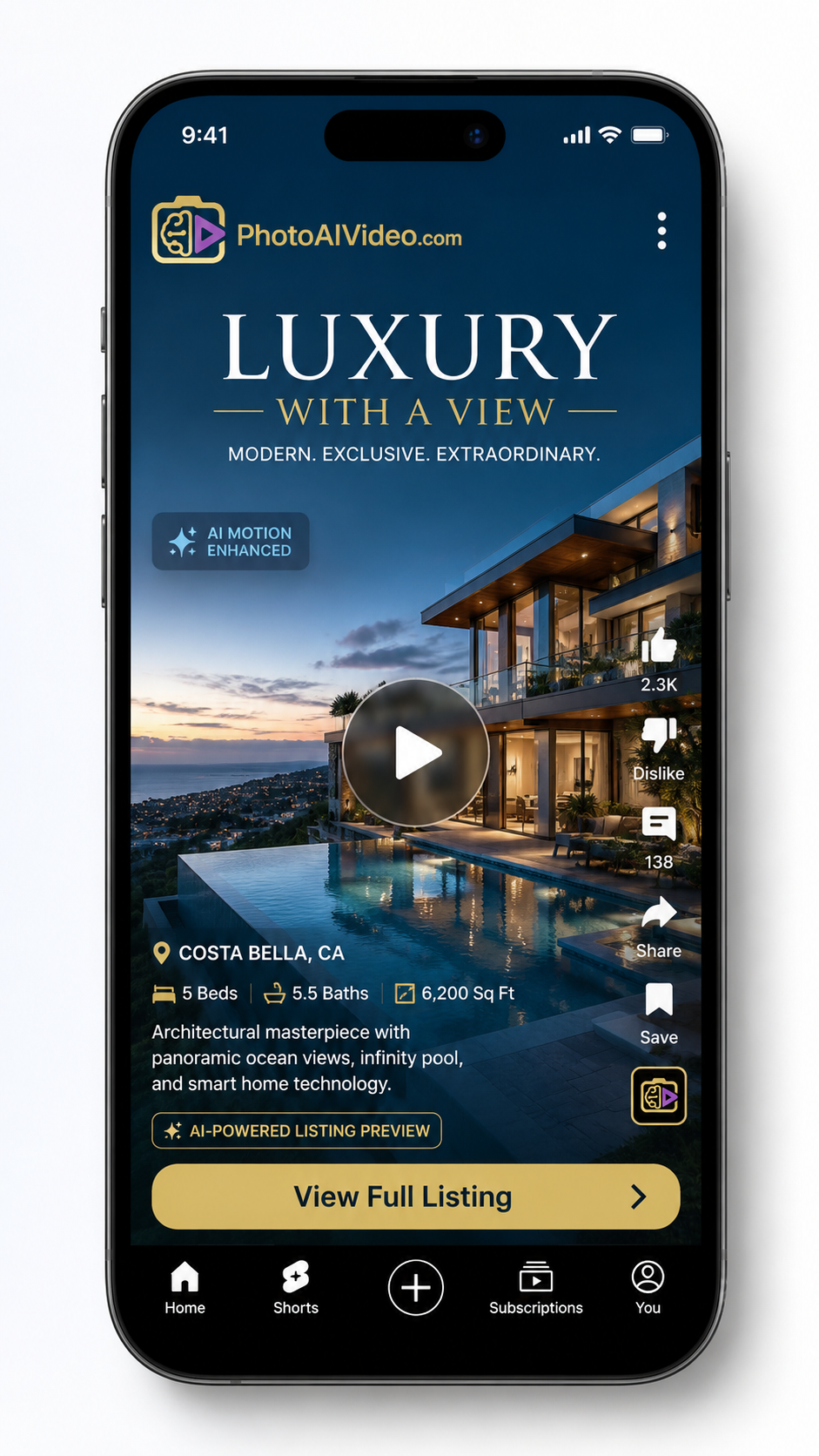
The YouTube Short is not trying to show every room.
It is trying to create the first click.
The agent’s caption says:
“Would you tour this home for the backyard alone? Full listing details available now.”
That gives the viewer a simple reason to engage.
A real estate photographer wants to sell a higher-value package without filming every property.
The photographer can offer a “Shorts teaser pack”:
One main listing video.
Three YouTube Shorts.
One open house teaser.
One unbranded listing version.
One branded social version.
Using AI video software for real estate photographers, the photographer can turn the existing listing photos into multiple deliverables.
This is easier for agents to buy because they are not just getting a video.
They are getting ready-to-post marketing assets.
Brokerages struggle when every agent handles video differently.
A simple standard package could include:
Full property video.
YouTube Short teaser.
Instagram Reel.
MLS-aware clean version.
Open house teaser.
Seller recap video.
The brokerage can train agents around one 3-scene structure:
Hook.
Proof.
Click path.
That makes social video easier to teach, easier to review, and easier to repeat.
For a brokerage, this is where AI real estate marketing software for agents becomes operational. It helps standardize content creation without requiring every agent to become an editor.
Property managers can use the same 3-scene structure for rental units.
Scene 1: “Available this week near downtown.”
Scene 2: Show living area, kitchen, bedroom, amenity.
Scene 3: “Request a tour today.”
This works for:
Apartment units.
Single-family rentals.
Vacation rentals.
Student housing.
Senior living communities.
RV park rentals or cabins.
For rental marketing, the goal is not cinematic storytelling.
The goal is to get a qualified person to schedule.
Agents can use YouTube Shorts strategy in listing appointments.
Instead of saying, “We post on social,” say:
“We create a full property video and then create focused Shorts around the strongest reasons buyers will click: backyard, kitchen, layout, neighborhood, and open house. Each Short has a specific job.”

That sounds like a plan.
Sellers hire plans.
A Short is not a full tour.
If you try to show every room, the viewer may remember nothing.
Pick one reason to care.
Many agents start with the front of the home because that is the first photo in the gallery.
But the first photo is not always the strongest hook.
Start with the best reason to stop scrolling.
“Just listed” is not enough.
Add a buyer-specific reason.
Better examples:
“Just listed with a main-level guest suite.”
“Just listed near the trail system.”
“Just listed with the backyard buyers want.”
“Just listed under $500K with a real office.”
Specificity beats generic hype.
A Short without a next step is only awareness.
Make sure viewers know where to go.
Full listing.
Showing request.
Open house.
Floor plan.
Neighborhood guide.
Private tour.
Branding is useful on social.
But if a version might be used in an MLS-sensitive environment, make sure you also have a clean version. An MLS compliant video maker for property listings should help you separate those assets instead of forcing one file to do every job.
If the text cannot be read on a phone, it does not help.
Use fewer words and larger text.
One listing can produce multiple Shorts.
Do not stop at one.
Create separate teasers for:
Best feature.
Open house.
Neighborhood.
Layout.
Price position.
Still available.
Seller update.
This is how one listing becomes a short-form campaign.
Choose the teaser based on the strongest buyer question.
If buyers care about lifestyle, create a backyard or neighborhood teaser.
If buyers care about function, create a layout teaser.
If buyers care about price, create a value-position teaser.
If buyers need urgency, create an open house teaser.
If buyers are comparing homes, create a “three reasons” teaser.
If sellers are watching your marketing, create a seller-proof teaser.
Use this simple decision guide:
Strong visual feature? Lead with the image.
Strong layout? Lead with the problem it solves.
Strong neighborhood? Lead with the lifestyle fit.
Strong price point? Lead with the search criteria.
Upcoming event? Lead with the date and reason to attend.
Luxury listing? Lead with emotion, then prove with details.
The strongest Short is not always the prettiest.
It is the one that matches the buyer’s reason to click.
Scene 1: “This backyard is the reason to tour.”
Scene 2: Show patio, pool, kitchen connection.
Scene 3: “Want the full listing?”
Scene 1: “Kitchen-first buyers, look at this.”
Scene 2: Show island, storage, dining flow.
Scene 3: “Ask for the full video.”
Scene 1: “The layout is the real win.”
Scene 2: Show floor plan and room flow.
Scene 3: “Want the floor plan?”
Scene 1: “Open house this Saturday.”
Scene 2: Show the three best visuals.
Scene 3: “Stop by or request a private tour.”
Scene 1: “Looking in this neighborhood?”
Scene 2: Show home, streetscape, amenity.
Scene 3: “Ask for nearby listings.”
Scene 1: “This is how we market listings now.”
Scene 2: Show full video, Short, email follow-up.
Scene 3: “Ask for the listing media plan.”
These scripts are short on purpose.
YouTube Shorts reward clarity.


Compact, ready to go anywhere
Interchangeable lens that’s upgradeable
Dual 1-inch sensors for improved clarity and low light performance
Dynamic range and 6K 360° capture
360° photo resolution at 21MP

8K 360° video recording for ultra-detailed visuals.
4K single-lens mode for traditional wide-angle shots.
Invisible selfie stick effect for drone-like perspectives.
2.5-inch touchscreen with Gorilla Glass protection.
Waterproof up to 33ft for underwater shooting.

360° photo resolution in 23MP
Slim design at 24 mm thick
Built-in image stabilization for smooth video capture.
Internal 19GB storage for photo and video storage.
Wireless connectivity for remote control and sharing.

60MP 360° still images for high-resolution photography.
5.7K 360° video recording at 30fps.
2.25-inch touchscreen for intuitive control.
USB Type-C port for fast charging and data transfer.
MicroSD card slot for expandable storage.
.png)

.png)

Try it free. No credit card required. Instant set-up.







.svg)


.svg)