


.png)


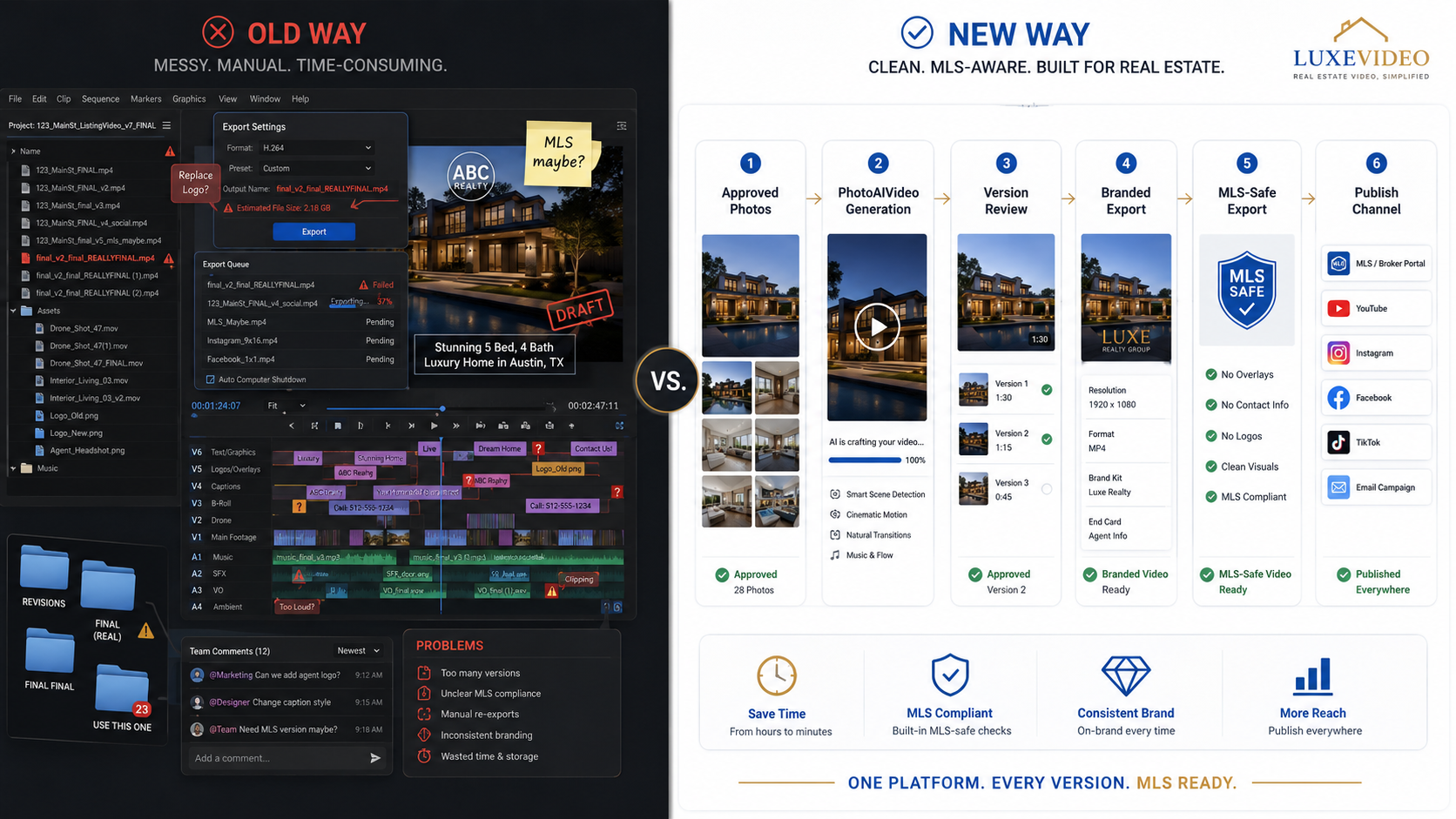
A video editor can make a listing look beautiful.
That does not mean the video is ready for the MLS.
This is where a lot of real estate teams get burned. They think the problem is production quality. Better transitions. Cleaner music. Sharper text overlays. A more cinematic intro. A smoother pan across the kitchen.
But local MLS rules do not care how polished the edit is.
They care about what appears in the media, how the media is hosted, what branding is visible, whether the property is represented accurately, and whether the correct version is being used in the correct listing environment.
That is why traditional video editors often fail real estate teams. Not because they are bad tools. They fail because they were not designed around MLS-specific listing workflows.
A standard editing platform helps you create video.
It does not help you manage local MLS strictures, branded versus unbranded versions, property-specific compliance review, hosting context, file naming, or repeatable listing media delivery.
That is the gap.
PhotoAIVideo helps agents, photographers, and listing teams create AI-generated real estate videos from property photos with a workflow better suited to modern listing media. The goal is not just to create a better-looking video. The goal is to create a cleaner, faster, more practical video asset that can support MLS-aware publishing, social media marketing, and repeatable listing promotion.
MLS rules vary by board, brokerage, and region. Always confirm your local requirements before publishing listing media. For broader MLS policy context, review NAR’s MLS policy resources, NAR’s Handbook on Multiple Listing Policy, and NAR’s Clear Cooperation Policy.
Traditional video editors were built for creative production.
Real estate listing media requires more than creative production.
That is the core issue.
A traditional editor might help an agent create:
All of that is useful.
But local MLS rules may require cleaner media for certain listing fields. Some MLS environments restrict visible agent branding, brokerage branding, contact information, promotional language, lead capture, branded tour links, or certain types of public marketing behavior.
That means the same video that works well on Instagram may not work inside an MLS listing workflow.
A real estate team needs to know:
Traditional editors do not solve those questions. They simply export files.
That is why agents increasingly need real estate video software that works with MLS rules instead of relying only on generic editing tools.
The issue is not whether the software can make a nice video.
The issue is whether the workflow helps prevent the wrong video from being used in the wrong place.
Real estate marketing is full of channel-specific rules.
Social media rewards personality, branding, and calls to action. The MLS often requires more neutral listing media. Seller updates may need a different tone. Property websites may need lead capture. Paid ads need hooks. Brokerage pages may need brand consistency.
One property can require five different media outputs.
A traditional editor does not naturally organize around that reality.
The editor sees a project timeline.
The agent sees a listing launch.
The coordinator sees a compliance checklist.
The photographer sees a deliverable package.
The brokerage sees risk.
Those are different perspectives.
When the tool does not match the workflow, people invent their own process. Someone names a file “final_video_new.mp4.” Someone else uploads the social version to a listing field. Another person embeds a clean video on a branded page. The agent thinks the video is unbranded because the logo was removed, but the thumbnail still includes the brokerage mark.
That is how mistakes happen.
The business problem is not just compliance. It is lost time.
Every time a video needs to be re-exported, renamed, reviewed, or replaced, the listing launch gets slower. Sellers get impatient. Agents lose momentum. Photographers get pulled back into old jobs. Coordinators spend time cleaning up avoidable issues.
A better system starts with the reality that real estate media is not one asset. It is a set of assets.
That is why PhotoAIVideo is useful for teams that want to create real estate videos from photos with AI while still keeping the workflow focused on real estate use cases.

The traditional video editor usually enters the process too late.
The property photos are done. The listing copy is almost finished. The agent wants a video. The photographer or assistant opens a video editor, drops in the photos, adds motion, adds text, picks music, and exports the file.
The video looks good.
Then the questions begin.
“Can we use this in the MLS?”
“Can you remove the logo?”
“Can you make a version without the agent intro?”
“Can we take out the phone number?”
“Can we make it vertical too?”
“Can we use it before the listing goes active?”
“Can you replace the video link because the hosting page shows branding?”
The editor did not cause the problem. The workflow did.
Traditional editors are usually built around creative completion. Once the video is exported, the project feels done. But in real estate, export is not the end. Export is where version control begins.
A real estate listing video often needs:
That is a lot of responsibility for a generic editing timeline.
Traditional editing tools also make it easy to hide important compliance issues inside the creative process. Branding can appear in lower-thirds, intros, outros, watermarks, thumbnails, captions, music tags, file names, hosting pages, metadata, or linked descriptions.
The logo is only one piece.
This is why MLS compliant video maker for property listings is a different category than a standard editor. It needs to support the way listing media is actually reviewed and used.

PhotoAIVideo starts from a different place.
Instead of forcing the agent or photographer to build a video from a blank editing timeline, PhotoAIVideo helps turn approved listing photos into AI-generated real estate videos.
That matters because listing photos are already part of the real estate workflow. They are usually edited, reviewed, and selected before marketing begins. Using them as source material makes video creation faster and more repeatable.
PhotoAIVideo is especially useful for agents and teams that need practical listing media, not a complex post-production project.
A Realtor can use it to create a property video from photos.
A photographer can use it to add video packages to photo shoots.
A brokerage can use it to create more consistent listing video assets.
A property manager can use it to turn rental photos into leasing videos.
The value is not that AI removes all review. It does not.
The value is that PhotoAIVideo reduces the amount of manual editing required before the review process starts.
That makes it easier to create listing videos, check them for channel fit, and prepare the right version for the right use.
For agents searching for an AI app to turn property photos into videos, the goal should not be “replace every editor.” The goal should be “create more listing video assets without rebuilding every project from scratch.”

Before choosing music, motion, captions, or format, decide where the video will be used.
Ask:
A traditional editor often starts with design.
A better listing media workflow starts with destination.
Use final photos that represent the property accurately.
This reduces confusion later. If the source images are current, clean, and approved, the video has a stronger foundation.
Avoid starting with random folder images, phone screenshots, outdated photos, or draft edits.
Use PhotoAIVideo to create video from the approved property photos.
This removes the need to manually build every motion sequence, transition, and video asset from scratch.
This is where the workflow becomes more practical for teams that need repeatable listing media.
Before publishing, review the video based on its intended use.
For MLS-aware use, check for:
For social media, branding may be useful. For the MLS, it may not be.
The review should match the channel.
Do not try to make one video do every job.
Prepare separate versions when needed:
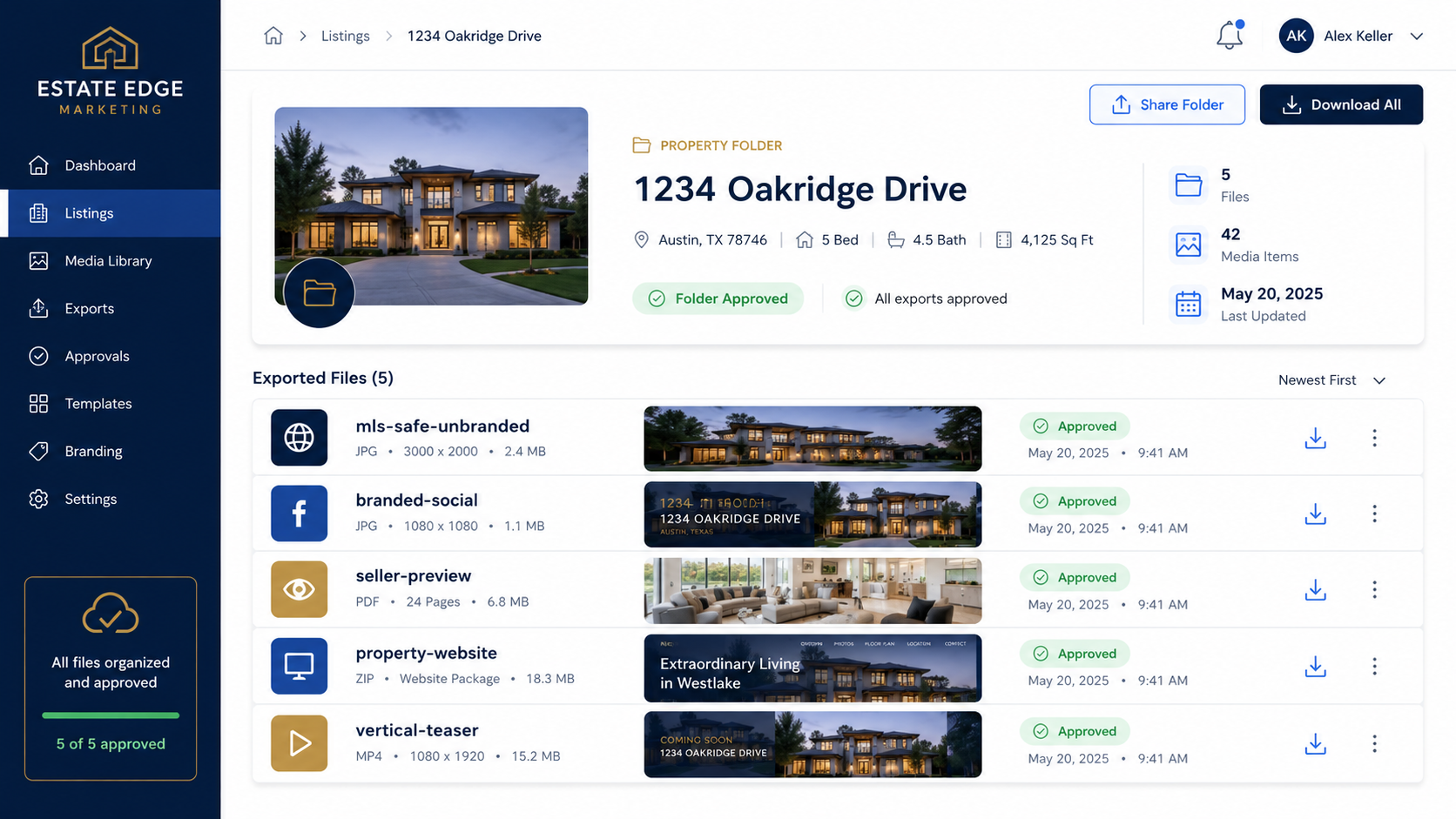
This is where an AI tool for making unbranded real estate videos becomes useful. It helps teams think beyond the single “final” export.
Use clear file names.
Examples:
Bad file names create bad uploads.
“Final.mp4” is not enough.
The final step is not uploading everywhere.
The final step is matching the asset to the correct channel.
Use the MLS-safe version where compliance matters. Use branded versions for social media and lead generation. Use seller preview versions for approval. Use property website versions where the goal is engagement and inquiry capture.
This is how teams avoid forcing a traditional editor to solve a workflow problem it was never built to manage.
Traditional editors are not useless.
They are simply not enough by themselves.
For high-end custom video work, a professional editor may still be the right choice. For everyday listing media, repeatable AI-assisted workflows can be faster and easier to manage.
A solo Realtor may not have time to learn a full video editor.
PhotoAIVideo helps that agent turn existing property photos into video assets without building everything manually.
This is useful when the agent needs:
For many agents, this makes PhotoAIVideo one of the best AI video software for real estate agents because it fits the way listings are already marketed.
A photographer using only traditional editing tools may spend too much time on small video requests that do not justify full custom editing.
PhotoAIVideo gives photographers a faster way to create add-on video deliverables from the same listing photos they already captured.
This can support:
Brokerages need repeatability.
Traditional editors can create beautiful one-off videos, but brokerages need a process agents can use across many listings.
PhotoAIVideo can support a more standardized approach where agents create videos from approved photos and follow a review process before publishing.
That helps reduce inconsistency.
Listing coordinators are often stuck fixing the messy part of the process.
They need to know which video version is approved, where it should be published, and whether the asset is clean enough for its intended use.
A PhotoAIVideo-based workflow can make this easier because the listing coordinator can work from clearer asset categories instead of chasing random exports.
Property managers do not always need custom cinematic video.
They need accurate, fast, reusable media for vacant units and rental listings.
PhotoAIVideo can help turn unit photos into video content for rental pages, email follow-ups, and leasing campaigns without waiting for a full video editing process.
Branding can exist beyond the obvious logo.
It can appear in captions, intros, outros, voiceovers, thumbnails, hosting pages, file names, and linked descriptions.
A true review looks at the whole viewing experience.
One video should not be forced into every role.
A social media video is allowed to be promotional. An MLS-aware video may need to be cleaner. A seller preview may need context. A property website video may need a stronger CTA.
Create versions based on destination.
Video editors are not usually responsible for interpreting local MLS rules.
The agent, brokerage, or listing team should define the requirements before the video is published.
Do not leave compliance decisions to whoever is exporting the file.
A video file can be clean while the hosting page is not.
If the video appears on a branded page with contact information, promotional links, or agent details, the overall experience may not be appropriate for every MLS environment.
Traditional editors can make a listing feel cinematic, but too much motion, color manipulation, or dramatic cropping can create a misleading impression.
The video should support the property, not distort it.
If your article, SOP, or listing media checklist is only inside an image, Google may not understand the details as clearly as crawlable text.
Google’s image SEO best practices recommend descriptive image context, filenames, and alt text. Google’s Article structured data documentation can also help Google better understand article pages, including title, image, date, and author information.
AI does not remove the need for review.
PhotoAIVideo can make video creation easier, but the final asset still needs to be checked for accuracy, branding, channel fit, and local MLS requirements.


Compact, ready to go anywhere
Interchangeable lens that’s upgradeable
Dual 1-inch sensors for improved clarity and low light performance
Dynamic range and 6K 360° capture
360° photo resolution at 21MP

8K 360° video recording for ultra-detailed visuals.
4K single-lens mode for traditional wide-angle shots.
Invisible selfie stick effect for drone-like perspectives.
2.5-inch touchscreen with Gorilla Glass protection.
Waterproof up to 33ft for underwater shooting.

360° photo resolution in 23MP
Slim design at 24 mm thick
Built-in image stabilization for smooth video capture.
Internal 19GB storage for photo and video storage.
Wireless connectivity for remote control and sharing.

60MP 360° still images for high-resolution photography.
5.7K 360° video recording at 30fps.
2.25-inch touchscreen for intuitive control.
USB Type-C port for fast charging and data transfer.
MicroSD card slot for expandable storage.
.png)

.png)

Try it free. No credit card required. Instant set-up.







.svg)


.svg)