


.png)


If you've searched for a real estate video creator lately, you already know the phrase can sound a little mysterious. What used to be a static slideshow of listing photos can now appear online panning, gliding, and zooming like a mini movie trailer. Behind many of these clips is software designed specifically to turn ordinary listing photos into polished, cinematic marketing videos without requiring a camera crew, professional filmmaking experience, or hours spent in editing software.
Is it an app? A service? Something only big brokerages can afford?
The short answer is that it's a tool — often AI-powered — that automates much of the video-making process, allowing agents to create professional-looking property videos much faster than traditional production methods.
This guide breaks down exactly what a real estate video creator does, the different types of tools you'll encounter, how the process works, and what to look for if you're just getting started with video marketing for real estate.
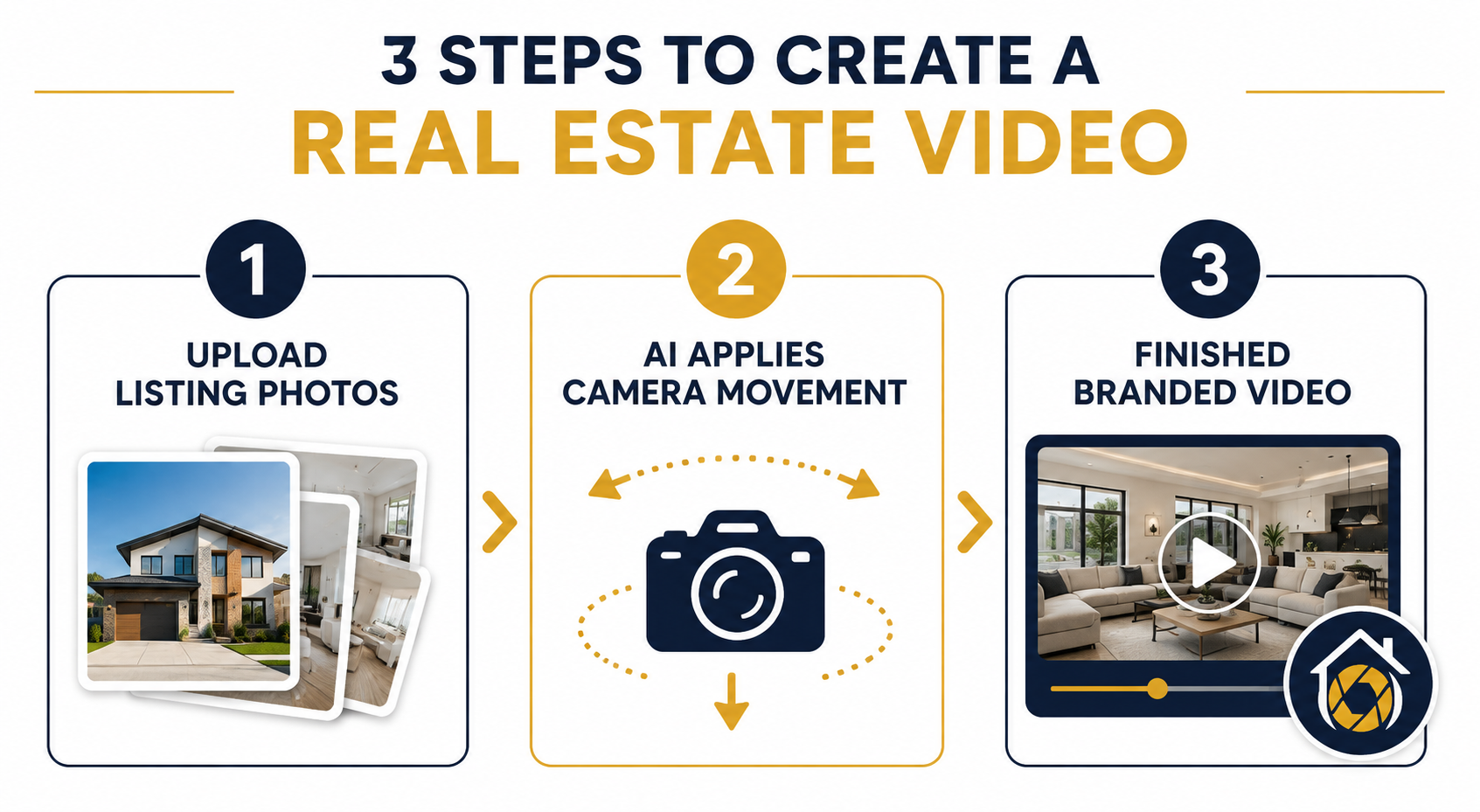
A real estate video creator is a software platform — usually web-based or available as a mobile app — designed to transform existing listing photos into a moving, branded property video.
Instead of hiring a videographer to walk through a home with a gimbal or drone, you can upload the same photos you'd normally use for your MLS listing. Depending on the platform, the software can then add camera movement, transitions, music, branding, and other video elements automatically.
This makes it meaningfully different from two tools or services people sometimes confuse it with:
A dedicated real estate video creator sits somewhere in between. It's automated enough that you don't necessarily need video editing experience, but purpose-built enough to create content specifically suited to property marketing rather than a basic slideshow with identical transitions between every image.
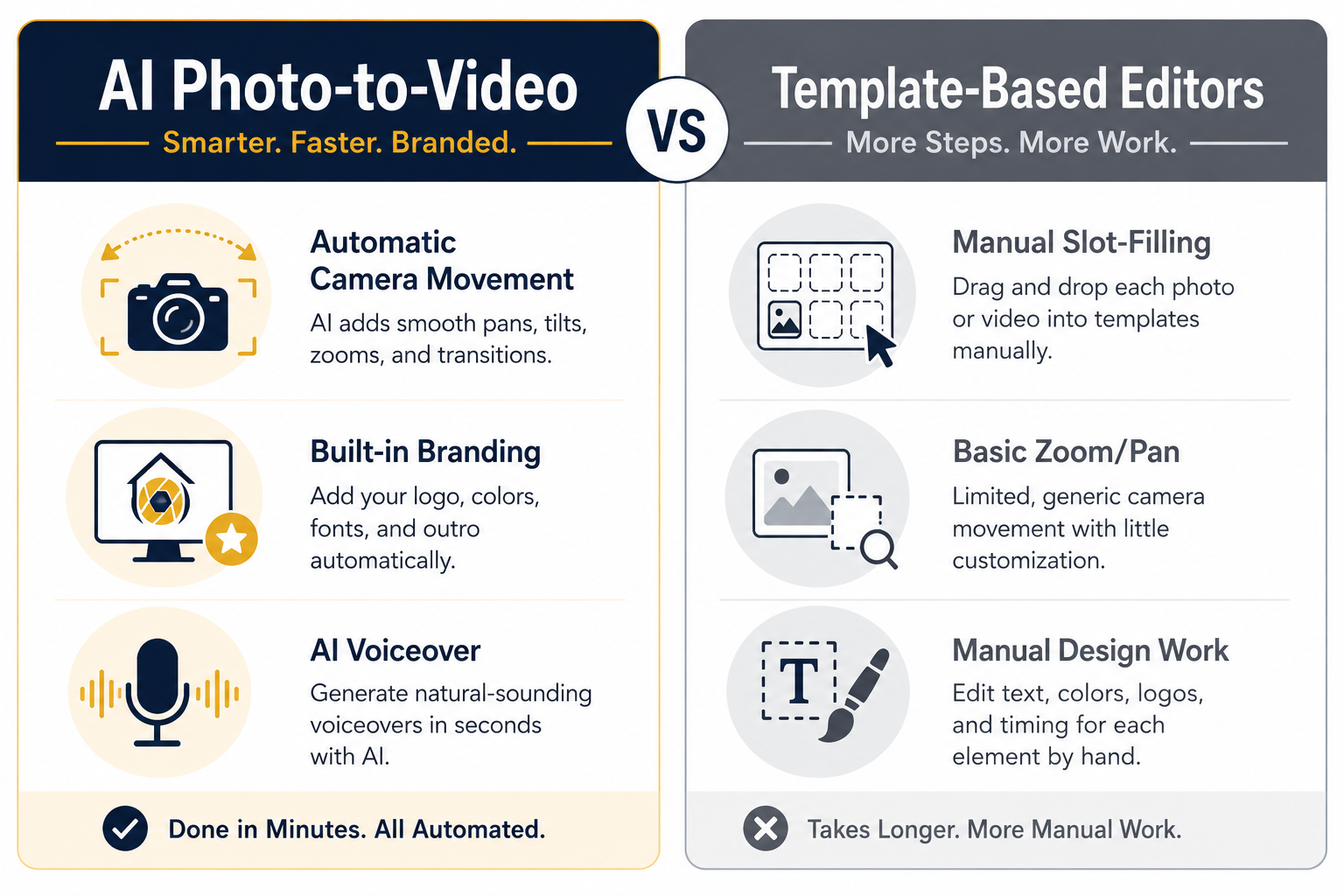
Not every platform works the same way. Broadly, real estate video tools tend to fall into three categories.
AI photo-to-video tools take still listing photos and use AI-powered effects to create the impression of camera movement.
For example, a platform might generate a slow pan across a kitchen island, a gentle push into a living room, or an orbit-style movement around a backyard pool.
Many of these tools also allow you to add branding, background music, captions, and AI voiceovers, helping you create a finished property video without having to complete a separate editing workflow.
Template-based platforms give you a library of predesigned video styles. You choose a template, place your photos into predefined sections, adjust the text and colors, and export the finished video.
They're often flexible and easy to use, although camera movement may be limited to basic pan-and-zoom effects, sometimes known as the Ken Burns effect.
Because the same effects may be applied repeatedly across multiple photos, the finished video can feel more like an animated slideshow than a simulated property walkthrough. You may also need to handle more of the design and sequencing yourself.
Built primarily for convenience, mobile real estate video apps let you shoot or upload photos directly from your phone and create videos optimized for mobile platforms such as Instagram Reels and TikTok.
They're useful for quick social content, although features vary significantly between apps. Some may offer fewer camera movement, branding, or customization options than more comprehensive desktop or web-based platforms.
Which type works best depends on your workflow. An agent focused primarily on fast social content may prefer a mobile app, while someone creating polished videos for every listing may value the additional automation and customization available in an AI-powered web platform.
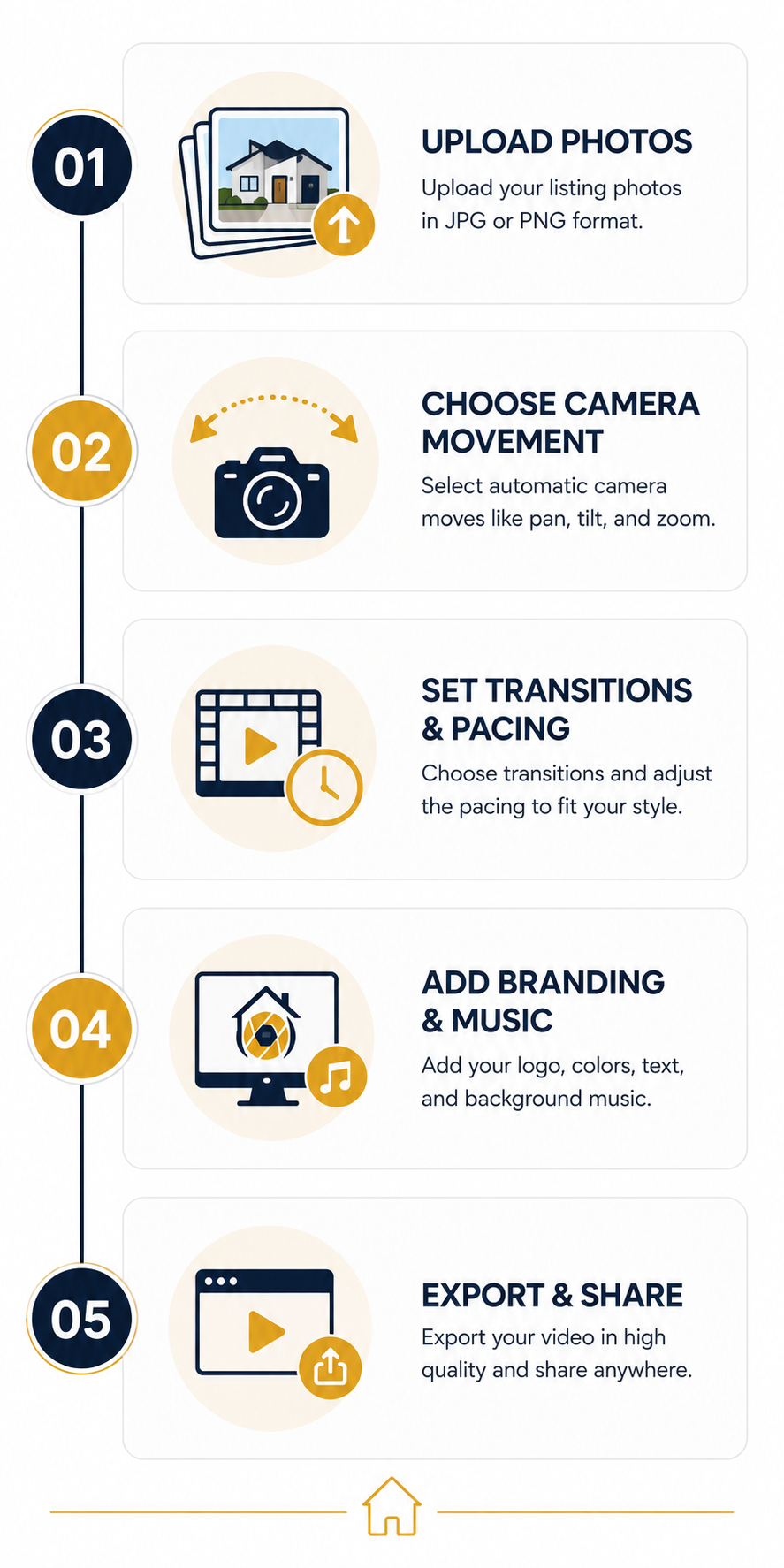
Although interfaces vary from platform to platform, the basic workflow across many AI-driven real estate video creators is fairly similar.
1. Upload your photos.
Start with the same high-quality property photos you already use for your listing marketing. Depending on the platform, little or no special preparation may be required.
2. Choose camera movements.
The software applies — or lets you select — effects such as pans, zooms, tilts, dolly movements, or orbits for individual images, creating the impression of a moving camera.
3. Set transitions and pacing.
The platform sequences your photos, adds transitions, and determines how long each scene appears so the finished video flows naturally.
4. Add branding and music.
Depending on the tool, you may be able to add your logo, contact information, brand colors, licensed music, captions, and even voiceover.
5. Export and share.
Once the video is rendered, you can export it in the formats or aspect ratios supported by the platform and use it across compatible marketing channels such as your website, YouTube, Instagram, Facebook, and property-listing platforms.
The goal of this workflow is simple: reduce the amount of manual production required to turn an existing set of listing photos into usable video marketing content.
Instead of treating every property video as a separate production project, agents can potentially make video a repeatable part of their listing workflow.

Solo agents are a natural audience for real estate video creators. An individual agent can produce video content for listings without necessarily hiring outside help or learning professional editing software — particularly useful when marketing is competing for time with showings, paperwork, prospecting, and client communication.
Teams and brokerages can use these platforms to help maintain more consistent branding across multiple agents' listings. Depending on the platform, teams may be able to standardize logos, intros, outros, colors, templates, and other visual elements.
Real estate photographers can also use video creation tools to expand their service offerings. The same set of property photos used for a listing gallery can potentially become the foundation for a video deliverable, giving photographers an additional product to offer without requiring an entirely separate video shoot.
Some platforms also provide white-label options, allowing photographers or agencies to deliver finished videos under their own branding.
Across these use cases, the appeal is similar: create additional marketing content without requiring a proportional increase in production time or complexity.
Video has become increasingly prominent across digital marketing, and real estate is particularly well suited to visual storytelling.
Buyers often begin evaluating properties online before scheduling an in-person showing. Professional photography remains essential, but video provides another way to communicate a home's layout, atmosphere, and progression from one space to another.
Industry organizations such as the National Association of Realtors regularly track how consumers search for and evaluate homes, highlighting the importance of digital resources throughout the home-buying journey.
This reflects a broader marketing trend. Research such as Wyzowl's State of Video Marketing and HubSpot's ongoing video marketing statistics demonstrates how widely businesses use video as part of their digital marketing strategies.
Real estate is a natural fit for the format. A home is inherently visual and spatial, and video can provide a sense of movement and progression that a static photo gallery presents differently.
For agents, that makes video another useful component of a broader listing marketing package alongside professional photography, property descriptions, virtual tours, social content, and other digital assets.
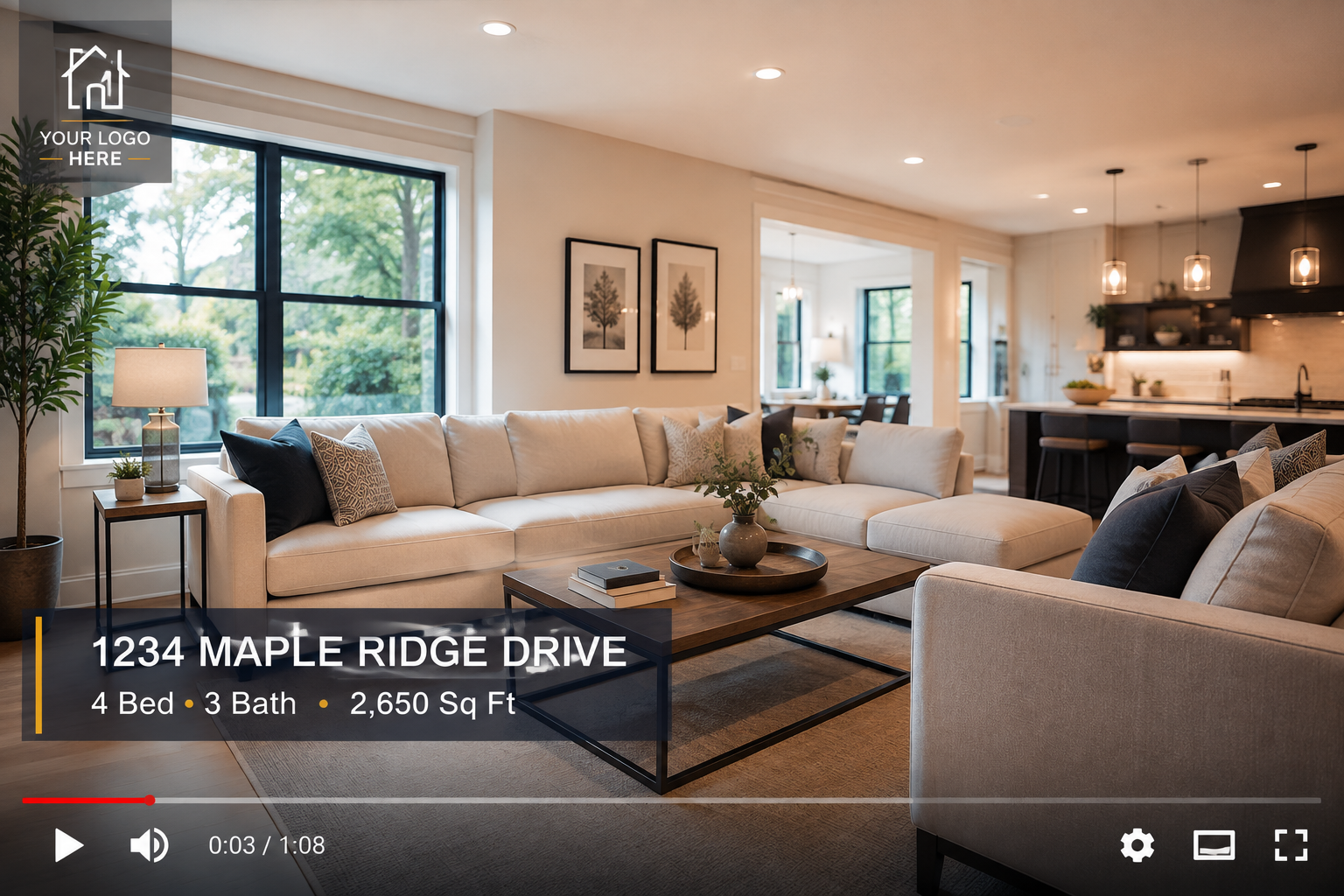
To make the concept less abstract, it helps to look at how a platform built specifically for real estate approaches the process.
PhotoAIVideo is an AI-powered real estate video creator designed to transform existing listing photos into cinematic property videos.
The platform offers more than a dozen camera movements, including pans, zooms, tilts, dolly-style movements, and orbits. This gives users the ability to vary how different rooms and exterior shots are presented rather than relying on the same effect throughout an entire video.
Beyond its core photo-to-video features, PhotoAIVideo supports custom branding, AI voiceover, and AI avatar functionality. These tools can help agents create more personalized listing content without having to manually film every component of the finished video.
The platform is designed for several types of real estate professionals, including individual agents, teams, and photographers offering video as an additional service.
You can browse before-and-after video examples to see how listing photos can be transformed into finished videos and review the available options on the pricing page.
Not exactly.
General-purpose video editing software gives you tools to create virtually any type of video from scratch. That flexibility can be powerful, but it usually requires more manual editing and technical knowledge.
A dedicated real estate video creator is designed specifically around property marketing and may automate elements such as camera movement, sequencing, pacing, transitions, and branding.
Not necessarily.
Many AI photo-to-video platforms work primarily from still listing photos, which means you may be able to create a property video without filming new footage.
If you want to incorporate original walkthrough footage, agent introductions, drone footage, or other video content, your equipment requirements will depend on the platform and type of video you're creating.
Production time varies depending on the platform, number of photos, video length, selected effects, and processing demand.
AI-assisted tools can significantly reduce the amount of manual editing involved, and some platforms can generate videos within minutes. However, it's worth testing the actual workflow yourself rather than assuming every project or platform will render at the same speed.
Many platforms offer export formats and aspect ratios designed for channels such as YouTube, Instagram, Facebook, and websites.
MLS requirements are different because individual MLS organizations can have their own rules regarding video, branding, links, and other listing media.
Before uploading a video to an MLS, check the specific requirements of the MLS you're using rather than assuming every exported video will automatically be compliant.
If you're new to video marketing, you don't need to overhaul your entire workflow overnight.
Start with your next listing. Take the same high-quality photos you'd normally use for your property marketing and run them through an AI-powered real estate video creator. Add your branding, choose the appropriate format, and test the finished video with your audience.
Then compare how the video performs alongside your existing photo-based content.
If the process saves time and produces content you can consistently use, you can gradually make video a more regular part of your listing marketing workflow.
Platforms such as PhotoAIVideo provide an accessible way to experiment with this process using photos you're already producing — allowing you to determine whether AI-assisted property video fits your business before making it a larger part of your marketing strategy.


Compact, ready to go anywhere
Interchangeable lens that’s upgradeable
Dual 1-inch sensors for improved clarity and low light performance
Dynamic range and 6K 360° capture
360° photo resolution at 21MP

8K 360° video recording for ultra-detailed visuals.
4K single-lens mode for traditional wide-angle shots.
Invisible selfie stick effect for drone-like perspectives.
2.5-inch touchscreen with Gorilla Glass protection.
Waterproof up to 33ft for underwater shooting.

360° photo resolution in 23MP
Slim design at 24 mm thick
Built-in image stabilization for smooth video capture.
Internal 19GB storage for photo and video storage.
Wireless connectivity for remote control and sharing.

60MP 360° still images for high-resolution photography.
5.7K 360° video recording at 30fps.
2.25-inch touchscreen for intuitive control.
USB Type-C port for fast charging and data transfer.
MicroSD card slot for expandable storage.
.png)

.png)

Try it free. No credit card required. Instant set-up.







.svg)


.svg)