


.png)


Comparing prices across virtual tour platforms is complicated enough when everyone uses the same basic billing structure. It gets more complicated when the underlying virtual tour pricing models themselves differ — a flat monthly subscription behaves very differently from a usage-based, pay-as-you-go structure, even before you compare specific rates. This article breaks down both models, so you can compare structure, not just price, when evaluating platforms.
Two platforms can advertise similar-sounding prices while operating on fundamentally different billing logic. A subscription model charges a consistent fee regardless of exactly how much you use the service within your plan's limits. A pay-as-you-go model ties cost more directly to actual usage, which can mean paying less in a slow month and more in a busy one. Neither structure is inherently better — they simply suit different usage patterns, and comparing them requires understanding the structure itself, not just the number attached to it.
A subscription structure is the more familiar pattern across most SaaS categories, including most virtual tour platforms: a flat recurring fee, typically monthly or annual, that includes a defined allowance (active tours, storage, team seats) regardless of whether you use the full allowance in a given period. This creates predictable, easy-to-budget costs for businesses with steady, consistent usage, since the bill doesn't fluctuate month to month based on exact activity.
The tradeoff is that a subscription model can mean paying for capacity you're not fully using during slower periods, and it can also mean hitting an allowance ceiling that forces a tier upgrade even if your average usage across the year would fit comfortably within a lower tier.
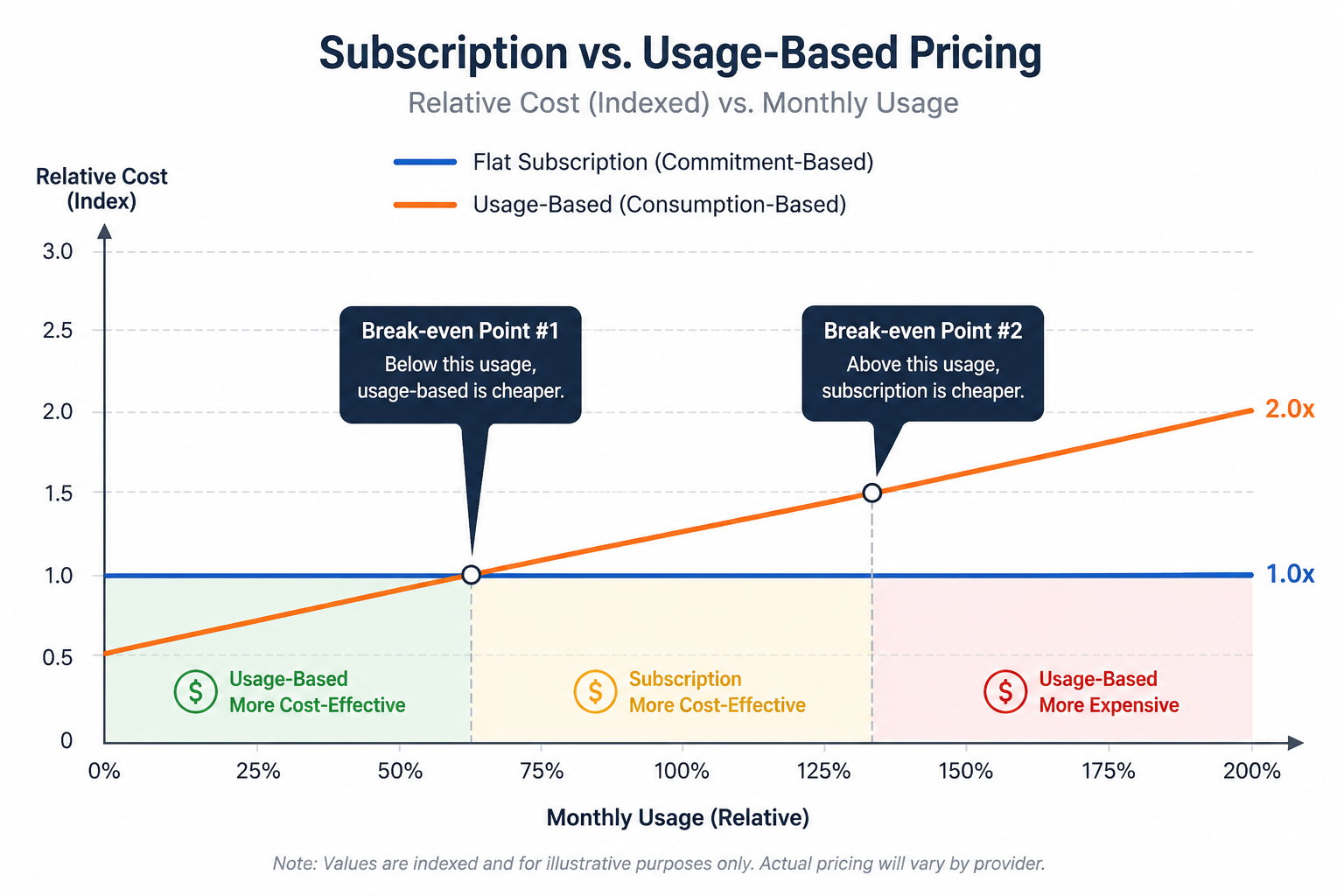
A usage-based, or pay-as-you-go, 3D tour software cost structure ties your bill more directly to specific actions — per tour created, per unit of storage or bandwidth consumed, or some similar consumption-based metric. This tends to suit businesses with irregular or seasonal usage particularly well, since a quiet month genuinely costs less rather than still incurring a flat subscription fee for capacity that went unused.
The tradeoff here runs the other direction: a usage-based model can become more expensive than a subscription during unusually busy periods, and it can also make budgeting harder, since your bill isn't fixed in advance the way a subscription's is.
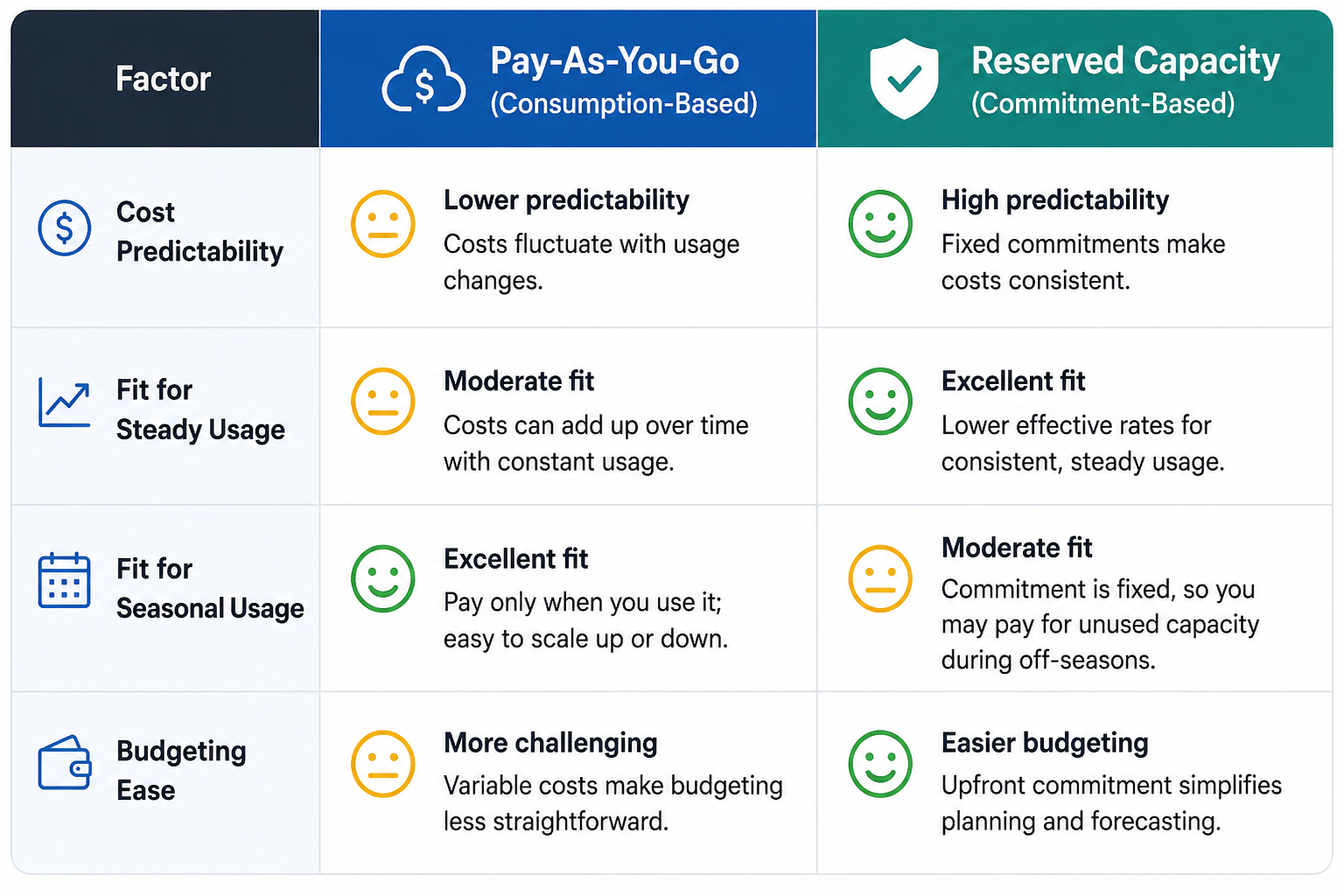
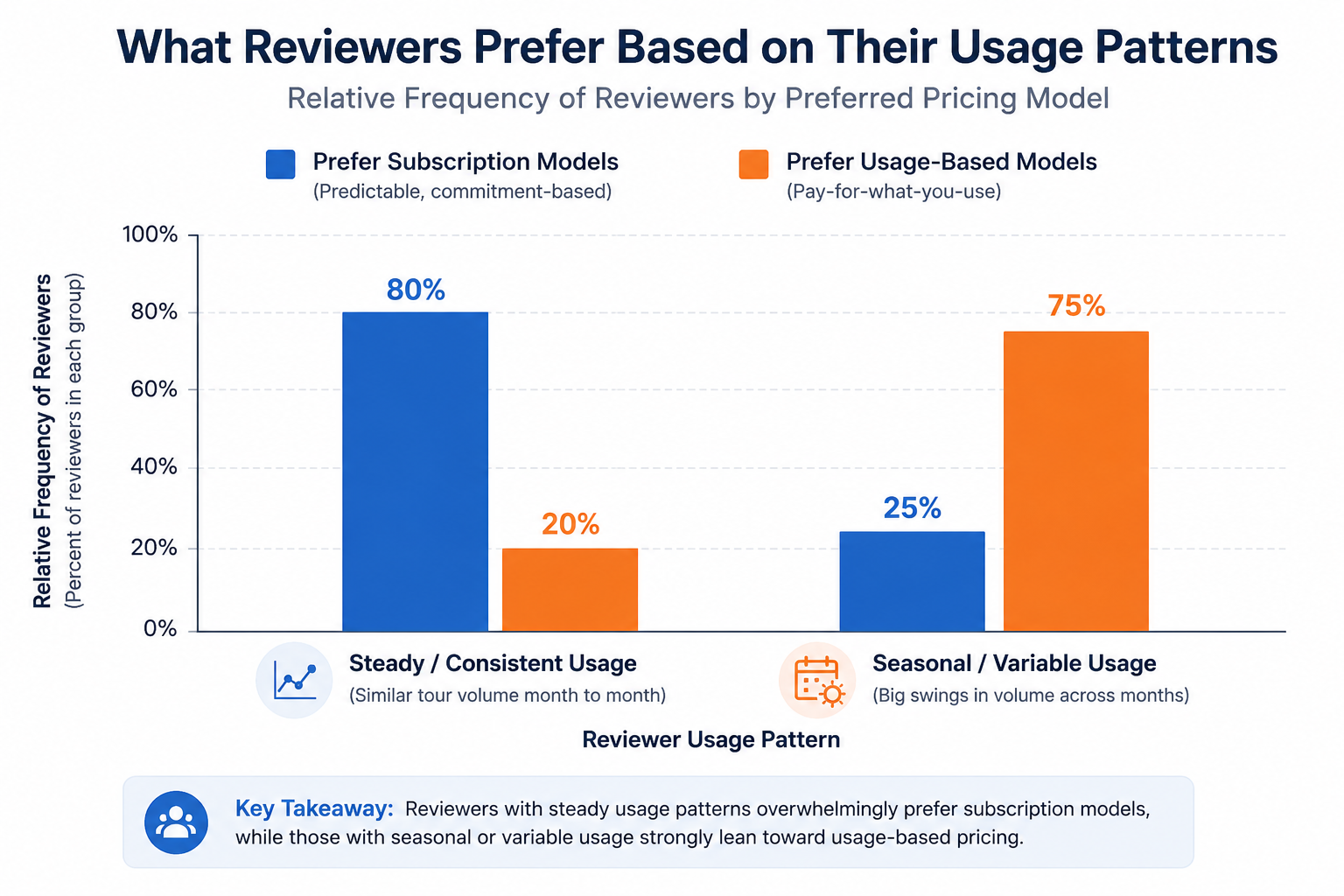
The honest answer to subscription vs usage-based pricing is that it depends entirely on how consistent your usage actually is. A business producing a steady, predictable number of tours monthly is generally well-served by a subscription model, since the flat fee matches a genuinely flat usage pattern. A business with highly seasonal or irregular tour production — a hospitality brand that captures most of its content in a single seasonal push, for instance — may find a usage-based model more cost-effective, since it avoids paying full subscription price during long quiet stretches.
This is worth mapping honestly against your own actual pattern, rather than defaulting to whichever model a platform you're already considering happens to use.
The CloudPano pricing model is generally structured around subscription tiers, similar to most platforms in this category, with an emphasis on bundling generously at each tier to reduce the frequency of forced upgrades as usage grows moderately. For businesses with fairly steady, ongoing tour production, this subscription structure tends to provide the predictability that businesses in this pattern generally prefer, while the more generous bundling addresses some of the traditional subscription-model drawback of paying for unused capacity.
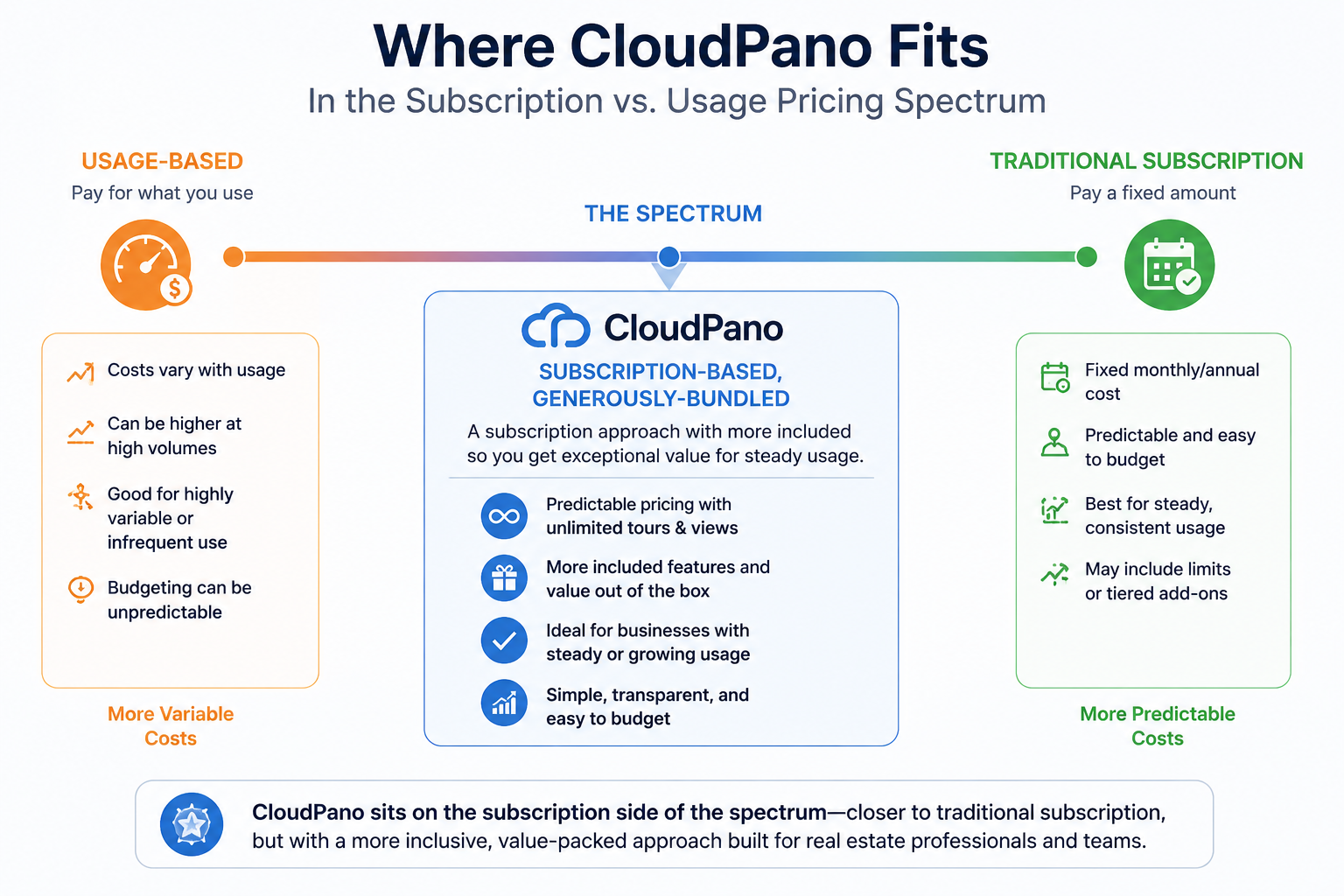
As with any platform, confirming current specifics directly against your own usage pattern is worth doing before committing, since general structural descriptions don't replace checking your own numbers. If you're specifically comparing the CloudPano pricing model against a usage-based alternative, it's worth running the same 12-month usage estimate discussed later in this article against both structures before deciding.
A smaller number of platforms in this category offer both a subscription and a usage-based option, letting customers choose based on their own pattern rather than forcing everyone into one structure. This flexibility is worth viewing as a positive signal in itself — a vendor willing to accommodate different usage patterns is generally also a vendor that has thought carefully about how different customers actually use the product, rather than optimizing billing purely around what's simplest for their own revenue predictability.
That said, having both options doesn't necessarily mean either one is priced competitively — it's still worth running the comparison in the next section against your own numbers rather than assuming flexibility alone makes a platform the right choice.
On G2's virtual tour software category page, reviewer discussions occasionally touch on billing model preference specifically, particularly among reviewers with seasonal or irregular usage patterns who've had strong opinions about which structure fit them better.
Capterra's virtual tour software listings offer a useful cross-platform view for identifying which specific platforms use which billing structure, which is worth checking directly since this isn't always obvious from a quick glance at a pricing page.
"Isn't usage-based pricing always going to be cheaper if I use less?"
Not necessarily — usage-based models often carry a higher effective per-unit rate than a subscription's bundled allowance, specifically because the vendor is taking on more billing unpredictability. A subscription can still be the cheaper option even for lighter users, depending on how the specific rates compare. This is worth calculating with your own real numbers rather than assuming usage-based is automatically cheaper for lower usage.
"Can I switch between billing models on the same platform?"
This varies by vendor — some offer both options and allow switching, others commit you to one structure. Worth asking directly if flexibility between models matters to you, particularly if your usage pattern might shift over time.
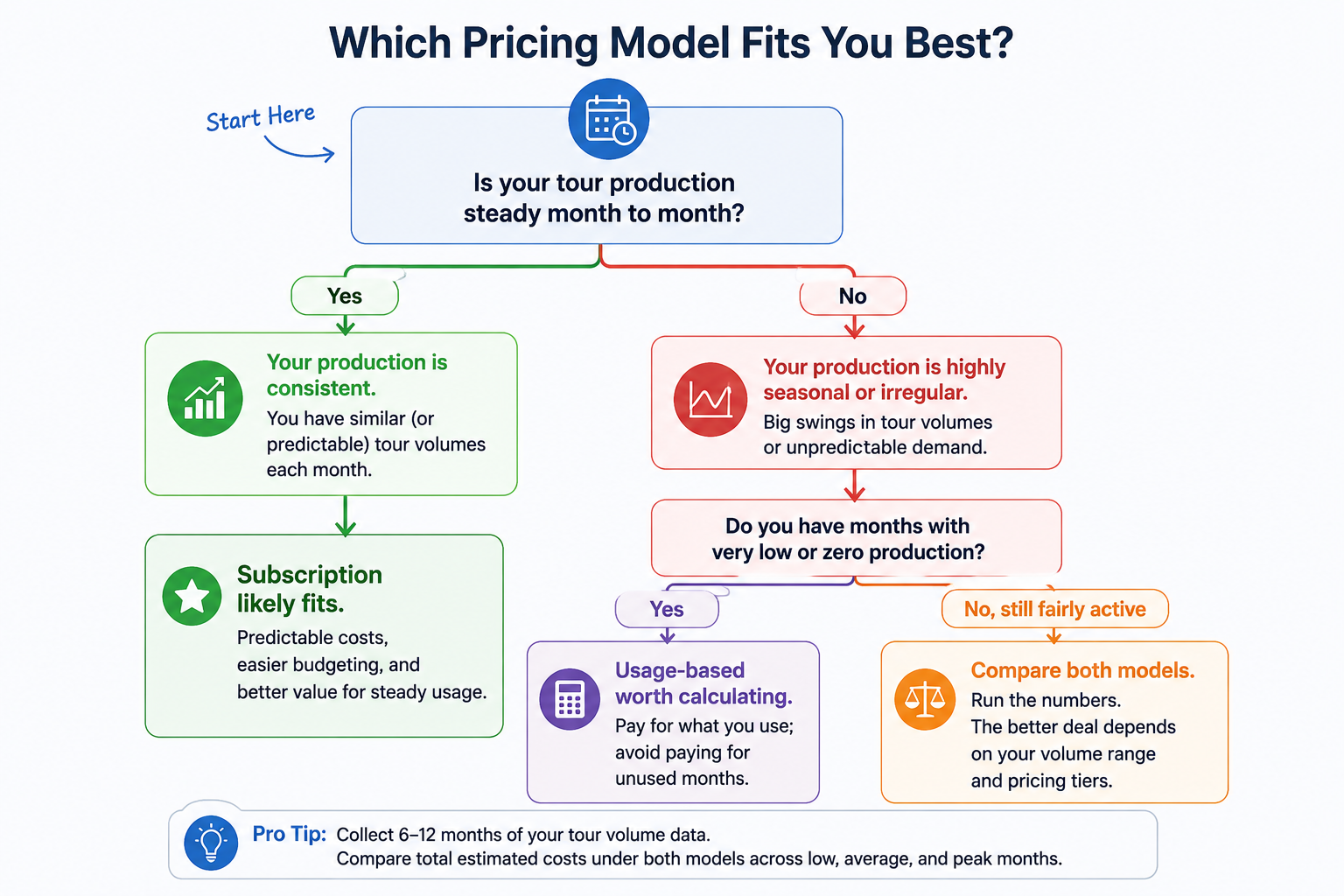
Not every business fits neatly into "steady" or "seasonal." Some have a baseline of consistent activity with occasional spikes tied to specific projects or campaigns. For this kind of mixed pattern, it's worth calculating both models against your actual data rather than assuming one clearly fits based on a general label like "steady" or "seasonal." A hybrid pattern might genuinely favor a subscription tier sized to your baseline usage, with the understanding that occasional spikes will push you into overage territory a few times a year — which can still work out cheaper than a pure usage-based model, depending on how the specific rates compare.
Subscription and pay-as-you-go models represent genuinely different approaches to virtual tour pricing, and the right fit depends on how consistent your actual usage pattern is, not which model sounds more modern or flexible in the abstract. A steady, predictable tour production pattern generally favors subscription pricing; a highly seasonal or irregular pattern may favor usage-based pricing instead.
If your usage pattern is fairly steady and predictable, CloudPano's subscription-based approach is worth evaluating directly against your specific numbers. And if you want the broader picture on what drives virtual tour software cost beyond just the billing model, our main pricing guide covers that ground in more depth. Understanding the model itself, before comparing specific rates, is what turns a pricing comparison from a guess into an actual calculation grounded in your real usage.


Compact, ready to go anywhere
Interchangeable lens that’s upgradeable
Dual 1-inch sensors for improved clarity and low light performance
Dynamic range and 6K 360° capture
360° photo resolution at 21MP

8K 360° video recording for ultra-detailed visuals.
4K single-lens mode for traditional wide-angle shots.
Invisible selfie stick effect for drone-like perspectives.
2.5-inch touchscreen with Gorilla Glass protection.
Waterproof up to 33ft for underwater shooting.

360° photo resolution in 23MP
Slim design at 24 mm thick
Built-in image stabilization for smooth video capture.
Internal 19GB storage for photo and video storage.
Wireless connectivity for remote control and sharing.

60MP 360° still images for high-resolution photography.
5.7K 360° video recording at 30fps.
2.25-inch touchscreen for intuitive control.
USB Type-C port for fast charging and data transfer.
MicroSD card slot for expandable storage.
.png)

.png)

Try it free. No credit card required. Instant set-up.







.svg)


.svg)